Viktor Review 2026: Is the “AI Employee” for Slack and Microsoft Teams Actually Worth Hiring? (Evidence-Based Deep Dive)
Every company now runs on a stack of tools that do not talk to each other. Revenue sits in Stripe, pipeline in HubSpot, ad spend in Meta and Google, tickets in Linear, documents in Notion, and conversation in Slack. The work of stitching those systems together — the Monday spend recap, the monthly board pack, the overnight ticket triage — is exactly the work that never gets a dedicated hire and never quite gets done.
Viktor attacks that gap with an unusually literal pitch, printed as the first line on its homepage: “Not a tool. A hire.” Built by Zeta AI, Inc., a Delaware company founded in 2023 by CEO Fryderyk Wiatrowski and CTO Peter Albert, both former Meta AI engineers, Viktor joins your Slack or Microsoft Teams workspace as a member you @mention like a colleague. It then executes against your real tools from its own cloud machine and hands back the finished artifact.
The company launched publicly in February 2026 and raised a $75 million Series A led by Accel in May 2026, with Bek Ventures, Kaya VC, Inovo VC and Tenacity Capital participating, alongside angel investors including Slack cofounders Stewart Butterfield and Cal Henderson. Fortune reported at the time that Viktor had reached a $15 million annualized revenue run rate across more than 2,000 organizations, roughly ten weeks after launch.
This review evaluates Viktor against its own published claims, its documentation, its case studies, its security posture and its competitors. Where a claim is the vendor’s own unaudited assertion, we say so — because on a product that receives write access to your CRM, your ad accounts and your codebase, the difference between “certified” and “in progress” matters.
Quick verdict
Rating: 4.6 / 5
The most complete execution-first AI coworker available in Slack and Teams today, held back by a workspace-shared permission model and a credit system you cannot price in advance.
Founders, marketing, ops and finance teams of 5 to 200 people who want recurring operational output without adding headcount — and who can treat integrations as team-wide.
Pricing: From $50/mo
$100 in free credits, no credit card, credits never expire. Paid plans are per workspace, not per seat, starting at $50/mo for 20,000 credits.
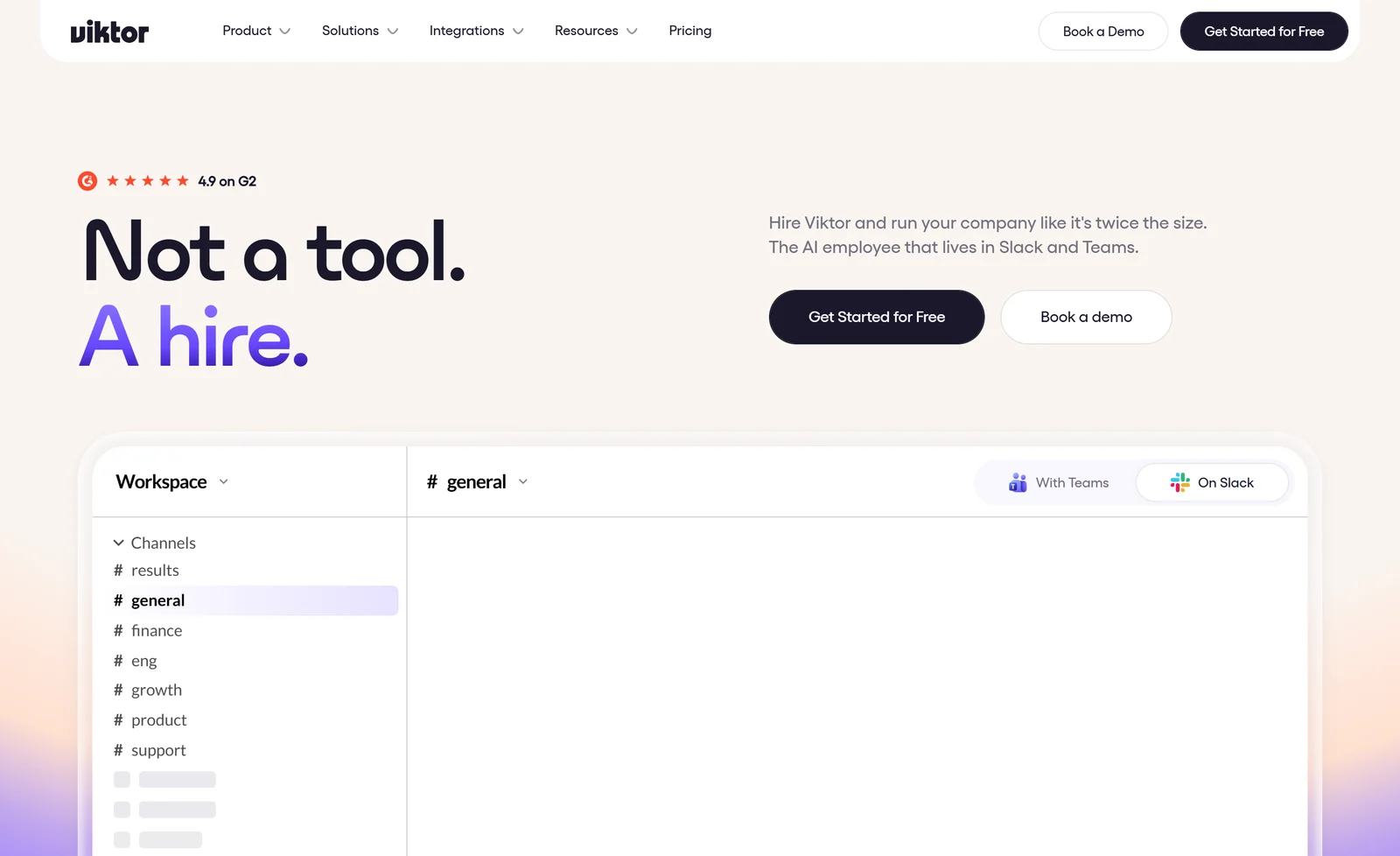
Viktor’s homepage, captured September 2026: the “Not a tool. A hire.” positioning sits directly above a Slack workspace view.
You can start with the free credit allowance on the official Viktor website without entering payment details.
1. What Is Viktor? Platform Overview and Company Background
Viktor describes itself in a single sentence on its homepage: “Viktor is the AI employee that lives in Slack and Microsoft Teams, connects to 3,200+ tools, and does the work. Reports, dashboards, code, campaigns.”
The distinction the company insists on is between generating text and completing work. Its FAQ puts it bluntly: “He has his own computer in the cloud where he writes and runs code to complete tasks. He’s not a chatbot. He’s a colleague that does real work.” The homepage runs a widget contrasting the two modes directly — ChatGPT “Tells you how to audit your ad spend,” while Viktor “Audits it. Hands you the PDF.”
Viktor frames the gap as one of authorization rather than raw model capability: “The difference isn’t intelligence. Both use frontier AI models. The difference is that Viktor is connected to your tools and authorized to act.”
The company behind the product
Viktor is operated by Zeta AI, Inc. (also trading as Zeta Labs), registered at 2810 N Church St, PMB 20589, Wilmington, Delaware. The same entity operates a second product, Jace AI, and both share security infrastructure and the same compliance attestation — a detail worth knowing when you review their trust documentation, because the attestation sits with the parent company rather than with Viktor standalone.
A note on identity: viktor.com is entirely unrelated to viktor.ai, a Rotterdam-based engineering application platform operated by different companies. Search results conflate the two constantly. Everything in this review refers to viktor.com.
2. Who Should Use Viktor? Target Personas and Honest Exclusions
Viktor segments its own site by team, industry and company size. The four core team personas each carry specific advertised jobs.
Founders and CEOs get a daily business pulse pulling MRR, churn, CAC, ad spend and pipeline from Stripe, PostHog, Google Ads, Meta Ads and the CRM into a Slack channel, plus monthly investor updates assembled from revenue, burn rate, pipeline and headcount.
Marketing and growth teams get full-funnel ad intelligence across Meta and Google Ads — spend, CAC, CTR and ROAS with budget-shift recommendations — plus stakeholder reports delivered as, in Viktor’s words, “polished PDFs — not raw spreadsheet exports.”
Engineering teams get bug triage that opens scoped tickets in Linear or Jira with reproduction steps, internal tools shipped as deployed web apps, and, per Viktor’s comparison page, work that “turns bug reports into scoped Linear tickets, keeps the CRM current, sends the follow-ups, moves ad budget to winners, deploys web apps, ships pull requests.”
Operations and finance teams get board-pack assembly, forecast refreshes, and invoice and contract processing that “Reads invoices and contracts as PDFs, matches line items against agreements, flags anomalies, and queues everything for review.”
Where Viktor tells you to buy something else
Credit where it is due: Viktor’s own comparison pages concede defeat in specific matchups. Against Lindy, it admits “Lindy’s visual workflow builder is more mature than anything Viktor exposes visually today,” and that Lindy leads on native meeting attendance and transcripts. Against Claude Tag, it frames the choice as “Viktor is the easy button, and Claude Tag is the do-it-yourself path for technical teams.”
Most directly, its ChatGPT comparison page tells solo buyers to walk away: pick ChatGPT if “You work primarily solo and don’t need team-wide AI capabilities” or “You want a free or low-cost option for personal use.” Viktor also lacks a native iOS app, and explicitly disclaims legal advice — attorneys “retain legal strategy, signed documents, licensed work, and final review.”
3. How Viktor Actually Works: Cloud Execution, @Mentions and Skill Memory
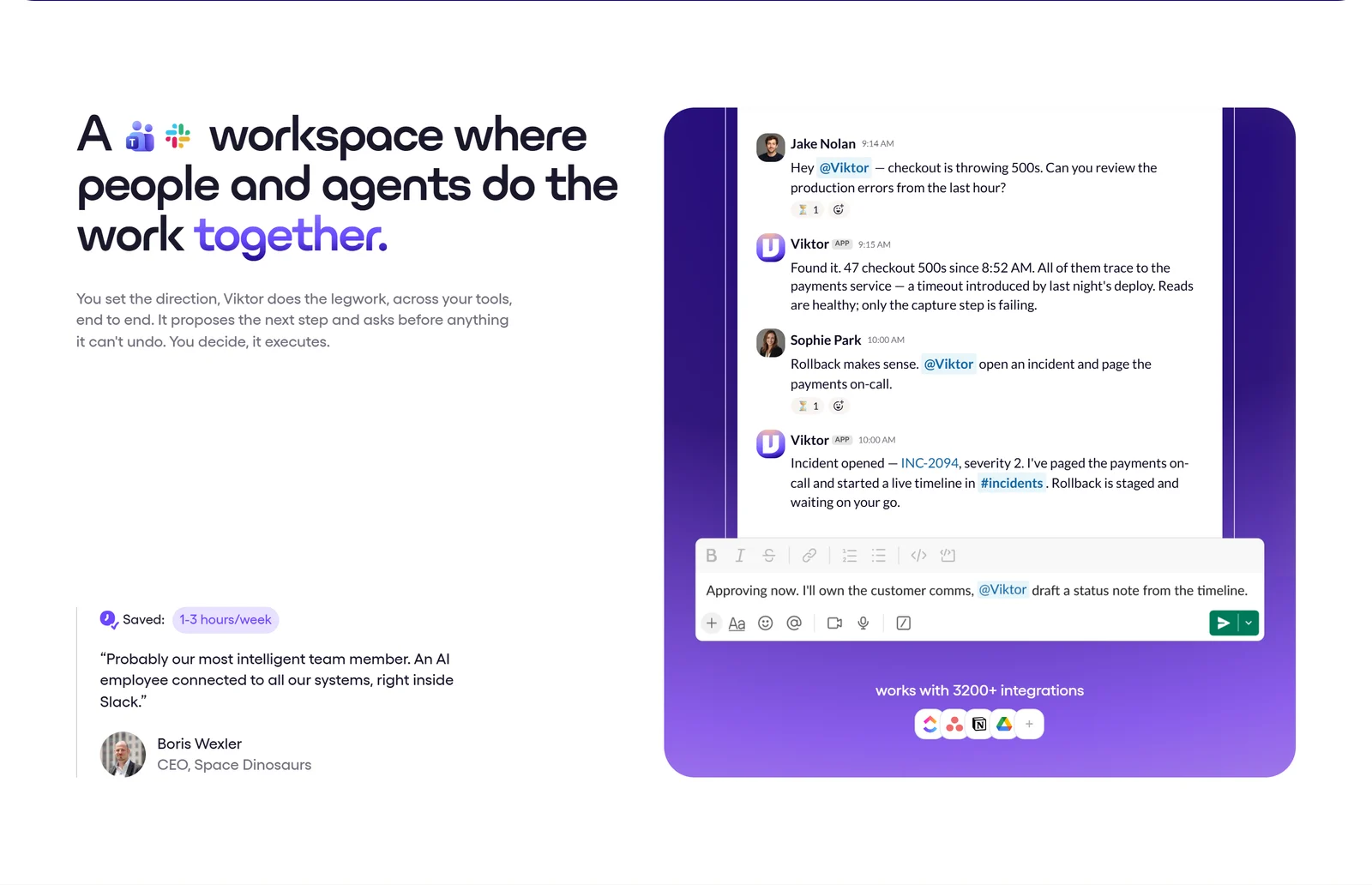
Viktor’s own demonstration of an @mention thread: it diagnoses 47 checkout errors, opens incident INC-2094 and stages a rollback that waits on a human.
Invocation and surface
Anyone in the workspace can @mention Viktor in a channel it has been invited to, or DM it directly. There is one shared instance per workspace rather than a per-user assistant. Viktor’s comparison page describes it as “Inside your Slack (or Microsoft Teams). You @mention Viktor like a colleague.” No slash-command interface is documented on any public page.
Beyond Slack and Teams, Viktor added Discord support on 1 August 2026 and opened its web app to all users on 6 August 2026, all sharing the same workspace, memory and integrations. Google Chat remains the notable gap. The full experience, approvals included, is still explicitly strongest in Slack and Teams.
The execution model
Slack and Teams are the conversational surface only. As Viktor puts it: “Slack and Teams are where you talk to Viktor, but his work extends everywhere. He connects to external tools, deploys apps to the web, and can send emails on your behalf.”
Each user gets what Viktor describes as an isolated compute environment. It is worth being precise here: Viktor discloses no VM, container or sandbox provider, no session lifetime and no filesystem persistence detail anywhere public. “His own computer in the cloud” is the vendor’s own framing, and the technical substrate behind it is undisclosed.
Memory: plain-text skill files
Viktor’s memory mechanic is unusually transparent. It reads conversations in channels it joins, observes how your team works, and writes what it learns into internal notes it calls skills. Its engineering blog describes these as literal plain-text files on a shared filesystem — skills/linear.md, skills/hubspot.md, skills/google-ads.md, skills/notion.md — shared team-wide, so that “One person’s correction benefits every future invocation by every user.”
The tool-use architecture follows from that. Rather than JSON function-calling, Viktor writes Python: “Instead of calling a send_email tool through a structured API, it writes a Python script that imports a function and calls it — exactly like a developer would.” Each integration contributes a one-line summary to context, with the full skill file loaded on demand — a user with 50 connected integrations carries roughly 68 skill entries.
One caveat on sourcing: that blog post is labeled “Written with Viktor.” It is a vendor self-description of its own architecture, not third-party analysis.
Model layer
Viktor exposes three effort settings on its product page, each mapped to a named model and reasoning level: Smart (Claude Opus 5, low reasoning, base rate), Balanced (Claude Sonnet 5, medium reasoning, roughly 50% cheaper) and Ultra (Claude Fable 5, high reasoning, roughly 2x cost). Viktor is not Anthropic-only — its changelog documents OpenAI GPT-5.6 and GPT-5.5, Moonshot Kimi K3 and Google Gemini models. Its security page names Anthropic, OpenAI and Google as model sub-processors.
4. Integrations: Reading the “3,200+ Tools” Number Correctly
This is the headline number, and it deserves precision because Viktor’s own pages qualify it while its marketing does not.
Viktor’s integrations page splits the catalog explicitly: “27 native integrations. 3,200+ tools via managed connectors.” The 27 native integrations carry what Viktor calls full read-write access; the 3,200+ figure counts tools reachable through managed connectors, which is a materially different claim.
| Integration layer | What Viktor publishes | What it means in practice |
|---|---|---|
| Native integrations | 27 total, only 15 named publicly | Deepest read-write coverage — Stripe, GitHub, Linear, Notion, Google Ads, Google Drive, PostHog, Meta, Salesforce, Sentry, Square, Webflow, Wix, Monday, Microsoft OneDrive |
| Managed connectors | 3,200+ tools | Named examples include HubSpot, Google Calendar, Airtable, Apollo, Attio, ClickUp, Figma, GitLab, Gmail, Telegram, Asana. Write-action coverage per connector is not published |
| Depth per tool | Varies enormously | Viktor’s own llms.txt lists 604 integrations with “the deepest coverage”: Asana 153 actions, Basecamp 139, Baremetrics 36, Airtable 18 — but Ahrefs only 3 |
| No API available | Browser control | Viktor can be given a normal seat in the tool with its own email and permissions: “If a person can use the software, Viktor can” |
| Custom | MCP servers and raw APIs | Viktor states it “can build the missing integration from a tool’s API documentation” |
Across the entire site, exactly 30 individual tool names are enumerated. There is no searchable or exportable directory of the full 3,200+ catalog — only a search box. If a specific tool is critical to your workflow, verify it before committing.
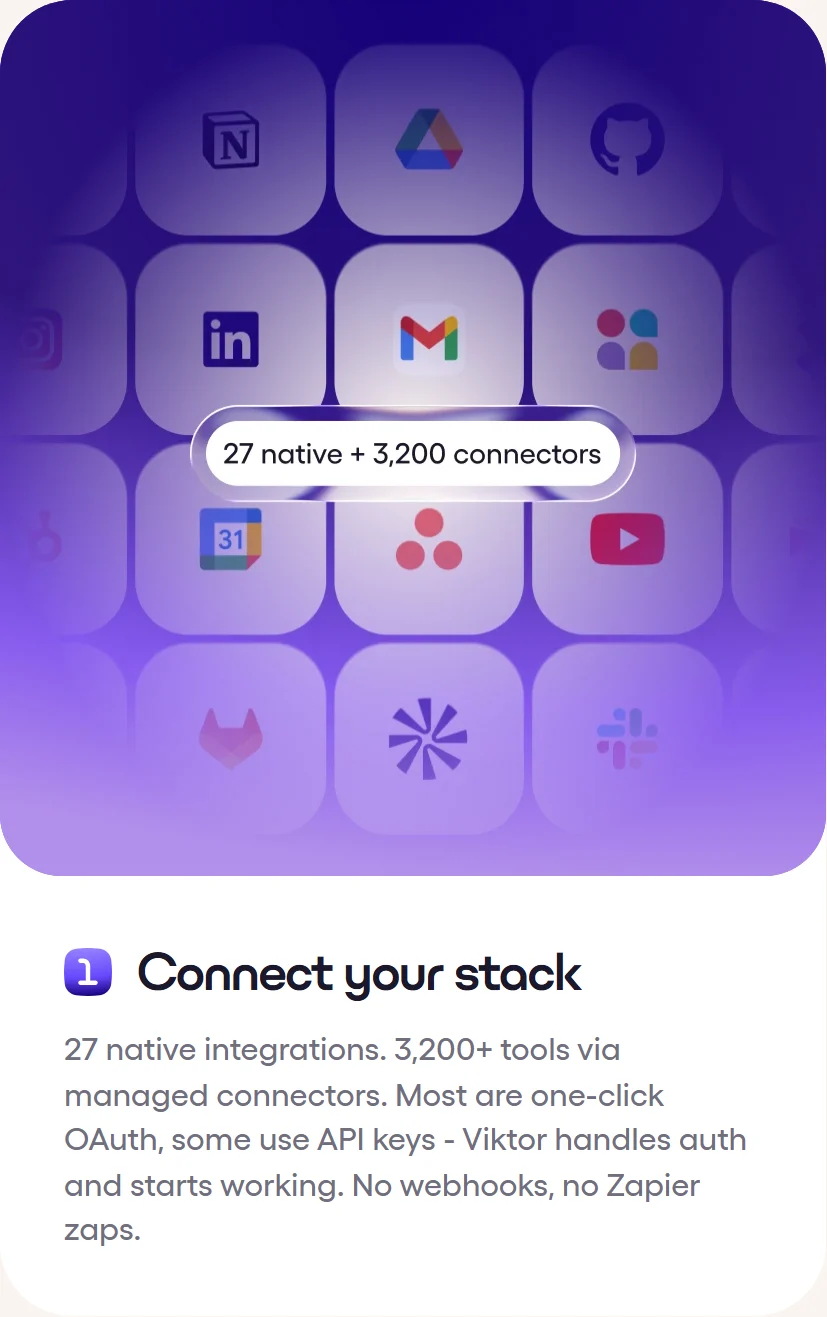
The distinction the headline number hides, in Viktor’s own words: “27 native integrations. 3,200+ tools via managed connectors.”
Authentication
Integrations connect through each vendor’s own sign-in. Viktor describes most connectors as one-click OAuth, with some requiring API keys that are stored in a secrets vault. Note that Viktor’s engineering blog overstates this, claiming all 3,200+ integrations use managed OAuth — its own integrations page contradicts that, stating “Most are one-click OAuth, some use API keys.”
The developer surface
Largely absent from the marketing navigation, Viktor ships a genuine developer platform: a public REST API with 18 documented endpoints under https://api.viktor.com/api/public/v1, an MCP server at https://api.viktor.com/mcp that “lets any MCP-compatible agent delegate work to Viktor” (Claude Code and Cursor are named clients), and OpenAI- and Anthropic-compatible chat endpoints accepting standard Chat Completions, Responses and Messages formats under model ID viktor.
Documented limits are concrete: script runs allow at most 16 command arguments of 2,000 characters each, up to 20 output files per run at 50 MB each, with stdout capped at the last 64,000 characters. Rate limits scale with plan tier and must be read at runtime from GET /api/public/v1/me. Calls through the compatible endpoint are capped at 10 minutes. API runs consume workspace credits like any other task.
5. What Viktor Delivers: Pages, Spaces and Deployed Applications
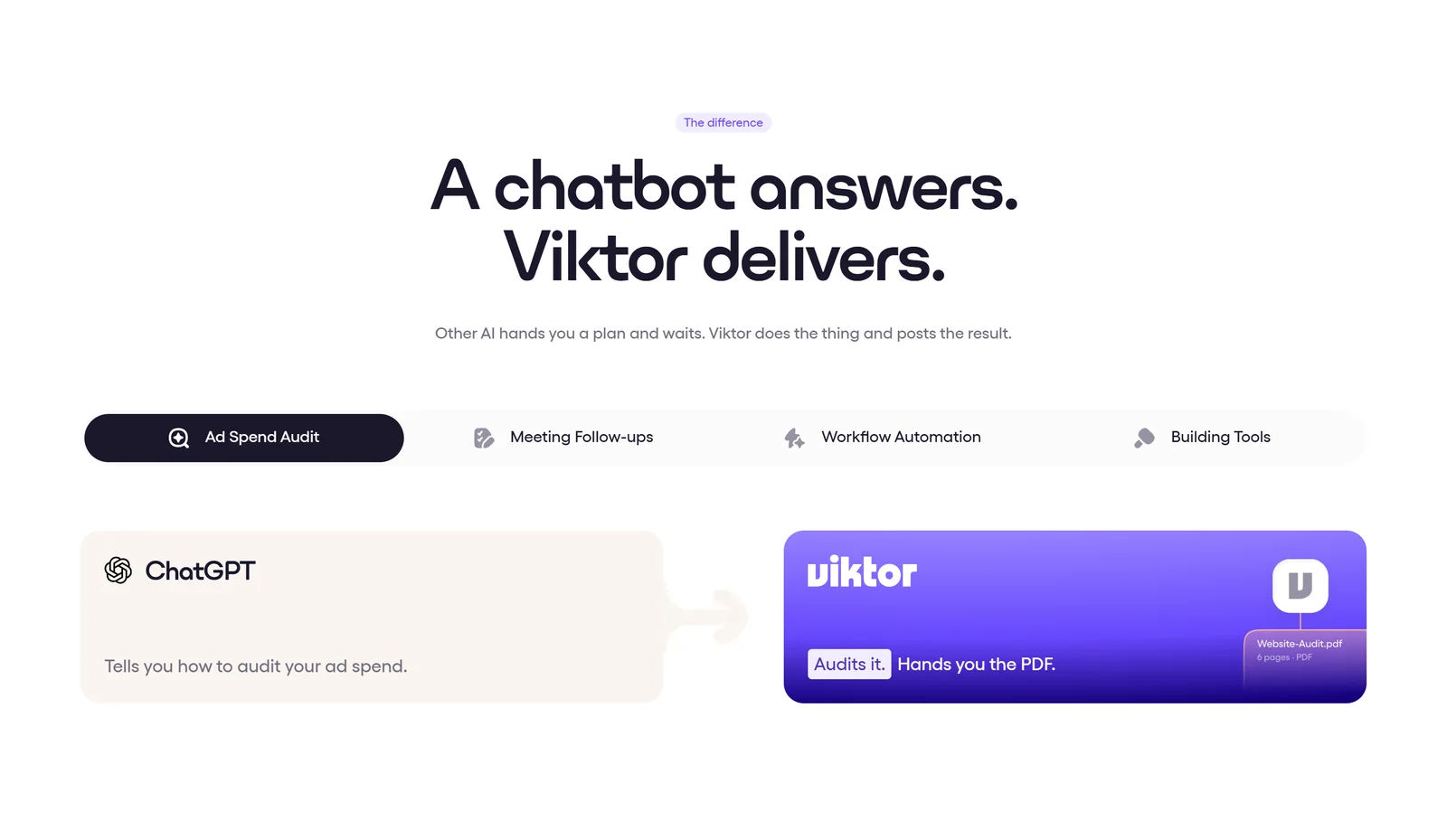
The entire product thesis in one widget from Viktor’s homepage: ChatGPT “tells you how to audit your ad spend”, Viktor “audits it, hands you the PDF”.
Viktor brands two output primitives:
- Viktor Pages — “Something you send. A finished document or dashboard at a link.” An investor update or client report you share by URL.
- Viktor Spaces — “Something your team signs into. A working internal tool that Viktor builds and keeps running… It has its own login and a link your team opens every day.”
Claimed output formats include board-ready PDFs, Excel spreadsheets, PowerPoint decks, full-stack web applications, code commits and pull requests. On app building, Viktor advertises that it “Builds revenue dashboards, client portals, and approval workflows as deployed web apps with database and auth. No engineering tickets. No sprint planning.”
A gap worth flagging: no documentation specifies the database engine, auth method, hosting domain, custom-domain support or quotas behind Viktor Spaces. For an internal tool your team opens daily, those are questions to ask sales before you depend on it.
Standing work
Recurring deliverables are the strongest fit. Viktor illustrates an ad spend recap to #marketing Mondays at 9:00, a pipeline update to #sales Fridays at 16:00, and inbox triage to #support every morning at 7:00.
Scheduling is conversational, with no builder to learn: “There is no separate builder to learn. The schedule is part of the conversation, and you can change it the same way” — you simply say “move the daily brief to 8 AM” or “pause the weekly report until next month.” Cron syntax is not required or mentioned.
Viktor can also be trained by screen recording: you record the job once, and “Viktor turns the recording into a skill: a written procedure you can open and correct.” The resulting scheduled task ships paused until a human approves it — “That pause is deliberate.”
6. Control, Approvals and the Shared-Workspace Caveat
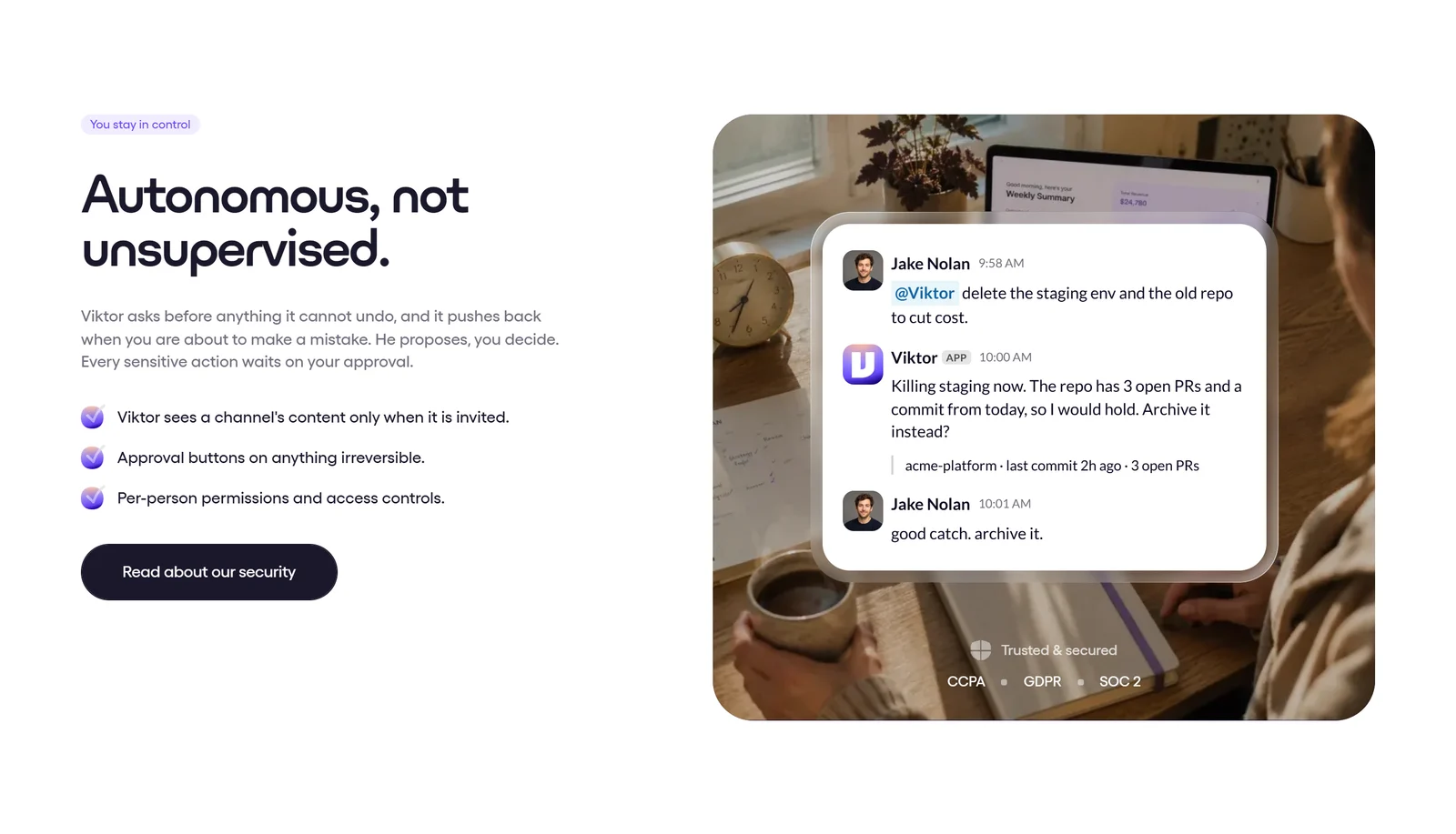
Viktor’s control claims, as published. Note the bare “SOC 2” badge and the “Per-person permissions and access controls” bullet — both discussed below.
This section matters more than any feature list, because Viktor asks for write access to systems that move money.
What genuinely ships
Approval gates are real and conservative by default. Sending emails, pushing code, modifying campaigns, deploying apps or charging cards require explicit human approval via Slack before execution, and admins choose which action types require sign-off. As Viktor puts it: “Emailing your customer list or touching what people pay: work like that waits in the thread until someone presses approve.”
Admin controls allow disconnecting any integration, pausing any user or killing a running task in one click, with permissions revocable instantly.
Tenant isolation between workspaces is claimed as shipped: “Every workspace runs in its own sandboxed execution environment with no cross-tenant data access at the infrastructure or application layer.”
The caveat you must plan around
Within a workspace, there is no isolation at all. Viktor’s own privacy policy states it plainly: “Integrations in Viktor are workspace-shared. Related credentials and tool settings may therefore be available for use by authorized members of that workspace through Viktor.”
Viktor’s homepage lists “per-person permissions and access controls” among its controls, but its own FAQ lists Private Mode, role-based access controls and per-user token scoping “with individual OAuth connections instead of shared tokens” among features it is actively building. The phrase “instead of shared tokens” confirms tokens are shared workspace-wide today. Viktor’s enterprise page markets per-user OAuth and RBAC as Enterprise features; treat those as forward-looking marketing until you see them in a contract.
Practical implication: connect the team’s shared accounts, not anyone’s personal inbox. Viktor itself advises treating it as a shared team resource and avoiding sensitive personal information.
There is a second scope nuance. Viktor’s FAQ says it “only sees channels he’s explicitly added to, threads he’s mentioned in, and direct messages sent to him” — but the privacy policy discloses that on joining a channel it “may retrieve up to approximately 90 days of that channel’s prior history.”
Compliance status, stated accurately
| Certification | Actual status (September 2026) |
|---|---|
| SOC 2 Type 1 | Certified. Auditor: Prescient Assurance. Report available under NDA only |
| SOC 2 Type 2 | In progress. Audit by A-LIGN, observation period running through September 2026 |
| ISO 27001:2022 | In progress. Anticipated within 6 months of Type 2 completion |
| GDPR | Trust center says Compliant; the security page says “Aligned,” a weaker self-assessed formulation |
| CCPA | Compliant |
| HIPAA | In progress. BAAs signed before any PHI access |
| Encryption | TLS 1.2+ in transit, AES-256 at rest, secrets in dedicated vaults |
| Data residency | AWS us-east-1 by default. EU residency claims conflict on Viktor’s own enterprise page — get it in writing |
| Training on your data | ”We do not train our own or third-party foundation models on Customer Data” — but narrow internal “service-specific quality models” are carved out |
| SSO | SAML for Okta, Microsoft Entra ID, Google Workspace, OneLogin — Enterprise plan only |
A publicly posted DPA incorporates the EU Standard Contractual Clauses with the UK Addendum and Swiss amendments, commits to breach notification within 72 hours, and gives 30 days’ notice of new sub-processors with an objection window. That is a genuinely buyer-friendly document.
No security incidents, breaches or CVEs for Viktor, Zeta AI or Jace AI surfaced in searches as of September 2026 — though absence of public reports is not proof that none occurred.
7. Pricing: The Credit Ladder, Decoded
Viktor’s pricing page shows three cards — Free, Team and Enterprise — but the Team card alone does not tell the whole story. The full ladder is published only in the markdown version of the page, and the two disagree on the entry price.
| Plan | Price | Credits | Key terms |
|---|---|---|---|
| Free | $0 | Up to $100 in credits | No credit card, no sales call. Credits never expire. Every feature and integration unlocked — nothing gated |
| Team (entry) | $50 / mo | 20,000 | The advertised entry price. Appears in the page title and CTA, but not on any plan card |
| Team (card default) | $100 / mo | 40,000 | What the “Most popular” card actually displays |
| Team (mid) | $750 / mo | 300,000 | Marked “Most popular” in the markdown version |
| Team (upper) | $3,000 – $30,000 / mo | 1.2M – 12M | 25 published tiers in total |
| Enterprise band | $35,000 – $50,000 / mo | 14M – 20M | Plus custom pricing, DPA, SLA, invoicing, per-user spend caps |
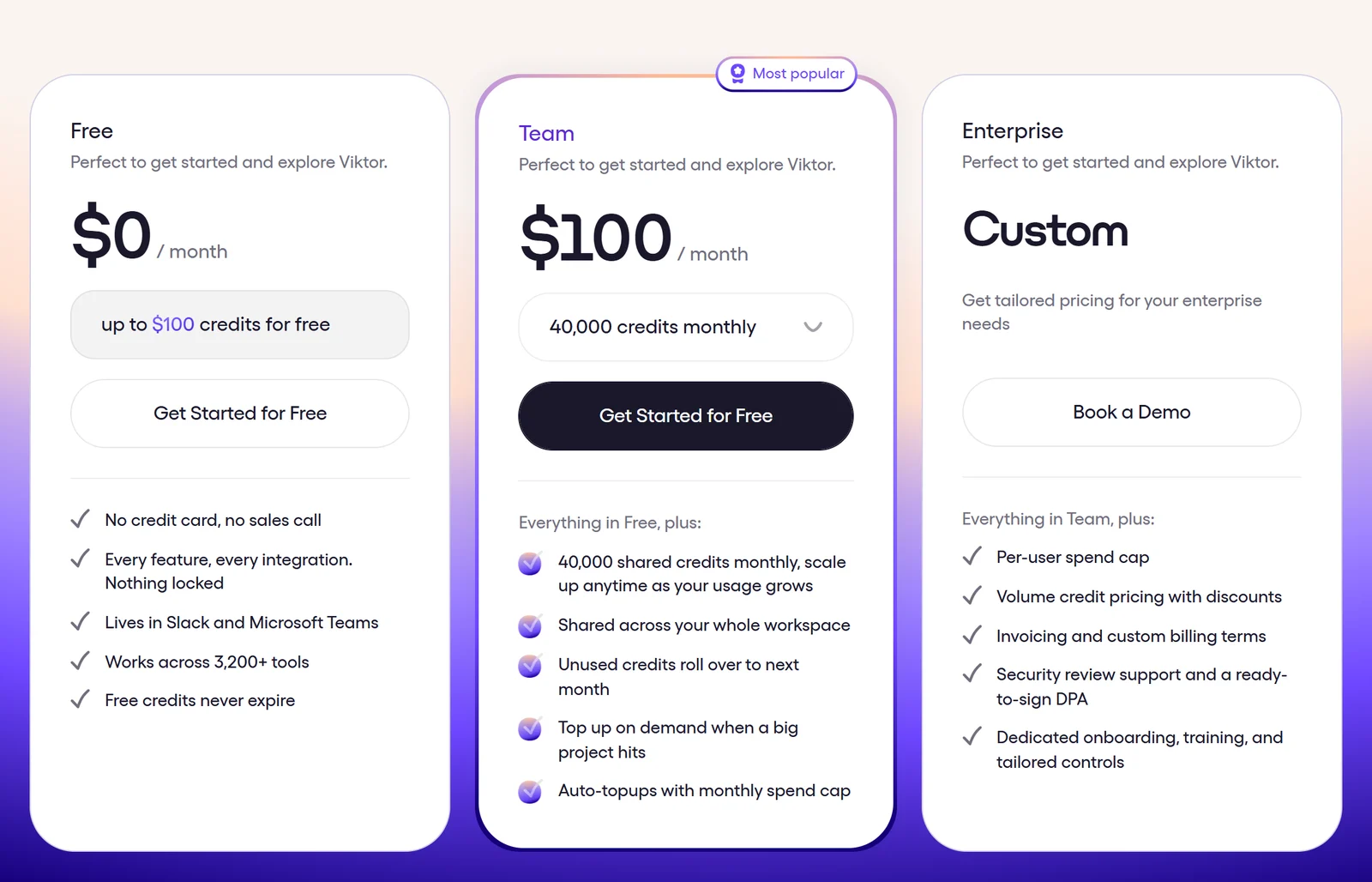
The plan cards as they actually appear. The advertised $50/mo entry tier is nowhere on this screen — the Team card opens at $100/mo for 40,000 credits.
What you should know before buying
- Workspace-based, never per seat. “Pricing is per workspace, not per seat. The tenth teammate costs the same as the first.” This is Viktor’s single strongest commercial differentiator against per-seat rivals.
- The rate is essentially flat. Every published tier works out to 400 credits per dollar, with one exception (125,000 credits for $300, roughly 417/dollar). Despite Enterprise advertising “volume credit pricing with discounts,” the published ladder shows effectively none.
- Rollover is limited. Unused monthly plan credits roll over for one month only. Free trial and bonus credits never expire.
- No annual billing exists. Every published price is monthly.
- Consumption guidance: Quick Tasks 100–300 credits, Complex Workflows 500–1,500, Full Projects 2,000–5,000. The FAQ separately says a quick Slack question might cost 50–100 credits, and that 20,000 credits buys “roughly 40–200 tasks depending on complexity.”
- Scheduled automations are the top credit consumer for active users, by Viktor’s own admission.
- Nonprofits get 15% off every monthly plan, permanently, verified with an EIN within one business day. No student, startup or annual-prepay discount exists.
The real pricing criticism
Viktor publishes no dollar-per-credit conversion rate and no top-up price. Auto top-ups with a monthly spend cap exist, but at an unpublished rate. The practical consequence is that you cannot forecast cost-per-outcome before purchase — you have to spend the free $100 to find out. Note that the loudest published versions of this criticism come from competing vendors, which does not make it wrong, but is worth knowing.
Start with the free allowance on the official Viktor website and measure your own burn rate before committing to a tier.
8. Real-World Evidence: What Viktor’s Case Studies Actually Show
Viktor publishes six case studies. Unusually, they include self-critical “Honest notes” sections that document failures — which makes them more useful than typical vendor marketing, even though every figure remains the customer’s unaudited account.
Hampton (private founder network, ~25 staff) installed Viktor on 12 April 2026 and reports 24 tools connected, 12 web dashboards and 26 recurring weekly jobs within 44 days, with 887 CEO threads in six weeks. Hampton says three budgeted roles worth $440K — a $200K senior data engineer, a $120K junior ops manager and $120K of partial PM coverage — came off its hiring plan. That is avoided planned spend asserted by the customer, not audited savings.
Hampton’s honest notes are the most valuable passage on Viktor’s entire site: ad spend numbers that did not match between sources, a pacing formula that produced wrong projections, a retention report that counted non-attending members, and the conclusion — “Viktor builds fast but doesn’t always verify its own output.”
Element Turf & Outdoor Solutions (25-person landscaping firm) reports 62 automated workflows across 15 tools in two weeks, a $3,000/year subscription cancelled within the first hour, and $134K of invoices past 90 days surfaced on day one. It also discloses real damage: “eight Aspire properties were accidentally deactivated and twelve had their addresses wiped due to API field-mapping errors. Both caught and fixed within hours, but they happened.”
AlphaSignal (AI newsletter, 280,000+ subscribers, 8-person team) reports 18 automated workflows in 67 days and a $5,717 SOW discrepancy caught to the cent, with proposals cut from 90 minutes to 10.
David Joerg, Technical Product Manager AI/ML at Chess.com, reports 30+ distinct projects in six weeks, including a full-stack web app evolved over 12 iterations with GitHub CI/CD and a 70+ entry practitioner database maintained by daily autonomous scans.
How to read the social proof
Apply a discount. Viktor’s site claims “Used by 50,000+ teams” on one page and “60,000+ workspaces” on another — two live pages, 10,000 apart, against Fortune’s reported ~2,000 organizations in May 2026. Its 4.9 G2 badge is accurate but rests on a small sample: G2’s own feed returns 9.8 on a 10-point scale across 57 reviews, with roughly 4.5/5 across about 16 Trustpilot reviews.
Of 43 entries on Viktor’s Wall of Love, about two-thirds are attributed only to “Viktor Community” or an X handle, with no company or role. The “Saved 10+ hrs/week” badges are undefined bucket labels with no stated measurement method — and the same person carries different badges on different Viktor pages.
Viktor’s own FAQ concedes the important part: “Yes. Viktor is capable, not infallible.”
9. Viktor vs Claude Tag, Lindy, Zapier Agents and Copilot
| Platform | Pricing model | Entry price | Key differentiator vs Viktor |
|---|---|---|---|
| Viktor | Workspace credits | $50/mo (20,000 credits) | Execution-first, 27 native integrations, no per-seat charge, approval gates |
| Claude Tag | Per seat | $20/seat/mo (Team Standard) | Stronger at specs and edge cases; Viktor concedes it is the “do-it-yourself path for technical teams” |
| Lindy | Per user | $29.99/user/mo | More mature visual workflow builder; native meeting attendance and transcripts. Credits do not roll over |
| Zapier Agents | Tasks + activities | $29.99/mo (Pro) | 9,000+ apps, roughly 2.8x Viktor’s catalog, but classic iPaaS wiring rather than a colleague model |
| n8n | Executions | €20/mo Cloud, free self-hosted | The only genuinely free-at-scale option; unlimited users on every plan |
| Make | Credits | $9/mo (Core) | Cheapest entry in the category; includes Maia AI agents |
| Cursor | Per user | $20/mo Individual | Deep in-IDE coding; not a cross-functional business agent |
| Slack AI | Per user | $18/user/mo (Business+) | Native, cheaper per user, but summarizes rather than executes across external tools |
| Microsoft 365 Copilot | Per user | ~$30/user/mo add-on | Requires a qualifying M365 license; never a standalone cost |
The honest summary: Zapier wins on catalog breadth, Lindy on visual workflow maturity, n8n on cost, Claude Tag on technical depth, and Slack and Copilot on per-user price. Viktor’s defensible edge is the combination of workspace pricing, execution-first output, and an approval model built for a shared team — not any single feature.
One important qualifier: no independent head-to-head benchmark exists comparing task-completion accuracy or failure rates across these products. Every capability comparison, including Viktor’s own comparison pages, rests on vendor claims. Viktor’s Claude Tag page is already stale, describing “about 14 connectors at launch” and “Claude Opus 4.8 only” when Opus 5 is current — a fact Viktor’s own product page confirms.
10. Pros and Cons: Objective Evaluation
Where Viktor is genuinely strong
- It returns artifacts, not advice. The PDF, the deck, the deployed dashboard, the pull request — this is the whole product thesis and it is delivered consistently across personas
- Workspace pricing beats per-seat economics the moment your team passes a handful of people
- Zero new interface. @mention in Slack, Teams or Discord; adoption friction is close to nil
- Conversational scheduling removes the workflow-builder learning curve that Zapier, Make and n8n all impose
- Approval gates are conservative by default, admin-configurable, and cover exactly the irreversible actions that matter
- Published case studies document their own failures, including data damage — rare and credible
- A real developer surface (REST API, MCP server, OpenAI/Anthropic-compatible endpoints) for teams that outgrow chat
Where Viktor falls short
- Workspace-shared integrations. No per-user scoping today. Private Mode, RBAC and per-user OAuth are roadmap, despite enterprise-page marketing implying otherwise
- SOC 2 Type 1 only, from a point-in-time examination dated October 2025. Type 2 and ISO 27001 remain in progress
- Unforecastable cost. No published dollar-per-credit rate, no top-up price, and scheduled automations are the top consumer
- Pricing presentation is confusing — the advertised $50 entry tier appears nowhere on the plan cards
- Self-reported metrics contradict each other across Viktor’s own live pages
- Verification is your job. By its largest customer’s account, “Viktor builds fast but doesn’t always verify its own output”
- No native iOS app, and no Google Chat support
11. Getting Started: A Practical First Week
Step 1: Install and connect
Sign up, choose Slack or Teams, and authorize the workspace. Viktor appears as a member you can DM or invite to channels. Its comparison page claims setup “Takes under 5 minutes.” Connect shared team accounts only — remember integrations are workspace-wide.
Step 2: Spend the free credits on one real job
Do not test with toy prompts. Give it the recurring report that currently eats someone’s Monday morning, and compare the artifact against the manual version.
Step 3: Verify the numbers
Given the documented tendency to build fast without self-verification, cross-check the first few outputs against source systems before anyone acts on them.
Step 4: Convert the winner into a schedule
Ask Viktor to run the validated job weekly. It will propose a paused scheduled task — review it before approving.
Step 5: Measure burn rate before choosing a tier
Open the Usage section to see scheduled tasks and the credits they consume. Only then pick a tier from the ladder.
12. Frequently Asked Questions
Is Viktor really free to start?
Yes. Viktor's Free plan is $0/month and includes up to $100 in credits with no credit card and no sales call. The credits never expire, and the free tier is not feature-limited — Viktor states 'Every feature, every integration. Nothing locked.' It is capped by credits rather than by days, so there is no trial clock.
Does Viktor really connect to 3,200+ tools?
That number needs context. Viktor's integrations page splits it explicitly: '27 native integrations. 3,200+ tools via managed connectors.' Only the 27 native ones carry full read-write depth, and only 15 of them are named publicly. Depth varies enormously even among connectors — Viktor's own data lists Asana at 153 actions but Ahrefs at 3. Verify your critical tool before committing.
Can each team member connect their own accounts privately?
Not today. Viktor's privacy policy states integrations are workspace-shared, meaning connected credentials may be available to authorized members of that workspace. Private Mode, role-based access controls and per-user OAuth token scoping are all listed by Viktor as features it is actively building, not shipped capabilities. Connect shared team accounts, not personal inboxes.
Is Viktor SOC 2 certified?
Viktor holds SOC 2 Type 1 only, audited by Prescient Assurance, with the report available under NDA. SOC 2 Type 2 (audited by A-LIGN, observation period through September 2026) and ISO 27001:2022 are both still in progress as of September 2026. Viktor's own badges are inconsistent — the accurate wording is in its FAQ, not on its homepage trust strip.
How much will Viktor actually cost me per month?
Plans start at $50/month for 20,000 credits and run per workspace rather than per seat. Viktor publishes no dollar-per-credit rate or top-up price, so cost per outcome cannot be forecast in advance — the practical approach is to spend the free $100 in credits on real work and measure your burn rate in the Usage section before choosing a tier. Note that scheduled automations are, by Viktor's own admission, the top credit consumer.
Does Viktor train AI models on my company data?
Viktor states it does not train its own or third-party foundation models on customer data, and that its model providers operate under no-training, zero-retention agreements. One nuance: the privacy policy reserves the right to build narrow 'service-specific quality models' — classifiers used to operate the service — on customer data. These are not general-purpose models and are never shared with third parties.
Can Viktor send emails or move money without asking me?
No, by default. Sensitive actions — sending external emails, pushing code, modifying campaigns, deploying apps or charging cards — generate an Approve or Reject preview in Slack before executing. Admins choose which action types require approval, and Viktor states the defaults are conservative.
Is viktor.com the same as viktor.ai?
No. They are completely unrelated companies. viktor.com is the Slack and Teams AI employee operated by Zeta AI, Inc. in Delaware. viktor.ai is an engineering application platform operated by Dutch companies in Rotterdam. Search results conflate them frequently — no claim transfers between them.
13. Final Verdict: Should You Hire Viktor in 2026?
Viktor earns 4.6 / 5. It is the most convincing execution-first AI coworker currently available inside Slack and Microsoft Teams, and its commercial model — priced per workspace, not per seat — is genuinely differentiated in a category where almost every rival charges per user.
The product thesis holds up. Where ChatGPT explains how to audit your ad spend, Viktor returns the audit as a PDF. Where Zapier asks you to wire a workflow, Viktor takes the instruction in a Slack thread and proposes the schedule itself. For founders, marketing, ops and finance teams carrying recurring operational load they cannot justify hiring for, that difference is the entire value.
Two things keep it from a higher score, and neither is cosmetic. Integrations are shared workspace-wide, with per-user scoping still on the roadmap while the enterprise page markets it as though shipped — which means Viktor must be scoped to team accounts, not personal ones. And cost is unforecastable before purchase, with no published credit rate. Add a certification posture that is Type 1 rather than Type 2, and Viktor is best characterized as a fast-moving, well-funded product that is ahead of its own governance.
Hire Viktor if: You want recurring operational output — reports, dashboards, triage, internal tools — delivered into Slack or Teams across a whole team, and you can work within shared team-level integrations.
Think twice if: You need per-user data isolation today, require SOC 2 Type 2 or ISO 27001 for procurement, work primarily solo, or need predictable per-seat budgeting.
The sensible path is the one Viktor’s own pricing makes easy: spend the free $100 in credits on one genuinely annoying recurring job, verify its output against your source systems, and let the burn rate tell you which tier you actually need. You can start on the official Viktor website without a credit card.
Disclosure: This review contains affiliate links. If you sign up for Viktor through our link, we may earn a commission at no additional cost to you. This supports our independent testing and review work. All factual claims in this review were verified against Viktor’s own published pages, documentation, trust center and third-party reporting as of 14 September 2026; claims we could not independently verify are attributed to the vendor throughout.