
Photoroom Review 2026: AI Product Photos for Online Sellers — Pricing, Limits and the Fine Print
Every online seller knows the rule: buyers judge the product by the photo. Photoroom has built a hugely popular app around that rule, with 100M+ downloads on Google Play alone. It started as a one-tap background remover for phone photos and has grown into an AI studio for e-commerce: AI backgrounds, virtual fashion models, ghost-mannequin and flat-lay shots, short product videos, batch editing, Shopify publishing and an image API for developers.
The app stores love it — 4.8 on the US App Store from 231,000 ratings and 4.7 on Google Play from about 4 million reviews. Trustpilot tells a different story, at 2.2 from 272 reviews, and much of the anger there is about trials, billing and changing limits rather than image quality.
This review explains what each tool really does, how credits, export limits and regional prices work, the trial and cancellation rules you need to know before you start, what Photoroom’s Terms say about training AI on your photos, and how it compares with Canva, Adobe Express, Pixelcut, Claid and remove.bg, whose standalone website and self-service API stop on 1 December 2026.
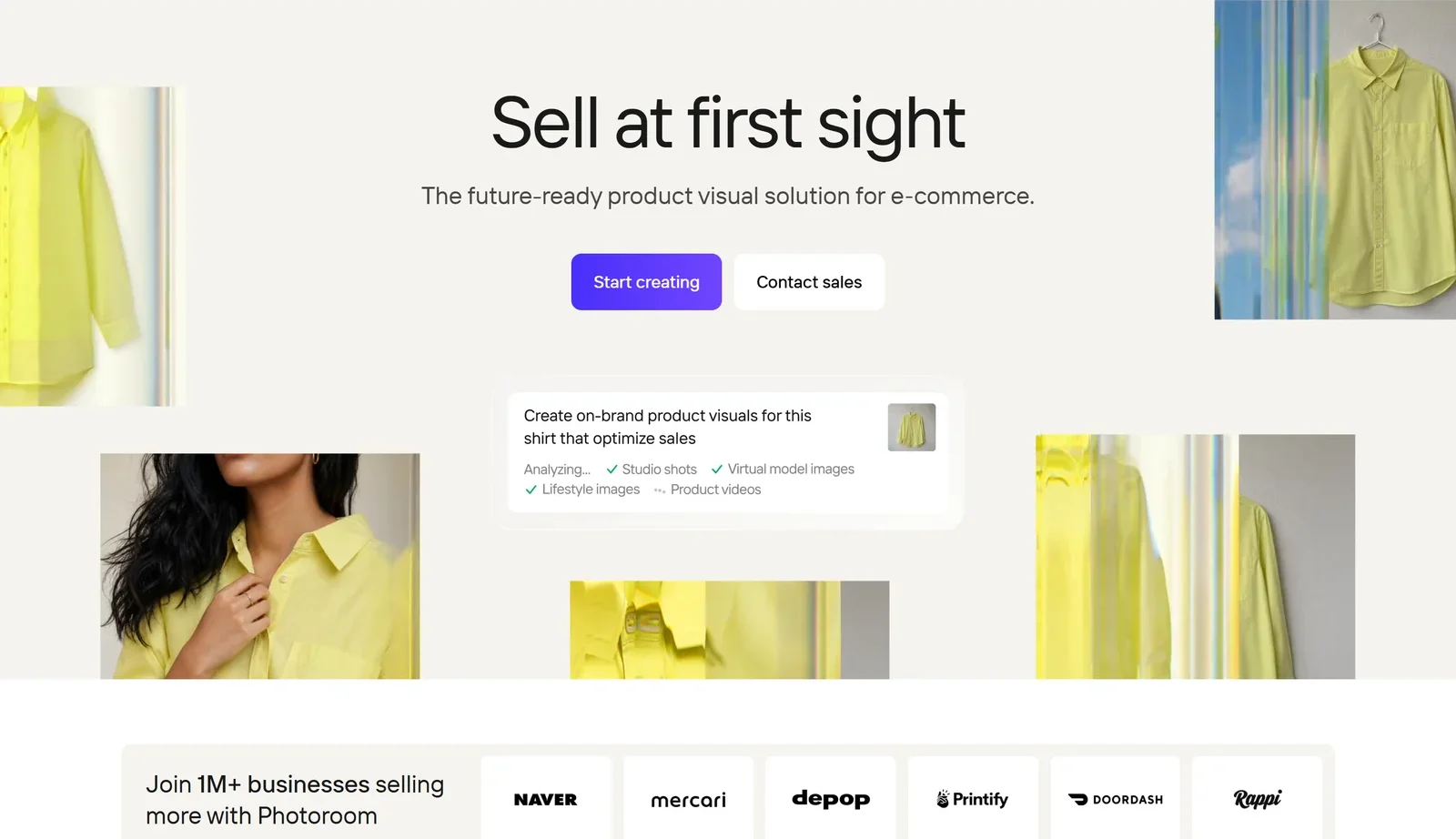
Photoroom’s homepage, captured 22 October 2026. The 1M+ businesses figure is Photoroom’s own claim.
1. What Photoroom Is — and Who Is Behind It
Photoroom describes itself as “the future-ready product visual solution for e-commerce.” In practice it is three things: a consumer and small-business photo editor on phone, Mac and web; a batch and Shopify workflow for growing stores; and an API and enterprise platform used by marketplaces and delivery apps.
The company. The service is run by Photoroom SAS, a French company registered in Paris (RCS Paris 853 059 384), created in July 2019. It was founded by Matthieu Rouif (CEO), who previously led image-editing products at GoPro, and Eliot Andres, and went through Y Combinator’s Summer 2020 batch. The website footer names “Photoroom, Inc.”, while the Terms and the App Store name Photoroom SAS.
Funding and scale. Photoroom raised a $1.2M seed round in 2020, a $19M Series A led by Balderton Capital in 2022, and a $43M Series B in February 2024 led by Balderton and Aglaé, bringing total funding to $64M. TechCrunch reported that the Series B valued the company at $500M. In May 2025 it made its first acquisition, GenerateBanners. In September 2026 Tech.eu reported that Andres had stepped back from his executive role to the board, with former Groupon executive Javier Sotelo taking over as CTO. Photoroom’s careers page describes a team of “just over 90 people”.
Its own numbers. In a June 2026 post, Rouif wrote that 300 million people have used Photoroom in more than 180 countries, that it processes more than 7 billion images a year, and that it serves over a million businesses. The homepage says “Join 1M+ businesses”. These are company figures, and different Photoroom pages count users in different ways — treat them as scale indicators, not audited facts.
Its own AI. Photoroom trains some of its own models — it open-sourced its PRX text-to-image model under the Apache 2.0 licence in November 2025 — but it also uses third-party ones. Its Product Staging and Product Beautifier tools run on OpenAI’s GPT-Image-1, according to Photoroom’s own tool pages, and its Data Processing Agreement lists OpenAI, Black Forest Labs and Google among its sub-processors.
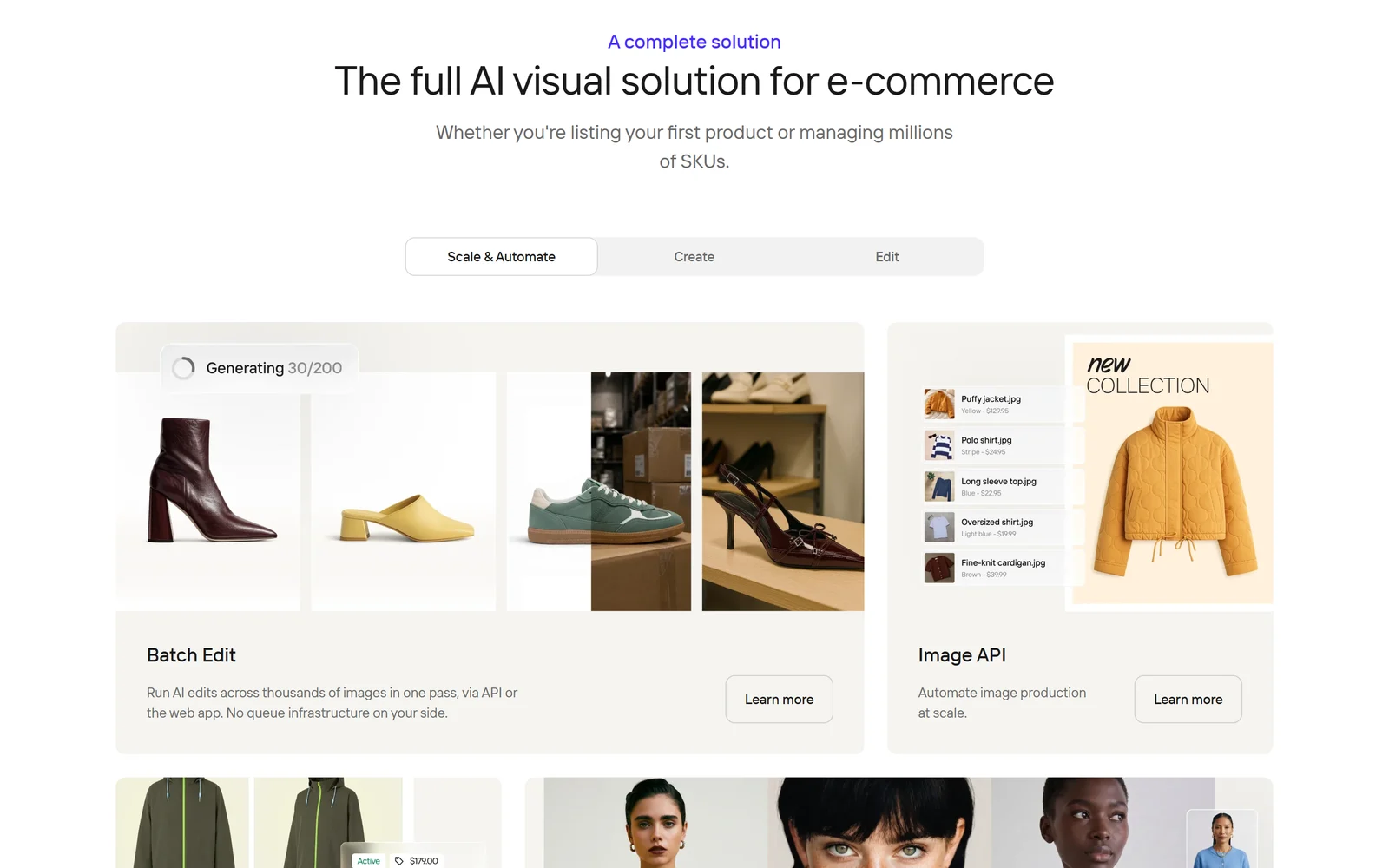
Photoroom splits its product into Scale and Automate, Create and Edit tools.
2. Who Photoroom Is For — and Who It Is Not For
It fits you if:
- You sell online — Amazon, eBay, Etsy, Shopify, Vinted, Depop — and photograph products on your phone
- You need consistent catalogue images across dozens or hundreds of items
- You sell clothing and want on-model, ghost-mannequin or flat-lay shots without a studio
- You run a team: up to 50 people can share one paid Space at no extra charge
- You are a developer who needs background removal or AI product shots inside your own app
Look elsewhere if:
- You want to use it for your business for free — the free plan is for personal, non-commercial use only
- You need exact product accuracy without checking — Photoroom’s own developer docs say some generative features can change products and recommend a human review
- You need your data kept in the EU — Photoroom says EU-only data residency isn’t available today
- You need contractual IP protection for AI images — that only exists in the Enterprise agreement
3. The Core Tools — What Each One Really Does
Background removal
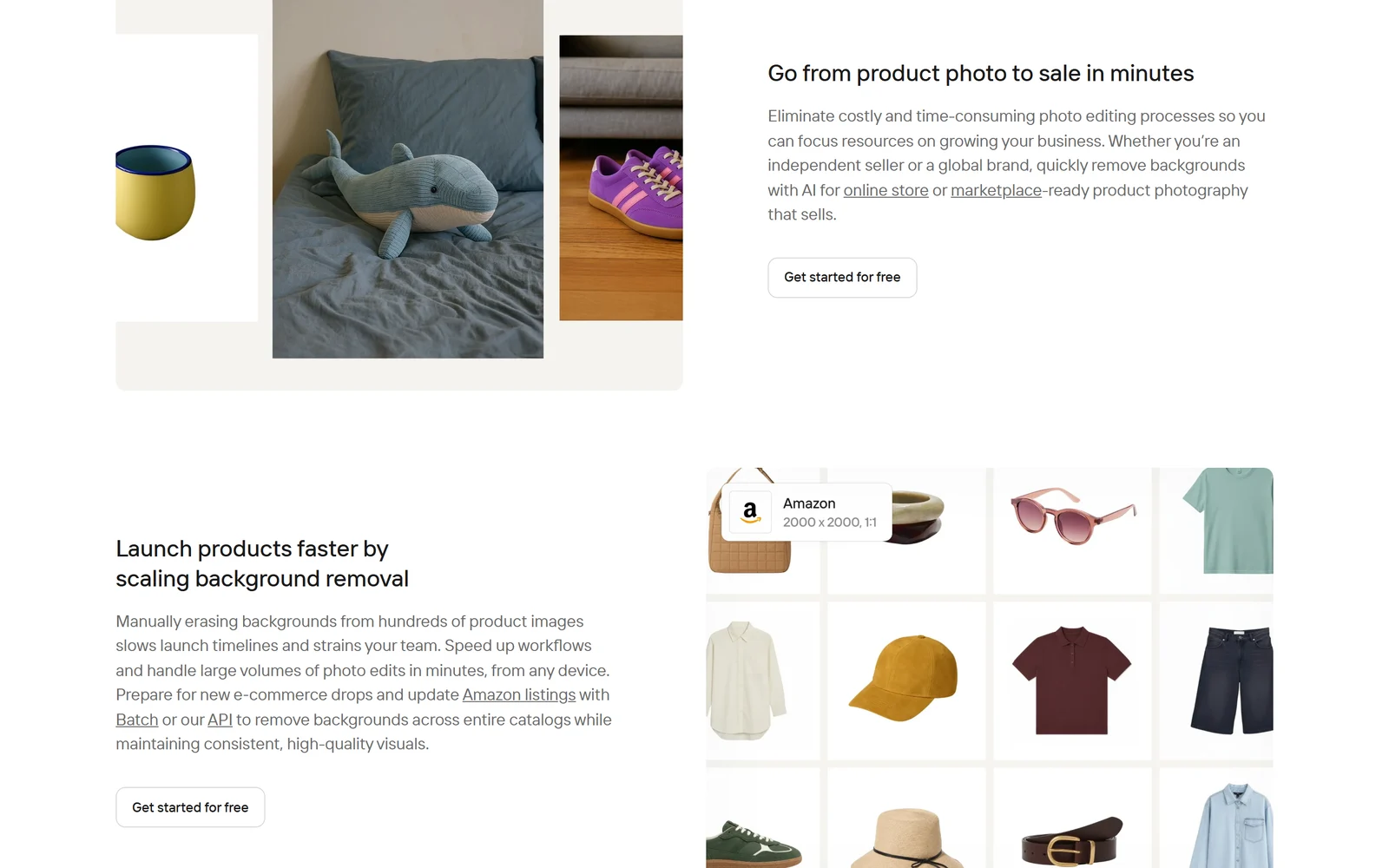
Background removal is still Photoroom’s core feature, with marketplace size presets such as Amazon’s 2000 × 2000.
This is the tool most people come for. Upload a photo and Photoroom cuts out the product automatically; you download a PNG, JPEG or WEBP with a transparent, white or new background. Photoroom says it handles hair, fur, lace and soft shadows and lets you refine the edges by hand. Long-time resellers on Reddit say its cutouts look far better than eBay’s built-in tool, and praise its AI shadows.
Importantly, background removal, white backgrounds and templates use no AI credits. Background Remover, AI Expand, Image Enhancer, preset AI Shadows, Resize and Retouch are “Free Utilities” with a daily cap — Photoroom says the cap is much lower in free Spaces, but doesn’t publish the number.
AI Backgrounds, Product Staging and Product Beautifier
AI Backgrounds places your cut-out product in a generated scene from a text prompt or preset. Photoroom’s help centre lists four models: Studio HD (1024 × 1024, about 10 seconds, web app), Studio (512 × 512, about 5 seconds), and the faster v3 and v2 (350 × 350, under a second). Product Staging and Product Beautifier are newer tools built on OpenAI’s GPT-Image-1: each returns two images per generation, Staging doesn’t let you choose a specific background, and Beautifier outputs square, portrait (2:3) or landscape (3:2) images.
AI Fashion Models, Ghost Mannequin and Flat Lay
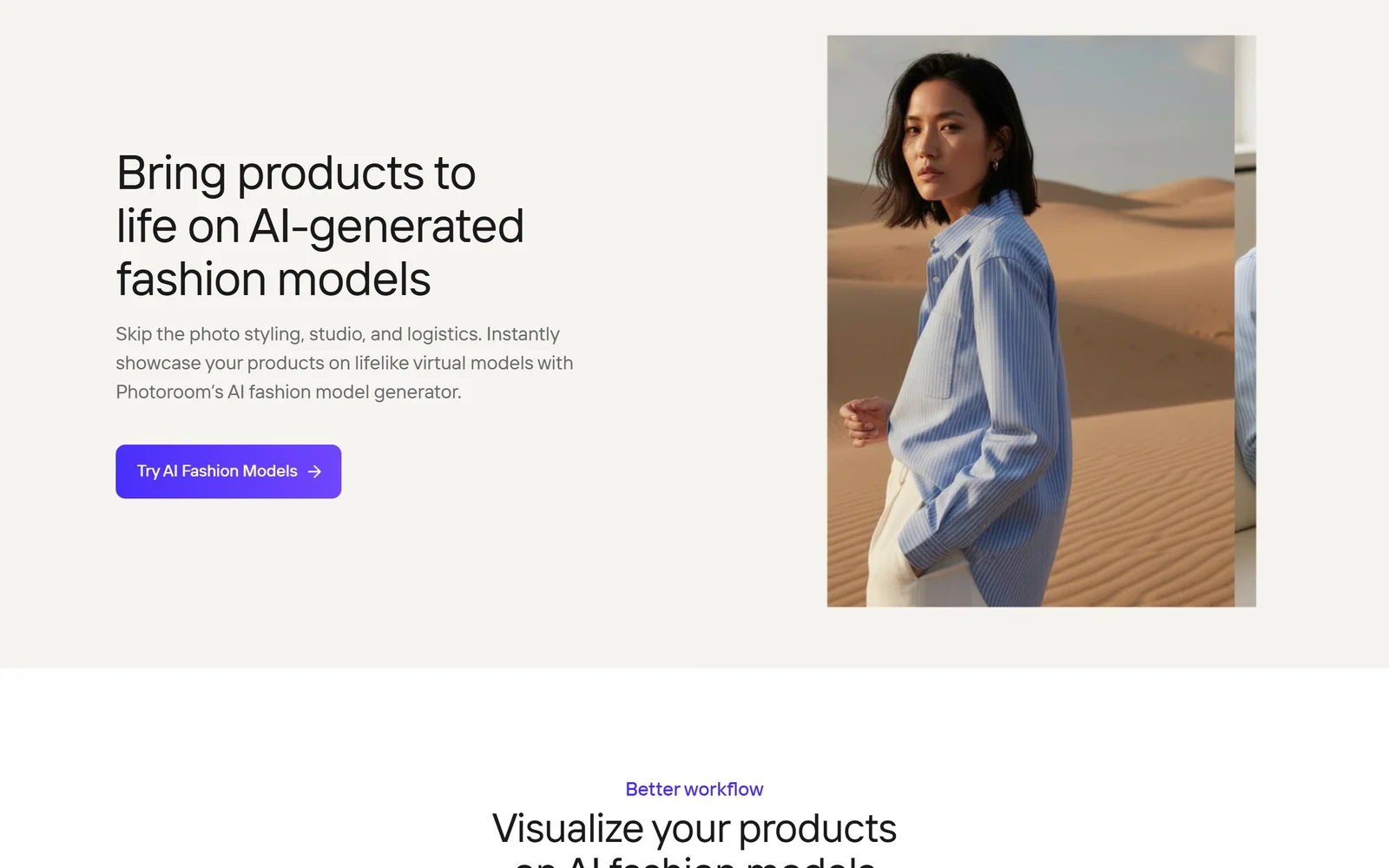
AI Fashion Models puts garments on pre-made or custom virtual models.
For clothing sellers, this is where Photoroom goes beyond a basic editor:
- AI Fashion Models dresses your garment on a pre-made model or one you create with ”+ Custom”, with choices of background, pose, quality, size and brand style. The number of saved custom models is 1, 3 or unlimited depending on your plan.
- Ghost Mannequin takes flat-lay, hanging, mannequin or on-model photos and uses AI to reconstruct the hidden parts of the garment.
- Flat Lay turns hanger, mannequin or model shots into top-down flat lays.
AI image quality comes in three tiers: Standard (1K) on all paid plans, Advanced (2K) from Max, and Premium (4K) on Ultra only.
Accuracy: the Fidelity Check
Generative AI can quietly change a product — a logo, a seam, a colour — and a resale buyer who receives something different from the photo can return it as “not as described”. Photoroom’s answer is an automatic Fidelity Check on paid plans, which compares AI Fashion Models, Ghost Mannequin, Flat Lay, Product Staging, Product Beautifier and Ironing outputs with your original; its “Fix it” repair costs no credits. Even so, Photoroom’s own API documentation recommends a human check wherever product accuracy matters — and we agree.
Product videos
Product Animator (previously called Video Generator, and still named that on the pricing page) turns one to four photos into a short, silent product video using 300+ templates. Video Ad Maker plans the shots, script and voiceover and exports 5, 8 or 10-second videos in 9:16 or 16:9. Both are on web, iOS and Android, but only on Max and Ultra. Photoroom’s US comparison table shows a maximum of 50 Video Generator generations a month on Max and 150 on Ultra if all your AI credits go to video — and credit allowances vary by country.
4. Batch Editing and Scale
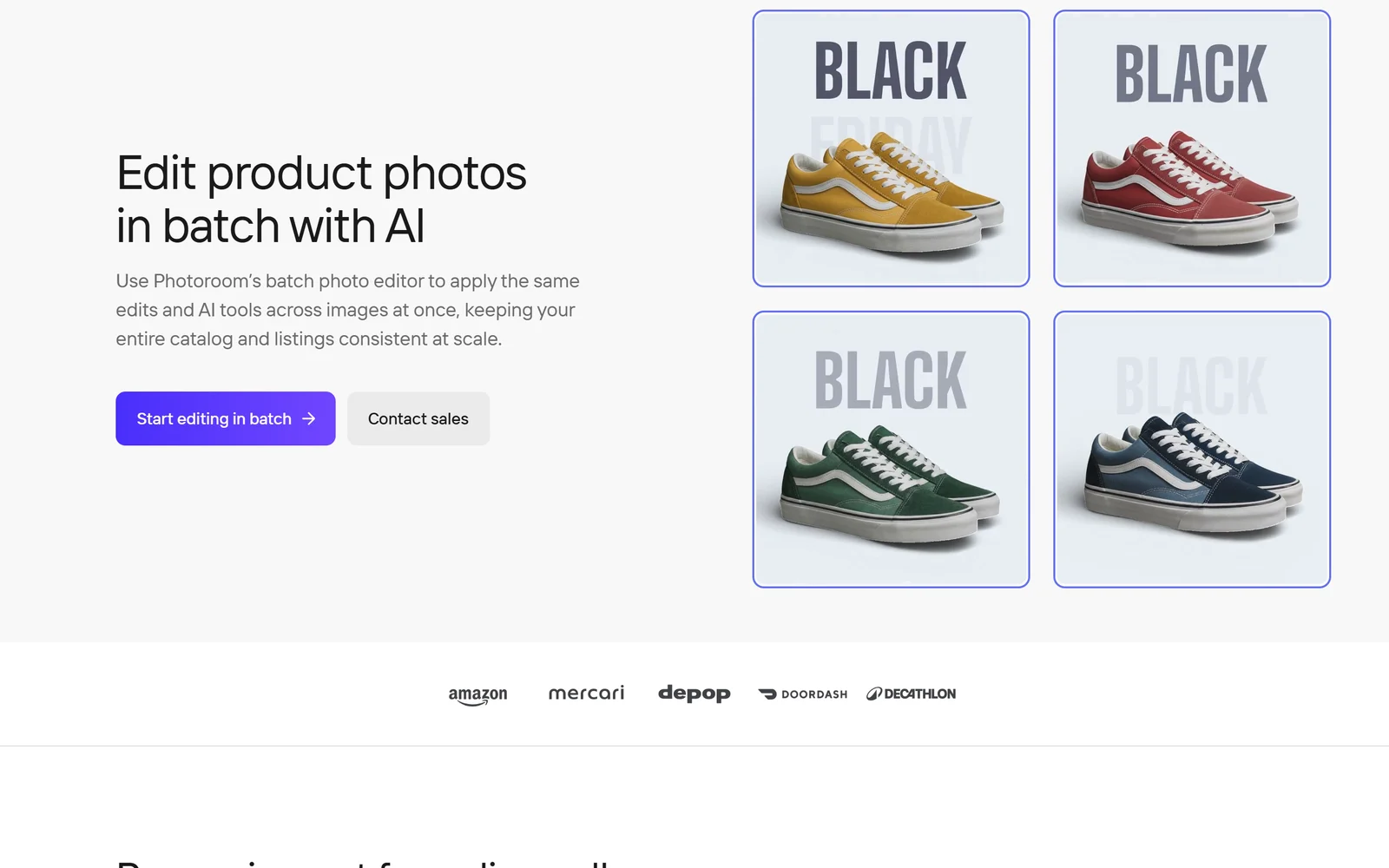
Batch applies one template or AI tool across many photos at once.
Batch applies the same template, background or AI tool — Ghost Mannequin, AI Fashion Model, Recolor, Flat Lay, Product Staging and more — to up to 250 images at once. According to Photoroom’s H1 2026 recap, AI tools such as Ghost Mannequin, AI Fashion Model, Recolor, Flat Lay and Product Staging have worked in Batch on the web since February 2026 and on mobile since May 2026. Two limits matter:
- Batch is available on every plan, but you can only export from it on Pro, Max or Ultra.
- Each image in a batch counts as one export toward your monthly limit, and web batch exports are capped at 2048 × 2048 pixels (4096 × 4096 for single paid exports).
Batch is also where Photoroom has upset its most loyal users. In November 2025, an annual subscriber posted on Reddit’s r/Flipping that batch exports had been capped mid-plan; the thread drew 134 comments. CEO Matthieu Rouif replied that “the change landed in the middle of active subscriptions”, and in December 2025 he posted that Pro and Max subscribers from before November 2025 who had paid at least once could activate a 5× monthly batch limit (Pro 2,500, Max 7,500) within two months, lasting until January 2029. Since August 2026, r/photoroom users have also complained about a batch-editor redesign that removed features they relied on.
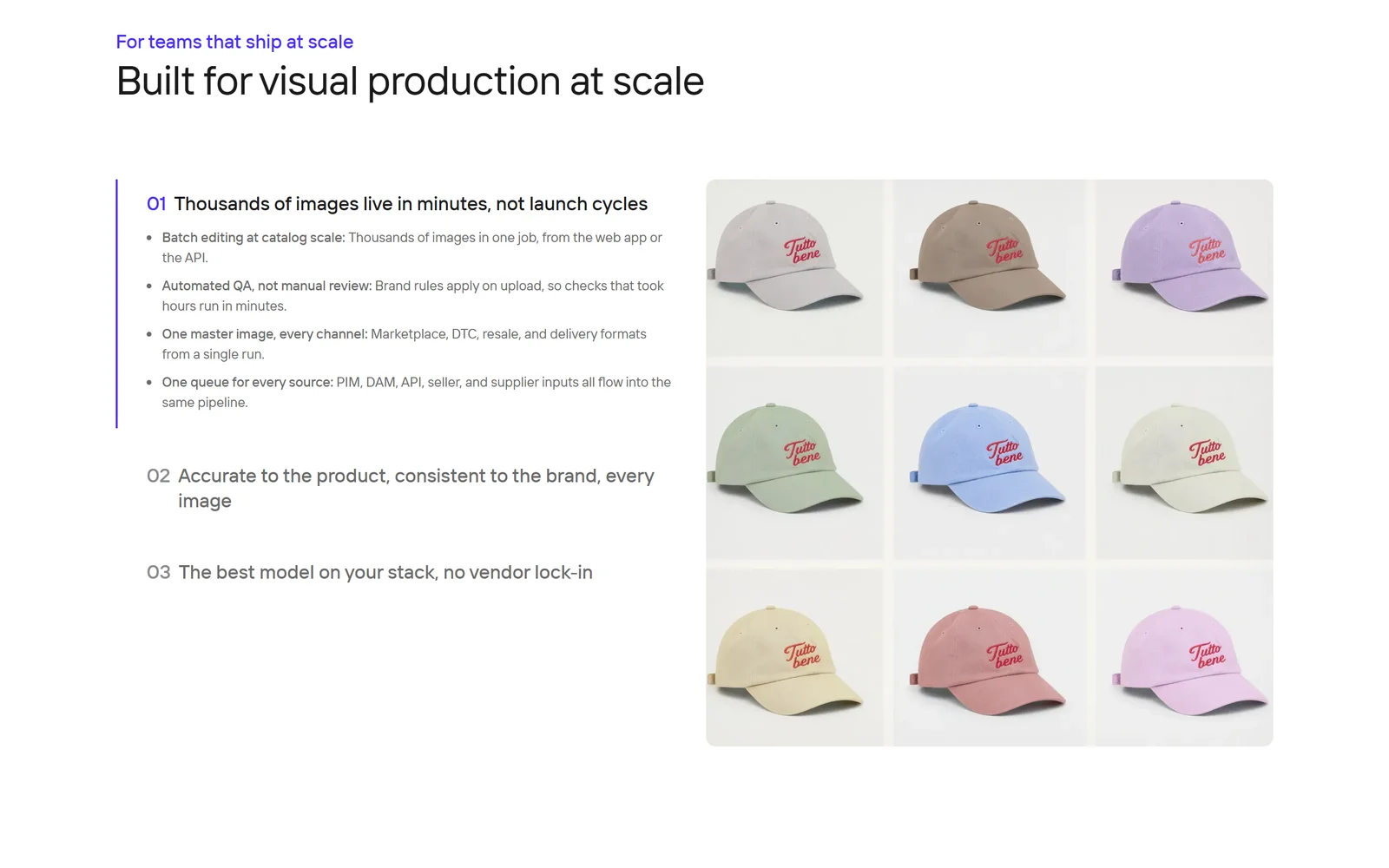
Photoroom’s pitch to larger teams. Visual QA is an Enterprise-only feature.
For large catalogues, Photoroom sells an Enterprise tier with Visual QA, SLA and SSO, and an Enterprise Guarantee: you agree pass/fail fidelity criteria in the contract, failed images are regenerated, and you pay only for accepted outputs. Its customer stories — written by Photoroom — include Wolt automating image editing for 140,000+ merchants and Decathlon cutting image-editing costs by 99% across 35,000 images.
5. Shopify, Integrations, Apps and Claude
- Photoroom for Shopify imports your product images, generates SEO titles, descriptions and alt text, and publishes to Shopify as drafts. Publishing, downloading and exporting require Max or Ultra. The Shopify App Store listing (“Photoroom AI Listing Assistant”) is free to install and rated 3.9 from 36 reviews.
- Integrations listed by Photoroom include Google Drive, Zapier, Make, Figma, Airtable, WordPress, Capture One, Image Relay and Pixelz.
- Apps run on iPhone and iPad (iOS 18+), Android (10+) and Macs with Apple silicon; Windows and Intel Mac users use the web app at app.photoroom.com. Maximum export sizes are 2000 × 2000 on the free web plan and 4096 × 4096 on paid web plans.
- A Claude connector lets you use Photoroom inside Claude, billed at API rates. Photoroom’s marketing page says it works on every Claude plan, but its help centre requires a paid Claude plan, an Admin role in your Photoroom Space and the API enabled.
6. Pricing — Credits, Exports and Regional Prices
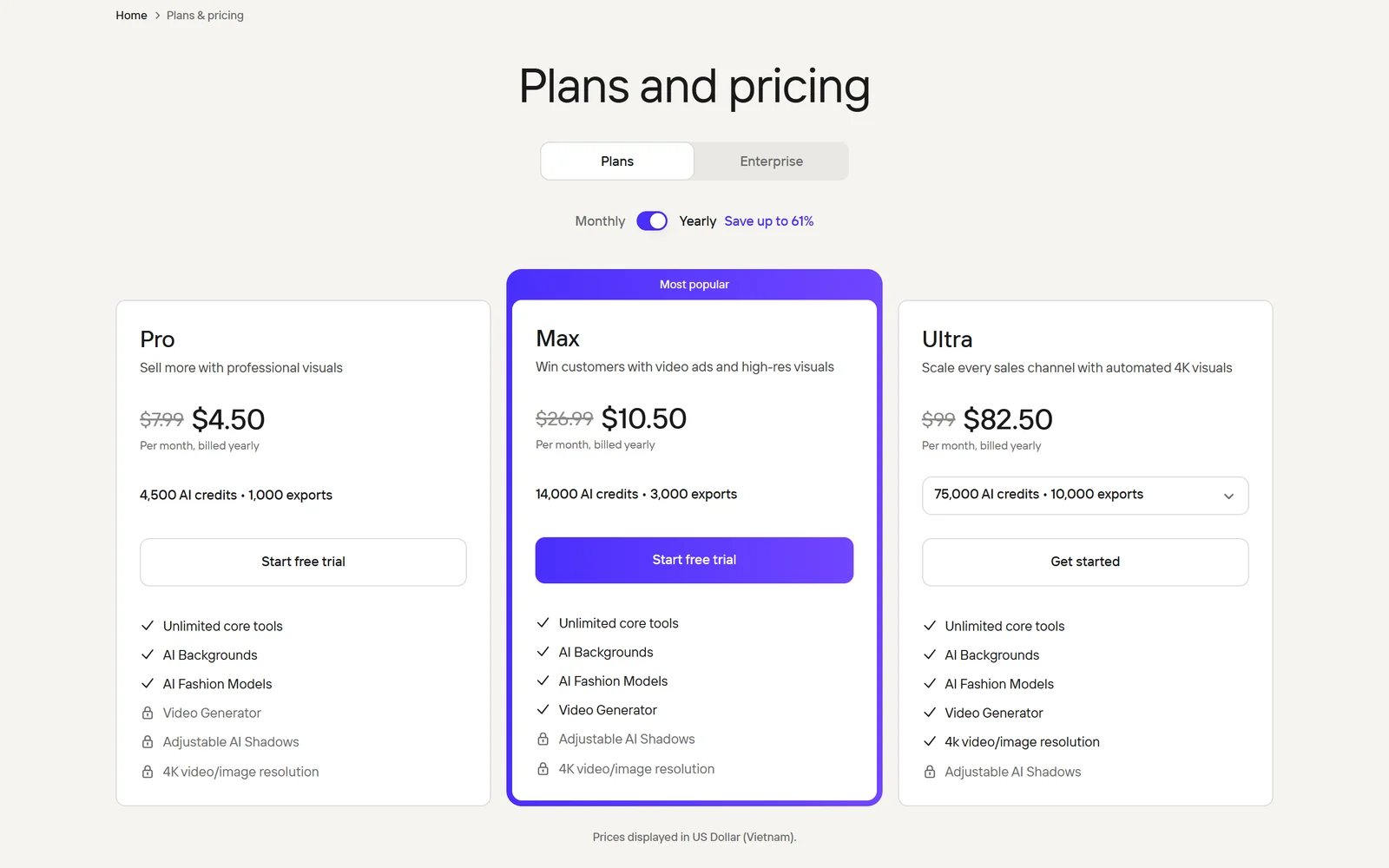
The pricing page as shown to a visitor in Vietnam on 22 October 2026. US visitors see higher Pro and Max prices and more credits (Ultra is the same) — see the table below.
Photoroom has a free plan, three self-serve paid plans and a custom Enterprise tier. Prices and AI-credit allowances vary by country — the screenshot above shows the Vietnamese prices — so the figures below are what Photoroom’s pricing page showed to US visitors on 22 October 2026:
| Plan | Monthly | Billed yearly (per month) | AI credits / month | Exports / month | What it adds |
|---|---|---|---|---|---|
| Free | $0 | — | Not published | 100 | Personal, non-commercial use only; no API; no Batch export |
| Pro | $12.99 | $7.50 ($89.99 a year) | 8,000 | 1,000 | Core tools, AI Backgrounds, AI Fashion Models; no video or Shopify |
| Max | $34.99 | $20.99 (about $250 a year) | 25,000 | 3,000 | Video Generator, Shopify integration, 2K AI images |
| Ultra | $99 | $82.50 ($990 a year) | 75,000 | 10,000 | 4K images and video; bigger tiers up to 750,000 credits ($990 a month) |
| Enterprise | Custom | Annual, usage-based contract | Shared balance | Contract | SLA, SSO, Visual QA, dedicated onboarding |
The US page advertises “Save up to 42%” on yearly billing. A visitor from Vietnam, by contrast, sees Pro at $7.99 a month or $4.50 billed yearly with 4,500 credits, and Max at $26.99 or $10.50 with 14,000 — while the comparison table further down the same page still lists the US credit amounts. Photoroom’s FAQ confirms that “the monthly credit amount included with your plan may vary depending on your country or region.” Trust the plan card and the checkout total, not the comparison table. Photoroom’s help centre says prices include VAT, but its Terms say fees exclude taxes, so check the final amount too.
What credits and exports buy
AI credits are a monthly pool per Space, shared by everyone in it. They refresh every month even on yearly plans, unused credits do not roll over, and generations that fail for technical reasons are refunded automatically. Photoroom doesn’t publish a per-tool credit cost; instead it shows the maximum you could make if all your credits went to one feature (US plans):
| Feature (max generations a month) | Pro | Max | Ultra |
|---|---|---|---|
| AI Backgrounds (Studio) | 4,000 | 12,500 | 37,500 |
| AI Fashion Models (1K) | 1,600 | 5,000 | 15,000 |
| Edit with AI | 400 | 1,250 | 3,750 |
| Video Generator | Not incl. | 50 | 150 |
Exports are counted separately: every download, save, share or Shopify publish counts, and each image in a batch counts once. Export limits apply to assets up to 2K. Core tools such as Background Remover, Retouch, preset AI Shadows, AI Expand and Image Enhancer are described as unlimited on paid plans, with the footnote “Fair use limits apply.” The pricing page is not always consistent — for example, all three plan cards list Adjustable AI Shadows as “Not included” while the comparison table gives each plan an allowance.
Free trial, refunds and cancelling — read this first
Trial, billing and cancellation complaints are the most common theme in Photoroom’s negative reviews. These are the rules, from Photoroom’s help centre and Terms:
- The free trial is 7 days, on yearly Pro and Max plans, one per customer. Ultra and the API have no standard trial. You need a payment method to start, and the first yearly payment is taken on day 8 unless you cancel. Upgrading to Ultra during a trial ends it and bills you immediately.
- Cancel on the platform you paid through — App Store, Google Play, the web (Stripe) or Shopify. Photoroom says “Canceling on a different platform won’t stop billing” and that it “can’t cancel subscriptions on your behalf.” Web subscriptions are cancelled at app.photoroom.com under your profile’s billing settings. Cancel at least 24 hours before renewal.
- Watch for double billing. Upgrading to Ultra on the web does not cancel an existing App Store or Google Play subscription, so you can be charged twice, and each Space is billed separately. Deleting your account does not cancel a subscription either.
- Refunds are discretionary. You may be eligible if you ask within 7 days of your last payment (4 days on weekly plans), but refunds are not guaranteed and are not available to API customers. App Store and Google Play refunds go through Apple and Google.
- Renewals happen automatically at the then-current price, with at least 30 days’ notice of price increases. There is no lifetime plan.
Our tip: if you start the yearly trial, set a reminder for day 6 and decide then.
Free plan · 7-day trial on yearly Pro and Max
Try Photoroom on your own product photos
Test background removal on the free plan first, then move to Pro or Max only when you’re ready to sell with it — and note your trial end date.
Try Photoroom free
7. The Photoroom API — and the remove.bg Shutdown
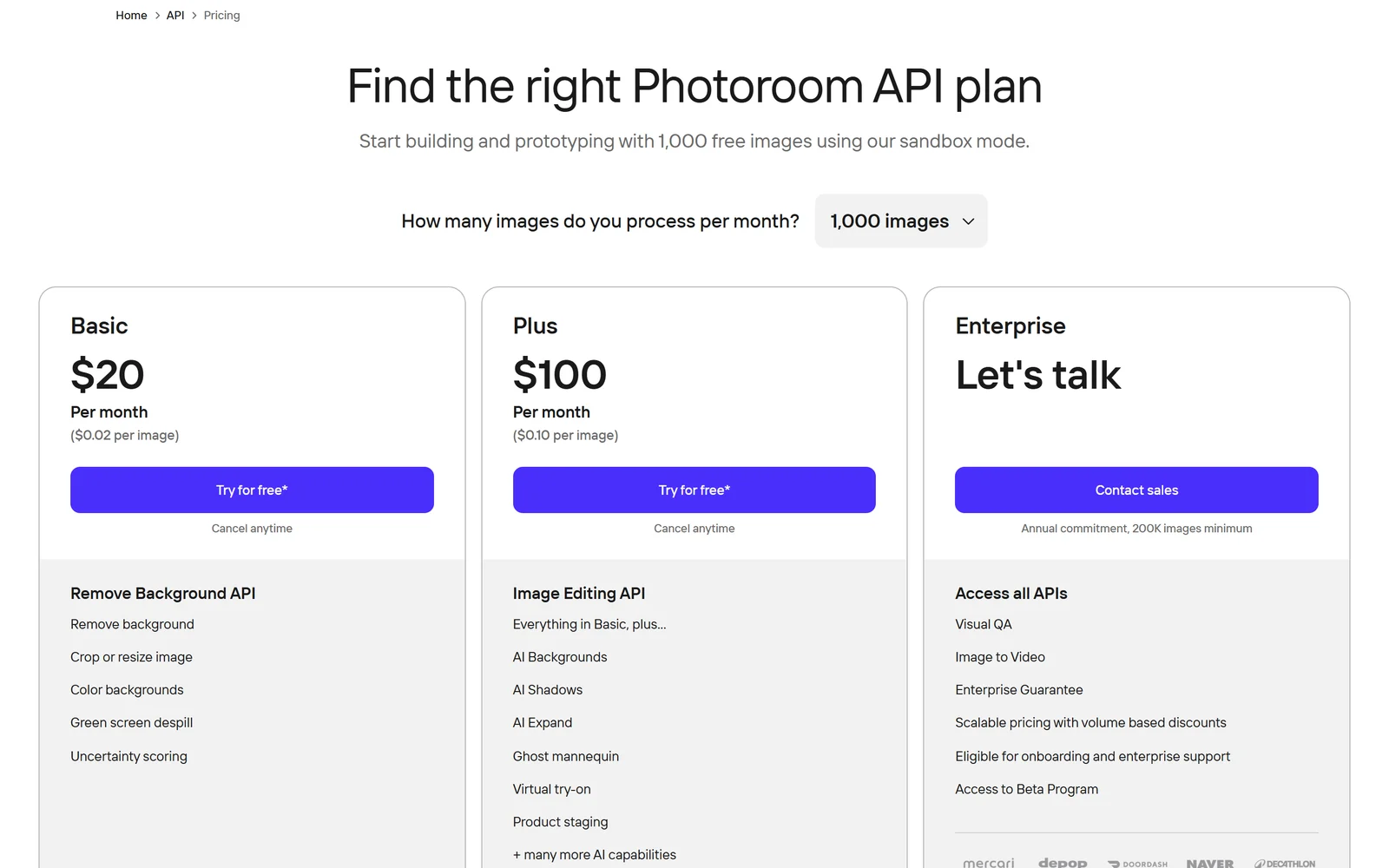
Photoroom’s API plans at the 1,000-images tier, captured 22 October 2026.
The API is a separate product with its own pricing:
| API plan | Price | Per image | What it includes |
|---|---|---|---|
| Basic | From $20/mo for 1,000 images | $0.02 | Remove Background API: cutouts, crop and resize, colour backgrounds, uncertainty score |
| Plus | From $100/mo for 1,000 images | $0.10 | Image Editing API: AI Backgrounds, AI Shadows, AI Expand, Ghost Mannequin, Virtual Try-On, more |
| Enterprise | Custom; annual, 200K images or more | Volume | All APIs plus Visual QA, Image to Video, Enterprise Guarantee |
Self-serve plans are monthly only, sold in fixed volumes up to 1 million images ($20,000 Basic or $100,000 Plus a month) with no volume discounts. You can test without a card: 1,000 watermarked sandbox calls a month on the Image Editing API, plus 10 free unwatermarked Remove Background calls. Photoroom’s API pricing page says unused images do not roll over, while its main pricing FAQ says credits are kept for six months after cancelling — so don’t count on carry-over.
Technical details. The Remove Background API accepts PNG, JPEG, WEBP or HEIC files up to 50MB and 6,000 pixels; the Image Editing API takes PNG, JPEG, WEBP or AVIF up to 30MB and 5,000 pixels. An HD mode is available for images of 2K or more, and responses include an uncertainty score so you can flag doubtful cutouts for review. In Photoroom’s own benchmark — not an independent test — its API answered in about 450 ms, against 600 ms for remove.bg and about 2 seconds for Clipdrop and Azure.
If you use remove.bg. remove.bg’s standalone website and self-service API stop on 1 December 2026: consumer use moves into Canva, and the API moves to Leonardo.ai, which says background removal will cost $0.1047 an image. Enterprise API contracts are unaffected. Photoroom says its Remove Background API “accepts the same argument names as remove.bg and returns the same response format”, so for many developers switching is mostly a change of endpoint and key — at $0.02 an image on the Basic plan.
8. Privacy, Security and Legal Terms
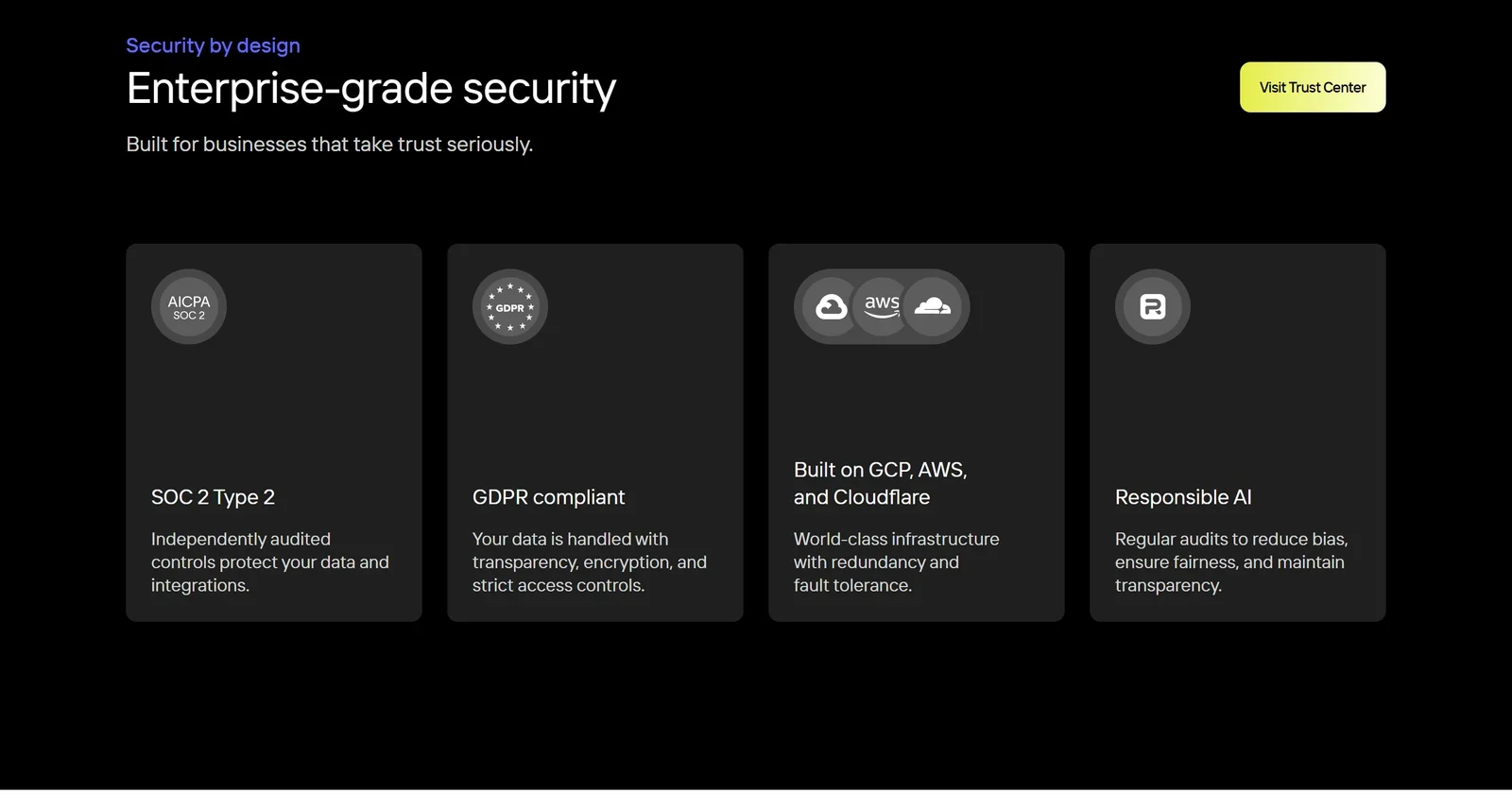
Photoroom’s own security claims on its homepage, captured 22 October 2026.
AI training is on by default. Photoroom’s Terms and Privacy Policy say the images and designs you upload are used to improve and train its models. You can switch this off (“Improve model for everyone” under your account’s data controls), but only per user — there is no team-wide switch — and the opt-out is not retroactive. For the API, Photoroom’s documents disagree: the Privacy Policy and help centre say API images are not used for training, while the FAQ on its security page says self-serve API plans train “yes by default” with an opt-out. If this matters, get it in writing. Enterprise contracts train only with your express consent.
Security claims. Photoroom’s Trust Center lists SOC 2 Type 2 as “Compliant”, and its security page says the attestation covers the API, with the latest report from April 2026. But on 22 October 2026 the Trust Center’s documents tab said “Photoroom has not uploaded any documents yet” and named no auditor, so we could not check the report. GDPR compliance is self-declared. Infrastructure runs on Google Cloud and AWS in the United States, and Photoroom says EU-only data residency isn’t available. For API calls, it says synchronous images are discarded after the response and operational logs are deleted after 15 days. Its stored files come with no backup promise: the Terms say backups are at Photoroom’s discretion.
Commercial use. Paid subscribers may use templates and AI-generated images commercially. The free plan is licensed for personal, non-commercial use only. Photoroom warns that AI output may contain copyrighted material and that “It is your responsibility” to make sure you have the right to use it.
The contract. You own the content you upload, but you give Photoroom a broad, perpetual, worldwide licence to use it to provide the service. The self-serve Terms (effective 29 July 2026) offer no IP indemnity — you indemnify Photoroom against third-party claims instead — and cap Photoroom’s liability at the fees you paid in the previous six months. An IP indemnity for AI outputs exists only in the Enterprise Services Agreement. Users outside Europe, the Middle East and Africa are under New York law and courts, and all users waive jury trials and class actions. Business customers also agree that Photoroom may use their company name and logo in its marketing.
9. What Users Say
| Source | Rating | Reviews | Note |
|---|---|---|---|
| App Store (US) | 4.8 | 231K ratings | Recent written reviews are much harsher (see below) |
| Google Play (US) | 4.7 | About 4.03M | 100M+ downloads, Editors’ Choice |
| Trustpilot (22 Oct 2026) | 2.2 | 272 | 71% one-star; unprompted reviews; replies take over a month |
| Shopify App Store | 3.9 | 36 | Photoroom AI Listing Assistant |
Two very different pictures. The app-store averages are built over years and include millions of star-only ratings left without a written review. Written reviews are more critical: the 500 most recent written US App Store reviews (February to October 2026) average 2.54 stars, with 48% at one star. In our keyword count of the 293 one- and two-star reviews in that sample, 79 mention “cancel”, 50 “trial”, 36 “charged” and 26 “refund”, against only 12 that mention “batch”. Written reviews skew negative everywhere, so treat this as a direction, not a score.
What people praise: fast, clean cutouts, especially compared with marketplaces’ built-in tools; natural AI shadows; how easy it is to produce consistent listing photos on a phone; and, in several Trustpilot reviews, helpful support staff.
What people criticise:
- Trials and billing. Annual charges after a trial, confusion over where to cancel, and charges users didn’t expect. Photoroom’s replies point users to the store they paid through.
- Limits changing mid-plan. The 2025 batch-export cap, and in 2026 a reworked export and credit system — although in July 2026 a Photoroom staff account on Reddit announced that AI Shadows, Retouch, Expand, Resize, Fill and Upscale would no longer use credits, subject to fair use.
- Batch and app reliability. Reports of batches stalling before 250 images, crashes losing generated images, and a batch redesign that long-time users dislike.
- Product accuracy. Resellers warn that AI edits can alter an item and lead to “not as described” returns.
Support signals. Photoroom’s CEO answers users on Reddit, and every one of the 200 newest Google Play reviews had a developer reply, usually within minutes and in formulaic wording — likely automated, though Photoroom hasn’t said so. On Trustpilot, it has replied to 48% of negative reviews, typically after more than a month.
10. Alternatives Worth Knowing
Prices are from each vendor’s own pricing page as of 22 October 2026 and may differ in your country.
| Tool | Paid from | Best at | Your uploads and AI training (vendor’s documents) |
|---|---|---|---|
| Photoroom | $12.99/mo; $7.50/mo yearly (US) | Full e-commerce photo workflow, batch, fashion tools, API | Used for training by default; per-user opt-out, not retroactive |
| remove.bg | $9/mo for 40 credits | Background removal — website and self-serve API end 1 Dec 2026 | Privacy policy allows training on uploads |
| Canva | Pro (price varies by region) | All-round design, with unlimited background removal on Pro | May train on uploads; you can manage this in privacy settings |
| Adobe Express | $9.99/mo Premium | Design and marketing graphics, Firefly-powered | Adobe says it doesn’t analyse your content to train generative AI |
| Pixelcut | $10/mo; $8/mo yearly | Background removal, 1,000 batch exports a month on Pro | Terms licence content to run the service; no AI-training clause found |
| Picsart | $15/mo; $10.50/mo yearly | Creative editing, bulk editing up to 50 images on Pro | Broad licence “for any purpose in connection with the Service and our business” |
| Claid.ai | $15/mo; $9/mo yearly | Catalogue enhancement and AI photoshoots, separate API | No-training statement only on its pricing page, not in its legal terms |
| Flair.ai | $10/mo; $8/mo yearly | Branded AI product photoshoots | Free, Pro and Pro+ images appear in a public gallery |
| Pebblely | $9/mo for 30 images | Simple AI product backgrounds | No-training statement only in its FAQ; no free trial or refunds |
| Magnific | €15/mo; €10.50/mo yearly (seen from Vietnam) | AI image generation, upscaling and editing, one credit pool | No-training statement only on its pricing page |
Where Photoroom wins: no rival here covers as much of the product-photo job in one app — cutouts, AI scenes, virtual models, ghost mannequin, flat lays, video, batch and Shopify drafts — on phone, Mac and web. Its API is also among the cheapest for background removal at $0.02 an image, and it’s built to take over from remove.bg.
Where it loses: Pixelcut costs a little less on monthly billing ($10 against $12.99, though $8 against $7.50 billed yearly) and includes unlimited background removal and 1,000 batch exports a month on Pro. Canva and Adobe Express are better if you need full marketing design as well as product photos, and Adobe makes the clearest promise not to train generative AI on your content. Flair.ai focuses on styled brand photoshoots. And anyone who just needs occasional cutouts for personal use can stay on Photoroom’s free plan — but must upgrade once it’s for a business.
11. Pros and Cons
Where Photoroom is genuinely strong
- The whole product-photo workflow in one app, from cutout to video
- Background removal and templates use no AI credits on paid plans
- Up to 50 people per Space at no extra charge
- Batch editing of up to 250 images, on web and mobile
- A cheap, remove.bg-compatible API from $0.02 an image, with a free sandbox
- Runs everywhere: iPhone, Android, Apple-silicon Mac and web
- Excellent app-store ratings: 4.8 on the App Store, 4.7 on Google Play
Where Photoroom falls short
- Free plan is non-commercial, and Batch export needs a paid plan
- Trials auto-convert, and billing complaints dominate recent reviews
- Cancel only where you paid; refunds are discretionary
- Trains on your uploads by default, with a per-user, non-retroactive opt-out
- Regional prices and credits, and an inconsistent pricing page
- Video and Shopify need Max or above
- Trustpilot 2.2, and a history of limits changing mid-subscription
12. Frequently Asked Questions
What is Photoroom?
Photoroom is an AI photo editor for selling products online. It removes backgrounds, places products on white, template or AI-generated scenes, adds shadows, dresses clothes on virtual fashion models, creates ghost-mannequin and flat-lay shots, makes short product videos and batch-edits up to 250 images at once. It runs on iPhone, Android, Apple-silicon Macs and the web, and also offers an image API for developers.
How much does Photoroom cost?
On 22 October 2026 Photoroom's US pricing page listed Pro at $12.99 a month or $7.50 a month billed yearly ($89.99 a year), Max at $34.99 a month or $20.99 a month billed yearly, and Ultra at $99 a month or $82.50 a month billed yearly ($990 a year). Prices and AI-credit allowances vary by country, so check the plan card and checkout in your region. API plans start at $20 a month for 1,000 images.
Is Photoroom free for business use?
No. Photoroom has a free plan, but its help centre and Terms say it is for personal, non-commercial use only, with lower credit and export limits, no API access and no Batch export. To use Photoroom images for your shop or listings, you need a paid plan — paid subscribers may use templates and AI-generated images commercially.
How does the free trial work, and how do I avoid being charged?
Photoroom offers a 7-day free trial on yearly Pro and Max plans, once per customer. You need a payment method, and the first yearly payment is taken on day 8 unless you cancel. Cancel on the platform you used to subscribe — the App Store, Google Play, the web app or Shopify — at least 24 hours before the trial ends. Cancelling elsewhere, or deleting your account, won't stop billing.
Does Photoroom use my photos to train its AI?
By default, yes. Photoroom's Terms and Privacy Policy say uploaded images and designs are used to improve and train its models. You can turn this off in your account's data controls, but only per user and not retroactively. Photoroom's documents disagree about images sent through the self-serve API, so API customers should confirm the position in writing. Enterprise contracts train only with your express consent.
Is Photoroom a good replacement for the remove.bg API?
For many developers, yes. remove.bg's standalone website and self-service API stop on 1 December 2026: consumer use moves into Canva, self-service API access is replaced through Leonardo.ai, and Enterprise API contracts are unaffected. Photoroom says its Remove Background API accepts the same argument names as remove.bg and returns the same response format, and its Basic API plan costs $0.02 an image ($20 a month for 1,000 images). You can try the API without a card: Photoroom gives 1,000 watermarked sandbox calls a month on its Image Editing API, plus 10 free unwatermarked Remove Background calls.
Can AI-edited photos misrepresent my product?
They can. Photoroom's own API documentation says some generative features can change products and recommends a human check where accuracy matters, and resellers warn that altered photos can lead to 'not as described' returns. Paid plans include an automatic Fidelity Check for tools such as AI Fashion Models and Ghost Mannequin, but always compare the final image with the real item before you list it.
Does the link in this review give a discount?
No. Our link is a Photoroom referral link. It takes you to Photoroom's normal homepage, and the prices, free plan and trial are exactly the same as visiting directly. If you buy a plan on the web through it, Photoroom pays us a referral commission.
13. Final Verdict: Is Photoroom Worth It in 2026?
For most online sellers, Photoroom is the most complete product-photo app you can put on your phone. It turns a kitchen-table photo into a clean marketplace image in seconds, background removal doesn’t use credits on paid plans, and the fashion tools — virtual models, ghost mannequin, flat lay — replace work that used to need a studio. Batch editing, Shopify drafts and a 50-person Space make it scale with a small business, and its API is one of the cheapest ways to replace remove.bg.
The caveats are about money and trust, not image quality. The free plan can’t be used commercially, trials turn into yearly subscriptions automatically, you must cancel on the right platform, and refunds aren’t guaranteed — which is why its Trustpilot score is 2.2 while its app-store ratings sit near 4.8. Photoroom has also changed limits mid-subscription before, trains on your uploads unless you opt out, and keeps its SOC 2 report out of public view.
Use it the smart way. Test on the free plan first. If you start a yearly trial, set a reminder for day 6. Turn off “Improve model for everyone” for every team member if your product photos are confidential, and check every AI-generated image against the real item before you list it. Choose Pro if you mainly need cutouts and AI backgrounds, and Max only if you want video or Shopify publishing.
Choose something else if you need full marketing design (Canva or Adobe Express), a simpler cutout tool with unlimited background removal (Pixelcut), EU data residency, or contractual IP protection without an Enterprise contract.
Disclosure: This review is an independent assessment by TrackerTools and contains a Photoroom referral link. If you buy a plan on the web through it, Photoroom’s referral programme pays us 20% of your first payment; the link gives you no discount, and prices are the same as visiting directly. All factual claims were verified against Photoroom’s website, pricing and API pricing pages, help centre, developer documentation, Trust Center, security page, Terms and Conditions, Privacy Policy, Data Processing Agreement and Enterprise Services Agreement, plus the App Store, Google Play, the Shopify App Store, Trustpilot, Reddit, TechCrunch, Tech.eu, Forbes, the French business registry, Y Combinator’s directory, remove.bg’s FAQ and each competitor’s own pricing and legal pages, as of 22 October 2026. User counts, image volumes, benchmarks, customer results and security statements are attributed to Photoroom; we could not verify them independently.