
Subscribr Review 2026: Can AI Write Viral YouTube Scripts?
Creating YouTube content is a highly competitive endeavor. Creators spend hours researching, writing, and editing scripts, only to see their video struggle if the first 30 seconds fail to hook the audience. While generic AI tools like ChatGPT can generate text, they usually write essay-style prose that doesn’t translate well to spoken-word video scripts or audience retention pacing.
Subscribr (subscribr.ai) is an AI content suite built specifically for YouTube workflows. By training its AI models on successful video scripts, retention curves, and channel analytics, Subscribr aims to streamline the scripting and research process for creators. In this comprehensive review, we evaluate Subscribr’s scriptwriting quality, test its competitor intelligence tools, check its pricing plans, and evaluate its overall value for content creators.
Quick verdict
A highly specialized YouTube AI scriptwriting tool that stands out for its competitor outlier search engine and custom channel voice model.
YouTube creators, scriptwriters, and video automation teams looking to speed up drafting and find high-potential topics.
Annual plans start at $299/yr (~$25/mo). Monthly plans start at $49/mo (Creator) and scale to $99/mo (Automation).
1. Platform Overview and Audience
Subscribr is a cloud-based web application tailored exclusively for video content creators. While general copywriters use tools like Jasper or Copy.ai for blogs and emails, Subscribr focuses solely on the structural demands of long-form YouTube videos.
The platform’s primary goal is to help individual creators and video production agencies scale their output without losing the unique personality and voice of their channels. Whether you run a personal brand channel, a tech review show, or a faceless cash-cow automation channel, Subscribr provides tools to identify viral topics and build structured, retention-focused scripts around them. By automating the tedious research and scripting phases, creators can spend more time on actual filming, editing, and audience engagement, thereby accelerating their upload frequency and channel growth.
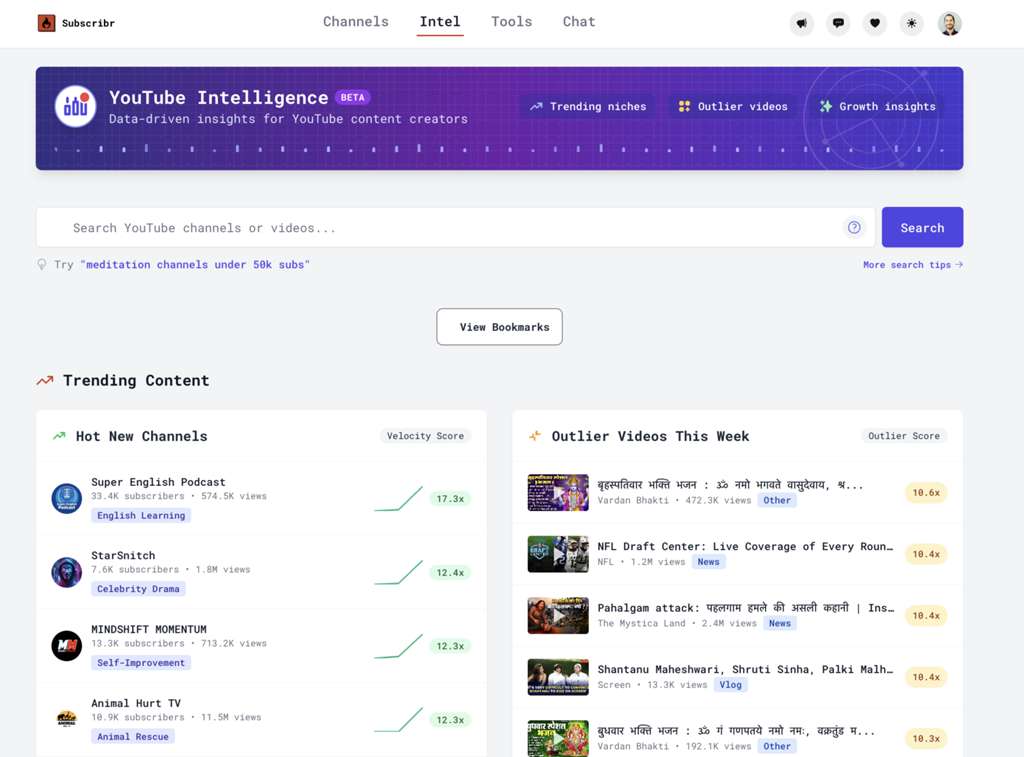
Subscribr Dashboard: Managing script drafts and channel configurations in one clean workspace.
2. Founders and Company Background
Subscribr was founded in January 2023 by Gil Hildebrand, a seasoned developer and tech executive with more than 25 years of software engineering experience.
Gil started Subscribr based on his personal challenges with writer’s block as an aspiring YouTuber. Operating as a bootstrapped team based in New Orleans, Louisiana, Subscribr has grown to serve 4,593 creators without taking on outside venture capital.
3. Core YouTube Creation Features
Unlike general-purpose writing tools, Subscribr divides the creation process into three distinct, YouTube-optimized stages:
- Research & Intel: Checking which videos in your niche are performing above average to optimize topic selection.
- Hook & Outline Generation: Developing attention-grabbing opening lines and logically structured content segments to keep users watching.
- Script drafting & Humanization: Generating full-length scripts that mimic natural human speech patterns, avoiding the typical AI-generated tone.
These features work together to create a streamlined pipeline. Instead of looking at a blank page, creators can go from a simple idea to a structured, ready-to-record video script in minutes, with the confidence that the script is built using battle-tested YouTube storytelling structures.
4. YouTube Pacing and Scriptwriter
The core editor in Subscribr is designed to structure scripts specifically for video pacing:
- The First 30 Seconds: Special tools help generate up to 5 different retention-focused opening hooks (e.g., curiosity gaps, bold statements, or story setups) so you can test them during recording.
- Segment Breakdown: Scripts are broken down into visual segments (Introduction, Body Points, Call to Action, Outro) with timing indicators to help you plan your speaking speed.
- The Humanize Tool: A single-click feature that rewrites academic-sounding sentences into conversational language, using contractions, rhetorical questions, and short phrases suitable for speaking.
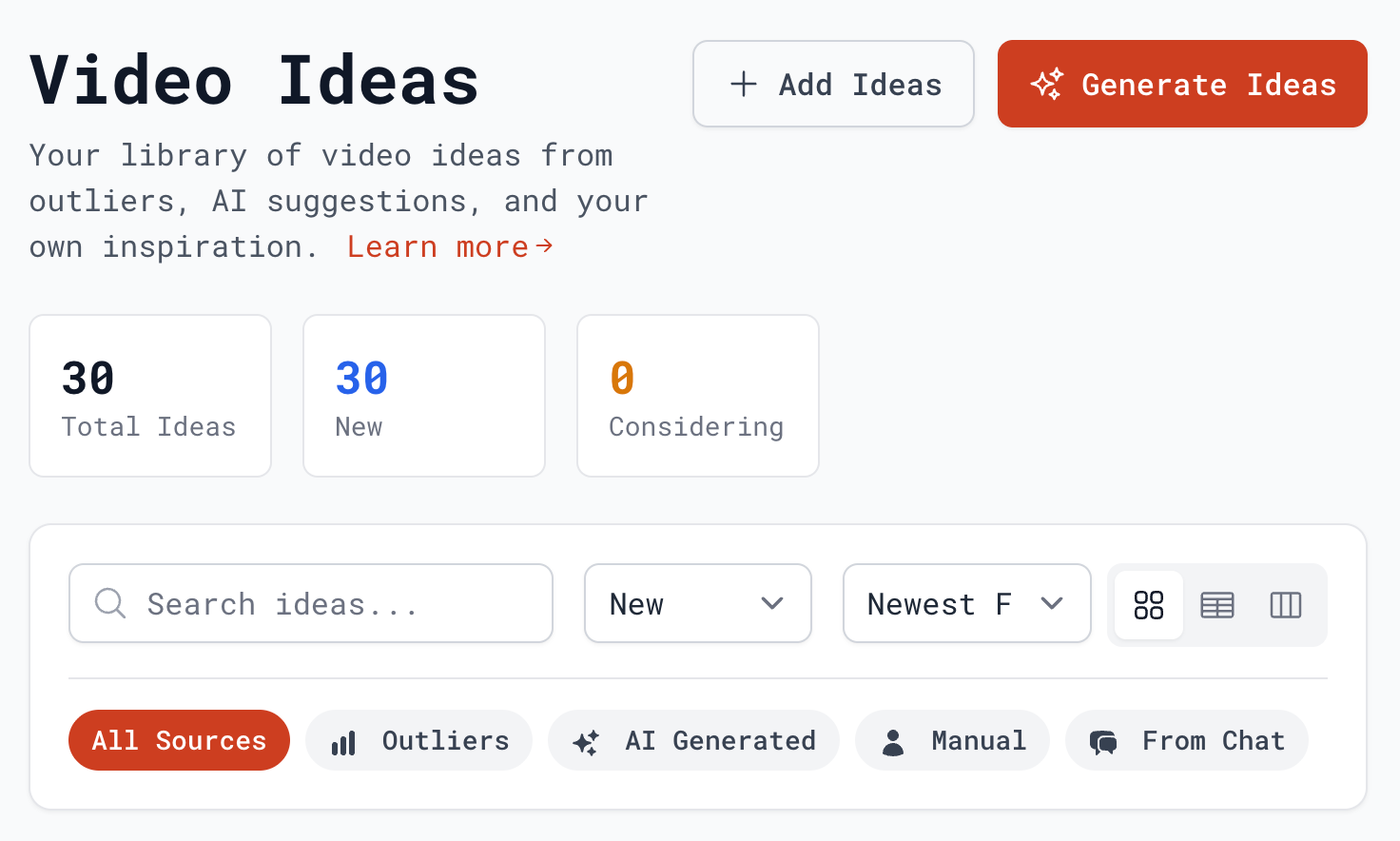
Subscribr Scriptwriter: Structuring hooks, outlines, and body sections for video narration.
5. Custom Channel Voice Profiles
One of the largest criticisms of AI scriptwriting is that the output sounds generic and lacks personality. Subscribr handles this through its Channel Voice Profiles:
- Transcript Training: You can upload your past video transcripts or sync your YouTube channel directly. The AI analyzes your vocabulary, sentence length, jokes, conversational habits, and typical catchphrases.
- Custom Voice Injection: Once trained, the system injects this profile style into all new generated scripts, ensuring the output matches your personal presentation style.
This feature is particularly valuable for creators who have established a loyal audience over years of uploading. It ensures that the transition to using AI assistance doesn’t result in a jarring shift in the channel’s tone, allowing you to scale production while preserving the authentic relationship you have built with your viewers.
6. Competitor Research and Intel
Before you write a script, you must select the right video topic. Subscribr’s YouTube Intel is a built-in competitor research tool:
- Outlier Identification: It analyzes specific channels and identifies “outlier videos”-videos that received significantly more views (e.g., 3x or 5x) than the channel’s standard average or subscriber count.
- Concept Transfer: If a competitor channel with 5,000 subscribers has a video that got 150,000 views, Subscribr identifies it and helps you adapt the core angle, title, and structure for your own audience.
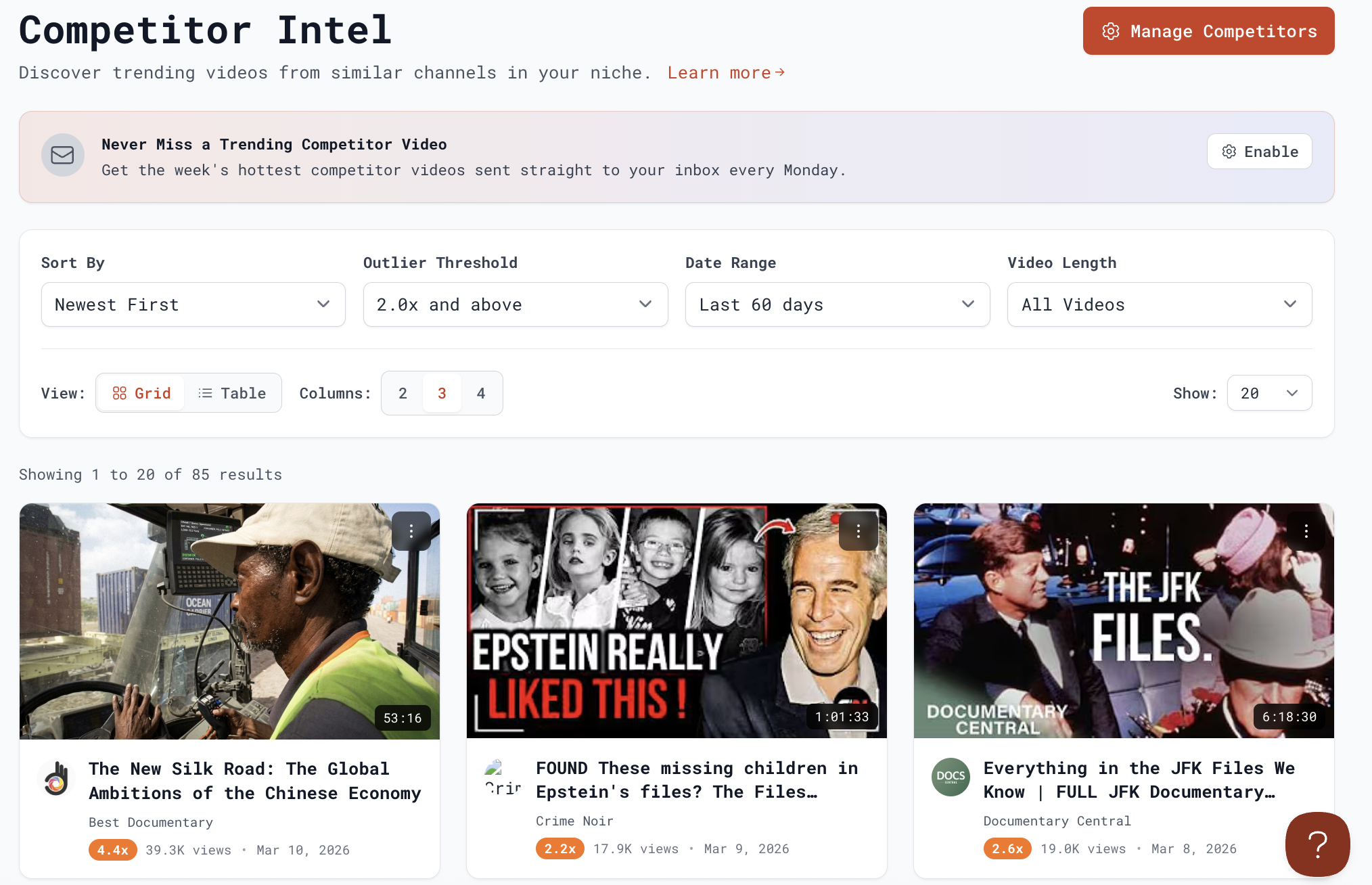
YouTube Intel: Locating viral outliers and high-performing video themes in your niche.
7. Video Recording Workflow Tools
Subscribr goes beyond writing to assist with the recording phase of production:
- Thumbnail Prompts: Generates descriptive image generation prompts or midjourney styles designed to match the hook of your script.
- Publishing Checklist: Includes structural metadata suggestions (titles, descriptions, tags, chapter timestamps) optimized for YouTube SEO.
By incorporating these post-writing workflow tools, Subscribr bridges the gap between scriptwriting and actual video production. Creators can record their videos directly within the web app, avoiding the need to export text to external teleprompter software, while the automated publishing checklist guarantees that the video is optimized for maximum algorithm reach from day one.
Recording Assistant: Scribing voice tracks and recording videos with the built-in teleprompter.
8. Key Pros and Cons
Subscribr offers excellent specialized value, but creators should note its trade-offs:
The Pros:
- YouTube Pacing: Structures scripts with actual audio hooks and narrative beats instead of simple block paragraphs.
- Competitor Outliers: Built-in research tool simplifies finding high-performance topics.
- Voice Customization: Analyzes past transcripts to copy your speaking style.
- 35+ Languages: Writes and translates scripts for international audiences.
- AI Thumbnail Studio: Generates prompts for thumbnail images and analyzes competitor videos for high-performance topics.
The Cons:
- Credit-Based Limits: Running out of monthly generation credits stops script drafting.
- Price Premium: Monthly plans starting at $49/month are relatively high compared to basic tools.
- Human Touch Required: Scripts still need review for logical transitions and personal anecdotes.
9. Cost and Value Analysis
Because Subscribr runs on a credit-based model and frequently updates its pricing plans, trials, and promotional packages, looking at the cost in isolation doesn’t tell the whole story. Instead, creators should evaluate the tool based on the cost per script and its overall return on investment (ROI).
1. Flexible Subscription Packages
Subscribr primarily offers two key subscription plans, designed to scale with your production speed:
- The Creator Package: Custom-built for solo creators who upload weekly or bi-weekly. It provides a monthly credit pool sufficient for drafting approximately 10 to 12 long-form scripts per month and supports up to 2 active YouTube channels.
- The Automation Package: Optimized for agencies, video teams, and faceless channel automation networks. It provides a larger credit pool (good for 20 to 25 scripts), supports up to 5 channels, and grants access to higher-quality AI reasoning models.
Billing is available on a standard monthly basis or via discounted annual subscriptions, which lower the equivalent monthly cost by up to 50%. The plan features a 7-day money-back guarantee, allowing creators to run test drafts before finalizing their commitment.
2. Credit System
Subscribr uses a credit-based model where unused subscription credits typically reset at the start of your billing month. If you run out of credits mid-month, you can upgrade your plan or purchase one-off credit bundles.
3. AppSumo and Lifetime Deals (LTD)
One of the most attractive aspects of Subscribr for independent creators is its participation in launch platforms like AppSumo. During promotional campaigns on AppSumo, Subscribr offers lifetime access licenses for one-time fees ranging from $79 to $459 depending on tier. These lifetime deals provide recurring monthly credits forever.
4. Return on Investment for Creators
To evaluate the true value of Subscribr, creators should compare the software’s cost against traditional alternatives:
- Freelance Hiring Costs: A professional freelance scriptwriter typically charges between $50 and $200 per video script. Producing 10 videos a month would cost between $500 and $2,000.
- Time Savings Value: Writing a structured 15-minute YouTube script manually takes an average of 4 to 6 hours. Subscribr reduces this drafting time to under 30 minutes, allowing creators to double their output or focus on editing and filming.
For channels that are actively uploading and looking to scale without hiring a full writing team, the equivalent cost of a Subscribr subscription pays for itself by replacing freelance costs and saving hours of manual labor per video.
10. Competitor Analysis and Alternatives
How does Subscribr compare to generic AI writing assistants?
| Criteria | Subscribr | Jasper AI | Open AI ChatGPT |
|---|---|---|---|
| Primary Focus | YouTube video research & scripting | Business copywriting & blog posts | General conversation & task solving |
| Video Outlier Analysis | Yes (Built-in search tool) | No | No |
| Script Structures | Retention-focused (hooks, loops) | Standard templates | Custom prompt-dependent |
| Voice Training | Analyzes past video transcripts | Analyzes style guides & brand assets | Requires prompt instructions |
| Workflow Tools | YouTube SEO tags | Integrates with Surfer SEO | None |
| Pricing | $7 for first 7 days, then $299/year (Creator) | $39/mo (Creator) | Free / $20/mo (Plus) |
Key Takeaway:
- Choose Subscribr if you are a dedicated YouTuber who wants to save hours of scriptwriting and leverage competitor data to find viral hooks.
- Choose Jasper if you write blog posts, marketing newsletters, and social media updates.
- Choose ChatGPT if you need a flexible assistant for coding, email drafting, or general writing tasks on a low budget.
11. Credit System and Limitations
Subscribr uses a credit-based usage model:
- Credit Consumption: Generating a full-length video script usually costs 3–5 credits depending on length. Outliner search queries and thumbnail prompt generations consume smaller fractions of credits.
- No Rollover: Monthly subscription credits do not roll over to the next billing cycle. If you are on the Creator plan with 60 credits, unused credits reset to 60 at the start of your new billing month.
- Overage Options: If you run out of credits mid-month, you can upgrade your plan or purchase one-off credit bundles.
This credit system means creators must plan their usage carefully. While it is highly efficient for standard channels uploading 1–2 videos a week, agencies or high-volume automation networks will need to invest in the Automation or Scale tiers to avoid running out of credits during high-production periods.
12. Frequently Asked Questions
Is Subscribr suitable for short-form content like TikToks or YouTube Shorts?
While you can generate short scripts, Subscribr is primarily optimized for long-form YouTube videos. Its layout, pacing templates, and video hooks are designed around the retention curves of 8-to-15 minute videos.
Can I connect multiple YouTube channels to a single Subscribr account?
Yes. The Creator plan supports up to 2 active YouTube channels, while the Automation plan supports up to 5 channels under a single subscription workspace.
Do unused credits roll over to the next billing cycle?
No. Standard monthly subscription credits do not roll over and reset at the start of your billing month. However, if you purchase additional one-off credit top-up packs, those credits do not expire.
How does the brand voice profile work?
You upload text transcripts of your previous videos or link your existing YouTube channel. The AI analyzes your word choice, structure, sentence length, and pacing to generate new scripts that sound like you.
13. Final Verdict and Recommendation
For YouTube creators, scriptwriters, and video agencies, Subscribr is a highly effective tool. Its primary strength is not just generating text, but the combination of the outlier video search (YouTube Intel) and the conversational script structures.
Annual billing only. $7 for first 7 days (cancel anytime), then $299/year (~$25/mo).
Use Subscribr if: You publish regular long-form videos on YouTube, struggle with retention pacing, and want to research competitor channels for high-potential video ideas.
Think twice if: You only make short-form content (like TikToks or Reels, where simple templates are enough) or need a general writer for blogs and social copy.
Start testing: Take advantage of their 7-day money-back guarantee, connect your channel to build a Voice Profile, and test the outlier title transfer tool on your competitors.





