
CodeRabbit Review 2026: The Numbers Behind the Most-Installed AI Reviewer
In early 2026, Martian published the first large-scale independent benchmark built specifically for AI code reviewers: roughly 300,000 real pull requests, measured over two months. CodeRabbit came first on F1 score. On the same benchmark’s other arm - 50 hand-curated pull requests scored against a known list of bugs - it came last on precision.
Both results are real, and the gap between them is the most useful thing anyone has published about this tool. It explains why one team calls CodeRabbit the best money they spend on tooling and the next calls it unusable noise, and it explains exactly which of those two you are likely to become.
This review is built from that benchmark and three others, from CodeRabbit’s own documentation and changelog as of 27 July 2026, and including a 2025 security incident publicly documented by the company. It quotes real prices, real rate limits, and real caps. Where a number comes from CodeRabbit’s own marketing rather than an independent source, it says so.
The AI reviewer that finds the most and hands you the most fixes - if you spend an hour teaching it to shut up about the rest. Best default choice for teams not exclusively on GitHub.
- Highest measured recall of any AI reviewer (53.5%, Martian)
- 68.3% of findings ship as one-click applyable diffs
- The only serious option outside the GitHub ecosystem
- Cheapest dedicated reviewer per seat, and only PR authors are billed
- Slowest of four tools measured: 9.5 min mean, 41 min P95
- 3.4 findings per PR, 96% of them Major or Minor rather than critical
- Architectural reasoning - scored 1/5 on completeness in an enterprise eval
- Vulnerability detection: Trails dedicated SAST tools by ~41% on CVE detection in a competitor-run OpenSSF benchmark
Evidence-based review. No vendor-supplied data was used where an independent source exists.
Start the free trial1. Scorecard
Ranks first or near-first on every dimension that involves finding and fixing problems, and clearly last on speed. The score assumes you configure it; an untuned installation is worth roughly a point less.
53.5% recall on the Martian benchmark - the highest measured, and roughly 15% above the next tool.
A 2.3% false-positive rate is genuinely low, but 281 findings across 146 PRs means volume is the real cost, not wrongness.
68.3% of findings arrive as applyable unified diffs, more than double the next best tool measured.
9.5 minute mean and 41 minute P95 - the slowest of four reviewers measured in parallel on the same PRs.
Three review profiles, path filters, per-directory instructions, AST rules and custom pass/fail gates in one YAML file.
GitHub, GitLab, Bitbucket and Azure DevOps, plus VS Code, Cursor, Windsurf, Slack, Discord, and a CLI. No competitor matches this.
SOC 2 Type II, zero retention and no training on your code - against a 2025 production RCE that exposed its GitHub App private key.
$24 per developer beats every dedicated competitor, and only developers who open PRs are billed.
2. What CodeRabbit actually is
CodeRabbit is an AI reviewer that runs both before and at the pull request layer. When a PR opens, it does four things in sequence: builds a semantic index and dependency graph of the surrounding repository; runs a suite of 50+ third-party linters and security scanners across the changed files; passes both the diff and that repository context to an LLM ensemble; and posts the result as a native PR comment thread - a plain-language walkthrough, a sequence diagram of the change, and line-by-line findings, most carrying a suggested fix. When the review finishes, the sandbox is destroyed.
Three boundaries matter, because most reviews blur them:
- It is not a coding agent. It reviews and proposes patches. It does not implement features. (The exceptions - fix-ci and post-merge actions are discussed in section 4.)
- It is not a replacement for SAST. It bundles security scanners, but on the OpenSSF CVE Benchmark it misses roughly 41% of real vulnerabilities. Keep your existing scanner.
- It reviews the diff with repository context - which is different from reasoning across the whole codebase as the primary unit. That distinction is the root cause of nearly every difference between CodeRabbit and Greptile discussed in section 8.
The vendor behind it
Handing a third party write access to your source control is a vendor decision as much as a technical one, so the company’s position is worth a paragraph.
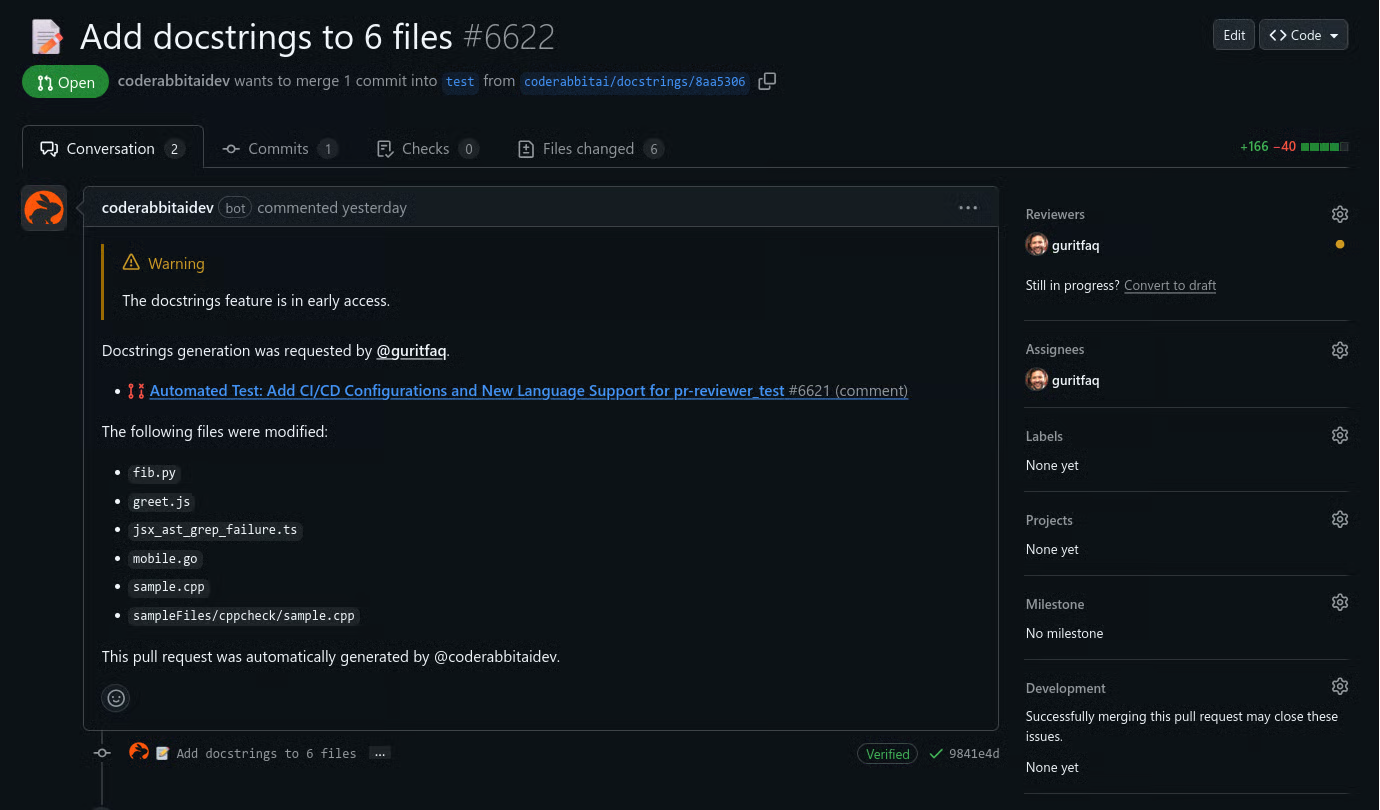
Repository, defect and customer counts are CodeRabbit's own figures and are not independently audited. Funding and valuation are from public filings; ARR is a third-party estimate from Sacra. NVIDIA's venture arm NVentures participated in the Series B, and NVIDIA CEO Jensen Huang is quoted on CodeRabbit's homepage saying the company uses it internally - a vendor-published testimonial, not an independent statement.
3. What the independent benchmarks say
This is the section most CodeRabbit reviews skip, usually because the results are inconvenient in both directions.
Ranked #1 overall. F1 51.2%, precision 49.2%, recall 53.5% - the highest recall of any tool evaluated, roughly 15% above the next closest. Measures whether developers actually changed code in response to a comment. Note: ~300,000 PRs is the full benchmark dataset; Martian's own data puts CodeRabbit's online sample at ~5,035 PRs, the largest of any tool.
Ranked last on precision. Scored against a fixed 'gold set' of known bugs drawn from Sentry, Grafana, Cal.com, Discourse and Keycloak. Findings outside that list counted as false positives.
Highest volume of the four: 281 findings (3.4 per PR), 92.2% of them found by no other tool. False positives 2.3% - second lowest. One-click applyable diffs on 68.3% of findings - best by a wide margin. Slowest reviewer: 9.5 minute mean, 41 minute P95. Only 12 findings rated critical or high; 96% sat at Major or Minor.
59.39% accuracy, 36.19% F1 - in a harness run by DeepSource, a competing vendor that ranks itself first on the same test. Directionally useful as a second net, not as a primary security gate.
Correctness and actionability 4/5. Completeness 1/5 and depth 2/5 - surfaces issues quickly but does not supply the architectural reasoning large organisations expect from a reviewer.
Every benchmark is a proxy for something. The DEV study covers a single PHP/React backend team, so it generalises poorly across stacks. The OpenSSF numbers come from a competing vendor's own harness on a JavaScript-only CVE dataset that has been largely unmaintained since 2020, and say nothing about logic bugs; treat them as directional at best. No single number here should decide a purchase.
Why the same benchmark ranks it first and last
The two Martian arms measure different things.
The online arm watches real developers. A comment counts as a hit if someone changed code because of it. By that definition CodeRabbit wins: roughly one in two of its comments produced a code change, and it surfaced more genuine issues than anything else tested.
The offline arm scores against a fixed list of bugs curated in advance. Anything a tool flags that is not on the list is scored as a false positive - including findings that are real but were not in the curated set. A high-volume reviewer is structurally penalised by that design, and CodeRabbit is the highest-volume reviewer in the field. Martian’s own researchers noted the gold set proved incomplete.
The honest synthesis: CodeRabbit is tuned for recall. It would rather show you ten things and be wrong about one than show you three and miss six. Whether that is a feature or a defect is a property of your team, not of the tool.
Not precision, not F1 - volume. 3.4 findings per pull request. On a 10-file PR that is roughly 30 comments. If your team treats every bot comment as a blocking item, CodeRabbit will feel like a tax. If your team treats it as a checklist to skim, the same output feels like coverage. Section 5 is about turning the first team into the second.
4. Features, with the limits attached
Feature lists are easy. What follows is every significant capability with the cap that applies to it, because the cap is what determines whether the feature is usable at your scale.
4.1 Reviews and walkthroughs
- Does
- Posts a change summary, a plain-language walkthrough, a sequence diagram of the affected flow, and line-by-line findings with severity labels. Most findings carry a unified diff you can commit directly.
- Limits
- 150 files per review on Pro, 300 on Pro+ and Enterprise. Rate limited to 5 PR reviews per developer per hour on Pro, 10 on Pro+, 12 on Enterprise. Independent measurement puts the mean wait at 9.5 minutes, with a 41 minute P95.
- Best for
- Teams whose PRs stay under the file cap and who want fixes rather than commentary.
- Does
- Indexes the repository as a dependency graph so a change in one file can be evaluated against its callers elsewhere. Linked repository analysis extends that across repo boundaries.
- Limits
- One linked repository on Pro. Ten on Pro+. Automatic repository linking is off by default and must be enabled in configuration.
- Best for
- Microservice and multi-repo architectures - this is the single strongest reason to consider Pro+ over Pro.
4.2 Static analysis and security
- Does
- Runs language-appropriate tooling alongside the LLM review: ESLint, Biome and Oxlint for JS/TS; Ruff, Flake8 and Pylint for Python; PHPStan, RuboCop, Clippy and Detekt; ShellCheck; Hadolint and TFLint for infrastructure; Semgrep, OpenGrep, TruffleHog and Betterleaks for security; SQLFluff and Squawk for SQL and Postgres migrations.
- Limits
- Microsoft Presidio (PII detection) stopped running by default on 8 May 2026 and now requires explicit opt-in. Individual tools can be toggled in the tools block of the config file.
- Best for
- Teams who want one integration instead of a dozen CI steps - but not as a replacement for a dedicated SAST, given the OpenSSF results.
- Does
- Diffs OpenAPI specifications between the base and head branches and flags breaking API contract changes during review. Enabled by default.
- Limits
- Only as good as your committed spec. Services that generate their OpenAPI document at runtime get nothing from this.
- Best for
- Teams shipping public or partner-facing APIs from a spec-first workflow.
4.3 Interactive and agentic
- Does
- Tag the bot in a PR comment to ask for an explanation, generate a test, or dismiss a finding. Replies that explain why something is intentional become persistent learnings applied to future reviews. Learnings can be scoped local, global or auto.
- Limits
- Chat is metered - 50 messages on Pro, 100 on Pro+, 25 on the open-source plan. This is the most commonly overlooked cap on the platform, because chat is marketed as a headline feature.
- Best for
- Teaching the reviewer your exceptions. Budget the messages; do not use them for conversation.
- Does
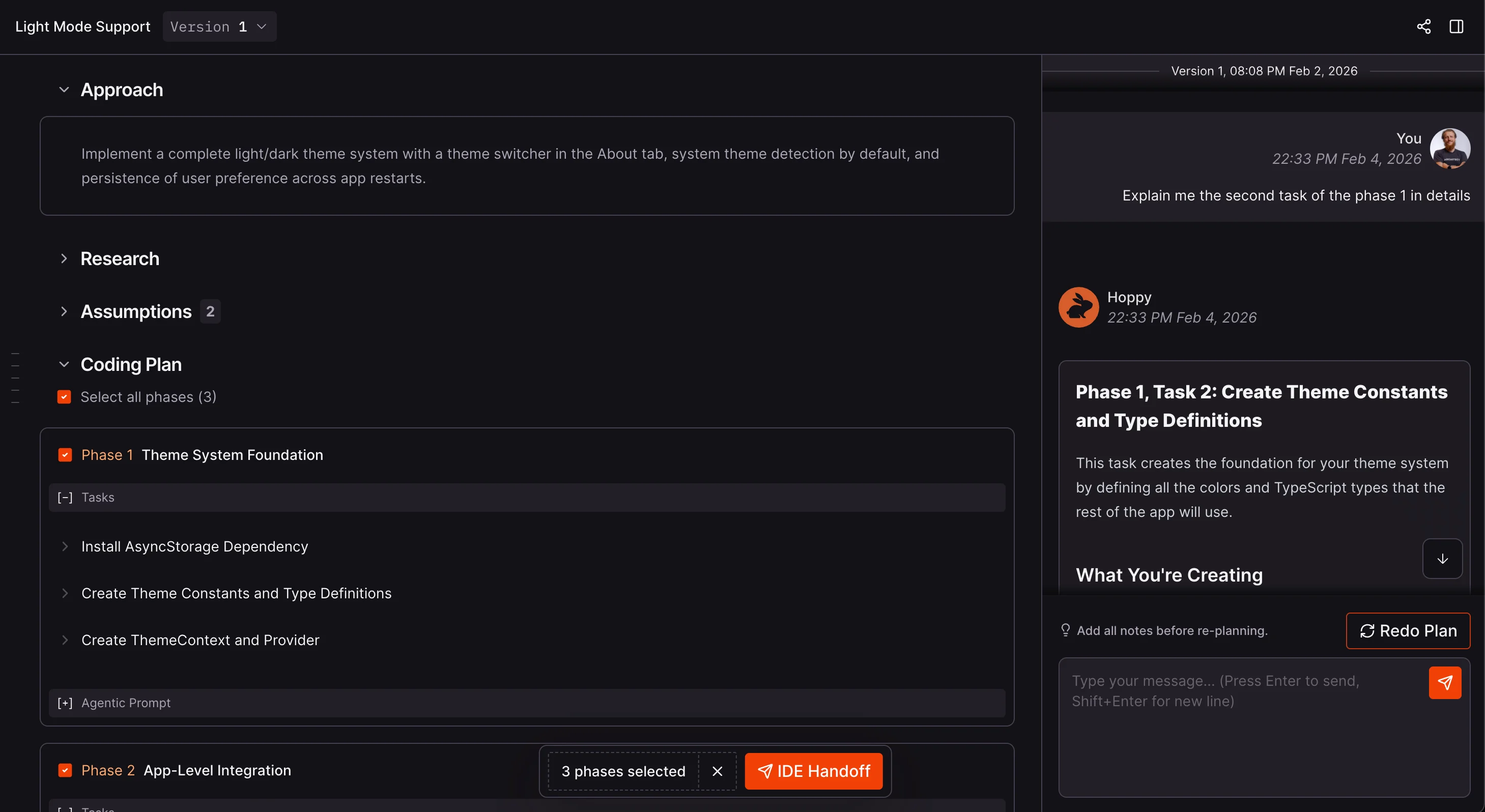
- Comment @coderabbitai plan on an issue in Linear, Jira, GitHub Issues or GitLab, and CodeRabbit returns a structured coding plan a few minutes later - intended to be handed to a coding agent as a specification instead of a vague ticket.
- Limits
- Beta. Requires a connected issue tracker. Plan quality depends heavily on issue quality, which is exactly the problem it claims to solve.
- Best for
- Teams running Claude Code, Codex or similar agents who keep losing time to underspecified tickets. This is the biggest strategic shift in the product this year.
- Does
- Comment @coderabbitai fix-ci and it investigates the failing check, then opens a stacked pull request containing the fix - or commits it directly to the PR branch with @coderabbitai fix-ci commit.
- Limits
- Beta, GitHub only, Pro+ only. The one place CodeRabbit crosses from reviewing into writing code.
- Best for
- Flaky-adjacent CI failures and mechanical build breaks. Do not expect it on a genuine logic failure.
- Does
- Natural-language instructions that run automatically after a merge - updating a changelog, notifying a channel, opening a follow-up issue.
- Limits
- Pro+ only. Available across all supported Git platforms.
- Best for
- Replacing the small custom GitHub Actions most teams accumulate and nobody maintains.
- Does
- Generates docstrings, proposes unit tests, simplifies code, resolves merge conflicts, and applies autofixes. Up to 20 custom recipes per repository can be defined in configuration (Pro+).
- Limits
- unit_tests, simplify, fix_ci and resolve_merge_conflict sit behind Pro+. simplify is off by default even there. Custom recipes cap at 20 per repository.
- Best for
- Docstring coverage on legacy modules - the least glamorous and most reliably useful item on this list.
4.4 Outside the pull request
- Does
- Review changes before you push, from the terminal or from VS Code, Cursor, Windsurf and Antigravity. Designed to sit inside agentic coding loops with Claude Code or Codex so generated code is checked before it reaches a PR.
- Limits
- v0.7.0 removed the --plain, --fast, --interactive, --cwd and --prompt-only flags in favour of --light, --dir and --agent - a breaking change if you have it wired into scripts. Rate limits are 3 CLI reviews per hour on Free, 5 on Pro, 10 on Pro+.
- Best for
- Anyone generating large volumes of AI code who wants the quality gate before review, not after.
- Does
- Skills let the agent store reusable procedures across sessions. MCP presets ship prefilled configuration for Context7, GitHub Copilot, Monday.com, ClickUp and DeepWiki so the reviewer can pull in external context.
- Limits
- Skills are early access. MCP connections cap at 5 on Pro and 15 on Pro+.
- Best for
- Teams whose review rules depend on context living outside the repository.
5. The noise problem, and the config that fixes it
The most consistent criticism of CodeRabbit in developer forums is not that it is wrong. It is that it is verbose. Recurring phrasings include “very verbose”, “50% of the time useless, too many nitpicks”, and “it ended up wasting more time than saving”. The benchmark data agrees with the sentiment: 3.4 findings per PR, 96% of them below critical severity.
That is a default-configuration problem, and it has a direct fix that takes under an hour.
5.1 Pick a review profile first
reviews.profile accepts exactly three values, and it is the single highest-leverage setting in the product:
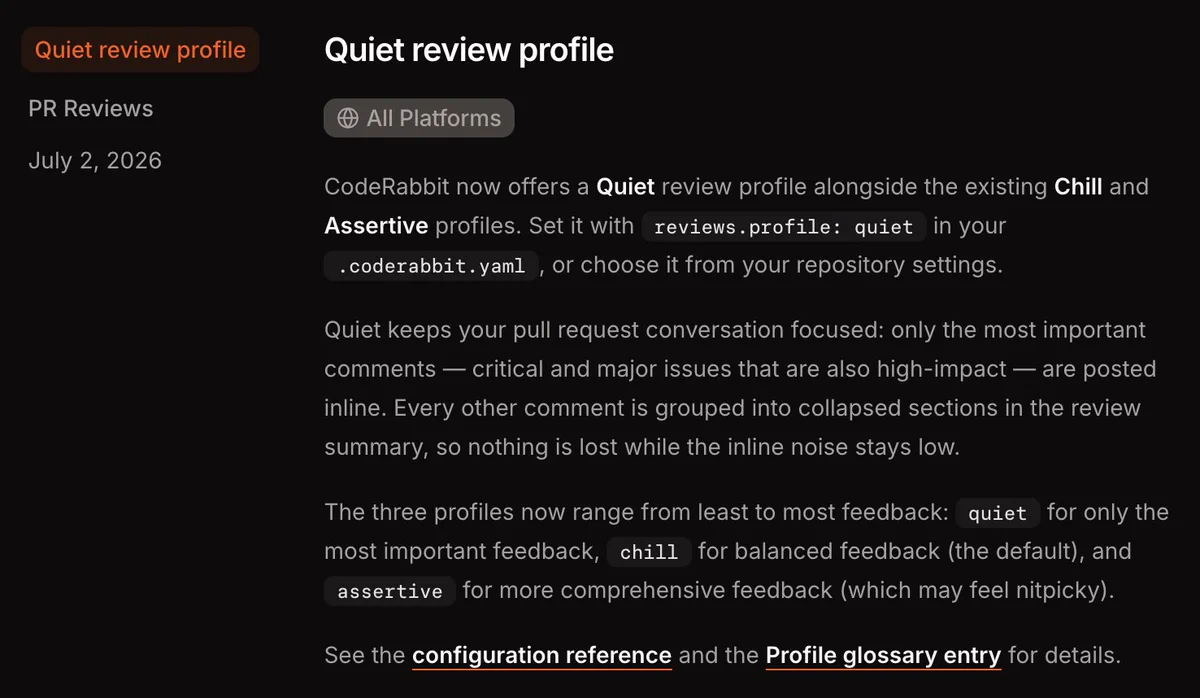
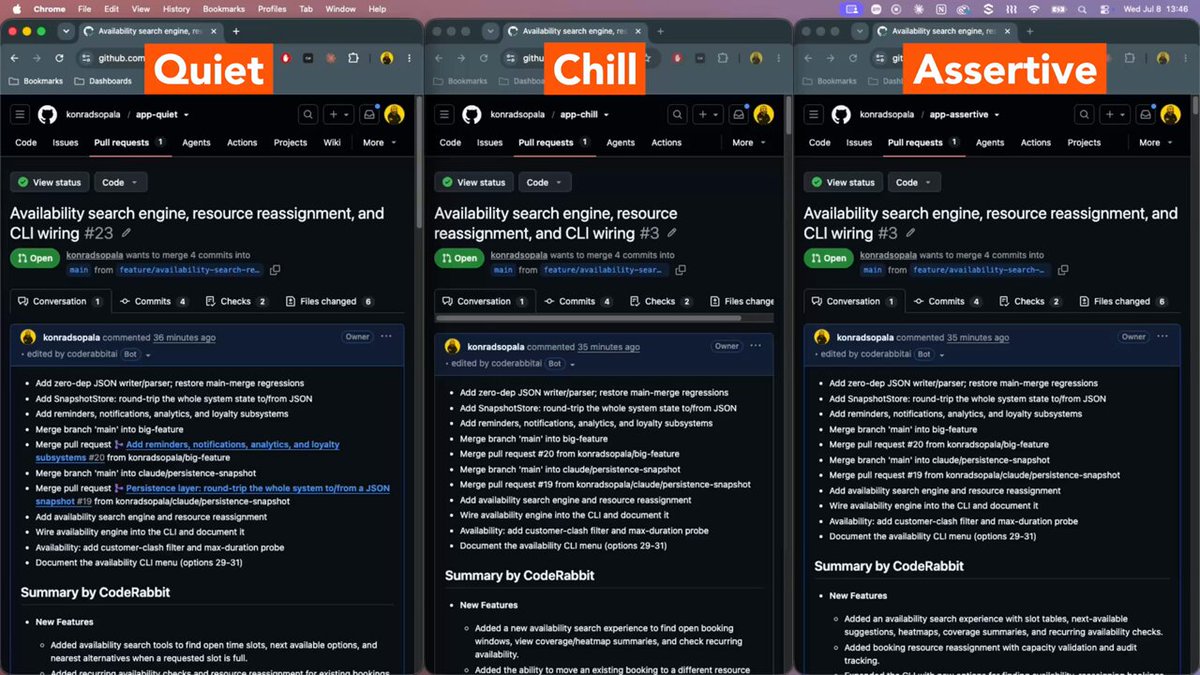
assertive- comments on style, naming, documentation and best practice in addition to defects. This is where the “nitpicky” reputation comes from.chill- the default. Focuses on bugs, security and logic errors.quiet- shipped 2 July 2026. Posts only critical, high-impact findings inline and collapses everything lower into a folded section of the review body.
quiet is new enough that most published reviews predate it, and it addresses the majority of the complaints above directly. If you are evaluating CodeRabbit and it feels loud, change this before you change anything else.
.coderabbit.yaml The setting most teams should apply on day one. Critical findings stay inline; everything else collapses out of the way.
language: en-US
reviews:
  profile: quiet
  auto_review:
    enabled: true
    auto_incremental_review: true
    auto_pause_after_reviewed_commits: 3
    drafts: false
  path_filters:
    - "!**/dist/**"
    - "!**/node_modules/**"
    - "!**/*.generated.*"
    - "!**/*.lock"
- "!**/migrations/**"-
profile: quietOnly high-impact findings post as inline comments; the rest are grouped into a collapsed block. -
auto_pause_after_reviewed_commitsStops the bot re-reviewing every push. CodeRabbit re-engaged on 49% of multi-commit PRs in independent testing, which is where the 5-6 review cycles per PR come from. -
path_filtersExcludes generated code, lock files and build output before the model ever sees them - cheaper and quieter than filtering afterwards.
5.2 Then tell it what your directories mean
Path instructions are where a generic reviewer becomes yours. They accept glob patterns and plain English, and they are applied only to matching files - so you can be demanding about controllers without being demanding about tests.
.coderabbit.yaml Give the reviewer the context a new hire would get on their first day: what matters where.
tone_instructions: "Be terse. Skip praise. Only comment when something is
  wrong or risky, and always say why."

reviews:
  path_instructions:
    - path: "src/pages/api/**"
      instructions: |
        - Every handler must validate input before touching the database.
        - Flag any query that bypasses the ORM layer.
        - Flag endpoints without authentication or rate limiting.
    - path: "src/components/**"
      instructions: |
        - Flag client-side state that should be server-rendered.
        - Ignore styling and class-name conventions entirely.
    - path: "**/*.test.ts"
      instructions: |
        - Check that edge cases and error paths are covered.
        - Do not comment on test naming style.

knowledge_base:
  code_guidelines:
    enabled: true
  learnings:
scope: auto-
path_instructionsScoped, natural-language rules per glob. This is the highest-value configuration in the file after the profile. -
tone_instructionsGlobal tone, capped at 250 characters. Useful for setting an expectation like 'be terse'. -
code_guidelinesPoints CodeRabbit at standards documents already in your repo instead of duplicating them here.
5.3 Finally, make some rules blocking
Custom pre-merge checks turn advisory comments into pass/fail gates. This is the feature that changes CodeRabbit from a commenter into part of your definition of done.
.coderabbit.yaml Promote the handful of rules you actually care about from suggestions into checks that can fail.
reviews:
  pre_merge_checks:
    custom_checks:
      - name: "API rate limiting"
        instructions: |
          Every new route under src/pages/api must apply rate-limiting
          middleware. Fail if a route is added without it.
      - name: "No secrets in source"
        instructions: |
          Fail if any credential, token or private key appears outside
          an environment variable reference.

code_generation:
  finishing_touches:
    docstrings:
      enabled: true
    unit_tests:
      enabled: true
    simplify:
enabled: false-
pre_merge_checksNatural-language conditions evaluated as pass/fail. Custom checks require Pro+ (up to 20 per organization). -
finishing_touchesdocstrings and autofix are available on Pro; unit_tests, simplify, fix_ci and resolve_merge_conflict need Pro+. simplify is off by default.
Realistic tuning time is 45 to 90 minutes: pick a profile, exclude generated paths, write instructions for your three or four most sensitive directories, then add gates once the noise is down. Teams that skip this step are the teams that write the negative reviews. If nobody on the team will own that hour, the tool will not work for you and a cheaper or quieter reviewer is the better purchase.
6. Security and compliance
CodeRabbit’s security posture is genuinely strong on paper, and it has one documented failure that every evaluation should account for.
What the vendor provides. SOC 2 Type II certification with a fresh report annually. Zero data retention after review: the sandbox environment is destroyed when the review completes and no copy of the code persists. Neither CodeRabbit nor its model providers use customer code for training, and this is contractual through the DPA rather than a blog-post promise. Enterprise adds self-hosted deployment with the option to disable all retention, EU-region SaaS, SSO, custom RBAC, audit logging, API access and multi-org support, with billing available through AWS and GCP Marketplace.
What happened in 2025.
Production RCE exposed CodeRabbit’s GitHub App private key | Critical · patched Jan 2025 |
|---|---|
| What happened | Researchers at Kudelski Security found that a pull request could include a .rubocop.yml file whose require directive loaded an arbitrary Ruby file from the PR. RuboCop was running outside the intended sandbox, so that payload executed on CodeRabbit’s production infrastructure with access to its environment variables. |
| Blast radius | The exposed environment included Anthropic and OpenAI API keys, GitLab personal access tokens, Jira secrets, a Pinecone key, PostgreSQL credentials, and - critically - the private key for the CodeRabbit GitHub App. That key allows minting installation tokens across every installation, which at the time meant read and write access to roughly one million repositories across 80,000+ installs. |
| Vendor response | CodeRabbit acknowledged the report on 24 January 2025 and mitigated it the same day: RuboCop was disabled and all secrets rotated within hours, with the permanent fix - sandboxing enforced for analyzer execution - confirmed on 30 January 2025. Same-day mitigation with a permanent fix inside a week is a strong response by any standard. |
| What it means today | There is no public evidence the flaw was exploited before it was fixed, and the specific vector is closed. What it demonstrates is structural: any AI reviewer that executes configuration supplied by an untrusted pull request inherits this class of risk. It is the strongest concrete argument for self-hosted deployment in regulated environments - considerably stronger than a vague objection to third-party code access. |
| Timeline |
|
An incident that was found, reported, fixed in six days and then disclosed is a healthier signal than a vendor with no published incidents at all. CodeRabbit published its own public account of the incident in August 2025, alongside Kudelski’s disclosure. The reason it belongs in a review is that most published reviews of the product still skip it.
7. Pricing and the caps nobody advertises
Prices are public and specific - a point worth making because a number of published reviews still claim CodeRabbit hides its pricing. It does not. What it does under-advertise are the rate limits, which is what the matrix below fixes.
PR summarisation only - not full reviews. Unlimited public and private repos, plus a 14-day Pro+ trial with no card required.
Full Pro+ feature set at no cost, but rate limits scale with how popular the project is. Genuinely generous, not unlimited.
Full reviews, 50+ linters, Jira and Linear integration, analytics, docstrings, autofix. The right plan for most teams.
Adds Issue Planner, unit test generation, fix-ci, post-merge actions, custom pre-merge checks and merge conflict resolution.
Self-hosting, EU SaaS, SSO, custom RBAC, audit logging, API access, multi-org, SLA support, dedicated CSM, marketplace billing.
Seats are billed per developer who authors pull requests, not per employee - a 20-person team where 8 people open PRs pays for 8 seats. A usage-based credit add-on covers unrestricted CLI and PR reviews beyond your tier's limits, and CodeRabbit Agent for Slack is billed separately at $0.50 per agent minute. The Lite and Pro Legacy plans were retired in June 2026 and existing customers were moved to Pro at no additional cost - if you find a review quoting a $12 Lite tier, it is out of date.
What it actually costs
| Team shape | PR authors | Pro (annual) | Pro+ (annual) | Rate-limit risk |
|---|---|---|---|---|
| Solo / side project | 1 | $288 / yr | $576 / yr | None - 5/hr is ample |
| Small team | 5 | $1,440 / yr | $2,880 / yr | Low |
| Growing team | 15 | $4,320 / yr | $8,640 / yr | Moderate during release crunches |
| Mid-size org | 40 | $11,520 / yr | $23,040 / yr | High - budget for the usage add-on |
The rate limit is per developer per hour, not pooled, so a larger team does not hit it sooner in aggregate. It bites when an individual developer pushes repeatedly through a fix cycle - which, given CodeRabbit typically re-engages across 5 to 6 review cycles on a substantive PR, is a realistic scenario rather than a theoretical one. A fair-usage layer sits on top: sustained individual volume shrinks the allowance - on Pro, 60+ reviews in a rolling 7 days drops that developer to 1 review per hour, released one at a time - so agent-heavy workflows should budget for the usage add-on.
Pro+ doubles the price for four things that matter to a minority of teams:
Issue Planner, 300-file reviews, fix-ci, and 10 linked
repositories. If you run a multi-repo microservice architecture or you feed
tickets to coding agents, it pays for itself. If you are a single-repo product
team, buy Pro and add usage-based credits when you hit a cap - that is
materially cheaper than upgrading everyone’s seat.
8. CodeRabbit vs the 2026 field
The competitive set has changed. Comparing CodeRabbit to SonarQube - as most reviews still do - compares an AI reviewer to a rule-based SAST, which are complements rather than alternatives. These are the tools a buyer is actually choosing between in 2026.
| CodeRabbit | Greptile | Cursor BugBot | Graphite Diamond | Qodo Merge | |
|---|---|---|---|---|---|
| Price / dev / mo | $24 | $30 (50 reviews, then $1 each) | $40 + Cursor seat, usage-based since Jun 2026 | $40 annual / $50 monthly | $30 annual / $38 monthly |
| Git platforms | GitHub, GitLab, Bitbucket, Azure DevOps | GitHub-first | GitHub, via Cursor | GitHub | GitHub, GitLab, Bitbucket |
| Context model | Diff plus full-repo semantic index | Full-codebase reasoning as primary unit | Diff-focused, editor-native | Stacked-diff workflow | Diff plus retrieval |
| Volume (146-PR study) | 281 findings - highest | 120 findings | 128 findings | Not measured | Not measured |
| False positives | 2.3% | 0% | 4.8% | Low, with low detection | Not measured |
| One-click fixes | 68.3% - best | 32.5% | In Cursor IDE only | Limited | Yes |
| Mean latency | 9.5 min - slowest | 4.9 min | 6.1 min | Not measured | Not measured |
| Free tier | Full Pro+ for OSS | Free Starter tier since Jun 2026 (50 reviews/mo, 1 dev) + free OSS | No | No | 30 PR reviews/mo |
Swipe the table sideways to see every tool →
Volume, false-positive, fix-coverage and latency figures come from the same three-week study of 146 pull requests on a single PHP/React codebase (May 2026); Graphite Diamond and Qodo Merge were not included in it. Pricing verified against vendor pages in July 2026. Note that Graphite was acquired by Anysphere, the maker of Cursor, in December 2025 - Diamond and BugBot now sit under the same owner.
8.1 CodeRabbit vs Greptile - the real matchup
281 findings across 146 PRs, 259 of them found by no other tool. Highest recall measured anywhere.
120 findings, 96 of them unique. Fewer, but denser.
2.3% false positives - low in absolute terms.
0% false positives across 118 assessed verdicts, and 51 P1-rated findings against CodeRabbit's 12 critical-or-high.
9.5 minute mean, 41 minute P95.
4.9 minute mean - roughly twice as fast.
68.3% of findings carry an applyable unified diff.
32.5%, delivered as GitHub suggestion blocks.
GitHub, GitLab, Bitbucket, Azure DevOps.
GitHub-first.
$24 flat per PR author, with optional usage credits.
$30 including 50 reviews, then $1 per additional review - costs scale with activity.
You are not exclusively on GitHub, you want fixes you can apply rather than issues to investigate, or you want predictable per-seat billing.
Your codebase is large and tightly interconnected, your team has bandwidth to triage carefully, and you would rather see five findings you trust completely than thirty you have to sort.
8.2 CodeRabbit vs Cursor BugBot
BugBot only makes sense if your entire team already lives in Cursor. Its fixes are applied through the Cursor IDE rather than as GitHub suggestions, so anyone reviewing in a browser gets prose and nothing else. It also moved to usage-based billing in June 2026 on top of the $40 seat, with Cursor putting a typical PR review at $1.00 to $1.50 - which makes annual cost harder to forecast than CodeRabbit’s flat seat.
CodeRabbit is editor-agnostic and reviews PRs from any developer or any coding agent. Unless Cursor is mandated across your org, this one is not close.
8.3 CodeRabbit vs GitHub Copilot code review
Copilot’s reviewer is bundled with a subscription many teams already pay for, and for a small GitHub-only team that bundling is a legitimate reason to skip a second vendor. But it reviews largely at the diff level, has limited configuration, no integrated SAST suite, and works only on GitHub.
CodeRabbit wins clearly on repository context, custom rules, security tooling and platform reach. Copilot wins on cost when it is already in your stack and your needs are light.
9. Who should buy it, and who should not
Strong fit
- Teams outside the GitHub monoculture. GitLab, Bitbucket and Azure DevOps shops have essentially one mature choice, and this is it.
- Teams shipping large volumes of AI-generated code. Recall matters more than precision when the input volume is high and the author did not read every line carefully. CodeRabbit’s CLI is explicitly built to sit inside agentic loops with Claude Code or Codex.
- Teams that want patches, not opinions. 68.3% one-click fix coverage is the most practical differentiator in this category.
- Open-source maintainers. Full Pro+ features at zero cost is a real offer, provided you can work within the rate limits.
Think carefully
- You need architectural review. 1/5 on completeness and 2/5 on depth in an independent enterprise evaluation. It will not question your design; it will question your null checks.
- You need fast feedback loops. A 9.5 minute mean and 41 minute P95 is fine for asynchronous review and frustrating if you expected a CI-speed gate.
- You are treating it as your security control. CVE detection is unproven - the only published number is a competitor-run OpenSSF test. Keep a dedicated SAST and treat CodeRabbit’s security findings as a second net.
- Your PRs routinely exceed 300 files. Even Pro+ caps there. Large monorepo migrations will be partially reviewed.
- Nobody will own the configuration. An untuned installation generates most of the complaints in this category. Section 5 is the price of entry, not an optimisation.
10. Frequently asked questions
How much does CodeRabbit cost?
Pro is $24 per developer per month billed annually, or $30 month-to-month. Pro+ is $48 annually or $60 monthly. Enterprise is custom-quoted. Seats are billed only for developers who author pull requests, so a 20-person team where 8 people open PRs pays for 8 seats. The Lite plan was retired in June 2026.
Is CodeRabbit free? Does the free plan review pull requests?
There are two free options and they differ. The Free plan does not perform full PR reviews - it provides PR summarisation plus IDE and CLI reviews, limited to 1 PR summary per developer per hour. The separate Open Source plan gives public repositories the full Pro+ feature set at no cost, with rate limits between 1 and 10 PR reviews per hour depending on how popular the project is. Every new account also gets a 14-day Pro+ trial with no credit card.
What are CodeRabbit's rate limits?
Per developer per hour: 5 PR reviews on Pro, 10 on Pro+, 12 on Enterprise. Reviews are capped at 150 files on Pro and 300 on Pro+ and Enterprise. Agentic chat is metered at 50 messages on Pro and 100 on Pro+. Sustained high volume also triggers fair-usage throttling: on Pro, 60+ reviews in a rolling 7 days reduces a developer to 1 review per hour. A usage-based credit add-on lifts these caps for teams that exceed them regularly.
How fast is CodeRabbit?
Slower than its competitors. In an independent three-week study across 146 pull requests, CodeRabbit averaged 9.5 minutes from commit to first finding with a 41 minute P95 - the slowest of four tools measured, against 4.9 minutes for Greptile and 3.7 for Sentry Seer. Claims of 90-second reviews that appear in some published reviews are not supported by measurement.
Is CodeRabbit better than Greptile?
They optimise for opposite things. CodeRabbit finds more (53.5% recall, the highest measured) and hands you more applyable fixes (68.3% versus 32.5%), and it works on GitLab, Bitbucket and Azure DevOps. Greptile is more precise (0% false positives across 118 assessed findings) and roughly twice as fast. Choose CodeRabbit for coverage and fixes, Greptile for signal density - and note Greptile bills $1 per review beyond 50 per month.
Does CodeRabbit train on my code?
No. CodeRabbit's data protection addendum states that neither CodeRabbit nor its model providers use customer code to train or refine models. It operates zero data retention after review: the sandbox environment is destroyed once comments are posted. The company is SOC 2 Type II certified with a report issued annually, and Enterprise customers can self-host and disable all retention.
Did CodeRabbit have a security breach?
Yes, and it was fixed in January 2025. Kudelski Security found that a pull request could supply a .rubocop.yml that executed arbitrary Ruby outside CodeRabbit's sandbox, exposing production environment variables including the GitHub App private key - which would grant write access across roughly one million repositories. CodeRabbit acknowledged the report on 24 January 2025 and mitigated it the same day by disabling RuboCop and rotating all secrets, with the permanent sandboxing fix confirmed on 30 January 2025. There is no public evidence of exploitation, and the vector is closed.
How do I stop CodeRabbit from being so noisy?
Set reviews.profile to quiet in .coderabbit.yaml - a profile added on 2 July 2026 that keeps only high-impact findings inline and collapses the rest. Then add path_filters to exclude generated code and lock files, and path_instructions to tell it what matters in each directory. Expect to spend 45 to 90 minutes on this. It is the difference between the positive and negative reviews of this product.
Can CodeRabbit replace human code review?
No, and the benchmark data is unambiguous about why. It catches roughly half of the real issues in a pull request, 96% of its findings sit at Major or Minor rather than critical severity, and an independent evaluation scored it 1/5 on completeness and 2/5 on architectural depth. It is a strong first-pass filter that lets human reviewers spend their attention on design and business logic.
Which platforms and tools does CodeRabbit support?
GitHub (including Enterprise Server), GitLab, Bitbucket Cloud and Data Center, and Azure DevOps. IDE extensions cover VS Code, Cursor, Windsurf and Antigravity, plus a standalone CLI. It integrates over 50 linters and scanners including ESLint, Biome, Ruff, Semgrep, PHPStan, Clippy, Detekt, TruffleHog, Hadolint and oasdiff, and connects to Jira, Linear and MCP servers such as Context7 and DeepWiki.
11. Verdict
CodeRabbit earns 4.6 out of 5 as the most complete AI reviewer available, with a caveat that belongs in the same sentence: its score depends on configuration more than any competitor in this category.
The case for it is quantitative. It has the highest recall of any AI reviewer independently measured, the widest platform coverage by a distance, the best one-click fix rate in the field by a factor of two, and the lowest per-seat price among dedicated tools - billed only for developers who actually open pull requests. For teams drowning in machine-written code, that combination is difficult to beat.
The case against it is equally quantitative. It is the slowest reviewer measured. It produces more comments than anything else, and the overwhelming majority sit below critical severity. It is shallow on architecture, and its CVE detection is unproven enough that it cannot be your security gate on its own. And it once shipped a flaw that exposed the keys to a million repositories - found, fixed and disclosed responsibly, but a reminder of what this class of tool is structurally exposed to.
None of those are reasons not to buy it. They are reasons to buy it with the configuration file open.
Install it on one active repository. Set profile: quiet before the first
review lands - not after. Run it for two weeks against real pull requests,
then count how many of its findings you actually acted on. That ratio, on your
codebase, is worth more than every benchmark in this article including the
ones we cited.
Start the free trial → | Compare alternatives →
- CodeRabbit's official documentation for plans, rate limits and the .coderabbit.yaml schema
- The CodeRabbit changelog, covering every release from February to 24 July 2026
- Four external benchmarks: Martian Code Review Bench (both arms), a competitor-run OpenSSF CVE test, a three-week four-tool study across 146 pull requests, and an enterprise suitability evaluation
- Published security research from Kudelski Security on the 2025 RCE disclosure
- Competitor pricing verified against each vendor's own pricing page in July 2026
- A long-term hands-on deployment by this site - where we cite measurements, they come from the named independent studies
- Vendor-supplied performance figures, except where explicitly labelled as such (repository counts, defect counts, customer counts)
- Testimonials published by CodeRabbit, which are noted as vendor-published where quoted
- 1 CodeRabbit plans and pricing (official docs) — docs.coderabbit.ai/management/plans
- 2 CodeRabbit changelog — docs.coderabbit.ai/changelog
- 3 CodeRabbit configuration reference — docs.coderabbit.ai/reference/configuration
- 4 CodeRabbit tops the Martian code review benchmark — coderabbit.ai/blog/coderabbit-tops-martian-code-review-benchmark
- 5 AI code review benchmark results from 200,000+ real pull requests — codeant.ai/blogs/ai-code-review-benchmark-results-from-200-000-real-pull-requests
- 6 Four AI reviewers run in parallel: 146 PRs, 679 findings — dev.to/_vjk/
- 7 AI code review tools compared and benchmarked — deepsource.com/resources/ai-code-review-tools
- 8 CodeRabbit production RCE disclosure — cybersecuritynews.com/coderabbits-production-servers-rce-vulnerability/
- 9 CodeRabbit Trust Center — coderabbit.ai/trust-center
- 10 CodeRabbit $60M Series B announcement — businesswire.com/news/home/20250916401011/en/
- 11 CodeRabbit revenue and valuation estimates — sacra.com/c/coderabbit/