
Chatbase Review 2026: The Easiest Way to Build AI Support Agents?
Customer support is evolving rapidly, moving away from frustrating, rigid decision-tree chatbots to intelligent AI agents that actually understand context. However, building a custom Retrieval-Augmented Generation (RAG) system from scratch requires significant engineering resources.
We spent weeks testing Chatbase to automate level-1 customer support queries across web and Slack. We evaluated its training accuracy, hallucination prevention, omnichannel capabilities, and analytics. Here is our comprehensive review of why it has become the go-to platform for over 10,000 businesses.
Quick verdict
Rating: 4.8 / 5
The most intuitive and effective no-code platform for deploying AI customer service agents trained on custom data.
SaaS founders, e-commerce stores, and customer support teams looking to drastically reduce ticket volume without coding.
Freemium + Subscriptions
Generous Free tier for testing. Paid plans start at $40/mo (Hobby) up to $500/mo (Pro) based on message volume.
1. What is Chatbase?
Chatbase is a leading no-code AI chatbot platform that allows anyone to build custom, intelligent support agents in minutes. By simply dragging and dropping PDFs, entering website URLs, or connecting a Notion workspace, Chatbase processes the data and creates an AI that acts as a subject matter expert on your business.
Unlike early AI chatbots that merely wrapped the OpenAI API, Chatbase provides a complete customer experience platform. It features deep integrations with existing helpdesk software (like Zendesk), allows AI agents to take actions in external systems, and provides robust analytics to refine responses over time.
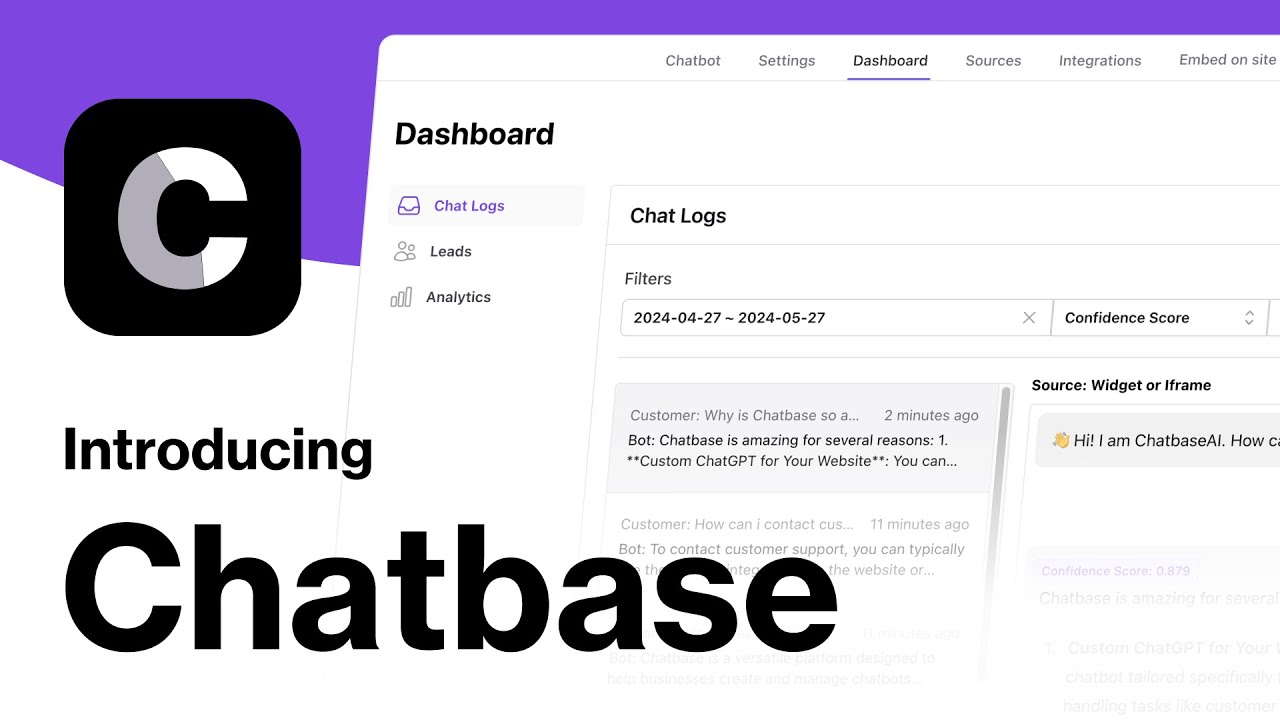
Chatbase No-Code Builder and Live Chat Preview
By the numbers: Trusted by 10,000+ businesses - Supports 80+ languages - Multi-model support (OpenAI, Anthropic) - Integrates with Slack, WhatsApp, Zendesk
2. Who should use Chatbase?
Chatbase is a great fit if you are:
-
A Customer Support Manager -> Why it works: You can deflect up to 80% of repetitive questions instantly, allowing your human agents to focus on high-value, complex customer issues.
-
A SaaS Founder or Solopreneur -> Why it works: You get enterprise-grade AI customer support running on your website in under 10 minutes without touching a single line of code.
-
An E-commerce Store Owner -> Why it works: Connect the agent to your Shopify or WooCommerce store data to answer product questions and process return requests 24/7.
Chatbase may not be the right choice if you:
- Need deep multi-agent autonomous orchestration - While Chatbase supports AI Actions, it is primarily designed as a customer-facing support agent rather than a complex backend orchestrator of multiple specialized AI swarms.
- Have extreme data privacy constraints - Although secure, highly regulated industries (like healthcare/HIPAA or defense) may require on-premise, self-hosted LLM solutions rather than cloud-based platforms.
3. Key features breakdown
3.1 Data Sources & Knowledge Syncing
The magic of Chatbase lies in its RAG capabilities. You can feed it virtually anything: sitemaps, specific URLs, PDFs, Word documents, or raw text. It automatically chunks and indexes this information. More importantly, it supports auto-retraining, meaning if you update a page on your website, the chatbot automatically syncs the new data.
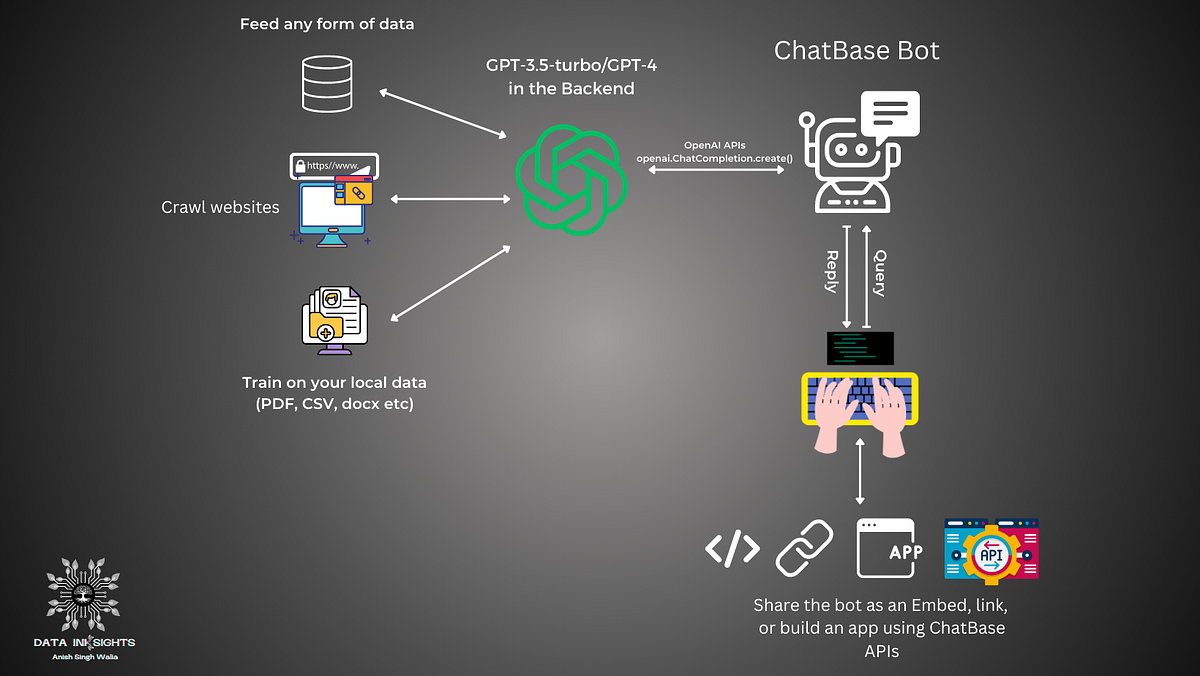
Connecting and Managing Training Data Sources
3.2 AI Actions & Workflows
Answering questions is helpful, but taking action is transformative. Chatbase allows you to define “Actions” that the AI can trigger based on customer intent. For example, if a user asks “Can I book a demo?”, the AI can fetch a Calendly link or directly capture lead information. By connecting Chatbase to Zapier or Make, the agent can update subscriptions, check shipping statuses in external databases, or create tickets in Jira.
3.3 Analytics & Continuous Improvement
Chatbase doesn’t just deploy a bot; it helps you improve it. The analytics dashboard provides granular insights into conversation volume, resolution rates, and user sentiment. Crucially, it includes a “Revise Answers” feature. If the AI gives a suboptimal answer, you can manually edit the response in the logs, and the AI will learn from that correction for all future interactions.
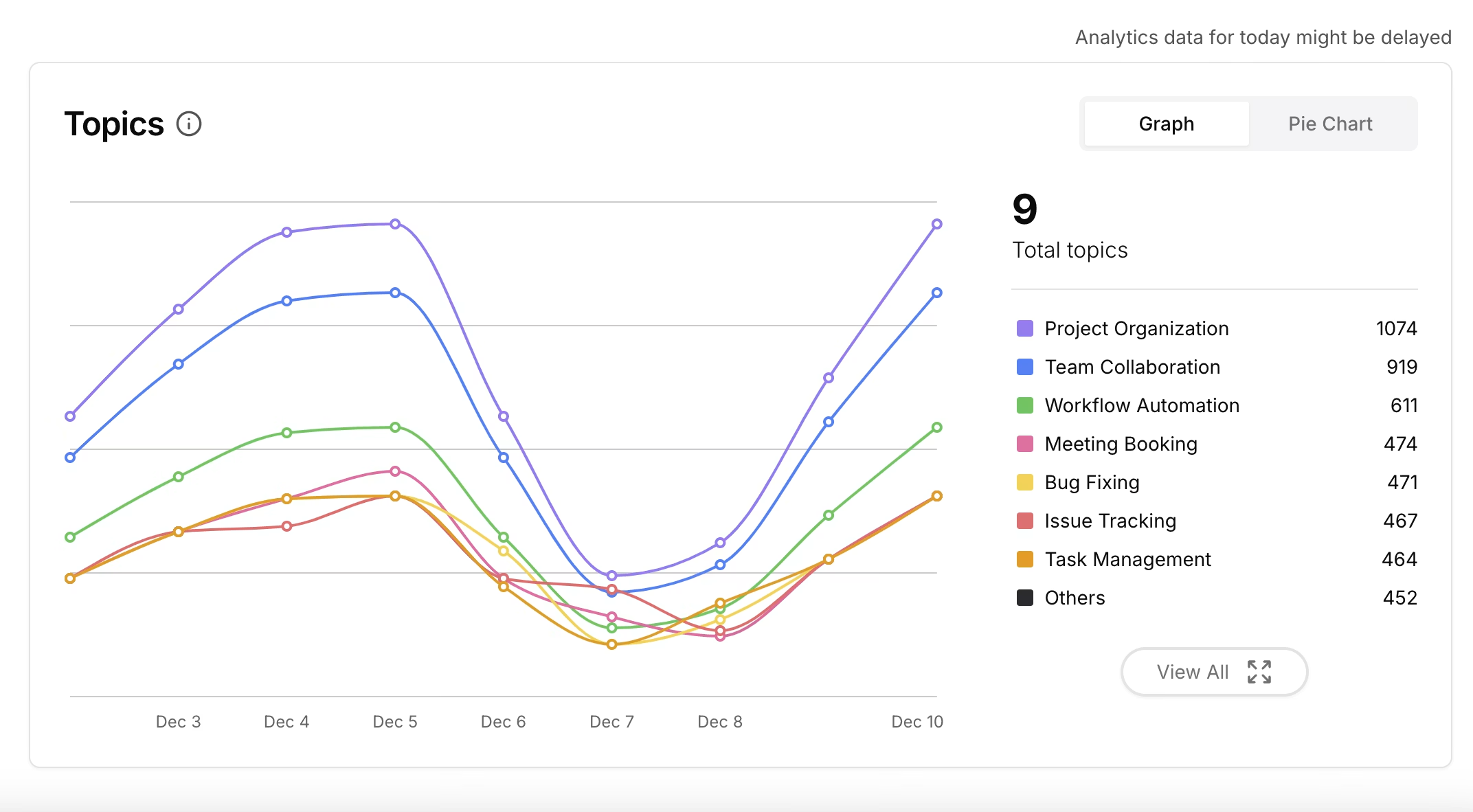
Robust Analytics and Conversation Insights
3.4 Omnichannel & Escalation
Your customers aren’t just on your website. Chatbase allows you to deploy the exact same trained agent to WhatsApp, Slack, Facebook Messenger, and Instagram. Furthermore, it supports graceful human escalation. If a user is frustrated or asks to speak to a human, Chatbase can seamlessly hand off the conversation to a live agent in Zendesk or notify your team in Slack.
Feature summary: Chatbase strikes the perfect balance between power and simplicity. It democratizes advanced RAG systems, allowing anyone to deploy highly accurate AI support agents that integrate deeply with existing business workflows.
4. User experience and interface
For the Creator: The UI is exceptionally clean and intuitive. The dashboard guides you logically from uploading data to customizing the widget’s appearance and defining the system prompt. Testing the bot in the live playground before deployment gives you immediate confidence in its capabilities.
For the End-User: The chat widget is modern, fast, and responsive. It supports rich text, markdown, and links. The AI responds almost instantaneously, and because you can customize the tone (e.g., “Be friendly and concise” vs. “Be professional and detailed”), the interaction feels natural.
Honest frustrations:
- Managing very large knowledge bases (e.g., thousands of PDFs) can sometimes make it tricky to pinpoint exactly which document the AI is pulling a specific piece of information from, though citation features are continually improving.
- The initial tuning of the “Base Prompt” (the system instructions) requires some trial and error to get the AI to behave exactly how you want in edge cases.
5. Customer support and reliability
Support channels: Chatbase offers responsive email support and has an extensive, well-documented Help Center. For higher-tier plans, they provide priority support and dedicated onboarding.
Community: Because Chatbase is widely adopted, there is a large community of users sharing prompt engineering tips, integration workflows, and best practices across social platforms and forums.
Reliability: The platform is built on robust infrastructure and consistently handles high message volumes. They allow you to choose between different underlying models (like GPT-4o or Claude 3.5 Sonnet), giving you fallback options if one provider experiences an outage.
6. Pricing and plans
Chatbase offers a transparent, credit-based pricing model that scales with your business needs.
| Tier | Price / Month | Key Features |
|---|---|---|
| Free | $0 | 50 message credits, 1 AI agent, limited models. Ideal for basic testing. |
| Hobby | $40 | 500 message credits, 1 AI agent, 5 AI actions, access to advanced models. |
| Standard | $150 | 4,000 message credits, 2 AI agents, 8 AI actions, API access, remove branding. |
| Pro | $500 | 15,000 message credits, 5 AI agents, advanced integrations. |
Note: You can save 20% by opting for annual billing (e.g., Hobby becomes $32/mo).
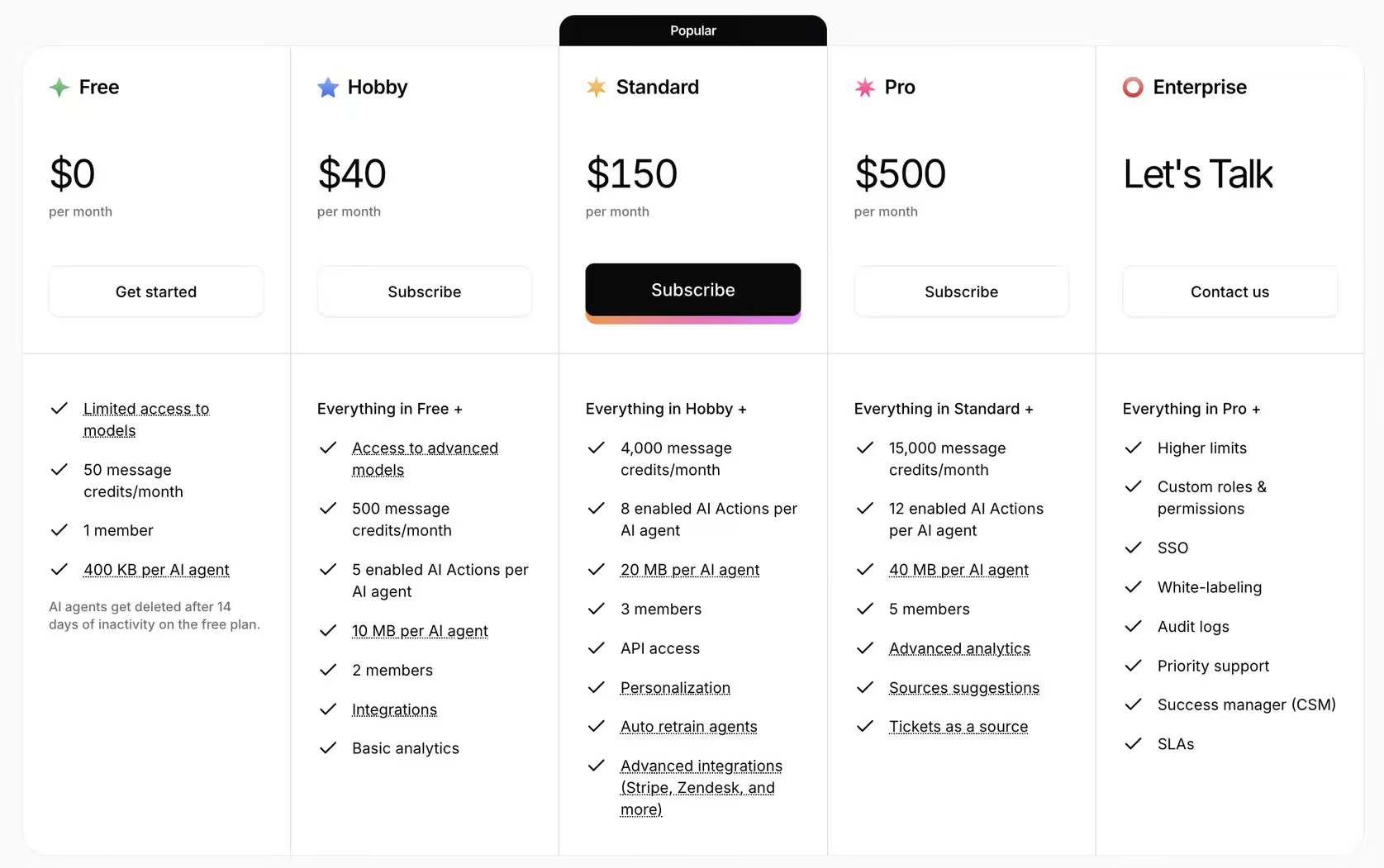
Chatbase Flexible Pricing Model
Best value pick: The Standard Plan ($150/mo) is the sweet spot for most growing businesses. It provides enough message credits to handle significant support volume, allows API access for custom integrations, and lets you remove the “Powered by Chatbase” branding for a fully white-labeled experience.
7. Pros and cons
What Chatbase does well
- Unmatched Simplicity: You can genuinely go from zero to a deployed AI agent in 10 minutes.
- Data Ingestion: The ability to crawl a website and auto-sync updates makes maintenance completely hands-off.
- Model Choice: The flexibility to switch between OpenAI and Anthropic models ensures you always have access to the best reasoning engines.
- AI Actions: Turning a passive Q&A bot into an active agent that can update databases and book meetings is a game-changer.
- Analytics & Training: The ability to manually correct answers and have the AI learn from them ensures continuous improvement.
Where Chatbase falls short
- Credit Burn Rate: Using premium models (like Claude Opus) costs significantly more credits per message than standard models, which can quickly drain your monthly allowance.
- Widget Customization: While the widget is clean, highly specific custom CSS or completely bespoke UI implementations require API usage rather than the out-of-the-box embed.
- Free Tier Limits: The Free plan is strictly for testing; agents are deleted after 14 days of inactivity, pushing serious users to upgrade quickly.
8. How Chatbase compares to competitors
Chatbase vs FastBots
FastBots is one of the closest direct competitors to Chatbase in the no-code AI agent space. While both allow you to train chatbots on your own data quickly, they cater to slightly different core needs.
| Criteria | Chatbase | FastBots |
|---|---|---|
| Primary Focus | Deep AI Actions & Workflow Automation | Broad Omnichannel Engagement |
| Core Integrations | Websites, Notion, Zapier, Zendesk | WhatsApp, Telegram, Instagram, Slack |
| Pricing Model | Credit-based (Usage tiers) | Flat-rate message based |
| Security | Enterprise-grade (SOC 2 Type II) | Standard |
| Ease of Setup | Extremely Fast (Under 10 mins) | Very Fast |
When Chatbase wins: You need a highly secure, enterprise-grade AI agent that can trigger real-world actions (like updating CRMs or checking order statuses) using webhooks and deep API integrations. It is the gold standard for workflow automation. When FastBots wins: Your primary strategy revolves around multi-channel social selling and support. If you need native, deep integrations into WhatsApp, Instagram, Telegram, and Facebook Messenger out of the box with predictable flat-rate pricing.
Platform Comparison: Chatbase vs FastBots
Chatbase vs Botpress
When Chatbase wins: You want a straightforward, highly accurate support bot built immediately with zero coding or complex flow mapping. When Botpress wins: You need extreme visual control over conversation flows, complex programmatic logic, and multi-agent orchestration, and you are comfortable with a steeper learning curve.
9. What real users are saying
Chatbase is highly regarded across SaaS, e-commerce, and agency communities for its approachability and effectiveness.
Most-mentioned positives:
- Instant ROI: Users consistently report immediate drops in repetitive support tickets (often 40-60% reductions in the first month).
- Ease of Use: Non-technical founders praise the platform for making advanced AI accessible.
- Multilingual Support: E-commerce stores love that the bot can read English docs but converse flawlessly in Spanish or French with customers.
Recurring pain points:
- Credit Management: Users sometimes find themselves accidentally upgrading tiers because they didn’t realize how fast premium models consume credits.
- Complex Table Data: While excellent with text, some users note the AI occasionally struggles to perfectly interpret highly complex PDF data tables.
“We embedded Chatbase on our SaaS pricing and documentation pages. It handles 70% of the ‘how do I do X?’ questions instantly. Our human team now only deals with actual billing issues and complex technical bugs. It’s easily the highest ROI tool in our stack.”
- Head of Customer Success, B2B Software Company
10. How to get started with Chatbase
Step 1: Create a Free Account
Visit chatbase.co and sign up for the free tier. No credit card is required to build your first test agent.
Step 2: Upload Your Knowledge
Enter your website URL to let Chatbase crawl your site, or upload PDFs, Word docs, and text snippets containing your FAQs and product info.
Step 3: Customize the Agent
Go to the settings to define the “Base Prompt” (tell it how to behave), choose its color scheme, add your logo, and set initial greeting messages.
Step 4: Test in the Playground
Use the internal testing environment to ask the bot questions. If it answers incorrectly, adjust your data sources or tweak the Base Prompt.
Step 5: Deploy
Copy the provided iframe or Javascript snippet and paste it into your website’s HTML, or connect the agent to integrations like Slack or WhatsApp via the dashboard.
11. Frequently asked questions
Is Chatbase free to use?
Chatbase offers a Free plan that gives you 50 message credits and 1 AI agent for testing. For production use, paid plans start at $40/month.
Can Chatbase hand off a conversation to a human?
Yes. Chatbase supports human escalation. You can configure the bot to notify a human agent via email, Slack, or Zendesk when it cannot resolve an issue or when a user specifically asks for human support.
How does Chatbase use my data?
Chatbase uses your uploaded data solely to train your specific chatbot using RAG. Your data is stored securely and is not used to train global underlying models like OpenAI's GPT-4.
Can I use Chatbase if I don't know how to code?
Absolutely. Chatbase is a completely no-code platform. Creating the bot is as simple as uploading files, and deploying it is just copying and pasting a snippet of text.
Does Chatbase support multiple languages?
Yes, Chatbase automatically supports over 80 languages. You can upload your documents in English, and if a customer asks a question in Spanish, the bot will understand the context and reply in perfect Spanish.
What happens if I run out of message credits?
If you hit your plan's limit, the chatbot will stop responding until the next billing cycle. However, you can monitor usage in the dashboard and upgrade your plan or buy extra credits before this happens.
12. Final verdict
Chatbase has firmly established itself as the premier no-code platform for building AI customer support agents. It earns a 4.8/5 for brilliantly democratizing complex RAG technology, making it accessible to businesses of all sizes.
By combining effortless data ingestion, multi-channel deployment, and actionable integrations (AI Actions), Chatbase provides a complete support automation solution. While heavy enterprise users might require custom-built infrastructure, for 95% of SaaS, e-commerce, and service businesses, Chatbase is the smartest, fastest choice available.
Use Chatbase if: you want to drastically reduce customer support volume and provide instant, accurate 24/7 answers without hiring developers or spending weeks configuring flows.
Think twice if: you are building a highly complex, multi-agent backend orchestration system, or if your budget strictly prohibits usage-based API scaling costs.
Start free: Utilize the Free tier to crawl your website and test the bot’s accuracy internally before deploying it to your customers.
Disclosure: This review may contain affiliate links. If you sign up through our link, we may earn a commission at no extra cost to you. This does not influence our ratings or editorial opinion.