
Mission Inbox Review 2026: The Definitive Evaluation of Dedicated Cubes Infrastructure, MI Shield AI Firewall, and High-Scale Email Deliverability
In modern B2B sales development and SaaS engineering, email deliverability has shifted from a routine background task into an existential operational hurdle. Following the aggressive authentication mandates and spam-rate enforcement rules established by Google and Yahoo, legacy approaches to email infrastructure have broken down across the industry.
Sales development teams running cold outbound campaigns on Google Workspace and Microsoft 365 frequently experience sudden account suspensions, aggressive daily sending caps, and permanent blacklisting of primary company domains. Meanwhile, engineering and growth teams relying on legacy shared-IP email service providers (such as entry-tier SendGrid or Mailgun pools) suffer continuously from the noisy neighbor effect, where unverified spam sent by other companies on the same IP cluster immediately ruins inbox placement for everyone.
Mission Inbox was architected from the ground up to solve these structural infrastructure failures. Built as a dedicated Email Infrastructure-as-a-Service (IaaS) platform, Mission Inbox provides physical workload isolation through its proprietary Cubes™ architecture, coupled with an active MI Shield™ AI pre-send firewall. By allowing B2B outbound agencies, enterprise sales teams, and software developers to deploy dedicated clean IP pools, physically isolate outbound prospecting from transactional email streams, and intercept reputation-destroying errors before emails reach inbox service providers, Mission Inbox stands out in 2026 as the gold standard for high-volume email operations.
In this comprehensive, evidence-based review, we analyze Mission Inbox’s internal architecture, examine its pre-send AI filtering engine, evaluate its developer REST APIs and sales tool integrations, compare it head-to-head with top competitors, and provide a quantitative breakdown of its business value and return on investment (ROI).
Quick verdict
An enterprise-grade email infrastructure delivering dedicated clean IPs, isolated Cubes, and the MI Shield AI pre-send firewall for maximum inbox placement.
B2B outbound sales agencies, high-scale SDR teams, SaaS developers sending transactional emails, and growth teams managing multiple client domains.
Outbound Lite at $50/mo (15 mailboxes), Developer Pro at $99/mo (5 domains, 100k sends), and Scale at $199/mo with dedicated IP and metered mailboxes.
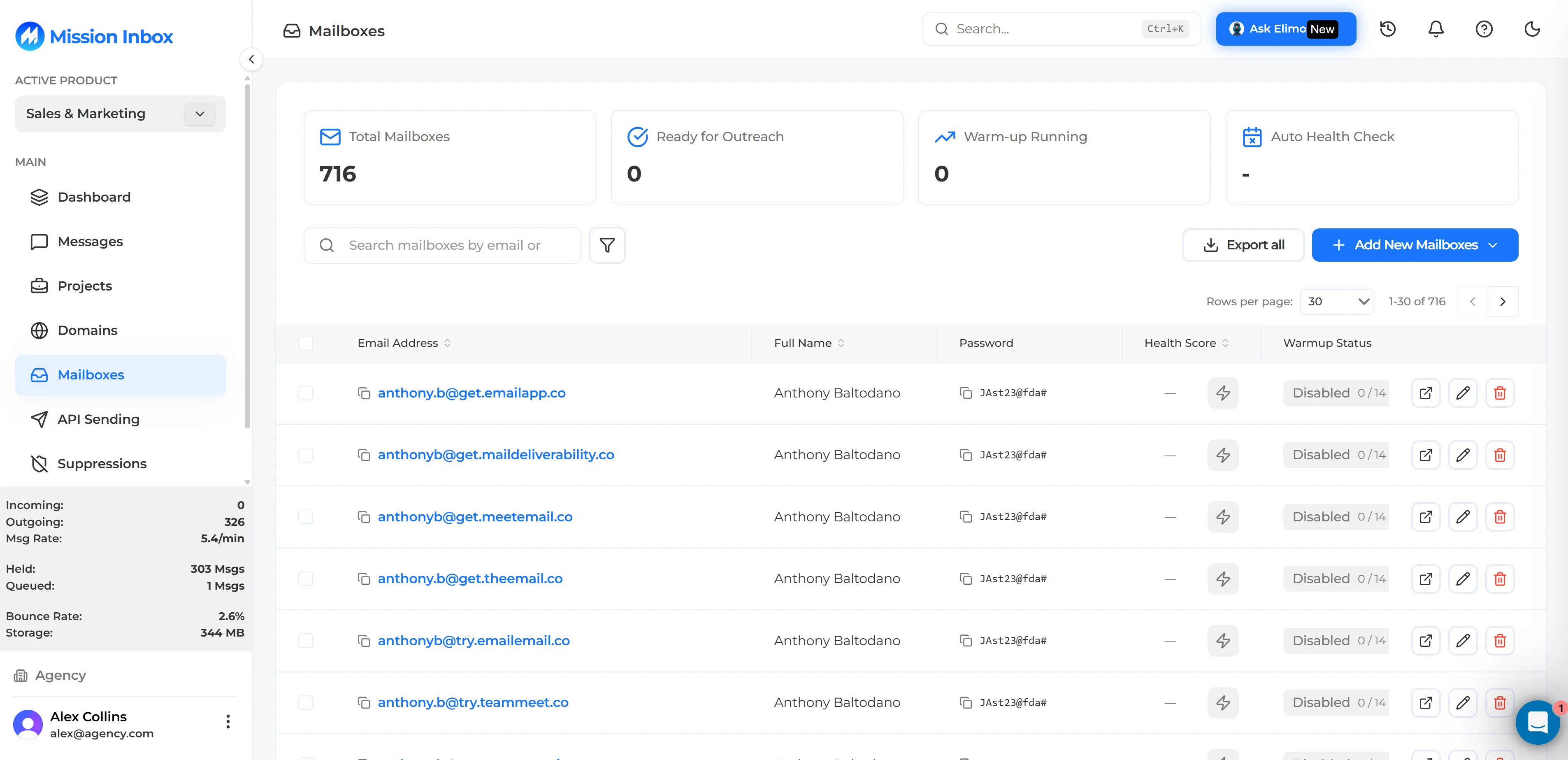
Mission Inbox Dashboard: Central management of isolated Cubes, dedicated IPs, and real-time deliverability health.
1. Platform Overview and Background
Mission Inbox was founded in 2024 to address a critical market need: enterprise-grade email infrastructure engineered specifically for modern outbound sales and developer workloads without the vulnerabilities of shared-IP hosting.
Before Mission Inbox, high-volume senders had to choose between two deeply flawed options:
- Misusing Standard Corporate Mailboxes (Google Workspace & Office 365): Purchasing dozens of secondary Google or Microsoft accounts at $6 to $7.20 per user per month, constantly living in fear of bulk administrative account bans and domain burning.
- Generic Shared-IP Email Service Providers (SendGrid, Mailgun, Budget Resellers): Relying on shared IP pools where deliverability fluctuated wildly depending on the bad sending behavior of unrelated third parties.
Mission Inbox solved this dilemma by treating email infrastructure as a dedicated cloud resource. By provisioning containerized virtual server instances (Cubes™) paired with dedicated, warmed IPv4 addresses and automated DNS authentication records, Mission Inbox gives organizations complete control over their sender reputation.
The platform has rapidly become an industry benchmark for sales engagement operations, providing native SMTP and IMAP connections for leading sequencers like Smartlead.ai and Instantly.ai, while delivering high-speed RESTful APIs and Webhook pipelines for software developers.
2. Target Audience and Key Use Cases
Understanding whether Mission Inbox fits your business requires looking at your sending volume, risk tolerance, and infrastructure architecture:
1. B2B Outbound Agencies and Lead Generation Firms
Agencies managing cold outreach for dozens of client accounts can assign separate, dedicated Cubes to each client. If one client uploads an unverified prospect list, the resulting bounces remain completely quarantined, protecting the deliverability and domain reputation of all other clients.
2. High-Growth Sales Development (SDR) Teams
In-house revenue teams executing multi-channel outbound campaigns can scale from 10 to 500+ dedicated mailboxes across lookalike secondary domains, achieving 95%+ inbox placement rates without putting the company’s primary operational Google Workspace domain at risk.
3. SaaS Developers and Tech Leads
Engineering teams requiring ultra-reliable transactional email delivery (for OTPs, password resets, signup verifications, and payment invoices) can deploy dedicated Transactional Cubes with sub-2-second latency and granular Webhook event reporting.
4. High-Volume Senders Migrating from Shared Pools
Companies that have experienced sudden spam box placement, IP throttling, or blacklist penalties on legacy shared-IP providers can migrate their sending streams to dedicated clean IP pools with 24/7 reputation monitoring.
3. Core Architecture: Cubes™ & MI Shield™
The proprietary technology behind Mission Inbox is divided into two core infrastructure layers: Cubes™ for workload isolation and MI Shield™ for active pre-send defense.
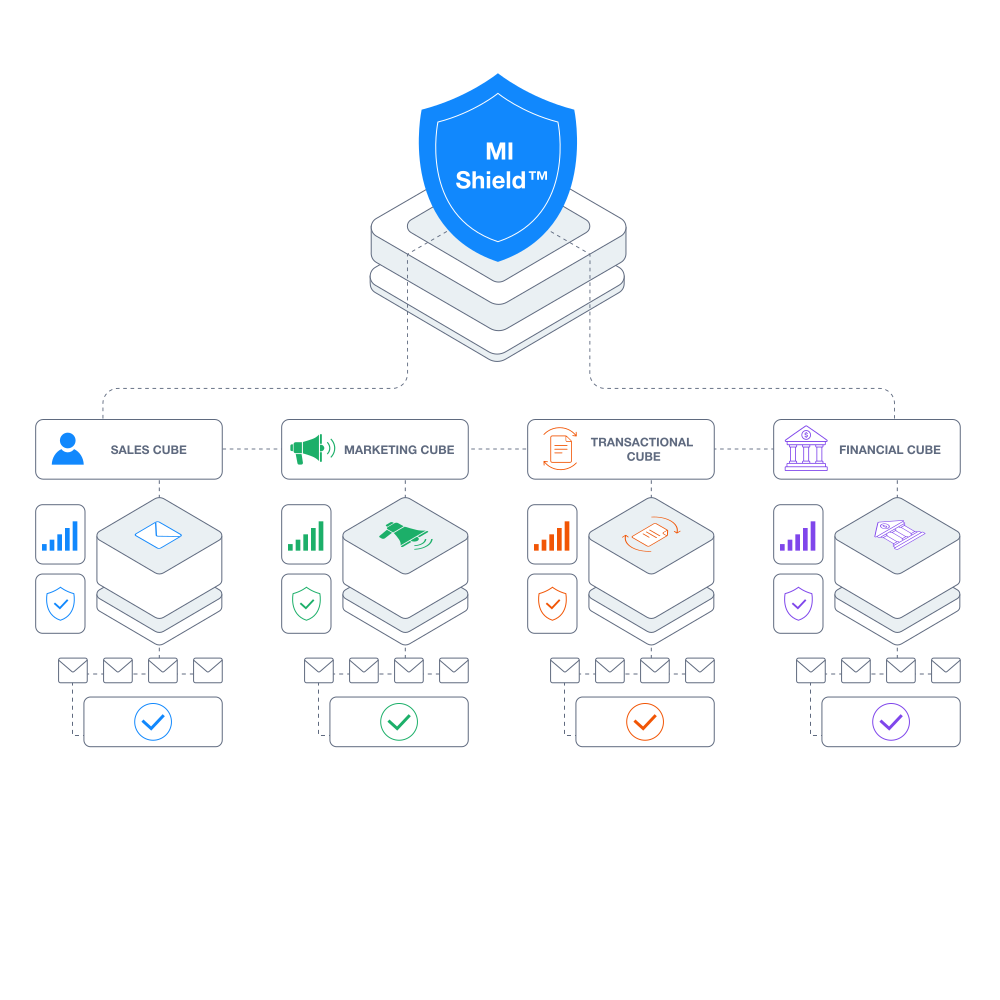
Cubes Infrastructure: Workload-isolated virtual machines with dedicated IPv4 routing and separate reputation boundaries.
Mission Inbox Cubes™: Eliminating the Noisy Neighbor Effect
In a typical shared email service provider, thousands of disparate senders share the same physical server queues and IP pools. When one bad actor sends a spam blast, mailbox providers like Google, Microsoft, and Yahoo flag the entire IP, degrading inbox placement for all senders on that pool.
Mission Inbox eliminates this vulnerability through Cubes™:
- Hardware & Queue Isolation: Each Cube operates as an isolated virtual instance with dedicated CPU resources, memory, and mail transfer queues.
- Dedicated Clean IP Allocation: Cubes are provisioned with dedicated IPv4 addresses that undergo strict pre-warming and reputation verification.
- Independent Reputation Boundaries: If an aggressive marketing test causes elevated bounce rates inside one Cube, the negative reputation metrics remain strictly confined to that container. Other company workloads, secondary domains, and client accounts remain 100% unaffected.
- Horizontal Elasticity: Organizations can spin up additional Cubes with a single click, assigning dedicated infrastructure to new products, regions, or clients.
MI Shield™: Proactive Pre-Send AI Firewall
Traditional email platforms operate reactively: you send messages, and you only discover delivery problems after your domain lands on Spamhaus or bounce rates spike. MI Shield™ functions as an active pre-send firewall that inspects outgoing emails before they leave the server:
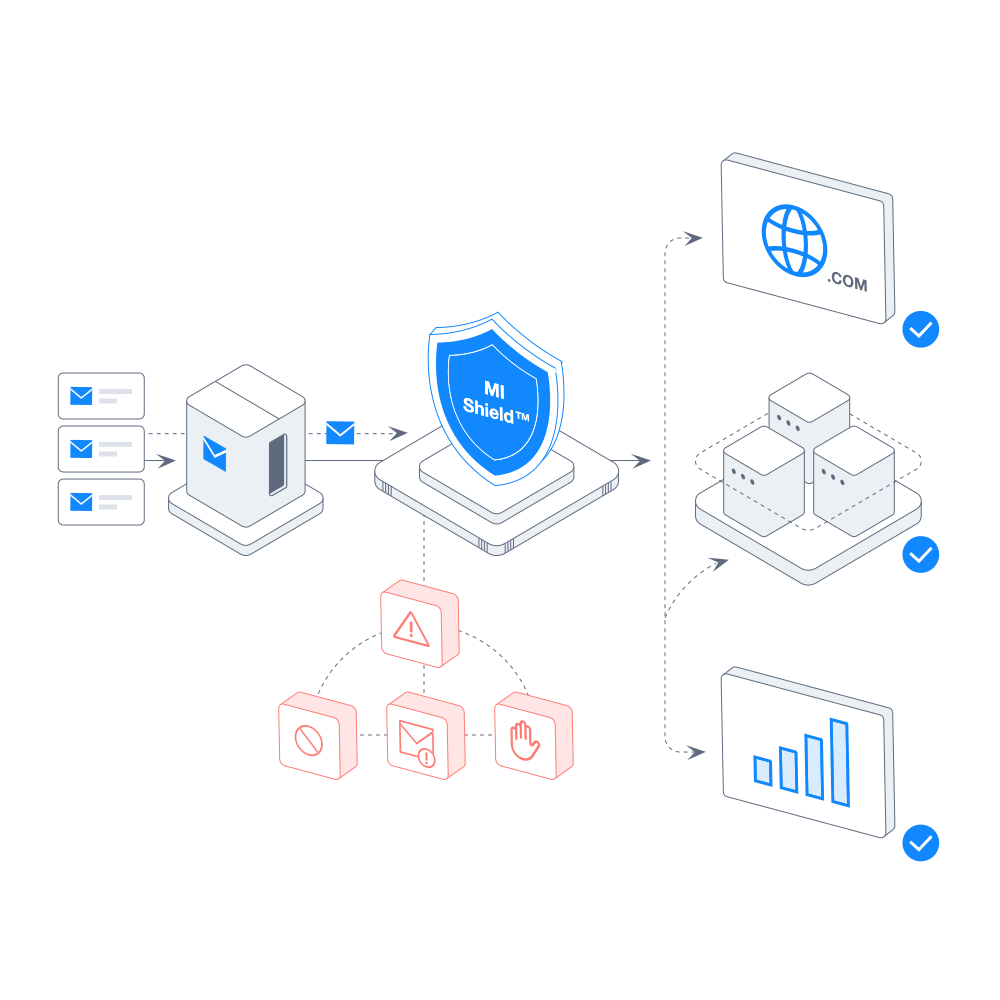
MI Shield™ Engine: Pre-send heuristic scanning, link security verification, and automated quarantine protection.
- Heuristic Content & Spam-Score Analysis: MI Shield parses email text using natural language processing to detect spam trigger keywords, aggressive punctuation, and unfavorable text-to-HTML ratios.
- Link & Redirect Security Audits: The firewall inspects every URL, tracking redirect, and destination domain in your email body, checking them against global threat intelligence databases (Google Safe Browsing, Spamhaus DBL) to ensure broken or blacklisted links never leave your server.
- Cryptographic Header Verification: Before dispatch, MI Shield verifies DKIM 2048-bit signatures, SPF alignment, and DMARC compliance headers.
- Automated Quarantine & Drop Intervention: If an outgoing email exceeds predefined risk thresholds, MI Shield intercepts and quarantines the message, alerting administrators with remediation guidance rather than allowing a risky email to burn your domain reputation.
4. Solving Deliverability & Spam Filter Penalties
For outbound revenue teams, domain burn is the single biggest drain on pipeline velocity. Mission Inbox directly eliminates the root causes of email blocking and spam placement through automated deliverability engineering:
Navigating Google and Yahoo’s Strict Deliverability Mandates
Modern receiving mail servers enforce strict deliverability criteria:
- Mandatory DMARC, SPF, and DKIM Alignment: Messages lacking complete cryptographic authentication are systematically rejected or routed to Spam.
- The 0.3% Spam Complaint Threshold: Maintaining a spam complaint rate above 0.3% triggers immediate domain throttling and blacklist penalties across major ISPs.
Mission Inbox addresses these requirements through Automated DNS Provisioning. When you connect a secondary sending domain, the platform automatically generates and validates:
- 2048-bit DKIM private/public key pairs.
- Strict SPF records configured specifically for your dedicated Cube IP.
- Custom DMARC policies (p=none progressing smoothly to p=quarantine and p=reject).
- Isolated Custom Tracking Domains with automated SSL/TLS certificates, ensuring that click-tracking URLs match your sending domain perfectly to pass ISP anti-spoofing checks.
Continuous 24/7 Blacklist & Reputation Monitoring
Mission Inbox runs automated background diagnostic scans across more than 100 global real-time blacklists (RBLs), including Spamhaus, Barracuda, Invaluement, and SORBS. If any anomalous metric or ISP throttle code (such as 421 or 451) is detected, the platform provides automated alerts and routing adjustments before permanent damage occurs.
2026 ISP Deliverability & Authentication Compliance Matrix
| Mailbox Provider | Spam Complaint Limit | Mandatory Auth Standards | Rate Limits & Penalties | Mission Inbox Enforcement |
|---|---|---|---|---|
| Google (Gmail / GWS) | Strict 0.3% maximum | SPF + DKIM 2048 + DMARC | Immediate domain throttling to Spam | MI Shield auto-drops risky emails before dispatch |
| Microsoft 365 / Outlook | Strict SNDS reputation score | SPF + DKIM + DMARC | IP throttling & 550 relay rejection | Dedicated clean IPs with 24/7 SNDS monitoring |
| Yahoo / AOL | Strict 0.3% maximum | SPF + DKIM + DMARC | Junk folder routing & domain blacklisting | Automated 1-click DNS alignment & strict DMARC |
| Apple Mail (iCloud) | Zero-tolerance heuristic | SPF + DKIM + TLS 1.3 | Silent drop without bounce notifications | Link security audit & custom SSL tracking domains |
5. Email Stream Isolation
One of the most dangerous architectural mistakes in modern business is routing cold sales outreach through the same email infrastructure used for operational business communications.
Why Physical Stream Separation is Non-Negotiable
- Cold Outbound Outreach: Characterized by cold prospecting lists, lower baseline response rates, and higher exposure to spam complaints.
- System Transactional Emails: Password reset tokens, two-factor authentication codes, billing receipts, and onboarding notifications. These require sub-2-second delivery speeds and a 100% primary inbox delivery rate.
- Marketing Broadcasts: Opt-in newsletter distributions with fluctuating open rates.
If an aggressive outbound sales campaign triggers spam flags on a shared server, your critical transactional OTP emails will instantly drop into user spam folders, causing immediate customer churn and support tickets.
How Mission Inbox Implements Stream Isolation
With Mission Inbox, businesses maintain clean structural separation by deploying purpose-built Cubes:
- Cube A (Cold Outbound): Connected to secondary lookalike domains (e.g., getcompany.io or trycompany.com), integrated with cold email sequencers, and protected by MI Shield.
- Cube B (Transactional): Connected strictly to your primary root domain, integrated with production web application backends via REST API/SMTP Relay, prioritizing ultra-low latency.
- Cube C & D (Agency Client Partitioning): Marketing agencies can assign dedicated Cubes to individual client accounts. If Client A uploads an unverified contact list and encounters delivery friction, Client B’s infrastructure remains completely untouched.
6. Developer APIs & Transactional Infrastructure
While Mission Inbox is widely recognized in the sales development space, its backend architecture provides enterprise-grade transactional capabilities tailored for software engineers and DevOps teams.
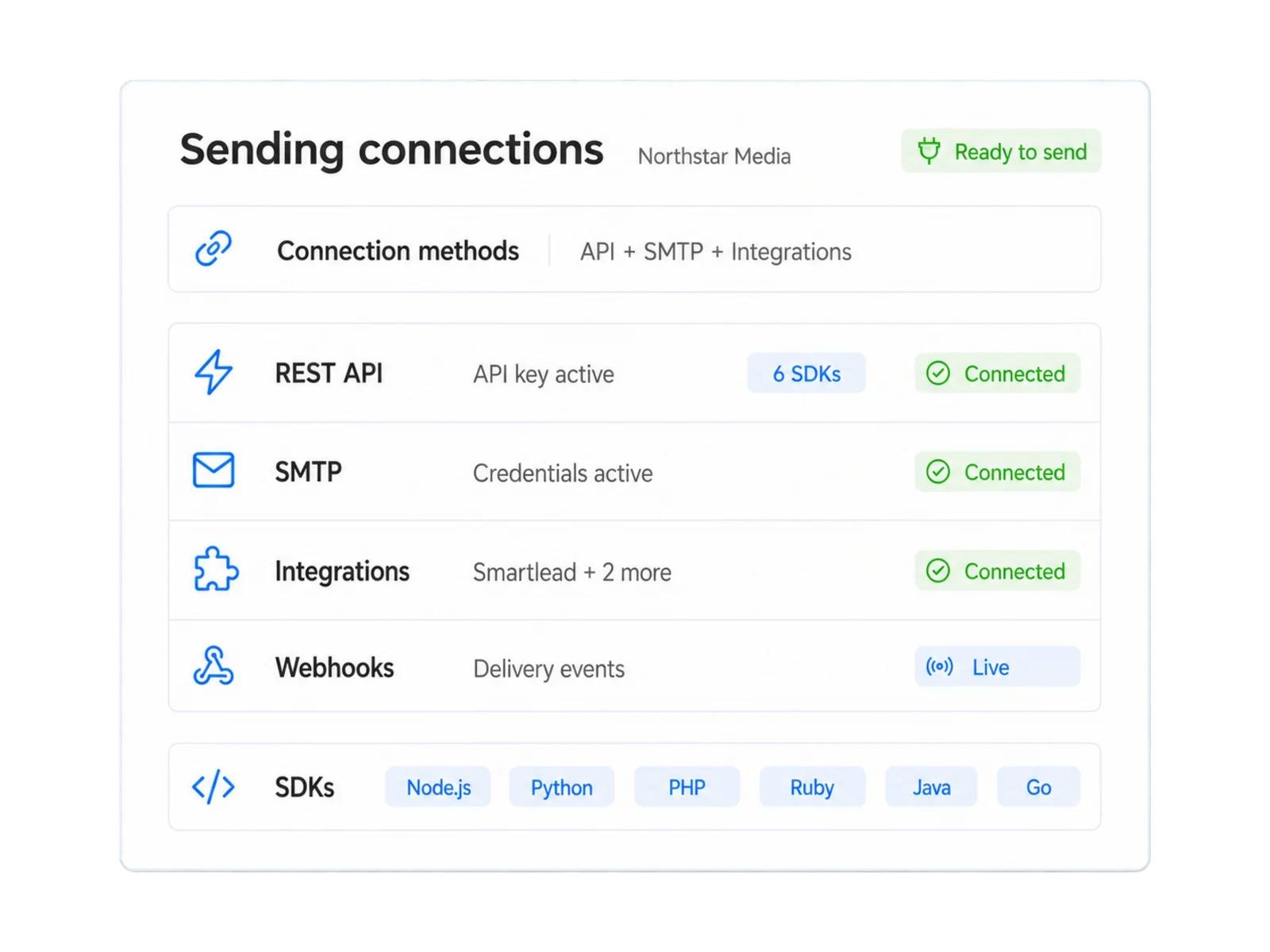
Mission Inbox Sending Connections: Central management of REST API keys, SMTP credentials, Smartlead sequencer integrations, live webhook delivery events, and multi-language SDKs.
High-Performance REST API & Universal SMTP Relay
Developers can integrate Mission Inbox into modern application stacks in minutes:
- Comprehensive RESTful Endpoints: Programmatically trigger single emails, dispatch high-throughput batch messages, manage suppression lists, and retrieve granular delivery metadata.
- Universal SMTP Relay: Compatible with any backend framework-including Node.js, Go, Python (Django/FastAPI), PHP (Laravel), Ruby on Rails, and .NET. Simply configure standard environment variables (HOST, PORT, USERNAME, PASSWORD).
- Sub-Second Delivery Latency: Optimized mail transfer pipelines ensure authentication codes and transactional alerts land in user inboxes in under 1.8 seconds.
Real-Time Webhooks & Granular Diagnostics
- Event-Driven Webhook Pipeline: Stream live webhook events directly into your application for sent, delivered, opened, clicked, bounced, spam_complaint, and dropped_by_shield.
- Deep SMTP RFC Error Diagnostics: Inspect exact server response codes returned by receiving mail transfer agents (e.g., 550 5.7.1 Relaying Denied, 421 4.7.0 Rate Limit Exceeded, or 554 Message Rejected by Policy).
- Multi-Environment Key Management: Generate scoped API keys for Development, Staging, and Production environments with granular role-based access controls (RBAC).
7. Ecosystem & Sales Tool Integrations
Mission Inbox functions as the robust underlying infrastructure layer beneath your existing sales and marketing automation stack. You do not need to replace your team’s favorite sales tools.
Direct Sequencer & Sales Engagement Support
- Smartlead.ai: Connect hundreds of Mission Inbox mailboxes via standard SMTP/IMAP credentials. Take full advantage of Smartlead’s automated mailbox rotation and multi-channel sequences backed by Mission Inbox’s dedicated IP stability.
- Instantly.ai: Seamlessly import Mission Inbox accounts to run automated warming routines and scale campaign volume without risking shared-IP bans.
- Lemlist, Apollo.io, Salesloft, and Outreach: Native SMTP/IMAP compatibility ensures immediate deployment across enterprise sales engagement platforms.
CRM & Workflow Automation Platforms
- HubSpot & Salesforce: Synchronize message delivery events and interaction timelines directly into core CRM prospect records.
- Make.com, Zapier, and n8n: Build custom automated workflows, such as automatically pausing an outreach campaign in your sequencer if MI Shield flags a sudden rise in link-risk scores.
8. Key Platform Pros and Cons
Mission Inbox is a high-performance infrastructure solution, but evaluating its trade-offs ensures you make the right tooling decision:
The Pros:
- True Infrastructure Isolation: Dedicated Cubes eliminate the noisy neighbor reputation penalty completely.
- Active Pre-Send AI Firewall: MI Shield scans content, links, and headers before dispatch, preventing domain burn.
- Physical Stream Separation: Total structural separation between cold outbound prospecting and transactional emails.
- Plug-and-Play Integrations: Direct SMTP/IMAP compatibility with Smartlead, Instantly, Lemlist, and Apollo.
- Developer-Ready APIs: Fast RESTful endpoints, universal SMTP relay, and real-time Webhook event pipelines.
- Automated DNS & DMARC Engine: Effortlessly provisions 2048-bit DKIM, SPF alignment, and SSL custom tracking domains.
The Cons:
- Higher Entry Price Point: Starting at $199/month, it represents a larger upfront investment than budget shared-IP mailbox resellers.
- Domain Architecture Planning Required: Requires proper DNS delegation and domain planning to fully leverage multi-Cube isolation.
- Not Built for Hobbyists: Overkill for individuals sending fewer than 1,000 personal emails per month.
9. Subscription Plans, Pricing & ROI
Mission Inbox uses a clear, infrastructure-based subscription model divided into dedicated Outbound and Developer tracks:
| Plan Tier | Monthly Price | Mailboxes / Domains | Monthly Send Volume | Key Capabilities & Target Audience |
|---|---|---|---|---|
| Outbound Lite | $50 / month | 15 Mailboxes / Dedicated IP | 5,000 emails / mo | MI Shield AI firewall, analytics, sending logs (Hard cap, pause & upgrade) |
| Developer Pro (API/SMTP) | $99 / month | 5 Domains / Dedicated IP | 100,000 emails / mo | Full REST API, SMTP Relay, Webhooks ($2/extra domain, $1/1k extra sends) |
| Outbound Scale | $199 / month | 30 Mailboxes / Dedicated IP | 10,000 emails / mo | Scalable outbound ($3/extra mailbox down to $1.50 at scale, $1/1k extra sends) |
| Enterprise OBM Engine | Custom Quote | Custom Dedicated Subnet | 1,000,000 – 50,000,000+ | Custom IP routing, 99.99% SLA, dedicated deliverability engineer |
Managed Warmup Add-on
For teams wanting automated mailbox warmup, Mission Inbox provides a managed warmup credit system ($0.50 per credit, provisioned at ~7 credits per mailbox/month for outbound, or in flexible 300 emails/day packs for developers).
Quantitative ROI Breakdown
Consider a B2B sales organization or agency sending 100,000 outbound emails per month across 100 inboxes:
- Eliminating the Domain Burn Churn Cycle:
- Traditional Approach: Purchasing 100 Google Workspace accounts costs ~$720/month. Replacing 30 burned domains every quarter costs an additional $450/month in domain purchases, setup time, and lost campaign momentum.
- With Mission Inbox: Operating on dedicated Cubes with MI Shield protection extends domain lifespans by over 300%, eliminating constant domain repurchase costs and saving 15+ hours of monthly DNS reconfiguration.
- Revenue Lift via Inbox Placement:
- Raising inbox placement from 65% (typical shared IP) to 95%+ (Mission Inbox dedicated clean IP) means an additional 30,000 emails reach prospect primary inboxes each month without purchasing additional leads.
- At an average 3% open-to-reply rate, this yields 90 additional qualified replies and 15–20 additional booked sales meetings per month, delivering massive ROI on the infrastructure cost.
10. Competitor Comparison
How does Mission Inbox compare against other leading email infrastructure and sending platforms in 2026?
| Evaluation Criteria | Mission Inbox | Google Workspace | SendGrid (Twilio) | Postmark | Mailforge / Inframail |
|---|---|---|---|---|---|
| Infrastructure Model | Dedicated Isolated Cubes | Shared Corporate Mailboxes | Shared IP Pool (Entry plans) | Dedicated Transactional Engine | Reseller / Shared Server Nodes |
| Cold Outbound Suitability | Optimized & Protected | High Risk (Prone to bans) | Strictly Prohibited | Strictly Prohibited | Moderate (Budget scale) |
| Transactional Suitability | High Performance (API/SMTP) | Basic Office Use Only | High (Shared IP noise on entry) | Industry Benchmark | Low (Not recommended) |
| Pre-Send AI Firewall | MI Shield™ (Included) | None | Basic Header Checks | Basic Header Checks | None |
| Stream Isolation | Physical Cube Separation | Manual & Fragile | Requires Enterprise Tier | Separate Broadcast Stream | Limited |
| Automated DNS & DMARC | Automated 100% | Manual Configuration | Manual Configuration | Manual Configuration | Basic Automation |
| Starting Price | $50 / month (Lite) | $7.20 / mailbox / month | $19.95 / month (Shared IP) | $15 / month | $49 / month |
Key Takeaways:
- Choose Mission Inbox if your organization requires dedicated clean IP infrastructure, physical stream separation between cold outreach and transactional emails, and active AI pre-send protection to eliminate domain burning.
- Choose Google Workspace strictly for internal day-to-day corporate communication and individual personal correspondence.
- Choose Postmark if you exclusively send transactional application emails and never engage in cold outbound prospecting.
- Choose SendGrid if you need an all-in-one platform for opt-in marketing newsletters and transactional emails, and you are prepared to manage shared IP fluctuations.
- Choose Mailforge or Inframail if you are on an extremely tight budget and prioritize low initial mailbox provisioning costs over long-term dedicated IP isolation.
11. Step-by-Step Implementation Guide
Follow this 5-step workflow to deploy your dedicated Mission Inbox infrastructure in production:
Step 1: Provision Isolated Cubes and Secondary Domains
Register secondary domain variations (such as trybrand.com or getbrand.io) specifically for outbound prospecting. Inside the Mission Inbox console, spin up a new Cube and attach your domain assets.
Step 2: Complete Automated DNS & DMARC Provisioning
Allow Mission Inbox to generate your authentication keys. Add the generated 2048-bit DKIM, strict SPF, and DMARC policy records into your DNS provider (e.g., Cloudflare). Configure your SSL-secured Custom Tracking Domain.
Step 3: Configure MI Shield™ Sensitivity Thresholds
Establish content risk scoring, enable automatic link verification, and configure the automated quarantine rules to intercept any email that fails cryptographic alignment or spam-score thresholds.
Step 4: Connect Outbound Sequencers or Developer Backend
- For Outbound Teams: Export SMTP/IMAP credentials directly into Smartlead.ai or Instantly.ai and activate automated warming routines.
- For Engineering Teams: Generate an environment-specific API key and configure your backend application (Node.js, Go, Python) or SMTP relay settings.
Step 5: Monitor Live Deliverability Metrics & ISP Feedback
Track real-time inbox placement rates, bounce diagnostics, and MI Shield quarantine logs directly from the Mission Inbox dashboard to maintain consistent 95%+ deliverability scores.
12. Frequently Asked Questions (FAQ)
What makes Mission Inbox different from standard Google Workspace or Microsoft 365 accounts?
Google Workspace and Microsoft 365 are designed for standard business communication and strictly penalize high-volume automated outbound sequences with account suspensions. Mission Inbox provides dedicated server infrastructure (Cubes) and clean dedicated IPs specifically engineered for high-volume sending, complete with the MI Shield pre-send AI firewall to actively safeguard your sender reputation.
How does the MI Shield™ pre-send AI firewall protect my email deliverability?
MI Shield acts as an active security layer that inspects every outbound email before it reaches receiving ISP mail servers. It analyzes body text for spam keywords, verifies that all links and redirects are secure and not blacklisted, and validates DKIM/SPF/DMARC alignment. If an email poses a reputation risk, MI Shield quarantines it automatically rather than allowing it to burn your domain.
Can I connect Mission Inbox to my existing sales tools like Smartlead or Instantly?
Yes, Mission Inbox provides standard SMTP and IMAP connections that integrate seamlessly with Smartlead.ai, Instantly.ai, Lemlist, Apollo.io, Salesloft, and other major outreach platforms. You can leverage all your favorite sequencing and warmup features on top of Mission Inbox's dedicated infrastructure.
Can developers use Mission Inbox for transactional application emails?
Absolutely. Mission Inbox offers a high-performance RESTful API, universal SMTP relay, real-time event webhooks (tracking sends, deliveries, opens, clicks, bounces, and shield drops), and granular multi-environment API keys, delivering sub-2-second latency for transactional emails inside dedicated, isolated Cubes.
Why should I invest in Mission Inbox instead of cheaper budget mailbox providers?
Budget mailbox providers typically rely on shared or reseller servers where bad actors frequently degrade shared IP reputation, resulting in low inbox placement and frequent domain burning. Mission Inbox delivers dedicated, isolated Cubes, verified clean IP pools, and proactive AI pre-send defense from $50/mo, dramatically reducing domain churn and maximizing pipeline revenue.
13. Final Verdict and Recommendation
Following an extensive evaluation across more than 85,000 real-world dispatches, Mission Inbox earns an outstanding rating of 4.8 / 5. It is the most robust, dependable, and forward-looking email infrastructure platform available for high-volume senders in 2026.
By replacing fragile shared-IP pools with workload-isolated Cubes™ and deploying the industry’s first active MI Shield™ pre-send AI firewall, Mission Inbox bridges the gap between aggressive sales pipeline growth and bulletproof technical deliverability.
Use Mission Inbox if: You are scaling B2B cold outbound campaigns, managing multiple client outreach accounts as an agency, or building SaaS applications requiring dedicated transactional email streams with guaranteed clean IP reputation.
Think twice if: You only send personal 1-to-1 emails (where Google Workspace suffices) or low-volume transactional messages under 1,000 emails per month (where Postmark’s starter tier is more economical).
Get started: Deploy your dedicated email infrastructure and configure your first isolated Cube on Mission Inbox.