Meshy Review 2026: AI 3D Models From a Photo or Prompt — What You Really Get
Making a 3D model used to mean hours in Blender or Maya, or paying an artist. Meshy promises to do it in about a minute: upload a photo or a sketch and get back a textured 3D model — or type a prompt for a mesh you then texture — ready to drop into a game, animate or send to a 3D printer.
It has become one of the best-known AI 3D tools. Meshy says more than 15 million people have registered and that over 100 million models have been generated, and in July 2026 it announced a Series B of nearly $400 million at a $1.5 billion valuation. It is also a tool where the details matter: who owns the models on the free plan, what the Terms allow for AI training, how far the credits really go, and how production-ready the meshes are.
This review explains what each tool actually does, what the plans cost in US dollars, the licence and refund rules, what independent testers and users report, and how Meshy compares with its main rivals.
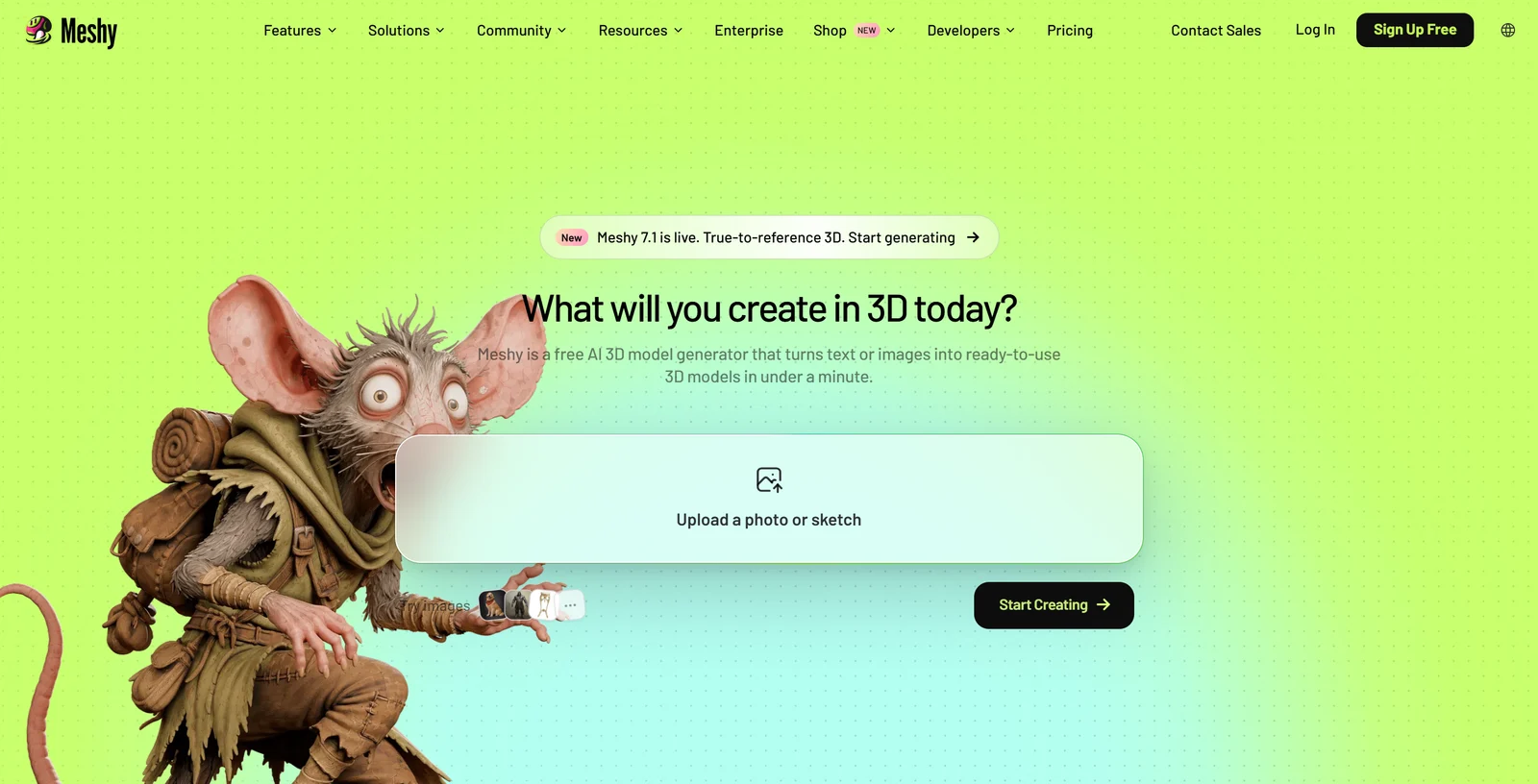
Meshy’s homepage, captured 22 October 2026. The “under a minute” claim is Meshy’s own.
1. What Meshy Is — and Who Is Behind It
Meshy describes itself as “a free AI 3D model generator that turns text or images into ready-to-use 3D models in under a minute.” Its web app has six modules — Image, 3D Model, 3D Printing, Animate, Scene and Video — plus a chat-based 3D Agent, and the same account works in the mobile apps, the API and the plugins.
The company. The service is provided by Meshy LLC, with a notice address in Sunnyvale, California. Its founder and CEO is Dr. Yuanming (Ethan) Hu, who holds a PhD from MIT and created the Taichi graphics programming language; his Taichi thesis won MIT EECS’s 2022 George M. Sprowls award. Before Meshy he founded Taichi Graphics, which, according to Chinese tech outlet QbitAI, raised a $50M Series A in 2022. Another Chinese outlet, 智东西, reports that Meshy was founded in Beijing in 2021 and first operated as Taichi Graphics; Meshy’s own English materials date its start to 2023.
Funding and scale. On 21 July 2026 Meshy announced it had raised “nearly $400 million in a Series B round at a $1.5 billion valuation.” Meshy did not name the investors; 36Kr reported they include IDG Capital, Matrix Partners China and Monolith, alongside existing backers. In a September 2026 release Meshy said its annual recurring revenue had passed $100 million, that it has over 15 million registered users, and that more than 100 million models have been generated. These are company figures and unaudited. Independently, a16z’s October 2026 ranking of consumer AI apps by observed US card spending included Meshy.
Its models. Meshy-1 launched in October 2023; the current generation is Meshy 7 (August 2026), with Meshy 7.1 rolling out from 10 September 2026 as an image-to-3D upgrade. Meshy names game companies Nexon and NetEase Games, 3D-printing brands Bambu Lab, Creality, Elegoo and FlashForge, and Hugo Boss among its customers and partners.
2. Who Meshy Is For — and Who It Is Not For
It fits you if:
- You are an indie game developer who needs props, characters or placeholders quickly
- You 3D print and want to turn a sketch, a photo or an idea into a printable figure
- You are a 3D artist who wants a textured base mesh to refine in Blender, ZBrush or Maya
- You teach or learn 3D and want results without modelling skills first
- You are a developer adding text- or image-to-3D to your own product
Look elsewhere if:
- You need clean, animation-ready topology straight out of the generator — game developers report dense meshes and weak skinning
- You need dimensionally precise parts — in an independent test, a lettered 25 mm cube came out 2.918 mm wider in one dimension than the other
- You want a contractual promise that your inputs stay out of AI training — the Terms permit training on all non-Enterprise data, and we found no opt-out in Meshy’s published documents
- You want to try paid features before paying — there is no free trial of paid plans
3. Image to 3D and Text to 3D
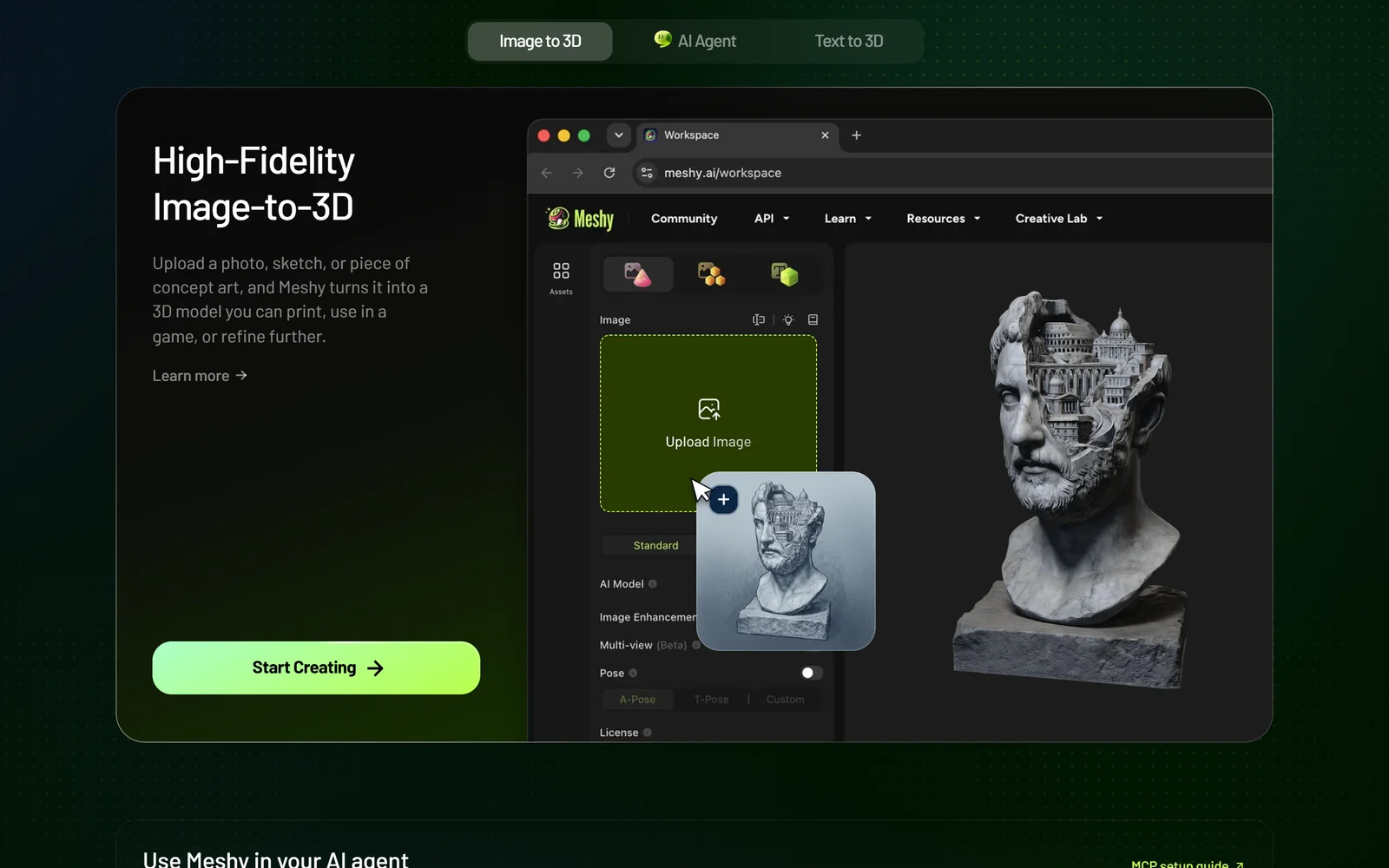
Image to 3D in Meshy’s web workspace, as shown on its homepage.
Image to 3D is Meshy’s flagship. It accepts PNG, JPG or WEBP files up to 20 MB, and the newest model, Meshy 7.1, focuses on matching the shape of your reference closely. A generation costs 20 credits at Standard quality or 25 at Ultra 2K or 4K; Ultra 2K is the default on paid plans other than Enterprise, so a default generation costs 25 credits. Meshy says its Ultra 4K mode builds geometry at 4096³ with raw meshes of up to 80 million triangles, and claims no other model works at that resolution — a vendor claim we could not test. Meshy itself admits two weaknesses of Meshy 7: thin strands of hair fuse into clumps, and exactly repeating structures, such as the floors of a building, drift.
On paid plans you can also feed up to four views of the same object (Multi-view), or turn up to 10 images into 10 models at once (Batch). Anyone registered can generate with Meshy 7.1, but downloading 7.1 models requires a subscription.
Text to 3D is more limited. In the web app it offers Meshy 6 (20 credits) and Meshy 6 Lite (10 credits) only — Meshy says Meshy 7 will not come to Text to 3D, and points users to the 3D Agent instead. The API is different: since 18 September 2026 it accepts Meshy 7.1 for Text to 3D. Text to 3D produces an untextured mesh, which you then texture as a separate step.
The 3D Agent (beta) is a chat interface that plans and runs these steps for you. It has been on the free plan since September 2026 and, by default, asks for approval before spending credits. 3D Printing Industry’s independent review called it Meshy’s strongest feature.
4. Textures, Topology, Rigging and Animation
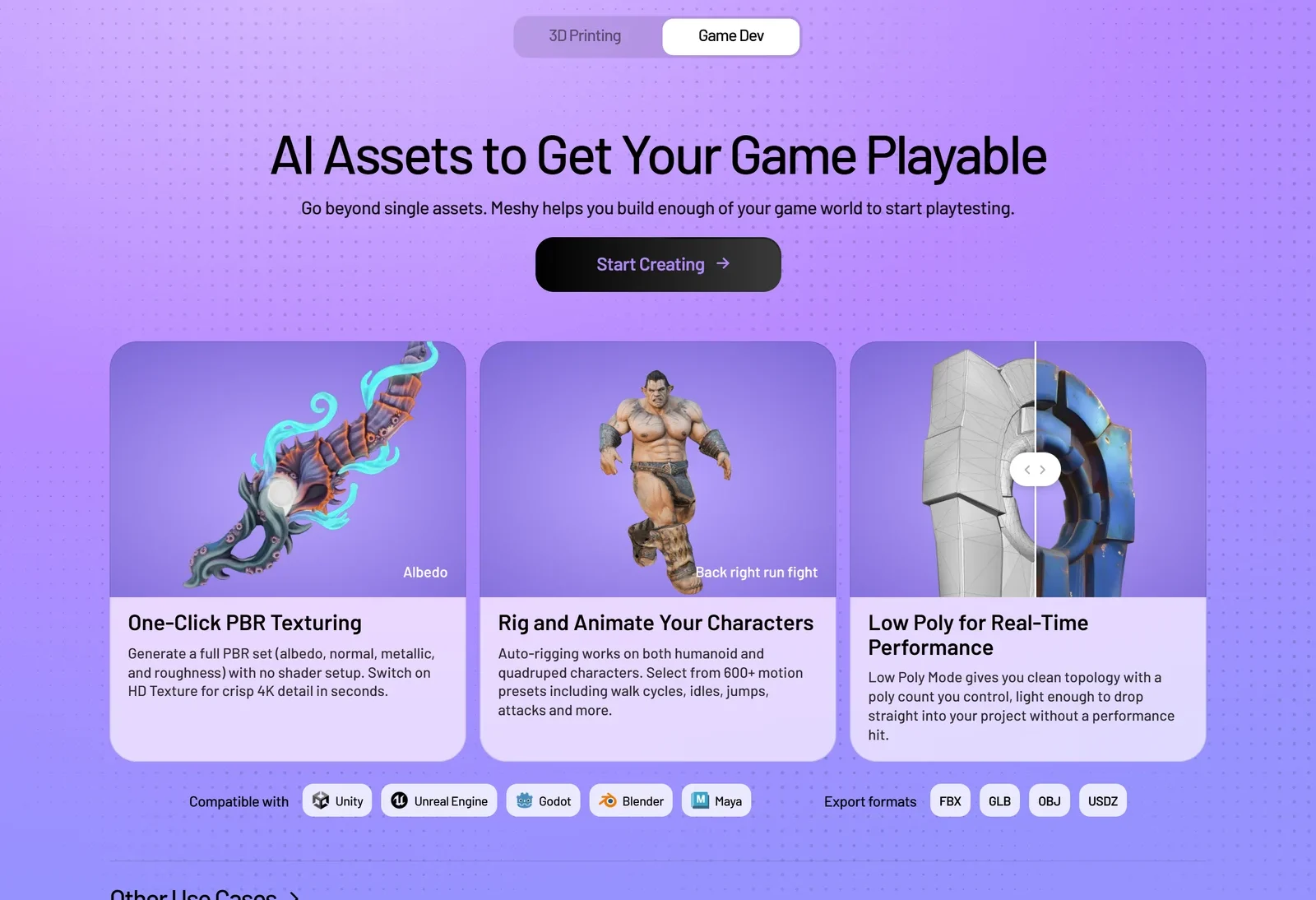
Meshy’s game-development pitch: textures, rigs and low-poly models in one place.
- AI Texturing paints a full PBR set (albedo, normal, metallic, roughness) from a prompt or a reference image, on Meshy models or your own FBX, OBJ, STL or glTF files up to 100 MB. It costs 10 credits, or 15 at 8K; 4K and 8K need a paid plan.
- Remesh lets you set a target polycount and costs no credits in the web app. Free accounts are limited to a 10K target; other targets, from 3K up to custom values of 100–300,000 polygons, need a paid plan.
- Smart Topology creates a game-ready low-poly version with 100–15,000 polygons for 5 credits, split into parts.
- Rigging is free in the web app for humanoids and four-legged characters, with a Smart Rig beta for other shapes (GLB only, no animation library).
- Animation draws on a library Meshy describes as 600+ presets for humanoids. A handful are free — Meshy’s pricing table lists 20 on the free plan — and the rest need a paid plan.
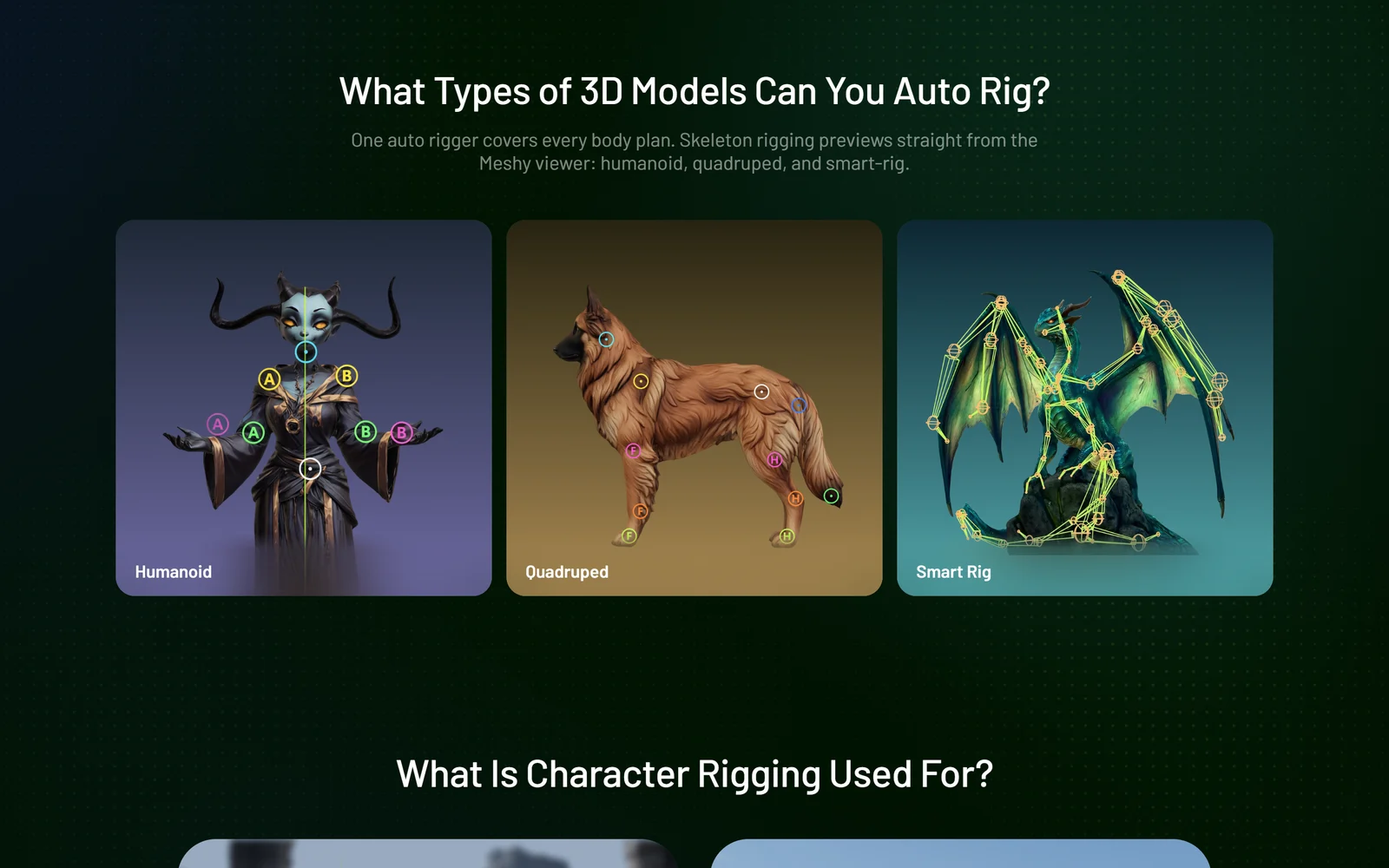
Meshy’s three rig types: humanoid, quadruped and Smart Rig (beta).
Exports come in eight formats — GLB, FBX, OBJ, USDZ, STL, BLEND, 3MF and DXF — with animated models in FBX, GLB or USDZ. Plugins and bridges send models straight into Blender, Unity, Unreal Engine, Godot, Maya, 3ds Max, ZBrush, Cascadeur, Omniverse and Roblox, but only from the Pro plan up.
How production-ready is it? This is where opinions split. On Reddit, game developers often describe Meshy as fine for placeholders and 3D printing but criticise its topology and skinning; one wrote that “the skinning is completely useless, and the rigging does the job.” Under Meshy’s own Meshy 7 launch post, users reported very dense meshes — one cites over 1.5 million triangles — and arms tilted outward in auto-rigged animations. 3D Printing Industry found the default output “consistently produced more faces than necessary,” with OBJ exports of 96–127 MB. Plan on remeshing, and on cleanup in a 3D tool for anything that will be animated or shipped.
5. Meshy for 3D Printing
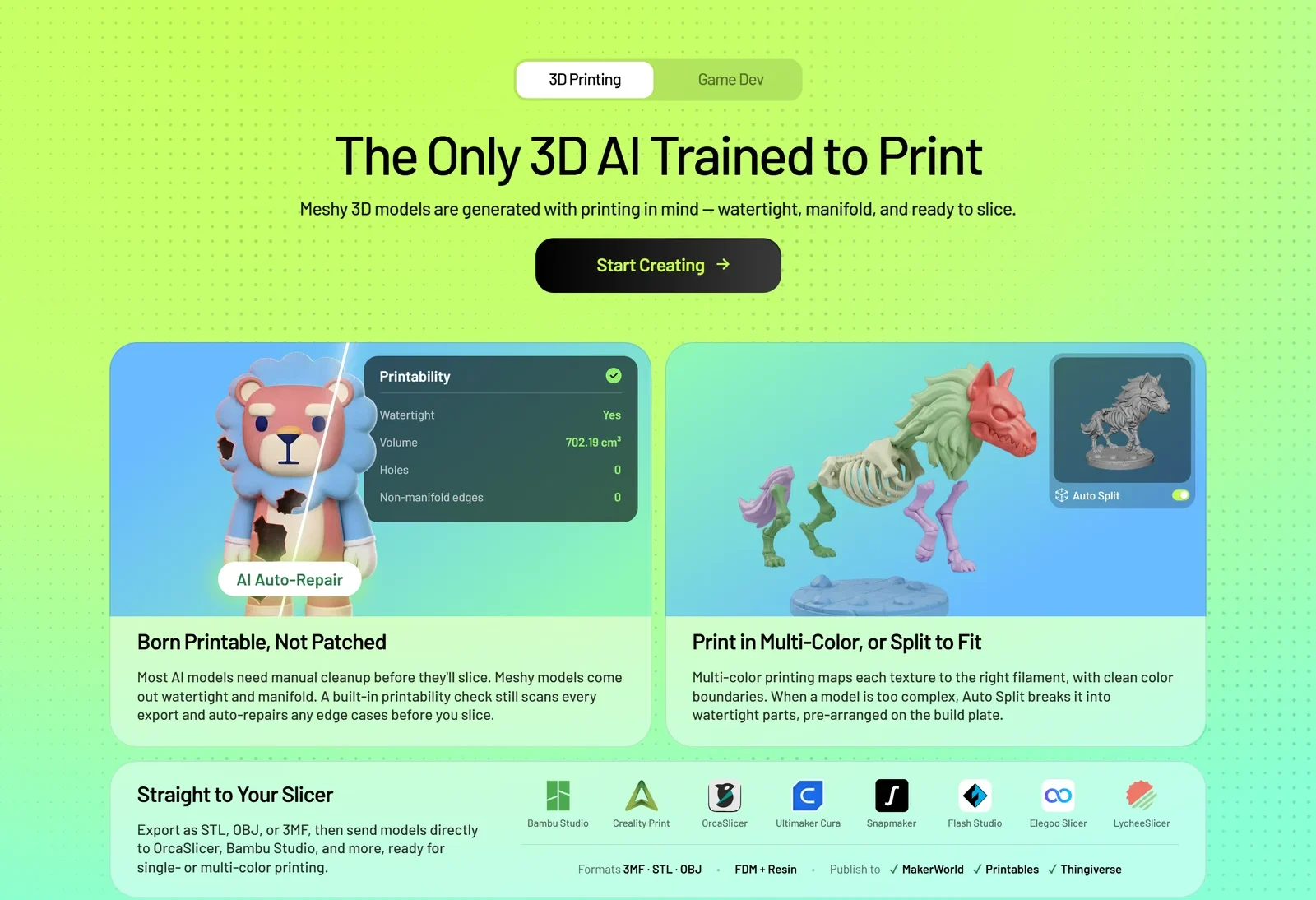
Meshy’s 3D-printing claims on its homepage, captured 22 October 2026.
Meshy markets itself heavily to 3D-printing hobbyists:
- A Printability check and a “Make Printable” repair (10 credits; paid for Meshy-generated models)
- Auto Split (paid, 10 credits) breaks complex models into parts, and multi-colour 3MF export keeps up to 16 colours
- Send to Printer (Pro and above) opens models directly in Bambu Studio, OrcaSlicer, Creality Print, Cura, Lychee and other slicers
- An optional print-and-ship service through a third-party manufacturer, and an integration with Formlabs’ Form Now service
Read the claims carefully. Meshy’s homepage says its models come out “watertight and manifold,” while its own documentation says they can be print-ready “but they need some post-processing first.” In 3D Printing Industry’s tests, Bambu Studio flagged non-manifold edges on a model that Meshy’s printability check had passed, and a lettered 25 mm cube came out 2.918 mm wider in one dimension than the other — though a plain cube was within 0.008 mm. The reviewer’s verdict: good for concept work, not for precise parts. 3D-printing users on Reddit similarly call results hit-or-miss, with multi-colour the weakest part.
6. Pricing — Plans, Credits and the Fine Print
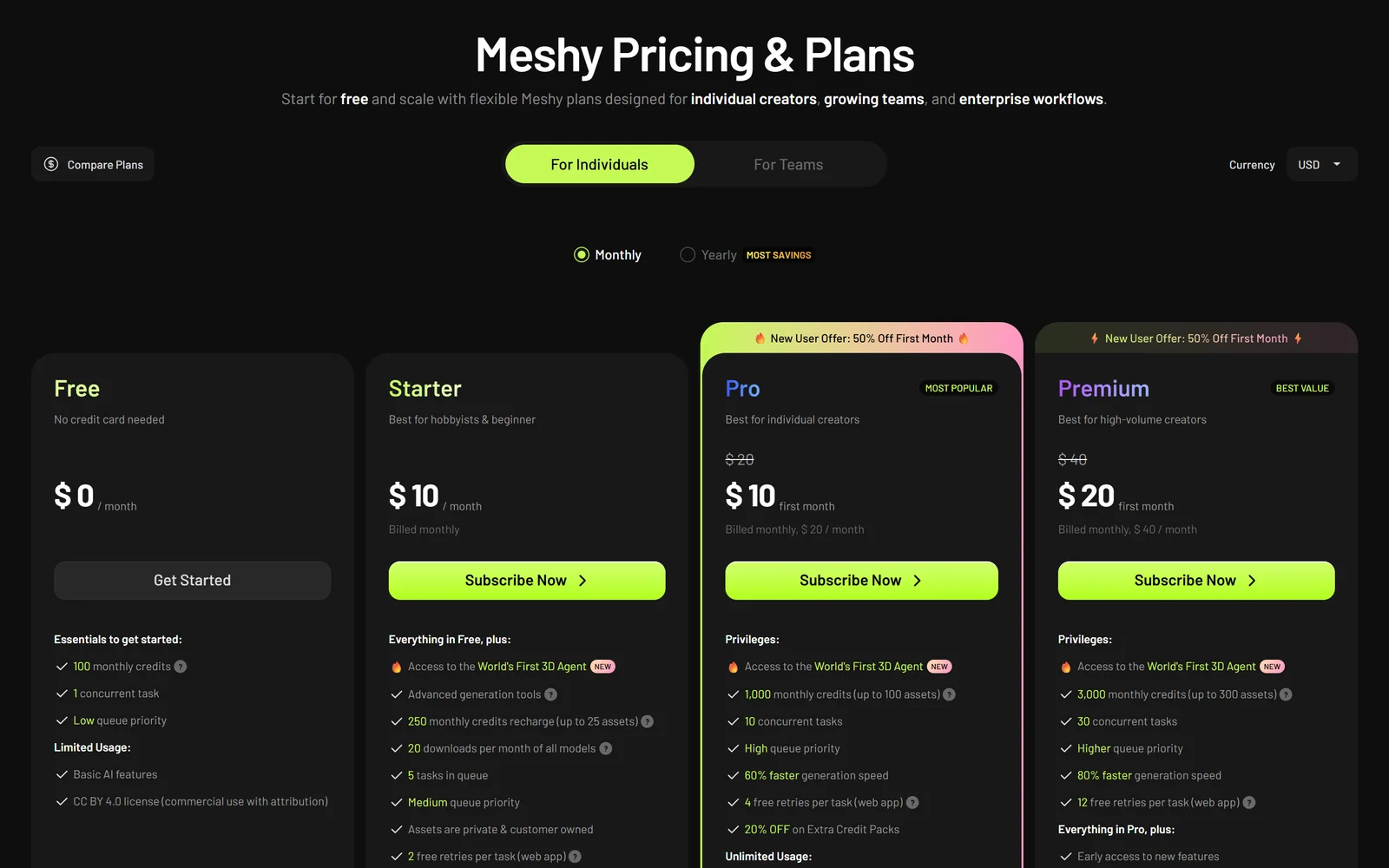
Meshy’s plans in USD as shown to a visitor in Vietnam on 22 October 2026. Starter appears only in some countries.
Meshy shows prices in your local currency, with a switch for USD and EUR. In US dollars, as of 22 October 2026:
| Plan | Price | Credits / month | Key limits and extras |
|---|---|---|---|
| Free | $0 | 100 | 1 task at a time; pricing page lists 10 Meshy 6 Lite downloads/mo; CC BY 4.0; no API |
| Starter | $10/mo (some countries only) | 250 | 20 downloads a month; private, customer-owned models; no API |
| Pro | $20/mo (50% off 1st month advertised) | 1,000 | Unlimited downloads; private licence; 10 concurrent tasks; API, plugins and MCP |
| Premium | $40/mo (50% off 1st month advertised) | 3,000 | 30 concurrent tasks; more free retries; early access to new features |
| Ultra | $100/mo (list price) | 8,000 | Not offered where Starter is; per Meshy’s site code, other countries get it instead |
| Studio | From $70/mo + $10 per extra seat | 5,500 shared (1X) | Team workspace and shared credits; 3X and 5X packages at $210 and $350 |
| Enterprise | Custom | Custom | SAML SSO, multiple workspaces, permanent API asset retention, no training on your data |
Ultra’s price comes from Meshy’s plan guide and page data rather than a rendered price card, and Meshy’s own sources disagree on its credits (8,000 on the pricing page, 10,000 in one help article). On 22 October 2026 Meshy’s yearly cards showed a “New User: 20% Off” offer — Pro, for example, was $192 billed for the first year — and Meshy does not state the renewal price; the yearly list price is simply 12 times the monthly price. Prices exclude VAT or GST, which is added at checkout.
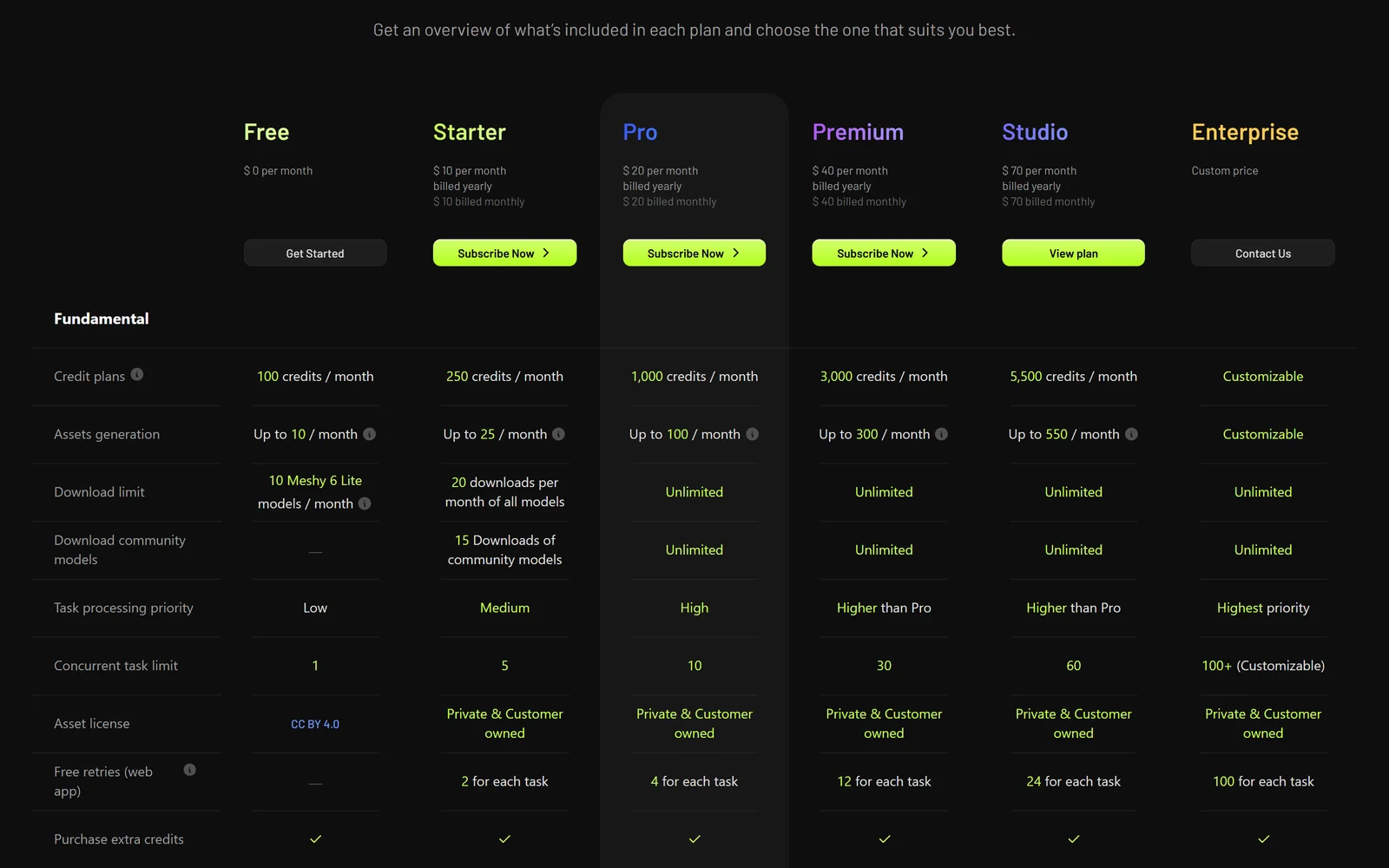
The plan comparison table: note the CC BY 4.0 licence on Free.
How far credits go
Credit costs are the same on every plan. In the web app, a Meshy 6 model costs 20 credits and texturing it costs 10 more, so a textured model is about 30 credits — by our arithmetic, roughly 33 a month on Pro’s 1,000 credits, fewer if you retry. Meshy’s “up to 100 assets” figure for Pro assumes cheaper generations. Paid plans include a few free retries per task in the web app, and remeshing and rigging there cost nothing.
Monthly credits do not roll over: on reset your balance is topped up to the plan allowance, not added to it, and yearly subscribers still receive credits month by month. Subscribers can buy extra credit packs at a discount, but the rules on how long purchased credits last are inconsistent — the Terms say they expire after a year, while the pricing FAQ says they don’t.
Billing rules to read first
- No free trial of paid plans. The free plan is the trial. Meshy advertises 50% off the first month of Pro or Premium for new subscribers and says it is applied automatically at checkout — check the price before you pay. Promotions cannot be combined and do not apply to PayPal payments.
- Refunds are narrow. A subscription charge can be refunded only if you ask within 5 days, have used 100 credits or fewer, and have downloaded no models. Credit packs are non-refundable, and an approved refund cancels the subscription.
- Cancelling in your account stops auto-renewal; the plan stays active to the end of the period, with no refund. Models made while subscribed stay private and downloadable. Meshy’s Terms are inconsistent here — one section allows self-service cancellation, another asks for written notice 30 days before the term ends — so cancel early and keep the confirmation. Annual subscribers get a renewal notice 30 days before renewal.
- Check your billing period at checkout. Several Trustpilot reviewers say they were charged for a year when they expected a month, or that a promotional price was not applied.
- Students and educators can apply for an education plan; Meshy’s help centre lists Pro at $5.99 a month for 13 months for approved students.
Free plan · 100 credits a month
Turn your first sketch into a 3D model
Test Image to 3D and the 3D Agent on the free plan, then move to Pro — new subscribers get 50% off the first month — when you need private models and unlimited downloads.
Try Meshy free
7. The Meshy API, Plugins and MCP
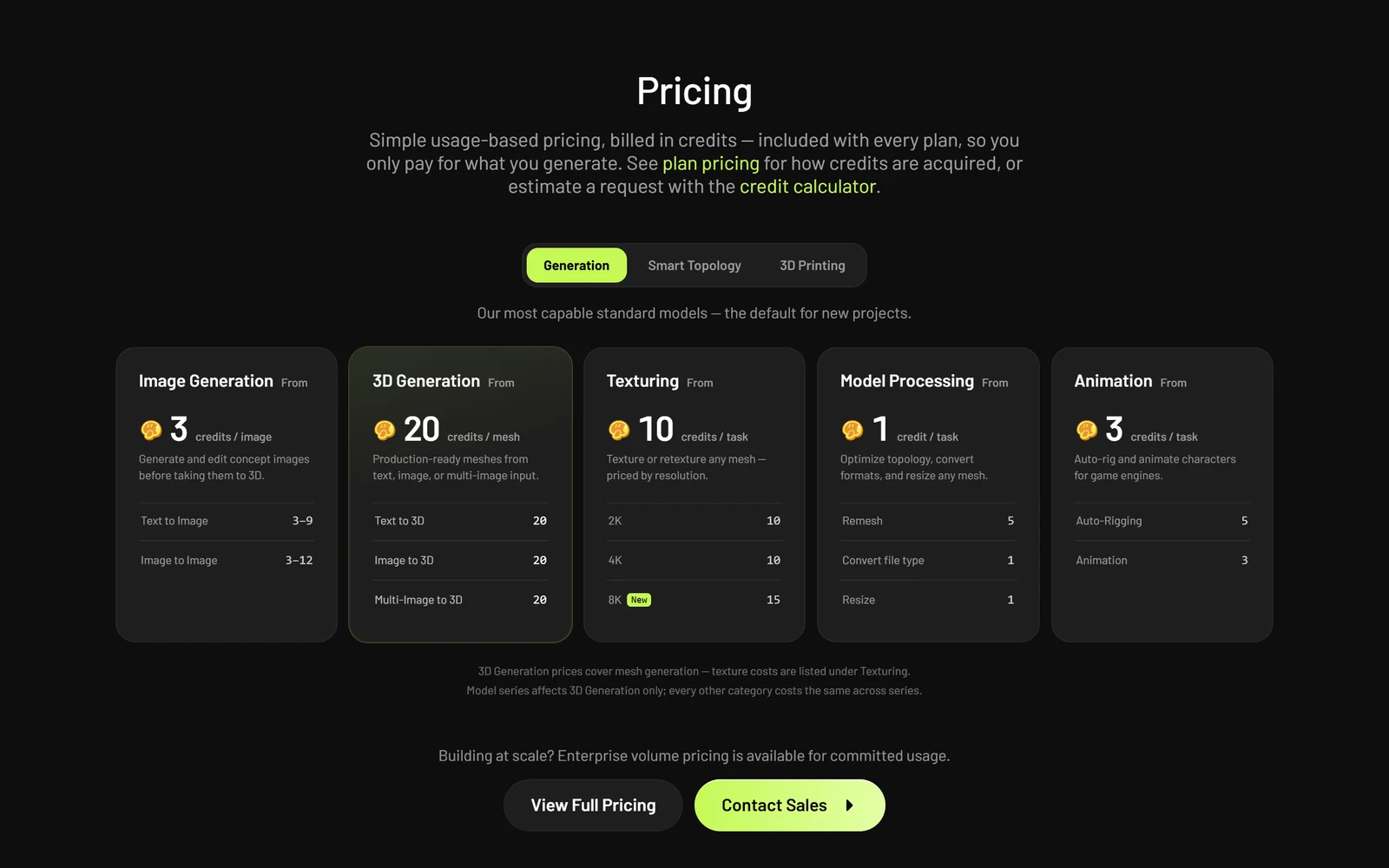
API costs are charged in the same credits as the web app.
The Meshy API is a REST API billed in the same credits as your plan: 20 credits for a mesh, 10 for 2K or 4K textures (15 at 8K), 5 for rigging and remeshing, 3 per animation. Every task is asynchronous — you get a task ID and poll, stream or use a webhook for the result. API keys require a paid plan (Pro and up), and outside Enterprise, Meshy keeps API-generated files for at most 3 days according to its docs and Terms (its pricing page says 14 days on Studio), so download results promptly. Meshy also offers an MCP server on Pro and above, which it says works with Claude Code, Cursor, Codex and other MCP clients, plus plugins for the main 3D tools.
8. Ownership, AI Training, Privacy and Security
Who owns your models. This is the most important difference between free and paid:
- On the free plan, Meshy’s Terms say Meshy owns the outputs and licenses them to you under CC BY 4.0 — you may use them commercially, but must credit Meshy (for example, “Model created with Meshy – CC BY 4.0 License”). Meshy’s help centre muddies this: one article says free generations are “generally limited to personal, non-commercial use.”
- On paid plans, you own your outputs “to the extent possible under applicable law” and can keep them private. According to Meshy’s help centre, models you made while subscribed keep those rights after you cancel or downgrade.
- Anything you publish to the Meshy Community is released publicly — models under CC0 (public domain) — and Meshy keeps a perpetual licence to it. Publishing is optional; models are private by default, but anyone with a share link can view them.
- The Terms warn that outputs may not be unique, may not qualify for IP protection, and that other users with similar inputs may get similar models.
AI training. Section 2.9 of the Terms says Meshy “may use Customer Inputs and Customer Outputs … from non-Enterprise Customers to train, validate, test, or improve Services unless otherwise agreed to in the Order.” That covers every self-serve plan, paid plans included, and we found no opt-out in the Terms, Privacy Policy or help centre. Meshy’s marketing says otherwise in places — its pricing FAQ says it won’t use data for training “without your consent” and its API page says API data is “never used for training” — but the Terms are the binding document. Only Enterprise content is excluded. Meshy says its own training data is licensed or purchased, not scraped; we could not verify that.
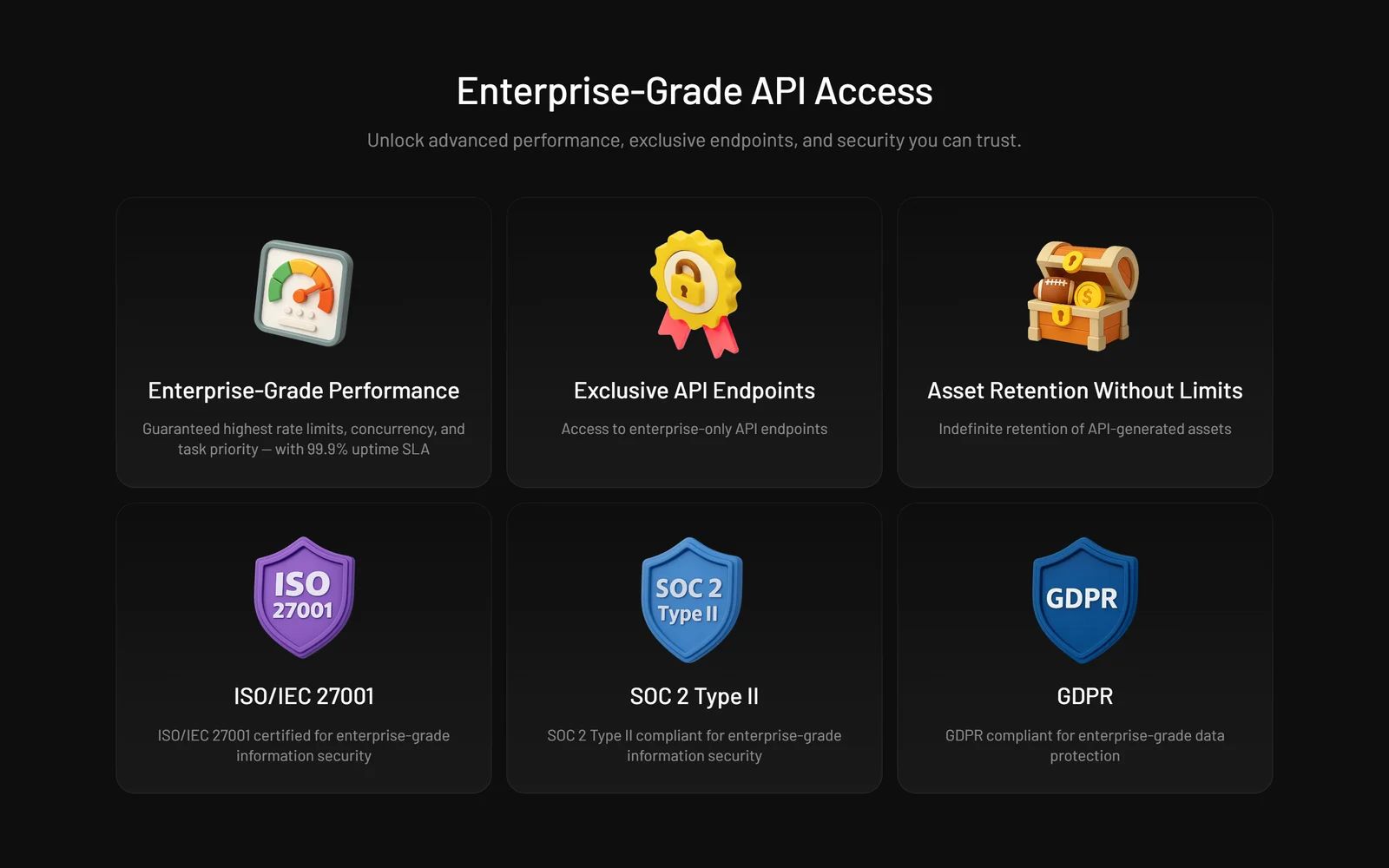
Meshy’s enterprise security claims on its API page. The audit documents are available only on request.
Security. Meshy’s trust centre (on Drata) lists a SOC 2 Type 2 report and an ISO 27001:2022 certificate, but both are available only on request — no auditor, scope or certificate number is public — and GDPR compliance is self-declared. Data is hosted on AWS in the United States, and the listed sub-processors include OpenAI and Fal.ai. The Terms mention a Data Processing Addendum, but the DPA page returned a 404 error when we checked.
The contract. Meshy LLC’s Terms (updated 19 September 2026) are governed by California law, with disputes going to binding arbitration in San Francisco County and a class-action waiver, and no opt-out from arbitration. Meshy’s liability is capped at what you paid or owed in the previous 12 months (except for gross negligence or wilful misconduct) — by our reading, effectively zero on the free plan. Users must be at least 14, and under-18s need a parent’s permission. Outputs may carry AI-identifying metadata that you must not remove.
9. What Users Say
| Source | Rating | Reviews | Note |
|---|---|---|---|
| Trustpilot (22 Oct 2026) | 4.7 | 3,871 | 84% five-star, 3% one-star; Meshy invites reviews |
| App Store (US) | 4.8 | 179 | iPhone app, launched 2026 |
| Google Play (US) | 4.5 | 698 | 100K+ downloads |
| Product Hunt | 4.9 | 22 | 3 launches; about 1.8K followers |
How to read the 4.7. Meshy is on a paid Trustpilot plan and asks customers to review it. In our snapshot of the 100 most recent English reviews (6–22 October 2026), 85 carried Trustpilot’s “Redirected” label — meaning the reviewer arrived through a link on Meshy’s website — and all 85 were 3–5 stars. Of the 14 organic reviews, 10 were one-star. Meshy also offers credits to users who review it on G2. None of this means the reviews are fake, but in our October 2026 snapshot recent reviews lean heavily on invited reviewers, and the organic minority is far more negative.
What people praise: speed, an intuitive interface, how quickly a photo or sketch becomes a textured model, good textures, and the 3D Agent.
What people criticise:
- Billing. Organic one-star Trustpilot reviews allege charges continuing after cancellation, yearly charges where a monthly plan was expected, promotional prices not applied, and refunds refused. A Reddit user reported paying for Pro for seven months while the account showed the free plan; Meshy’s account responded and the user said only the latest charge was refunded.
- Mesh quality for games. Dense meshes, “triangle soup” and weak skinning; several r/aigamedev commenters prefer Tripo for mesh quality and price, and Meshy for textures.
- Printing. Non-manifold or unprintable meshes and poor handling of text and logos.
- The paywall. Downloads require a subscription for most models, and credits are spent on failed retries.
- Support. An AI-chatbot-first support channel; on Trustpilot, Meshy has not replied to recent negative reviews.
A note on YouTube. Much high-reach Meshy video content is sponsored or carries Meshy affiliate links, and critical comparisons are often commercial too: one widely viewed “Tripo vs Meshy” video is flagged as paid promotion and carries a Tripo referral link. Independent tests, such as 3D Printing Industry’s, are the more useful guide.
10. Alternatives Worth Knowing
Prices are from each vendor’s own pricing page as of 22 October 2026. Credits are not comparable between tools, so compare what each plan says it produces.
| Tool | Free option | Paid from | What it does best | Your content and AI training (vendor’s documents) |
|---|---|---|---|---|
| Meshy | 100 credits/mo; CC BY 4.0, credit Meshy | $20/mo Pro (1,000 credits) | Image and text to 3D, texturing, rigging, print prep, plugins | Terms allow training on all non-Enterprise inputs and outputs |
| Tripo AI | 200 credits/mo; public, non-commercial | $20/mo Pro (3,000 credits) | Image and text to 3D with auto-rigging; pay-as-you-go API at $0.01/credit | Paid users: Tripo “will not use Inputs and Outputs as training data” |
| Rodin (Hyper3D) | Pay per result; exports from legacy models | $30/mo Creator ($24/mo yearly) | Pay-per-result free tier; API on the $120/mo Business plan | Terms allow use to improve services and for research; API data kept 7 days |
| Sloyd | 1 AI generation a day, personal use | $15/mo Plus ($12.50/mo yearly) | Unlimited text and image to 3D on Plus; prepaid API | Commercial 3D printing needs a custom licence |
| 3D AI Studio | — | $19/mo Basic ($12/mo yearly) | One subscription for several generators, marketed as including Meshy | API files deleted within 24 hours |
| Spline | No AI 3D on the free plan | $15/mo Hobby ($12/mo yearly) | Interactive web 3D design with AI generation built in | Terms effective 29 Oct 2026 allow training on de-identified data |
| Kaedim | — | Secret Sauce 3D $25/mo; studio custom | AI generation plus artist review for production assets | Says customer IP is not used to train AI models |
| Hunyuan3D 2.1 (open weights) | Free to run yourself | Your own GPU (about 29 GB VRAM) | Local image-to-3D with PBR textures | Runs on your hardware; licence excludes the EU, UK and South Korea |
| TRELLIS.2 (open source) | Free, MIT licence | Your own GPU (24 GB or more) | Local image-to-3D research model from Microsoft | Runs on your hardware; its nvdiffrast dependency is licensed non-commercial |
Two older names have dropped out: Common Sense Machines’ websites no longer resolve, and Luma’s former Genie page now redirects to a homepage with no 3D product on its pricing or API pages.
Where Meshy wins: no rival here covers as much of the workflow in one place — image and text to 3D, PBR texturing, free remeshing and rigging in the web app, an animation library Meshy puts at 600+ motions, multi-colour 3MF and Auto Split for printing, mobile apps, and plugins for most major 3D tools and game engines.
Where it loses: Tripo’s Pro plan costs the same $20 a month but includes 3,000 credits — about 200 models by Tripo’s estimate, against Meshy’s “up to 100 assets” — and its Terms promise not to train on paid users’ content; several r/aigamedev commenters also prefer Tripo’s meshes. Kaedim adds human artists for production-grade assets, and Hunyuan3D or TRELLIS let you keep everything on your own hardware if you have a powerful GPU and can live with their licence limits.
11. Pros and Cons
Where Meshy is genuinely strong
- A real free plan with 100 credits a month
- One workspace for image and text to 3D, textures, topology, rigging, animation and print prep
- Free remeshing and rigging in the web app
- Eight export formats for games, AR and printing
- Paid models are yours, private, and keep their rights after cancelling
- Plugins, API and MCP for real pipelines
- Strong review scores: 4.7 on Trustpilot, 4.8 on the App Store
Where Meshy falls short
- Free models belong to Meshy under CC BY 4.0, and the pricing page lists only 10 Meshy 6 Lite downloads a month
- Training allowed on all non-Enterprise data under the Terms, and we found no opt-out in the published documents
- No trial of paid plans and a 5-day, low-usage refund window
- Dense default meshes and weak skinning for production games
- Print-readiness overstated in marketing
- Billing complaints about cancellations and promotions
- Contradictory pages on downloads, retention and training
12. Frequently Asked Questions
What is Meshy?
Meshy is an AI 3D model generator. It turns a photo, sketch, concept art or text prompt into a 3D model, and includes tools to texture it, reduce its polycount, rig and animate characters, prepare models for 3D printing and export them to game engines and 3D software. It runs in the browser and on iOS and Android, with an API and plugins for developers.
How much does Meshy cost?
Meshy has a free plan with 100 credits a month. In US dollars, Pro costs $20 a month for 1,000 credits, Premium $40 for 3,000 and Ultra $100 for 8,000 (per the pricing page; one help article says 10,000), while the Studio team plan starts at $70 a month for 5,500 shared credits plus $10 per extra seat. A $10 Starter plan is offered in some countries. New subscribers get 50% off the first month, and prices exclude tax.
Is Meshy free?
Yes, there is a free plan with 100 credits a month, enough for a few models. But on the free plan Meshy owns the outputs and licenses them to you under CC BY 4.0, so you must credit Meshy, and the pricing page lists only 10 downloads a month of Meshy 6 Lite models. Newer Meshy 7 models need a subscription to download.
Can I use Meshy models commercially?
On paid plans you own your models to the extent the law allows and can use them commercially and keep them private. On the free plan, Meshy's Terms license models under CC BY 4.0, which allows commercial use with credit to Meshy, although one help-centre article describes free generations as generally for personal use. Anything you publish to the Meshy Community is released under CC0.
Does Meshy use my uploads to train its AI?
Meshy's Terms (section 2.9) allow it to use inputs and outputs from all non-Enterprise customers, including paid plans, to train and improve its services, and we found no opt-out in its published documents. Some Meshy marketing pages say data is not used for training without consent, but the Terms are the binding document. Enterprise customers' data is excluded.
Are Meshy models ready for 3D printing?
Often, but not always. Meshy includes printability checks, a repair tool, Auto Split and direct sending to slicers, and its homepage says models are watertight and manifold. Its own documentation says models need some post-processing, and an independent test found non-manifold edges on a model Meshy's check had passed. Always check the model in your slicer before printing.
Can I get a refund from Meshy?
Only in narrow cases. Meshy refunds a subscription charge only if you ask within 5 days, have used 100 credits or fewer and have downloaded no models. Credit packs are non-refundable, cancelling does not trigger a refund, and an approved refund cancels the subscription. There is no free trial of paid plans, so test on the free plan first.
Does the link in this review give a discount?
No. Our link is a Meshy affiliate link and opens Meshy's normal website. You get the same offers as any other visitor, including Meshy's 50% discount on the first month for new subscribers. If you subscribe through it, Meshy may pay us a commission.
13. Final Verdict: Is Meshy Worth It in 2026?
Meshy is one of the most complete AI 3D tools available. For hobbyists, indie developers and educators, going from a sketch or photo to a textured, rigged or printable model in minutes is remarkable, and the free remeshing, free rigging, broad export formats and plugins make it more than a demo. Pro at $20 a month, with 50% off the first month advertised for new subscribers, is a fair price for unlimited downloads and private, customer-owned models.
The caveats are about production quality, rights and billing. Default meshes are dense, skinning and topology often need work, and printable output still needs checking in your slicer. Free-plan models belong to Meshy under CC BY 4.0, and the Terms allow training on every non-Enterprise user’s data. There is no paid trial, the refund window is five days with almost no usage, and billing complaints are the most serious theme in organic reviews.
Use it the smart way. Start on the free plan and test it with your own sketches or photos. Subscribe monthly first, check the billing period at checkout, and remember the 5-day refund window. Remesh or use Smart Topology before importing into a game engine, check every print in your slicer, and don’t upload anything confidential unless you are on Enterprise.
Choose something else if you need clean, animation-ready topology without cleanup, precise mechanical parts, or a contractual promise that your inputs won’t train the model.
Disclosure: This review is an independent assessment by TrackerTools and contains a Meshy affiliate link. If you subscribe through it, Meshy may pay us a commission; the link gives you no extra discount, and you see the same offers as any other visitor. All factual claims were verified against Meshy’s website, pricing page, help centre, developer documentation, blog, Trust Center, Terms of Use, Privacy Policy and press releases, plus Trustpilot, Product Hunt, the App Store, Google Play, Reddit, 3D Printing Industry, 36Kr, QbitAI, a16z and each competitor’s own pricing page, as of 22 October 2026. User numbers, revenue, funding details and performance claims are attributed to Meshy or the reporting outlet; we could not verify them independently.