
Scrimba Review 2026: Is It the Best Interactive Coding Platform? (Honest Deep Dive)
Selecting the right platform to learn software engineering often determines whether a aspiring developer completes their journey or abandons it mid-way. The online educational ecosystem has long been divided into two primary paradigms: passive video lectures on platforms like Udemy, Coursera, and YouTube-where students spend hours watching an instructor code without active participation-and text-heavy interactive sandboxes like Codecademy or freeCodeCamp, which can feel abstract and detached from real development workflows.
Scrimba emerged to challenge both paradigms with its proprietary interactive video format known as “Scrims.” The platform claims to eliminate the friction between watching someone code and writing the code yourself by turning every video lesson into a fully functional, browser-based editor. But with a paid Pro subscription model and an increasingly crowded edtech space, does Scrimba truly deliver on its promise for career switchers and modern developers?
Over the past four months, our editorial team conducted an exhaustive evaluation of Scrimba. We worked through its free introductory modules, completed extensive sections of the flagship Frontend Developer Career Path, tested the newly launched AI Engineer Path, and examined the Scrimba v2 platform upgrade. This review provides an objective, deep-dive analysis of Scrimba’s technology, curriculum quality, user experience, pricing structure, and practical job-readiness outcomes.
Quick verdict
1. What is Scrimba?
Scrimba is a specialized interactive learning platform founded in Oslo, Norway, by Per Harald Borgen and Sindre Aarsæther. Backed by Y Combinator, the company was established with a singular mission: to eradicate the notoriously high drop-out rates associated with self-paced online coding courses by reinventing how technical video content is delivered.
Unlike conventional learning management systems that serve static MP4 video files recorded from an instructor’s desktop, Scrimba developed a custom rendering architecture. This engine records code editor events, DOM modifications, cursor movements, and instructor audio in perfect synchronization. The result is a video lesson that is not a static video at all, but a live, running code environment operating natively inside the user’s web browser.
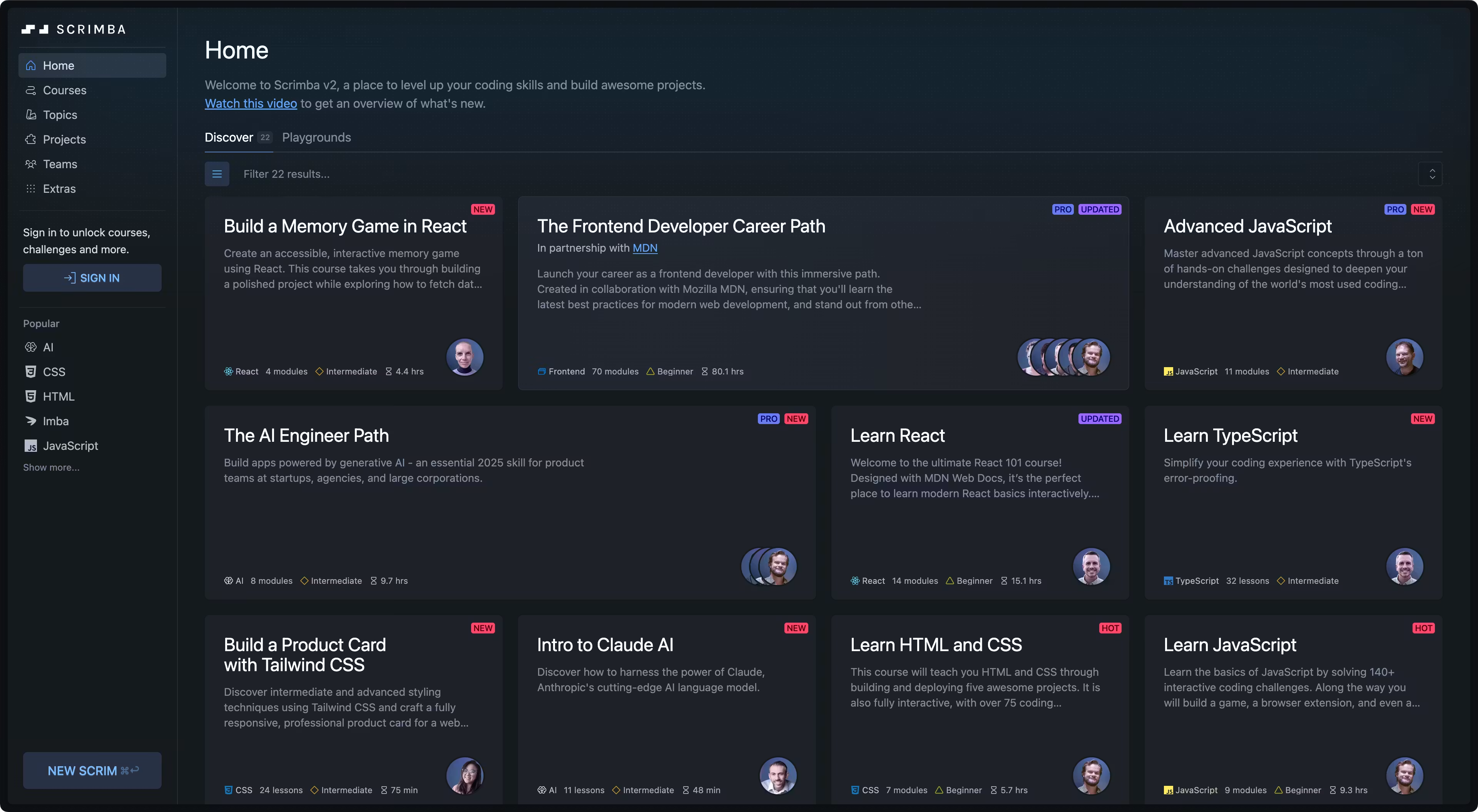
While Scrimba initially made its reputation by specializing strictly in core web development-HTML, CSS, JavaScript, and React-the platform has expanded significantly. Today, its catalog includes comprehensive full-stack engineering paths, UI design fundamentals for developers, and a forward-looking AI Engineer Path. You can explore the platform’s layout and test its free modules directly on the Official Scrimba Homepage.
By the numbers: 81.6h curriculum - 72+ courses - MDN endorsed - 100% interactive Scrims - 7-day money-back guarantee
2. Who should use Scrimba?
Understanding whether Scrimba fits your specific learning profile requires analyzing how your cognitive style aligns with its teaching methodology. The platform shines for specific learner profiles while being suboptimal for others.
Ideal fit for specific learner profiles
For career switchers with zero prior programming experience, Scrimba provides an exceptionally low-friction entry point. Traditional programming courses often derail beginners in the first chapter when attempting to install Node.js, configure terminal environment paths, or resolve local dependency conflicts. Scrimba bypasses this initial barrier entirely by embedding a complete development environment directly within the browser, enabling students to write and execute code within seconds of creating an account.
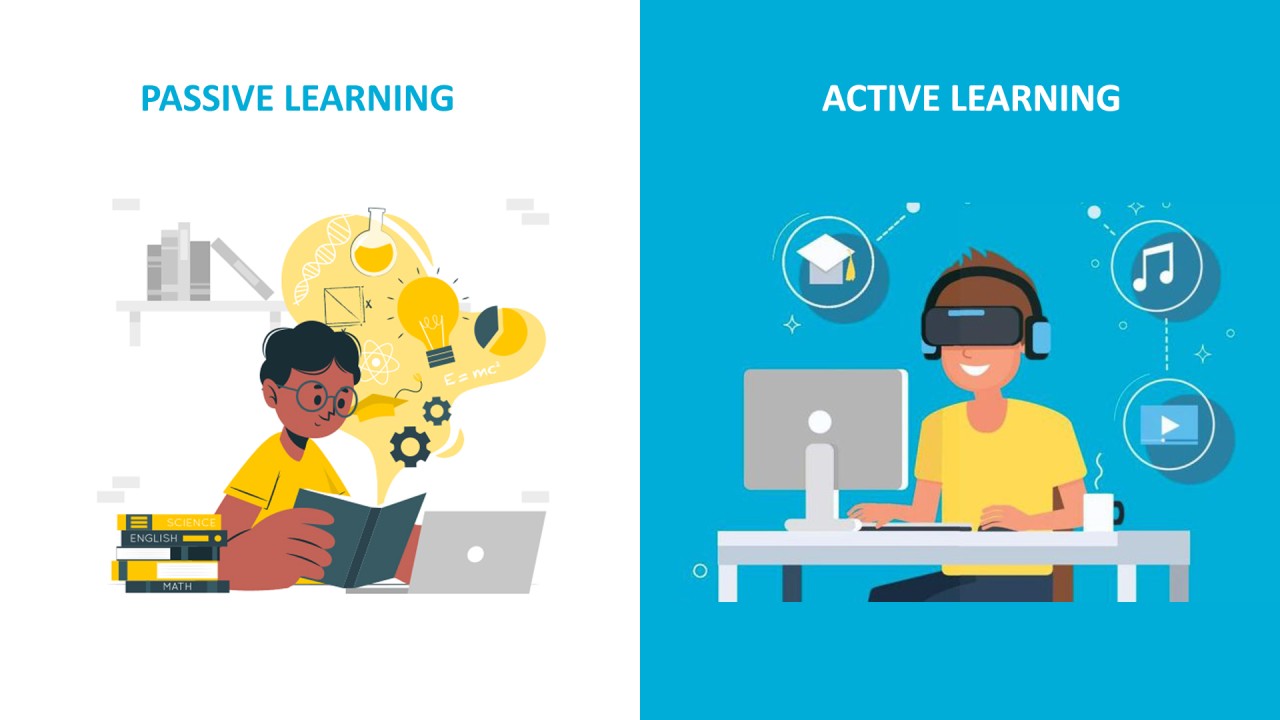
For visual and kinesthetic learners, Scrimba solves the ubiquitous problem of tutorial fatigue. Watching a 45-minute video lecture on YouTube or Udemy frequently leads to passive boredom and poor retention. Scrimba forces active participation by interspersing short explanations with instant coding challenges, compelling the brain to actively construct memory pathways rather than passively absorb video frames.
For aspiring Frontend and React specialists, Scrimba’s curriculum depth is virtually unmatched in the self-paced market. The Frontend Developer Career Path covers HTML, CSS Flexbox/Grid, modern ES6+ JavaScript, API integration, and React architecture in a structured sequence curated by industry veterans and verified by Mozilla MDN engineers.
Scenarios where alternative platforms excel
Conversely, Scrimba is not universally suitable for every engineering discipline. If your goal is to master Data Science, Machine Learning research, or quantitative analytics, Scrimba is not the right choice. Platforms like Coursera (specifically tracks offered by DeepLearning.AI or Stanford) or edX offer far deeper coverage of Python data structures, linear algebra, Pandas, and PyTorch.
Similarly, if you are focusing on enterprise backend systems built with Java, C# (.NET), Go, or Rust, Scrimba’s library will feel restrictive. The platform remains heavily anchored around the JavaScript, TypeScript, and modern Web ecosystem. Engineers seeking low-level system design or microservice architectures should look toward specialized platforms or official documentation.
3. How Scrim technology works
To appreciate why Scrimba feels fundamentally different from other educational platforms, it is necessary to examine the underlying mechanics of a “Scrim.”
Technical data streams under the hood
A Scrim is not a recorded video file. When an instructor creates a lesson on Scrimba, the recording tool logs three separate, lightweight data streams simultaneously:
- Audio Stream: High-fidelity voice narration nimbly noded to time markers.
- Event Stream: Microsecond-accurate recordings of every keyboard stroke, backspace, selection highlight, scroll position, and cursor movement.
- Workspace State: A complete JSON representation of the file directory, active tabs, and package dependencies.
When a student clicks play, Scrimba’s client-side runtime interprets these streams and replays the instructor’s actions inside an in-browser code editor powered by Microsoft’s Monaco Editor engine (the same core engine driving Visual Studio Code). Because the browser is rendering text characters and executing code locally rather than streaming heavy video pixels, network bandwidth requirements are minimal, and text displays with crisp vector sharp precision on screens of any resolution.
The cognitive power of “Pause and Edit”
The true pedagogical breakthrough of Scrimba occurs when a student pauses a lesson. Suppose an instructor like Bob Ziroll is demonstrating state updates in React. A student wonders: “What happens if I pass an object instead of an array to this state updater, or mutate the state directly?”
On traditional video platforms, testing that curiosity requires stopping the video, launching a local IDE, creating a project workspace, transcribing code line-by-line, and starting a local server-a process taking several minutes that disrupts learning flow.
On Scrimba, the student simply clicks anywhere on the code editor surface or presses the spacebar. The video instantly freezes, transforming into an active IDE. The student can modify variables, refactor functions, and observe immediate updates in the adjacent browser preview window. Clicking play automatically reverts or merges the code, allowing the instructor to continue smoothly.
Key takeaway: By collapsing the time gap between conceptual curiosity and practical code execution from minutes to seconds, Scrimba dramatically accelerates active recall and mental model formation.
4. Key courses and curriculum
Scrimba’s curriculum design prioritizes progressive skill acquisition over fragmented tutorial videos. Rather than presenting isolated topics, courses are arranged into comprehensive learning pathways.
The Frontend Developer Career Path
The crown jewel of Scrimba’s library is the Frontend Developer Career Path, representing roughly 81.6 hours of interactive instruction spread across dozens of modules.
The journey begins with foundational HTML5 and CSS3, advancing quickly into complex layout architectures using CSS Flexbox and CSS Grid. Rather than treating CSS as an afterthought, Scrimba places heavy emphasis on responsive design patterns and mobile-first layouts.
The JavaScript section represents the core of the curriculum. Students move from elementary control flow and functions into advanced DOM manipulation, event handling, ES6+ syntax (destructuring, rest/spread operators, array methods), asynchronous JavaScript (Promises, Async/Await), and working with REST APIs.
Tooling modules introduce students to essential software engineering practices: using Git for version control, managing remote repositories on GitHub, navigating the command-line interface, and translating UI designs directly from Figma files into pixel-perfect web code.
The React track is widely considered one of the best available online. Taught primarily by Bob Ziroll, it covers component hierarchy, props, state management, event handling, side effects with useEffect, custom hooks, conditional rendering, and client-side routing using React Router v6.
Partnership with Mozilla Developer Network (MDN)
Demonstrating its commitment to educational rigor, Scrimba collaborated directly with technical experts from Mozilla Developer Network (MDN) to audit and validate the Frontend Developer Career Path.
MDN reviewers verified that all code examples, architectural patterns, and accessibility guidelines conform strictly to modern W3C web standards and contemporary JavaScript best practices. This accreditation guarantees that students learn modern, industry-standard code rather than obsolete techniques.
| Course Name | Duration | Access Tier | Core Skills Covered | Target Learner |
|---|---|---|---|---|
| Frontend Developer Career Path | ~81.6 Hours | Pro | HTML, CSS, JS ES6+, React, Git, Figma, APIs | Career switchers seeking frontend skills |
| Learn React for Free | ~12 Hours | Free | React Components, State, Props, Forms, APIs | Developers with JS knowledge learning React |
| Learn JavaScript | ~15 Hours | Free / Pro | JS Syntax, DOM Manipulation, Functions, Arrays | Beginners building programming logic |
| The AI Engineer Path | ~11.4 Hours | Pro | Vercel AI SDK, Langbase, RAG, AI Agents, LLM APIs | Web developers adding AI capabilities |
| UI Design for Developers | ~5 Hours | Pro | Color Theory, Typography, Spacing, Figma Layouts | Coders wanting clean UI design skills |
| Learn HTML & CSS | ~10 Hours | Free | HTML5 Elements, CSS Selectors, Box Model | First-time learners starting web dev |
5. Scrimba v2 and AI path
The evolution of Scrimba reached a major milestone with the release of Scrimba v2, a comprehensive platform modernization that expanded the tool’s capabilities beyond structured course delivery.
Next-generation capabilities in Scrimba v2
The v2 platform architecture introduced an Open Creator Platform, transforming Scrimba from a closed course vendor into a community publishing platform. Independent educators and developers can now author, record, and publish custom Scrims using Scrimba’s proprietary recording tools.
In addition, Scrimba v2 features a fully realized Stand-Alone Web IDE. The editor interface mirrors desktop development environments, complete with multi-file tab management, an integrated terminal emulator, enhanced preview rendering, and improved workspace snapshot persistence. Students can launch blank sandboxes to build personal projects from scratch without being tied to a specific lesson structure.
Practical application in the AI Engineer Path
Recognizing the shift toward AI-assisted software development, Scrimba launched The AI Engineer Path (~11.4 hours of interactive instruction).
It is vital to understand the scope of this path: it is designed specifically for application-level web developers, not data science researchers. You will not write Python scripts to train neural networks or derive loss functions. Instead, the curriculum focuses on integrating modern Large Language Model (LLM) APIs into web applications.
Students learn to work with OpenAI, Anthropic Claude, and open-source models via API endpoints. The path covers building Retrieval-Augmented Generation (RAG) systems to query custom vector databases, implementing stream processing with the Vercel AI SDK, orchestrating autonomous AI Agents, and exploring emerging protocols like the Model Context Protocol (MCP).
For JavaScript and TypeScript engineers wanting to build modern AI-powered applications, this path offers one of the most efficient, practical learning tracks available.
6. Scrimba vs popular competitors
Evaluating Scrimba requires positioning it against rival educational platforms across content delivery, environment setup, cost structure, and community support.
| Evaluation Criteria | Scrimba | Codecademy | Udemy | freeCodeCamp |
|---|---|---|---|---|
| Content Delivery | Interactive Scrims (Edit video code) | Split-screen text + sandbox | Static MP4 video | Text tutorials + challenge runner |
| Environment | In-browser Monaco editor | In-browser sandbox | Local IDE setup required | In-browser test runner |
| Pricing | Free tier / $24.50–$49/mo | Free tier / $19.99–$34.99/mo | Pay per course ($10–$100+) | 100% Free |
| Curriculum Focus | Web Dev (JS/React/AI) | Broad tech (Python, Java, SQL) | Varies by instructor | Structured Web Dev |
| Community | Active Discord + Code reviews | Internal forums & Discord | Video Q&A section | Global forum & local meetups |
Comparative insights
Comparing Scrimba to Udemy highlights a fundamental contrast in learning philosophy. On Udemy, course quality varies dramatically depending on the individual instructor, and students remain passive observers during long video recordings. Scrimba provides a curated, standardized quality baseline with active coding built into every minute of instruction.
When measured against Codecademy, Scrimba’s advantage lies in audio-visual engagement. Codecademy relies heavily on reading long blocks of text instructions in a sidebar before typing code into a sandbox-a format that can feel dry and clinical. Scrimba combines the human warmth and nuance of an instructor’s voice with interactive code execution.
freeCodeCamp remains an extraordinary non-profit resource, particularly for self-reliant learners who prefer text documentation. However, learners who struggle with self-direction often find Scrimba’s video-guided interactive format significantly easier to finish.
7. Pricing plans and PPP discounts
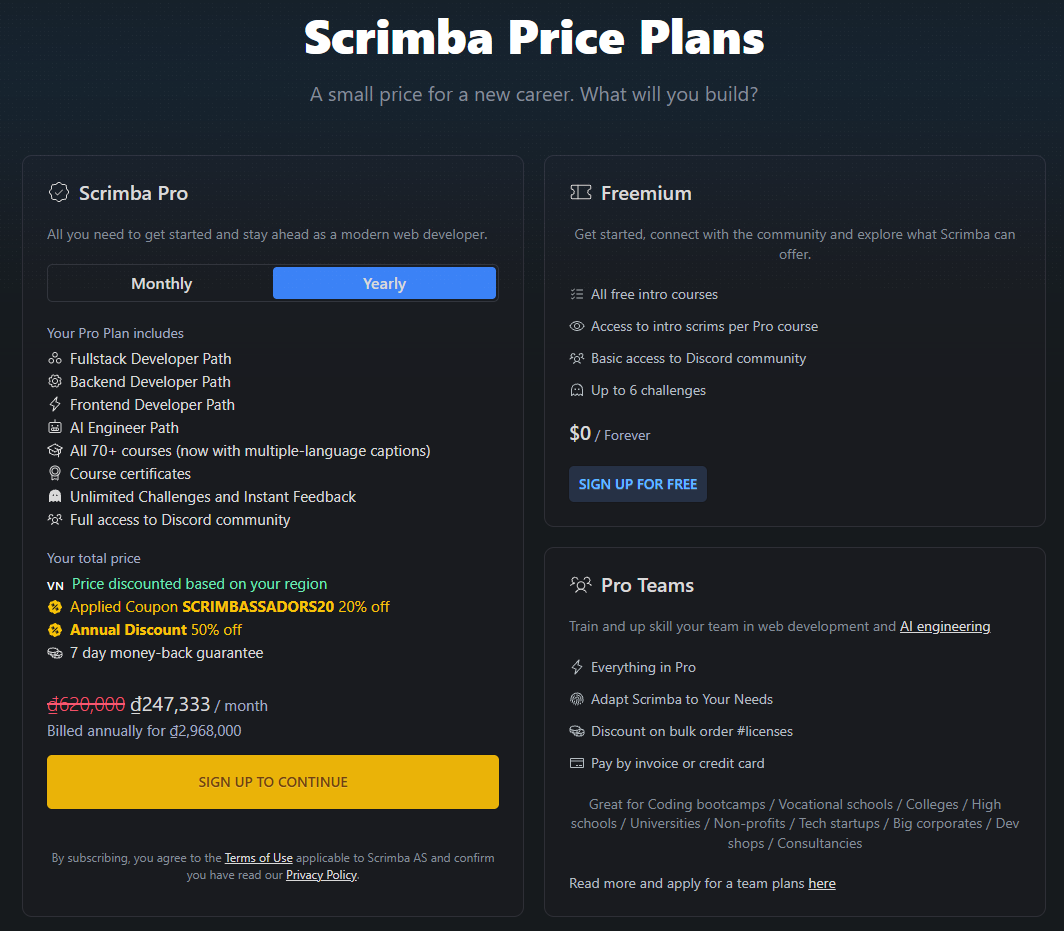
Scrimba uses a freemium model. Accessing career paths, advanced modules, project reviews, and Discord community perks requires a paid Pro subscription.
Subscription tiers and pricing
- Annual Pro Plan: Approximately $24.50 per month, billed as an upfront single payment of $294 per year.
- Monthly Pro Plan: Approximately $49.00 per month, billed on a recurring monthly cycle with cancel-anytime flexibility.
Regional Purchasing Power Parity (PPP)
One of Scrimba’s most commendable policies is its automated Purchasing Power Parity (PPP) pricing system. Recognizing that subscription fees in US Dollars can be prohibitive in developing economies, Scrimba dynamically detects user geolocation and applies regional discounts ranging from 20% to 50% off standard rates.
Risk-free guarantee
Scrimba provides a 7-day money-back guarantee on first-time Pro subscriptions. If you upgrade to Pro and decide within the first week that the teaching style or interactive player does not fit your workflow, customer support issues a full refund.
You can verify the exact subscription rates and PPP discounts available in your country on the Scrimba Pro Pricing Page.
8. Pros and cons
What Scrimba does well
- Proprietary interactive screencasts: The ability to pause any video lesson and edit code directly inside the browser player transforms passive watching into active, hands-on learning
- MDN-endorsed curriculum quality: Curated by industry veterans and verified by Mozilla Developer Network experts to ensure adherence to modern web standards and best practices
- Exceptional instructor pedagogy: Taught by top-tier educators like Bob Ziroll who break down complex React and JavaScript concepts into clear, digestible steps
- Mandatory solo projects: Forces learners to apply concepts independently without step-by-step video guidance, building real-world problem-solving confidence
- Automatic PPP discount pricing: Purchasing Power Parity adjustments make Pro subscriptions accessible for learners in developing economies
- Pragmatic AI Engineer path: Provides web developers with an efficient, hands-on track for building LLM-powered applications using Vercel AI SDK, RAG, and AI Agents
Where Scrimba falls short
- Sandbox environment dependency: The seamless in-browser experience means beginners can miss out on learning local VS Code configuration, terminal path setups, and command-line workflows
- Ecosystem scope limitations: The platform is heavily focused on JavaScript, TypeScript, and modern frontend tools, with limited depth for backend languages like Python, Java, C#, or Go
- Non-accredited certificates: Course completion certificates hold limited weight with tech recruiters compared to actual working GitHub portfolio projects
- Requires strong self-discipline: Unguided solo projects require significant personal initiative to troubleshoot without direct live 1-on-1 tutor management
The primary technical critique of Scrimba centers on what senior developers call “the sandbox abstraction risk.” Because Scrimba automatically handles server environments, build configurations, dependency bundlers, and live preview rendering behind the scenes, students can complete an entire career path without gaining experience in configuring local VS Code settings, managing terminal paths, handling environment variables (.env), or resolving Git merge conflicts locally. To avoid this trap, students should make a deliberate habit of exporting their Scrimba projects and rebuilding them locally on their own machines using VS Code and native terminal tools.
9. User experience and community
Onboarding and interface ergonomics
Creating an account on Scrimba takes under 60 seconds using Google or GitHub authentication. The platform requires zero software downloads, local installations, or complex setup steps. You can launch any free lesson directly within your browser immediately.
The user interface is exceptionally clean. The left side of the screen displays the file tree and code editor, the right side renders the live browser output preview, and playback controls sit along the bottom. Keyboard shortcuts allow seamless pausing, rewinding, and code execution without leaving the editor.
Community support and peer review
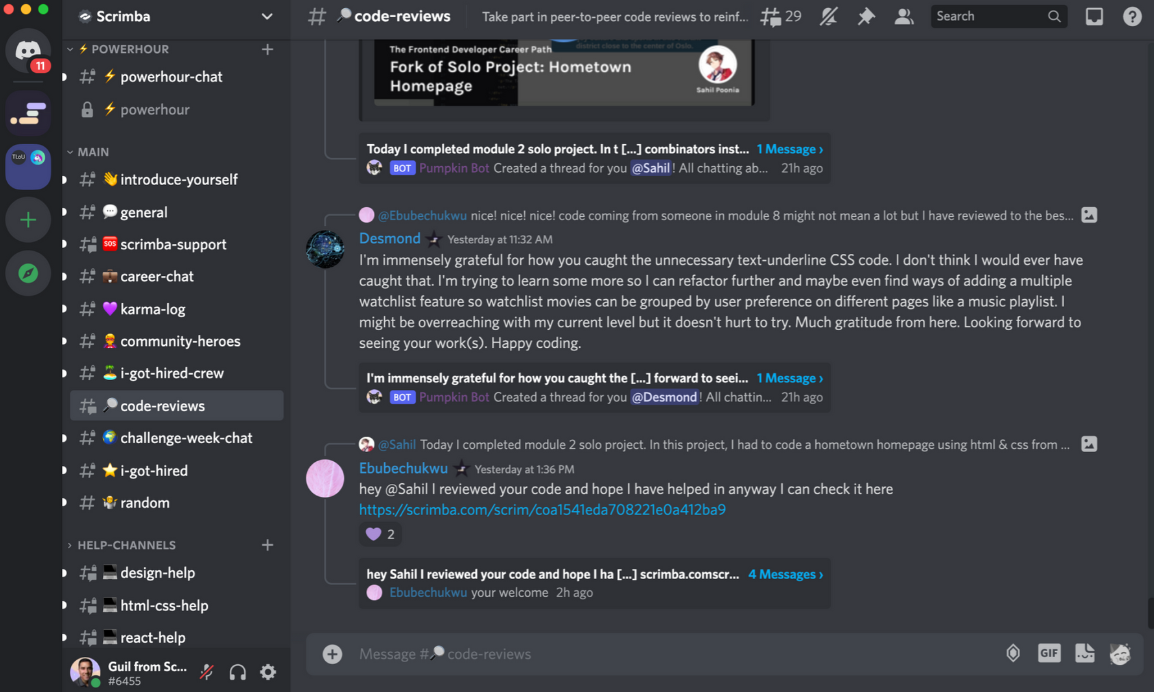
Pro subscribers gain access to Scrimba’s private Discord server. Unlike generic student forums that quickly become ghost towns, Scrimba’s Discord community is exceptionally vibrant.
Channels are segregated by course modules, project reviews, job search advice, and study groups. Dedicated community mentors and peer students answer code questions quickly, ensuring learners rarely remain stuck on a bug for long.
10. How to get started
Taking full advantage of Scrimba requires a methodical approach to ensure both foundational understanding and real-world execution.
Step 1: Create a free account
Head over to scrimba.com and register a free account. Test the interactive mechanics by enrolling in a free introductory course like Learn React for Free or Learn JavaScript.
Step 2: Test the pause-and-edit workflow
During free lessons, practice pausing the stream to experiment with code logic. Modify function arguments, change styling parameters, and observe the immediate feedback in the live preview window.
Step 3: Upgrade to Pro for career paths
If the teaching style fits your learning preferences, upgrade to Scrimba Pro to unlock the complete Frontend Developer Career Path or the AI Engineer Path.
Step 4: Rebuild solo projects on your local machine
When you finish a Solo Project inside Scrimba’s browser editor, open Visual Studio Code on your personal computer, spin up a local Vite project, set up Git tracking, and rebuild the application from scratch locally. Push the final code to your public GitHub profile to showcase real-world development competence to prospective employers.
11. Frequently asked questions
Is Scrimba free to use?
Yes, Scrimba offers a generous free tier that includes complete courses like Learn React for Free, Learn JavaScript, and Learn HTML & CSS without requiring a credit card.
Will Scrimba help me land a developer job?
The Frontend Developer Career Path provides the core technical skills needed for entry-level roles. However, landing a job also requires building unique personal projects and preparing for interviews.
Does Scrimba issue completion certificates?
Yes, Pro subscribers receive digital Certificates of Completion for major paths. Note that in software development, your portfolio and technical skills carry far more weight than certificates.
Can I use Scrimba with no prior coding experience?
Yes, the Frontend path assumes zero prior knowledge, starting with basic HTML/CSS before advancing to JavaScript logic and React frameworks.
What is Scrimba's refund policy?
Scrimba offers a 7-day money-back guarantee on first-time Pro subscriptions. You can request a full refund within seven days of purchase.
How does Scrimba compare to watching YouTube or Udemy?
Unlike static videos where you only watch someone else code, Scrimba turns every lesson into an interactive editor where you can pause, modify code, and run tests instantly.
12. Final verdict
Following an extensive multi-month evaluation, Scrimba earns an overall rating of 4.8 / 5. It is arguably the most engaging, pedagogically effective interactive platform for learning modern web development available today.
By combining the human guidance of voice instruction with real-time code intervention, Scrimba effectively bridges the gap between passive video watching and active software engineering. For career switchers and web developers seeking a hands-on path into React, frontend architecture, or AI engineering, Scrimba represents an outstanding educational investment.
Use Scrimba if: you want an interactive, hands-on path to master JavaScript, React, and modern AI engineering without setup friction
Think twice if: you require deep machine learning, Python data science, or enterprise C# backends
Start free if: you want to test the interactive Scrim format on free courses before committing to Pro
Disclosure: This review may contain affiliate links. If you sign up through our link, we may earn a commission at no extra cost to you. This does not influence our ratings or editorial opinion.