
Hunter.io Review 2026: The Ultimate Email Hunting Tool?
Finding the right person to contact within a company is often the hardest part of B2B sales and marketing. You know their name, you know where they work, but you do not have a direct line to their inbox. Bounce rates, bad data, and spam filters make cold outreach a tricky minefield.
Hunter.io (originally launched as Email Hunter) has spent years establishing itself as one of the premier platforms for finding and verifying professional email addresses. In this comprehensive review, we evaluate Hunter’s core features, test its data accuracy, analyze its cold email campaign tool, and compare its pricing and performance against the best email finder alternatives in 2026.
Quick verdict
Rating: 4.7 / 5
Hunter.io remains the gold standard for corporate email intelligence, offering unrivaled accuracy, transparent sourcing, and an easy-to-use interface.
B2B sales representatives, growth marketers, recruiters, and startup founders who need a steady stream of verified email contacts.
Flexible Pricing
Generous free tier with 50 unified credits monthly. Paid plans scale from $34/month (annual billing) to $299/month.
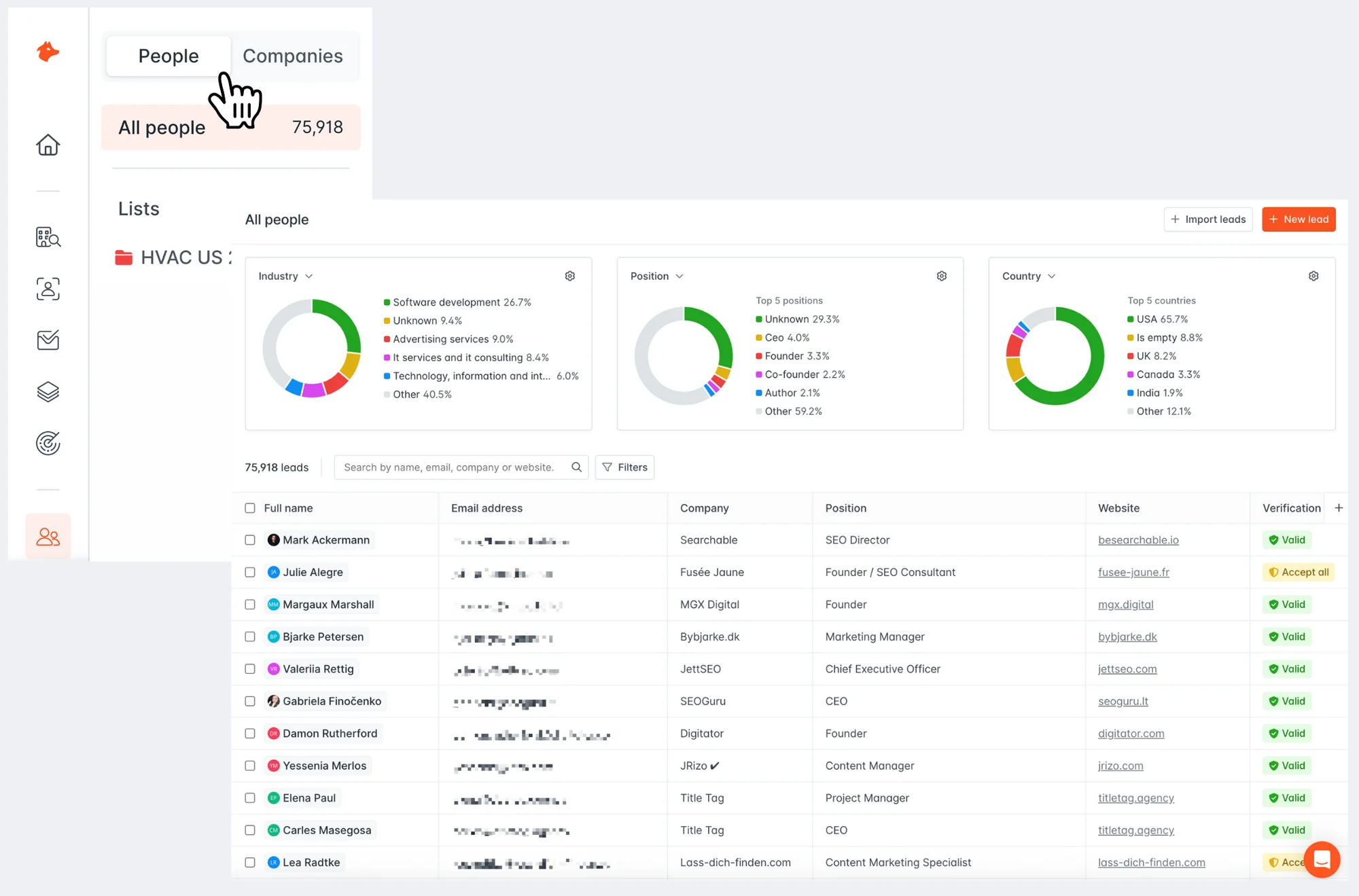
Hunter.io Dashboard: The central hub for searching domains, verifying leads, and tracking outreach.
1. Platform Overview
At its core, Hunter.io is a specialized search engine for corporate contact details. Unlike contact databases that buy static list packages, Hunter index-crawls the web continuously to catalog where professional email addresses are publicly mentioned.
When you sign up for Hunter, you gain access to an ecosystem of tools designed for the entire outreach lifecycle:
- Search Tools: Domain Search, Bulk Domain Search, and the Chrome Extension.
- Finder Tools: Individual and Bulk Email Finder, Author Finder.
- Verification Tools: Single and Bulk Email Verifier.
- Outreach Tools: Hunter Campaigns, custom tracking, and direct email provider integrations.
What You Don’t Get:
- Personal Emails: Hunter strictly filters out personal email domains like @gmail.com, @yahoo.com, or @outlook.com. It is built exclusively for B2B.
- Direct Phone Numbers: Unlike databases like ZoomInfo or Apollo, Hunter focuses almost entirely on email. You will not get mobile numbers or direct office extensions.
- Social Media Scraper: Hunter does not natively scrape social networks like LinkedIn, though its browser extension integrates with some pages to locate corporate addresses associated with profiles.
2. Domain Search Feature
The Domain Search is Hunter’s flagship tool. When you input a company name or website domain (e.g., google.com), Hunter scans its indexed database to display a list of all email addresses found on the public web associated with that domain.
Key Features of Domain Search:
- Pattern Recognition: It analyzes all discovered emails to predict the most common email format for the company. This is highly accurate, even for large enterprises.
- Source Transparency: Next to every email, Hunter displays a list of sources-public web pages where its crawler found that email address, along with discovery dates. This is a massive feature for validating that the email isn’t just guessed.
- Department Filters: For larger companies, you can filter emails by department (Sales, Marketing, HR, Engineering, etc.) to get directly to the team you want to target.
Accuracy Rating:
Hunter does not publish an official accuracy rate, but user reviews and third-party tests consistently report high accuracy (85-95%) for established corporate domains. New startups or secretive companies may have lower coverage.
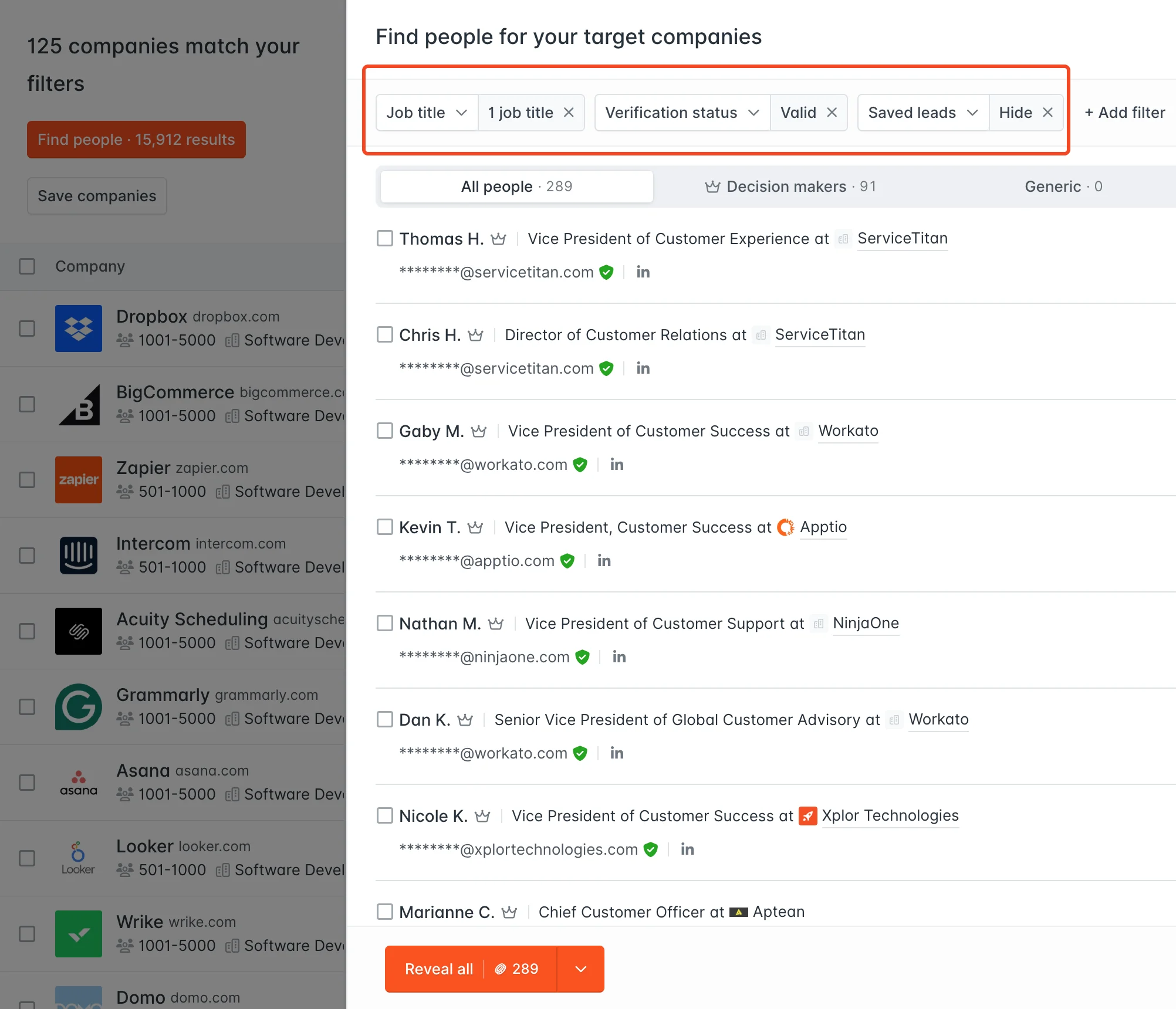
Hunter Domain Search: Finding professional contacts and predicting patterns.
3. Email Finder & Verification Engine
While the Domain Search shows you who works at a company, the Email Finder is designed to find the email address of a specific person. You input the person’s first and last name, along with their company name or domain, and Hunter returns a single, calculated email address.
Under the hood, Hunter checks its database, applies the domain’s email pattern, and triggers a real-time validation sequence.
This leads directly into the Email Verifier, which runs a rigorous, multi-step check on any email to ensure it is deliverable before you send an email. It executes:
- Format Check: Verifies if the structure is correct.
- Gibberish Detector: Flags random strings that aren’t real mailboxes.
- Domain & MX Record Check: Verifies that the domain is active and configured to receive mail.
- SMTP Connection Check: Connects to the mail server directly (without sending an email) to see if the mailbox accepts messages.
- Catch-All Status: Identifies if the server accepts all emails regardless of mailbox availability (a crucial indicator of potential deliverability risk).
Test Results:
User reviews and industry reports indicate Hunter’s ‘Deliverable’ status has a bounce rate typically under 3%, which is excellent for cold outreach. Emails marked ‘Accept-All’ should be handled with caution.
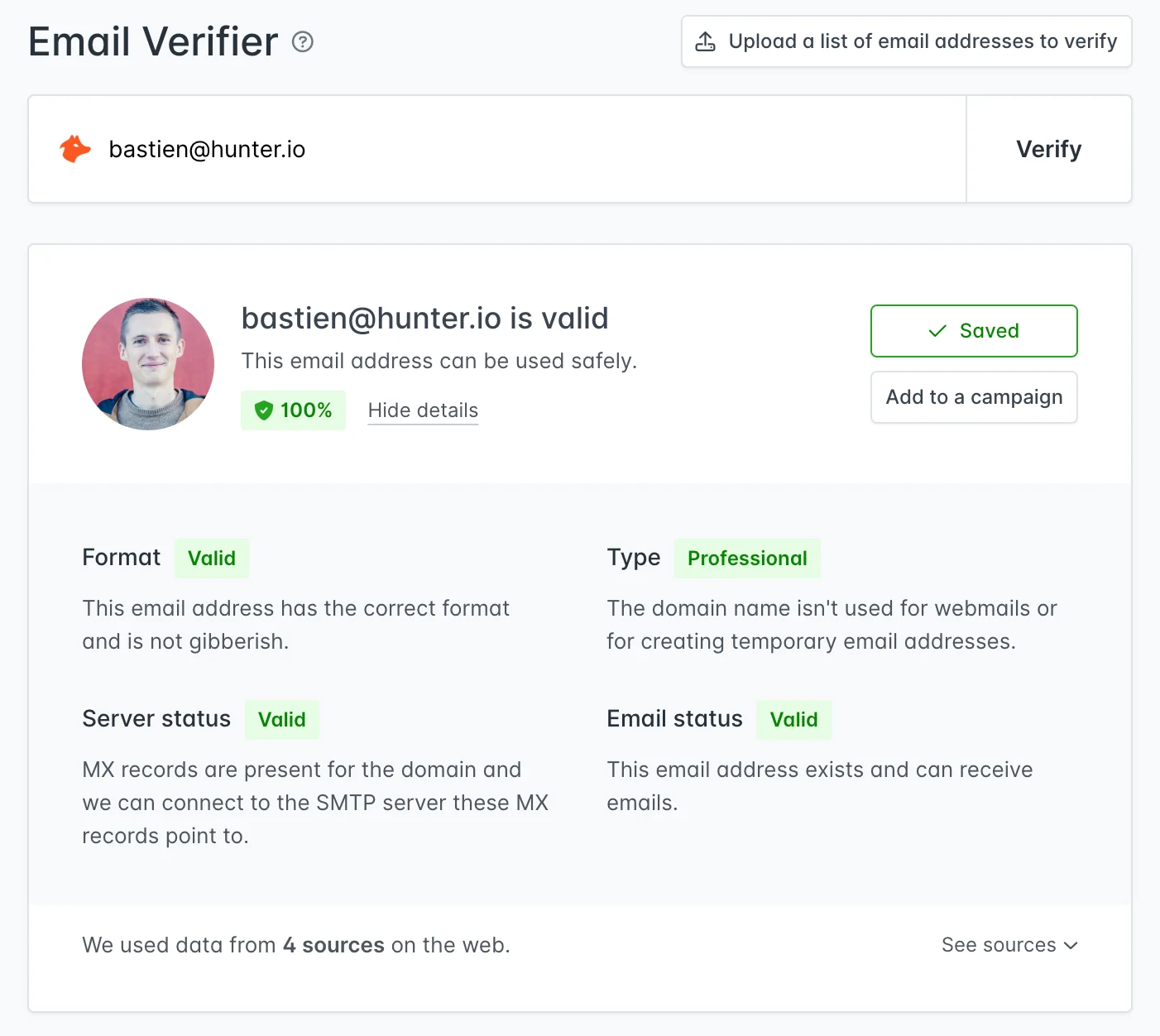
Hunter Email Verifier: Green indicates a safe address, protecting your sender score.
4. Cold Email Outreach & Campaigns
To make itself a complete solution, Hunter includes Hunter Campaigns, a built-in cold outreach tool that allows users to send automated, personalized email sequences directly from their own inboxes (supporting Gmail, Outlook, and custom SMTP/IMAP).
Key Features of Hunter Campaigns:
- Personalization Variables: Merge tags like first_name, company, and custom attributes allow you to customize emails at scale.
- Multistep Sequences: Create follow-up sequences that trigger automatically if the recipient doesn’t reply within a specified number of days.
- Tracking & Analytics: Detailed tracking for email opens, link clicks, bounce rates, and replies.
- Daily Sending Limits: Set limits to pacing your campaigns to avoid triggering email provider spam alerts.
Limitations:
- No Email Warmup: Hunter Campaigns does not include built-in email warmup features. You will need to warm up new domains using dedicated external services like Lemlist, Instantly, or Smartlead.
- Basic A/B Testing: It lacks complex split testing features or multi-variant messaging options.
- Simple Inbox Management: While it tracks replies, it is not a full-scale Unified Inbox. You will still need to manage replies inside your email provider dashboard or CRM.
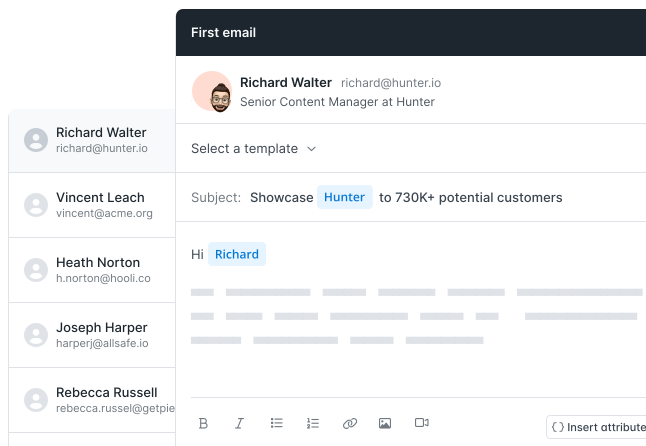
Hunter Campaigns: Sending automated, personalized sequences directly from Hunter.
5. Chrome Extension & Browser Integrations
The Hunter Chrome Extension is one of the most widely used browser extensions in the sales tech industry, acting as an indispensable bridge between your web browsing and lead generation workflows. Instead of manually copying domain names and switching tabs back to the web application, the extension brings Hunter’s entire database directly to your browser.
How the Chrome Extension Works:
- Domain Search on the Go: When visiting any company website, clicking the extension icon pulls up a clean, slide-out overlay. It immediately displays the predicted email format pattern , along with a list of all email addresses discovered on that domain, complete with names, job titles, and clickable public sources.
- LinkedIn Integration: The extension seamlessly injects a green “Find Email” button directly onto LinkedIn profiles and LinkedIn Sales Navigator pages. Clicking it runs an instant real-time search and verification, saving the prospect’s email, name, title, and company directly to your selected Hunter lead list with a single click.
- Salesforce & CRM Sync: If you use HubSpot, Salesforce, Pipedrive, or ZoHo, you can configure the extension to automatically sync discovered leads from your browser directly into your CRM pipeline, eliminating manual data entry.
The Google Sheets Add-on:
In addition to the browser extension, Hunter offers a highly efficient Google Sheets Add-on. This tool is particularly powerful for bulk prospecting. You can import a list of company names/domains or prospect names, and run the Domain Search or Email Finder functions directly within your spreadsheet cells, enriching hundreds of rows of data automatically in seconds.
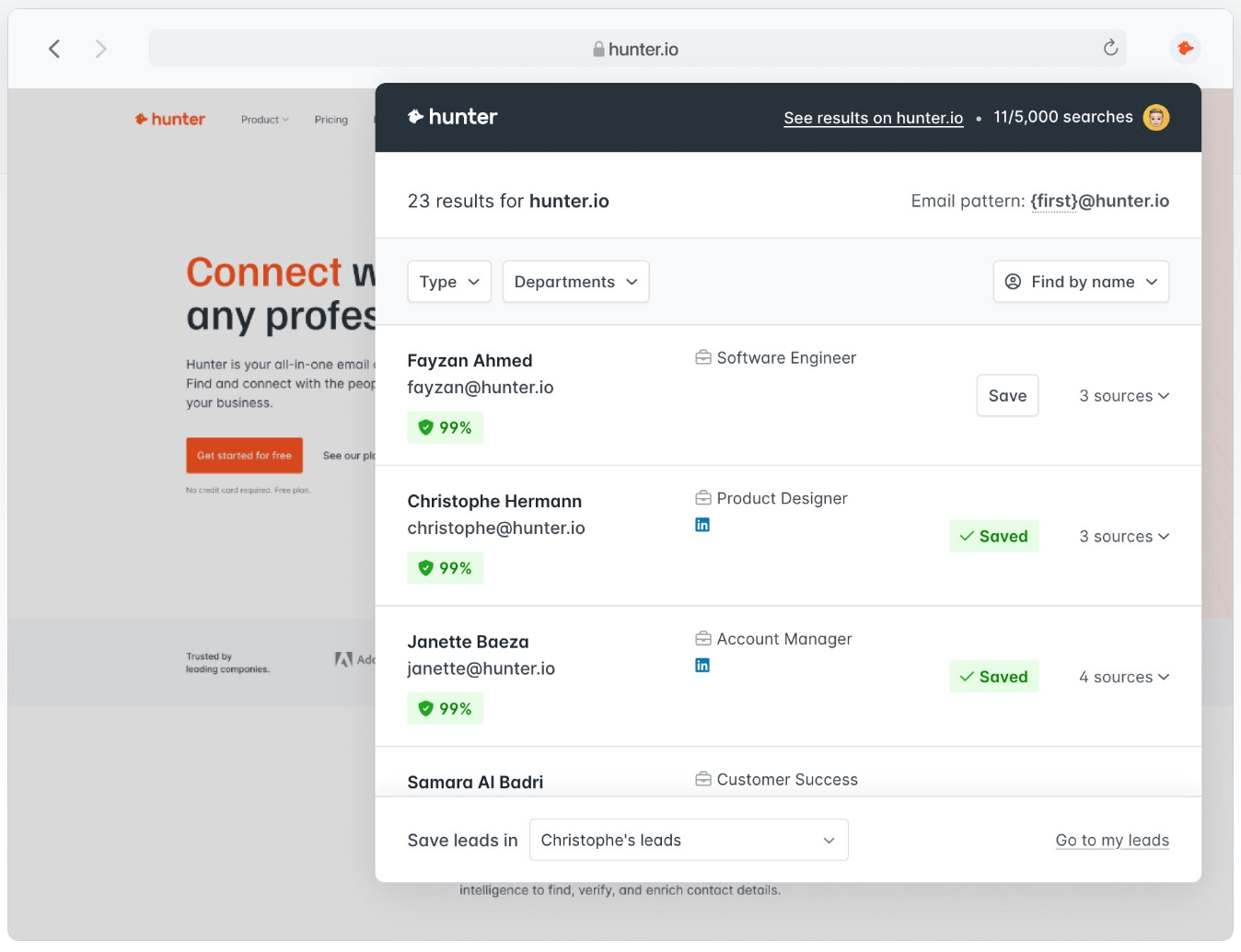
Hunter Chrome Extension: Discovering contacts in real-time as you browse.
6. Ideal Users & Target Audience Cases
Hunter.io is highly versatile, serving as a core utility across various departments. However, it excels particularly in four major business use cases:
1. Sales Representatives & Outbound SDRs
For outbound sales teams, speed and database hygiene are everything. SDRs use Hunter to build targeted outbound lists from scratch:
- Lead Sourcing: Identifying decision-makers at target accounts using Domain Search.
- CRM Syncing: Direct integrations with Salesforce, HubSpot, and Pipedrive allow SDRs to push verified contacts into active call and email cadences without leaving Hunter.
- Campaign Automation: Sending personalized, automated sequences with follow-ups directly through Hunter Campaigns to initiate first-touch conversations.
2. Link Building, SEO, & PR Specialists
Outreach is a foundational pillar of SEO and PR. Finding the right editor or journalist to pitch is traditionally a manual, time-consuming process.
- Author Finder: Hunter offers a unique “Author Finder” tool. By pasting the URL of a blog post or news article, Hunter scans its index to identify the specific author who wrote the piece and retrieves their professional email address.
- PR Pitching: PR professionals use Hunter to discover the contact details of editors and journalists at media outlets, ensuring pitches land in a personal inbox rather than a generic
info@orcontact@address.
3. Recruiters & HR Talent Sourcers
In a competitive job market, reaching passive candidates directly is key to successful recruiting.
- Direct Candidate Sourcing: Recruiters utilize the Chrome Extension on LinkedIn or candidate portfolio websites to find direct professional email addresses.
- Personalized Recruiting Campaigns: Using Hunter Campaigns to send customized job opportunity sequences, achieving significantly higher response rates than standard LinkedIn InMail.
4. API Developers & Software Engineers
Hunter’s infrastructure is highly developer-friendly, making it a popular choice for integrating contact intelligence into custom business software.
- Real-Time Data Enrichment: Developers use Hunter’s REST API to enrich incoming leads automatically when a user signs up on a landing page.
- Bulk Verification: Integrating the API to run bulk verification checks on email databases before sending newsletters or product updates, preventing domain blacklisting.
- CRM Integration: Building custom internal databases that automatically sync and verify contacts against Hunter’s live web index.
7. Key Pros & Cons
Every tool has its strengths and limitations. Here is a balanced look at the pros and cons of using Hunter.io.
The Pros:
- Transparent Data Sources: Knowing where an email address was found on the web increases confidence and safety.
- Superb Verification Engine: Reduces bounce rates significantly, protecting your domain from blacklists.
- Generous Free Credits: 50 free unified credits every month, resetting monthly.
- Built-in Campaign Functionality: Eliminates the need for a separate cold email tool for basic campaigns.
- Polished Integration Network: Connects natively with Salesforce, Hubspot, Pipedrive, and Zapier.
The Cons:
- No Personal Email Addresses: You cannot find prospects who use @gmail.com or @yahoo.com.
- No Phone Numbers: If cold calling is part of your strategy, Hunter will not fit all your needs.
- Risky “Accept-All” Emails: Many corporate email domains are catch-all, and Hunter cannot guarantee their deliverability (credits are still charged to find them).
- Expensive for Scale: If you need to search hundreds of thousands of domains, the credit costs scale up rapidly compared to scraping-based alternatives.
8. Pricing Plans & Cost Structure
Hunter.io uses a unified credit-based pricing model. Performing a search or finding an email costs 1 unified credit, while verifying an email address costs 0.5 unified credit.
Here is a breakdown of Hunter’s 2026 outreach subscription plans:
| Plan | Monthly Price | Annual Price (Per Month) | Monthly Unified Credits | Key Features |
|---|---|---|---|---|
| Free | $0 | $0 | 50 | 1 email account, 500 campaign recipients |
| Starter | $49 | $34 | 2,000 | 3 email accounts, 2,500 campaign recipients, CSV export |
| Growth | $149 | $104 | 10,000 | 10 email accounts, 5,000 campaign recipients, custom tracking domains |
| Scale | $299 | $209 | 25,000 | 20 email accounts, 15,000 campaign recipients, advanced API integrations |
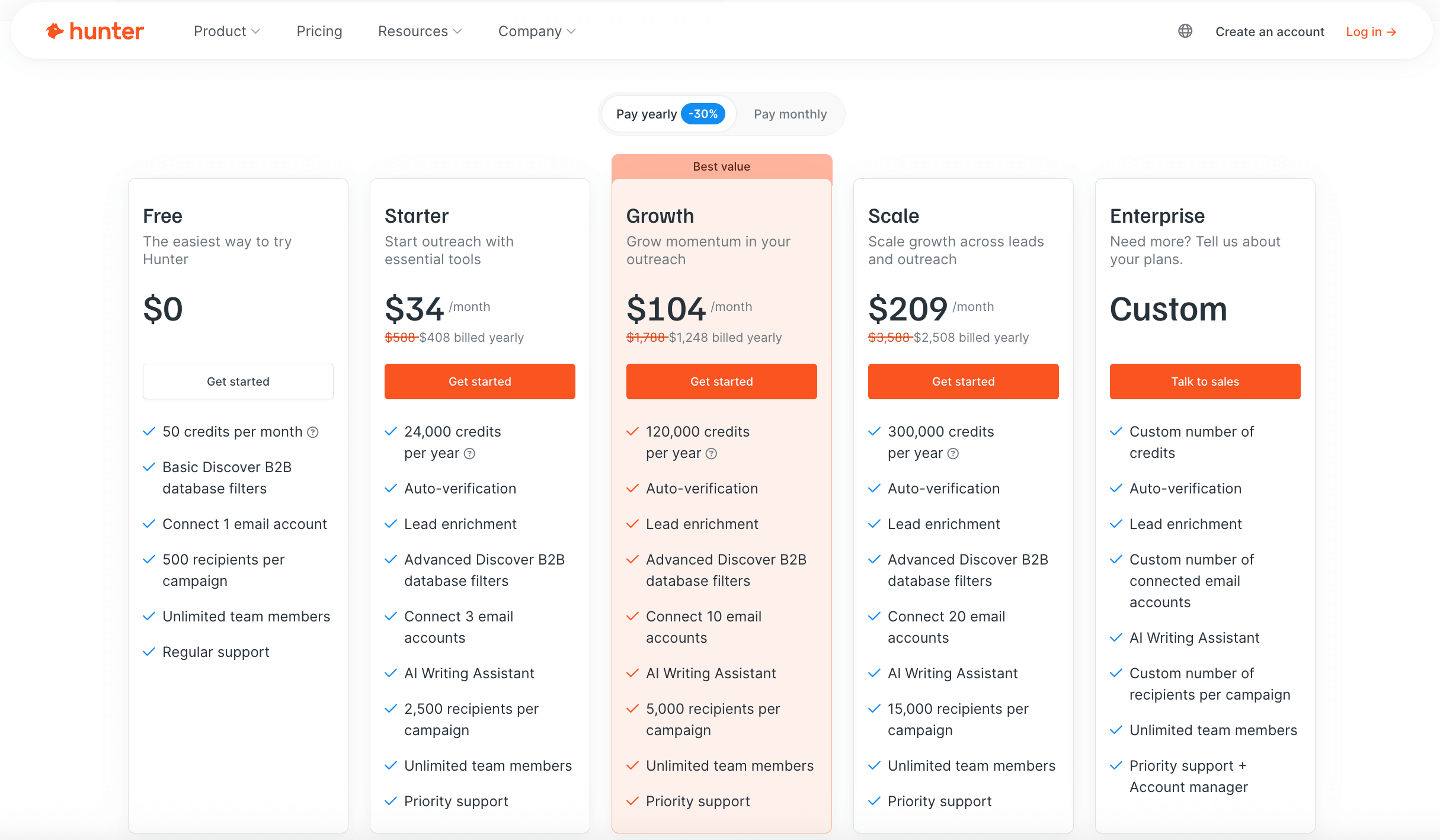
Hunter.io Pricing: Scaling from free testing to enterprise bulk lead validation.
9. Competitor Comparison & Alternatives
How does Hunter stack up against other big names in the sales intelligence space?
| Criteria | Hunter.io | Apollo.io | Snov.io |
|---|---|---|---|
| Primary Focus | Domain search & Verification | Database & B2B Sales Engagement | Multipurpose Lead Gen & Email Outreach |
| Data Types | B2B Emails (highly accurate) | Emails, Mobile Numbers, Org Charts | Emails, basic B2B data |
| Phone Numbers | No | Yes | No |
| Accuracy | Excellent (92% verified) | Moderate to Good | Good |
| Campaign Outreach | Yes (Basic) | Yes (Advanced) | Yes (Advanced) |
| Starting Price | $34/month (Free plan available) | $59/month (Free plan available) | $39/month (Free plan available) |
Key Takeaway:
- Choose Hunter.io if email quality and domain lookup accuracy are your highest priorities.
- Choose Apollo.io if you need direct mobile phone numbers and a large database of contacts with advanced filtering.
- Choose Snov.io if you want cheaper credits and more complex campaign drip logic.
10. Data Accuracy & Verification Quality
A tool is only as good as its data. In B2B marketing, using outdated data leads to high bounces, which flags your domain as spam, permanently ruining your email deliverability.
Hunter maintains high quality by:
- Indexing in Real Time: It searches for mentions of emails live on the web and updates source pages continuously.
- Confidence Scores: Every email returned is accompanied by a percentage confidence score (e.g., 98%), letting users assess risk.
- Verification Integrity: Its verifier does not guess; it connects to target mail servers to confirm mailbox presence.
While its coverage of local businesses or non-technical niches (like construction or retail) is less extensive compared to tools like ZoomInfo, its coverage of tech, corporate, finance, and agency sectors is practically unmatched.
11. Support, Security, & GDPR Compliance
Data privacy regulations like GDPR and CCPA have changed the landscape of B2B prospecting. Using tools that scrape private profiles or buy questionable list packages can expose companies to severe legal risks.
11.1 Security & GDPR Compliance
This is where Hunter.io strongly differentiates itself from traditional scrapers or bulk database vendors:
- Public Data Indexing: Hunter does not hack databases or buy private contact lists. It acts as a search engine, scanning the public web for mentions of email addresses. For every email address returned, Hunter provides the exact URL source where it found the email, along with the discovery date. This transparency is a critical requirement for proving legitimate interest under GDPR.
- Opt-Out Control & Claim Page: Hunter maintains a dedicated, easily accessible opt-out page. Anyone can search for their email address and request its immediate removal from Hunter’s index. These requests are processed instantly.
- Data Protection Officer (DPO): Hunter has a dedicated DPO to ensure ongoing compliance with European Union regulations.
- ISO 27001 Certification & CCPA: The platform is ISO/IEC 27001 certified, demonstrating enterprise-grade information security management. It is also fully compliant with the California Consumer Privacy Act (CCPA).
11.2 Support Quality & Documentation
Support quality is another key strength of the platform, particularly for teams relying on Hunter for daily sales activities or API integrations:
- Availability: Paid plan subscribers receive priority support via email and live chat. Response times are typically under an hour during business hours.
- Technical Competency: Unlike generic customer service agents, Hunter’s support staff is highly trained in technical subjects, such as API integration, custom tracking domains (CNAME), and SMTP/IMAP connection troubleshooting.
- Self-Service Help Center: Hunter provides a comprehensive knowledge base with step-by-step guides, video tutorials, and API reference documentation. The documentation is extremely clear, featuring copy-pasteable code blocks for popular programming languages (Python, JavaScript, Ruby, PHP) to help developers get up and running quickly.
12. Frequently Asked Questions
Is Hunter.io free to use?
Yes. Hunter.io offers a free plan that provides 50 unified credits every month. It includes access to the browser extension and basic campaign features.
Does Hunter.io find personal emails like Gmail?
No. Hunter.io is strictly designed for B2B outreach and only crawls and stores professional corporate email addresses. It automatically filters out webmails like Gmail, Outlook, and Yahoo.
What is a 'Catch-all' email, and does Hunter charge for verifying it?
A catch-all email server accepts all incoming emails, regardless of whether the specific mailbox exists or not. Hunter flags these as 'Accept-All' or 'Risky'. Hunter charges 0.5 unified credit to verify catch-all emails, but advises caution when emailing them.
Can I use Hunter.io to send cold email campaigns?
Yes. Hunter Campaigns is a built-in feature that lets you connect your G Suite, Outlook, or custom SMTP accounts to send automated, personalized cold emails and follow-up sequences for free.
Is Hunter.io GDPR compliant?
Yes, Hunter.io is fully compliant with GDPR. It only indexes professional email addresses that are publicly available on the internet, provides clear source links for every address, and offers a clear opt-out process for anyone to remove their contact details.
13. Summary & Final Recommendation
For teams focused on clean, targeted B2B email outreach, Hunter.io is absolutely worth it. It does one thing exceptionally well: finding and validating corporate emails.
If you are hoping for an all-in-one CRM database with phone numbers and social media triggers, Hunter will feel limited. But if you value deliverability, accurate source references, and a simple, reliable API, it is an essential tool in your tech stack.
Use Hunter.io if: you are a sales representative, growth marketer, recruiter, or founder who needs a highly accurate, transparently sourced tool to find and verify B2B email addresses at scale, or if you want to run simple, automated email campaigns.
Think twice if: you need to find personal email addresses (Gmail, Yahoo, etc.), require direct mobile phone numbers, or need advanced email warmup features within your outreach platform.
Start free: Utilize the Free tier (50 unified credits monthly) to build your lead lists and test the verification and campaign features before committing to a paid tier.
Disclosure: This review may contain affiliate links. If you sign up through our link, we may earn a commission at no extra cost to you. This does not influence our ratings or editorial opinion.