
Ringover Review 2026: Is It the Ultimate Business Phone & AI Contact Center System? (Honest Deep Dive)
Modern business communication has evolved far beyond traditional PBX desk phones and localized landline infrastructure. As distributed sales teams, customer support centers, and recruitment agencies transition to remote and hybrid operational models, legacy telephone hardware has become an expensive, inflexible bottleneck. Modern organizations require cloud-based Voice over Internet Protocol (VoIP) solutions that unify business calling, SMS text messaging, video conferencing, call queue routing, and real-time CRM data synchronization into a single interface.
Ringover has emerged as one of Europe’s leading cloud communications and contact center platforms, positioning itself as an all-in-one software suite designed to streamline sales prospecting and customer support operations. By pairing virtual business phone lines across 43+ countries with advanced sales dialers, multi-channel cadence automation, and conversational AI analytics (Empower), Ringover promises to replace complex telephony stacks with a plug-and-play web and mobile application.
However, in a market crowded with established industry giants such as Aircall, RingCentral, Dialpad, and JustCall, does Ringover deliver sufficient reliability, feature depth, and financial value for growing mid-market companies?
Over the past three months, our research team conducted a comprehensive hands-on evaluation of Ringover. We tested its softphone interface across web browsers, desktop applications, and mobile devices, configured multi-level Interactive Voice Response (IVR) call trees, synced conversation records across major CRMs, and rigorously tested the Empower AI conversation intelligence engine. This review provides an objective, granular analysis of Ringover’s capabilities, pricing plans, operational trade-offs, and competitive standing.
Quick verdict
1. What is Ringover?
Ringover is a cloud-based Business Phone System and Contact Center-as-a-Service (CCaaS) platform developed by the Ringover Group in Paris, France. Founded to simplify corporate telecommunications, the company has grown to serve over 10,000 organizations globally, processing millions of calls monthly across international business hubs.
Unlike traditional on-premise hardware systems that require dedicated physical wiring, PBX servers, and specialized telecom maintenance contracts, Ringover operates entirely in the cloud. It transforms any internet-connected desktop computer, laptop, smartphone, or tablet into a full-featured business phone system. Users can select local, toll-free, or international business phone numbers in over 43 countries and initiate unlimited calling to 110 global destinations depending on their chosen plan tier.
Beyond basic voice calling, Ringover has expanded into an integrated communications platform. It incorporates SMS/MMS messaging, video meetings, team chat, multi-channel sales sequences via Cadence, and automated conversational insights through Empower AI. You can explore the platform’s core dashboard and request a live demonstration directly on the Official Ringover Website.
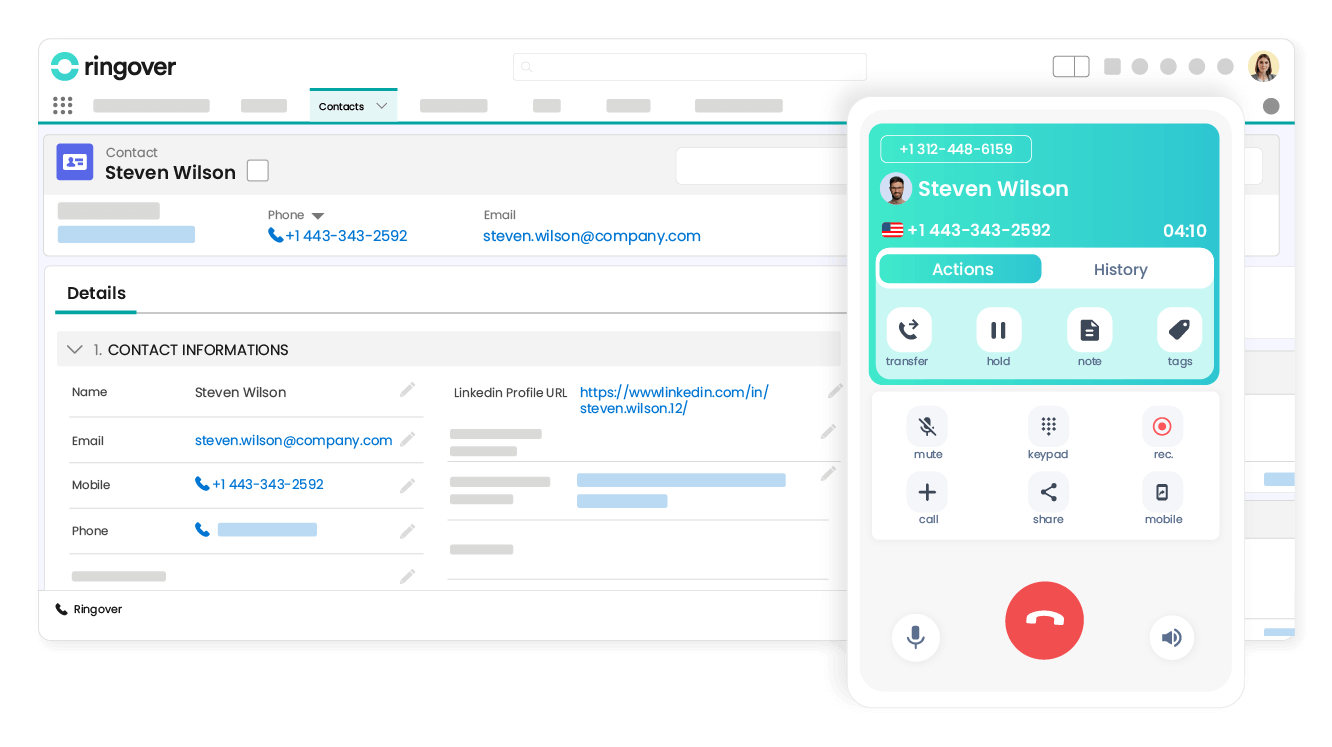
By the numbers: 10,000+ business customers - Unlimited calls to 110 destinations - Virtual numbers in 43+ countries - 100+ native CRM & Helpdesk integrations - 99.9% network uptime SLA
2. Who should use Ringover?
Determining whether Ringover aligns with your organization requires examining how your operational workflows and team structure match its technical strengths. Ringover is engineered to address specific operational friction points across sales, support, and recruitment functions.
Ideal fit for specific team workflows
For outbound sales teams and business development reps (BDRs), Ringover provides a high-velocity calling engine. Sales teams operating in fast-paced environments spend an enormous amount of time manually dialing numbers, logging call notes, and updating CRM statuses. Ringover eliminates these repetitive tasks through click-to-call browser extensions, Power Dialer capabilities, automated voicemail drop, and two-way CRM logging.
For customer support departments and call centers, Ringover delivers sophisticated inbound call management. Managers can construct custom multi-level Interactive Voice Response (IVR) phone trees in minutes using a visual drag-and-drop builder. Inbound calls are intelligently routed to specific agent groups based on skill sets, language preferences, or business hours, ensuring incoming customer inquiries reach the correct representative immediately.
For international and remote teams, Ringover removes geographic barriers. Companies expanding into foreign markets can instantly provision local virtual phone numbers in over 43 countries (such as the US, UK, France, Germany, Spain, and Australia) without establishing local physical offices. This allows local prospects to call a familiar domestic number while your remote team answers from anywhere in the world.
For recruitment agencies and talent acquisition teams, Ringover offers specialized outreach workflows through its Cadence tool. Recruiters can structure multi-channel candidate contact sequences combining phone calls, automated SMS follow-ups, and email touchpoints, significantly increasing candidate response rates.
Scenarios where alternative platforms excel
Conversely, Ringover is not the optimal choice for every organization. If your business operates primarily as a micro-business or solo freelancer needing only a simple secondary mobile number for occasional voice calls, Ringover’s team-oriented pricing tiers ($15 to $47/user/month) may feel overly complex. Lightweight consumer-grade services like Google Voice or OpenPhone offer simpler, lower-cost single-line options.
Similarly, if your organization requires complex multi-site enterprise PBX infrastructure tied into legacy physical SIP desk phones (such as Cisco or Polycom hardware matrices across dozens of physical office buildings), traditional enterprise telecom providers like RingCentral or 8x8 offer broader hardware provisioning protocols.
3. Core VoIP and phone features
At its core, Ringover replaces traditional hardware PBX installations with a robust suite of software-driven telephony features engineered for business reliability and administrative control.
Softphone accessibility and call handling
The primary user interface for Ringover is its web softphone, accessible directly through Google Chrome, Mozilla Firefox, or standalone desktop applications for macOS and Windows. The softphone layout is exceptionally clean, featuring a numeric dialpad, recent call logs, contact directories, SMS message threads, and active call controls.
During active calls, users can execute smooth call transfers (both warm transfers with prior announcement and blind transfers), place callers on hold with customized background music, initiate three-way conference calls, or mute microphonic input. Call quality remained consistently clear throughout our evaluation, utilizing modern WebRTC voice codecs that dynamically adapt to bandwidth fluctuations to minimize latency and jitter.
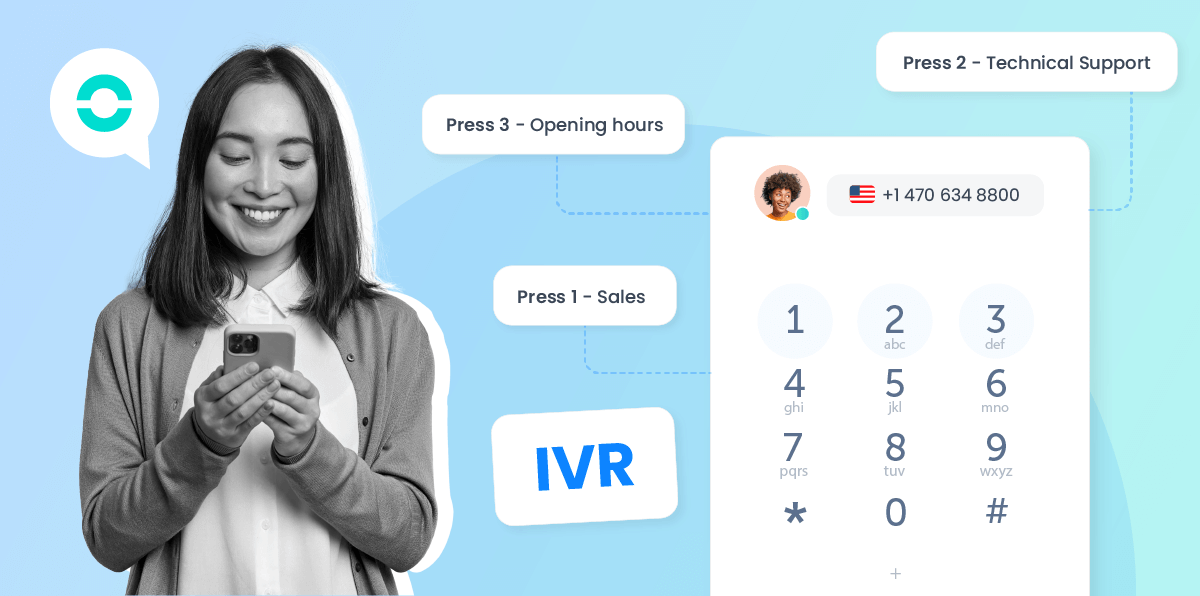
Visual IVR builder and intelligent routing
One of Ringover’s standout administrative tools is its visual IVR creator. Setting up custom auto-attendants on legacy PBX systems used to require specialized IT contractors. Ringover converts this into an intuitive drag-and-drop flow chart.
Administrators can record custom audio greetings or utilize text-to-speech engine generation in multiple languages. You can configure multi-option keypad menus (e.g., “Press 1 for Sales, Press 2 for Support”), define business hours routing rules, forward after-hours calls to mobile devices or voicemails, and assign call distribution algorithms (such as round-robin, simultaneous ringing, or longest-idle agent priority) across ring groups.
Live call monitoring and manager coaching
For call center managers and sales team leads, maintaining conversation quality is critical. Ringover incorporates built-in call monitoring and coaching controls directly accessible within the manager dashboard:
- Listen (Double Listening): Managers can silently join active calls to monitor agent tone, script adherence, and customer responses without the agent or caller knowing.
- Whisper (Call Whispering): Managers can speak directly into the agent’s ear to provide real-time guidance, objection handling tips, or technical advice during a live call without the customer hearing the manager.
- Barge (Barge-in): In critical situations where a call is escalating or an agent needs immediate help, managers can take over the call and convert it into a three-way conversation.
Key takeaway: Ringover’s combination of WebRTC softphones, visual IVR configuration, and real-time coaching tools provides mid-market teams with enterprise contact center capabilities without enterprise IT overhead.
4. Plans and feature breakdown
Ringover structures its core pricing into clear functional tiers based on calling scope, mobile application access, CRM integration depth, and contact center capabilities.
Detailed tier feature matrix
The table below provides a comprehensive comparison of Ringover’s core subscription plans to help you evaluate which tier matches your organization’s operational requirements:
| Feature / Capability | TALK Plan | SMART Plan | BUSINESS Plan | ADVANCED Plan |
|---|---|---|---|---|
| Monthly Cost (Annual) | $15 / user / mo | $21 / user / mo | $47 / user / mo | Custom Pricing |
| Access Platform | Web Browser Only | Web, Desktop & Mobile Apps | Web, Desktop & Mobile Apps | Web, Desktop & Mobile Apps |
| Virtual Numbers | 1 Local or Toll-Free Number | 1 Number per user (43 countries) | 1 Number per user (43 countries) | Custom Number Pool |
| Outbound Calling Scope | Unlimited National Calls | Unlimited to 110 Destinations | Unlimited to 110 Destinations | Unlimited Global Scope |
| IVR & Call Routing | Basic Greetings & Hours | Standard IVR & Groups | Advanced Smart Routing IVR | Enterprise Multi-Tier IVR |
| CRM & ATS Integrations | Not Included | Standard Webhooks | 100+ Native Integrations | Custom API & SSO |
| Call Coaching Tools | Not Included | Not Included | Listen, Whisper, Barge-in | Full Supervisor Suite |
| Sales Power Dialer | Not Included | Not Included | Not Included | Included (Advanced Dialer) |
| Call Recording | Included | Included | Included (Unlimited Storage) | Unlimited Storage + Audit |
Analysis of plan selection logic
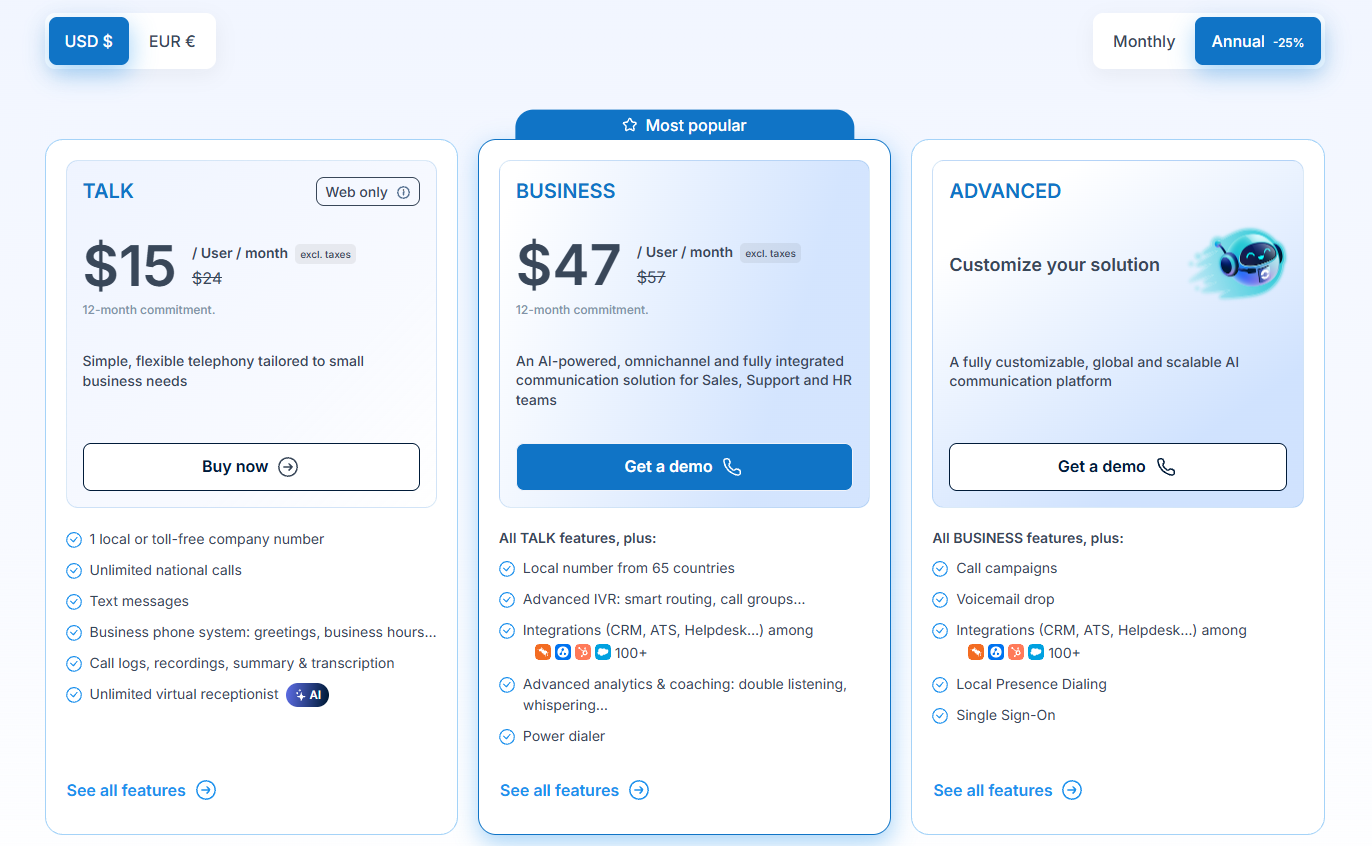
The entry-level TALK plan ($15/user/month) is designed for lightweight teams operating exclusively from desktop web browsers who only require basic national calling and simple call logs. However, because it lacks mobile applications, international destinations, and CRM integrations, it serves primarily as a basic business phone replacement.
The SMART plan ($21/user/month) represents the core entry point for most small businesses. Unlocking native mobile apps (iOS and Android), desktop applications, and unlimited calling to 110 global destinations, it provides the mobility and reach required for modern hybrid workforces.
The BUSINESS plan ($47/user/month) is the recommended tier for professional sales organizations, customer support hubs, and recruitment teams. It introduces native two-way synchronization with over 100 CRMs (Salesforce, HubSpot, Zendesk), advanced IVR routing, and live call coaching capabilities (Listen, Whisper, Barge-in), transforming Ringover from a simple phone system into an operational contact center.
5. Empower AI and sales analytics
As artificial intelligence transforms enterprise sales and customer service workflows, Ringover has introduced Empower AI, a specialized conversational intelligence engine designed to extract actionable insights from business voice conversations.
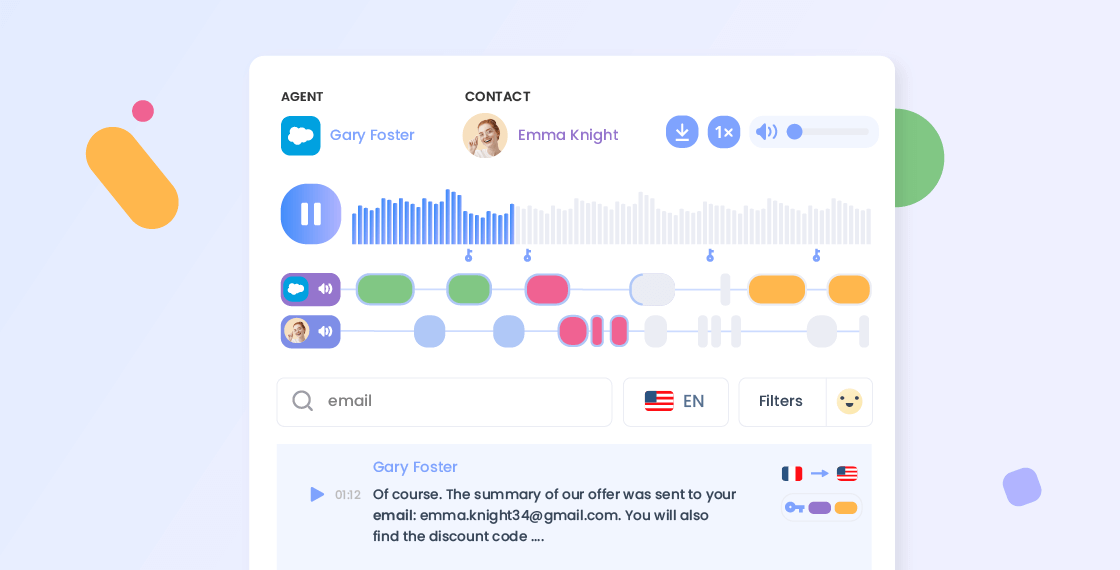
Automated call transcription and AI summaries
In high-volume sales and support environments, representatives often spend 15% to 20% of their workday manually writing post-call notes, typing summary emails, and updating CRM status fields. Empower AI automates this post-call administrative work entirely.
Immediately after a call concludes, Empower AI processes the call recording and generates an accurate, timestamped speech-to-text transcription available in multiple languages (including English, French, Spanish, German, and Italian). The AI automatically extracts key takeaways, action items, customer questions, and next steps into a concise call summary card that automatically syncs to your CRM.
Sentiment analysis and topic tracking
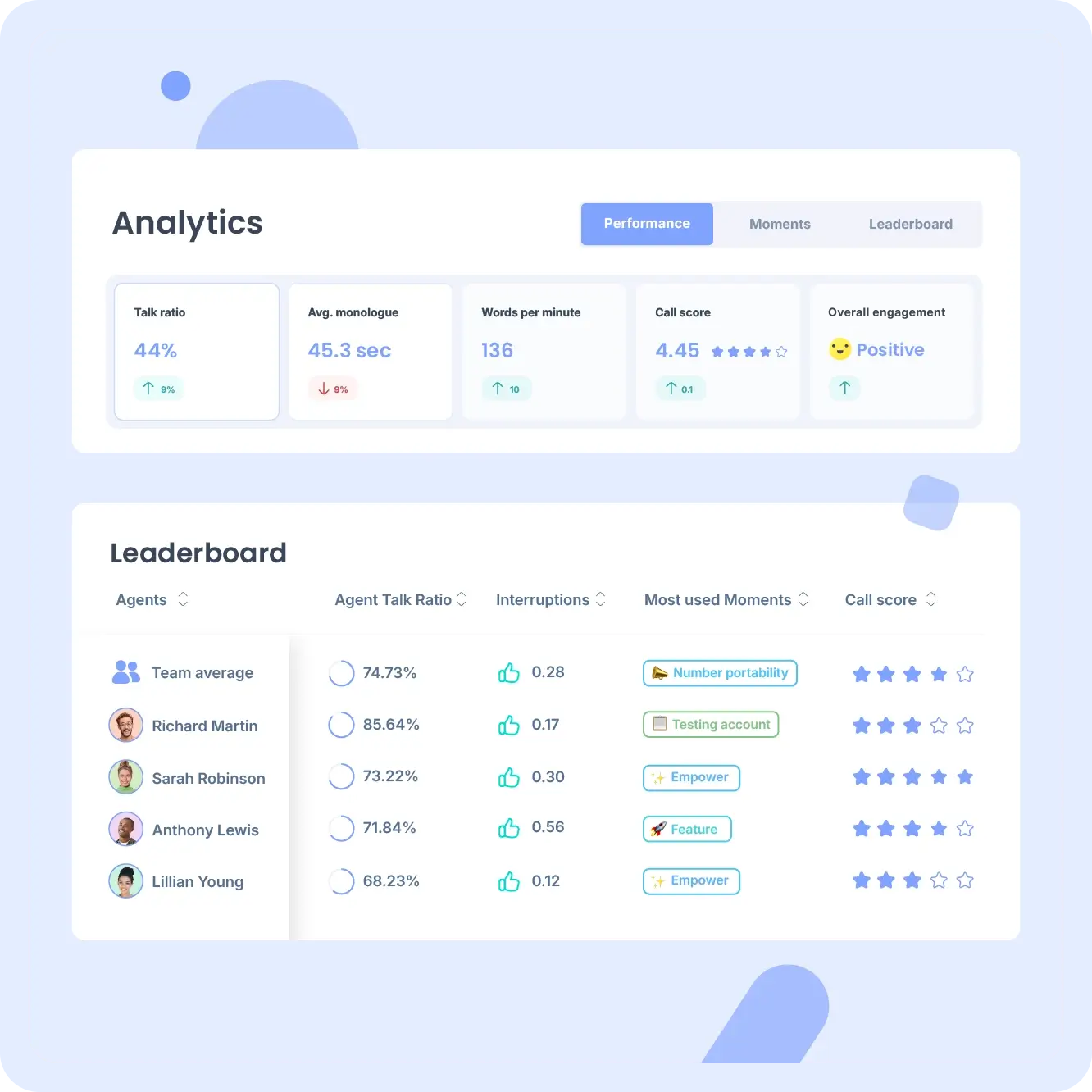
Beyond basic transcription, Empower AI analyzes conversation dynamics to provide qualitative feedback for team leaders and quality assurance managers:
- Emotional Sentiment Scoring: The AI evaluates voice tone, word choice, and conversational pacing to assign a sentiment score (positive, neutral, or negative) to each call segment, allowing managers to quickly identify dissatisfied customers or exceptional sales interactions.
- Topic & Keyword Detection: Administrators can configure custom tracker keywords (such as competitor names, pricing objections, feature requests, or compliance phrases). Empower AI automatically tags calls containing these keywords, enabling company-wide trend analysis.
- Talk-to-Listen Ratio: The platform tracks the speech balance between the representative and the prospect. If a sales rep is talking for 80% of a discovery call, Empower flags the call to help managers coach reps on active listening techniques.
Pitch Room and AI call simulation
A unique feature within the Empower suite is Pitch Room, an AI-powered call simulation environment built for sales onboarding and agent training.
Instead of requiring senior sales managers to spend hours conducting manual role-play sessions with new hires, reps can practice sales pitches, objection handling, and cold-calling scripts against interactive AI personas. Pitch Room provides instant feedback on rep delivery, pacing, keyword usage, and confidence scores, accelerating ramp-up times for new sales representatives.
6. Ringover vs top competitors
Selecting a business communications platform requires comparing Ringover against leading competitors in the cloud VoIP and contact center market.
| Feature / Metric | Ringover | Aircall | RingCentral | JustCall |
|---|---|---|---|---|
| Starting Price (Annual) | $15 / user / mo | $30 / user / mo | $20 / user / mo | $19 / user / mo |
| Included Call Scope | Unlimited 110 Countries | Unlimited US/Canada | Unlimited US/Canada | Pay-Per-Minute / Tiered |
| CRM Integrations | 100+ Native CRMs | 100+ Native CRMs | 300+ Marketplace Apps | 60+ CRMs |
| Conversational AI | Empower AI ($39/mo) | AI Add-on ($9/mo) | RingSense AI | JustCall AI |
| Sales Prospecting Tool | Cadence (Built-in/Add-on) | Third-party required | Third-party required | Sales Dialer Included |
| Virtual Number Pool | 43+ Countries | 100+ Countries | 100+ Countries | 70+ Countries |
| Setup Complexity | Low (Under 15 mins) | Low (Under 15 mins) | Moderate to High | Low to Moderate |
Detailed competitive analysis
When evaluated against Aircall-Ringover’s most direct European competitor-Ringover offers a distinct pricing and international calling advantage. While Aircall requires a higher starting price ($30/user/month) and restricts basic plans to US/Canada calling, Ringover includes unlimited calling to 110 global destinations on its $21/month Smart tier. Furthermore, Ringover’s native Cadence tool provides integrated sales prospecting sequences that Aircall requires third-party software (like Salesloft or Outreach) to achieve.
Comparing Ringover to RingCentral reveals a difference in target audience and system complexity. RingCentral is an enterprise legacy giant offering extensive hardware phone matrix compatibility, video conferencing, and deep PBX customizations. However, RingCentral’s administrative console is notorious for steep learning curves and complex setup procedures. Ringover delivers a far more modern, agile interface that non-technical team managers can configure in under 15 minutes.
Against JustCall, Ringover stands out with superior international calling packages and more advanced conversational AI analytics through Empower, making Ringover the stronger option for European and multi-national sales operations.
7. Pricing plans and add-ons
Ringover maintains a transparent, modular pricing model structured around core user seats with optional specialized add-ons for AI conversational intelligence and multi-channel messaging.
Core plan pricing options
- TALK Plan: $15 per user / month (billed annually) or $21 per user / month (billed monthly). Web-only softphone, 1 national number, unlimited national calling, basic call logs and recordings.
- SMART Plan: $21 per user / month (billed annually) or $29 per user / month (billed monthly). Web, desktop, and mobile apps, 1 virtual number (43 countries), unlimited calling to 110 destinations, IVR, call group management.
- BUSINESS Plan: $47 per user / month (billed annually) or $59 per user / month (billed monthly). All SMART features plus 100+ native CRM integrations, live call coaching (Listen, Whisper, Barge-in), advanced IVR routing, and unlimited call recording storage.
- ADVANCED Plan: Custom Quote (billed annually). Dedicated account management, Power Dialer, call campaigns, automated voicemail drop, single sign-on (SSO), and custom API access.
Modular add-on licensing
To keep core subscription costs manageable for smaller teams, Ringover separates advanced capabilities into optional add-on modules:
- Empower AI Add-on: $39 per license / month. Unlocks automated speech-to-text transcriptions, sentiment analysis, AI call summaries, custom keyword trackers, talk-ratio metrics, and Pitch Room AI role-play simulations.
- Omnichannel Messaging Add-on: $29 per license / month. Consolidates multi-channel customer communications-including WhatsApp Business, Facebook Messenger, Instagram DMs, SMS threads, Email, and Google Business Reviews-into a single agent inbox.
- Cadence Sales Prospecting Tool: Pricing varies based on user count and sales team requirements. Streamlines multi-channel prospecting cadences combining phone calls, automated SMS, and email outreach.
To review current promotional offers or request a customized volume quote for your organization, visit the Ringover Pricing Portal.
8. Pros and cons
Below is a structured breakdown of Ringover’s primary operational strengths and technical limitations:
What Ringover does well
- Seamless zero-hardware deployment: Operates completely in web browsers, desktop apps, and mobile devices with zero physical phone wiring or IT infrastructure required
- Unmatched international calling scope: Unlimited calling to 110 global destinations included on Smart ($21/mo) and Business ($47/mo) plans, eliminating surprise long-distance bills
- Deep two-way CRM and ATS integrations: Native, pre-built integrations with over 100 tools-including Salesforce, HubSpot, Zendesk, Zoho, Pipedrive, and Bullhorn-with automatic call logging and contact syncing
- Advanced manager coaching controls: Built-in double listening, secret call whispering, and active call barge-in empower team leaders to coach reps in real time during live calls
- Powerful Empower AI analytics: Delivers highly accurate speech-to-text transcriptions, sentiment tracking, automated CRM summaries, and Pitch Room AI sales training
- Intuitive visual IVR builder: Drag-and-drop auto-attendant flow builder enables non-technical managers to construct complex call routing trees in minutes
Where Ringover falls short
- Modular add-on costs: Advanced features like Empower AI ($39/mo) and Omnichannel Messaging ($29/mo) require separate licenses, increasing overall per-user monthly costs
- Power dialer restricted to top tier: Outbound sales power dialers and automated voicemail drop features require the enterprise-level Advanced plan tier
- Entry-level plan limitations: The Talk plan ($15/mo) is restricted to web browsers only and lacks mobile applications, international destinations, and CRM integrations
- Bandwidth-dependent audio quality: Because Ringover relies entirely on WebRTC cloud connectivity, poor local Wi-Fi or ISP congestion can impact voice clarity
The primary operational consideration when adopting Ringover centers on modular licensing overhead. While the core Business plan ($47/user/month) is competitively priced for CCaaS features, adding Empower AI ($39/license/month) brings the total cost to $86 per user/month. Organizations evaluating Ringover should audit which team members truly require AI transcription versus basic phone access to optimize license allocation.
9. User experience and integrations
A business phone system is only as effective as its daily usability and its ability to fit into your existing software stack.
Onboarding velocity and softphone interface ergonomics
Setting up a new team on Ringover is remarkably straightforward. Administrators can create company accounts, invite team members via email, and assign individual virtual phone numbers in under 15 minutes. No specialized hardware configuration or network port forwarding is required.
The user softphone interface emphasizes daily efficiency. A persistent click-to-call browser extension allows sales representatives to initiate phone calls directly from any webpage, email thread, or CRM record with a single click. Incoming calls trigger instant pop-up notifications displaying caller details, past interaction logs, and CRM record links before the rep even answers the call.
Ecosystem integration depth
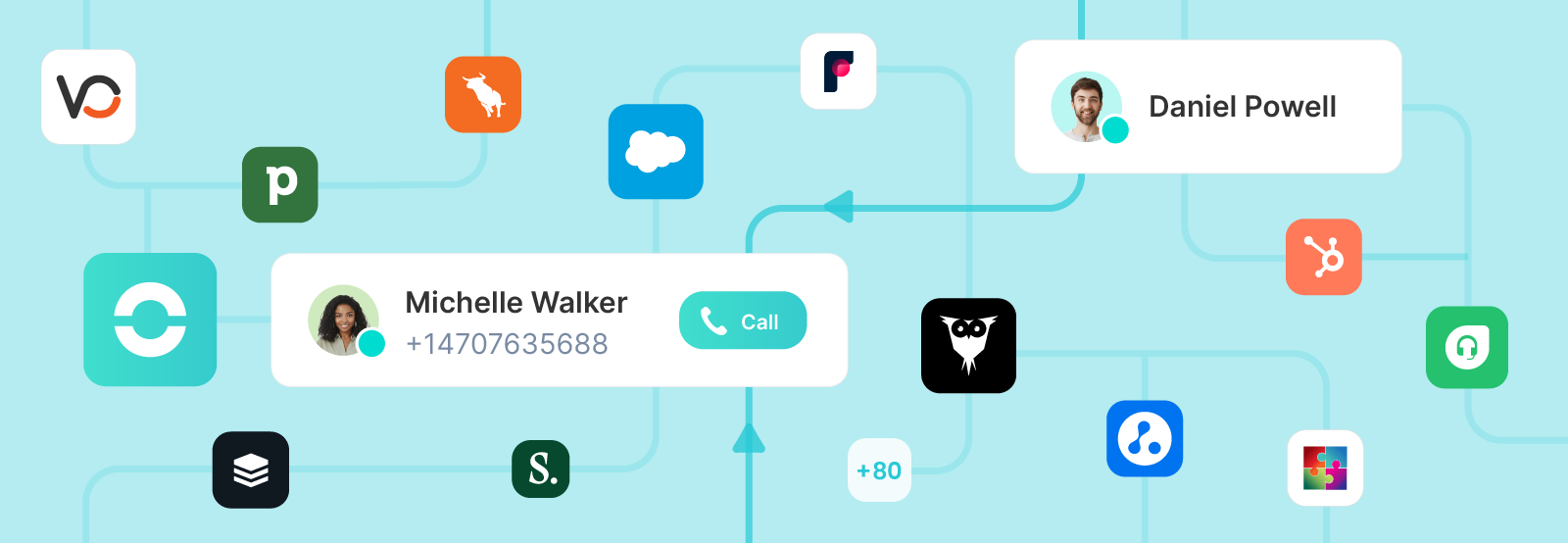
Ringover’s integration library is one of the most comprehensive in the business VoIP sector, boasting over 100 pre-built native connectors:
- CRM Platforms: Salesforce, HubSpot, Pipedrive, Zoho CRM, Freshsales, Copper, Microsoft Dynamics 365.
- Helpdesk & Support Tools: Zendesk, Freshdesk, Gorgias, Intercom, Help Scout.
- Applicant Tracking Systems (ATS): Bullhorn, Vincere, Jobadder, Recruiterflow, Loxo.
- Productivity Suites: Google Workspace, Microsoft Teams, Slack, Zapier, Webhooks API.
The two-way synchronization ensures that when an agent makes or receives a call in Ringover, the call record, audio recording URL, duration, call disposition tags, and Empower AI summary automatically attach to the corresponding contact file in your CRM in real time.
10. How to get started
Deploying Ringover across your sales or support team requires a structured rollout plan to ensure smooth phone number porting and CRM mapping.
Step 1: Sign up for a trial account
Navigate to ringover.com and sign up for a free trial. Test softphone audio quality, test browser extensions, and evaluate dashboard ergonomics with your core team leads.
Step 2: Provision or port virtual business numbers
Select new local or toll-free numbers from Ringover’s global inventory across 43+ countries. If you have existing business phone numbers, initiate a seamless porting request through the Ringover admin console to transfer your numbers without downtime.
Step 3: Connect your CRM or Helpdesk platform
Navigate to the Integrations tab in the Ringover admin dashboard, select your primary CRM (e.g., Salesforce or HubSpot), and complete one-click OAuth authorization. Map custom call fields and enable automatic contact creation for unknown callers.
Step 4: Configure IVR call routing and ring groups
Use the visual IVR builder to upload custom greetings, set up business hours routing, assign team ring groups, and configure failover rules for missed calls.
Step 5: Activate Empower AI for conversation analytics
Assign Empower AI licenses to key sales reps and customer support leads. Set up custom keyword trackers, define sentiment alerts, and start gathering automated call summaries directly inside your CRM.
11. Frequently asked questions
Is Ringover easy to set up for remote teams?
Yes. Ringover requires zero physical hardware or IT wiring. Team members simply download the softphone app on desktop (Windows/macOS) or mobile (iOS/Android), or log in via a web browser, and can start making calls within 15 minutes.
Can I port my existing business phone numbers to Ringover?
Yes. Ringover supports seamless number porting for local, national, and toll-free business numbers across over 43 countries. You can submit a porting request directly from the admin dashboard without experiencing service interruptions.
Does Ringover include unlimited international calling?
Yes. The Smart ($21/user/mo) and Business ($47/user/mo) plans include unlimited calling to 110 international destinations, including landlines and mobiles across North America, Europe, Asia-Pacific, and Latin America.
What CRMs does Ringover integrate with natively?
Ringover offers native two-way integration with over 100 platforms, including Salesforce, HubSpot, Zendesk, Pipedrive, Zoho CRM, Bullhorn, Freshdesk, and Microsoft Dynamics 365, with support for custom webhooks and APIs.
What is Empower AI and is it included in standard plans?
Empower AI is Ringover's conversational intelligence engine providing speech-to-text transcriptions, sentiment scoring, AI call summaries, and Pitch Room role-play simulations. It is available as a modular add-on for $39 per license/month.
What is Ringover's refund and contract policy?
Ringover offers flexible monthly billing as well as discounted annual contracts. Subscriptions can be upgraded or scaled at any time. Terms of service provide standard account management support with transparent renewal pricing.
12. Final verdict
Following an extensive three-month evaluation, Ringover earns an overall rating of 4.7 / 5. It is an exceptional, feature-rich cloud business phone and contact center platform that combines European regulatory compliance with modern sales and support automation.
By pairing unlimited global calling across 110 destinations with intuitive visual IVR configuration, deep CRM integration, and cutting-edge conversational intelligence via Empower AI, Ringover provides mid-market companies with an agile, high-velocity telecommunications engine. While teams should budget carefully for optional AI add-ons, Ringover represents an outstanding investment for any organization seeking to modernize its business phone infrastructure.
Use Ringover if: you are a growing business, remote sales team, or support hub needing high-quality global calling, 100+ CRM integrations, and advanced AI call analytics without complex hardware management
Think twice if: you are a solo freelancer needing only a basic single mobile line, or an enterprise requiring legacy physical desk phone hardware provisioning across complex multi-site office setups
Start risk-free: Test softphone performance and CRM integration depth by initiating a trial on the Official Ringover Portal
Disclosure: This review may contain affiliate links. If you sign up through our link, we may earn a commission at no extra cost to you. This does not influence our ratings or editorial opinion.