
TickBlaze Review 2026: The Ultimate Institutional Trading Suite for Free?
Active trading in modern markets requires more than basic charts and indicators. For discretionary traders, success hinges on fast execution, clean charts, and robust trade journals. For algorithmic traders, it demands a high-performance backtester, portfolio-level optimization, and standard coding languages like C# and Python. Traditionally, retail traders had to buy expensive licenses, subscribe to separate data feeds, and learn complex niche scripting languages to achieve this level of performance.
TickBlaze attempts to disrupt this model. By offering an institutional-grade hybrid platform-previously valued at $2,495-entirely for free to retail traders, and integrating zero-cost real-time data from dxFeed, TickBlaze is positioning itself as the go-to solution for retail, prop, and algorithmic traders. In this review, we examine TickBlaze’s dual desktop environments, evaluate its scripting engine, test its broker integration, and break down its true cost of ownership.
Quick verdict
A stellar broker-neutral trading suite offering professional C# and Python algorithmic backtesting alongside manual trading dashboards-all for free.
Algorithmic developers, prop firm traders using Rithmic or CQG, and discretionary day traders seeking a high-performance Windows platform.
Fully free software license for retail traders. Free real-time and historical dxFeed market data included. Custom enterprise rates.
1. Platform Overview
TickBlaze is designed as a hybrid, broker-neutral trading platform. This means it completely separates your market data feed from your broker execution routing. Traders can connect high-quality data feeds (like dxFeed, Rithmic, or IQFeed) for charting and strategy calculations while executing trades through different brokers (such as Interactive Brokers, CQG, or Rithmic).
The desktop software is structured into two main workspaces:
- Standard Desktop: Tailored for manual discretionary traders. It features flexible multi-chart workspaces, 200+ built-in indicators, 18 bar types, advanced order entry panels (DOM), trade journaling, and risk metrics.
- Strategy Desktop: Built specifically for algorithmic and quantitative developers. It is a full development environment where you can write, compile, debug, backtest, and optimize trading scripts in standard C# and Python.
In addition to the Windows desktop software, TickBlaze is primarily a high-performance Windows desktop client. For non-Windows users, alternative access options may be limited compared to cloud-based platforms.
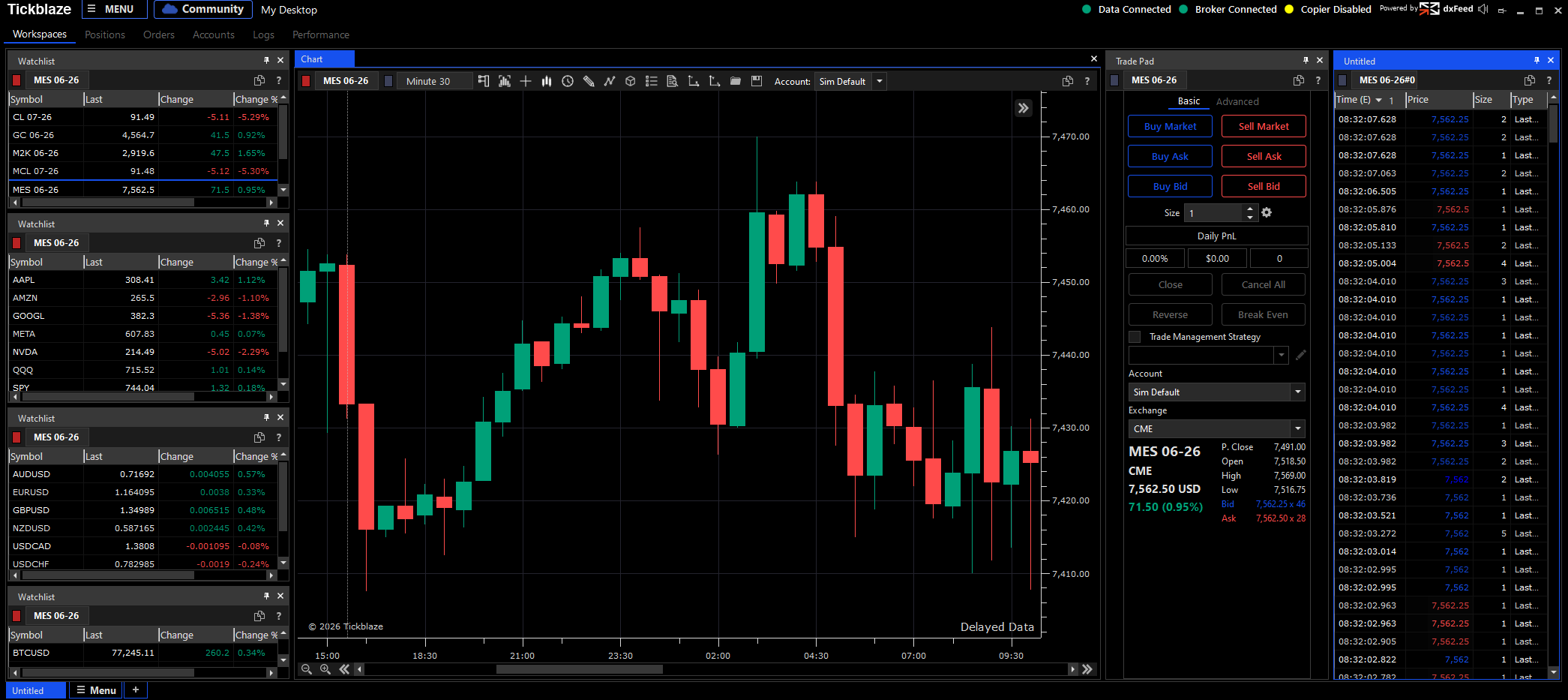
TickBlaze Dashboard: The central hub for discretionary and algorithmic trading operations.
2. Platform Features
The discretionary trading features of TickBlaze stand out for their flexibility and clean performance:
- Multi-Asset Charting: Supports stocks, futures, forex, and cryptocurrency. You can open multiple windows, link charts by symbol, and display advanced order flow indicators.
- Chart Trading & DOM: You can place, drag, and modify orders directly on the charts or trade from a fully featured depth-of-market (DOM) ladder.
- Built-in Trade Journaling: It automatically logs your trades, tracks execution latency, and generates detailed performance analytics, which is essential for audit compliance and self-improvement.
- Prop Trade Copier: Allows traders to copy trades across multiple accounts (e.g., duplicating trades across multiple prop firm accounts) with customizable scaling and risk controls.
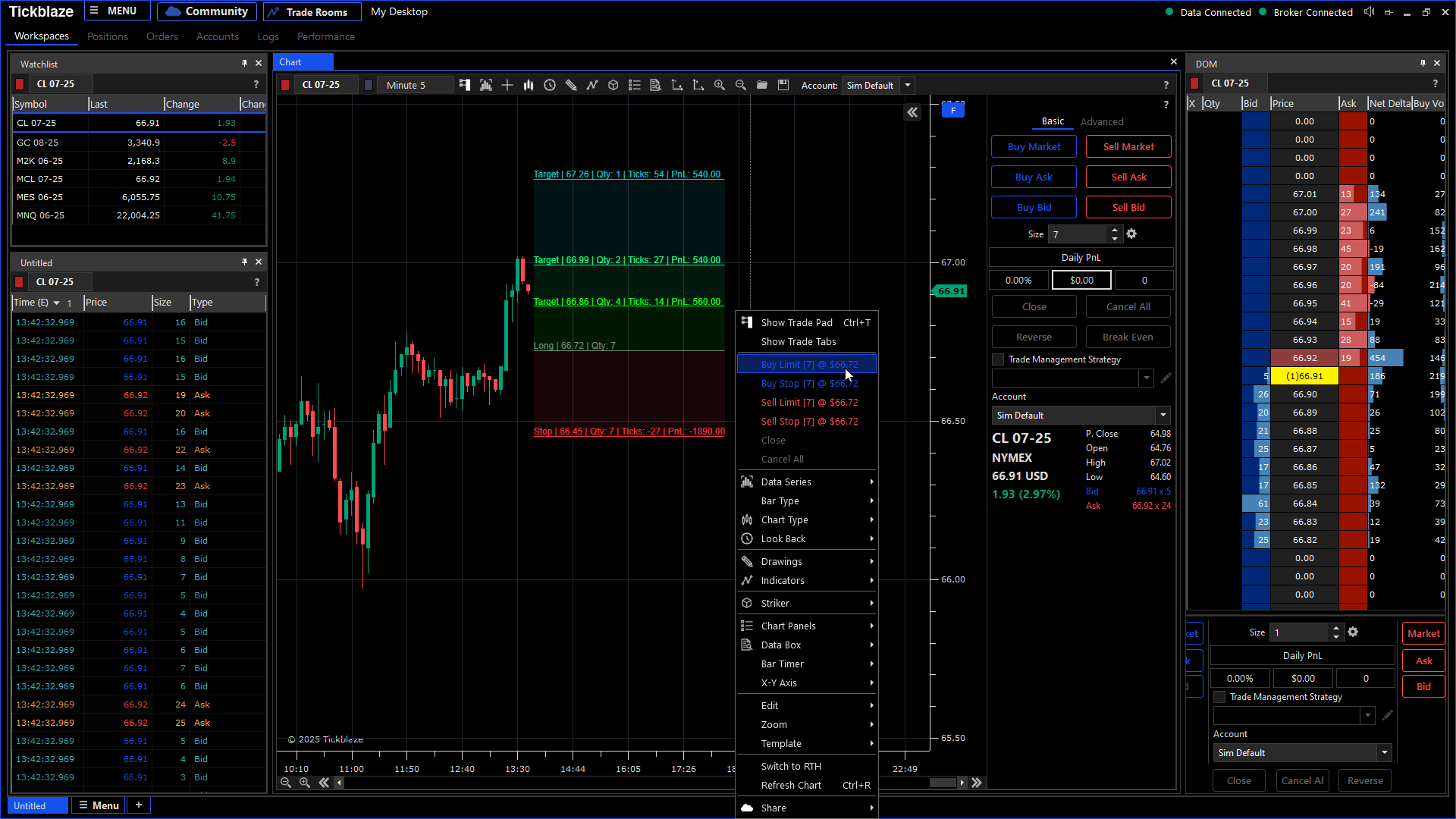
TickBlaze WebTrader: Zero-install web trading interface for discretionary manual execution.
3. Algorithmic Strategy Engine
For quantitative traders, the main draw is TickBlaze’s Strategy Desktop. Unlike platforms that lock you into proprietary scripting languages (such as EasyLanguage or Pine Script), TickBlaze uses industry-standard C# and Python.
This allows quant developers to:
- Write Native Code: Build strategies using standard IDEs and leverage external C# or Python packages for machine learning, statistical analysis, and complex data structures.
- Event-Driven Execution: Build strategies that respond to tick-by-tick market events, bar closures, or custom indicators.
- Run Multiple Scripts: Execute multiple automated strategies simultaneously across different symbols or asset classes from a single dashboard.
4. Backtesting & Optimization Capabilities
A strategy is only as good as its backtesting verification. TickBlaze provides a highly advanced, portfolio-level backtesting engine:
- Multi-Symbol Testing: Run historical backtests on portfolios of hundreds of symbols simultaneously, taking into account cash allocation, margin requirements, and cross-asset correlations.
- Detailed Metrics: Analyze strategies using over 70 performance metrics, including Sharpe ratio, Sortino ratio, profit factor, maximum drawdown, and equity curve trajectory.
- Advanced Optimization: Optimize strategy parameters using standard search algorithms, genetic optimization, and walk-forward validation to avoid curve-fitting.
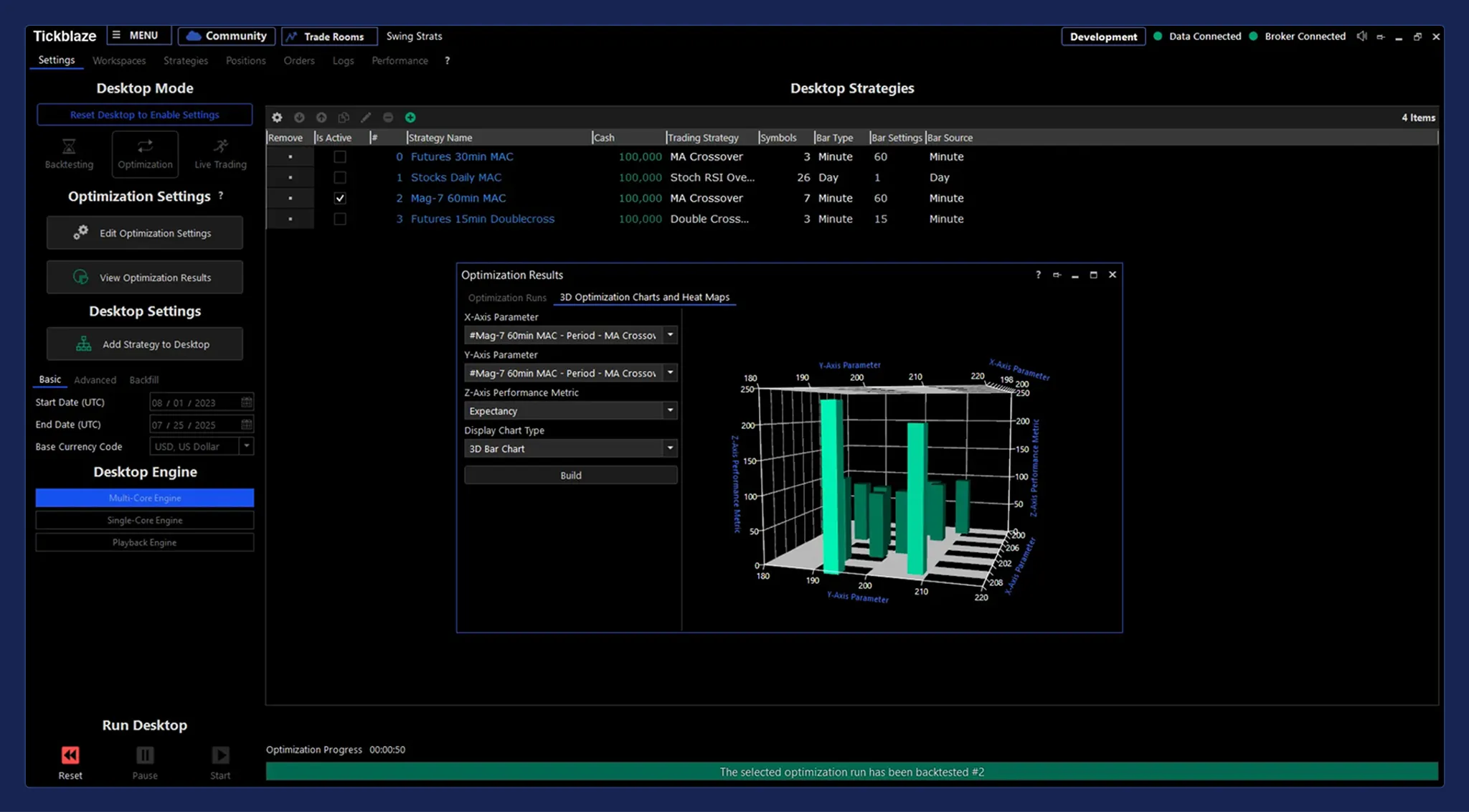
TickBlaze Strategy Backtest: Portfolio-level historical backtesting with detailed performance reports.
5. Market Data Integrations & Broker Connections
One of TickBlaze’s most significant advantages is its strict adherence to a broker-neutral architecture. In traditional trading software, data feeds and execution routes are tightly coupled, forcing you to use a single provider’s infrastructure for both charting and execution. TickBlaze breaks this mold by separating the two layers completely: you can fetch ultra-low latency, unfiltered market data from a dedicated feed while routing your order execution to a completely different broker, allowing you to optimize for both data quality and commission rates.
The dxFeed Partnership: Removing the Data Cost Barrier
High-quality, tick-by-tick real-time and historical market data is typically one of the largest monthly overhead expenses for retail day traders, often costing anywhere from $50 to $150+ per month. TickBlaze eliminates this expense through its native integration with dxFeed, one of the financial industry’s premier data infrastructure providers.
- Zero-Cost Access: Retail users receive access to real-time and historical feeds for US equities (including Nasdaq Basic), major futures contracts, forex pairs, and cryptocurrencies at no cost.
- Granular Historical Data: The dxFeed connection provides high-density historical tick data, which is automatically cached locally for rapid strategy backtesting and chart loading.
Supported Broker & execution Connections
When you are ready to route orders live, TickBlaze connects to some of the industry’s most stable execution gateways:
- Interactive Brokers (IBKR): Connect directly via the IB Gateway or TWS. This integration is ideal for multi-asset traders who trade global stocks, options, CFDs, and futures under a single account.
- CQG: A standard execution loop for retail futures brokers (such as Amp Futures, Discount Trading, or Stage 5). CQG provides highly stable order routing and depth-of-market (DOM) access.
- Rithmic: The gold standard for low-latency futures trading and proprietary trading firms. The Rithmic API bridge enables TickBlaze to execute orders in milliseconds, making it a favorite for scalpers and automated trading models.
- Nasdaq TotalView & L2 Book Depth: For equity traders who require deep visibility into order book queues, TickBlaze supports full Nasdaq TotalView integrations, displaying market depth directly on DOM panels.
6. Target Audience & Key Use Cases
TickBlaze’s hybrid environment is designed to bridge the gap between discretionary manual trading and quantitative code development, excelling in three distinct use cases:
1. Algorithmic and Quantitative Developers
Quant developers use the Strategy Desktop as a comprehensive local IDE. Because TickBlaze supports standard C# and Python, developers are not constrained by proprietary scripting languages.
- Advanced Codebases: Developers can link TickBlaze to external development tools (like Visual Studio or VS Code), import standard Python packages for data analysis and machine learning (compatibility with external packages varies based on environment), and write complex event-driven strategies.
- Execution Algorithms: Strategies can interact with real-time Level 2 order book data, allowing quants to build sophisticated execution models like volume-weighted average price (VWAP), time-weighted average price (TWAP), or iceberg order splitters.
2. Proprietary Trading Firm (Prop) Traders
In the current prop trading landscape, traders often manage multiple evaluation and funded accounts simultaneously across platforms like Apex, Bulenox, or Lilo. Managing these accounts individually is inefficient and increases operational risk.
- Built-in Trade Copier: TickBlaze includes a high-performance, low-latency multi-account trade copier directly in the core platform.
- Custom Scaling and Rules: Traders can execute orders on a primary “Master” account and have TickBlaze automatically copy those orders to multiple “Slave” accounts. The copier supports lot-size scaling (e.g., executing 1 contract on Master and 2 contracts on Slave), maximum slippage boundaries, and execution log tracking, eliminating the need to purchase expensive third-party copy software.
3. Professional Retail Day Traders
Manual discretionary day traders who require advanced charting tools, order entry panels, and DOM screens.
- Noise-Filtering Bars: Supports 18 different bar formats, including Renko, Range, Tick, and Volume bars, allowing traders to smooth out price action and focus on pure order flow dynamics.
- Bracket & OCO Orders: Traders can configure automated brackets (automatically attaching Stop Loss and Take Profit orders to every entry) or One-Cancels-the-Other (OCO) orders, ensuring trade management rules are executed instantly without manual intervention.
- Comprehensive Trade Journal: The platform automatically logs every trade, tracks execution times, and reports detailed performance statistics, helping manual traders evaluate their metrics and refine their discipline.
7. Key Pros & Cons
Every platform involves trade-offs. Here is a balanced look at TickBlaze’s pros and cons.
The Pros:
- Completely Free Software: Retail licenses (previously $2,495) are now $0, with no platform subscription fees.
- Included Market Data: Integration with dxFeed provides high-quality real-time and historical data for free.
- C# & Python Integration: Developers are not forced to learn proprietary languages and can import standard programming packages.
- Low-Latency Execution: Native Windows client connects directly to institutional execution loops like Rithmic and CQG.
- Trade Copier Included: Useful B2B copier tools built straight into the platform.
The Cons:
- Windows-Only Desktop: The high-performance client requires Windows 11 or later. macOS and Linux users are restricted to WebTrader.
- CME Non-Display Fees: Algorithmic traders using CME data feeds may still be subject to exchange-mandated Non-Display fees, which are billed directly by CME.
- Advanced Learning Curve: Strategy coding, script compiling, and connection setup assume a strong technical background.
8. Pricing Plans & Cost Structure
TickBlaze’s pricing model is straightforward:
| Plan | Price | Key Features |
|---|---|---|
| Retail License | $0 (Free) | Standard & Strategy Desktops, WebTrader, Mobile App, dxFeed integrated real-time data |
| Marketplace Add-ons | Variable (Paid) | Purchase of premium indicators, custom algorithms, or third-party strategy templates |
| Enterprise / Broker | Custom | Tailored institutional deployment, white-labeled platforms, and custom SLAs |
Note: There are no hidden platform fees. Algorithmic traders using CME Group data should coordinate directly with CME regarding potential Non-Display usage fees.
TickBlaze Marketplace: Discovering and purchasing premium indicators and automated strategy add-ons.
9. Competitor Comparison & Alternatives
Here is how TickBlaze compares against major platforms in the space:
| Feature | TickBlaze | NinjaTrader | QuantConnect | MultiCharts |
|---|---|---|---|---|
| License Cost | Free ($0) | Free for basic / Billed for live | Subscription-based cloud | Paid ($1,099-$1,497 depending on version) |
| Data Feed Cost | Free (dxFeed included) | Paid | Paid | Paid |
| Programming Language | C# and Python | C# (NinjaScript) | C# and Python | PowerLanguage (EasyLanguage) |
| Execution Architecture | Desktop / Web / Mobile | Desktop / Web | Cloud-based | Desktop-only |
| Broker-Neutral | Yes | No (tied to NinjaTrader Brokerage) | Yes | Yes |
Key Takeaway:
- Choose TickBlaze if you want Python/C# scripting, broker neutrality, and want to eliminate platform and data feed costs.
- Choose NinjaTrader if you prefer a platform with a larger retail ecosystem and direct brokerage integrations.
- Choose QuantConnect if you want cloud-based backtesting and execution without managing local infrastructure.
10. System Requirements & Tech Specifications
Because TickBlaze is a high-performance desktop client, it requires adequate system hardware to perform real-time tick analysis and strategy compilation:
- Operating System: Windows 11 or later.
- Processor: Intel Core i7 (11th Gen or better) or AMD Ryzen 7 equivalent.
- RAM: 16GB minimum (32GB recommended for heavy optimization).
- Graphics Card: DirectX 10 compatible GPU (for smooth chart rendering).
- Software Dependencies: Microsoft .NET Framework (installed automatically during platform setup).
- Screen Resolution: 1024 x 768 minimum display resolution.
11. Support, Security, & Compliance
For professional and algorithmic traders running live capital or managing institutional accounts, platform stability, technical support responsiveness, and data security are paramount. TickBlaze addresses these requirements through a robust infrastructure:
Technical Support and Documentation
TickBlaze provides support via its technical team, complemented by online community forums and a comprehensive documentation center.
- API Code Reference: The online help center features full API reference manuals for both C# and Python libraries. The documentation includes copy-pasteable script templates, detailed class breakdowns (such as Strategy, Indicator, Order, and Position), and step-by-step connection walkthroughs, making it easier for developers to get their code compiled and running.
- Onboarding Resources: Direct video guides and documentation help users configure CQG, Rithmic, and Interactive Brokers connections, resolving common port or connection token issues quickly.
Security and Intellectual Property Protection
Unlike cloud-based quantitative platforms that require you to upload your strategy code and broker credentials to remote servers, TickBlaze operates as a local desktop client.
- Local Code Compilation: All strategy scripting, compilation, and database indexing are performed locally on your hard drive. Your proprietary trading algorithms and quantitative source code never leave your computer, protecting your intellectual property from external access.
- Local Credential Storage: API tokens, password credentials, and broker connection settings are encrypted and stored locally on your machine, rather than on TickBlaze’s servers, minimizing the risk of remote database breaches.
Compliance Logging & Audit Trails
To assist professional and institutional traders who must maintain compliance records, TickBlaze features an advanced Order Management System (OMS) audit engine.
- Execution Latency Tracking: The OMS logs the exact millisecond timestamps of order generation, routing, broker acceptance, and execution, allowing quants to measure slippage and broker execution latency.
- Detailed Audit Log: Generates comprehensive CSV-based execution audits, tracking order modifications, cancellations, and execution codes, which is essential for institutional compliance reviews.
12. Frequently Asked Questions
Is TickBlaze really free?
Yes. Full platform license available at no cost to retail traders (no monthly platform fees).
Does TickBlaze support Python?
Yes, TickBlaze supports Python and C# natively. You can write strategy scripts in either language, compile them locally, and backtest or execute them live.
Can I use TickBlaze on a Mac?
The full desktop platform (Standard & Strategy Desktops) is Windows-only. However, macOS users can access the zero-install WebTrader via web browser or use the mobile app.
What brokers are supported by TickBlaze?
TickBlaze is broker-neutral and supports CQG, Rithmic, and Interactive Brokers for trade execution, separating execution routes from market data feeds.
What is dxFeed and is it free?
dxFeed is a leading financial market data provider. TickBlaze integrates dxFeed to provide free real-time and historical data for stocks, futures, forex, and crypto to retail platform users.
13. Summary & Final Recommendation
For active retail and quantitative traders, TickBlaze is an outstanding platform. By offering a powerful dual-desktop trading environment, support for Python and C#, and integrating free dxFeed market data-all without charging license fees-it removes the financial barriers to institutional-grade trading tools.
The platform has a steep learning curve and requires a Windows desktop, but its broker-neutral design and portfolio-level backtesting engine make it a premier choice for algorithmic and prop traders.
Use TickBlaze if: you are an algorithmic developer, prop trader, or active retail day trader who wants to build and execute C# or Python strategies and eliminate software license or data feed costs.
Think twice if: you require a native macOS desktop client, need a simple fundamental analysis tool, or do not have a Windows 11+ system.
Start free: Register on TickBlaze’s website to claim your free license key, download the Windows client, and begin backtesting C# or Python models immediately.
Disclosure: This review may contain affiliate links. If you sign up through our link, we may earn a commission at no extra cost to you. This does not influence our ratings or editorial opinion.