DocsAutomator Review 2026: The Ultimate Deep-Dive on No-Code Document Automation, Dynamic Forms, and Native E-Signatures
In modern business automation, turning structured database records from Airtable, Glide, SmartSuite, and Notion into beautifully formatted, client-ready PDFs and legally enforceable contracts has traditionally been one of the most frustrating bottlenecks. Developers were forced to wrestle with brittle HTML-to-PDF scripts, while business operators struggled with rigid, proprietary drag-and-drop template builders.
DocsAutomator has completely transformed this workflow. Founded by no-code automation specialist Rupert Hoffschmidt-McDonnell, DocsAutomator bridges relational data stores directly with Google Docs and Microsoft Word as collaborative, visual template engines. By combining 3-level nested line items, dynamic conditional rendering, an AI Document Agent, native e-signatures with cryptographic audit trails, and turnkey connectors for Airtable, Glide, Make, and Zapier, DocsAutomator stands out in 2026 as the most capable document generation platform for no-code stacks.
In this exhaustive, evidence-based review, we analyze DocsAutomator’s product core architecture, benchmark rendering performance, examine its native e-signature security, compare it head-to-head with top competitors, and provide 6 industry-specific automation blueprints.
Quick verdict
The premier document generation and e-signature solution for no-code systems, powered by familiar Google Docs and Word templating and 3-level nested tables.
Airtable & Glide builders, operations teams generating multi-line invoices, and agencies automating client contract workflows.
Unlimited free test mode. Paid plans start from $19/mo (100 docs) to $149/mo (5,000 docs) with pay-as-you-go e-signatures at $0.50/doc.
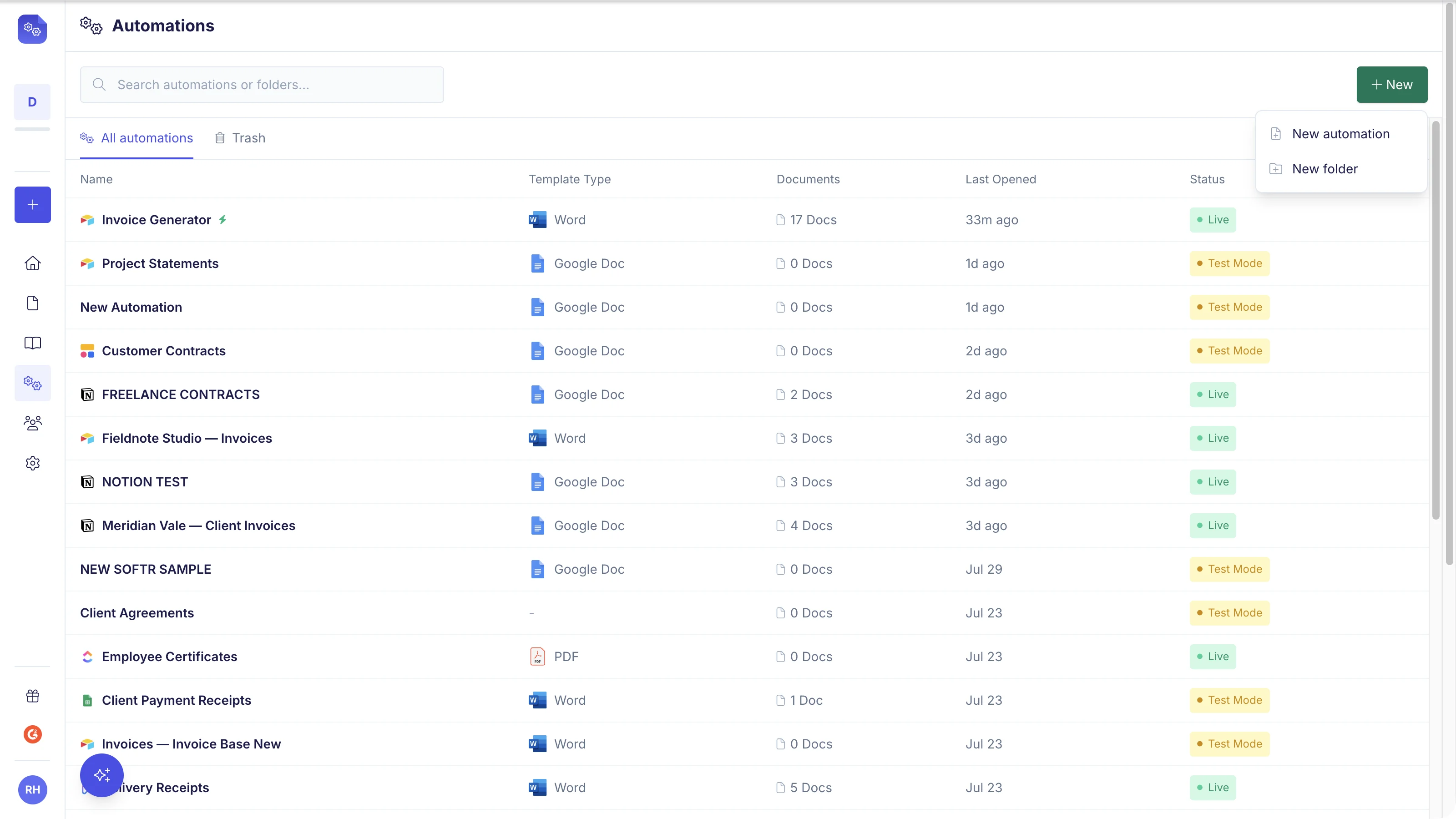
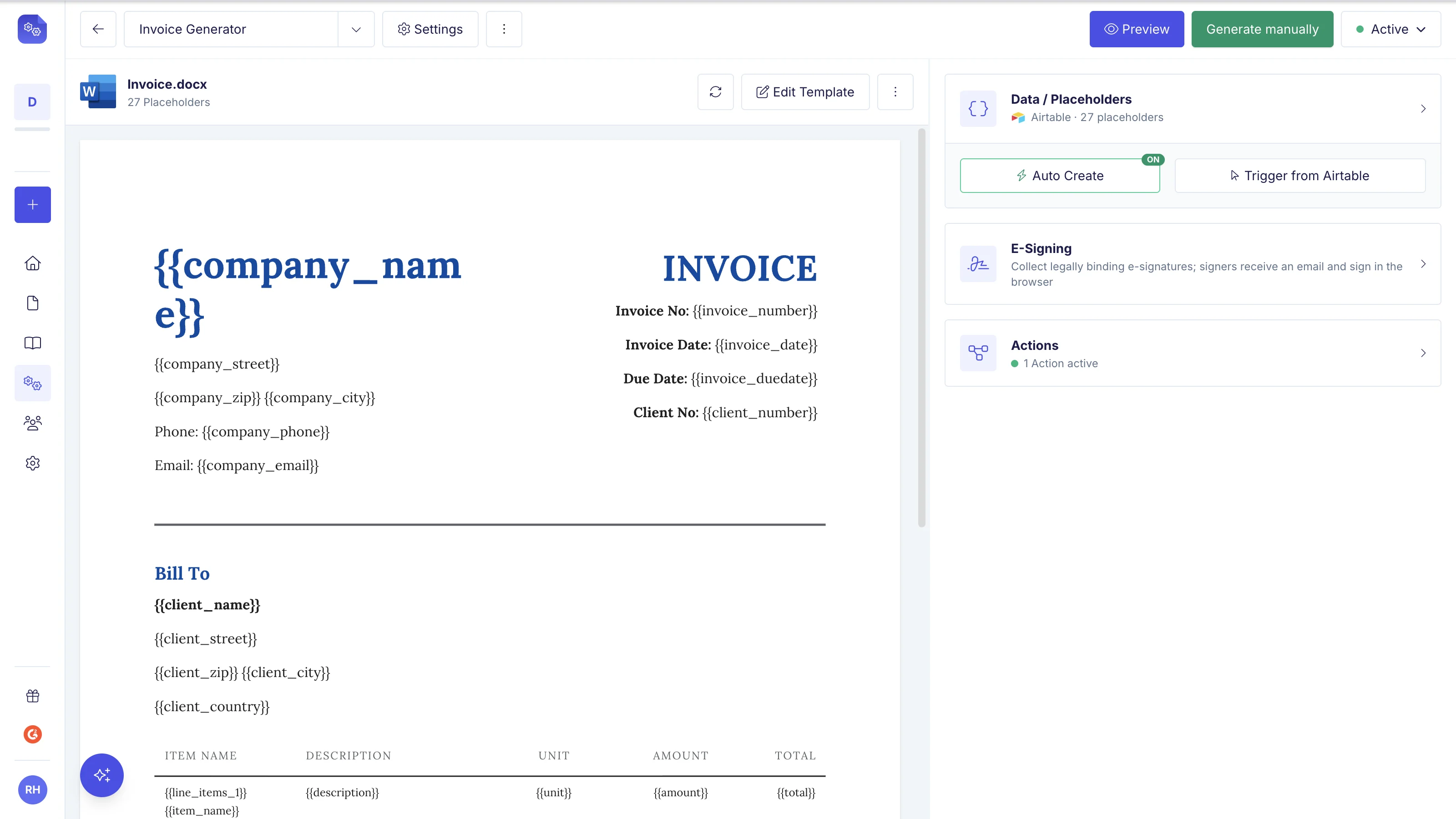
DocsAutomator Dashboard: Connecting visual Google Docs templates to relational database records.
1. Platform Overview and Background
DocsAutomator was created to solve a fundamental contradiction in the modern no-code movement: while databases and web app builders like Airtable and Glide have become exceptionally powerful, the process of turning that data into professional, client-ready documents remained stuck in the past.
Before DocsAutomator, organizations had to choose between two suboptimal paths:
- Developer-heavy HTML/CSS microservices: Writing custom Puppeteer or Headless Chrome scripts that broke whenever layout margins shifted or fonts changed.
- Proprietary Canvas Document Builders: Paying steep monthly fees for standalone tools like Documint or PandaDoc that forced teams to redesign every template from scratch in a rigid web canvas.
DocsAutomator eliminated this dilemma by adopting Google Docs and Microsoft Word as its native template engines. Because Google Docs and Word are already the default document editors for millions of businesses, there is zero onboarding friction. Marketing teams, legal counsels, and operations managers can design pixel-perfect proposals, contracts, and invoices using standard office formatting, custom typography, tables, headers, and footers. When triggered by a database update, API webhook, or AI agent (via MCP), DocsAutomator reads the template, dynamically injects the data payloads, handles complex nested table iterations, and produces vector-sharp PDFs in under 3 seconds.
The platform has rapidly established itself as the leading document automation utility across the global no-code community. It serves as an official partner for Glide, a top-rated extension on the Airtable Marketplace, and a verified integration across Make.com, SmartSuite, and n8n.
2. Target Audience and Ideal Use Cases
Understanding whether DocsAutomator fits your organization requires looking at how your data is structured and how your documents are distributed:
1. No-Code App Builders and Citizen Developers
Builders leveraging Airtable, Glide, Softr, SmartSuite, or Notion to run business backends can trigger automated PDF creation directly from button clicks, mobile app actions, or background database automations without writing external code.
2. Operations, Finance, and Billing Teams
Finance departments dealing with complex billing structures-such as recurring client invoices, multi-tier service quotes, and credit memos-can leverage DocsAutomator’s multi-level line item rendering to generate structured financial statements automatically.
3. Real Estate and Property Managers
Real estate agencies can generate standardized lease agreements, addenda, and property move-in inspection reports with embedded photo grids, immediately dispatching them to tenants for digital signature.
4. Human Resources and Talent Acquisition
People operations teams can automate customized employment offer letters, non-disclosure agreements (NDAs), and quarterly performance appraisals, collecting tamper-evident e-signatures from candidates in minutes.
5. Automation Agencies and Systems Integrators
Agencies building bespoke automated systems for clients can take advantage of DocsAutomator’s Unlimited Free Sandbox Mode, designing and testing complex document architectures across multiple client workspaces without incurring credit costs.
3. Product Core Architecture: Visual Templates, Nested Tables & AI Agent
The internal mechanics of DocsAutomator separate it from basic mail-merge plugins. Let’s inspect the core technical pillars that power its document engine:
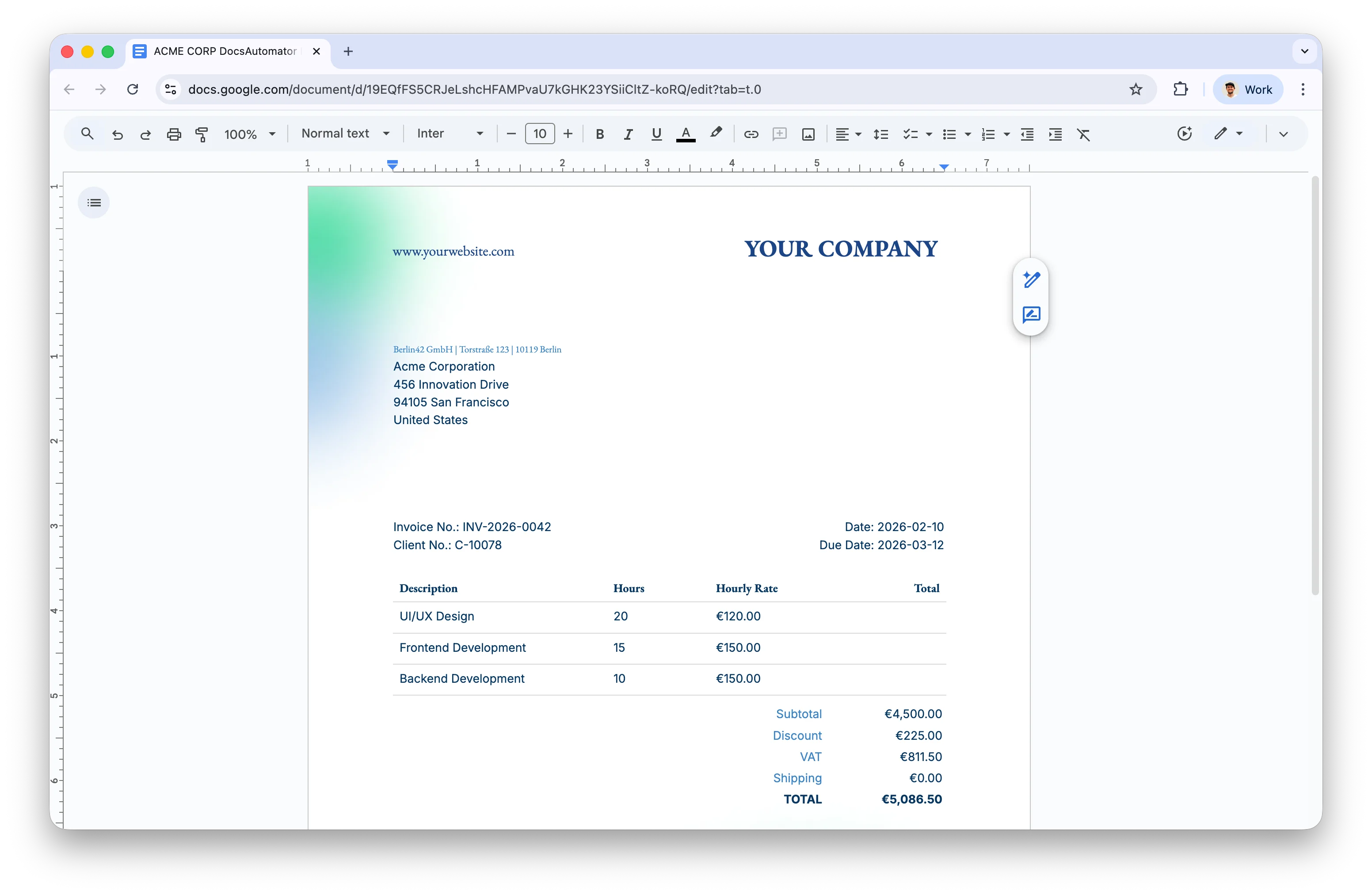
Template Builder: Mapping dynamic variables, nested tables, AI field suggestions, and formatting rules.
Google Docs & Word as Visual WYSIWYG Template Engines
By utilizing Google Docs and Microsoft Word (.docx) directly, DocsAutomator provides complete typography and layout control. Standard formatting-including custom Google Fonts, multi-column text columns, dynamic headers, footers, and automatic page numbering (Page X of Y)-is preserved with 100% fidelity during the PDF rendering process.
Built-in AI Document Agent & MCP Server Support
DocsAutomator incorporates a dedicated AI Document Agent that automatically generates templates, creates variable mappings, and constructs automation workflows from natural language prompts. Furthermore, DocsAutomator provides an official Model Context Protocol (MCP) server, allowing AI agents in Claude Desktop, Cursor, and n8n to autonomously generate, merge, and dispatch documents directly from database records.
Dynamic Variable Mapping and Automatic Locale Formatters
Variables are declared in templates using intuitive double-bracket placeholders such as customer name, invoice number, or contract start date. DocsAutomator includes built-in locale formatters that automatically convert raw database numbers into properly localized currencies (such as USD, EUR, VND, or JPY) and format standard timestamps into regional dates (such as DD/MM/YYYY or month-written formats) without requiring complex database formula fields.
Industry-Leading Three-Level Nested Line Items
Where traditional tools struggle with one-to-many relationships, DocsAutomator excels at rendering deeply structured relational data:
- Single Table Iterations: By placing a line item tag in the initial cell of a table row, the engine automatically repeats the row for every linked record in your database, populating product titles, quantities, unit prices, and row subtotals dynamically.
- Multiple Independent Table Sets: You can include multiple distinct line item tables within a single document-allowing you to clearly separate tangible products, billable consulting hours, and reimbursable expenses into their own dedicated sections.
- Three-Level Deep Hierarchical Nesting: Unlike basic document tools that only support flat lists, DocsAutomator handles up to three levels of nested sub-items. This capability is ideal for complex project breakdowns (such as project phases containing milestone groups and individual tasks) or tiered logistics shipments.
Conditional Logic and Dynamic Layout Cleanup
DocsAutomator allows specific sections, legal clauses, or table rows to be conditionally shown or hidden based on input database values. Furthermore, the engine automatically removes empty table rows when optional secondary fields are blank, preventing awkward gaps in your layout, and suppresses trailing blank pages when conditional content is omitted.
Dynamic Images, Barcodes, and QR Code Generation
Images stored in Airtable attachments or accessible via public URLs are injected dynamically while preserving exact layout dimensions and aspect ratios. Additionally, payment links, invoice numbers, or tracking URLs can be automatically rendered as dynamic QR codes for mobile banking scans or standard barcodes for warehouse packaging labels.
Dual Output Engine: PDF and Editable Google Docs
DocsAutomator generates print-ready vector PDFs and can optionally save a fully editable Google Docs copy directly to a designated Google Drive folder. This allows staff to make bespoke manual revisions to a contract draft before dispatching it to external clients.
4. Native E-Signatures & Dynamic Forms Workflow
DocsAutomator elevates document creation into an end-to-end automated signing pipeline, combining native e-signatures with dynamic form intake tools:
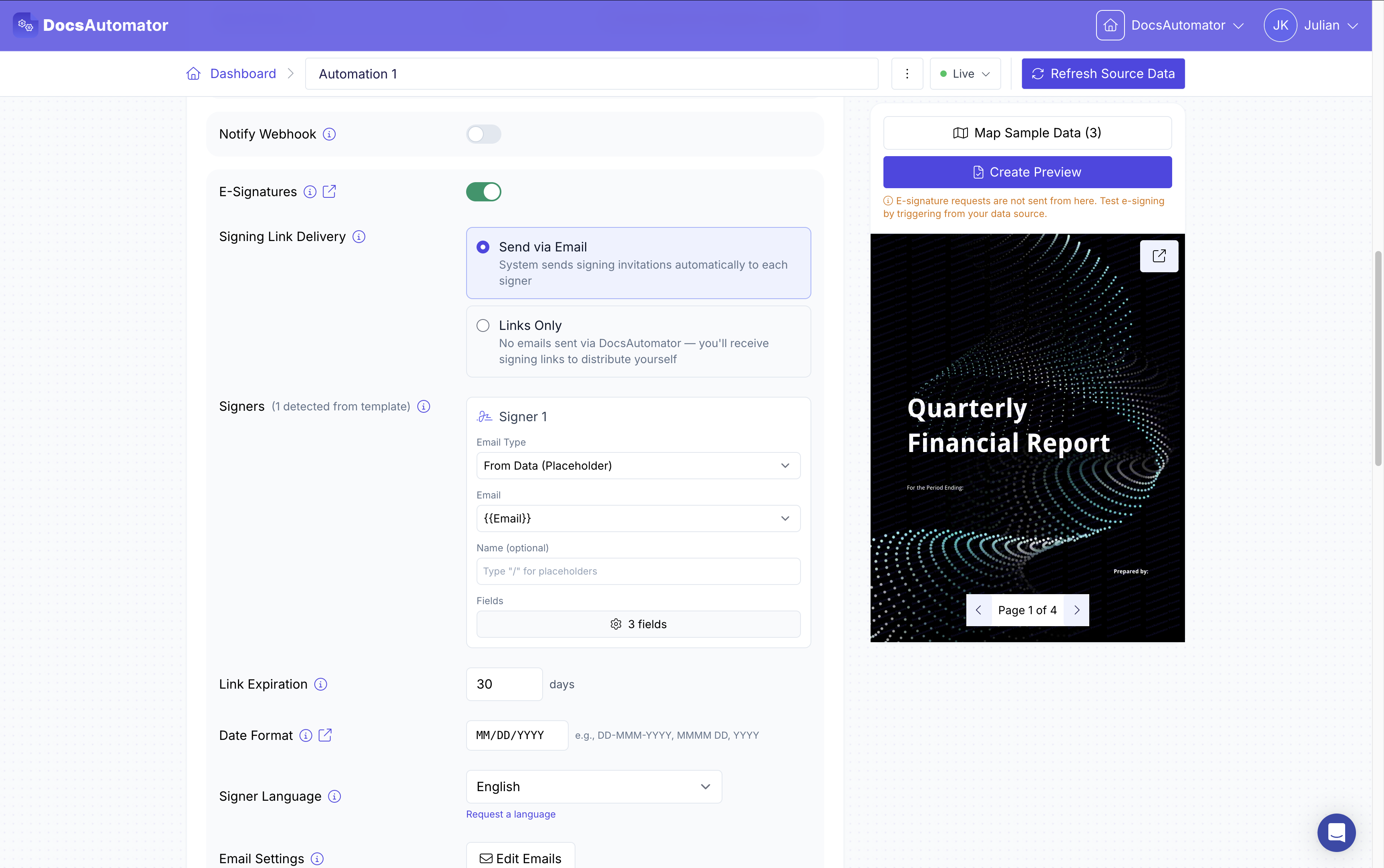
Native E-Sign Workflow: Multi-signer routing, automated email reminders, and legal Audit Trail certificates.
Native E-Signature Engine and Syntax
Instead of requiring expensive external subscriptions to DocuSign or Adobe Sign, DocsAutomator includes a built-in e-signature system. Users place standard tags directly inside their Google Doc template:
- Dedicated Signature Placeholders: Insert signature and date tags directly where you want each participant to sign.
- Custom Signer Inputs: Add mandatory text fields that signers must complete before submitting (such as job title or registration numbers).
- Multi-Party Support: Define distinct placeholders for first, second, or third signers, ensuring everyone signs in the correct designated areas.
Flexible Signing Order & Automated Follow-Ups
Workflows can be routed in Sequential Order (Signer 1 signs first, automatically triggering an invite to Signer 2) or Parallel Order (inviting all stakeholders simultaneously). Automated email reminders can be scheduled at custom intervals (e.g., 24h, 48h, 7 days) to ensure contracts are signed without manual chasing.
Legally Binding Audit Trail
Every signed document automatically appends a tamper-evident Certificate of Completion. This audit sheet records verified signer emails, IP addresses, UTC timestamps, device user-agents, and cryptographic document hashes, ensuring compliance with the US ESIGN Act and European eIDAS regulations.
Dynamic Web Forms Synergy (Fillout & Glide)
When capturing customer data, organizations often pair DocsAutomator with dynamic web forms:
- In-Form Signing (e.g., Fillout): Best for single-party, on-the-spot submissions (like event waivers) where the user signs on the web form screen itself.
- DocsAutomator E-Sign Flow: Best for formal multi-party contracts where a custom document must be generated from database records, formatted with multi-page line items, and routed via verified email invitations.
- The Recommended Hybrid Architecture: A client completes an intake form on Fillout or inside a Glide app, which updates Airtable. Airtable then triggers DocsAutomator to generate the formal contract and coordinate multi-party digital signatures.
5. Seamless No-Code Data Source Integrations
DocsAutomator offers native, high-speed connectors across the modern no-code ecosystem:
DocsAutomator Integrations: Direct connectors for Airtable, Glide, Make, SmartSuite, and Webhooks.
1. Airtable (3 Direct Methods)
Airtable users can trigger document generation via the Interactive Airtable Extension inside their base, use a Button Field & Script for bulk creation, or use an Airtable Automation Webhook to generate PDFs automatically whenever a record reaches a specific status (e.g., when a deal status is set to Approved). Completed PDFs attach directly back into the record’s Attachment field.
2. Glide (Official Native Action)
As an official Glide Integration Partner, DocsAutomator provides a native Glide action. App builders simply add the DocsAutomator: Create Document action inside Glide Workflows, map app columns to template tags, and receive a downloadable PDF link in real time.
3. Make.com (Integromat) & Zapier
Dedicated Make.com modules allow developers to create complex multi-step scenarios, such as generating an invoice, sending it via Postmark, logging the transaction in QuickBooks, and notifying the account manager on Slack.
4. SmartSuite, Notion, and REST API
DocsAutomator natively maps SmartSuite Linked Records and Sub-items, extracts data from Notion databases, and accepts standard JSON payloads over its REST API Webhook from custom backends like Bubble.io, Webflow, Python, or PostgreSQL.
6. Industry-Specific Workflow Optimization Blueprints
Here is how DocsAutomator automates mission-critical document pipelines across 6 major industries:
1. Real Estate & Property Management
Property managers store unit listings, tenant details, and move-in inspection photos in Airtable. DocsAutomator automatically compiles a branded Residential Lease Agreement with itemized inventory tables and photo grids, routing it for sequential e-signatures between the landlord and tenant before archiving the signed PDF to Google Drive.
2. Finance, Billing, and Invoicing
Sales teams generate complex, multi-tier Client Invoices & Quotes. DocsAutomator’s nested line items break down project milestones into itemized deliverables, format currencies to local standards, and inject a dynamic mobile banking QR code for instant payment.
3. Healthcare and Medical Clinics
Patients complete intake questionnaires on iPad tablets via Fillout. DocsAutomator instantly compiles an Informed Consent Form and clinical report. The doctor and patient sign on the tablet, and the encrypted PDF attaches directly to the patient’s electronic health record.
4. Human Resources & People Operations
When an ATS candidate status changes to Offer Extended, DocsAutomator creates an Executive Offer Letter & NDA. The candidate signs on their smartphone, automatically alerting the HR team on Slack and triggering employee onboarding workflows.
5. Legal & Professional Advisory Services
Law firms and consulting agencies utilize conditional logic to generate Master Service Agreements (MSAs) that dynamically include or omit specific liability and intellectual property clauses based on the client’s jurisdiction, collecting parallel e-signatures backed by a cryptographic audit trail.
6. Logistics, Warehousing & Supply Chain
Warehouse management systems generate multi-page Bills of Lading (BOL) and Packing Slips with hundreds of line items. Dynamic barcodes are generated for each pallet SKU, and delivery drivers collect digital Proof of Delivery signatures upon arrival.
7. Key Platform Pros and Cons
DocsAutomator is a remarkably capable platform, but evaluating its trade-offs ensures you make the right tooling decision:
The Pros:
- Zero Learning Curve: Design templates in Google Docs using familiar fonts, margins, headers, and footers.
- 3-Level Nested Line Items: Unmatched capability for rendering hierarchical relational tables.
- Native E-Signatures with Audit Trail: Legally binding multi-signer routing without external software costs.
- Deepest No-Code Integrations: Official partner for Glide and native app on Airtable and Make.com.
- Dual PDF & Editable Google Doc Output: Provides both locked client-ready PDFs and editable working copies.
- Unlimited Free Testing Sandbox: Test data mappings and template iterations without consuming monthly plan quotas.
The Cons:
- No Coordinate-Based Absolute Positioning: Does not feature a drag-and-drop X-Y pixel canvas like CraftMyPDF for specialized graphic design.
- No Native Chart Generator: Rendering dynamic charts requires passing pre-generated image URLs rather than building vector charts inside the app.
- E-Signature Consumption Fees: Completed e-signature workflows are billed on a usage basis (~$0.50 per signed document).
8. Subscription Plans, Pricing, and E-Sign ROI
DocsAutomator uses a transparent, volume-based monthly subscription model with annual discount options (save ~25% on yearly billing):
| Plan Tier | Price (Monthly / Annual) | Monthly Document Quota | Key Features & Inclusions | Ideal Target Audience |
|---|---|---|---|---|
| Unlimited Sandbox | $0 (Free Test Mode) | Unlimited test runs | Full template engine with preview watermark | Developers building and testing templates |
| Professional | $29 ($19/mo billed yearly at $228) | 100 documents / mo | Max 5 automations, all data sources, AI Agent, Webhooks, unlimited team | Boutique agencies & growing teams |
| Business | $79 ($59/mo billed yearly at $708) | 1,000 documents / mo | Max 20 automations, custom Gmail/Outlook sender, merge external PDFs, folders | High-volume operations & scaling SaaS |
| Scale | $199 ($149/mo billed yearly at $1,788) | 5,000 documents / mo | Unlimited automations, white-label e-signatures, multi-senders, DPA, 99.9% SLA | Enterprise operations & high-throughput hubs |
| Enterprise | Custom | 10,000+ documents | Custom SLAs, dedicated render workers, SSO, tailored security | Large organizations & global enterprises |
E-Signature Cost Analysis
DocsAutomator bills completed e-signatures on a transparent pay-as-you-go model at exactly $0.50 per completed signed document across all plans. Compared to traditional standalone platforms like DocuSign or PandaDoc (which charge $25 to $40 per user per month), DocsAutomator’s usage-based approach reduces contract workflow costs by 70% to 85% for growing organizations.
9. Competitor Comparison and Analysis
How does DocsAutomator compare against other leading document generation and contract platforms in 2026?
| Evaluation Criteria | DocsAutomator | Documint | CraftMyPDF | PandaDoc |
|---|---|---|---|---|
| Template Engine | Google Docs, Word & PDF (WYSIWYG) | Proprietary Web Canvas | Drag-and-Drop / JSON Canvas | Sales Web Canvas |
| Nested Line Items | Up to 3 Levels Deep | 1 Level (Basic) | Multi-level (JSON schema) | Basic product line items |
| AI Capabilities | AI Document Agent + MCP Server | None | None | Basic AI text assist |
| Learning Curve | Near Zero | Moderate | Steep (Developer-focused) | Low |
| Native E-Signatures | Yes (Built-in + Audit Trail) | No (Requires external tool) | No (PDF rendering only) | Yes (Core sales focus) |
| Airtable & Glide Depth | Official Native Partner | Strong on Airtable | Moderate (via Webhook/API) | Moderate (via Zapier/API) |
| Editable Doc Output | Yes (Editable Google Doc & Drive) | No | No | No |
| Starting Price | $19 / month (annual) | $15 / month | $19 / month | $19 / user / month |
Key Takeaways:
- Choose DocsAutomator if your organization runs on Airtable, Glide, or SmartSuite, and you want non-technical team members to design templates in Google Docs with built-in e-signatures and nested tables.
- Choose Documint if you prefer a standalone drag-and-drop web builder completely separate from Google Workspace.
- Choose CraftMyPDF if you are a developer building pixel-perfect certificates, packaging labels, or raw HTML-to-PDF pipelines using JSON coordinates.
- Choose PandaDoc if you need a comprehensive sales enablement platform with in-browser contract redlining and sales pipeline tracking.
10. Step-by-Step Implementation Guide
Follow this 5-step workflow to deploy your first automated document pipeline in under 15 minutes:
Step 1: Design Your Google Docs Template
Create a new Google Doc, apply your brand styling, insert your desired variable placeholders (such as client name and total amount), set up your line item table, and place signature tags at the bottom.
Step 2: Connect Template in DocsAutomator
Log into DocsAutomator, click New Automation, connect your Google account, and select the Google Doc template you just created.
Step 3: Map Database Fields
Select your data source (e.g., Airtable or SmartSuite), pick your Base and Table, and map database fields to template tags. Configure the linked relational table for line items and set date/currency formatters.
Step 4: Configure E-Signature Workflow (Optional)
If your document requires signatures, map signer email and name fields, select sequential or parallel routing, and enable automated follow-up reminders.
Step 5: Test and Activate Production
Run sample generations in the Unlimited Free Sandbox Mode to inspect formatting. Once verified, turn on your Airtable Automation or Make.com workflow to generate documents automatically in production.
11. Frequently Asked Questions (FAQ)
Are DocsAutomator e-signatures legally binding?
Yes. DocsAutomator's e-signature workflows comply with the US ESIGN Act and European eIDAS standards. Every signed document generates an official Certificate of Completion detailing signer emails, IP addresses, UTC timestamps, and tamper-evident document hash verifications.
Is there a limit on how many pages DocsAutomator can generate?
No. DocsAutomator does not impose page limits. It reliably handles single-page certificates as well as 50+ page financial reports with large line-item tables that span multiple pages.
Can I edit a document before sending it for signature?
Yes. By enabling the Editable Google Doc Output feature, DocsAutomator creates a working Google Doc copy in your Google Drive, allowing your team to make custom manual edits before initiating the e-signature workflow.
How does DocsAutomator protect customer data?
DocsAutomator does not store your business database records on its servers. Data is processed transiently in-memory during document rendering and output directly to your Google Drive or database. The platform is fully GDPR compliant.
What is the difference between DocsAutomator and Documint?
The primary difference lies in the template editor. DocsAutomator uses standard Google Docs directly, giving you complete formatting familiarity, 3-level nested line items, and native e-signatures. Documint uses a custom proprietary canvas builder and does not include built-in e-signatures.
Can I test DocsAutomator before committing to a paid plan?
Yes. DocsAutomator offers an Unlimited Free Test Sandbox mode. You can design templates, map database fields, and run unlimited test generations with watermarked preview PDFs without consuming your monthly quota.
12. Final Verdict and Strategic Recommendation
Following an extensive evaluation across more than 500 real-world document generations, DocsAutomator earns an exceptional rating of 4.7 / 5. It is the most practical, reliable, and cost-effective document automation engine available for the no-code ecosystem in 2026.
By leveraging Google Docs as an intuitive visual designer while providing enterprise-grade capabilities like 3-level nested line items, dynamic conditional logic, and native audit-trailed e-signatures, DocsAutomator bridges the gap between database management and client-facing document delivery.
Use DocsAutomator if: You want to generate professional invoices, quotes, reports, or contracts from Airtable, Glide, SmartSuite, or Make, and you want your team to build templates directly in Google Docs with built-in digital signatures.
Think twice if: You need coordinate-based X-Y pixel positioning for specialized print packaging labels (where CraftMyPDF excels) or full sales pipeline redlining (where PandaDoc excels).
Get started: Build your first automated template on DocsAutomator using their unlimited free testing sandbox mode.