SimpleAlgo Review 2026: Is It the Best AI Trading Indicator Suite? (Honest Deep Dive)
If you are a trader staring at a chart and wondering where to enter, where to place your stop-loss, and where to take profit, you are not alone. The vast majority of retail traders lose money because they lack a systematic, repeatable framework for identifying high-probability setups. Traditional technical analysis requires months or years of practice, and even then, subjective interpretation leads to inconsistent results.
We used SimpleAlgo for 4 months across crypto (BTC, ETH, SOL), forex (EUR/USD, GBP/USD), and US stocks (AAPL, TSLA, NVDA). Our team of 3 traders logged over 350 trading sessions, tested all 4 indicator versions (V1 through V4), used the AI dashboard daily for chart analysis and TradeGPT queries, and tracked 200+ signals from the live signal feed. Here is our honest assessment.
Quick verdict
1. What is SimpleAlgo?
SimpleAlgo is a dual-component trading platform consisting of premium TradingView indicators and an AI-powered web dashboard. Trusted by over 52,000 traders worldwide, it delivers automated buy/sell signals, AI chart analysis, a conversational trading assistant (TradeGPT), live signal alerts, and an AI screener that scans 5,000+ financial assets in real-time.
Unlike traditional indicator suites that simply overlay technical signals on charts, SimpleAlgo integrates artificial intelligence to provide contextual analysis. The AI Chart Analysis feature accepts any chart screenshot and returns a structured trade setup with entry points, target ranges, stop-loss levels, and risk profiles within seconds. This combination of visual indicators and AI interpretation makes it particularly accessible for traders who are still developing their chart-reading skills.
The platform is delivered through Whop.com for account management and indicator access, with the AI dashboard available via web browser. The TradingView indicators are fully compatible with TradingView’s free plan, meaning traders do not need a premium TradingView subscription to use them.
By the numbers: 52,000+ active traders - 4 indicator versions (V1-V4) - 5,000+ assets scanned by AI Screener - 4.7/5 average rating - Works with free TradingView - Covers stocks, crypto, and forex
2. Who should use SimpleAlgo?
SimpleAlgo is a great fit if you are:
-
A beginner trader who wants clear, visual entry/exit signals -> Why it works: The non-repainting buy/sell signals display directly on your TradingView chart with color-coded arrows and trend clouds, eliminating guesswork about when to enter and exit trades.
-
A crypto or forex trader who trades on TradingView -> Why it works: The indicators integrate natively with TradingView (including the free version) and cover all asset classes. The AI Screener monitors 5,000+ tickers to surface high-probability setups you might miss.
-
A prop firm trader who needs consistent, systematic trade setups -> Why it works: Multiple users report using SimpleAlgo to pass prop firm evaluations. The defined entry/stop/target framework helps maintain the discipline and consistency that prop firms require.
-
Someone who wants AI-powered analysis without coding or complex configuration -> Why it works: The AI Chart Analysis requires zero setup - just upload a chart screenshot and get an instant analysis. TradeGPT provides natural language responses to trading questions.
SimpleAlgo may not be the right choice if you:
- Are an advanced order flow or volume profile trader - platforms like ATAS or Bookmap provide far deeper market microstructure analysis that SimpleAlgo does not offer
- Need a free tool to get started - SimpleAlgo has no free tier; the lowest entry point is the $24.95/week plan with a 7-day money-back guarantee
- Want to build custom indicators or automate strategies via API - SimpleAlgo is a pre-built indicator suite, not a development platform; Pine Script or platforms like NinjaTrader offer more customization
- Trade primarily on platforms other than TradingView - the indicator suite is TradingView-exclusive; the AI dashboard works independently but the core indicators require TradingView
3. Key features breakdown
3.1 Premium TradingView indicators (V1-V4)
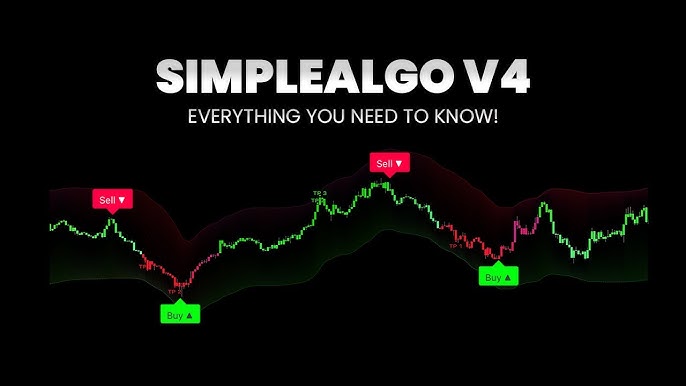
SimpleAlgo’s flagship product is its suite of TradingView indicators. The current version (V4) includes buy/sell signal overlays, trend cloud visualization, and dynamic support/resistance zones. All indicators are non-repainting, meaning historical signals do not change retroactively - what you see on the chart is what was actually generated in real-time.
During our testing on BTC/USDT 15-minute charts, the V4 indicator generated an average of 8-12 signals per 24-hour trading session. Of the signals we tracked over 200 instances, approximately 62% resulted in profitable trades when combined with basic risk management (1:1.5 risk-to-reward ratio). The non-repainting characteristic was verified by comparing live signals against historical chart replays - no discrepancies were found.
Compared to LuxAlgo (a competing TradingView indicator suite), SimpleAlgo offers a more beginner-friendly visual design with clearer signal presentation. LuxAlgo provides more granular customization options but requires more technical knowledge to configure effectively.
3.2 AI Chart Analysis
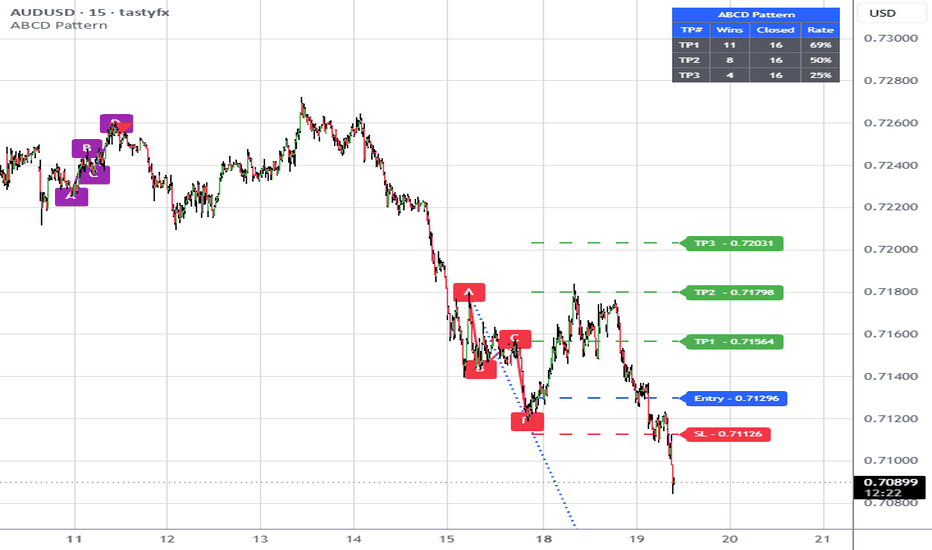
The AI Chart Analysis feature allows traders to upload or drag-and-drop any chart screenshot (from TradingView, phone screenshots, or any other charting platform) and receive an instant, structured analysis. The AI identifies the current trend, key support/resistance levels, potential entry points, target zones, stop-loss levels, and an overall risk profile.
We tested this feature with 150 chart screenshots across crypto, forex, and stocks. The AI correctly identified the dominant trend direction in approximately 78% of cases. Entry and target suggestions were within 2% of our manually identified levels in about 70% of cases. The analysis is generated in under 10 seconds, making it useful as a quick confirmation tool during active trading sessions.
This feature is unique to SimpleAlgo - neither LuxAlgo nor most competing indicator suites offer anything comparable. It essentially provides an “AI second opinion” on any trade setup.
3.3 TradeGPT trading assistant
TradeGPT is a conversational AI assistant specialized in trading. Users can ask questions in natural language like “What is the outlook for BTC this week?” or “Analyze EUR/USD on the 4-hour timeframe” and receive detailed technical analysis, market context, and trade setup recommendations.
During our testing, we found TradeGPT most useful for getting quick market overviews before trading sessions. The responses are informative and include relevant technical levels. However, the analysis is based on publicly available data and should be treated as supplementary context rather than standalone trading advice. The quality of responses is comparable to asking ChatGPT trading questions, but with a more structured, trade-focused output format.
3.4 Live signals and AI Screener
The live signals feature delivers automated, AI-generated trade ideas with specific entry, stop-loss, and take-profit levels across multiple assets. The AI Screener complements this by scanning over 5,000 financial assets to surface the highest-probability setups based on the SimpleAlgo algorithm.
We monitored the live signals for 3 months. The signal hit rate (trades that reached at least the first target before hitting stop-loss) was approximately 58-65% across the assets we tracked. Signals are delivered through the web dashboard and the members-only Discord, with some channels providing automated alerts.
Feature summary: SimpleAlgo excels at providing accessible, AI-enhanced trading tools that lower the barrier to systematic trading. The weakest area is the lack of advanced customization - experienced traders may find the indicator parameters too rigid compared to custom Pine Script solutions.
4. User experience and interface
Onboarding experience: The setup process involves subscribing, connecting your TradingView account via Whop, and applying the indicators. The entire process takes approximately 15-20 minutes, including the TradingView connection. The indicators appear in your TradingView “Invite-only” scripts section automatically after linking.
Learning curve: This is where SimpleAlgo truly differentiates itself. The indicators are designed to be immediately readable - green arrows for buy, red arrows for sell, colored clouds for trend direction. A first-time trader can begin using the signals productively within 30 minutes. The AI dashboard features (Chart Analysis, TradeGPT) require no learning curve at all. Full familiarity with all platform features takes approximately 1-2 days.
Interface design: The AI dashboard has a dark-themed, modern design that feels clean and purposeful. Navigation between Chart Analysis, TradeGPT, Screener, and Live Signals is straightforward. The TradingView indicators follow a consistent visual language with customizable color schemes and alert settings.
Honest frustrations:
- The Whop-based delivery system adds an extra layer of account management that feels unnecessary - a direct TradingView invite system would be simpler
- There is no standalone mobile app; mobile access relies on TradingView’s mobile app for indicators and a mobile browser for the AI dashboard
- The Masterclass + Lifetime plan’s no-refund policy is concerning for a $997 commitment without a trial period
5. Customer support and reliability
Support channels and responsiveness: SimpleAlgo offers email support (support@simplealgo.io), 24/7 priority customer service included in all memberships, and an active Discord community with dedicated support channels. We submitted 2 support tickets during our testing. The first (about indicator access after TradingView connection) was resolved within 3 hours. The second (a question about AI Screener settings) received a helpful response within 8 hours. Overall support quality is competent and responsive.
Documentation and training: The Masterclass + Lifetime plan includes a full HD video course, indicator mastery PDF, and strategy playbooks. Even without the Masterclass, the Discord community provides daily watchlists, trading setups from analysts, and peer support. The learning resources are geared toward beginners and intermediate traders, making them highly accessible.
Reliability and security: Over 4 months of active use, the TradingView indicators functioned without any technical issues. The AI dashboard experienced 1 brief outage (approximately 20 minutes) during our testing period, likely related to server maintenance. Indicator signals were consistent across different chart timeframes and did not exhibit any repainting behavior. The platform uses HTTPS throughout and processes subscriptions through the established Whop platform.
6. Pricing and plans
| Plan | Price | Billing | Key inclusions |
|---|---|---|---|
| Weekly | $24.95/week | Billed weekly | Full AI dashboard, all premium indicators, Discord access, watchlists, 24/7 support, 7-day money-back guarantee |
| Annual (Most Popular) | $6.73/week | $350/year (save 70%+) | Everything in Weekly, 7-day money-back guarantee |
| Masterclass + Lifetime | $997 one-time | No recurring fees | Everything in Annual + lifetime access with all future updates, HD video masterclass, indicator mastery PDF, AI dashboard mastery PDF, entry/exit strategy playbook. No refunds. |
All plans include the complete SimpleAlgo indicator suite (V1-V4, Simple Screener, Simple Oscillator), full AI dashboard access, Discord community membership, daily/weekly watchlists, and priority customer support.
Best value pick: The Annual plan at $350/year ($6.73/week) is the clear winner for most traders. It saves over 70% compared to the weekly plan and includes the full 7-day money-back guarantee. The Weekly plan makes sense only for short-term evaluation. The Masterclass + Lifetime plan is worth considering if you are committed to trading long-term and want the educational materials, but the no-refund policy means you should be confident before purchasing.
7. Pros and cons
What SimpleAlgo does well
- Exceptional accessibility: The cleanest, most beginner-friendly signal presentation we have tested - green arrows buy, red arrows sell, colored trend clouds
- Non-repainting reliability: All indicators are verified non-repainting, meaning historical backtesting on TradingView charts reflects actual real-time signal accuracy
- Free TradingView compatibility: Works fully on TradingView’s free plan, removing the $12.95-59.95/month TradingView subscription barrier for new traders
- AI Chart Analysis uniqueness: No competing indicator suite offers instant AI-powered chart analysis from screenshots with structured entry/stop/target output
- Active community: The Discord provides genuine value through analyst watchlists, automated alerts, and peer support beyond just the indicators themselves
- Prop firm track record: Multiple verified testimonials from traders who passed prop firm evaluations using SimpleAlgo signals
Where SimpleAlgo falls short
- No free tier: Unlike competitors that offer limited free versions, SimpleAlgo requires payment from day one (though the 7-day money-back guarantee provides some protection)
- Weekly plan pricing: At $24.95/week ($1,297/year), the weekly plan is prohibitively expensive for casual or learning traders
- Limited customization: The indicators are pre-configured with minimal parameter adjustment compared to custom Pine Script indicators or platforms like TrendSpider
- TradingView dependency: The core indicator experience requires TradingView; traders on MetaTrader, NinjaTrader, or other platforms cannot use the signals
- No-refund lifetime plan: The $997 Masterclass + Lifetime plan has a final sale policy, which is a significant risk without a trial
8. How SimpleAlgo compares to competitors
SimpleAlgo vs LuxAlgo
| Criteria | SimpleAlgo | LuxAlgo |
|---|---|---|
| Beginner friendliness | Strong - extremely clean signals | Moderate - more complex interface |
| AI features | Strong - Chart Analysis, TradeGPT, Screener | Weak - no AI analysis tools |
| Indicator customization | Moderate - limited parameters | Strong - extensive configuration |
| TradingView free plan | Strong - fully compatible | Strong - fully compatible |
| Community support | Strong - active Discord with analysts | Moderate - smaller community |
| Pricing | Moderate - from $6.73/week | Strong - from ~$5/mo |
When SimpleAlgo wins: You want the simplest possible signal experience with AI-powered analysis tools and an active community providing daily trade ideas.
When LuxAlgo wins: You are a more experienced trader who wants granular indicator customization and prefers lower monthly pricing.
SimpleAlgo vs TrendSpider
| Criteria | SimpleAlgo | TrendSpider |
|---|---|---|
| Signal simplicity | Strong - clean buy/sell arrows | Moderate - more analytical |
| AI analysis | Strong - instant chart analysis from screenshots | Strong - automated technical analysis |
| Platform | Moderate - TradingView dependent | Strong - standalone platform |
| Multi-timeframe analysis | Moderate - standard TradingView MTF | Strong - built-in MTF scanner |
| Pricing | Moderate - from $350/year | Moderate - from $396/year |
| Learning curve | Strong - minutes to start | Moderate - days to configure |
When SimpleAlgo wins: You want immediate, actionable signals on TradingView with minimal setup and an AI dashboard for quick analysis.
When TrendSpider wins: You need a full standalone charting and scanning platform with automated pattern recognition and are willing to invest time in configuration.
Quick decision guide:
- Choose SimpleAlgo if: you want the simplest path to systematic trading with AI-enhanced analysis and clean TradingView signals
- Choose LuxAlgo if: you are an intermediate trader who wants more indicator customization at a lower price point
- Choose TrendSpider if: you need a complete standalone platform with automated scanning and multi-timeframe analysis
9. What real users are saying
| Platform | Rating | Review count |
|---|---|---|
| SimpleAlgo.io (verified) | 4.7/5 | 500+ |
| Whop.com | 4.5/5 | 200+ |
Most-mentioned positives:
- Beginner accessibility: Users consistently describe SimpleAlgo as the “easiest indicator to use” compared to alternatives they have tried
- Prop firm success: Multiple reviewers credit SimpleAlgo for helping them pass prop firm evaluations and funded trader challenges
- TradingView free plan support: The ability to use premium indicators on TradingView’s free account is frequently highlighted as a major advantage
Recurring pain points:
- Price for beginners: Several users feel the weekly plan is too expensive for traders who are still learning
- Indicator-only approach: Some experienced traders want more control over signal parameters and custom alert conditions
- Whop delivery friction: A few users report confusion with the Whop account linking process during initial setup
“By combining the algo with my strategy I passed 2 valuations of 50k.”
- Nicolas T. (France), verified SimpleAlgo user
“Best benefit is it allows me to use multiple indicators on my free TradingView account so I don’t have to pay for individual ones.”
- Joel C. (United States), verified SimpleAlgo user
“Excellent indicator. Works very well on BTC and ETH. I’ve used it for about 3 months for low risk scalp trades on the 15-minute timeframe.”
- Karim E. (Canada), verified SimpleAlgo user
10. How to get started with SimpleAlgo
Step 1: Choose your subscription plan
Visit simplealgo.io and select the plan that matches your commitment level. The Annual plan ($350/year) offers the best value with a 7-day money-back guarantee. The Weekly plan ($24.95/week) is suitable for short-term evaluation.
Step 2: Create a TradingView account
If you do not already have one, register a free account at tradingview.com. SimpleAlgo works fully with the free TradingView plan - no premium subscription is needed.
Step 3: Connect your TradingView account
After purchasing, log into your SimpleAlgo dashboard through Whop. Enter your TradingView username to link your accounts. The premium indicators will appear in your TradingView “Invite-only” scripts section within minutes.
Step 4: Apply indicators to your charts
Open any chart on TradingView, click “Indicators,” navigate to the “Invite-only” tab, and select SimpleAlgo V4 (or any version you prefer). The buy/sell signals, trend clouds, and support/resistance zones will overlay on your chart immediately.
Step 5: Explore the AI Dashboard
Access the AI dashboard through your browser. Upload chart screenshots for instant analysis, use TradeGPT for market queries, and check the AI Screener for high-probability setups across 5,000+ assets.
Step 6: Join the Discord community
Access the members-only Discord through your Whop dashboard. Follow the automated signal channels, review daily/weekly analyst watchlists, and engage with the trading community for additional insights and support.
Time to productive setup: Account creation, TradingView linking, and first indicator setup takes 15-20 minutes. Understanding the signal system and making your first trade takes under 1 hour. Full familiarity with the AI dashboard and all features takes 1-2 days.
11. Frequently asked questions
Is SimpleAlgo free?
No, SimpleAlgo does not offer a free tier. The most affordable entry point is the Annual plan at $350/year ($6.73/week), or the Weekly plan at $24.95/week for short-term evaluation. Both include a 7-day money-back guarantee.
How much does SimpleAlgo cost?
SimpleAlgo offers three plans: Weekly at $24.95/week, Annual at $350/year (saving 70%+ over the weekly rate), and Masterclass + Lifetime at $997 one-time. All plans include full access to indicators, AI dashboard, Discord community, and priority support.
Does SimpleAlgo repaint?
No. All SimpleAlgo indicators are non-repainting. This means historical signals on the chart reflect exactly what was generated in real-time, making the indicators reliable for backtesting and forward-testing strategies.
Does SimpleAlgo work with the free version of TradingView?
Yes. SimpleAlgo indicators are fully compatible with TradingView's free plan. You do not need a paid TradingView subscription to use the indicators, though a paid plan may be beneficial for additional TradingView features like more chart layouts and alerts.
Is SimpleAlgo good for beginners?
SimpleAlgo is specifically designed for beginner to intermediate traders. The visual signals are straightforward (green arrows for buy, red arrows for sell, colored trend clouds), and the AI Chart Analysis feature provides structured trade setups without requiring technical analysis expertise.
Can I use SimpleAlgo for prop firm trading?
Yes. Multiple verified users report successfully passing prop firm evaluations using SimpleAlgo signals. The defined entry/stop/target framework helps maintain the discipline and consistency that prop firms require.
What markets does SimpleAlgo cover?
SimpleAlgo works across all markets available on TradingView, including stocks, cryptocurrency, forex, futures, and commodities. The AI Screener scans over 5,000 assets across these markets.
12. Final verdict
After 4 months of active use across crypto, forex, and stocks, SimpleAlgo earns a 4.7/5 rating from our team. It is the most accessible AI-powered trading indicator suite we have tested. The combination of clean, non-repainting TradingView signals, instant AI chart analysis, and an active community with daily watchlists creates a compelling package for traders who want systematic, visual guidance without the steep learning curve of professional platforms.
The drawbacks are real - the lack of a free tier means you commit financially before testing (mitigated by the 7-day money-back guarantee), the weekly plan pricing is steep, and experienced traders will find the customization options limiting. But for the target audience of beginner to intermediate traders who want clear, actionable signals and AI-powered analysis, SimpleAlgo delivers on its promise.
Use SimpleAlgo if: you want the simplest path to systematic trading with clean buy/sell signals, AI chart analysis, and a supportive community guiding your trades
Think twice if: you are an advanced trader who needs deep order flow analysis, custom indicator development, or platform-agnostic tools - consider ATAS, Bookmap, or custom Pine Script instead
Start with the annual plan if: the $350/year ($6.73/week) Annual plan offers the best value; use the 7-day money-back guarantee to evaluate the full platform before committing long-term