
Postmark Review 2026: The Gold Standard for Transactional Email?
In modern software development, sending emails is easy. Ensuring they actually arrive in the user’s inbox is the hard part. Password reset links, purchase receipts, account activation codes, and security alerts are critical transactional notifications-if they are delayed by even a few minutes, or land in the spam folder, it directly impacts your user experience, conversion rates, and operational support load.
Postmark (acquired by ActiveCampaign) is a cloud-based email delivery service built specifically to address this issue. By separating transactional emails from bulk marketing broadcasts at the IP level, providing lightning-fast delivery times, and keeping a 45-day archive of searchable content logs, Postmark claims to offer the most reliable delivery engine in the market. In this comprehensive review, we evaluate Postmark’s message streams, test its API latency, compare its pricing structure, and analyze its strengths and weaknesses against top alternatives.
Quick verdict
The most reliable and developer-friendly email delivery engine for transactional notifications, offering unrivaled deliverability and 45-day searchable log history.
SaaS platforms, developer teams, and system administrators who require immediate delivery of system notifications and detailed logs.
Free Developer plan (100 emails/mo). Paid plans scale from $15/mo for 10,000 emails with flexible overage pricing.
1. Platform Overview
Postmark was originally launched in 2010 by Wildbit (a software company based in Philadelphia) with a simple goal: to build an email delivery platform specifically optimized for transactional emails. Unlike existing providers at the time that lumped transactional emails and marketing spam onto the same shared IP addresses, Postmark chose to enforce a strict division. By screening senders, verifying domains, and rejecting bulk marketing campaigns on their core IPs, Postmark established a reputation for stellar delivery rates.
In 2022, Wildbit was acquired by ActiveCampaign, a leading customer experience automation platform. Since the acquisition, Postmark has maintained its independent brand and pricing structure, while benefitting from expanded development resources.
Today, Postmark operates as an institutional-grade API and SMTP server network, routing millions of critical emails daily. While it now supports marketing newsletters through a separate stream system, its core focus remains delivering password resets, purchase receipts, and account notifications with minimal delay and maximum reliability.
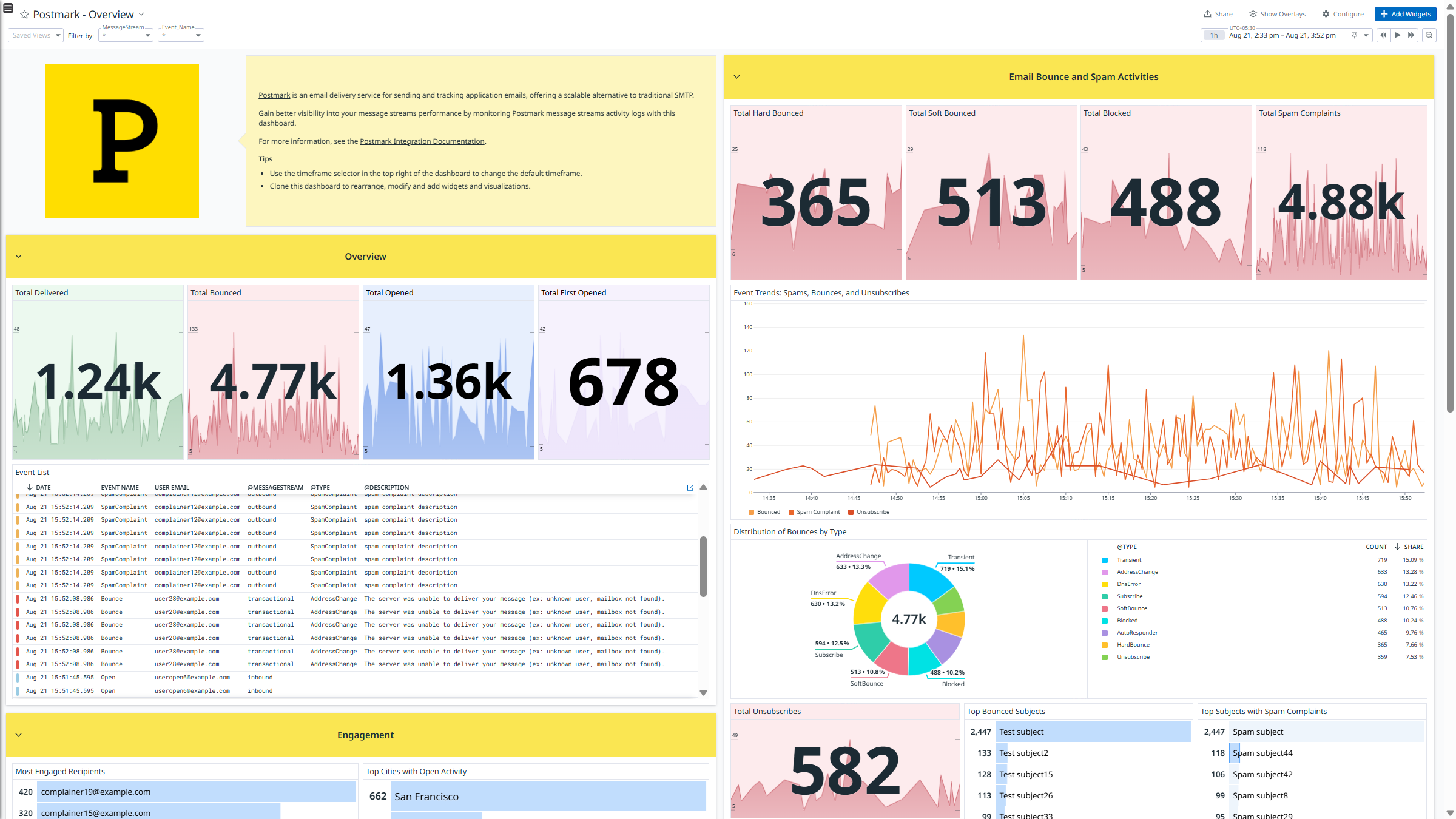
Postmark Dashboard: Real-time visibility into active server streams and delivery metrics.
2. Message Streams & Delivery Infrastructure
The cornerstone of Postmark’s deliverability strategy is its Message Streams architecture. Traditional email service providers (ESPs) require developers to buy multiple IP addresses or set up complex configurations to separate transactional alerts from marketing broadcasts. Postmark handles this division natively:
- Transactional Streams: Reserved exclusively for user-triggered events (password resets, notifications, receipts). These streams route through high-reputation shared IPs, ensuring inboxes accept them immediately.
- Broadcast Streams: Designed for bulk marketing newsletters, product updates, and promotional content. These route through separate IPs, preventing marketing spam spikes from degrading your transactional sender reputation.
Per Postmark’s published benchmarks, transactional emails routed via transactional streams achieve 99%+ inbox placement rates on major webmail clients with average delivery times under 2 seconds.

Postmark Message Streams: Protecting delivery rates by separating transactional and broadcast mail.
3. Email API & SMTP Server Setup
Integrating Postmark into an application codebase is designed to be as straightforward as possible, offering both REST API and SMTP server endpoints.
1. The REST API Endpoint
Postmark’s REST API is highly optimized for performance and ease of use. It uses standard JSON payloads and supports API token authentication per server stream. The payload structure is clean and compact, requiring only a few standard fields:
- From: The verified sender email address.
- To: The recipient email address.
- Subject: The subject line of the email (e.g., Reset Your Password).
- HtmlBody: The HTML formatted body of the email (e.g., Hello, please reset…).
- MessageStream: The identifier of the outbound message stream to route through (e.g., outbound).
The API supports bulk sending (up to 500 emails in a single API call to reduce latency and HTTP overhead), CC/BCC headers, custom metadata tracking (e.g., passing custom client IDs), and attachment encoding (using base64). Official client libraries are available for almost every popular language, including Python, Node.js, C#, Ruby, PHP, and Go.
2. Standard SMTP Routing
For legacy systems, CRMs, or CMS platforms (like WordPress) that do not support custom API integrations, Postmark provides standard SMTP server relays. The setup simply requires configuring your SMTP host smtp.postmarkapp.com, port (25, 2525, or 587 with TLS, or 465 for SSL), and using your stream’s server token as the username and password. While the REST API is generally recommended for its lower connection latency and built-in retry mechanisms, Postmark’s SMTP endpoints are globally distributed to ensure quick connection times from any server cluster.
4. Inbound Email & Webhooks Processing
Postmark is not just an outbound sending platform; it is also a highly efficient inbound processor, making it a complete two-way communication channel:
1. Inbound Parsing Engine
Setting up inbound processing requires configuring your MX records to point to Postmark’s inbound server (inbound.postmarkapp.com). Once verified, you can assign an inbound email address or wildcard domain (e.g., *@inbound.yourdomain.com). When an email is received, Postmark’s parsing engine automatically parses the raw email format. It strips out complex MIME headers, decodes base64 attachments, processes inline images, isolates replies from previous email history, and compiles the entire message into a structured JSON payload.
2. Real-Time Webhook Payloads
Once parsed, Postmark immediately sends the JSON data to a webhook URL defined in your application via an HTTP POST request. This webhook payload contains everything you need to act on the email programmatically:
- Detailed Sender Details: Full names, addresses, and email metadata.
- Parsed Body Content: Separated HTML, text body, and reply-only body (which removes quoted replies, leaving only the user’s latest response).
- Base64 Encoded Attachments: File names, content types, and size metrics are extracted, enabling direct storage into databases or cloud storage buckets (like AWS S3).
- Spam & Security Flags: Includes spam scores (via SpamAssassin) and SPF/DKIM/DMARC validation status to let you decide if the sender is authenticated.
This makes it incredibly simple to implement features such as direct email replies for forum threads (similar to how GitHub, Basecamp, or Linear allow users to reply to notifications directly via email) or automated processing of incoming receipts and documents.
3. Webhook Security and Reliability
Postmark ensures your webhooks are secure and reliable:
- Webhook Failover and Retries: If your application server goes down, suffers a timeout, or returns a non-200 status code, Postmark will not discard the message. Instead, it places the webhook payload into a retry queue and attempts redelivery using an exponential backoff schedule over a 24-hour window.
- Manual Requeuing: Within the Postmark dashboard, developers can inspect webhook logs, view the raw payload of failed webhooks, and manually trigger a redelivery once the application server is back online.
- Authentication & Integrity: You can secure your webhooks by configuring custom HTTP headers, basic auth credentials, or verifying Postmark’s origin IP addresses to ensure incoming payloads are authentic.
5. Diagnostic Tools & Searchable Logs
If an email fails to arrive, the developer is usually the first person blamed. Finding out what happened requires detailed logs. This is where Postmark strongly outperforms lower-cost competitors like Amazon SES:
- 45-Day Content Retention: By default, Postmark retains the full content (including HTML body, subject lines, headers, and metadata) of every email sent for 45 days. This is highly useful for checking if a dynamic template rendered correctly or verifying the exact content sent to a specific recipient.
- Detailed Search Filter: You can search logs by recipient email, subject keyword, delivery status (delivered, bounced, opened, clicked), or custom metadata attributes.
- Full Delivery Path: For every message, Postmark displays the exact SMTP exchange with the receiving mail server (e.g., showing the specific response code from Gmail’s server), making it easy to diagnose blocklists, graylisting, or user inbox capacity errors.
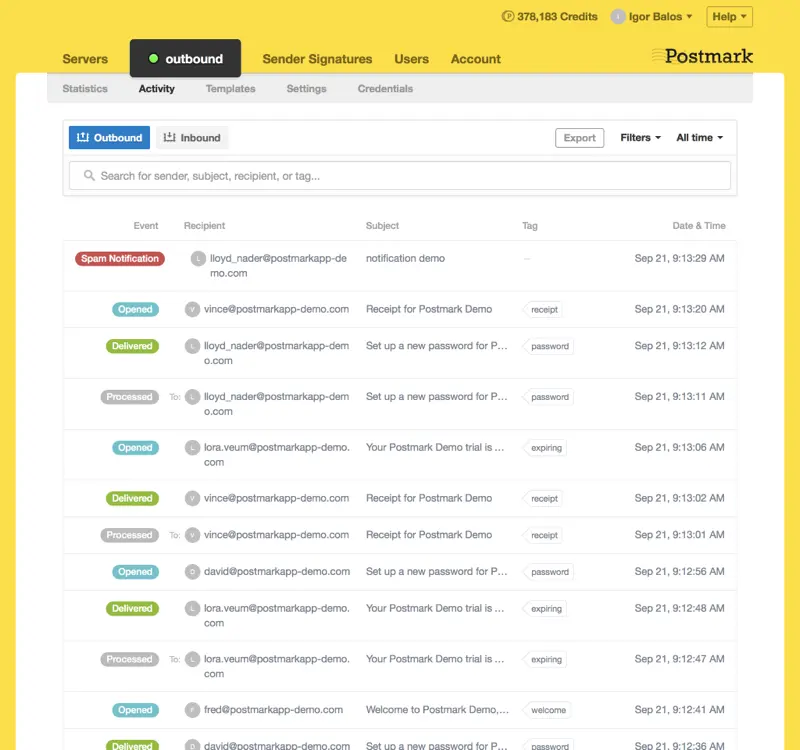
Postmark Activity Logs: Full content search and delivery diagnostics for rapid troubleshooting.
6. Target Audience & Developer Use Cases
Postmark is built specifically for users who value deliverability and logging:
1. SaaS & Web Application Developers
SaaS platforms that require immediate delivery of password reset links, billing receipts, invoice notifications, and double-opt-in verification emails.
2. System Administrators & DevOps Engineers
DevOps teams who need to send system alerts, database backup logs, server crash notices, and cron job reports via SMTP with high reliability.
3. Product and Support Teams
Customer support desks and product managers who need to inspect email delivery paths and confirm the exact contents of messages sent to resolving customer issues without bothering database quants.
7. Key Pros & Cons
Every email delivery platform involves trade-offs. Here is a balanced look at Postmark’s strengths and limitations.
The Pros:
- Outstanding Deliverability: Shared IPs maintain excellent reputation scores by strictly prohibiting spam.
- Searchable Logs: 45 days of searchable logs with full content history simplifies debugging.
- Fast Transit Times: Outbound emails generally land in recipient inboxes in less than 3 seconds.
- Separated Outbound Streams: Protects transactional reputation from marketing broadcast drops.
- Developer Experience: Clean API design, excellent documentation, and robust SDK wrappers.
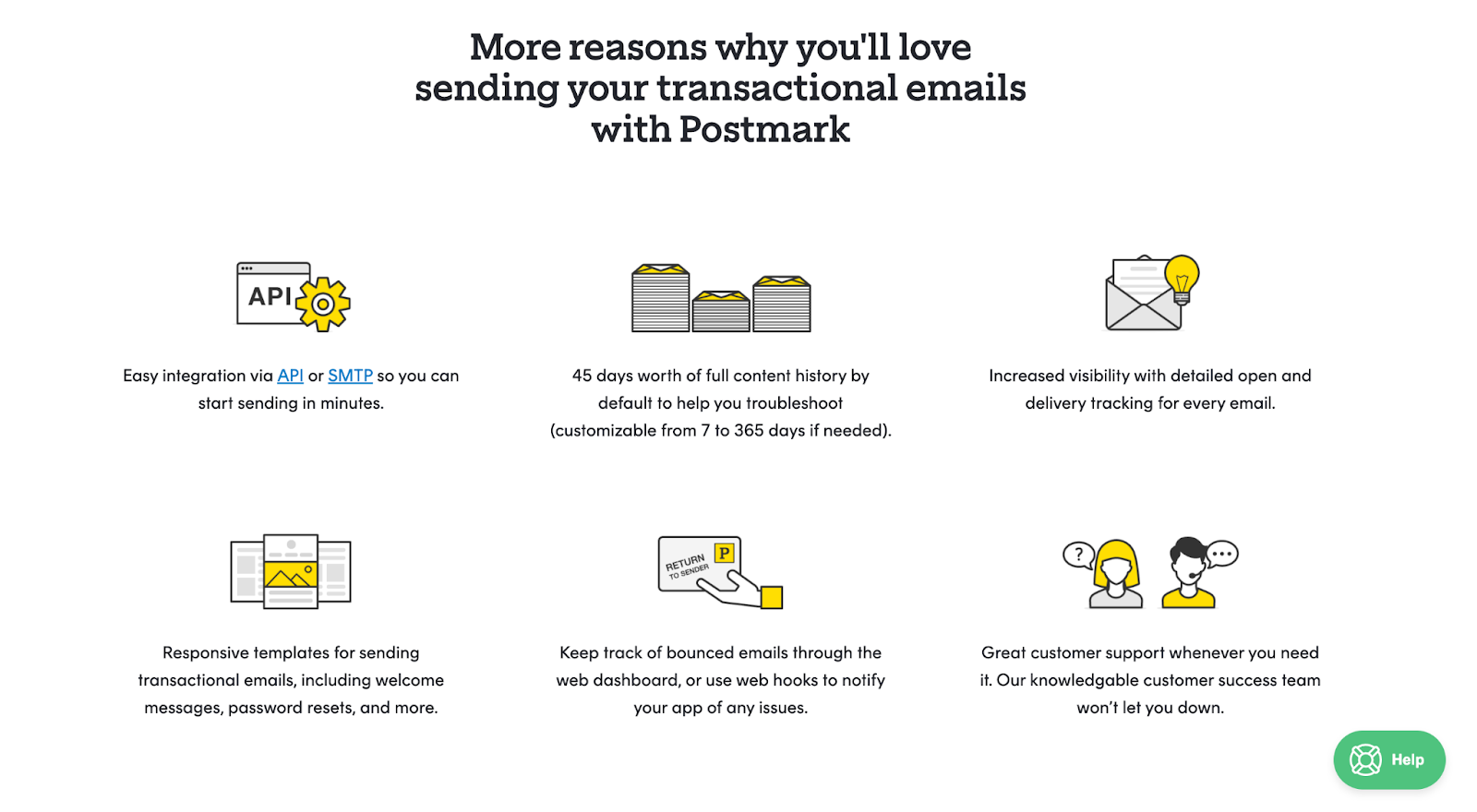
Postmark Review: Real-time visibility into active server streams and delivery metrics.
The Cons:
- Higher Base Pricing: Starting at $15/month, it is more expensive than bulk senders like Amazon SES or SendGrid.
- Small Free Tier: The Developer plan is limited to only 100 emails/month (good only for testing).
- Auto-Pay Only: Billed automatically via credit card; no support for manual invoices or annual prepay discounts.
8. Pricing Tiers & Overage Costs
Postmark’s pricing is volume-based, allowing plans to scale automatically as your application grows. All paid plans include unlimited users, servers, domains, and the full 45-day retention logs.
| Plan | Monthly Cost | Included Monthly Emails | Overage Rate (Per 1,000 Emails) |
|---|---|---|---|
| Developer | $0 | 100 | N/A (Sending blocks until next cycle) |
| 10K Plan | $15 | 10,000 | $1.80 |
| 50K Plan | $55 | 50,000 | $1.25 |
| 125K Plan | $115 | 125,000 | $1.00 |
| 300K Plan | $245 | 300,000 | $0.85 |
| 700K Plan | $455 | 700,000 | $0.65 |
Optional Add-ons:
- Dedicated IP Address: $50/month per IP (generally recommended for senders sending 300,000+ emails/month).
- DMARC Monitoring (DMARC digests): Starts at $14/month per domain.
- Extended Content Retention: Customize logs beyond 45 days (starts at $5/month).
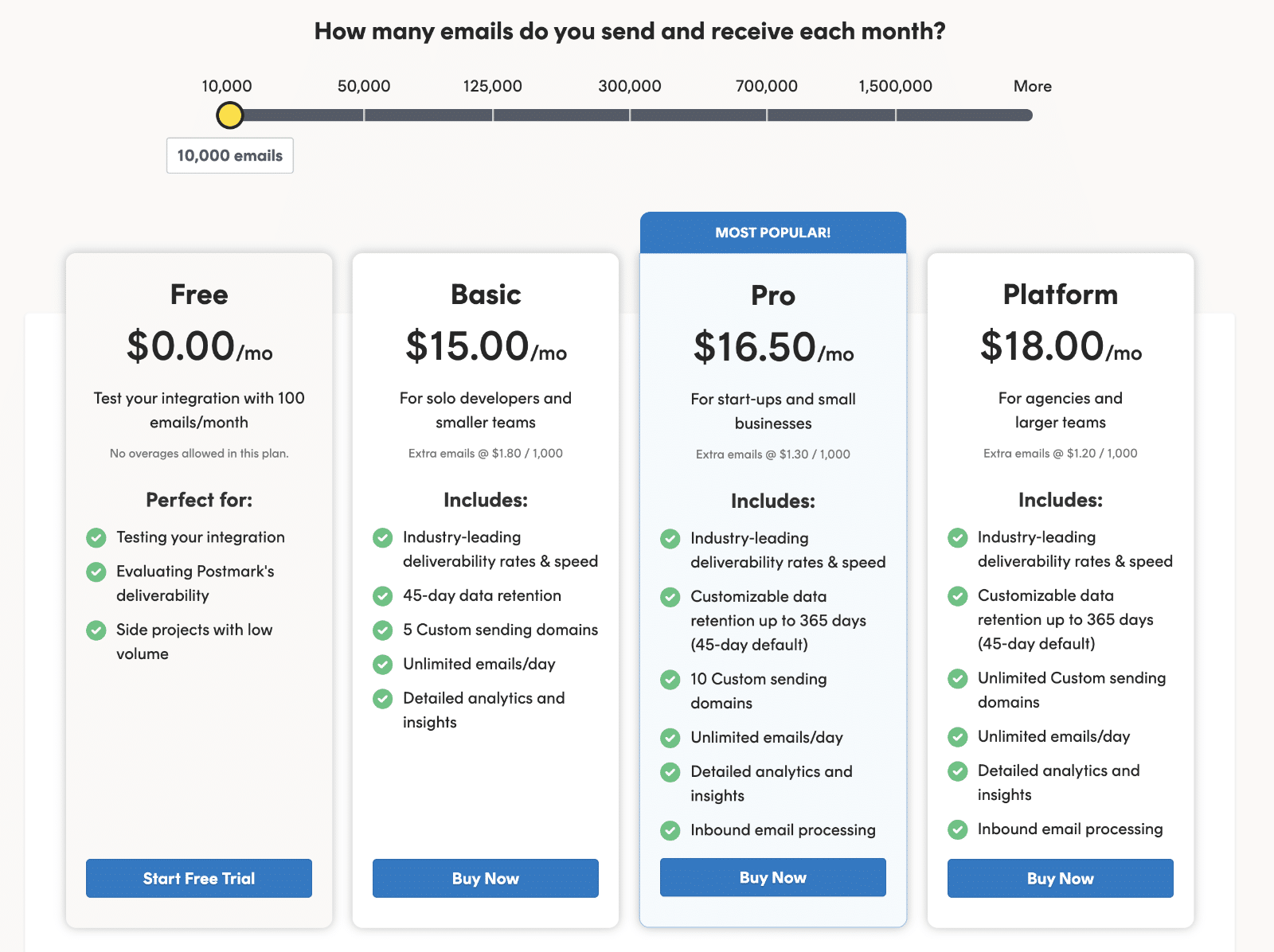
Postmark Pricing Tiers: Volume-based paid plans scaling from $15/month.
9. Competitor Comparison & Alternatives
How does Postmark compare against other key email API platforms?
| Criteria | Postmark | SendGrid | Resend | Amazon SES |
|---|---|---|---|---|
| Primary Focus | High-deliverability transactional | High-volume marketing & api | Modern developer-first api | Low-cost infrastructure |
| Delivery Speed | Ultra-Fast (under 2s) | Moderate | Fast | Moderate |
| Content Logging | 45 Days (Included) | Event webhooks only (no content retention) | Webhook-based (limited native logging) | None (Requires custom setup) |
| Pricing Model | $15/mo base rate | Free / $19.95/mo base rate | Free / $20/mo base rate | Pay-as-you-go ($0.10 / 1,000) |
| Deliverability | Excellent | Good to Moderate | Good | Moderate (Requires active management) |
Key Takeaway:
- Choose Postmark if deliverability and diagnostic content history are your highest priorities.
- Choose SendGrid if you need a single platform for massive marketing lists and developer APIs.
- Choose Resend if you prefer a modern react-based email template developer workflow.
- Choose Amazon SES if your volume is massive (millions of emails) and you have the DevOps capacity to build custom logging and manage your own IP reputations.
10. Security, Deliverability, & Compliance
For corporate systems, meeting enterprise security standards is as critical as landing in the inbox. Postmark is built with a compliance-first architecture to satisfy the requirements of financial, healthcare, and enterprise SaaS companies:
1. Advanced DNS Authentication
Postmark does not allow unverified sending. To activate outbound streams, you must verify ownership of your sending domain by configuring DNS records:
- SPF (Sender Policy Framework): Authorizes Postmark’s IP addresses to send emails on behalf of your domain.
- DKIM (DomainKeys Identified Mail): Uses a public/private key pair (with support for 1024 and 2048-bit keys) to cryptographically sign every email, proving the message was not altered in transit.
- DMARC (Domain-based Message Authentication, Reporting, and Conformance): Postmark strongly enforces DMARC alignment, helping you comply with Google and Yahoo’s strict sender requirements to prevent phishing and spoofing.
2. EU Data Residency & GDPR Compliance
While Postmark’s primary infrastructure defaults to US-based servers, they offer full GDPR compliance and EU data residency options.
3. SOC 2 Type II Certification & Encryption
Postmark underwent independent audits to achieve SOC 2 Type II certification, validating their internal controls over security, availability, and confidentiality. In terms of data transmission:
- Encryption in Transit: Enforces TLS 1.2 or TLS 1.3 encryption for all SMTP and API transmissions.
- Encryption at Rest: All logged content, attachment data, and server configuration settings are encrypted at rest using industry-standard AES-256.
4. Automatic Suppression Lists
To protect the shared IP pool’s reputation, Postmark maintains an automated bounce and spam management system. If an email is sent to an invalid address (hard bounce) or a recipient marks a message as spam, Postmark immediately blocks future sends to that address by placing it on a domain-specific suppression list. This prevents repetitive failures that would damage your domain’s sending reputation. Developers can review, search, and manually remove addresses from the suppression list directly from the dashboard if a recipient was suppressed by mistake.
5. DMARC Digests
One of Postmark’s unique security offerings is its standalone DMARC Digests tool. It collects XML feedback reports sent by major inbox providers (like Google, Microsoft, and Yahoo) and aggregates them into easy-to-read weekly email reports. These reports show you exactly which servers are sending emails from your domain, whether they are passing authentication, and highlight potential spoofing attempts or misconfigured servers (e.g., third-party services like HubSpot or Salesforce sending on your behalf without proper DNS records).
11. Frequently Asked Questions
Is Postmark free to use?
Postmark offers a Free Developer plan that provides 100 emails per month. This plan is fully featured and designed for testing, development, and integration building. It does not expire.
Does Postmark support marketing emails?
Yes, via its Broadcast Message Streams feature. Broadcast streams run on separate IP addresses to protect your transactional delivery reputation, allowing you to send newsletter campaigns without risk to system alerts.
What happens if I exceed my plan's monthly email limit?
Postmark does not block your sending. Instead, you are charged an overage fee per 1,000 additional emails (ranging from $1.80 to $0.65 depending on your tier), which is billed at the end of your billing cycle.
Do I need a dedicated IP address with Postmark?
For most users, no. Postmark's shared IP pools have excellent reputation scores because they prohibit spam. Dedicated IPs are available for $50/month and are generally recommended only if you send more than 300,000 emails/month.
Who owns Postmark?
Postmark was acquired by ActiveCampaign in 2022. It continues to operate as an independent delivery platform and service.
12. Final Verdict & Recommendation
For teams whose core product relies on fast, reliable email delivery, Postmark is absolutely worth the price. It does one thing exceptionally well: delivering system notifications directly to the inbox in seconds.
While its starting price ($15/month) is higher than bulk competitors, the time saved debugging deliverability issues, coupled with the security of the 45-day searchable content logs, easily offsets the monthly cost for any active SaaS project or web application.
Use Postmark if: you are building a web application or SaaS platform where instant delivery of password resets, confirmations, and alerts is critical, and you want searchable content history.
Think twice if: you only send marketing newsletters, need a free plan with high volume limits, or want a pay-as-you-go setup (consider Amazon SES or Mailgun instead).
Start testing: Sign up for the Free Developer plan to get 100 free monthly emails, test the API or SMTP endpoints, and build templates before upgrading to a paid tier.
Disclosure: This review may contain affiliate links. If you sign up through our link, we may earn a commission at no extra cost to you. This does not influence our ratings or editorial opinion.





