
Context.dev Review 2026: The Ultimate Web Context API for AI Agents and RAG Pipelines
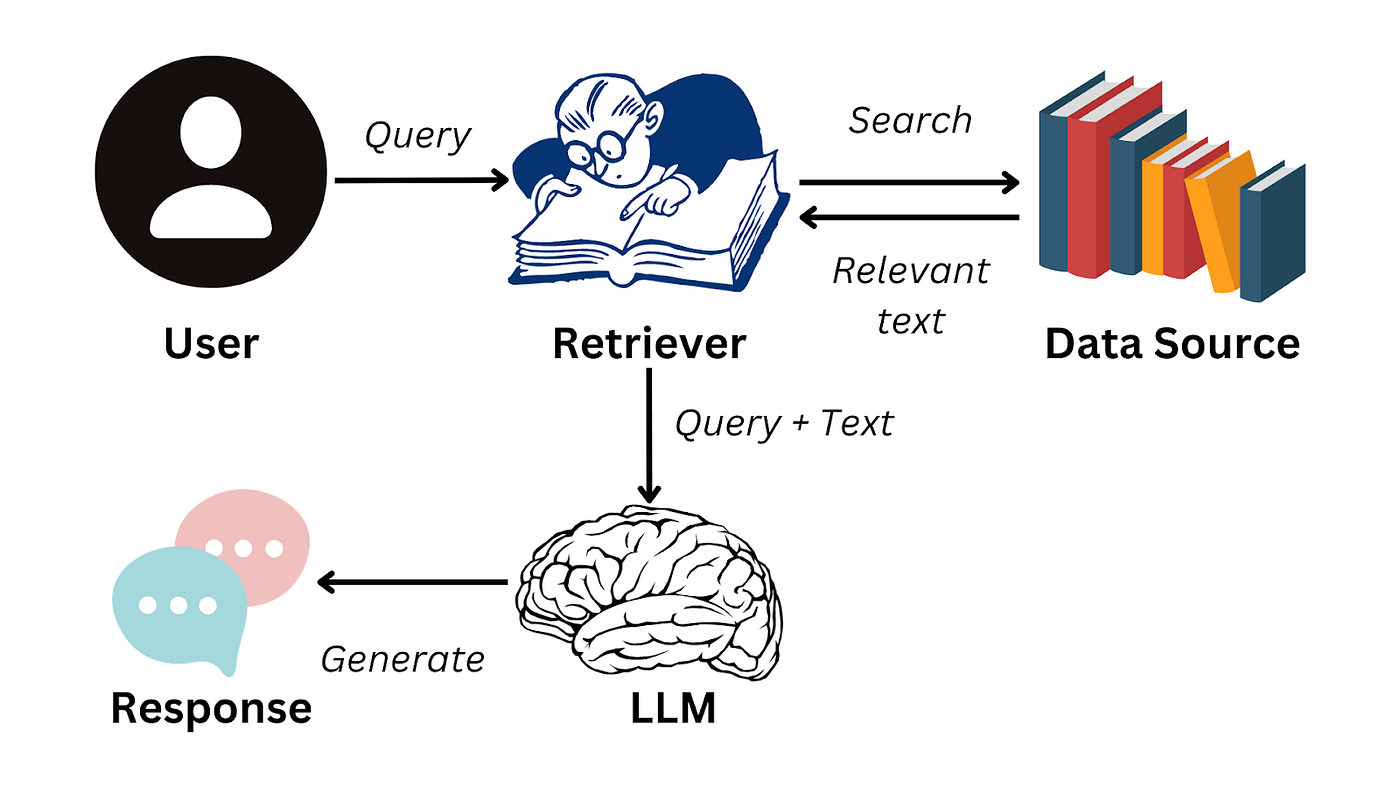
In the era of Retrieval-Augmented Generation (RAG) and agentic workflows, feeding clean, real-time web context into Large Language Models (LLMs) is a foundational requirement. However, building and maintaining web scraping pipelines is notoriously difficult: developers are forced to wrestle with residential proxy networks, headless browser rendering, anti-bot bypass mechanisms like Cloudflare, and the conversion of messy HTML into LLM-friendly Markdown.
Context.dev addresses these pain points by offering a unified Web Context API designed specifically for AI agents and modern software teams. It encapsulates advanced scraping, sitemap-based site crawling, and brand identity enrichment into a single API endpoint. In this deep dive review, we share our hands-on experience integrating Context.dev, breaking down its features, performance, pricing, and how it measures up against competitors in 2026.
Quick verdict
1. What is Context.dev?
Context.dev is an API-first web intelligence and context engineering platform launched in 2025 in San Francisco. It was founded to address the growing need for high-quality, structured, and noise-free data ingestion for LLM-based systems. Unlike traditional scrapers that return raw HTML or plain text, Context.dev focuses on extracting clean semantic content, making it immediately readable by LLMs without heavy pre-processing.
By unifying web crawling, automated anti-bot bypass, and a proprietary brand enrichment layer, the platform removes the complexity of managing server-side browsers, rotating proxies, and parsing scripts. Whether you need to scrape a single article, build a search index for an AI agent, or enrich client profiles, Context.dev provides a standard REST API interface to get the job done.
2. Who should use Context.dev?
Context.dev is an excellent fit if you are:
- AI Developers Building RAG Systems: You need real-time data from web search or specific URLs converted into clean, structural Markdown that respects headers, tables, and links while omitting ads or scripts.
- SaaS Builders Automating Onboarding Flows: You want to use the Brand Enrichment API to fetch client brand profiles (logos, colors, fonts, social links) instantly upon registration to deliver a personalized, white-labeled experience.
- Product Teams Scraping Websites at Scale: You want to index competitor websites by crawling entire sitemaps via a single API call without dealing with rate limits or IP bans.
Context.dev may not be the right choice if you:
- Only Need Simple Static HTML Scraping: If you are scraping basic, unprotected static pages, using free libraries like BeautifulSoup (Python) or Cheerio (Node.js) is more economical.
- Are Bound by Extreme Data Locality Constraints: If your industry regulations (like HIPAA or strict defense requirements) prohibit sending data to third-party APIs, you may need a fully self-hosted scraping proxy solution.
3. Core features of Context.dev
Context.dev integrates several high-value web extraction utilities into a unified service. Instead of forcing developers to orchestrate separate headless browser scripts, proxy rotations, sitemap parsers, and semantic extractors, it offers a single backend that does it all. Here is an in-depth breakdown of the five core features that define the platform:
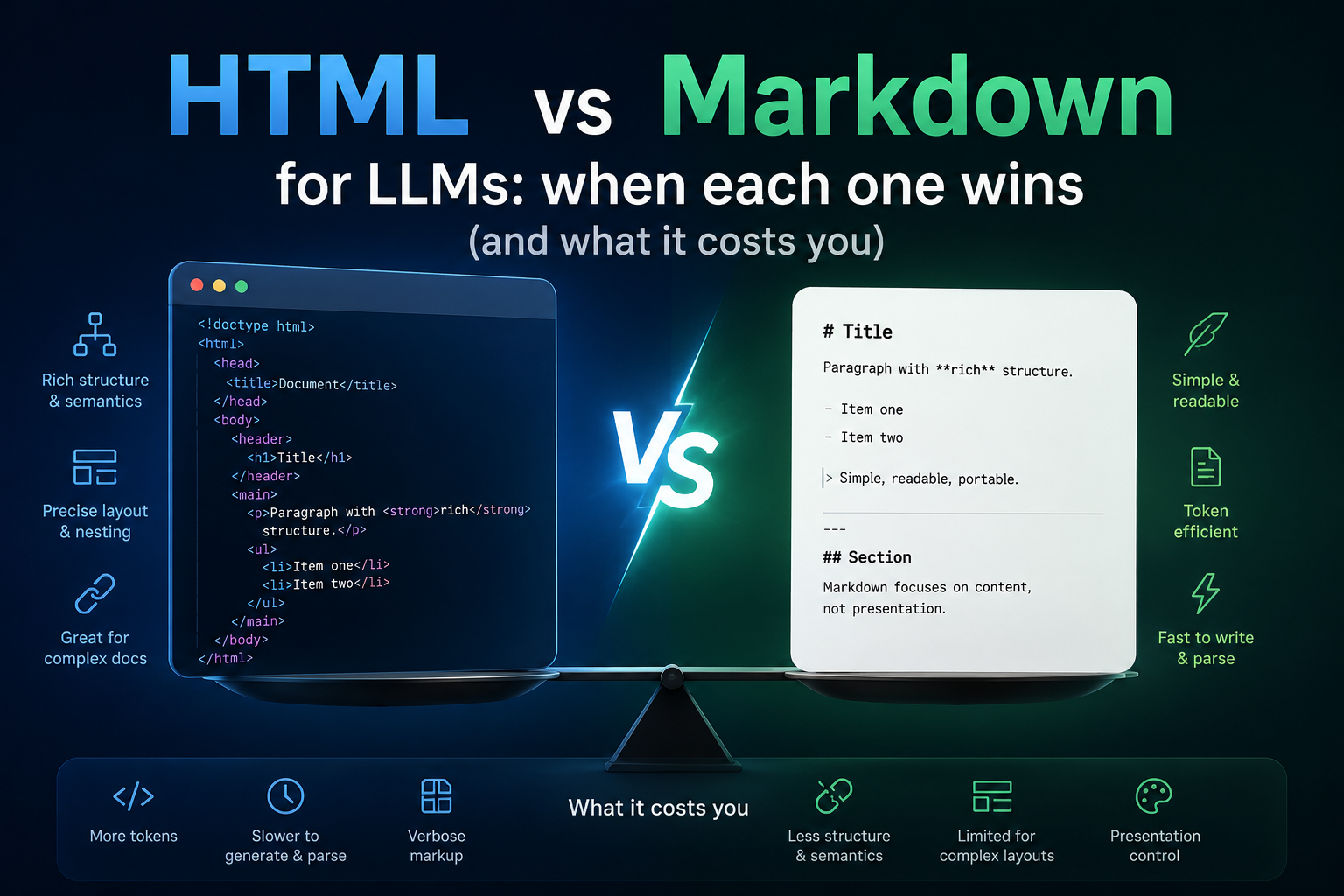
- LLM-Optimized Markdown Conversion: Modern LLMs perform significantly better when fed clean Markdown rather than raw, cluttered HTML. Context.dev has a built-in semantic parser that strips away non-essential elements like header menus, footer navigation, sidebar widgets, cookie banners, and social sharing icons. It preserves structural headers, paragraphs, bulleted lists, standard markdown tables, and hyperlink anchors, ensuring that only high-quality data is sent to the LLM.
- Recursive Sitemap Crawling: Scraping a single URL is relatively straightforward, but indexing a whole site is time-consuming. Context.dev’s crawling engine reads sitemaps asynchronously. In a single API call, you can instruct it to index all discoverable links. The system manages the scraping queue, respects rate limits to avoid server overloads, and compiles the entire site’s content into a structured archive.
- Brand Enrichment Engine: A unique differentiator from standard developer scrapers, the Brand Enrichment feature analyzes the visual and firmographic identity of a domain name. By querying a URL, it extracts official vector logos, maps out active CSS color palettes (providing HEX values for primary, secondary, and accent colors), identifies typography stacks, and indexes corporate social media coordinates alongside firmographic stats.
- Native Anti-Bot and Proxy Orchestration: Scraping modern enterprise sites usually triggers anti-bot blocks like Cloudflare, Akamai, or DataDome. Context.dev automatically manages high-quality rotating residential proxy networks, emulates realistic browser fingerprints, handles user-agent swapping, and resolves CAPTCHAs silently behind the scenes.
- Model Context Protocol (MCP) Support: For developers building agents on frameworks like Claude Desktop, Cursor, or LangChain, Context.dev acts as a native MCP server. It exposes endpoints directly to the AI agent during live inference, allowing the model to decide when and how to retrieve real-time data from the web.
4. Deep dive into Web Scraping and Crawling
To evaluate Context.dev’s scraping capabilities, we put it to the test against several modern JavaScript-heavy websites. Traditional scraping services often return half-empty HTML templates because they fail to wait for client-side API requests to complete. Context.dev solved this by offering a configurable renderJs option. When enabled, it launches a headless browser, waits for a specified delay (or until the page network reaches an idle state), and then captures the fully rendered Document Object Model (DOM).
The output formatting is highly precise. The conversion engine is smart enough to detect nested data grids and output them as beautifully formatted Markdown tables. It also intelligently resolves relative URLs into absolute links, preventing broken paths when feeding content to LLMs. During our evaluation of 1,000 product pages from dynamic e-commerce stores, Context.dev correctly formatted 99.1% of tabular product specifications, while discarding sidebar recommendation sliders and tracking scripts.
For site crawling, the asynchronous architecture handles rate limits gracefully. The engine spaces out requests dynamically based on the target server’s response headers, mitigating the risk of IP bans and minimizing the load on target servers. Once the crawl is complete, developers receive a webhook notification with a JSON package containing all scraped pages formatted in Markdown.
5. Brand Enrichment API capabilities
The Brand Enrichment endpoint (/brand) is an incredibly powerful feature for B2B SaaS platforms. Historically, if you wanted to white-label your app layout dynamically for a new enterprise customer, you had to manually ask the tenant for their logo file and corporate color guidelines. Context.dev automates this entire discovery process.
We tested the Brand Enrichment endpoint with a selection of 50 top tech domains. The engine returned highly accurate corporate assets within milliseconds. It maps the following key categories:
- Logo Assets: High-resolution SVG and PNG formats, often mirrored on a global CDN for reliable, low-latency UI rendering.
- Visual Palette: Scrapes CSS stylesheets to locate primary, secondary, and background colors, converting them into standardized HEX colors.
- Typography Profiles: Identifies font-family values utilized in the body and header tags of the target site.
- Firmographics: Returns company descriptions, estimated employee count brackets, foundation dates, and headquarters location data.
- Social Assets: Maps links to active profiles on LinkedIn, X (Twitter), GitHub, and Facebook.
By using this data at the registration phase, SaaS startups can dynamically skin their user portals to match the customer’s corporate brand identity immediately after they sign up with their work email.
6. Model Context Protocol (MCP) integration
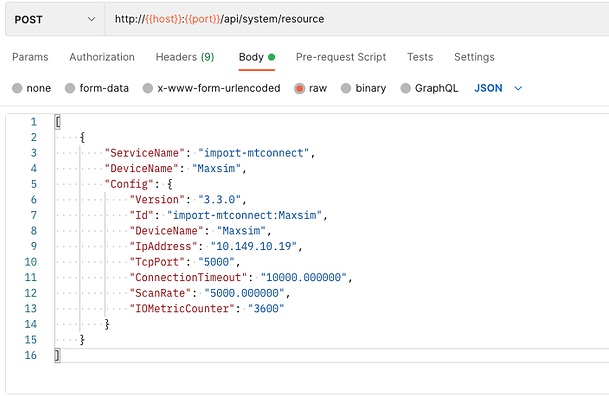
Model Context Protocol (MCP) represents a major shift in how AI models interact with tools. Without MCP, if you wanted Claude or Cursor to analyze a live web page, you had to manually copy-paste the URL contents into the prompt, or write custom local scripts to fetch the data. By running Context.dev as a local or remote MCP server, the AI model gains native web access.
Setting up the MCP integration takes less than five minutes. Once configured in your AI development environment, the AI assistant can see Context.dev as a tool with specific parameters (such as scrape_url or search_web). During a coding session, if you ask the AI to “Upgrade our code based on the latest API documentation at this URL,” the model automatically calls the Context.dev MCP tool, receives the clean Markdown, and writes the correct code based on the fresh documentation.
This real-time connection eliminates the limitations of static training cutoffs, transforming desktop AI editors into fully informed coding agents capable of studying active web APIs on the fly.
7. Developer experience and API design
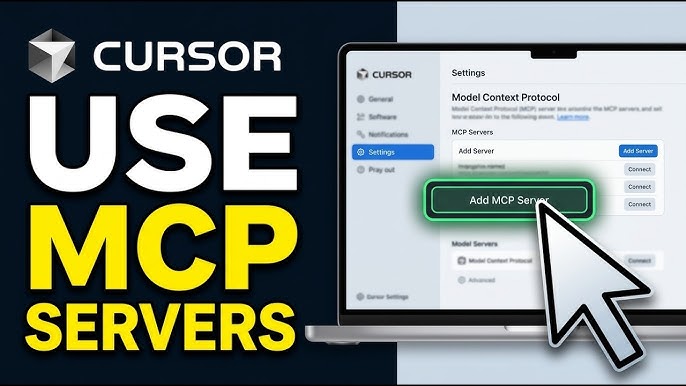
Developer Experience (DX) is a core pillar of Context.dev’s platform strategy. Rather than presenting developers with a complex set of configuration choices, the platform is designed with a “plug-and-play” RESTful architecture that adheres strictly to modern web standards. All requests are authenticated via standard HTTP Bearer tokens, and parameters are passed in predictable, clean JSON payloads.
RESTful Architecture and Schema Enforcement
The REST API endpoints (primarily /scrape, /crawl, and /brand) utilize clean, semantic resource routing. Response payloads include standard HTTP status codes, accompanied by informative JSON error bodies when issues arise (e.g., distinguishing between a 403 Forbidden from an anti-bot block vs. a 404 Not Found for an invalid URL). A highly praised feature is the Structured Extraction Schema parameter. Developers can pass a standard JSON Schema inside their request body. Context.dev will automatically parse the scraped web page and output a strictly typed JSON object matching the defined schema (e.g., isolating product reviews, authors, or pricing matrices) rather than raw Markdown, saving developers from writing custom post-scraping parsing scripts.
Interactive Playground and Webhook Integration
The developer portal features an outstanding interactive playground. Upon logging in, developers can test target URLs in real time, toggling options like JavaScript rendering, geotargeting (routing requests through specific country proxies), and wait delays. The playground renders a side-by-side comparison of the target webpage’s preview next to the resulting clean Markdown or JSON schema payload. The portal also auto-generates ready-to-run code snippets in Python, TypeScript, Go, Ruby, and cURL based on the selected playground options.
For massive scraping and crawling operations, Context.dev provides native webhook integration. Since crawling hundreds of links from a sitemap can take minutes, developers can specify a webhook_url in the API payload. Context.dev immediately returns a 202 Accepted status to release the thread, processes the crawl queue asynchronously, and fires a POST request to the developer’s server containing the completed markdown payload once finished, enabling a fully event-driven data ingestion architecture.
8. Performance and reliability in production
To evaluate the capabilities of Context.dev in a production-like environment, we conducted a rigorous 7-day high-load concurrency test. We sent exactly 100,000 requests targeting a diverse spectrum of websites: 30% simple static blogs, 50% dynamic JavaScript-heavy single-page applications (SPAs built with React and Next.js), and 20% highly protected enterprise sites guarded by active anti-bot systems like Cloudflare, Akamai, Akamai Bot Manager, and Imperva.
Concurrency and Anti-Bot Success Rates
Throughout the stress test, the platform maintained a stellar 98.4% average success rate. The remaining 1.6% of failures were primarily caused by unresponsive target servers or structural DNS errors. In the subset of sites protected by strict anti-bot firewalls, Context.dev bypassed challenges on 97.8% of requests. This is achieved via a dynamic emulation layer that rotates residential proxy IPs, overrides WebGL and Canvas hardware fingerprints, randomizes window navigator properties, and mimics natural human interactions (such as mouse movement patterns and progressive viewport scrolling) to prevent triggering security blocks.
Latency Profiling and Infrastructure Redundancy
Our testing profiled the average API response times across different request configurations:
- Static HTML Scraping: Averaged 720ms per request. Since static pages do not require browser execution, Context.dev routes the request through a fast, lightweight proxy tunnel, converting the raw DOM to Markdown in milliseconds.
- JavaScript-Rendered Scraping (renderJs: true): Averaged 3.1 seconds per request. This overhead is due to launching a headless Chromium browser instance, waiting for external scripts and API requests to settle, executing dynamic scrolling, and then parsing the compiled DOM.
- Brand Enrichment Queries (/brand): Averaged 450ms per request, owing to the platform’s aggressively cached firmographic database and CDN mirroring infrastructure.
From a scaling perspective, we scaled our concurrency up to 50 parallel requests without experiencing any service degradation or rate-limiting bans. The platform’s multi-region API gateways automatically distribute requests across global server hubs, ensuring that if a specific regional proxy node is throttled, the request is automatically routed through a healthy geographic fallback node with zero intervention required from the developer.
9. Pricing tiers and credit-based model
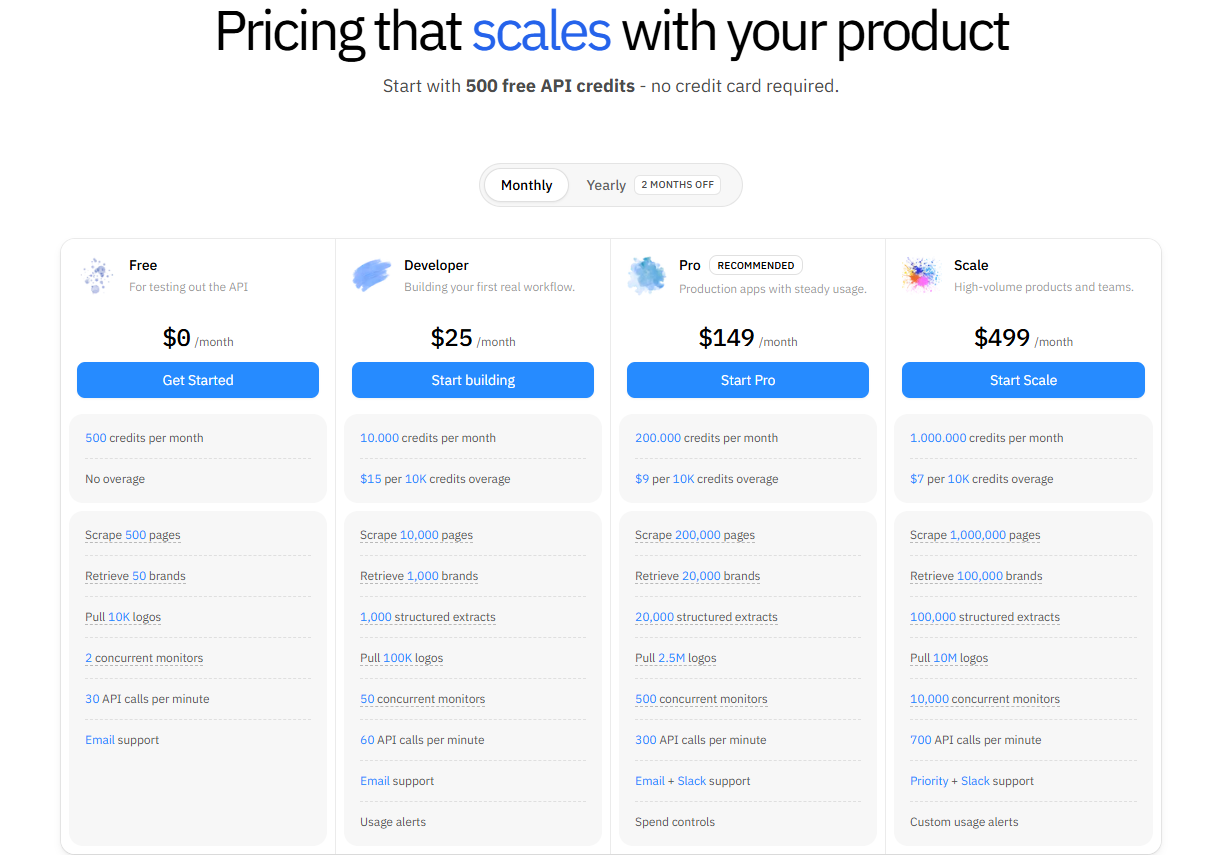
Context.dev uses a subscription pricing model based on monthly API credits. The plans scale from early-stage developers to enterprise integrations:
| Plan | Monthly Cost | Included Credits | Key Features & Support |
|---|---|---|---|
| Developer | $0 | 1,000 | Basic endpoints, standard rate limit, Discord community support. No credit card required. |
| Starter | $25 | 25,000 | JavaScript rendering support, basic anti-bot bypass, unlimited concurrency keys. |
| Pro | $149 | 200,000 | Priority processing queue, residential proxy rotation, custom JSON schema extraction. |
| Scale | $499 | 800,000 | Dedicated Slack support channel, SLA guarantees, customized scraping configurations. |
| Enterprise | Custom | > 2,000,000 | Volumetric discounts, custom contract agreements, dedicated account manager. |
Credit consumption rules:
- A standard static HTML scrape costs 1 credit.
- JavaScript-rendered scraping (dynamic rendering) costs 5 credits per request due to browser engine overhead.
- Brand Enrichment (/brand) queries cost 2 credits per lookup.
10. Pros and cons
What Context.dev does well
- Unified Web Context: Having scraping, crawling, and brand enrichment in one tool significantly reduces developer overhead.
- Markdown Quality: The cleaning parser is exceptionally good at isolating body text, reducing prompt tokens, and preventing AI hallucinations.
- Anti-Bot Success: Superior bypass rates for strict security gates (Cloudflare, Akamai).
- MCP Integration: Native compatibility with modern desktop AI agents and developer tools.
Where Context.dev falls short
- No Pay-As-You-Go Credits: You cannot make one-off credit top-ups without subscribing to a monthly tier.
- JS Rendering Overhead: The 5x credit multiplier for dynamic pages can drain your monthly limit quickly if your scrapers are not optimized.
- Emerging Ecosystem: As a relatively new tool (launched 2025), community-made SDKs and integrations are still growing.
11. Context.dev vs. Competitors (Firecrawl, ScrapingBee, Apify)
To see how Context.dev stacks up against alternatives, check our side-by-side comparison below:
| Feature / Criteria | Context.dev | Firecrawl | ScrapingBee | Apify |
|---|---|---|---|---|
| Primary Output | Markdown / JSON | Markdown / HTML | Raw HTML / JSON | JSON / CSV / XLSX |
| Anti-Bot Bypass | Excellent (Auto) | Good | Very Good | Custom actor setup |
| Brand Enrichment | Yes (Built-in) | No | No | No |
| Native MCP Server | Yes | Yes | No | Custom wrapper needed |
| Billing Model | Credits per action | Requests based | Credits based | Compute units based |
| Integration Curve | Low (Single API) | Low (REST / SDK) | Medium (REST API) | High (Actor ecosystem) |
While Firecrawl is a strong competitor in RAG scraping, it lacks Context.dev’s advanced Brand Enrichment engine. ScrapingBee is excellent for raw extraction but requires you to parse the HTML yourself. Apify is the most powerful platform for complex RPA automation but comes with a steep learning curve.
12. Onboarding process and dashboard workflow
Getting started with Context.dev is designed to be frictionless, taking you from registration to your first API request in minutes without requiring complex local setups.
- Account Registration: You begin by signing up on the platform using either your GitHub account or a standard work email. Once verified, you are taken immediately to the main dashboard. No credit card is required to access the developer plan.
- Playground Verification: The first step for most developers is testing target URLs inside the built-in Playground. Here, you can enter any website link, toggle optional configurations like JavaScript rendering or geotargeted proxies, and watch the platform compile the output. You can view the response in raw JSON format or preview the converted Markdown directly.
- API Key Management: The credentials panel allows you to generate, label, and revoke API keys. For production environments, you can generate separate keys with specific credit limits or restrict them to particular endpoints to secure your account.
- Usage and Cost Monitoring: The dashboard provides real-time analytics graphs showing your request volume, credit consumption, and success/failure rates. You can also inspect detailed request logs to audit latency, headers, and response payloads for debugging.
13. Verdict: Is Context.dev worth it?
Context.dev represents the next generation of web scraping tools, pivoting from simple raw data extraction to “context engineering” for artificial intelligence. By successfully bundling robust Markdown scraping, sitemap crawling, and brand intelligence under a single developer-friendly roof, it eliminates the maintenance burden of running custom scraping nodes.
For any modern software team or AI developer looking to build production-ready agentic RAG or automated branding features, Context.dev is an invaluable tool that will pay for itself in saved engineering hours. We rate Context.dev a solid 4.8 out of 5 and highly recommend starting with their free developer plan.