
Anara Review 2026: The Ultimate AI Research Assistant for Academics?
In the current era of artificial intelligence, generating text is trivial, but verifying it is incredibly difficult. For researchers, students, and analysts, using standard LLMs often results in hallucinations, generic summaries, and a complete lack of verifiable sources. Academic research requires precision: every statement must be backed by a specific citation.
Anara (formerly known as Unriddle AI) is a specialized research workspace built to solve this exact problem. By anchoring AI outputs directly to uploaded files or connected academic databases, Anara ensures that every summary, explanation, and synthesis is backed by a verifiable citation. In this comprehensive review, we evaluate Anara’s document parsing capabilities, test its citation engine, inspect its integrations, and outline its pros and cons to see if it is worth the subscription.
Quick verdict
A premium academic workspace offering verified citations, Zotero integrations, and agentic deep search across libraries of PDFs.
Students, PhD candidates, and professional researchers who need to analyze dense literature and manage bibliographies.
Free basic tier. Paid plans start at $10/mo (Plus) and $20/mo (Pro) with advanced agentic plans at $167/mo (Max).
1. Platform Overview and Background
Anara was originally launched under the name Unriddle AI by founder Naveed Janmohamed. The startup gained rapid traction among university students and researchers who were looking for an alternative to ChatGPT that could read dense PDFs. The company was accepted into Y Combinator (YC), providing the resources necessary to scale their team and introduce advanced AI features.
To reflect their expanding mission-shifting from a simple document reader to an institutional-grade research platform-the company rebranded from Unriddle to Anara AI. Today, Anara operates as a cloud-based research workspace that combines a powerful multi-model chat interface, bibliography library, and a rich text editor.
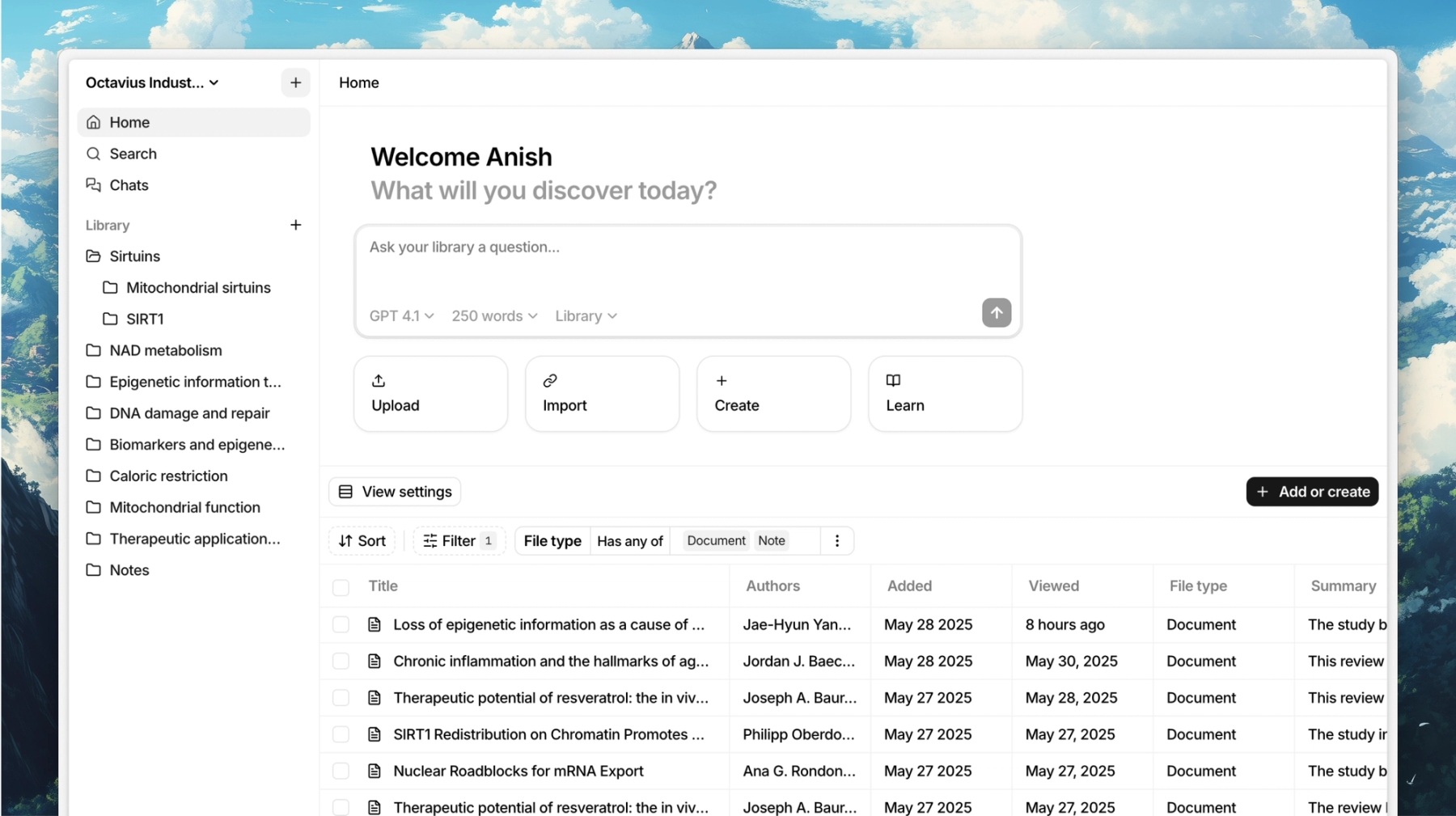
Anara Workspace: Organizing your PDF research papers and collections in a central library.
2. The Evolution of Unriddle
The transition from Unriddle to Anara marked a major upgrade in technology. While Unriddle was a standard Retrieval-Augmented Generation (RAG) tool that matched keyword strings, Anara leverages semantic chunking, custom multi-vector search, and multiple model APIs simultaneously. This evolution from a basic document reader to a comprehensive literature synthesis platform addresses the core needs of modern academics who require more than just simple summaries.
Rather than locking users into a single model, Anara allows subscribers to switch between models depending on their task. For instance, you can use Claude 3.5 for nuanced writing and editing tasks, GPT-4o for structural logical reasoning and complex mathematical parsing, or Gemini 1.5 Pro to process large multi-hour video and audio recordings with its massive context window. By allowing users to switch models on the fly, Anara ensures that you are always using the best engine for your specific research needs without paying for multiple separate AI subscriptions.
3. Document Analysis Core Features
Anara’s core value lies in its ability to digest information from multiple file types. Unlike simpler competitors that only accept standard PDFs, Anara supports:
- Text Documents: PDF, DOCX, TXT, EPUB, and markdown.
- Multimedia Files: Audio (MP3, WAV) and video (MP4) files, which the system automatically transcribes and indexes.
- Web Content: Web page URLs and YouTube links, allowing you to import web articles directly into your library.
- Images: Scanned documents and diagrams parsed using built-in OCR.
Once files are uploaded, you can select specific files to chat with, or query your entire library to find common patterns, compare divergent viewpoints, and synthesize literature notes.
4. Citation and Source Verification
The most important feature of Anara is its source verification system. In academic writing, you cannot make claims without reference. When you ask Anara a question about your uploaded documents, the AI responds with text, but includes clickable citation bubbles (e.g., “[1]”, “[2]”). This visual linking is crucial because it bridges the gap between AI generation and academic validity, ensuring that users can rely on the outputs for peer-reviewed papers.
Clicking a citation bubble instantly displays a split-screen view, highlighting the exact page, paragraph, and line in the source document where the AI pulled the fact. This completely eliminates the risk of silent hallucinations; if the AI makes a claim, you can immediately double-check its accuracy in the source text. Furthermore, Anara parses complex tables, footnotes, and headers, ensuring that the visual citation highlights correspond exactly to the layout of standard academic PDFs. This feature saves hours of manual searching, allowing you to compile references with absolute confidence.
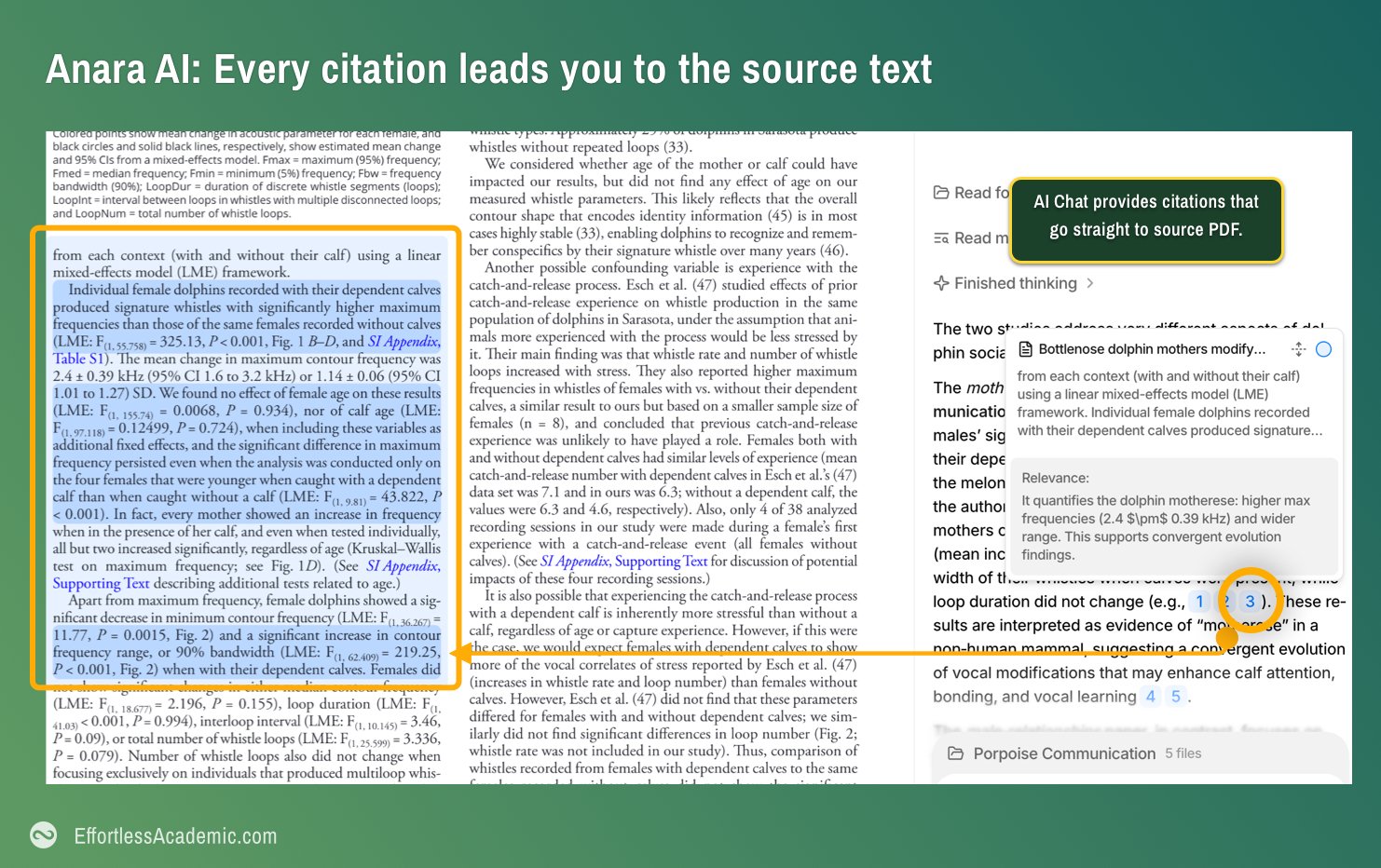
Source Highlighting: Visually tracing AI responses back to source text locations.
5. Zotero and Library Management
Managing bibliographies is a tedious part of academic life. Anara includes a clean, folder-based library management system. The platform allows you to organize your papers into custom collections, add searchable tags, and sort documents by publication date, author, or upload time.
For users of Zotero and Mendeley, Anara offers a direct sync integration. Once connected, your folders, metadata, and PDF collections in Zotero are mirrored inside Anara. When you add a new paper to your reference manager, it automatically syncs to Anara, ready to be read, annotated, and questioned by the AI agent. This means you do not have to double-upload files or manually manage database backups. Any notes or highlights you make in Anara are maintained in your research workspace, creating a seamless connection between your existing literature library and your writing workflow.
6. Side-by-Side Writing Assistant
Research is only half the battle; the other half is translating those findings into a cohesive, well-written paper. Traditional workflows require researchers to constantly toggle between their PDF reader, reference manager, web browser, and a separate text editor like Microsoft Word or Google Docs. This fragmented setup leads to cognitive fatigue and increases the likelihood of copying errors or misplaced references. Anara solves this friction by providing a highly optimized, split-screen Write workspace that integrates the document library directly into the drafting editor.
1. Parallel Research Workspaces
In Write mode, your workspace is split clean down the middle:
- The Reference Viewer (Left Side): Displays the document, paper, web article, or video transcript you are actively referencing. You can select text, highlight important formulas, or write margin notes.
- The Rich Text Editor (Right Side): A distraction-free markdown text editor where you write your draft.
This side-by-side design lets you write your paper while maintaining direct visual contact with your sources, making it easy to summarize complex arguments without having to minimize windows or switch monitors.
2. Context-Aware Inline AI Editing
The right-side writing editor features an interactive AI assistant that behaves like a collaborative co-writer:
- Targeted Text Manipulation: You can highlight any sentence or paragraph in your draft and trigger prompt menus. You can command the AI to “Expand” a brief thought, “Simplify” jargon-heavy prose, “Change Tone” to fit formal academic requirements, or “Generate Transition” to link two paragraphs smoothly.
- Source-Aware Suggestions: Unlike general-purpose writing tools that hallucinate facts to fill in text, Anara’s editor is context-aware. When you ask it to expand or rewrite, it references the facts from the source documents open on the left side, ensuring that the generated text remains anchored in real data.
3. Autocomplete and Auto-Citation Insertion
Tracking citations is historically one of the most frustrating parts of drafting research papers. Anara automates this process through its smart editor autocomplete:
- Interactive @-Mentions: While writing in the editor, you can type the @ symbol to trigger a searchable list of all documents in your project library.
- Automatic Reference Insertion: Selecting a document from the menu instantly inserts a formatted in-text citation (e.g., (Janmohamed, 2026) or [1]) at your cursor position.
- Dynamic Bibliography Generation: As you insert citations throughout your paper, Anara dynamically builds and updates your bibliography list at the bottom of the document, supporting major formatting styles such as APA, MLA, Harvard, Chicago, and IEEE.
Once your draft is finalized, you can export the document as clean Markdown, HTML, or a standard Microsoft Word .docx file, complete with fully preserved headers, bullet lists, and bibliography citations, ready for final formatting and submission.
7. Autonomous Deep Search Agent
For power users, Anara offers the Deep Search Agent on its premium Max tier:
- Autonomous Inquiries: Instead of manual back-and-forth prompts, you can assign a research question to the agent (e.g., “Summarize the clinical trials for drug X in our library and highlight side effects”).
- Iterative Deep Reading: The agent will open multiple documents in your library, read through them, extract relevant data points, cross-reference them, and compile a structured markdown report automatically.
- Comprehensive Report Compilation: The output is a highly structured document detailing the findings, complete with citation markers for every generated claim.
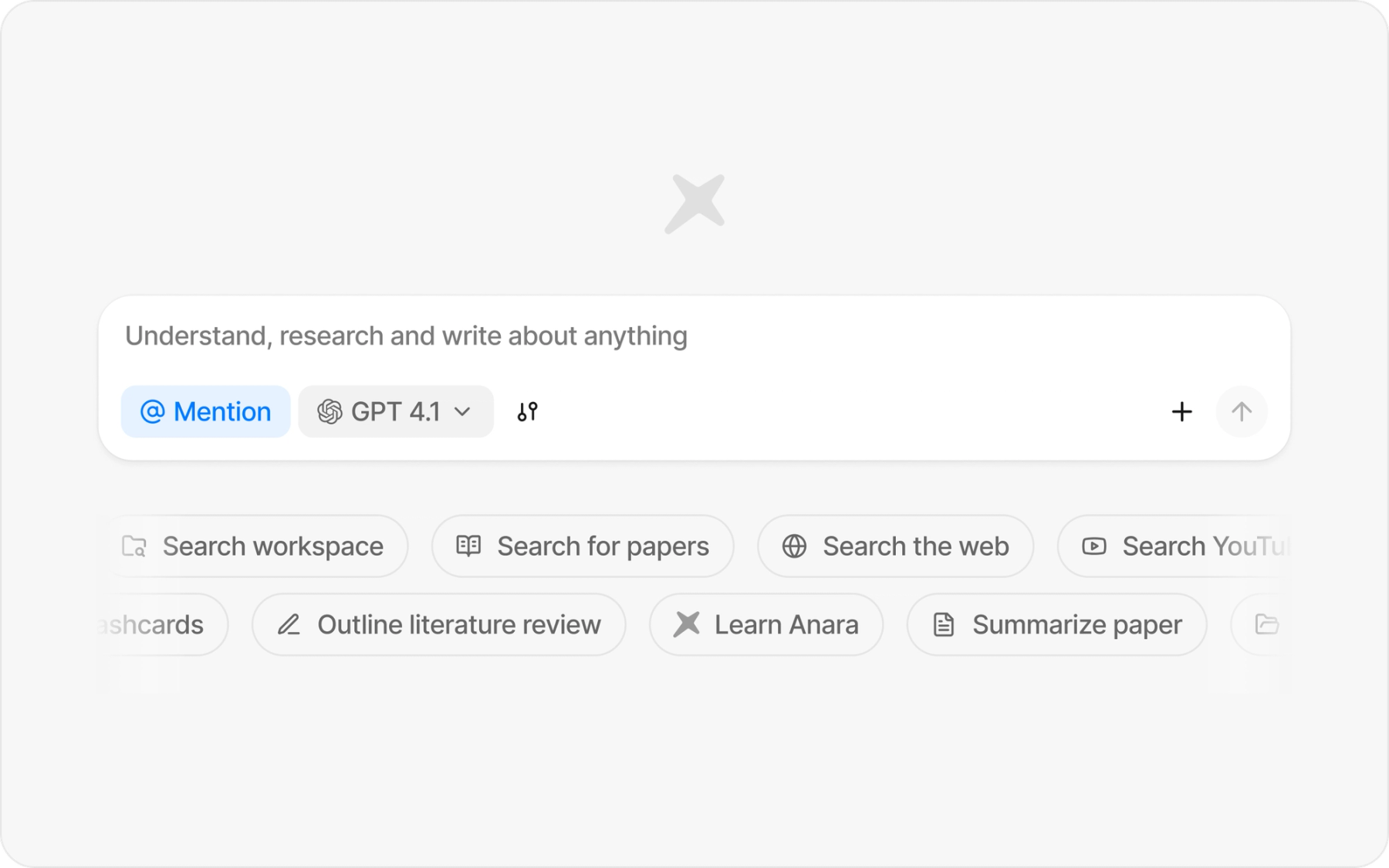
Deep Search Agent: Synthesizing information across hundreds of files autonomously.
8. Target Audience and Cases
Anara is designed specifically for research-intensive workflows:
1. Ph.D. Candidates and Researchers
Ph.D. students writing literature reviews can import hundreds of research papers, map out conceptual networks, and generate drafts with precise academic citations.
2. Undergraduate and Graduate Students
Students can upload textbooks, lecture slides, and study guides. Anara can automatically generate flashcards, practice quizzes, and explain complex concepts in simpler terms.
3. Professional Analysts and Investigators
Business analysts tracking market trends or legal teams reviewing contracts can upload multiple reports and prompt the AI to find key anomalies or data points across thousands of pages.
9. Key Platform Pros and Cons
Anara is a highly polished tool, but it is not without its limitations:
The Pros:
- Flawless Citation Highlights: Split-screen source tracing saves hours of cross-referencing.
- Zotero Integration: Keeps your bibliography synchronized automatically.
- Multimodal Support: Transcribes audio and video formats directly into searchable text.
- Multi-Model Choice: Access GPT-4o, Claude 3.5, and Gemini Pro within a single tool.
- Built-in Editor: Side-by-side writing layout speeds up the translation from research to drafting.
The Cons:
- Restrictive Free Tier: Limits on uploads and daily AI word counts make it unsuitable for heavy workloads.
- Premium Pricing for Advanced Features: The agentic Deep Search is locked behind a expensive $167/month Max tier.
- Offline Limitation: Being a cloud-based web app, it requires an active internet connection to process files and run models.
10. Subscription Plans and Pricing
Anara uses a monthly volume subscription plan with options to purchase yearly commitments for discounts:
| Plan | Price (Monthly) | Included Features | Target Audience |
|---|---|---|---|
| Free | $0 | Limited daily AI word usage, 5 document uploads, basic model access | Casual testing |
| Plus | $10 | Expanded daily limits, access to GPT-4o-mini and mid-tier models | Undergraduate students |
| Pro | $20 | Unlimited documents, Zotero/Mendeley sync, access to Pro models (GPT-4o, Claude 3.5) | Ph.D. students and active researchers |
| Max | $167 (billed annually) | Includes all Pro features, plus Deep Search Agent and frontier models | Professional researchers & enterprise teams |
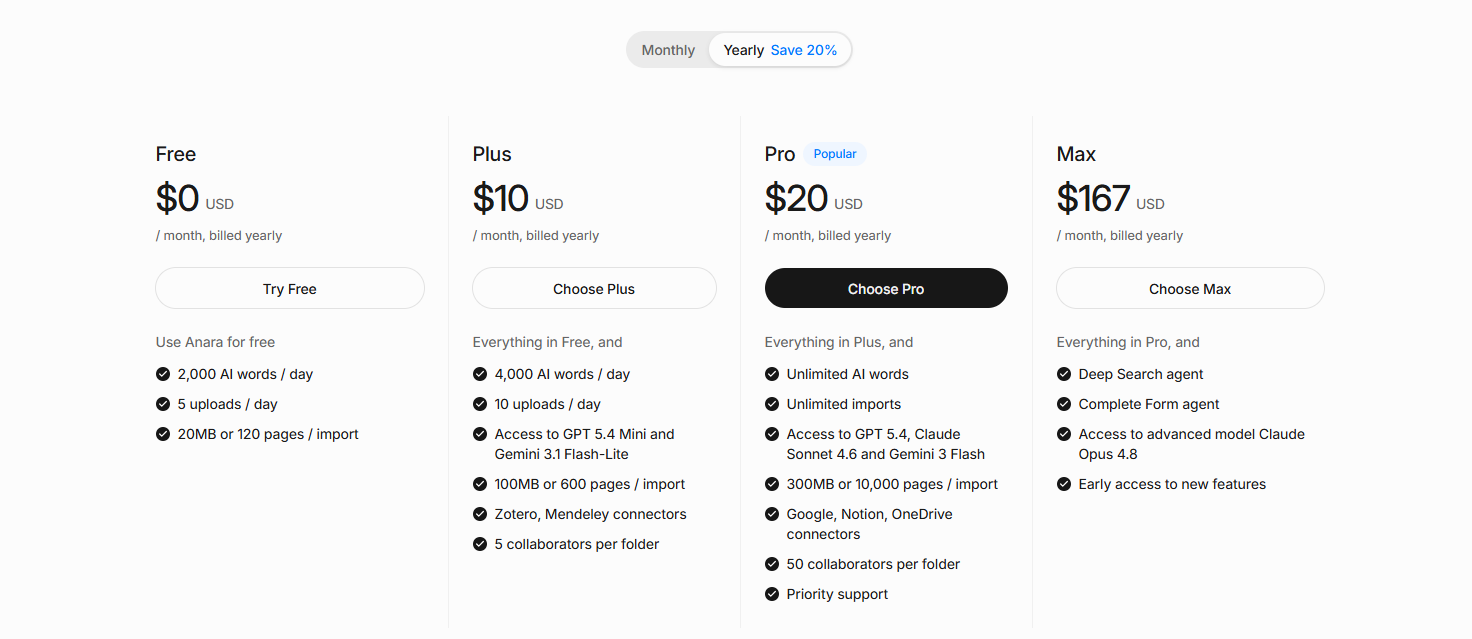
Anara Pricing Tiers: Custom monthly and annual plans for researchers and teams.
11. Competitor Comparison and Analysis
How does Anara stack up against other popular research tools?
| Criteria | Anara AI | Google NotebookLM | Consensus |
|---|---|---|---|
| Source Type | Uploaded documents, Zotero libraries, URLs, video/audio | Uploaded documents, Google Drive, YouTube URLs | Academic journals database (200M+ papers) |
| Primary Use Case | Library workspace, writing reports, and manual synthesis | Personal note-taking, summaries, and audio briefings | Finding papers and answering queries using journal data |
| Citation System | Split-screen visual text highlighting | Clickable document reference bubbles | Inline journal article link citations |
| Integrations | Zotero, Mendeley | Google Docs, Google Slides | Zotero, Mendeley (Export only) |
| Pricing | Free / Paid ($10 to $167/mo) | Free | Free / Paid ($9.99 to $29/mo) |
Key Takeaway:
- Choose Anara if you have your own extensive library of papers (especially inside Zotero) and need a side-by-side editor to write drafts with active citations.
- Choose NotebookLM if you want a free, simple note-taking notebook tool and enjoy the automated audio discussion feature.
- Choose Consensus if you do not have files yet and need to find published academic journal papers to support a scientific claim.
12. Security, Privacy, and Control
For researchers working with unpublished papers, clinical studies, or proprietary research, security is paramount. Academic integrity and patent protection require that research documents remain confidential and are not exposed to the public:
- Data Privacy: Anara does not use uploaded files to train public AI models. All documents are stored securely in encrypted cloud storage and are only processed when you actively query the models.
- Security Audits: The platform operates on YC-vetted secure cloud infrastructure with encryption in transit (HTTPS) and encryption at rest. It complies with modern security protocols to ensure that personal research libraries are completely protected from external leaks.
- Full Data Control: Users have absolute ownership over their data. You can delete individual files or wipe your entire library at any time. This action permanently deletes the indexed text vectors from Anara’s servers, leaving no residual traces.
13. Final Verdict and Recommendation
Anara is one of the most complete AI workspaces available for literature reviews and drafting. The combination of multi-vector search, selectable frontier models, Zotero synchronization, and the split-screen citation highlighted editor makes it an exceptional tool for academics.
While the Free tier is too limited for long-term use, the $20/month Pro tier is reasonably priced for active PhD candidates and researchers. The Max tier ($167/mo) is a major investment, but the autonomous Deep Search Agent can save hundreds of hours of manual synthesis for professional teams.
Use Anara if: You manage an active reference library (like Zotero), need to synthesize multiple PDFs, and want to write articles with verified source citations.
Think twice if: You are looking for a completely free tool (NotebookLM is a better fit) or need an academic database to find papers from scratch (Consensus or Semantic Scholar would be better).
Start testing: Sign up for the Free plan, upload 2-3 dense papers, and test the split-screen citation highlight feature to see how it fits your writing workflow.





