Superlist Review 2026: The Spiritual Successor to Wunderlist?
In the productivity space, we are often forced to choose between two extremes. On one side are simple to-do list applications like Todoist or Apple Reminders-quick to use but lacking the formatting needed for detailed project briefs. On the other side are complex relational workspaces like Notion or Obsidian, which offer endless customization but require significant setup time and can feel slow for rapid daily task inputs.
Superlist (superlist.com) aims to solve this dilemma. Founded in Berlin by Christian Reber, the creator of the legendary task manager Wunderlist, Superlist represents his vision of a modern, post-Wunderlist productivity tool. By merging tasks, text, and AI capabilities into a highly polished, visual editor, Superlist serves as a workspace for both individual creators and collaborative teams. In this comprehensive review, we evaluate Superlist’s core features, test its integrations, analyze its pricing models, and compare it directly to other productivity platforms.
Quick verdict
A beautifully designed, fluid productivity app that successfully blends task management with note-taking, enhanced by smart AI tools.
Wunderlist fans, freelancers, and small teams looking for a visually stunning and integrated to-do list and document editor.
Generous free tier. Individual Pro starts at $6/month (or $59/year), while Team plans start at $10/month per user.
1. Introduction to Superlist
Superlist is designed to serve as the unified home for all your daily thoughts, check-lists, and ongoing projects. Instead of maintaining separate apps for notes (like Apple Notes) and tasks (like Todoist), Superlist organizes both inside a single canvas. When you open a list, you are greeted with a rich text document where tasks, paragraph notes, headings, bullet points, and attachments co-exist naturally.
The app’s design philosophy places a heavy emphasis on visual quality and fluid feedback. Every checked task accompanied by subtle animations, slide transitions, and micro-interactions makes organizing your day feel highly satisfying. With native applications across all major operating systems, Superlist ensures a consistent, fast, and responsive user experience.
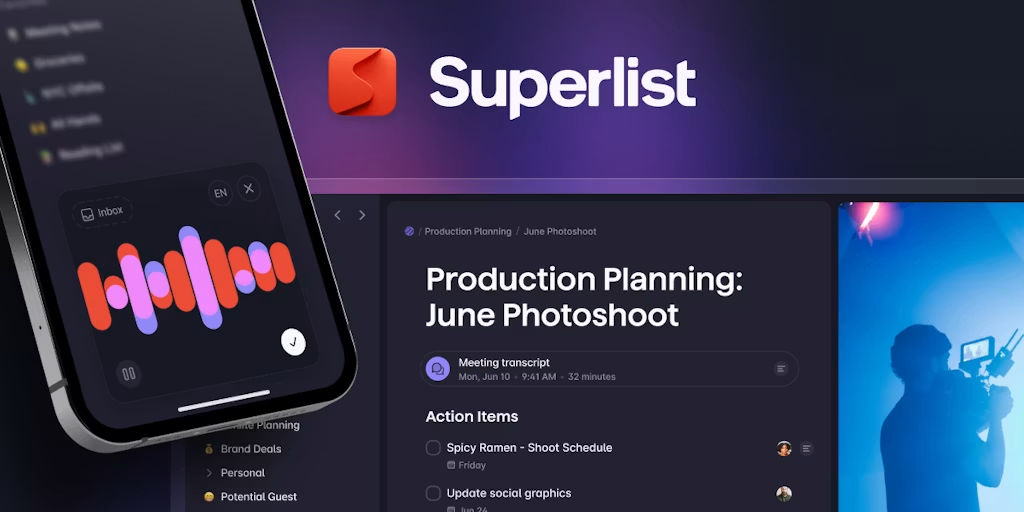
Product Hunt Launch: Superlist’s highly anticipated public launch page.
2. Founders and the Wunderlist Legacy
To understand Superlist, it is helpful to look at its predecessor, Wunderlist. Launched in 2011 by Christian Reber, Wunderlist became one of the most popular to-do list applications in the world, renowned for its simple interface and iconic “ding” sound when checking off tasks. In 2015, Microsoft acquired Wunderlist for an estimated $150M. However, corporate integration proved difficult, and Microsoft eventually decided to discontinue Wunderlist in 2020 in favor of Microsoft To-Do.
Reber, along with members of the original Wunderlist team, launched Superlist Software GmbH in Berlin to build a successor that preserved Wunderlist’s simplicity while addressing the needs of modern, distributed teams. Backed by seed funding, the team spent years refining the app’s performance, offline capabilities, and integrations, establishing a strong foundation for the platform’s release.
3. The Core Workspace: Tasks and Notes Unified
The central innovation of Superlist is its unified list workspace. In traditional productivity setups, you write a meeting outline in one tool and copy action items over to another tool. Superlist removes this friction entirely:
- Mixed Blocks: Any line in a list can be styled as a paragraph, a header (H1, H2, H3), a bullet list, or an interactive task block.
- Instant Conversion: You can convert text paragraphs into tasks (and vice versa) with a simple shortcut, allowing you to turn brainstorming sessions into projects instantly.
- Rich Attachments: You can drag and drop images, PDFs, code snippets, and audio recordings directly into any list.
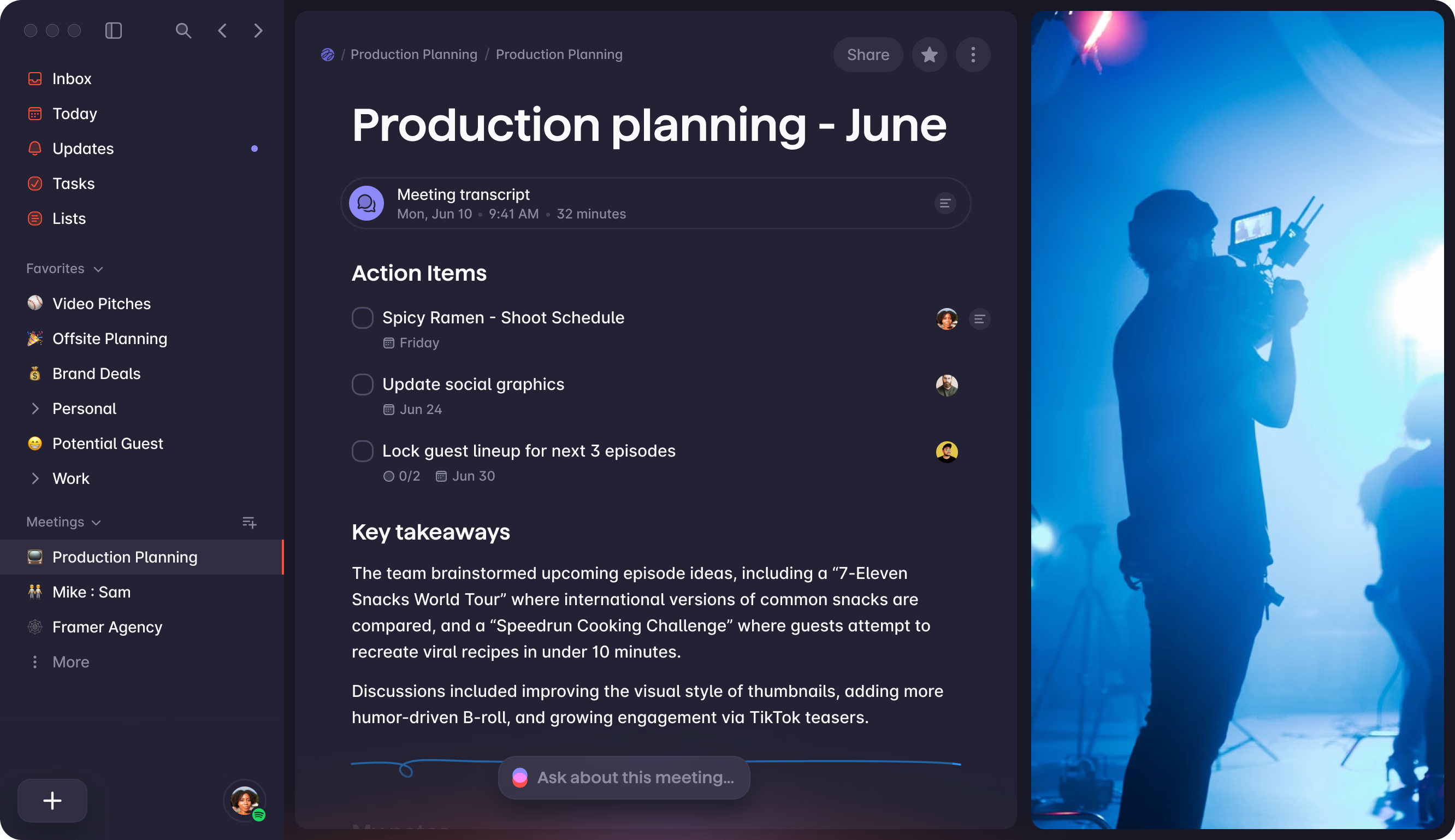
Unified Workspace: Combining narrative notes, checklists, and subtasks in one place.
4. Advanced Task Management Capabilities
Despite its focus on visual design, Superlist contains advanced features to manage complex workflows:
- Infinite Subtask Nesting: Tasks can contain subtasks, which in turn can contain their own subtasks, allowing you to break down larger projects into manageable steps.
- Due Dates and Reminders: Easily set due dates, recurring patterns (daily, weekly, custom schedules), and automated reminders.
- Task Metadata: Assign labels, custom priority levels, and attach explanatory notes directly to a task card.
- Smart Filters: A dedicated “Today” and “Inbox” view gathers all tasks assigned to you across both private and shared lists, helping you focus on the day’s priorities.
5. Collaboration and Shared Lists for Teams
Superlist is built for collaboration, allowing you to work with team members without context switching:
- List Sharing: Share any list with specific email addresses or generate shareable public links for read-only access.
- Task Assignment: Assign specific tasks to team members. Assigned tasks automatically populate in their personal “Tasks” view.
- Collaborative Folders: Organize shared lists into structured folders (e.g., Marketing, Product, Operations) with custom permissions.
- Activity Feeds: Monitor real-time changes and task updates within shared lists, complete with comments and reactions.
6. AI-Powered Meeting Notes and Voice Capture
Superlist incorporates modern AI capabilities directly into the editor canvas, transforming the application from a simple task repository into a collaborative thinking assistant:
- Make AI Writing Assistant: Rather than just correcting grammar, the built-in “Make AI” editor serves as an in-context assistant. By highlighting any note paragraph or raw list, users can trigger the AI to expand brainstorming points, translate text into over a dozen languages, adjust the tone (e.g., rewriting casual notes into a formal project proposal), or automatically format conversational blocks into nested task lists.
- AI Meeting Notes (Audio-to-Task Pipeline): Users can record meeting audio directly within Superlist’s desktop or web apps, or upload pre-recorded audio files. The platform’s speech-to-text engine transcribes the discussion with high accuracy, separates speakers, compiles a structured summary with key topics, and automatically extracts action items as assigned checkboxes, saving teams from manual post-meeting administrative work.
- Voice Assistant (“Talk” Mobile Input): On mobile devices, Superlist utilizes natural language processing to let users dictate ideas on the go. Instead of typing rigid commands, you can speak naturally (e.g., “I need to review the Figma layout designs tomorrow at 3 PM and notify Sarah”). The AI parses the sentence, extracts the core task, sets the deadline date, adds contextual notes, and schedules the reminder automatically.
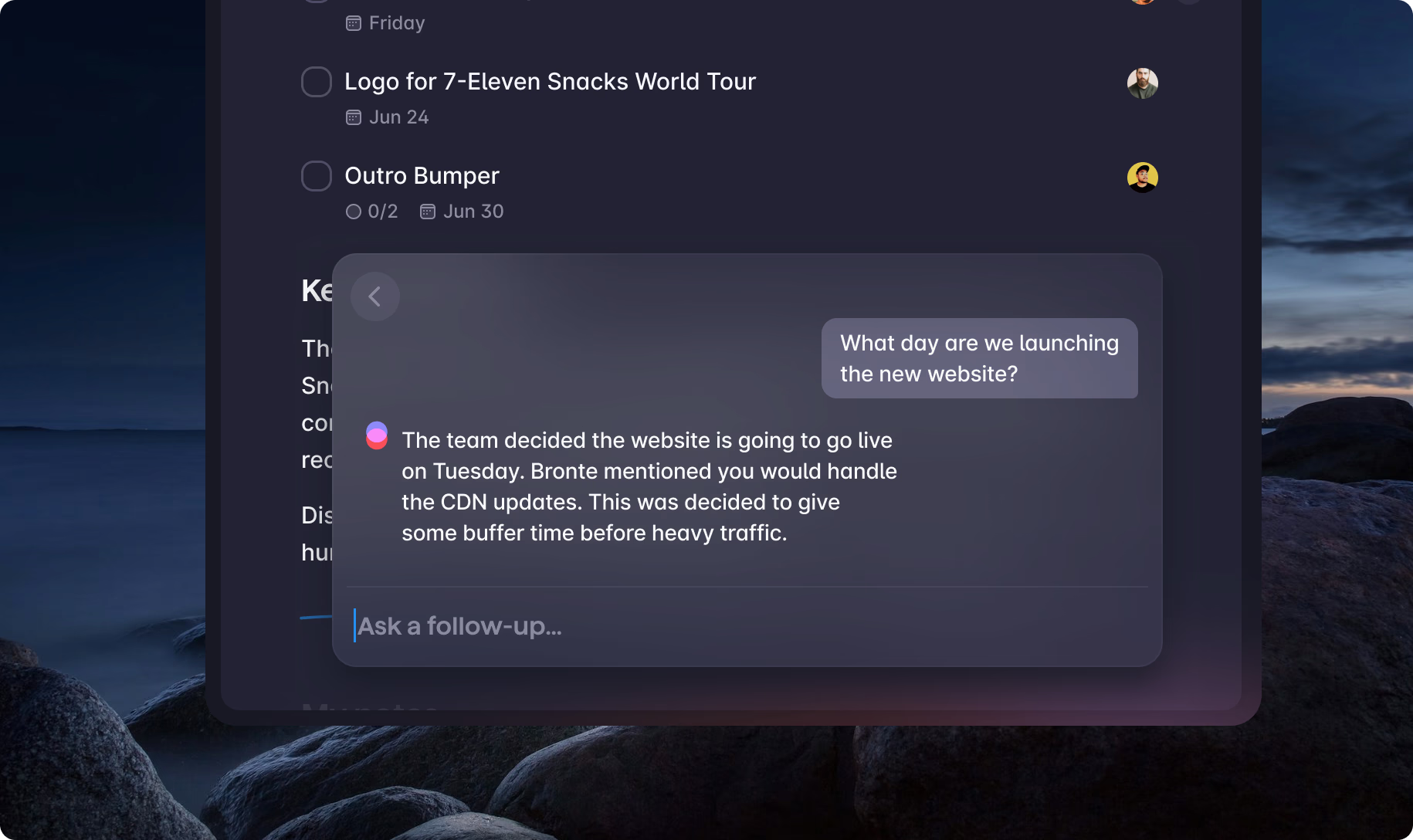
Superlist AI: Transcribing audio and extracting actionable checklists automatically.
7. Platform Integrations (Slack, GitHub, Figma, etc.)
Rather than attempting to lock users into a closed ecosystem, Superlist acts as an integration hub that connects with your existing software stack using bidirectional synchronization:
- Gmail & Google Calendar: Starred emails or messages tagged with a specific label in Gmail automatically generate new cards inside your Superlist Inbox, complete with direct links back to the original email thread. For calendar management, assigning a due date to a task creates a corresponding event block on Google Calendar, and rescheduling the calendar block updates the task deadline instantly.
- Slack App Integration: Users can configure the Superlist app in Slack to capture team requests. By reacting to any Slack message with a designated emoji, the link, text, and attached documents are pushed to Superlist. This prevents action items from getting lost in fast-moving chat channels.
- GitHub & Linear Synchronization: Perfect for software engineers and product managers, this integration links code repositories and bug trackers. When a GitHub pull request or Linear issue is assigned to you, it registers as a task in Superlist. Marking the checklist item as completed updates the status on GitHub or Linear, and vice versa.
- Figma Frame Embeds: Designers can paste Figma links directly into their project briefs in Superlist. The editor parses the URL and renders an interactive, real-time image preview of the Figma canvas inside the document, allowing collaborators to review design changes without leaving their task list.

Integrations Panel: Consolidating tasks from Slack, GitHub, and email into one inbox.
8. Cross-Platform Accessibility (macOS, iOS, Android, Web)
Superlist is designed around a modern, local-first database architecture that ensures seamless access and performance across all platforms:
- Native Desktop Clients: Unlike many web wrappers that hog RAM and run sluggishly, Superlist’s desktop applications for macOS and Windows are optimized natively. This enables instant startup times, fast navigation, and support for system-wide shortcuts, such as the global quick-add pop-up (CMD+Shift+K on Mac) to capture ideas from any screen.
- Mobile Apps & Native Widgets: The iOS and Android applications are fully optimized for touch interfaces and integrate with mobile features. This includes interactive home screen and lock screen widgets that allow users to view and check off items directly without launching the main app, alongside share-sheet extensions to send web pages or text snippets straight to Superlist.
- Local-First Offline Architecture: All workspaces, documents, and checklists are cached locally on your device. This allows you to work, write notes, and organize tasks without an active internet connection. When you reconnect, the app performs a silent delta sync, resolving edits and merges without creating duplicate entries or losing data.
- Web Companion: A fully featured web application provides access from Linux machines or locked-down corporate computers, maintaining visual consistency and formatting across browsers.
9. User Interface and Visual Design Aesthetics
Rooted in the design-centric heritage of Wunderlist, Superlist stands out as one of the most visually refined productivity applications available:
- Premium Typography and Layouts: The editor utilizes clean, modern typefaces and high-contrast styling that makes reading and drafting notes feel like interacting with a premium publication. The interface is spacious, emphasizing content clarity over crowded, complex database grids.
- Delightful Micro-Animations: Every user action is supported by polished visual feedback. Checking off a task triggers a smooth, satisfying strike-through animation, combined with delicate color shifts and slide transitions that make daily planning feel rewarding.
- Frosted Glass & Depth Effects: The layout makes extensive use of glassmorphism overlays and soft gradient backdrops, providing a distinct sense of depth and hierarchy. Interactive buttons, hover states, and drag-and-drop handles float fluidly over the workspace canvas.
- Adaptive Theme Support: Light and dark modes are tailored with custom HSL color palettes that shift automatically based on system preferences, reducing eye strain during late-night planning sessions.
10. Cost, Value, and Subscription Packages
Superlist operates on a freemium model with options for individuals and teams:
- Free Plan ($0): Includes up to 5 private lists, up to 5 shared lists, unlimited tasks, and basic collaboration.
- Pro Individual ($6/month, billed annually): Unlocks unlimited private and shared lists, unlimited lists + cloud storage, larger file uploads, and full integration options. If billed monthly, it is $8/mo.
- Pro Team ($10/month per seat, billed annually): Adds shared team workspaces, admin controls, unified team billing, and shared team workspaces + increased storage. Billed monthly at $12/mo.
- Super Plan ($25/month, billed annually): Unlocks advanced AI capabilities, including unlimited AI meeting notes, advanced automation, and priority customer support.
The individual Pro tier ($6/mo) represents a competitive value compared to other tools in the space.
App Store Listing: Superlist available for download across Apple platforms.
11. Comparison with Todoist, Notion, and Wunderlist
How does Superlist stack up against key competitors?
| Feature | Superlist | Todoist | Notion | Wunderlist (Legacy) |
|---|---|---|---|---|
| Primary Focus | Tasks + Notes hybrid | Pure task checklists | Relational workspace | Simple to-do lists |
| Interface Style | Highly visual, fluid | Minimalist, list-heavy | Modular block editor | Clean, skeuomorphic |
| AI Capabilities | Yes (Meeting notes, talk) | Basic text assistant | Yes (Notion AI) | No |
| Sync Speed | Fast (Native engines) | Ultra-fast | Moderate | Fast |
| Integrations | Slack, GitHub, Linear, Gmail | Extensive API network | Moderated databases | Basic email integrations |
| Pricing | Free / $6/mo (Pro) | Free / $4/mo (Pro) | Free / $8/mo (Plus) | Free |
12. Security, Privacy, and Data Management
For individuals and companies, data security is paramount:
- Encryption standards: Data is encrypted in transit using TLS 1.3 and at rest using AES-256 protocols.
- EU Hosting: Server infrastructure is hosted in Europe, ensuring compliance with strict GDPR regulations.
- Export Capabilities: Easily export lists as Markdown files or CSV data, ensuring you retain full ownership of your data.
13. Frequently Asked Questions
Is Superlist really the successor to Wunderlist?
Yes. Superlist was founded by Christian Reber, the original creator of Wunderlist, alongside members of the original Wunderlist team, with the goal of building a modern spiritual successor.
How does the email integration work?
You can connect Gmail or Outlook to Superlist. Starred or flagged emails can automatically create new tasks inside your Superlist inbox with a link back to the original email.
Can I use Superlist offline?
Yes. Superlist has local database architecture within its native macOS, Windows, iOS, and Android applications, allowing you to create and edit tasks offline, which will sync automatically when you reconnect.
Is there a limit to how many lists I can share on the free plan?
Yes. The Free plan allows you to create up to 5 private lists and share up to 5 lists with others. The Pro Individual tier unlocks unlimited private and shared lists.
14. Final Verdict and Recommendation
Superlist is a highly polished, visual productivity tool. The combination of narrative note-taking, checklists, and automated AI meeting notes makes it an exceptional workspace.
For fans of Wunderlist looking for a modern spiritual successor, or users who find Notion too slow and Todoist too dry, Superlist is an excellent middle ground.
Use Superlist if: You want a beautifully designed app that combines checklists and documents, need smart AI transcription tools, and value native cross-platform speed.
Think twice if: You require advanced relational databases or complex custom spreadsheets (where Notion or Airtable remain superior).
Start testing: Sign up for the Free plan on web or mobile, import your tasks, and test the voice-to-task assistant to see how it fits your daily routine.