
Odoo Review 2026: Is It the Best Open-Source ERP & Business Suite? (Honest Deep Dive)
Managing modern enterprise operations often turns into a chaotic struggle against fragmented software stacks. As companies grow, they frequently accumulate specialized, isolated SaaS subscriptions-using Salesforce for customer relationship management, QuickBooks or Xero for financial accounting, Shopify for e-commerce, Monday.com or Asana for project tracking, and Excel spreadsheets for inventory management. This fragmented approach creates data silos, causes duplicate data entry errors, increases recurring subscription expenses, and deprives executives of a single, real-time view of company performance.
Odoo was engineered to solve this operational fragmentation. Positioning itself as a unified, open-source Enterprise Resource Planning (ERP) and business management suite, Odoo provides an ecosystem of over 30 core applications-and more than 40,000 community modules-designed to cover every functional department within a company. From customer acquisition to warehouse logistics, financial reconciliation, and human resources, Odoo centralizes all enterprise data into a single, interconnected PostgreSQL database.
However, choosing an ERP system represents one of the most critical decisions a business can make. Implementation failures in the ERP industry are notoriously common, expensive, and disruptive. Can Odoo’s modular architecture and flexible pricing truly scale from small bootstrapped businesses up to complex mid-market enterprises? How does its open-source Community edition compare to the commercial Enterprise edition? And how does Odoo stack up against legacy ERP giants like SAP, NetSuite, Zoho, and Microsoft Dynamics 365?
Over the past four months, our research team conducted an in-depth, hands-on evaluation of Odoo. We deployed instances on Odoo Online cloud and self-hosted servers, configured complex multi-currency accounting structures, mapped double-entry inventory rules, built custom workflows using Odoo Studio, and evaluated real-world implementation costs. This review provides an objective, granular breakdown of Odoo’s capabilities, pricing tiers, operational limitations, and long-term value proposition.
Quick verdict
1. What is Odoo?
Odoo is a globally recognized open-source business management software suite created by Fabien Pinckaers in Belgium. Originally launched in 2005 under the name TinyERP, and later rebranded as OpenERP before adopting the name Odoo in 2014, the software has evolved into one of the most widely deployed business applications in the world, serving over 12 million active users globally.
Underneath its modern user interface, Odoo operates on a robust open-source technology stack. The backend is powered by Python and a PostgreSQL relational database, while the frontend utilizes Odoo’s custom Web Client framework (OWL - Odoo Web Library), rendering responsive XML and QWeb views. This architectural design allows every application module-whether it is CRM, Point of Sale, Manufacturing, or Invoicing-to read from and write to a single centralized database schema in real time.
Odoo is distributed under a dual-licensing business model. The Odoo Community edition is 100% free and open-source under the LGPLv3 license, allowing organizations to self-host and customize the software without paying license fees. The commercial Odoo Enterprise edition requires a per-user subscription and unlocks advanced applications, proprietary automated tools, mobile apps, official support, and automated cloud upgrades. You can explore the platform’s app ecosystem directly on the Official Odoo Website.
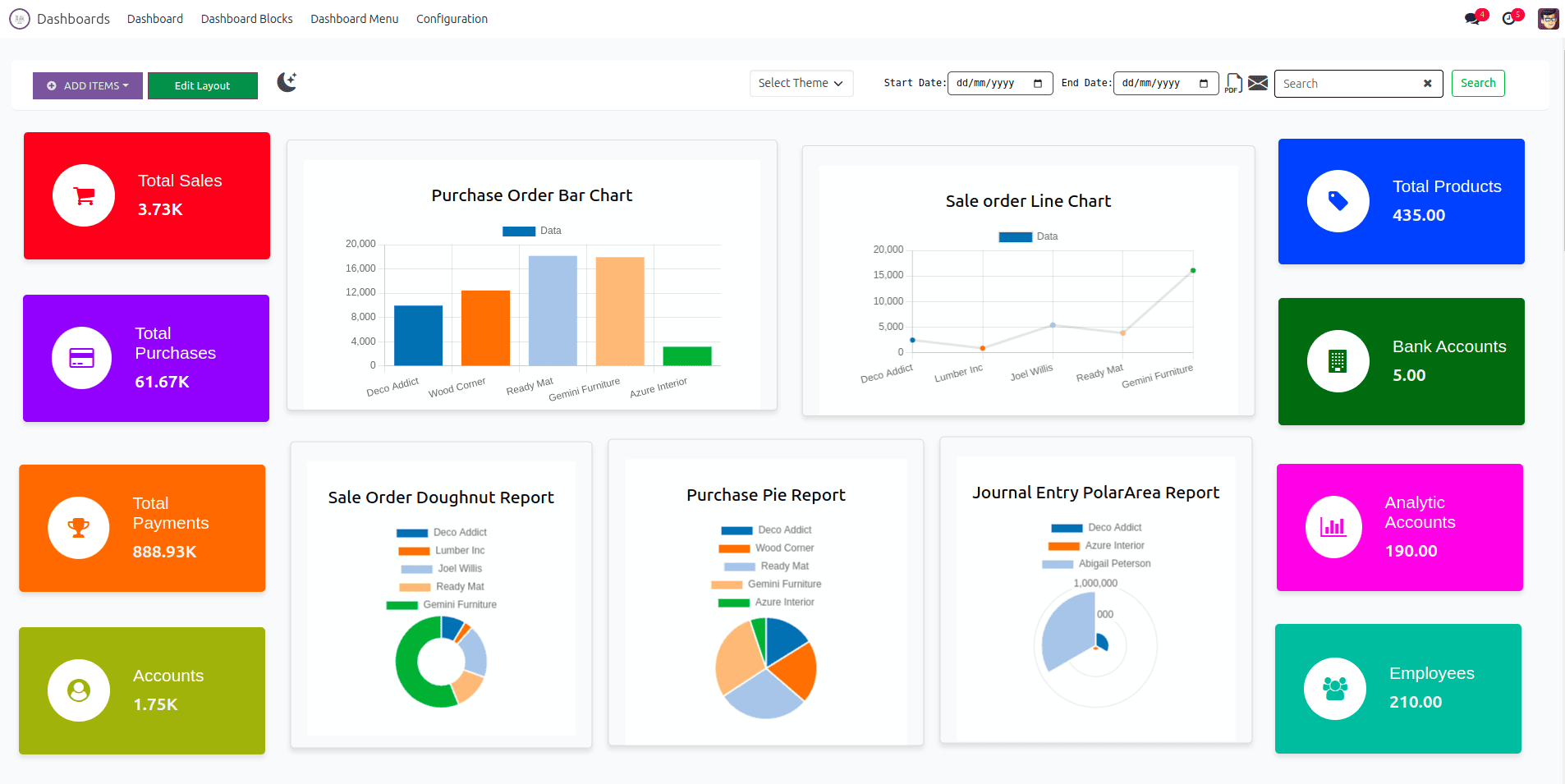
By the numbers: 12M+ global users - 30+ core official apps - 40,000+ community modules - 4,000+ global implementation partners - 100% integrated single-database architecture
2. Who should use Odoo?
Selecting an ERP platform requires evaluating whether your organizational size, technical resources, and operational complexity fit Odoo’s specific strengths. The software accommodates a wide range of business models, but it requires clear implementation planning.
Ideal operational fit for growing companies
For small to mid-sized enterprises (SMEs) currently struggling with software proliferation, Odoo provides a smooth consolidation pathway. Instead of paying separate monthly invoices for CRM, accounting software, inventory tools, and email marketing, SMEs can migrate all functions into Odoo. The single-database architecture guarantees that when a salesperson closes a deal in the CRM module, Odoo automatically generates the sales order, reserves product inventory in the warehouse module, and creates a draft invoice in the accounting module without human intervention.
For e-commerce retailers and multi-channel merchants, Odoo delivers exceptional operational synchronization. Native integrations between the Odoo Website/E-commerce builder, Inventory, and Accounting modules ensure that online orders automatically adjust stock levels across physical stores and digital storefronts simultaneously. Third-party connectors also allow seamless syncing with Amazon, eBay, and Shopify.
For manufacturers and distributors, Odoo offers advanced industrial controls. The Manufacturing (MRP) module integrates Bills of Materials (BOM), multi-level work centers, Master Production Scheduling (MPS), Maintenance, and Quality Control into a single operational view, enabling production managers to track raw material consumption and labor efficiency in real time.
For service-based businesses and consultancies, Odoo unifies client management and project delivery. The integration between Sales, Project Management, Timesheets, and Invoicing allows consultancies to track billable hours accurately and convert completed milestone tasks directly into client invoices.
Scenarios where alternative solutions fit better
Conversely, Odoo may not be the optimal fit for every scenario. If your company is a micro-business or sole proprietor needing only basic income and expense tracking, full ERP platforms like Odoo will introduce unnecessary complexity. Lightweight accounting packages such as Xero, QuickBooks Online, or Wave offer simpler setups for basic bookkeeping.
Similarly, if your business is a tier-1 global conglomerate with 50,000+ employees across 80 countries requiring rigid, highly standardized compliance frameworks and legacy mainframe integration, enterprise heavyweights like SAP S/4HANA or Oracle Cloud ERP provide specialized enterprise governance structures that Odoo’s out-of-the-box system may require extensive customization to match.
3. Modular ERP app architecture
The core design philosophy of Odoo is modularity. Rather than forcing companies to adopt an all-or-nothing monolith, Odoo allows businesses to install only the specific applications they need today, with the ability to add new modules seamlessly as their operations expand.
Inter-module communication and data flow
In traditional unintegrated software environments, transferring data between departments requires manual export/import of CSV files or fragile third-party API webhooks. Odoo eliminates this friction through a unified relational data model.
When a customer record is created or updated in the CRM module, that exact record object is immediately accessible across all other installed modules. There is no concept of “syncing” between sales and accounting because both modules query the exact same database tables.
The double-entry inventory system
One of Odoo’s most impressive architectural innovations is its double-entry inventory management system, inspired by classical financial double-entry bookkeeping.
In standard inventory software, stock levels are tracked as simple numerical balances incremented or decremented in a table. In Odoo, stock is never simply added or deleted. Every stock change is treated as a physical transaction between locations:
- Vendor Location → Virtual Input Location: Goods arriving from suppliers.
- Physical Warehouse → Customer Location: Goods shipped to clients.
- Production Location → Scrap Location: Materials consumed or damaged during manufacturing.
This double-entry tracking provides complete traceability across your entire supply chain. Managers can audit the complete movement history of any individual serial number or batch lot from raw material receipt through production work centers to final delivery.
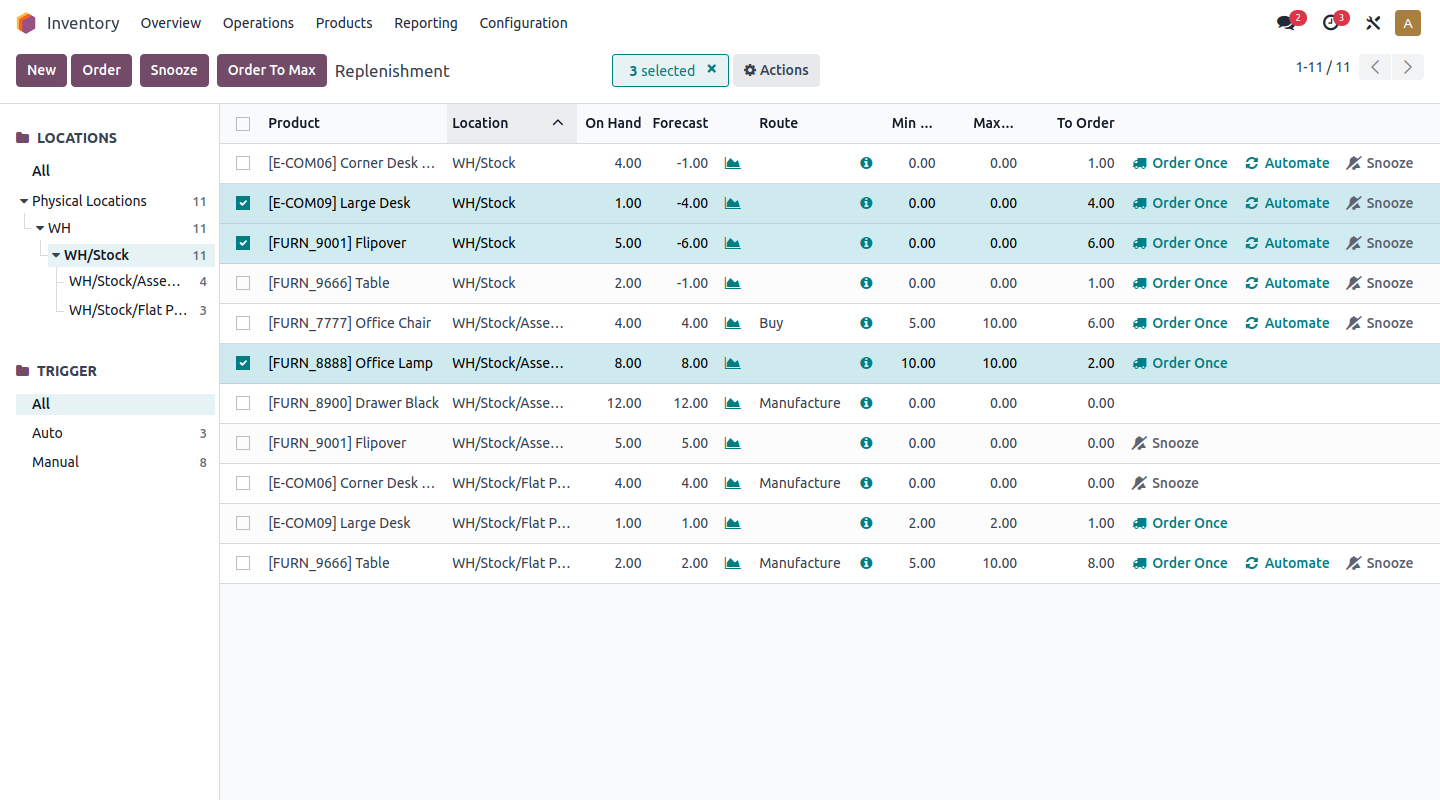
Key takeaway: Odoo’s modular architecture allows companies to start small-using just one or two apps-and scale up to an enterprise-wide ERP without migrating databases or changing software interfaces.
4. Key apps and features
Odoo’s suite is divided into several primary functional suites: Finance, Sales, Operations, HR, Website, and Marketing. Below is a structured analysis of Odoo’s key application modules and their core capabilities.
Application suite breakdown matrix
The table below outlines Odoo’s primary application modules, their functional capabilities, and their availability across Community and Enterprise editions:
| Application Module | Primary Functionality | Key Features | Edition Availability |
|---|---|---|---|
| CRM & Sales | Lead management & quotations | Pipeline stages, lead scoring, quotation builder, e-signatures | Community & Enterprise |
| Accounting | Financial management & reports | Bank reconciliation, tax localization, asset management, AI OCR | Enterprise (Limited in Community) |
| Inventory & MRP | Supply chain & manufacturing | Double-entry tracking, multi-warehouse, Barcode app, BOM, MPS | Community (Advanced in Enterprise) |
| E-Commerce & Web | Online storefront & CMS | Drag-and-drop website builder, payment gateways, SEO tools | Community & Enterprise |
| Point of Sale (POS) | Retail & restaurant sales | Offline mode, hardware integration, kitchen display, loyalty | Community & Enterprise |
| Project & Timesheets | Task & resource management | Gantt charts, Kanban boards, billable hours, customer portal | Community (Gantt in Enterprise) |
| HR & Payroll | Employee administration | Attendance, leave requests, recruitment, expense management | Community & Enterprise |
| Odoo Studio | No-code app customization | Custom fields, automated actions, report designer, app builder | Enterprise Only (Custom Plan) |
Accounting and financial localization
Accounting is often the decisive factor when selecting an ERP. Odoo Enterprise provides full-featured financial management supporting multi-currency transactions, automated bank feed synchronization (connecting with 24,000+ financial institutions worldwide), automated customer follow-ups, and AI-powered Optical Character Recognition (OCR) for vendor bill digitization.
Odoo supports over 70 country-specific accounting localizations out of the box, ensuring compliance with local tax requirements, electronic invoicing formats (such as Peppol, Factur-X, and KSeF), and standard chart of accounts structures across North America, Europe, Asia-Pacific, and Latin America.
5. Community vs Enterprise editions
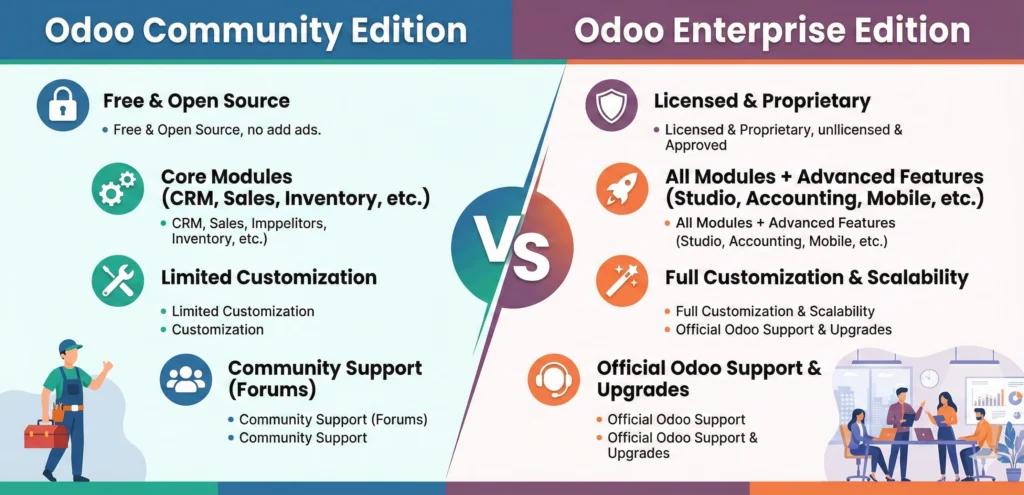
One of the most important decisions an organization must make when evaluating Odoo is selecting between the open-source Community edition and the commercial Enterprise edition.
Detailed edition comparison
While both editions share the same underlying Python core and data model, Odoo S.A. reserves specialized applications, advanced automation tools, mobile apps, and official cloud hosting services for the Enterprise edition.
| Feature / Capability | Odoo Community Edition | Odoo Enterprise Edition |
|---|---|---|
| Software License Cost | 100% Free (LGPLv3 Open Source) | Per-user monthly/annual subscription |
| User Interface | Web Responsive (Standard Theme) | Modern Web + Native iOS & Android Apps |
| Full Accounting Module | Invoicing only (Basic reports) | Full Accounting (Bank sync, Asset mgmt, OCR) |
| Inventory Capabilities | Basic warehouse management | Barcode App, Shipping connectors, Multi-company |
| Manufacturing (MRP) | Basic Work Orders & BOM | Work Center IoT, Quality, Maintenance, MPS |
| Odoo Studio (No-Code) | Not Included | Included (Custom Plan) |
| Hosting Options | Self-Hosted On-Premise / Third-party Cloud | Odoo Online, Odoo.sh PaaS, or On-Premise |
| Software Upgrades | Manual (Community script migration) | Automated Version Upgrades Included |
| Official Support | Community Forums & GitHub | Included 24/5 Direct Vendor Support |
Strategic edition recommendations
For bootstrapped startups and tech-savvy small businesses with internal Python development capabilities, Odoo Community provides incredible value. You can self-host the software on a low-cost VPS (such as EvoXt or DigitalOcean) and utilize free community modules from the Odoo Association (OCA) to fill functional gaps like advanced accounting reporting.
However, for mid-sized businesses, retail chains, and manufacturing companies, Odoo Enterprise is almost always the required choice. The inclusion of full financial accounting automation, native mobile applications, Barcode scanning, automated software version upgrades, and vendor support far outweighs the recurring subscription costs for operational teams.
6. Odoo vs top competitors
Evaluating Odoo requires placing it in direct comparison with rival ERP and business management platforms across functionality, deployment flexibility, total cost of ownership, and customization depth.
| Feature / Metric | Odoo Enterprise | SAP Business One | NetSuite (Oracle) | Zoho One |
|---|---|---|---|---|
| Target Business Size | SMEs to Mid-Market | Mid-Market to Enterprise | Mid-Market to Enterprise | Micro to Small Businesses |
| Pricing Model | ~$7.25–$37.40 / user / mo | Custom (High License + Impl) | Custom ($999/mo + $99/user) | ~$37–$45 / user / mo |
| Deployment Options | Cloud, PaaS (Odoo.sh), On-Premise | On-Premise or Hosted | Cloud Only | Cloud Only |
| Source Code Access | Open Core (Full Access) | Proprietary | Proprietary | Proprietary |
| No-Code Customization | Odoo Studio | Complex Configuration | SuiteCloud Tools | Zoho Creator |
| App Ecosystem | 40,000+ Community Modules | Partner Add-ons | SuiteApp Store | Zoho Suite Extensions |
| Implementation Time | 1 to 6 Months | 6 to 12+ Months | 6 to 12+ Months | 1 to 3 Months |
Competitive positioning insights
When compared against legacy ERP giants like SAP Business One and Oracle NetSuite, Odoo’s primary advantages are affordability, implementation speed, and deployment flexibility. NetSuite and SAP frequently cost tens of thousands of dollars in annual licensing fees alone, combined with lengthy 6 to 12-month implementation cycles driven by specialized consultants. Odoo Enterprise delivers comparable core ERP functionality at a fraction of the licensing cost, with significantly faster deployment timelines.
When evaluated against Zoho One, Odoo excels in deep application integration and manufacturing/inventory depth. Zoho One provides an impressive suite of isolated cloud apps, but its underlying tools often feel like separate products acquired over time that pass data via background syncs. Odoo operates on a single unified data model, providing superior double-entry inventory control, manufacturing BOM management, and deep customization via Odoo Studio.
7. Pricing plans and hosting
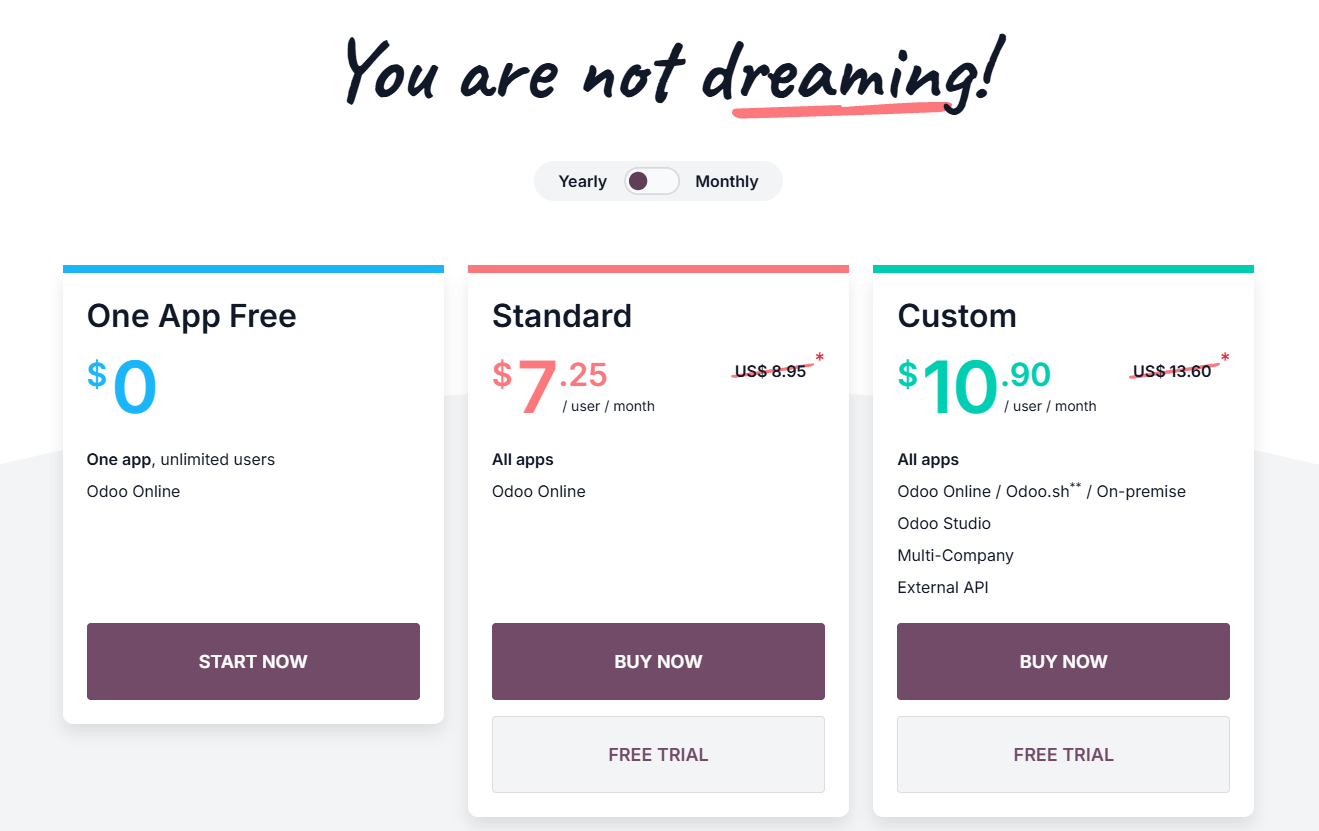
Odoo simplified its commercial pricing model to make Enterprise licensing transparent and accessible, offering all apps under unified user-based subscription tiers.
Enterprise subscription plans
- One App Free Plan ($0 / month): Offers access to one single application (e.g., just CRM, just Invoicing, or just Website) for an unlimited number of users at zero cost. Hosted on Odoo Online cloud.
- Standard Plan (~$7.25 to $24.90 / user / month): Unlocks access to all Odoo official applications for all users. Designed for companies operating on standard out-of-the-box workflows using Odoo Online cloud hosting.
- Custom Plan (~$10.90 to $37.40 / user / month): Unlocks access to all Odoo apps plus Odoo Studio (for custom no-code app creation), multi-company management, external API access, and deployment flexibility across Odoo Online, Odoo.sh, or self-hosted servers.
Note: Pricing varies based on geographic region, billing frequency (annual vs. monthly), and introductory promotional discounts. You can verify exact regional rates on the Odoo Pricing Calculator.
Deployment and hosting options
Odoo Enterprise offers three distinct hosting architectures to match organizational IT requirements:
- Odoo Online (SaaS): Fully managed public cloud hosting managed directly by Odoo. Includes automated daily backups, 99.9% uptime SLA, and automatic version upgrades. Ideal for companies using standard features without custom Python code extensions.
- Odoo.sh (PaaS): A specialized Platform-as-a-Service environment tailored for developers and implementation partners. Hosted on AWS infrastructure, Odoo.sh integrates directly with GitHub repositories, providing automated staging environments, CI/CD testing pipelines, and full access to install custom Python modules and third-party apps.
- On-Premise (Self-Hosted): Install Odoo Enterprise or Community on your own physical servers or private cloud infrastructure (AWS, Google Cloud, DigitalOcean). Provides maximum control over data sovereignty and server configuration, but requires internal sysadmin management for backups, security hardening, and performance tuning.
8. Pros and cons
Below is a structured analysis of Odoo’s major operational strengths and technical limitations:
What Odoo does well
- Unified single-database ecosystem: Over 30 core applications communicate natively through a shared PostgreSQL database, eliminating manual data entry between CRM, sales, inventory, and accounting
- Exceptional value proposition: The One App Free tier offers genuine $0 access for unlimited users, while Standard and Custom plans deliver enterprise ERP capabilities at a fraction of SAP or NetSuite costs
- Massive open-source app store: Access to over 40,000 community-developed modules allows companies to find pre-built solutions for almost any industry-specific requirement
- Powerful no-code customization with Odoo Studio: Enables non-technical managers to add custom database fields, design PDF reports, build custom views, and automate workflow triggers effortlessly
- Flexible deployment architectures: Supports managed cloud SaaS (Odoo Online), developer PaaS (Odoo.sh), and self-hosted on-premise infrastructure for total data sovereignty
- Modern user interface and native mobile apps: Clean, intuitive UI reduces employee training time, while iOS and Android apps allow field technicians and sales reps to work remotely
Where Odoo falls short
- Community edition functional gaps: The free open-source Community edition omits full accounting automation, mobile apps, Barcode scanning, and Odoo Studio, forcing commercial users toward Enterprise
- Implementation complexity and partner risk: Setting up complex ERP workflows requires careful business process mapping; inexperienced implementation partners can lead to project delays and budget overruns
- Version upgrade migration friction: While core cloud databases upgrade automatically, migrating custom Python code and third-party app store modules between major annual releases (e.g. Odoo 17 to Odoo 18) can require developer refactoring
- Variable customer support responsiveness: Standard vendor cloud support handles basic bug fixes, but complex workflow guidance usually requires purchasing paid implementation success packs or partner contracts
The primary technical consideration when adopting Odoo centers on implementation governance. Because Odoo is extremely flexible and customizable, non-technical teams can fall into the trap of over-customizing the software to match legacy, inefficient business processes rather than adapting company workflows to fit Odoo’s standard best-practice architecture.
9. User experience and customization
A software suite’s long-term adoption depends on daily interface ergonomics and how easily it adapts to evolving company workflows.
User interface ergonomics and navigation
Odoo’s user interface is among the cleanest and most intuitive in the ERP industry. Upon logging in, users are greeted with a smartphone-style dashboard displaying installed app icons. Navigating between applications is seamless, and global search functionality allows users to jump to specific invoices, customer records, or products instantly from anywhere in the system.
Data views are standardized across all modules, offering Kanban board drag-and-drop pipelines, structured List views, Pivot table analytical views, Calendar views, and Graphical charts. This visual consistency significantly reduces employee onboarding time.
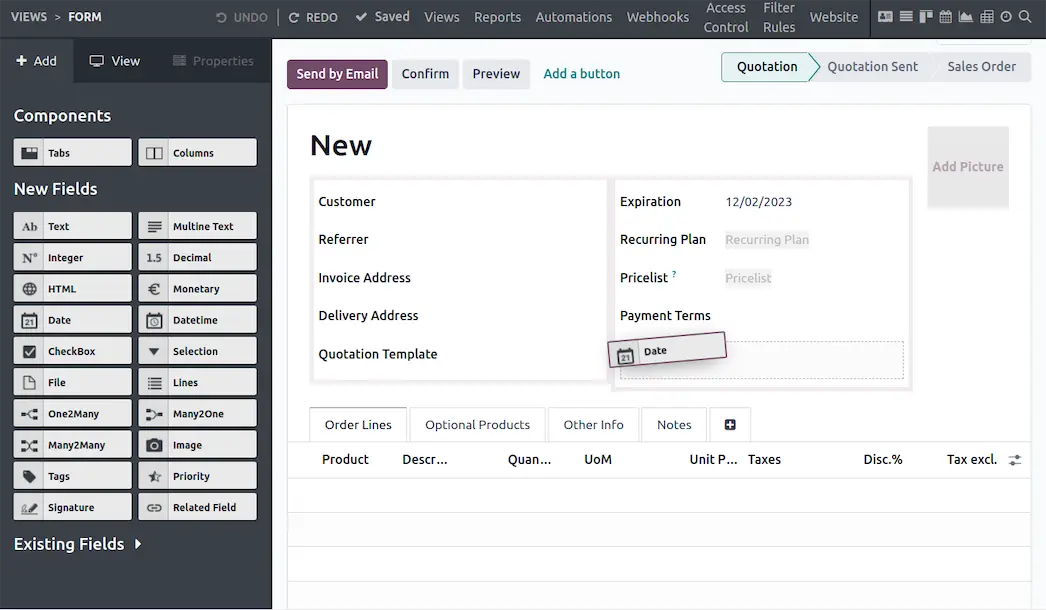
No-code app creation with Odoo Studio
Included in the Enterprise Custom plan, Odoo Studio is one of the platform’s most powerful differentiators. Studio is a visual, drag-and-drop customization tool that empowers administrators to modify existing forms and build brand-new custom applications without writing code.
Using Odoo Studio, managers can:
- Add custom input fields (text, monetary, relational dropdowns, date pickers) to any form.
- Design custom PDF reports and invoice templates visually.
- Build automated business logic triggers (e.g., “Send an email notification to the manager when a sales order exceeds $10,000”).
- Create custom mobile-friendly views and Kanban pipelines.
For complex enterprise requirements, developers can extend Odoo further by writing custom Python modules using Odoo’s clean Object-Relational Mapping (ORM) framework.
10. How to get started
Deploying Odoo successfully requires a clear, phased approach to avoid common implementation pitfalls.
Step 1: Define core scope and test One App Free
Start by identifying your most critical operational bottleneck (e.g. CRM, Inventory, or Invoicing). Visit the Official Odoo Portal and launch a free database using the One App Free plan to test standard workflows risk-free.
Step 2: Choose your edition and deployment model
Evaluate whether your requirements mandate Odoo Enterprise (for full accounting, mobile apps, and Odoo Studio) or if Odoo Community meets your self-hosted needs. Select between Odoo Online cloud for simple management, Odoo.sh for custom code development, or On-Premise hosting.
Step 3: Clean and import historical data
Clean your legacy data before importing it into Odoo. Prepare structured CSV/Excel templates for customer contact lists, vendor records, product catalogs with SKU numbers, chart of accounts, and opening inventory balances.
Step 4: Configure core settings and test workflows
Set up company information, tax rates, currencies, bank accounts, and user access permissions. Conduct end-to-end testing across your complete business process-from sales quotation to inventory pick/pack/ship and final invoice reconciliation.
Step 5: Train staff and go live
Conduct department-specific training sessions using video walkthroughs and procedure documentation. Once staff members are confident with the new interface, perform final opening balance imports and cut over to live production operations.
11. Frequently asked questions
Is Odoo Community really 100% free?
Yes. Odoo Community edition is open-source software under the LGPLv3 license. It is completely free to download, install, and self-host for an unlimited number of users. However, you are responsible for server hosting costs, maintenance, and technical setup.
What is the difference between Odoo Standard and Custom plans?
The Standard plan includes access to all official Odoo apps hosted on Odoo Online cloud for standard workflows. The Custom plan adds Odoo Studio (for no-code app customization), multi-company support, external API access, and deployment flexibility on Odoo.sh or self-hosted servers.
Can Odoo replace QuickBooks, Salesforce, and Shopify combined?
Yes. Odoo is designed to replace multiple isolated SaaS applications. Its integrated modules handle CRM, financial accounting, inventory management, e-commerce, and HR within a single system, eliminating the need for third-party synchronization tools.
Do I need a official Odoo Implementation Partner?
For simple setups using standard workflows, small teams can implement Odoo independently. However, for mid-sized companies with complex manufacturing, multi-warehouse logistics, or heavy data migration needs, hiring a certified Odoo Implementation Partner is strongly recommended.
How does Odoo handle annual version upgrades?
For Odoo Enterprise cloud customers (Odoo Online and Odoo.sh), database upgrades to new annual major versions (e.g. Odoo 17 to Odoo 18) are included in your subscription. Custom Python code and third-party app store modules may require technical updates during version upgrades.
Is Odoo secure and compliant for corporate data?
Yes. Odoo Online and Odoo.sh infrastructure use high-security AWS data centers with SSL encryption, daily automated off-site backups, strict access controls, and GDPR compliance.
12. Final verdict
Following an extensive four-month evaluation, Odoo earns an overall rating of 4.6 / 5. It is one of the most versatile, cost-effective, and technologically modern ERP and business management platforms available on the market today.
By unifying over 30 core business applications around a single, integrated PostgreSQL database, Odoo successfully eliminates data silos, reduces recurring SaaS subscription expenses, and delivers enterprise-grade operational visibility to growing companies. While organizations must carefully plan their implementation and guard against over-customization, Odoo represents an outstanding investment for any business seeking to modernize its operational stack.
Use Odoo if: you are a growing small or mid-sized business, e-commerce brand, manufacturer, or agency looking to consolidate separate software tools into a single, cost-effective ERP system
Think twice if: you are a micro-business needing only simple single-entry bookkeeping, or a massive tier-1 global enterprise requiring legacy SAP-level global compliance structures
Start free: Test Odoo’s modular interface risk-free by launching a single application on the Official Odoo Portal
Disclosure: This review may contain affiliate links. If you sign up through our link, we may earn a commission at no extra cost to you. This does not influence our ratings or editorial opinion.