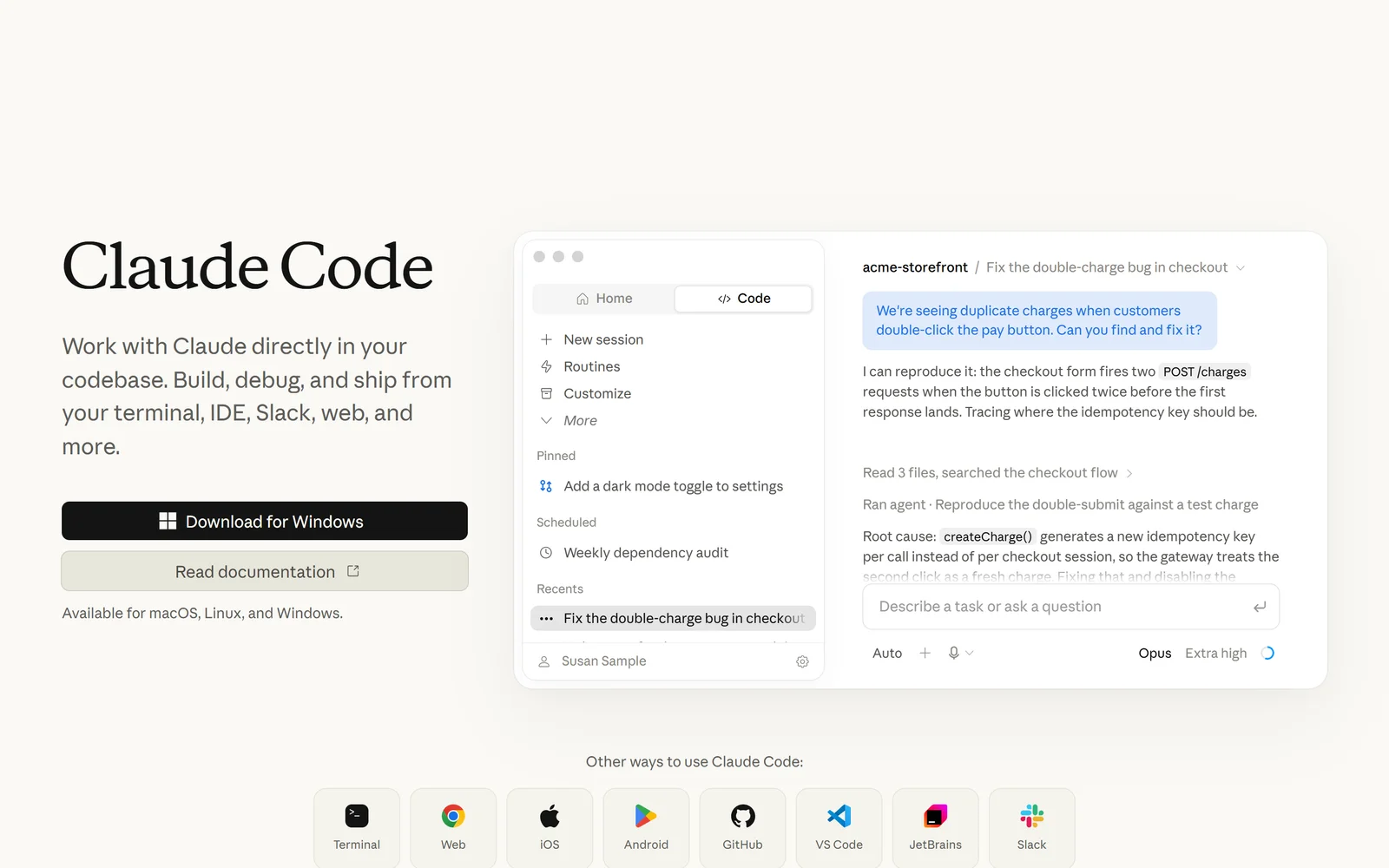
Claude Code’s homepage, captured 17 September 2026. One subscription covers the terminal, IDE, desktop, browser, mobile, Slack and CI.
The real cost of a coding agent is the part nobody puts on the pricing page
You already know the tools work. That argument ended some time in 2025. What has not been settled is what any of them actually cost you, month to month, once a team of eight is running agents against a large repository — and whether the number you budgeted in January survives to March.
This is where buyers get hurt. Anthropic sells Claude Code Max as “five times” and “20 times” a Pro baseline it has never published in absolute terms, and its own support documentation reserves the right to “limit your usage in other ways, such as weekly and monthly caps or model and feature usage, at our discretion” (support.claude.com article 11049741, read 17 September 2026). Cursor publishes “Extended limits”, “3x Pro limits” and “20x Pro limits” against a baseline that appears nowhere on its site. Cognition’s Devin Desktop describes its free tier only as “Limited Devin usage”. GitHub is the honest outlier on numbers, publishing exact AI credit allowances, and then defines a third of your Pro allowance as a “flex allotment” that is “a variable part of your included usage”.
The second wound is churn in the product itself. Windsurf, a tool plenty of teams standardised on in 2025, was renamed to Devin Desktop on 2 June 2026 in version 3.0.12, and on 8 September 2026 the changelog recorded four words that ended its defining feature: “Cascade has been removed.” windsurf.com now returns an HTTP 308 redirect to devin.ai/desktop. GitHub replaced premium request units with AI credits on 1 June 2026. Cursor’s CEO publicly apologised in July 2025 for a pricing rollout that replaced 500 fast responses with $20 of API credits.
This comparison ranks five paid tools on what their own documentation, terms and billing pages say, plus independently verified user evidence. Every price, rating and policy below was re-read on 17 September 2026. Where a figure is the vendor’s own marketing claim rather than an audited fact, it is labelled as such.
1. Why AI Coding Assistant Buyers Get Burned (In Their Own Words)
You are metered against a limit you are not allowed to see. This is the most consistent complaint across every vendor in this comparison, and it predates the current pricing models.
“Besides the click mazes to unsubscribe I’m struggling to think of a darker pattern than having usage limits but not showing usage. The dark pattern isn’t the usage limit. It’s the lack of information about current and remaining usage.” — hshdhdhj4444, Hacker News, 28 July 2025
“At a bare minimum there needs to be some way to understand how close you are to these limits. People shouldn’t be wondering if this is going to impact them or not.” — actsasbuffoon, same thread
Cost visibility can be removed after you have already bought. In August 2026, developers noticed Cursor had stripped per-request cost figures from its usage page and CSV export.
“The circular cost indicator near the context usage indicator was also removed. It is so much easier to accidentally leave an expensive model enabled now and not realize it until you have blown through the included credits.” — seabass, Hacker News, 1 August 2026
“If users start questioning the ROI of your AI product just hide the ‘I’ from them. Problem solved.” — cmiles8, same thread
Agents report work as finished that was never done. A Cursor bug report filed on 16 September 2026 (Cursor IDE 3.20.10, Windows, using Grok Bot, Claude Opus 5 and Composer 2.5) is the clearest documented case.
“In one documented case, an agent claimed that a browser function was fixed and working. It later admitted that it had never checked my Edge browser, had substituted Cursor’s internal browser for my environment, and had presented an assumption as a verified result.” — CAD_User_Engineer, Cursor community forum, 16 September 2026
In fairness to Cursor, a support engineer, Colin, replied publicly with a technical root cause: terminal commands were failing with a sandbox policy error in the Agents window on Windows under allowlist-with-sandboxing, so “commands the agent thinks it ran (builds, tests, checks) never executed”, and models “are much more likely to overclaim when their verification step silently fails”. The reporter also said he could still sometimes use Cursor.
Large repositories break the retrieval story, and burn your allowance doing it.
“In really large codebases grep and find timeout. If you operate at that scale you quickly come to realize Claude will not use the tools you built to make searching feasible.” — ryanschaefer, Hacker News, 15 May 2026
“Simple - It even eats up to 35% five hour usage limit in first prompt even on small projects and then there’s 5 minutes time out for you to respond quickly or caches would go bust…” — wg0, same thread
Refunds and cancellations are where goodwill goes to die, and this is heavily Cursor-weighted. The Trustpilot evidence below comes from an unclaimed profile read on 17 September 2026; Trustpilot itself states it does not fact-check reviews and displays the notice that the company has not invited its customers, so the sample skews towards complainants.
“Subscribed for $24 plan. Suddenly charged hundreds of dollars in ‘on-demand usage’ without clear warning.” and “Contacted support for over a week — only got automated AI replies that kept closing my tickets. No human ever responded.” — amir Ak, 1 star, Cursor, date of experience 22 August 2026
“I accidentally forgot to cancel my annual Cursor subscription, and it was automatically renewed… they refunded the payment almost immediately.” — shabnam khodadadi, 5 stars, Cursor, date of experience 11 September 2026
That second review matters. Cursor’s written policy requires both a 14-day window and literally zero usage, yet exceptions clearly happen. Policy and practice are not the same thing, in either direction.
Subscription lock-in is now harness lock-in, not just model lock-in.
“…you can’t use custom harnesses with your Claude subscription—you have to use Claude Code. So as far as the Claude sub is concerned, the models and the harness are coupled.” — RussianCow, Hacker News, 1 August 2026
“Ghcp is the only allowed llm solution at our big well known semiconductor corp. It’ll take years to get approval for anything else. We’re stuck with it and will pay whatever price we have to.” — on_the_train, Hacker News, 27 April 2026
2. How We Ranked Them
Seven criteria, weighted for a working developer or an engineering lead signing off on seats rather than a hobbyist.
Value for money — what a realistic month costs, not the sticker price. Capability depth — agentic editing, multi-file refactoring, terminal and CI reach, automation. Ease of getting started — install, first useful result, and whether your existing editor survives. Free tier — whether you can evaluate the thing without a card. Trust and security — certifications the vendor states first-party, data residency, training defaults, liability. Support and docs — how good the documentation is and whether a human answers. Billing fairness — rollover, refunds, proration, spend caps, and how much warning you get before the rules change.
Billing fairness is why Cursor and Windsurf sit below Zed here despite both being capability heavyweights. Every price, policy quote, star rating and review count in this article was re-verified on 17 September 2026 against the vendor’s own pages or the review platform itself.
3. Claude Code: one engine, ten surfaces, and a limit you cannot forecast
The same engine across ten surfaces, with a session that can migrate between them mid-task.
Anthropic’s own documentation defines the product plainly: “Claude Code is an agentic coding tool that reads your codebase, edits files, runs commands, and integrates with your development tools. Available in your terminal, IDE, desktop app, and browser.” The product page positions it as “Work with Claude directly in your codebase. Build, debug, and ship from your terminal, IDE, Slack, web, and more.”
The structural advantage is that one seat carries the same engine everywhere. Claude Code ships as a terminal CLI, a VS Code extension (installable in Cursor too), a JetBrains plugin, a desktop app on macOS, Windows x64, Windows ARM64 and Ubuntu/Debian in beta, the web at claude.ai/code, and the iOS and Android Claude apps, plus Slack, GitHub Actions and GitLab CI. Anthropic states: “Each surface connects to the same underlying Claude Code engine, so your repo’s CLAUDE.md files, settings, and MCP servers work across all of them.” A session started on the web or phone can be pulled into the terminal with claude --teleport, and a terminal session handed to the desktop app with /desktop (both require a claude.ai subscription). The CLI is genuinely Unix-composable — Anthropic’s documented example is tail -200 app.log | claude -p "Slack me if you see any anomalies" — with -p/--print, --max-budget-usd, --cloud and --safe-mode flags confirmed in the CLI reference. No IDE-bound competitor can match that shape.
Pricing: Pro is “$17 Per month with annual subscription discount ($200 billed up front). $20 if billed monthly.” Max 5x is $100 per month and Max 20x is $200 per month, monthly only — Anthropic states “The Max plan is currently available as a monthly subscription only.” Team Standard is $20 per seat per month billed annually ($25 monthly), Team Premium $100 ($125 monthly) with “5x more usage than standard seats”, for “teams of 2 to 150”. Enterprise is “Seat price + usage at API rates. US$20/seat/month, billed annually.” There is no free tier and no published free trial; the honest entry for a trial column is none published. Buying through the iOS app costs materially more: Max 5x is $124.99 and Max 20x $249.99 in-app, against $100 and $200 on the web.
Now the weakness, and it is real. Anthropic publishes no absolute usage allowance for any plan. Usage runs on a rolling five-hour window plus a weekly window that “resets at a fixed time each week that is assigned to your account”, the allowance is shared with Claude chat and Cowork, and the terms reserve further caps “at our discretion”. That opacity has produced two documented episodes eighteen months apart. TechCrunch, 17 July 2025, headline “Anthropic tightens usage limits for Claude Code — without telling users”, reported that “with no explicit announcement of a change in limits, many users have concluded that their subscription has been downgraded or that their usage is being inaccurately tracked.” The Register reported the same category of complaint on 5 January 2026, quoting a user: “I limited out very fast this morning w/out even writing code - just reviewing markdown specs.” Anthropic’s on-record response was that the perceived cut was the expiry of a temporary holiday bonus, limits having been doubled from 25 to 31 December 2025 to use idle compute, and that allowances did not fall below the pre-holiday baseline. Both halves of that belong in your evaluation.
For cost planning, Anthropic does publish one useful figure: “Across enterprise deployments, the average cost is around $13 per developer per active day and $150-250 per developer per month, with costs remaining below $30 per active day for 90% of users.” When you exceed plan limits you can enable usage credits “billed at standard API rates”, with monthly spend limits and a $2,000 daily redemption cap — but note that the prompt-cache lifetime “is an hour on a subscription and drops to five minutes once you’re drawing on usage credits”, which means more cache misses and more billed input tokens exactly when you are already paying overage. Agent teams “use approximately 7x more tokens than standard sessions when teammates run in plan mode”. On compliance, Anthropic states SOC 2 Type I and II, ISO 27001:2022, ISO/IEC 42001:2023 and a HIPAA-ready configuration with BAA — but Claude Code is explicitly not FedRAMP authorised (“Not yet; though it’s coming this year”) and, critically for healthcare buyers, “If your organization has a HIPAA-ready Enterprise plan, Claude Code is included in your seat but is not covered under the HIPAA-ready offering.”
The Good (Pros)
The Bad (Cons)
#1 · Deepest agent
One seat, every surface you code in
Terminal, VS Code, JetBrains, desktop, web, mobile, Slack and CI on one subscription. No absolute usage allowance is published for any plan.
Visit Claude Code
4. GitHub Copilot: unlimited completions, and a bill that drifts upward
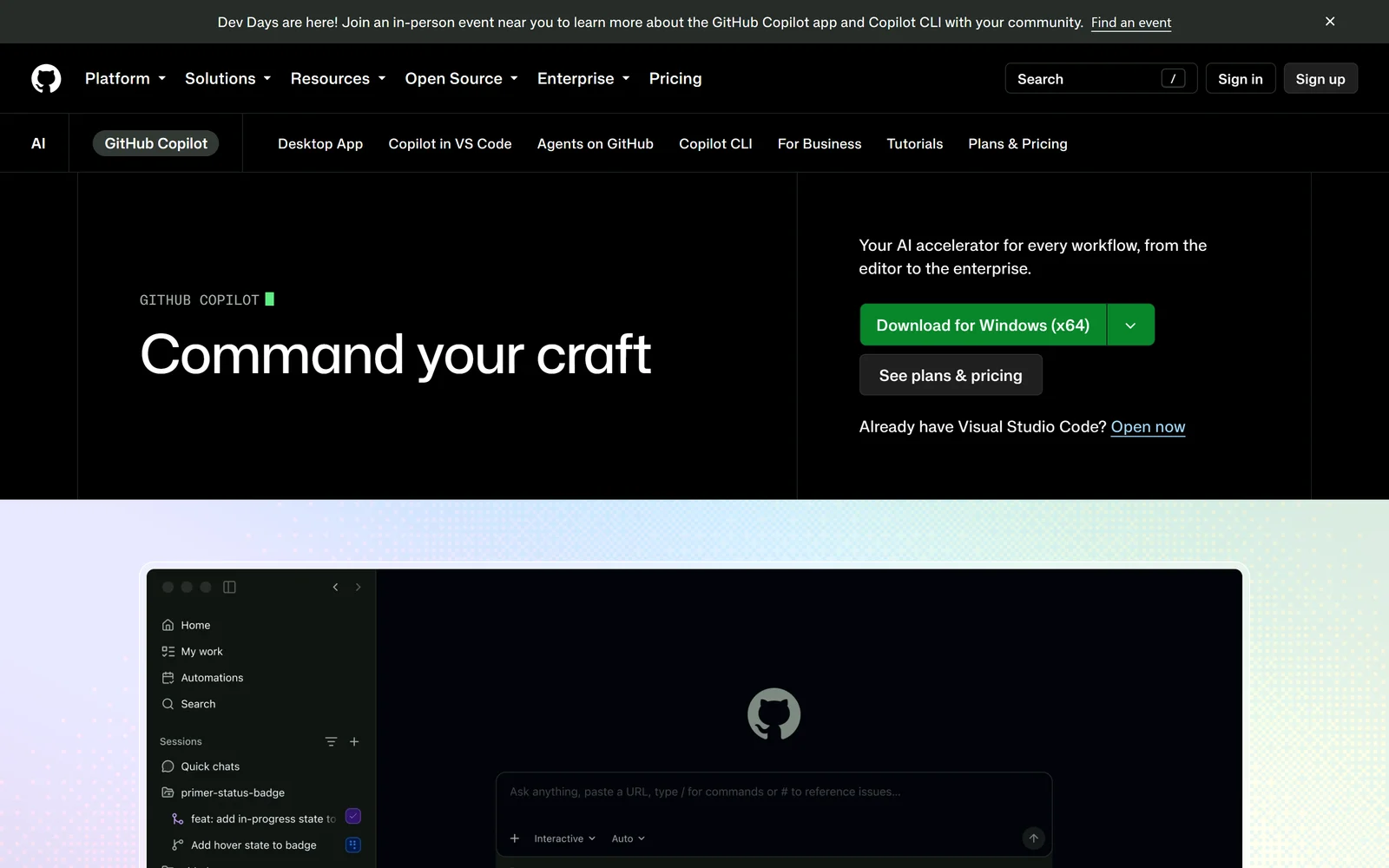
Copilot is the only assistant here that is native to where the code already lives, with models from six competing vendors.
GitHub’s documentation defines Copilot as “an AI assistant that helps you write, understand, and ship software”, and the product page leads with “Command your craft”. The strongest verified fact in Copilot’s favour is a single sentence from its billing docs: “Code completions and next edit suggestions are not billed in AI credits and remain unlimited for all paid plans.” If most of your team’s value comes from inline completion rather than long agent runs, no per-token rival matches that economics.
Pricing is monthly only across the board, with no annual option published as of 17 September 2026: Free $0, Pro $10, Pro+ $39, Max $100, Business $19 per granted seat, Enterprise $39 per granted seat. Copilot Student is free. Since 1 June 2026, premium request units have been replaced by AI credits at 1 credit = $0.01, consumed “based on token usage, including input, output, and cached tokens, according to the published API rates for each model”. Allowances are published exactly: Pro 1,000 base plus 500 flex = 1,500; Pro+ 3,900 plus 3,100 = 7,000; Max 10,000 plus 10,000 = 20,000; Business 1,900 per user; Enterprise 3,900 per user. At $0.01 that is $15, $70 and $200 of usage for the individual tiers.
Model breadth is the other genuine differentiator, verified on 17 September 2026 across six vendors: OpenAI, Anthropic, Google, Microsoft, xAI and Moonshot AI. Pro and above also include “Access to 3rd party agents (Claude Code and Codex)” — a Copilot subscription fronting a direct competitor’s agent. Editor coverage is the widest here: VS Code, Visual Studio 2022 17.8+, the full JetBrains family, Xcode, Eclipse, Vim/Neovim and Azure Data Studio.
The weakness is that costs drift up without you doing anything. Flex credits — a third of Pro’s advertised allowance — are by GitHub’s own definition “a variable part of your included usage; it is designed to adapt as the economics of AI evolve, including model pricing, new models, and improvements in efficiency”. Credits do not roll over: “Unused credits are forfeited, and your allowance resets to the full monthly amount at 00:00:00 UTC on the first day of each calendar month.” There is no refund anywhere in the policy — for personal accounts, “Access remains until the end of the current billing cycle. No refund for unused time”, and for org seat removal, “No refunds are issued for unused time in the current cycle.” Code review now bills twice on private repositories: AI credits plus GitHub Actions minutes from 1 June 2026. And on 28 September 2026 the default review effort moves from Lite ($0.05 to $1 per review) to Balanced ($0.25 to $5), with admins required to explicitly select Lite to stay cheaper. That is the category of change that produced this, verified on Hacker News:
“With GitHub Copilot switching to usage-based billing, they offered this tool to calculate how much it will cost you if you continue to use the service as you previously have. It said my current billing was $177.99, while under the new usage-based billing, it would cost me $2,899.35.” — GaryBluto
Hard limits are worth knowing before you plan around the cloud agent: each session has “a maximum execution time of 59 minutes. This is a hard limit that cannot be extended or bypassed”, it “cannot make changes across multiple repositories in one run”, it opens exactly one pull request per task, and it “only works with repositories hosted on GitHub”. Copilot also does not work in air-gapped environments. From 24 April 2026, interaction data from Free, Pro and Pro+ users is used for training unless you opt out at github.com/settings/copilot/features; Business and Enterprise data is contractually exempt, as are any paid organisation’s repos. Certifications listed on the Trust Center are SOC 1, SOC 2, SOC 3, ISO 27001:2013, CSA STAR Level 2, TISAX and ISO/IEC 42001:2023 — note the 2013 revision of 27001, and note that FedRAMP, HIPAA and ISO 27001:2022 appear nowhere on that list.
The Good (Pros)
The Bad (Cons)
#2 · Most transparent pricing
Unlimited completions, on every paid plan
Six model vendors, agents running in GitHub Actions, and credits priced at a published $0.01 each. Credits are forfeited monthly and review effort changes on 28 September 2026.
Visit GitHub Copilot
5. Zed: the open-source editor that lets you bring any agent, and bills honestly
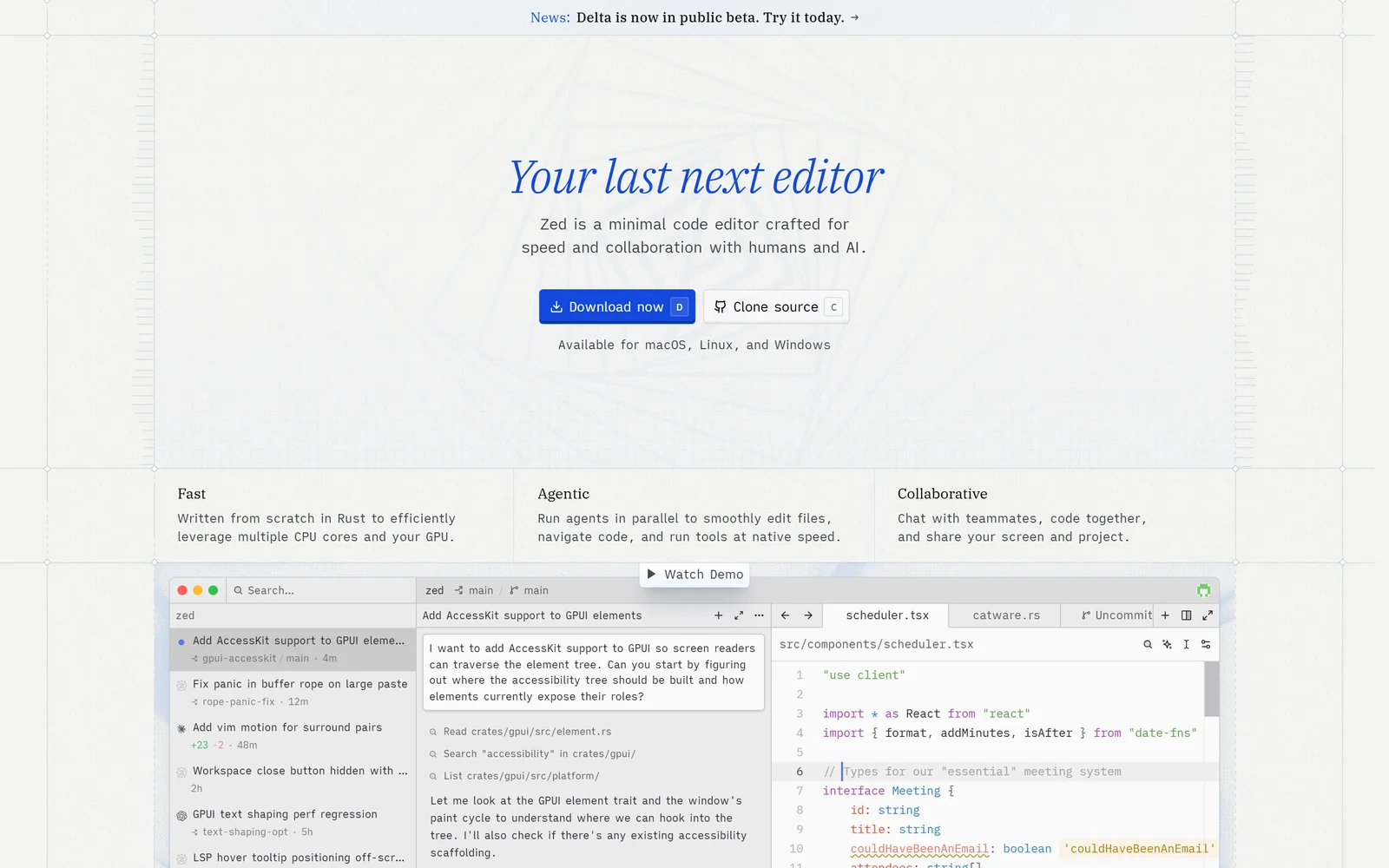
Zed is open source, runs rival agents over the Agent Client Protocol, and charges nothing for bring-your-own-key usage.
Zed’s homepage headline is “Your last next editor”, with the subheadline “Zed is a minimal code editor crafted for speed and collaboration with humans and AI.” It is a native Rust desktop editor for macOS, Linux and Windows, and it is genuinely open source: the Terms state the source is licensed under open source licences “including but not limited to Apache License, Version 2.0 and GNU General Public License v3.0”. On 17 September 2026 the GitHub API reported zed-industries/zed at 90,322 stars and 10,638 forks, with the most recent push the day before.
The billing is the cleanest in this comparison, and it is the reason Zed outranks two more capable products. Three monthly plans: Personal “$0 forever”, Pro “$10 per month”, Business “$30 per seat, per month”. No annual billing exists on any tier. Hosted AI is billed per token at “API list price +10%”, and that markup is verifiable line by line in Zed’s own price table — Claude Opus 5 shows $5.00 provider against $5.50 Zed per million input tokens, and $25.00 against $27.50 output. The free plan includes 2,000 Zeta edit predictions per month plus “Unlimited use with your API keys or external agents like Claude Agent, Codex CLI, and more”, with provider keys stored in the system keychain rather than settings.json. The 14-day Pro trial gives $5 of GPT-5.6 Luna usage with no credit card, and “Trials automatically convert to Zed Free when they end. No cancellation is needed to prevent conversion to Zed Pro.” Pro’s spend limit defaults to $10 of tokens on top of the $10 subscription and can be set to $0 to cap total spend at exactly $10 per month.
Agent-agnosticism is the capability story. Zed implements the open Agent Client Protocol and ships an in-app ACP registry that installs third-party CLI agents as first-class citizens, naming Claude, Codex, OpenCode, Copilot, Cursor, Pi Coding Agent, Gemini CLI and Poolside. Two verified developer comments capture why that matters:
“This is the killer Zed feature, IMO, that they support almost any agent via extensions. I deleted Cursor but still use the agent via Zed because it’s a lot nicer experience, Zed never had popups telling me Grok is half off.” — ok_dad, Hacker News, 5 August 2026
Zed is honest that it disclaims responsibility for those agents: “External Agents run through their own process and provider relationship. Billing, legal terms, retention, and data handling are between you and the agent provider.”
The blocker is procurement. Zed states outright: “SSO, SAML, SCIM, and SOC 2 are not currently available, but we’re working on them now.” zed.dev/security returns HTTP 404. Hosting is United States only with no EU or UK residency option. The Terms forbid PHI under HIPAA and cardholder data under PCI DSS outright. Liability is capped at the greater of 12 months of fees or US$100, fees are non-refundable, Business has no free trial, and claims are time-barred after one year under Delaware law and binding arbitration. There is also a credibility problem on the speed claim, from a developer on the same thread as the praise above:
“It’s funny, zed started out really refreshing, and now it’s degraded to the point where it’s fairly unusable. Regularly it would tie up tons of resources on my fairly beefy laptop. I switched back to sublime and it is a breath of fresh air, I didn’t realize how slow zed had gotten.” — rozap, Hacker News, 5 August 2026
The Good (Pros)
The Bad (Cons)
#3 · Best free option
Bring your own key and pay Zed nothing
Apache-2.0 and GPL-3.0, 90,322 GitHub stars, unlimited BYOK on a permanently free plan. No SSO, SAML, SCIM or SOC 2 yet.
Visit Zed
6. Cursor: enormous capability, priced in multipliers nobody can convert
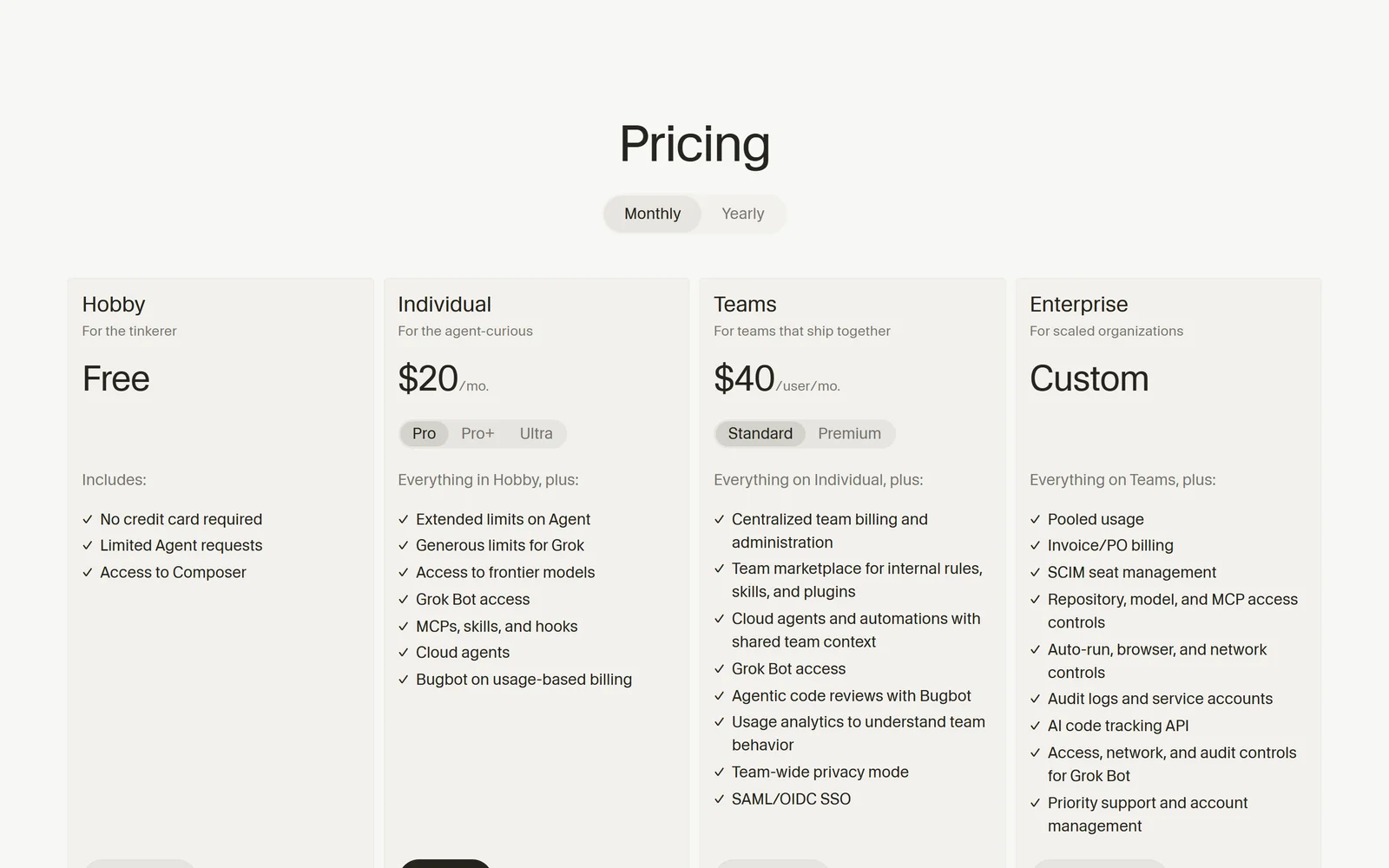
Cursor covers more of the delivery loop than anything else here, and publishes no absolute usage figure for any paid tier.
Cursor’s homepage reads “Cursor is your coding agent for building ambitious software”, and its docs define the agent as one that “can complete complex coding tasks independently, run terminal commands, and edit code.” On raw capability it is arguably the most complete product here. Cursor covers more of the delivery loop inside one subscription than any rival: an agent IDE with no ceiling on tool calls per task (“There is no limit on the number of tool calls Agent can make during a task”), a CLI with non-interactive/CI and ACP modes, a TypeScript SDK, a REST API at api.cursor.com, cloud agents that can run on self-hosted machines inside your own network or on AWS Lambda, Coder, Cloudflare, Daytona, Modal, Namespace, Vercel and E2B, agentic code review via Bugbot, twelve documented first-party integrations plus MCP, and its own Composer and Grok models billed from a cheaper pool. Projects, launched 10 September 2026, “maintains context over months of work, delegates tasks to thousands of subagents, and performs recurring work without being prompted.”
Prices as read on 17 September 2026: Hobby free, Pro $20, Pro+ $60, Ultra $200, Teams Standard $40 per user, Teams Premium $120 per user, Enterprise custom, plus an India-only Start plan at ₹649. A Monthly/Yearly toggle advertises “Save 20% with yearly billing”, though no annual dollar totals appear in fetchable page markup — treat any annual number, including ours, as arithmetic rather than a quoted price.
The problem is that no included-usage figure is published for any paid tier. The pricing page offers “Extended limits on Agent” for Pro, “3x Pro limits” for Pro+, “20x Pro limits” for Ultra, and Teams Premium at “5x the Standard limits”, against a baseline Cursor never states. Metering runs against two pools, Cursor Models and Other Models, and “Unused usage does not roll over”. Cursor’s own documentation then concedes the sticker price is not the real cost: “Daily Agent users: Typically $60–$100/mo total usage / Power users (multiple agents/automation): Often $200+/mo total usage”. Teams and Enterprise also pay a Cursor Token Rate of $0.25 per million tokens on third-party models on top of model API pricing, and “requests made with your own key still carry the Cursor Token Rate” — bringing your own key does not escape the margin. Supplying your own key does not keep code off Cursor’s servers either: “Even if you use your API key, your requests will still go through our backend! That’s where we do our final prompt building.”
Refunds require both recency and zero usage: “The charge was made within the last 14 days. You have not used the subscription during that billing period.” Downgrades are not prorated where usage exists, and upgrade credit is based only on unused included usage, so upgrading late in a heavy cycle costs full price. That combination shows in the sentiment split. On 17 September 2026 Cursor’s unclaimed Trustpilot profile showed 1.6 out of 5 from 320 reviews, 78% one-star, with Trustpilot’s own notice that the company has not invited its customers. The same day, Apple’s lookup API showed the Cursor iOS app at 4.75 (displayed 4.8) from 711 ratings. Capterra showed 5.0 from just four reviews, a sample too small to mean anything. That gap between an unclaimed complaint-weighted board and a large in-product rating is the honest picture: people who use it tend to like it, and people who get billed by surprise write about it.
To Cursor’s credit on governance: Privacy Mode is available on every tier including free and can be enforced by an admin, output IP is assigned to the customer, and the security page states AIUC-1, ISO/IEC 27001:2022 and ISO/IEC 42001:2023 certifications plus a SOC 2 Type II attestation — an attestation, not a certification, with reports available on request only. US-only data residency exists but carries “a 10% uplift on Model pricing for eligible Models” and restricts which models you may select. Liability is capped at the greater of six months of fees or $100, under Texas law.
The Good (Pros)
The Bad (Cons)
#4 · Most complete IDE
Agent, CLI, cloud agents and PR review in one
Unlimited in-task tool calls, an iOS app rated 4.8 from 711 ratings, Bugbot review. Cursor itself forecasts $60-$200+/mo on top of the plan price.
Visit Cursor
7. Windsurf (now Devin Desktop, Cognition): the best agent picker, on the least stable ground
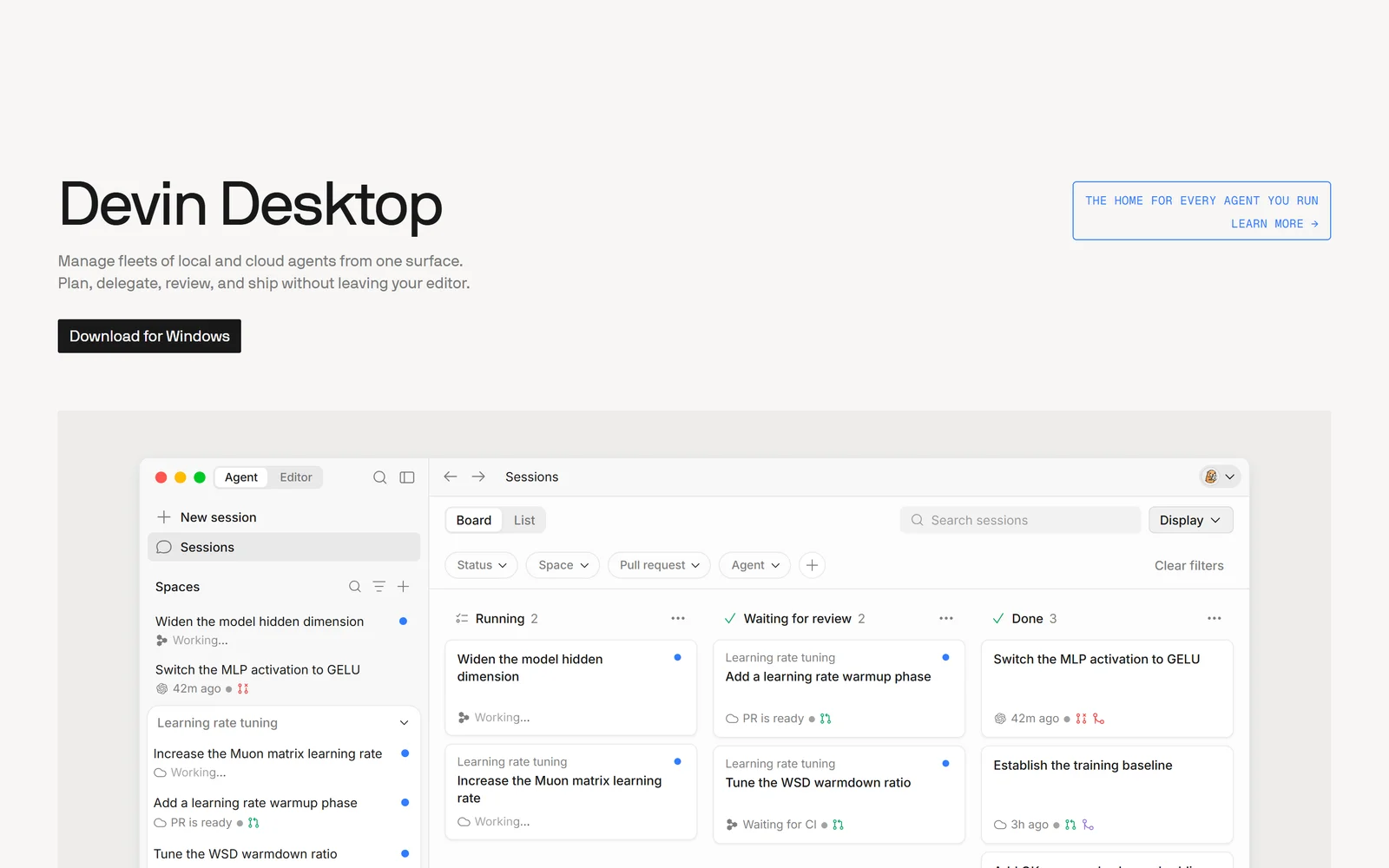
Windsurf, now Devin Desktop under Cognition, runs third-party agents as first-class citizens over the Agent Client Protocol.
Name it accurately: the product formerly sold as Windsurf is now Devin Desktop, owned by Cognition. windsurf.com returns HTTP 308 to devin.ai/desktop and docs.windsurf.com returns HTTP 307 to docs.devin.ai. The rename shipped over the air on 2 June 2026 in version 3.0.12, logged as “Windsurf is now Devin Desktop”. Cognition’s docs define it as “a next-generation AI IDE built to keep you in the flow.”
Its genuine strength is architectural and under-discussed. The Agent Command Center lets you “Manage all of your Devin Desktop agents — local and cloud — from a single Kanban-style view”; Spaces “Group all of the agent sessions, PRs, files, and context for a task or project into a single view”; and, like Zed, it implements ACP so you can “Run third-party agents inside the Devin Desktop Agent Command Center via ACP”. That combination of local and cloud execution under one board, with non-Cognition agents allowed in, is something neither Cursor nor Copilot offers. There is also a REST API at api.devin.ai/v3 covering sessions, knowledge, playbooks and secrets, and Cognition sets a refreshingly candid scope limit: “As a rule of thumb, if you can do it in three hours, Devin can most likely do it.”
Billing has one genuinely best-in-class term. Self-serve pricing is Free $0, Pro $20 per month, Max $200 per month, Teams from $80 per month with full seats at $40 per seat, Enterprise custom, with no annual option anywhere. Included allowances refresh “automatically on a calendar basis” — daily and weekly for Pro and Teams full seats, weekly only for Max. But purchased on-demand credits “Roll over month-to-month. Purchased credits never expire”, and on Teams they draw from a shared pool. Nobody else in this comparison lets you keep what you bought. Metering is work-based rather than message-based, and usage does not accrue while Devin waits for your reply, waits for a test suite, or clones repositories. One surcharge to plan for: Windows sessions consume “approximately 9% more usage than equivalent Linux (Ubuntu) sessions”.
The reason it ranks last is churn plus defaults. Within roughly fourteen months, buyers saw the brand renamed, the domain redirected, and the agent they chose the product for deleted: “Cascade has been removed. Devin Local is now the only agent available in Devin Desktop” (8 September 2026). The docs have not caught up — the MCP page still read “Integrate MCP servers with Cascade” nine days later. More importantly for an engineering lead: for self-serve users, training on your data is on by default. The Terms state “Cognition may use Customer Data for model training purposes and to improve and enhance the Services. If you subscribe to a paid Service Tier, you may opt out of this use”, and the admin docs agree. Opting out also enables Zero Data Retention with model providers, but the opt-out is only available on paid plans, which means free-tier users appear to have none. Enterprise is contractually different: “By default, Cognition does not train its models on customer data or code.”
Independent sentiment is the worst here, on a small sample: Trustpilot showed 1.4 out of 5 from 59 reviews with 93% one-star on 17 September 2026, with the same unclaimed-profile caveats that apply to Cursor.
“Changed pricing model to an impossible structure overnight.” — ilya, Israel, 1 star, 25 May 2026
“This is by far the best vibe coding tool I have ever come across.” — Dominic Fagan Guimond, Peru, 26 April 2026
Cognition itself is not fragile: it raised more than $1 billion at a $26 billion post-money valuation on 27 May 2026, reporting $492 million in annualised revenue run-rate. The product roadmap, not the company, is the risk.
The Good (Pros)
The Bad (Cons)
#5 · Most agent-neutral
Run Claude, Codex and Devin side by side
An Agent Command Center over local and cloud agents with shared Spaces. Renamed in June 2026 and Cascade was removed in September 2026.
Visit Windsurf
Scored Comparison Chart
The chart below shows why the order is not a straight capability ranking. On capability depth alone, Cursor and Windsurf score at or near the top of the field — Cursor for covering IDE, CLI, SDK, API, cloud agents and code review in one subscription, Windsurf for its local-and-cloud agent board with an ACP picker. Neither is a weak tool, and treating them as also-rans would be wrong.
Billing fairness is what separates the top three from the bottom two, and it is one of the seven published criteria. Cursor’s unclaimed Trustpilot profile read 1.6 out of 5 from 320 reviews with 78% one-star on 17 September 2026, against a 4.8 from 711 ratings on the App Store the same day; Windsurf read 1.4 from 59 reviews with 93% one-star. Those boards are self-selected and complaint-weighted, which is exactly why the App Store figure sits next to them here. But the underlying policies are checkable and they match the complaints: Cursor requires zero usage for a refund and forecasts $60 to $200 of overage as normal, while Windsurf trains on self-serve data by default.
Zed scores lowest on trust and security for a specific, vendor-stated reason — no SOC 2, no SSO, no SAML, no SCIM, US-only hosting — and highest on billing fairness, because a published API-list-plus-10% rate and a spend limit you can pin at $0 is the most forecastable arrangement on this page. Claude Code takes the top spot on capability and surface reach while carrying the field’s worst score on allowance transparency, and Copilot wins on free-tier and ease-of-start by publishing exact credit counts and keeping completions unmetered.
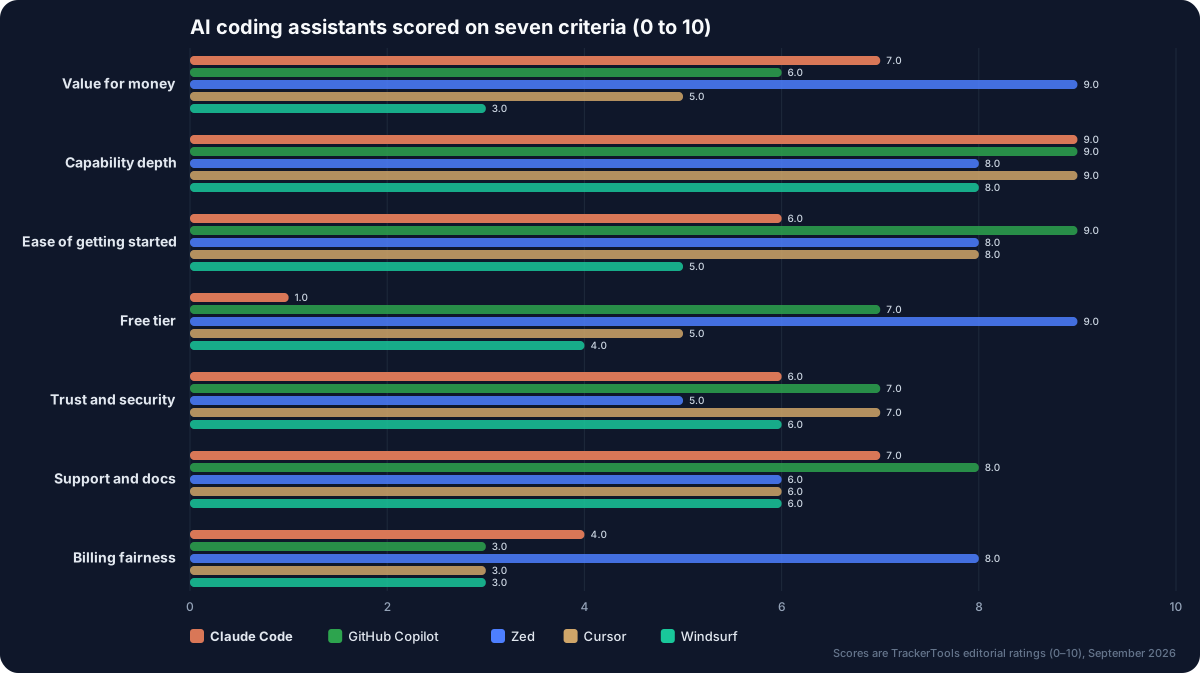
Seven criteria, five tools. Capability is close to a tie at the top; billing fairness is where they separate, and Zed is the only one above 5.
Pros and Cons Matrix: Who Solves Which Pain Point
| Pain point | Claude Code | GitHub Copilot | Zed | Cursor | Windsurf |
|---|---|---|---|---|---|
| Can you see your remaining allowance? | ✗ No absolute figure | ✓ Exact credit counts | ✓ Token spend + cap | ✗ Multipliers only | ⚠ Refresh, unquantified |
| Cost visibility in-product | ⚠ Session cost shown | ✓ Credits and budgets | ✓ Published +10% table | ✗ Indicator removed | ⚠ No public rate card |
| Guard against false completions | ⚠ Hooks and sandboxing | ⚠ Review disclaimer | ⚠ Undo excludes files | ⚠ Sandbox bug confirmed | ⚠ Three-hour envelope |
| Large-repo context handling | ⚠ Grep timeouts reported | ⚠ 400-line PR cap | ⚠ 200k Gemini cap | ✓ Unlimited tool calls | ✓ Spaces per project |
| Refunds and cancellation | ⚠ EEA/UK 14 days only | ✗ No refunds stated | ✗ Non-refundable | ✗ 14 days and zero use | ✗ Non-refundable |
| Escape from lock-in | ✗ Harness coupled | ⚠ Third-party agents | ✓ ACP plus BYOK | ⚠ BYOK still metered | ✓ ACP agent picker |
Pricing at a Glance
| Tool | Free tier | Cheapest paid | Top published tier | Trial | Refunds | Independent rating (read 17 Sep 2026) |
|---|---|---|---|---|---|---|
| Claude Code | None | Pro $17/mo annual, $20 monthly | Max 20x $200/mo | None published | Non-refundable except EEA/UK 14 days | 4.7 from 263K ratings (Claude umbrella app, App Store); 1.3 from 481 (Anthropic the company, Trustpilot) |
| GitHub Copilot | Free, 2,000 completions | Pro $10/mo | Max $100/mo; Enterprise $39/seat | Free tier only | No refund for unused time | 4 from 1,056 ratings (VS Code Marketplace); 4.5 from 51 (Capterra) |
| Zed | Personal $0 forever | Pro $10/mo | Business $30/seat/mo | 14 days, $5 usage, no card | Non-refundable | 4.9 from 48 reviews (Product Hunt, small self-selected sample) |
| Cursor | Hobby, unquantified | Pro $20/mo | Ultra $200/mo; Teams Premium $120 | Not confirmed either way | 14 days and zero usage only | 4.8 from 711 ratings (iOS app); 1.6 from 320 (Trustpilot, unclaimed) |
| Windsurf (Devin Desktop) | Free, unquantified | Pro $20/mo | Max $200/mo; Teams from $80 | None documented | Non-refundable | 1.4 from 59 reviews (Trustpilot, unclaimed) |
Which One Should You Actually Pick?
Buy Claude Code if you live in a terminal and work across machines. One Pro, Max, Team or Enterprise seat carries the same engine across CLI, VS Code, JetBrains, desktop, web, mobile, Slack and CI, with CLAUDE.md, settings and MCP servers travelling with you and sessions handing off mid-task. The caveat: you cannot forecast next month’s allowance, and the limit is shared with Claude chat and Cowork.
Buy GitHub Copilot if completions are most of your value and your work already lives on GitHub. Unlimited, credit-free completions on every paid plan plus six model vendors at $10 for Pro is the best entry price here. The caveat: flex credits are variable by design, nothing rolls over, and the default code-review effort rises on 28 September 2026 unless an admin opts out.
Buy Zed if you want to know exactly what you are paying and keep your agent choices open. API list price plus 10%, a spend cap you can set to $0, unlimited BYOK on a free plan, no-training by default, and an ACP registry that runs rival agents. The caveat: Zed states SSO, SAML, SCIM and SOC 2 are not currently available, so many security teams will stop the purchase there.
Buy Cursor if you want the most complete agent platform in one subscription and can absorb variable spend. Unlimited tool calls per task, self-hosted execution machines, a real SDK and API, and Bugbot review. The caveat: Cursor’s own docs forecast $60 to $200 per month of usage on top of the plan, and a refund requires zero usage within 14 days.
Buy Windsurf, now Devin Desktop, if managing a fleet of local and cloud agents on one board is the job. The Agent Command Center, Spaces and ACP agent picker are genuinely differentiated, and purchased credits never expire. The caveat: training on self-serve customer data is on by default with opt-out on paid plans only, and the product was renamed and had its flagship agent removed inside fourteen months.
Final Verdict
Claude Code takes first place because its surface reach is structural rather than cosmetic. Anthropic’s own documentation confirms one engine across ten surfaces with shared project instructions and MCP servers, live session migration between them, and a CLI that composes with the rest of your toolchain — tail -200 app.log | claude -p "...", --max-budget-usd, CI runs. No IDE-bound competitor can retrofit that. It is also the only vendor here that publishes a real-world cost benchmark, stating around $13 per developer per active day and $150-250 per developer per month across enterprise deployments.
That win comes with the sharpest criticism in this article, and it belongs to the winner. Anthropic publishes no absolute usage allowance for any plan, sells Max as multiples of an undisclosed baseline, shares the pool with Claude chat and Cowork, and reserves further caps at its discretion. That opacity has produced documented, independently reported episodes of limits tightening without notice twice — TechCrunch in July 2025 and The Register in January 2026 — and in the second case Anthropic’s explanation, that a temporary holiday bonus had expired, was reasonable but arrived after the complaints rather than before the change. A team cannot forecast what a $100 or $200 seat will deliver next month, and that is a genuine procurement problem, not a grumble.
GitHub Copilot is the safest default for most teams and the cheapest credible entry at $10, provided an admin watches the 28 September 2026 review-effort change and the private-repo Actions billing. Zed earns third on billing honesty and agent portability, and will jump higher the day SOC 2 and SSO land. Cursor and Windsurf are both excellent tools whose capability scores would place them higher on a pure feature ranking; they sit fourth and fifth because billing fairness is one of the seven criteria and both are outliers on it, with complaint-weighted Trustpilot scores of 1.6 from 320 reviews and 1.4 from 59 reviews respectively, read 17 September 2026 on unclaimed profiles that Trustpilot itself flags as possibly unrepresentative.
Pick Claude Code if: you work across a terminal, an IDE, CI and a phone on the same tasks, you want repo-level instructions and MCP servers to follow you everywhere, and you can live with an allowance the vendor will not quantify.
Think twice if: you need a forecastable monthly ceiling, a FedRAMP-authorised environment today, or HIPAA BAA coverage that extends to your coding tool. On all three, Anthropic’s own documentation says no.
Disclosure: TrackerTools has no affiliate relationship with any product in this comparison, and the links above are plain nofollow links. Every price, limit, rating and quotation was verified against the vendors’ own pricing pages, documentation, terms of service, changelogs, Trustpilot, app-store listings and the original developer posts on 17 September 2026. Where a vendor publishes no absolute figure, we say so rather than estimating. Claude Code is made by Anthropic, which also makes the model used to draft parts of this site’s tooling; the ranking here follows the same published scoring method as every other comparison we run.

