The credit ran out on a Tuesday. Not the whole budget, just the monthly allowance on an entry-tier plan, and with it went the lead routing, the invoice chasing and the meeting notes. Nobody had done anything wrong. A workflow that cost two credits yesterday cost seventy today because someone edited one line of prompt text inside it. That is the actual shape of the problem with AI agent platforms in 2026: not whether they can do the work, but whether you can predict what the work will cost and know when it silently stopped happening.
If you run operations at a company of 5 to 200 people, you are being sold on the idea that an agent will handle multi-step work without an engineer. Some of that is true. What the pricing pages do not tell you is that every vendor in this category now meters you in a private currency — credits, activities, executions, tasks — that maps to nothing you can forecast from a spreadsheet. Gumloop says so in its own documentation: the same agent “might cost 2 credits for a quick question and 200 for a deep research task.” Lindy publishes three cost bands spanning 2 to 2,500 credits per request, at roughly a cent each, which is a range of about $0.02 to $25 for one instruction. Neither figure is a defect. Both are the product.
The second problem is quieter and worse. Automations do not usually fail loudly. They return a green tick and do nothing, or they loop and bill you for the looping, or a connector changes upstream and the scenario keeps running against an endpoint that no longer accepts what it is sending. On n8n’s own community forum, a user posting on 11 August 2026 called this “one of the sneakiest production issues in n8n,” and said they had debugged a dozen instances of it. Another user in the same thread described a video upload where the API honestly returned success and the tags simply were not applied — and it went unnoticed for weeks.
Then there is vendor risk, which stopped being theoretical during the research for this article. Relay.app was one of the five platforms originally lined up for testing. It switched off signups on 16 July 2026, gave free users 30 days and paying customers 60 days to evacuate, and then permanently deleted accounts and data — free accounts after 15 August 2026, paid accounts after 14 September 2026. It had roughly $8.1M in disclosed funding and no visible product failure. The founder took a job as VP of Product for Google Chrome. That is the exit timeline you should assume is possible for anything you are about to build a business process on top of.

n8n’s homepage, captured 17 September 2026. It bills one whole workflow run as a single execution, no matter how many steps it contains.
1. Why AI Agent Platform Buyers Get Burned (In Their Own Words)
1. A single edit to a working automation can change its per-run cost by an order of magnitude.
“I was using the LinkedIn Message Generator template and each time I used it, I’d use 1 or 2 credits. I then added a custom line re: scheduling time via calendly to the text manipulation node in the subflow and the credit usage skyrocketed to 70 credits per run. I didn’t realize this until I had run it many times to test it and now I’m nearly out of credits.” — Chris Dyer, Gumloop community forum, 29 January 2025
“the pricing model is extremely frustrating. The jump in price between tiers is huge, and you burn through your monthly ‘task’ limit incredibly fast—especially if you use multi-step Zaps. Every little action counts as a task, which means your bill skyrockets before you know it.” — Hasan Bal (TR), 2 stars, Trustpilot, 7 June 2026
2. A broken automation bills you at full rate while it is breaking.
“Built a simple three-step zap for a project last week and it just repeatedly failed, chewed through my whole monthly task limit in two days, and tanked the workflow.” — Melissa Vance (US), 1 star, Trustpilot, 22 August 2026
“I set up a basic three step lead integration to pipe website signups straight into our gym CRM, and it burned through my monthly task allowance in less than 48 hours without warning.” — Roger Hebert (US), 1 star, Trustpilot, 7 August 2026
Two unrelated reviewers describing the same three-step failure mode two weeks apart is stronger evidence than either alone.
3. Green does not mean done.
“One of the sneakiest production issues in n8n: the workflow runs green, no errors, execution shows ✓ — and nothing actually happened. I’ve debugged a dozen of these.” — user pirateprentice, n8n Community, 11 August 2026
“The video uploaded successfully, so the API response was honest. But the tags weren’t applied as intended. … It went unnoticed for weeks. The thing I took from it was that once a value leaves the workflow, a green execution isn’t enough evidence anymore.” — user runtimegap, n8n Community, 20 August 2026
4. You can end up paying to repair damage the platform caused.
“It keeps crashing and breaking the workflow, so I have to keep remaking it. Each time I try to fix it it costs credits, so I’m paying to fix my workflow that their website broke.” — Bob (US), 1 star, Trustpilot, 28 June 2026 (n8n)
“Their justification? They sent a billing reminder email. That’s it. Miss one email and you’re locked into $500 with zero recourse. Every rep was perfectly pleasant, perfectly scripted, and perfectly unwilling to do the right thing.” — Steve R (US), 1 star, Trustpilot, 7 August 2026 (Zapier; the reviewer describes the renewal as roughly $500)
5. “No-code” has a ceiling, and you find it about two weeks in.
“No-code: ‘I don’t need code, this is so easy!’ 2 weeks later ‘I wish I had access to literally any code system to make this work.’” — user kristopherleads, Hacker News, 9 October 2025
“I wouldn’t call it ‘nocode’. You need to get pretty techincal to implement useful functionality. You need to write SQL, you need to extract data from XML or JSON, you need to describe HTTP queries and parse responses.” — user vbezhenar, Hacker News, 9 October 2025 (typo in the original)
6. Self-hosting is not automatically an escape from metering.
“For a moderately used app we very quickly burned through their ‘executions’ that were allotted by our license - and that’s where we host it ourselves, configuring and paying for the servers, load balancers, key value store and database, with its failovers and backups” … “even their highest enterprise license was cutting it close, and if you ‘run out’ of these executions, the service just stops working” — user seer, Hacker News, 9 October 2025
“It seems crazy to me that they impose imaginary limits on the self-hosted version, you can have a server that can handle more executions, but the license won’t allow it.” — user vini, Hacker News, 9 October 2025
2. How We Ranked Them
Seven criteria, weighted for a 5-to-200-person company that has real workflows and no spare engineering team.
Value for money — what a realistic production workload costs, not what the headline tier costs. Capability depth — can the platform reach your actual stack, run code when the visual builder runs out, and expose an API or CLI. Ease of getting started — how long from signup to a working agent, and whether a non-engineer can do it. Free tier — whether you can prove value before paying, and what the free tier actually withholds. Trust and security — attestations with named auditors, data residency, training commitments, and what the contract caps liability at. Support and docs — whether there is a human on the other end below Enterprise. Billing fairness — rollover, refunds, overage behaviour, and what happens when you hit the wall.
Every price, plan limit, contract clause and review rating below was re-verified on 17 September 2026, and figures that are self-reported by the vendor are marked as such. Ratings scraped from sites that block automated access were excluded entirely rather than repeated from search snippets.
3. n8n: the most powerful option, and the least no-code one
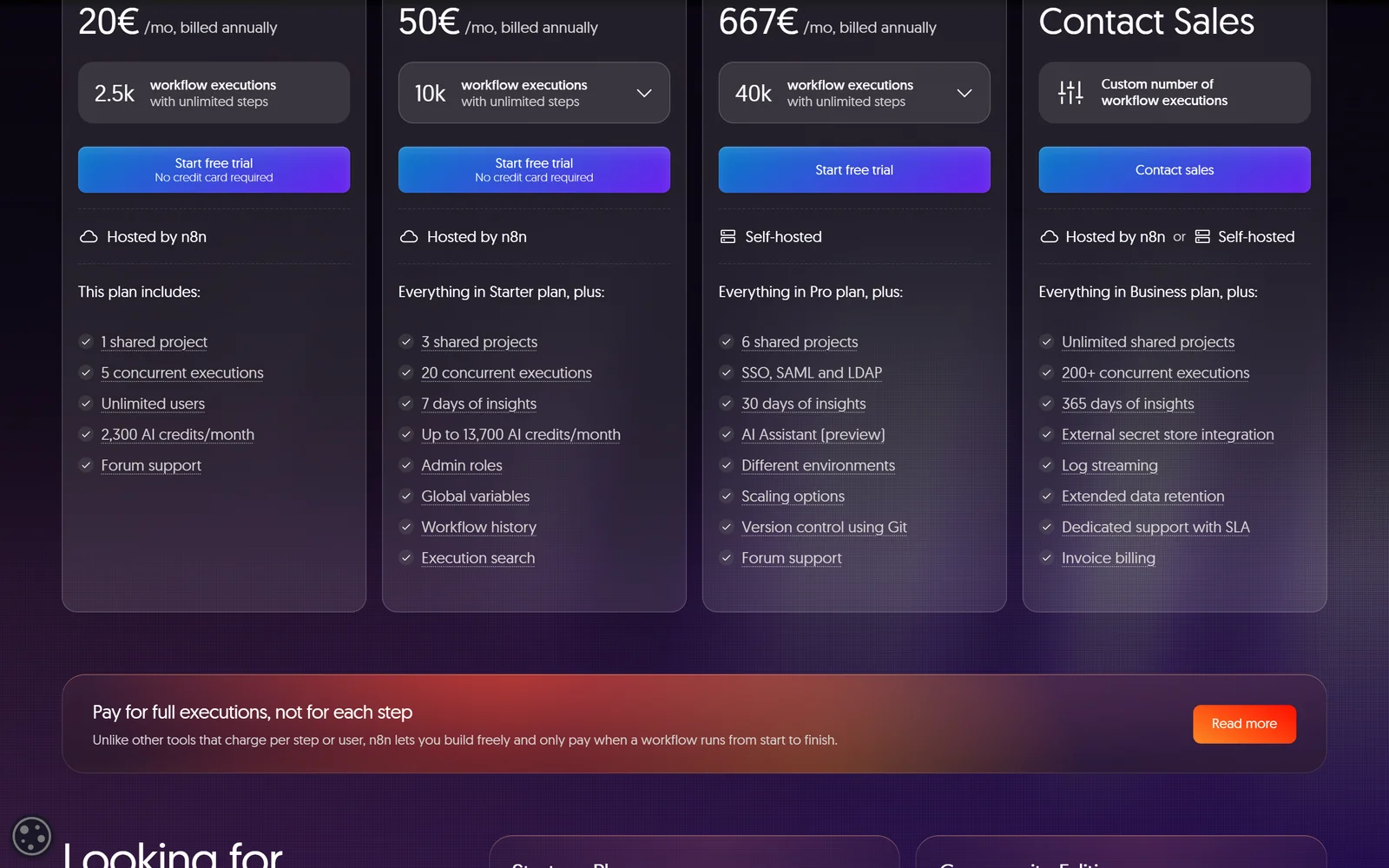
n8n charges per completed workflow execution rather than per step or per seat, and includes unlimited users on every tier.
n8n wins this comparison on economics and control, not on friendliness. Its Cloud plans include unlimited users and unlimited workflows on every tier, and it bills by completed workflow execution rather than per step or per seat. Its pricing page puts it plainly: “Unlike other tools that charge per step or user, n8n lets you build freely and only pay when a workflow runs from start to finish.” No other platform here lets a whole ops team build without a per-seat charge and also lets you walk away to your own VPS.
The genuinely free tier is the self-hosted Community edition, which n8n’s docs describe as including “almost the complete feature set of n8n.” Ten named features sit outside it: custom variables, environments, external secrets, external binary storage, log streaming, multi-main mode, projects, SSO (SAML, LDAP), sharing of workflows and credentials, and Git version control. Registering by email unlocks folders, debug-in-editor and custom execution data at no cost. Note the licence: n8n is source-available under the Sustainable Use License, not OSI open source — you may run it for your own internal business purposes, but you may not resell it or offer it as a hosted service to clients. Files with “.ee.” in the name require a separate Enterprise licence, and non-main branches carry no grant at all.
Cloud pricing is where the sharp edges are. As of 17 September 2026 n8n Cloud is priced exclusively in euros with no currency selector and no USD list price: Starter 20€/mo billed annually with 2.5K executions, Pro 50€/mo with 10K, Business 667€/mo with 40K, Enterprise on request. US buyers pay in euros through an unnamed merchant of record and absorb the FX. Read the plan labels carefully: Starter and Pro are “Hosted by n8n”, but the 667€/mo Business tier is labelled “Self-hosted” — it is a licence, not managed cloud. Annual billing is advertised as “Save 17%” and annual plans are, per the Self-Serve Terms, “a non-refundable payment which will be payable in advance.” The FAQ adds: “n8n does not offer pro-rata refunds.” Business overage is sold in blocks of 4,000 EUR for 300,000 executions. Workflows do not stop at the cap — “Your workflows will continue running without interruption, but overage charges may apply.”
Security is decent with caveats. SOC 2 Type 2 is listed in n8n’s Trust Center; the public security page uses softer wording, saying n8n “aligns its security program to SOC 2.” No ISO 27001 and no HIPAA or BAA is published. Cloud is EU-only — hardware and data are hosted in the European Union on Microsoft Azure, with no US, UK or APAC region. The privacy policy carries an unusually broad no-training pledge covering data from third-party integrations. Support is forum-only on Starter, Pro and Business; “Dedicated support with SLA” is Enterprise-only, and the SLA terms are not published. The Self-Serve Terms contain no monetary liability cap at all — the service is provided “as is” with liability excluded outright.
On evidence: Capterra rates n8n 4.6 from exactly 48 reviews, with Ease of use its lowest sub-score at 4.0. Trustpilot rates it 3.2 from exactly 48 reviews, as of 17 September 2026. n8n’s homepage displays a 4.7/5 G2 badge — that is a vendor-displayed badge, attributed here to n8n’s homepage, not to G2. The homepage advertises “over 500 integrations” while the directory header reads “2174 integrations”; the larger figure counts nodes, including separate regular and trigger nodes for the same app, not distinct third-party apps.
The Good (Pros)
The Bad (Cons)
#1 · Best value and exit
One execution, however many steps it contains
Unlimited users and workflows on every tier, plus a free self-hostable Community edition. Priced in euros, and the jump to Business is steep.
Visit n8n
4. Gumloop: unlimited seats, unpredictable bills
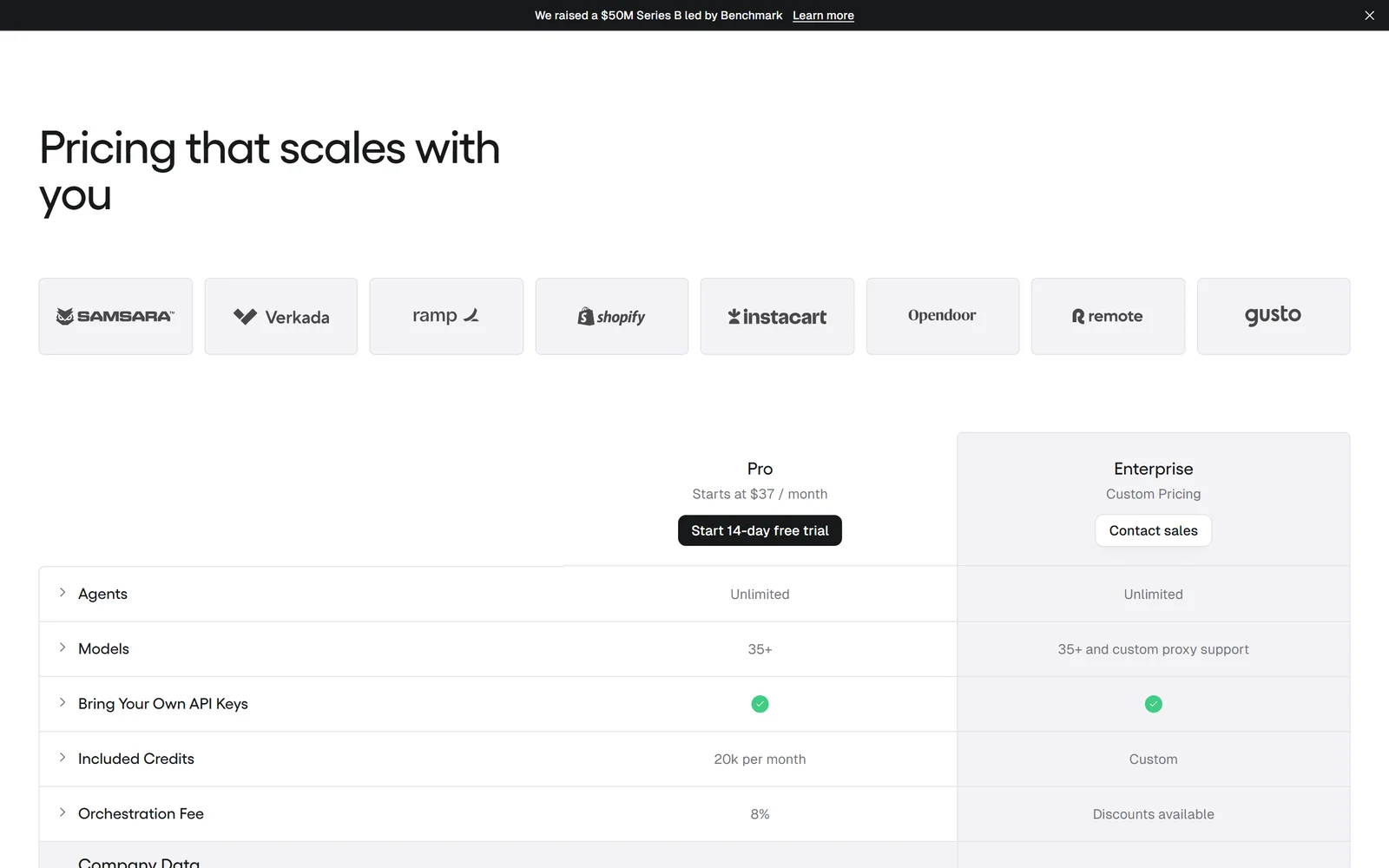
Gumloop charges nothing per seat: Agents, Seats and Teams are all listed as Unlimited on both published tiers.
Gumloop is the clearest answer in this category to the per-seat problem. Its pricing table lists Agents, Seats and Teams as Unlimited on both Pro and Enterprise, and its FAQ confirms the scope: “On both Pro and Enterprise plans, team members can share credentials, collaborate on agents, and use the same pool of credits.” A 40-person operations team pays the same licence as a solo founder. That licence is Pro at “Starts at $37 / month” with a 14-day trial; Enterprise is custom-priced with nothing published.
The metering is where you need to concentrate. Credits are indexed at $0.005 each, and Pro includes “7,400 + 12,600 bonus credits (20,000 total) for $37/month” — so only 7,400 of the monthly grant is priced at list, and Gumloop itself labels the rest bonus. Agent cost breaks into chat and reasoning at model cost, tool calls at 1 credit each plus the tool’s own charge, compute at 5 credits per session-minute, and an 8% orchestration fee on top. Failed tool calls are not charged. Bringing your own model API key does not save the fee — it doubles it to 16%, and Gumloop charges that percentage “based on the full list cost of what the task would have cost without BYOK.” Credits do not roll over on Pro. Run out and agents stop until you enable pay-as-you-go, which is off by default and then bills at $0.005/credit against a default ceiling of 1,000,000 overage credits ($5,000) that you can lower.
There is no free tier. Every account starts on a 14-day Pro trial that requires a card, is one-time per customer, and rolls into a paid subscription unless cancelled. One oddity worth flagging: the pricing page’s JSON-LD structured data advertises an offer named “Free plan” priced at “0”, which can cause search engines to surface a free plan that does not exist.
The Pro/Enterprise split is the real buying decision. Gumloop’s own FAQ reserves “RBAC, organization-wide governance policies, audit logs, incognito mode, and more” for Enterprise. Pro users also “cannot set keys at the organization level.” So the tier that gives you unlimited seats gives you no SSO, no audit log and no role-based access control — an awkward combination if you are putting agents in front of 60 people. Concurrency is organisation-wide: Pro allows 25 concurrent agent interactions, and at the ceiling Pro API requests get HTTP 429 while trigger-driven runs are simply skipped. Enterprise queues instead.
Gumloop ships fast — a numbered release every 2 to 5 days through August and September 2026, including a model router in 10.29.0 on 14 September 2026. It displays a SOC 2 Type II badge with no auditor, report date or observation period published, and trust.gumloop.com serves no compliance content, so treat it as a marketing claim. No ISO 27001 or HIPAA claim is made. Data is processed in the United States; the only residency control is Enterprise VPC deployment on AWS, Azure or Google Cloud. The no-training commitment is scoped: the privacy policy promises it “for premium users,” which leaves trial and non-paying users outside. Liability is capped at the amount paid, which for a $37/month customer is very low relative to what an agent with credentials can touch. Independent review evidence is thin: the only verifiable third-party source is the Chrome Web Store, at 3.1 out of 5 from 7 ratings with 5,000 users.
The Good (Pros)
The Bad (Cons)
#2 · No per-seat cost
Put the whole company in it for one licence
$37/month with unlimited seats, agents and teams. Spend is variable by the vendor’s own admission, and governance tooling is Enterprise-only.
Visit Gumloop
5. Make: the most engineering value per dollar, and the least forgiving contract
Make packs code execution, 300+ REST endpoints, an MCP server and a CLI into a $9/month entry tier.
Make gives you more genuine capability at $9/month than anything else here. At the 10,000 credits/month setting with the default “Pay annually” toggle, prices read Free $0, Core $9, Pro $16, Teams $29 and Enterprise custom. Core removes the two-scenario cap entirely, drops the minimum scheduling interval from 15 minutes to 1, raises maximum execution time from 5 to 40 minutes, and adds Make API access — 300+ endpoints at 60 calls/minute on Core, 120 on Pro, 240 on Teams. The Make Code App runs custom JavaScript or Python at 2 credits per second of execution. There is an MCP server row on the pricing table, and a CLI that Make’s release notes confirmed live on 17 April 2026, “now available to all users.”
Watch the toggle and the slider. The pricing page loads with annual pre-selected, so $9/$16/$29 are commitment rates; monthly billing at the same credit volume is $10.59/$18.82/$34.12. Make advertises “Save 15% or more,” and the annual rate is exactly 15.0% below monthly. The volume discount is mild: going from 10,000 to 150,000 credits per month is 15x the credits but roughly 11x the price on Core ($10.59 to $116.47) and about 10x on Teams ($34.12 to $343.01). The honest reading is that the $9 headline understates a production workload by roughly an order of magnitude.
A credit is defined as one module action, so a ten-step scenario run costs about ten credits and the free plan’s 1,000 credits is on the order of 100 runs. Error handler and router modules are exempt. Unused credits do not survive: the FAQ answer to what happens to them is simply “Credits expire at the end of the term.” Run out and “Your scenarios won’t continue to run, until credits are added again,” with notifications at 75% and 90%. Overage protection — uninterrupted execution past the limit — is listed only on the Enterprise card.
The contract is the harshest in this comparison in one specific respect. MSA section 5.1 states subscription fees are “non-cancelable and non-refundable once Services are ordered,” and section 9.2 caps total aggregate liability at $1,000.00. There is one carve-out worth knowing: section 9.1 warrants substantial conformity with the documentation, and if Make cannot correct or replace a nonconforming Service it refunds prepaid fees for the remainder of the term. Your counterparty is Celonis, Inc., governed by New York law. Section 4 also lets Celonis drop support for a third-party connector that stops interoperating “without entitling You to any refund, credit or other compensation” — which matters, because a large share of Make’s 2026 changelog is breaking third-party API migrations with deadlines attached.
On security, Make states it has “completed SOC 2 Type II and SOC 3 audits.” The ISO 27001 sentence appears only under “Make for enterprises,” and the linked certificate is issued to Celonis SE, the parent group, not to Make and not to Celonis, Inc. Make’s own homepage compliance line names GDPR, SOC 3 and SOC 2 Type II and does not mention ISO. HIPAA is not mentioned on the security page. Hosting is listed as “AWS (EU/North America)” identically across every tier with no selectable region. A 99.5% uptime commitment exists for Enterprise only. Make AI Agents was announced on 14 April 2025 and is still labelled “(beta)” 17 months later; running an agent on Make’s own AI Provider costs “1 credit per operation + credits based on AI tokens,” while a custom provider connection is 1 credit per operation plus your own LLM bill. On evidence, Capterra gives Make 4.8 from exactly 409 reviews with Ease of Use at 4.3 and Customer Service at 4.5; Trustpilot gives make.com 2.7 from exactly 169 reviews with a barbell distribution, 50% five-star and 35% one-star, as of 17 September 2026.
The Good (Pros)
The Bad (Cons)
#3 · Most depth per dollar
Engineering-grade automation from $9 a month
3,000+ connectors, JavaScript and Python execution, MCP server and CLI on Core. Unused credits expire and fees are non-refundable.
Visit Make
6. Zapier Agents: the widest reach, on a second meter
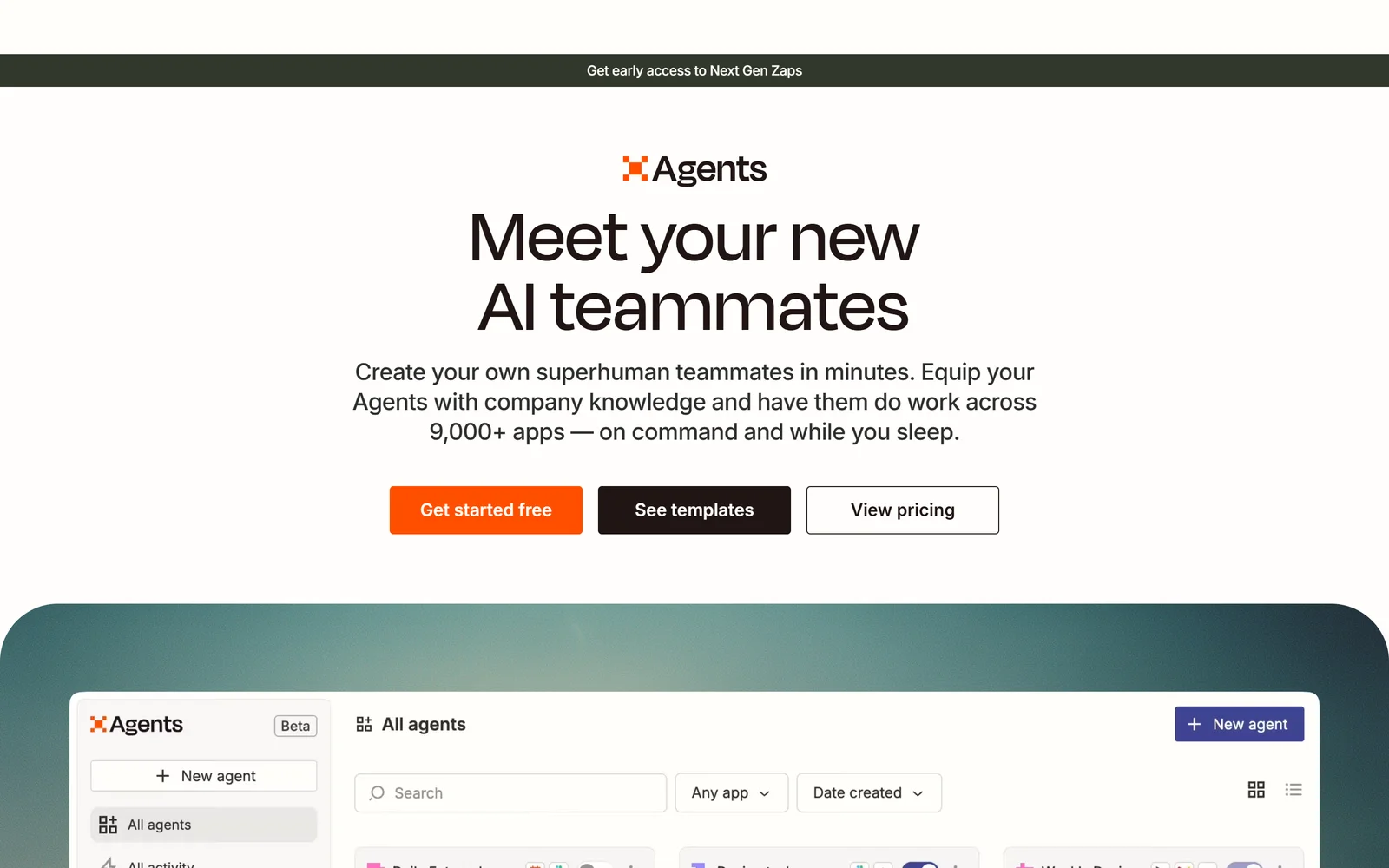
Zapier Agents inherits a maintained 9,000+ app library, and meters itself in activities separate from Zapier tasks.
Zapier Agents is an add-on, not a plan. On zapier.com/pricing the selector separates “AI ORCHESTRATION / Platform” from “ADD-ONS / Agents,” and Agents is metered in activities, which are a different currency from Zapier tasks. Zapier’s help documentation is explicit: “An activity is any billable action that your agent takes,” and “Using activities does not affect your Zapier task usage.” Six things each count as one activity — a trigger firing, answering from a knowledge source, running an action, browsing or scraping a page, running a web search, and a message via the Chrome extension. One instruction like “research this company” can therefore consume many.
The connector reach is the reason to consider it. The agents page claims agents can “do work across 9,000+ apps,” which is the largest catalogue any vendor here claims, though the figures are inconsistent across Zapier’s own properties: the press page says “over 9,000 apps” and the Agents Chrome extension listing still says “7,000+ apps.” Free gives you 400 activities per month, with live data sources, web browsing and the Chrome extension included, capped at 10 activities per single run, and testing counts against quota. Pro is $400 billed annually, shown as $33.33/month, with 1,500 activities, 40 per run, and testing that does not count. Enterprise is custom, and is the only tier with agent sharing, enterprise-grade audit logs and restricted apps support.
The per-run cap is a genuinely good guardrail — hit it mid-run and the run stops rather than draining the month. But the monthly ceiling is a wall, not a meter. When you hit it, Zapier’s own list says agents stop running, actions stop, browsing stops, web searches stop, triggers are not received, knowledge lookups fail and the Chrome extension goes dark. Chat still works. There is no published per-activity overage rate, and Zapier does not charge for spillover used to finish an in-flight run. This is the opposite of the core platform, where tasks auto-convert to pay-as-you-go. Two currencies, two opposite failure behaviours, one bill.
Refunds are absolute: “All purchases are considered non-refundable, including monthly and annual plans, plan upgrades, renewals, and add-ons.” Because Agents is an add-on, it is covered. Trials auto-convert if a card is on file, and post-trial charges are non-refundable. There are further constraints: a documented limit of 500 messages per day, and Agents cannot be embedded on a website or exposed to customers — Zapier’s own docs direct that use case to Chatbots. Note one internal contradiction to raise with sales: the pricing FAQ says “Zapier Agents doesn’t currently support app and action restrictions that may be in place on an Enterprise account,” while the Agents Enterprise card lists “Restricted apps support” as a feature.
Security is solid on paper: SOC 2 Type II and SOC 3 certifications with the SOC 2 audit conducted annually, AES-256 at rest, TLS 1.2 and above. No ISO 27001 claim is made by Zapier for itself, and no HIPAA statement either way. Hosting is US-only on AWS, with no EU residency option on self-serve. Model training is opt-out below Enterprise — Enterprise is automatically opted out, everyone else must submit a form. On evidence, Capterra gives Zapier overall 4.7 from 3,076 reviews; Trustpilot gives it 1.3 out of 5 from 319 reviews with 74% at one star, as of 17 September 2026. That gap is stark, though Trustpilot skews toward billing-motivated reviewers. One reviewer’s experience shows both sides: Ben Johnson (GB), 8 May 2026, wrote “I accidentally created a Zap loop during testing, which caused unexpected task usage and a charge that was concerning for our company” — and gave five stars, because support waived the credits within the hour. No user-sourced complaint about Zapier Agents pricing specifically was found; the billing complaints above all concern classic Zaps and tasks.
The Good (Pros)
The Bad (Cons)
#4 · Widest app reach
9,000+ apps your agent can reach on day one
Free tier of 400 activities a month including web browsing and the Chrome extension. Activities are a second meter with no published overage rate.
Visit Zapier Agents
7. Lindy: the fastest to deploy, the hardest to budget
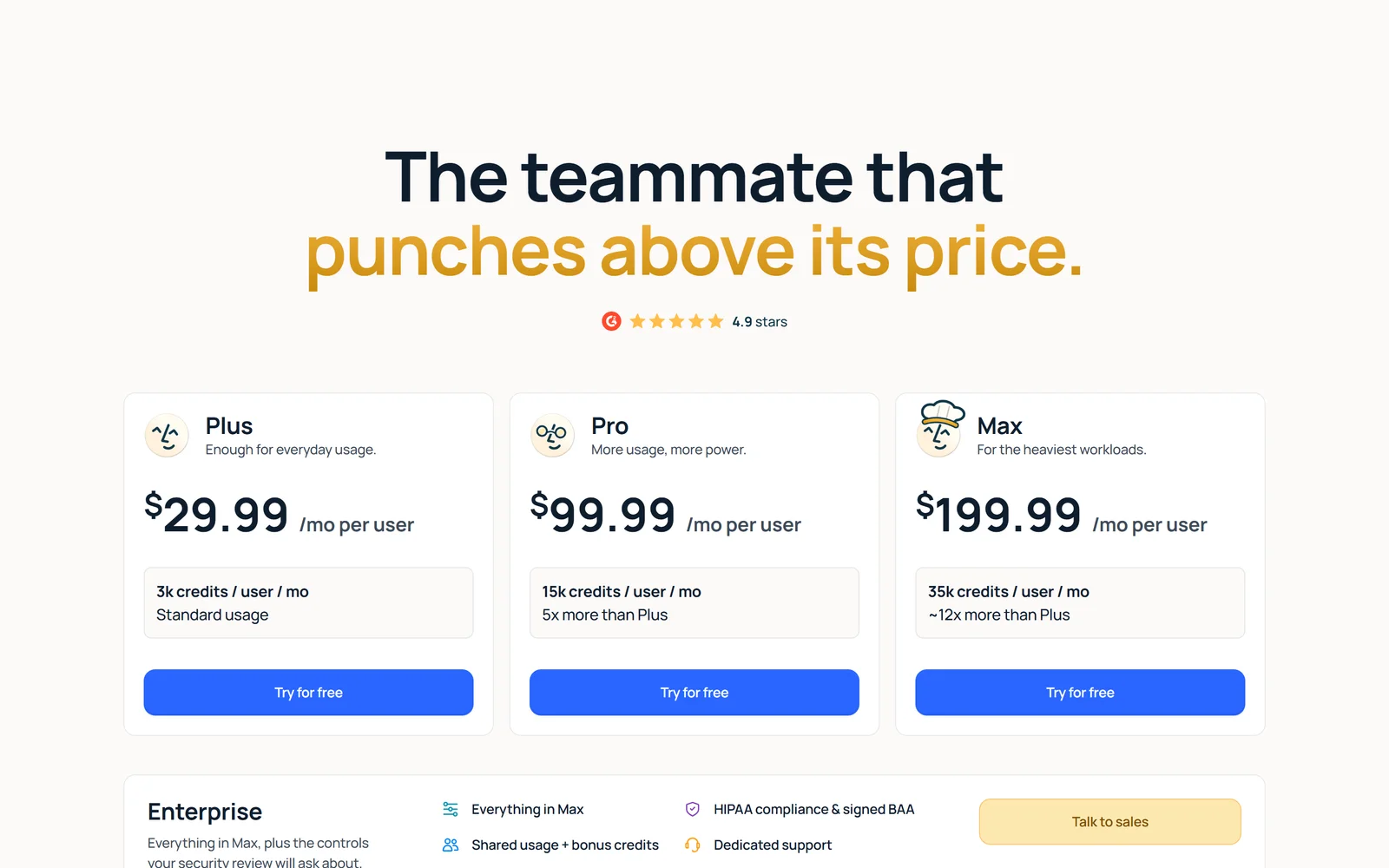
Lindy is the fastest to deploy to a non-technical team, and the hardest to budget: one request can consume 2 to 2,500 credits.
Lindy is the only platform here that a non-technical ops lead can push to a whole team in an afternoon. An admin adds Lindy to Slack, each person links their account and tools, and anyone gets value by @mentioning it in an approved channel. There is no workflow to build first. Approval gates are default-on for consequential actions — sending email, updating a ticket, posting to another channel, publishing a doc all wait for a human, while read-only lookups from approved sources do not. It joins Google Meet, Zoom and Microsoft Teams as a named participant and files recordings into folders visible only to the owner unless shared. Its memory is stored as plain files you can edit, which is a real differentiator against opaque vector stores.
Pricing is month-to-month per seat with no annual option and no annual discount: Plus $29.99/user/month with 3,000 credits, Pro $99.99 with 15,000, Max $199.99 with 35,000, Enterprise custom. Credits are “about one cent each” per Lindy’s docs, pooled at workspace level but allocated per seat, and they do not roll over. The published cost bands are the problem: “Everyday Asks / 2-250 Credits”, “Deep work / 250-1,000 Credits”, and “Big Builds / 1,000-2,500 Credits”. No per-action or per-integration credit table exists, so you cannot model spend before buying. Top-ups are $10 per 1,000 credits; overage is documented at 2x the regular credit cost, which sits awkwardly beside the pricing page’s promise that when credits run out “Nothing breaks and there is no surprise bill.” A paying reviewer on Trustpilot, 1 star, GB, 21 August 2026, reported consuming the full 3,000-credit Plus allocation in a single day.
Two traps deserve naming. First, the 7-day free trial is Slack-only: “New teammates who join through Slack get their first week free… Direct signups are billed right away” — while the page’s primary call-to-action reads “7-day free trial • Cancel anytime” with no on-button warning. Second, a seat is consumed by ordinary behaviour: “Anyone who uses Lindy takes a seat, whether they sign up directly, join your workspace, or @mention Lindy in Slack.” Cancellation and seat removal are both non-prorated, all purchases are contractually non-refundable, and liability is capped at “THE LESSER OF THE AMOUNT PAID… DURING THE SIX (6) MONTH PERIOD PRIOR… OR $100.00 USD.”
There is also a first-party contradiction to check before you buy Plus. The pricing page lists “Computer use” and “Connect up to 5 inboxes” among features included on every plan, but Lindy’s own pricing documentation says computer use is Pro and above, and inboxes scale 2 on Plus, 3 on Pro, 5 on Max and Enterprise. SSO, SCIM and HIPAA with a signed BAA are Enterprise-only. Lindy is SOC 2 Type II certified and names its auditor, Johanson Group — the strongest independently framed security claim in this comparison — though no report date is published and trust.lindy.ai does not resolve. ISO 27001 is claimed nowhere. Data residency is not disclosed at all, and retention is open-ended. Integrations are cited as 1,000+ on the headline while the same page’s counter reads “Showing x out of 1400+ integrations”; 1,000+ is the defensible figure. There is no public API, no webhooks and no CLI documented for the current product. And the public changelog has not been updated since 21 October 2025 — roughly eleven months stale — with every entry describing the retired agent-builder product rather than the Slack teammate Lindy sells today. Trustpilot rates Lindy 1.7 out of 5 from 39 reviews as of 17 September 2026, 77% at one star. That is a small sample, and the verbatim text of most of those reviews could not be confirmed, so treat it as a signal rather than a verdict.
The Good (Pros)
The Bad (Cons)
#5 · Fastest to deploy
Anyone gets value by @mentioning it in Slack
No workflow to build first, approval gates on by default, meeting capture on every paid tier. Credits never roll over and purchases are non-refundable.
Visit Lindy
Scored Comparison Chart
The chart below tells a story that the pricing pages actively obscure: the cheapest headline number and the cheapest production workload are rarely the same platform. Make’s $9 Core tier scores highest on entry value and capability depth per dollar, but its scaling curve is only mildly discounted — 15x the credits costs about 11x the money — and its $1,000 liability cap drags the billing-fairness score down hard. n8n scores lowest of the five on ease of getting started, which is not an accident: its own machine-readable site summary positions it for technical teams, and Capterra’s 48 reviewers gave Ease of use 4.0, its weakest sub-score.
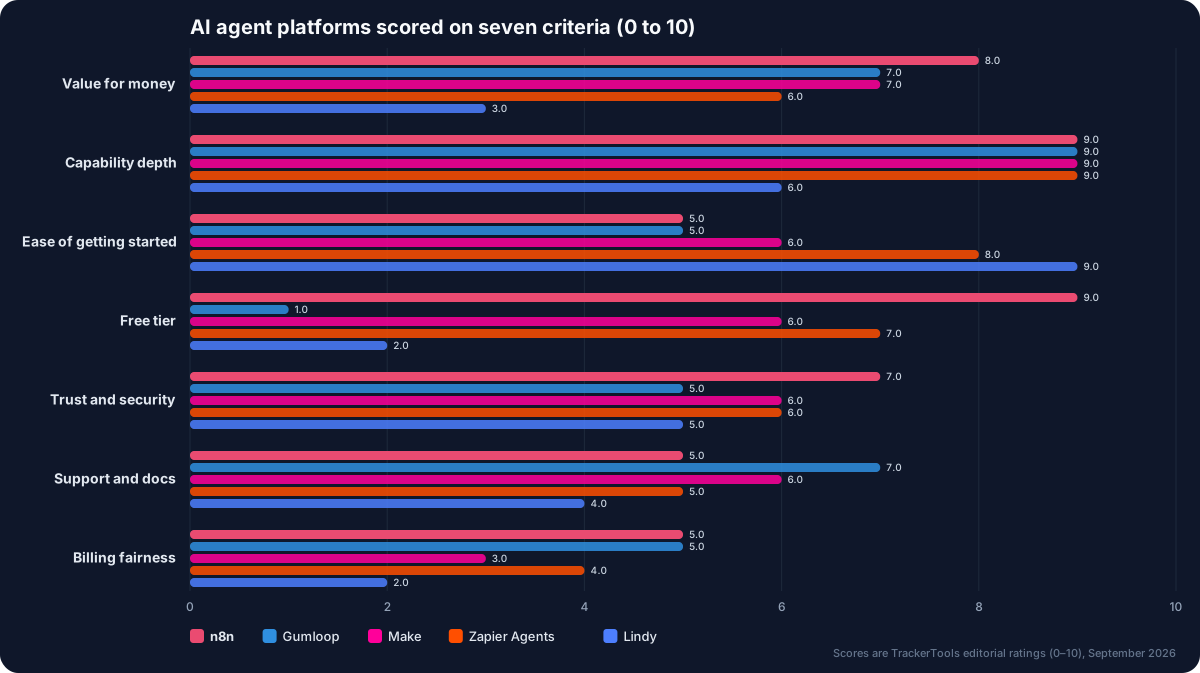
Seven criteria, five platforms. n8n leads on value and free tier; every platform in the category scores 5 or below on billing fairness.
The security and trust column separates the field more cleanly than any other. Make and Zapier both have completed SOC 2 Type II and SOC 3 attestations. Lindy names its auditor, which nobody else does. n8n lists SOC 2 Type 2 in its Trust Center but softens the language on its public security page. Gumloop shows a badge and nothing behind it, with a trust centre that serves no compliance content at all. Nobody in this comparison publishes an ISO 27001 certificate issued to the product entity — the one ISO certificate in play belongs to Celonis SE, Make’s parent group, not to Make or to the entity that signs the self-serve contract.
Billing fairness is where every score is mediocre and the differences are in the failure mode rather than the price. n8n keeps running and bills overage. Make, Gumloop and Zapier Agents all stop. Lindy says nothing breaks while documenting a 2x overage rate. Credits roll over on none of them below Enterprise. Refunds exist on none of them except Make’s narrow warranty remedy. Read that column as a prompt to size your plan with headroom rather than as a tiebreaker.
Pros and Cons Matrix: Who Solves Which Pain Point
| Pain point | n8n | Gumloop | Make | Zapier Agents | Lindy |
|---|---|---|---|---|---|
| Forecastable per-run cost | ⚠ per execution, not per step | ✗ vendor admits 2–200 credits | ⚠ 1 credit per module action | ✗ six event types count | ✗ 2–2,500 credit bands |
| Failed or looping runs don’t bill | ⚠ overage continues | ✓ failed tool calls free | ✗ credits consumed | ✓ no spillover charge | ✗ 2x overage documented |
| Visibility into silent failures | ⚠ traceable canvas, green-run risk | ⚠ session logs only | ⚠ 30-day log retention | ✓ Monitor activity view | ⚠ approvals, no logs below Ent |
| Refund or escape route | ⚠ self-host exit, no refunds | ✗ non-refundable, cap set | ⚠ narrow MSA 9.1 remedy | ✗ add-ons non-refundable | ✗ non-refundable, $100 cap |
| Usable by non-engineers | ✗ ease of use 4.0 on Capterra | ✓ chat-first agent builder | ✓ visual, 4.3 ease sub-score | ✓ no-code agent setup | ✓ Slack mention, no build |
| Freedom from vendor lock-in | ✓ free self-hosted edition | ⚠ VPC on Enterprise only | ✗ no self-host, no residency | ✗ US-only, no export path | ✗ no API, webhooks or CLI |
Pricing at a Glance
| Platform | Free tier | Cheapest paid | Top tier | Trial | Refunds | Rating (reviews) |
|---|---|---|---|---|---|---|
| n8n | Self-hosted Community edition (no free Cloud plan) | Starter 20€/mo billed annually, 2.5K executions | Enterprise, contact sales | 14 days, Pro features, Starter compute, 1,000 executions | No pro-rata refunds; annual non-refundable | Capterra 4.6 (48); Trustpilot 3.2 (48) |
| Gumloop | None | Pro from $37/mo, 20,000 credits | Enterprise, custom pricing | 14 days, card required, one-time | Paid fees non-refundable except where law requires | Chrome Web Store 3.1 (7 ratings) |
| Make | Free, 1,000 credits/mo, no time limit | Core $9/mo annual at 10k credits | Enterprise, custom pricing | Free plan serves as trial; Maia 30-day trial on Free | Non-refundable per MSA 5.1, narrow 9.1 warranty remedy | Capterra 4.8 (409); Trustpilot 2.7 (169) |
| Zapier Agents | 400 activities/mo, $0 forever | Agents Pro $400 billed annually ($33.33/mo) | Agents Enterprise, contact for pricing | Free tier; platform trials auto-convert | All purchases non-refundable, including add-ons | Capterra 4.7 (3,076, whole platform); Trustpilot 1.3 (319) |
| Lindy | None | Plus $29.99/user/mo, 3,000 credits | Max $199.99/user/mo; Enterprise custom | 7 days, Slack joiners only; direct signups billed immediately | All purchases non-refundable, no proration | Trustpilot 1.7 (39) |
All ratings read 17 September 2026.
Which One Should You Actually Pick?
Pick n8n if you have one technical person and want to stop paying per seat forever. A team of any size can build on it, you pay only when a workflow completes end to end, and if the Cloud bill or the EU-only residency becomes a problem you can move the whole thing to a VPS you control. The caveat: budget for the learning curve, and if you are outside the eurozone, accept that you will be billed in euros through an unnamed merchant of record with no USD price published anywhere.
Pick Gumloop if you want everyone building agents and nobody counting seats. Unlimited seats and agents on a $37/month licence, one shared credit pool, shared credentials and co-editing, and a fast release cadence. The caveat: set the overage cap down from its $5,000 default on day one, and accept that you get no SSO, no audit log and no RBAC until you are on Enterprise.
Pick Make if you want the most engineering capability for the smallest cheque. Core at $9/month annual removes the scenario cap, gives you one-minute scheduling, the API, and JavaScript and Python execution, on the largest verified review base here at 4.8 from 409 Capterra reviews. The caveat: credits expire at the end of the term, scenarios hard-stop at the limit, and total liability is capped at $1,000.
Pick Zapier Agents if your stack is wide and weird. Nothing else claims 9,000+ maintained connectors, and the free tier of 400 activities lets you prove the agent reaches your long-tail SaaS before spending anything. The caveat: activities are a second meter with no published overage rate, so model your consumption on the free tier first and buy the annual $400 plan only once you have a number.
Pick Lindy if the blocker is adoption, not capability. An admin connects Slack and the company starts using it the same afternoon, with approval gates on by default and meeting capture on every paid tier. The caveat: you cannot forecast spend from published information, seats are created by anyone @mentioning the bot, and the contract caps liability at the lesser of six months of fees or $100.
The Platform That Shut Down Mid-Comparison
Relay.app was the fifth platform this comparison set out to test. It switched off signups on 16 July 2026. Free users were given 30 days to evacuate; paying customers were given 60. Free accounts were permanently deleted after 15 August 2026, paid accounts after 14 September 2026. The company had roughly $8.1M disclosed across two funding rounds, and the wind-down followed its founder becoming VP of Product for Google Chrome — not a product failure, not a funding failure, not a security incident. A working, funded automation vendor simply stopped.
Sixty days is not long to move business-critical automation. It is long enough to export a list of what you had, and rarely long enough to rebuild it somewhere else and re-establish trust that it is working. If your lead routing, invoice chasing, onboarding checklists and meeting notes all lived there, the exit cost was not a subscription refund. It was several weeks of someone’s time, plus the failures nobody noticed in the fortnight after the cutover, plus whatever you lost while the process was simply not running.
This is why export and self-hosting stop being ideological preferences and start being line items in a risk register. Of the five platforms reviewed here, n8n leaves you least stranded: the self-hosted Community edition is free and, per n8n’s own docs, includes “almost the complete feature set,” so a shutdown of n8n Cloud is a migration of infrastructure rather than a loss of logic. The licence permits running it for your own internal business purposes. Make is next, in the sense that scenarios are yours, the API is documented and a CLI exists, but there is no self-hosted option at all. Gumloop offers VPC deployment only on Enterprise. Zapier Agents is US-only SaaS with no export path for agent logic. Lindy has no public API, no webhooks and no CLI documented for the current product, which means there is no supported way to get your automations out in a form anything else can read.
The practical version of this, whichever platform you choose: keep a written description of every automation outside the vendor — what triggers it, what it touches, what it writes, who it emails. That document is what a 60-day window actually buys you time to use. Without it, you are reverse-engineering your own operations from memory under deadline.
Final Verdict
n8n takes the top spot because it is the only platform here where cost and control both scale in your favour. Unlimited users and unlimited workflows on every Cloud tier, billing on completed executions rather than steps or seats, and a free self-hosted edition that n8n itself describes as almost feature-complete. That combination means a 60-person ops team is not penalised for adoption, and a bad Cloud invoice is a reason to move rather than a reason to be stuck. It is also, by its own description, the least no-code product in this comparison — n8n’s site summary positions it for technical teams, and its 48 Capterra reviewers rated Ease of use 4.0, the lowest sub-score it publishes. If you have nobody who will read a JSON payload, start elsewhere.
Gumloop takes second on the strength of a genuinely unusual commercial model — unlimited seats, unlimited agents, one credit pool, $37/month — and loses ground on everything a buyer would use to control the resulting spend. Every governance feature it names, RBAC, audit logs, organisation-wide policy, sits behind Enterprise. Its SOC 2 Type II claim is a badge with nothing published behind it. And its independent evidence base is seven Chrome Web Store ratings, which is not enough to be confident about anything. Make, Zapier Agents and Lindy each solve one problem well — cheapest real capability, widest connector reach, fastest adoption — and each carries a contract term that would make a cautious buyer pause.
The pattern that matters more than the ranking: across four platforms and five independent source types, including a Gumloop employee speaking on the record, the same two failure modes recur. Users cannot predict what a run will cost, and a green execution is not proof the work happened. Whichever platform you pick, size the plan with headroom, turn the overage ceiling down before you need it, and build an independent check that the outcome occurred — a row appeared, an email arrived, a record changed — rather than trusting the tick.
Pick n8n if: you have at least one person comfortable with APIs and data shapes, you want a whole team building without per-seat charges, and you want the option to move everything to your own servers if the bill or the EU-only residency stops working.
Think twice if: your team is entirely non-technical, you need USD invoicing, you need support that answers faster than a forum, or you cannot live with annual plans that are non-refundable and paid in advance.
Disclosure: TrackerTools has no affiliate relationship with any product in this comparison, and the links above are plain nofollow links. Every price, quota, rating and quotation was verified against the vendors’ own pricing pages, documentation, terms of service, G2, Capterra, Trustpilot and the original community posts on 17 September 2026. Relay.app is discussed as a shutdown case study and is not a product you can buy. Claims we could not independently verify are attributed to the vendor.

