Fabric Review 2026: The AI “Second Brain” for Files, Notes and Meetings — Real Prices, the No-Refund Rule and What the Terms Say About Your Data
Notes apps keep getting AI bolted on. Fabric comes from the other direction: it started in 2023 as a “collaborative internet drive with AI search”, and three years later it is a cloud library for files, photos, videos, PDFs, bookmarks, notes and meeting recordings with an assistant that has read all of it, background agents that work on a schedule, a Chrome clipper, desktop apps for Mac, Windows and Linux, mobile apps, a CLI, an MCP server and an API.
The pitch has an audience: the iOS app scores 4.6 from 254 ratings, the Android app 4.6 from 2,766 ratings with more than 100,000 downloads, and Fabric’s homepage counts “3.5K+ app ratings” and 350,000 users. But 2026 has also brought a steep price rise (Pro yearly went from $150 to $216, Max from about $390 to $648), a pricing page that no longer shows the free plan’s limits, a no-refund policy written into both the FAQ and the Terms, and a stream of app-store reviews about failed uploads and an assistant that “consistently led me astray”.
This review explains what Fabric does in November 2026, which AI models you get on which plan, what Free, Plus, Pro, Max and Teams cost under both billing toggles, what the Terms and the privacy page say about refunds, arbitration and your data, how to get your data out, what users like and dislike, and how it compares with Notion, Mem, Capacities, mymind, Tana, Obsidian, Google’s Gemini Notebook and others.
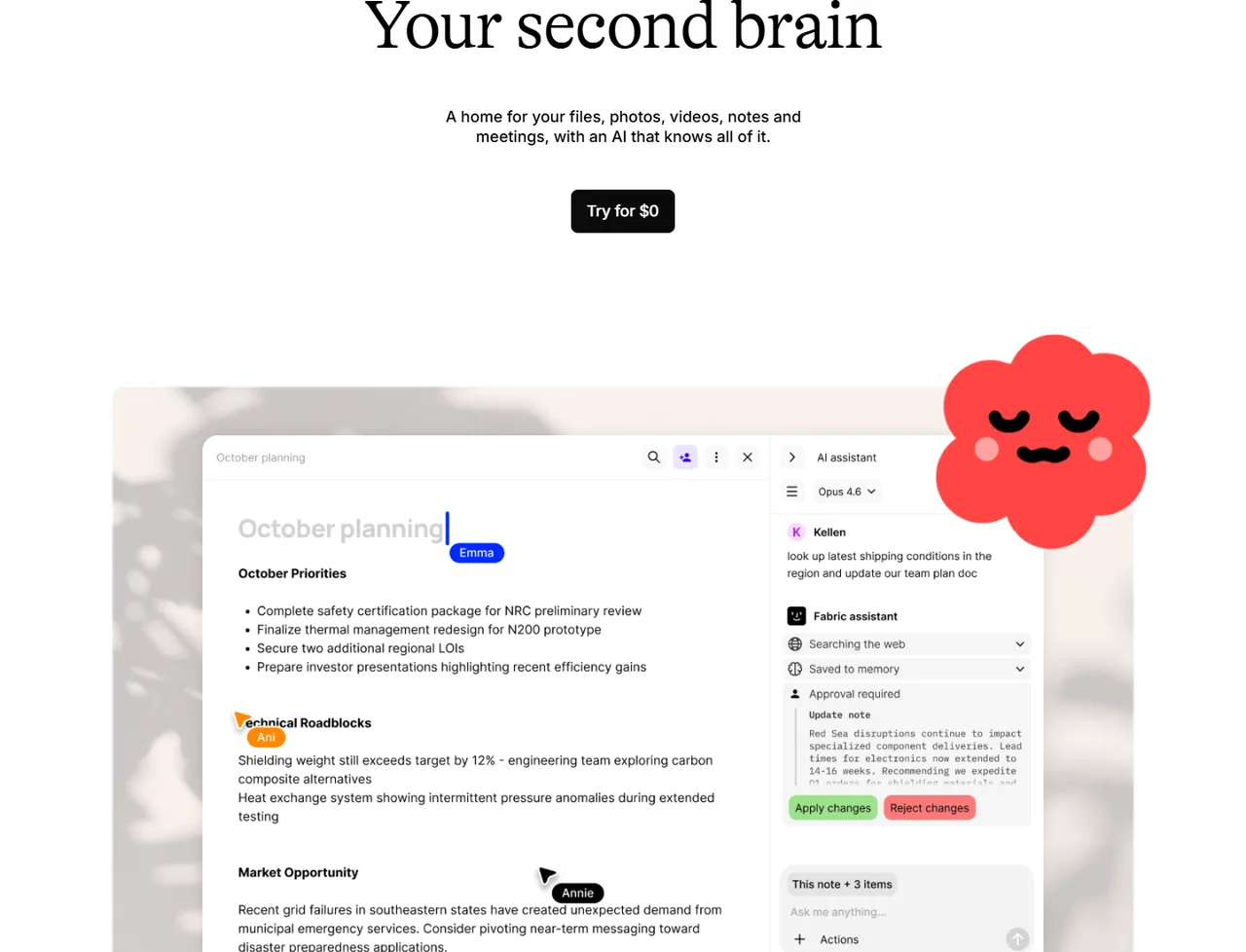
Fabric’s homepage on 3 November 2026. The 4.6 rating is the combined iOS and Android store figure; the user count is Fabric’s own claim.
1. What Fabric Is — and Who Is Behind It
Fabric describes itself as “the workspace that thinks with you” and, more plainly, “a home for your files, photos, videos, notes and meetings, with an AI that knows all of it.” In practice it is five things sharing one account and one library:
- A web app (fabric.so/home) with folders and “spaces”, a markdown editor with real-time collaboration, an infinite canvas, kanban, tasks and reminders, annotations and chat on any item.
- Desktop apps for macOS, Windows and Linux. On Mac and Windows the app creates a local “Fabric” folder that syncs with the cloud; it also adds Spotlight-style search, screenshot capture, quick notes and the meeting recorder.
- iOS and Android apps that back up photos and files, capture screenshots and voice notes, and run the assistant on your phone.
- A Chrome web clipper (also Edge and other Chromium browsers) that saves articles, images, videos, PDFs and full pages with highlights.
- Developer surfaces: a free CLI (
fabric save,fabric ask,fabric search), a remote MCP server at mcp.api.fabric.so that works with Claude Code, Claude Desktop, Cursor, Windsurf, Codex, VS Code and ChatGPT, and a REST API on Pro and Teams.
The company. The Terms are issued by WFHLAND, Inc., “a Delaware C-Corp, based in the US”; the App Store lists the developer as “Fabric Internet” and the seller as WFHLAND, Inc., and Google Play shows “Fabric Internet Co”. The founder and CEO is Jonathan Bree, a London-based former LEGO industrial designer and Telefónica product lead, with co-founders Leonard Marcq and Ivo Silva at launch. TechCrunch covered the public launch on 7 November 2023 alongside a $1 million pre-seed led by Seedcamp with Acequia Capital and angels; the careers page says the investors “built Figma, Microsoft, Loom, Revolut, Dropbox”. We found no later funding announcement. The team is small and remote (the one open role asks for UTC±4 hours), and Bree runs a second company, Exabase, whose “memory engine” press releases say it powers Fabric.
History. Fabric launched on Product Hunt on 13 April 2023 as “your new home on the internet” (number 2 of the day), followed by mobile apps, the browser extension and the assistant later that year, “Fabric platform 2.0” and the public iOS/Android release in early 2025, a public API beta in late 2025 and the Fabric CLI on 23 April 2026. The roadmap lists a desktop app v1.0, “Voice notes v2” and a public API as current work.
Three things worth knowing in 2026. First, the about page says “350,000 people” in the body and “300,000+” in its meta description, and the App Store listing says “Rated 4.7 stars across platforms” while the stores show 4.6 and 4.3 — small inconsistencies, but a pattern. Second, Fabric runs a “community ownership” page: it is an AngelList roll-up vehicle for accredited investors only, not equity or points for ordinary users, and no window was open when we checked. Third, every paid subscription funds mangrove planting in Kenya and Brazil, with a stated goal of carbon and water neutrality by 2030; no totals are published.
2. Who Fabric Is For — and Who It Is Not For
It fits you if:
- Your “second brain” problem is files, not just text — recordings, PDFs, screenshots, videos, design files — and you want one searchable library across devices
- You want AI that quotes your own material with citations, included on every plan rather than sold as a per-seat add-on
- You run meetings and calls and want transcripts and summaries without a bot in the participant list
- You are a founder, consultant or agency and would use scheduled agents for briefs, monitoring and client reports
- You are a developer or power user who wants a CLI, an MCP server and an API over your personal knowledge base
Look elsewhere if:
- You want a refund safety net — Fabric gives none, on any plan
- You need relational databases, formulas or heavy project management — Fabric’s own Notion comparison concedes those
- You want Markdown files you own — Obsidian or Logseq keep local Markdown; Fabric exports HTML in a ZIP
- You need documented compliance (SOC 2, ISO 27001, HIPAA) for work data — Fabric publishes none
- You are a heavy AI user who would burn through a token quota — the allowance is unpublished and top-ups cost extra
3. Storage, Capture and Search — the “Personal Cloud” Half
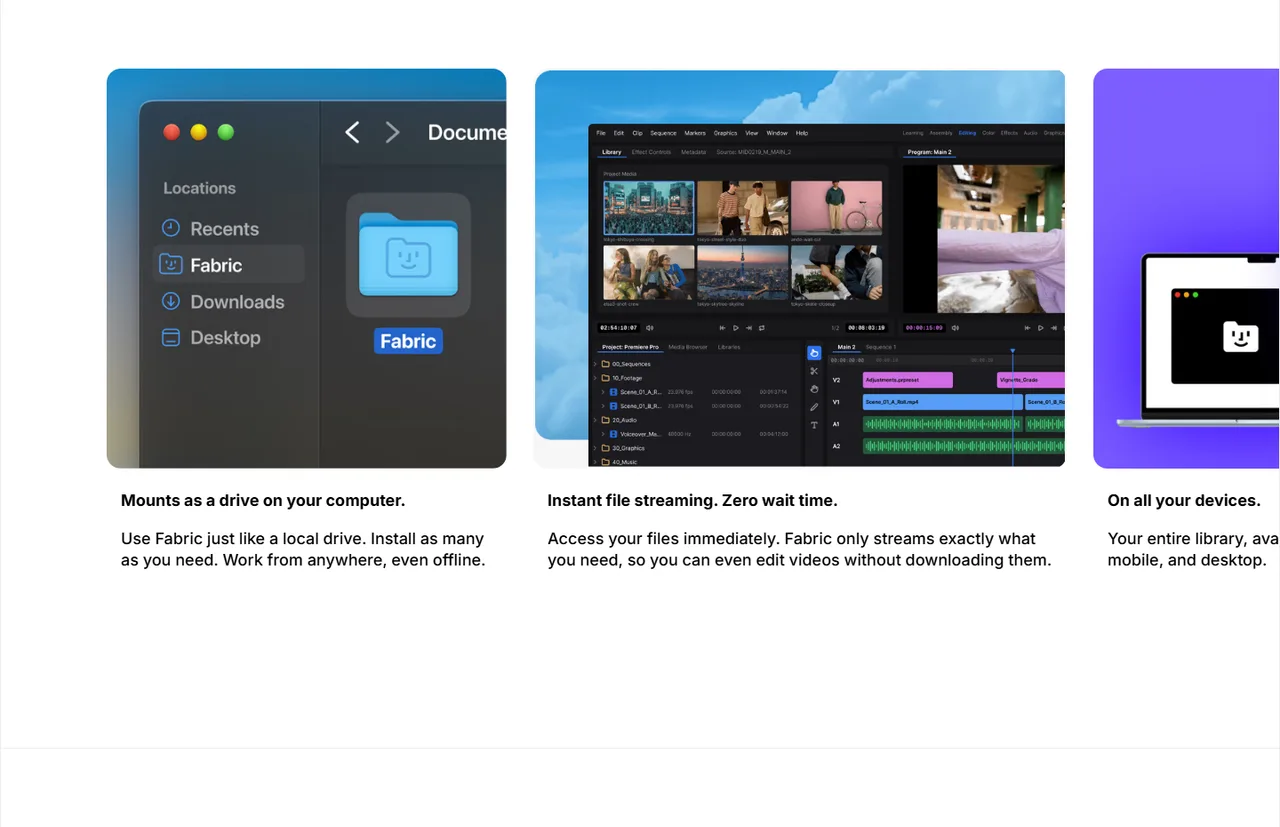
The homepage promises a mounted drive; the documentation describes a synced “Fabric” folder on Mac and Windows.
What goes in. Fabric accepts any file type and does extra work on notes, URLs, images, video, audio, highlights, PDFs, Markdown, text, HTML, PowerPoint, EPUB, Word, JSON and CSV. Audio and video are transcribed on paid plans; images get OCR and visual search; web pages are saved with their content. Capture routes include the desktop folder, drag-and-drop in the web app, the Chrome clipper, the mobile share sheet, automatic photo backup, a personal email-to-Fabric address, and imports from Evernote, Notion, mymind, Raindrop, Pocket and Chrome, Safari, Firefox and Edge bookmarks.
The “drive”. The homepage says Fabric “mounts as a drive on your computer” with files that take “zero disk space” and work “even offline”. The user guide is more modest: the desktop app creates a synced “Fabric” folder, you choose which folders sync to each device, and “sync is only available on MacOS and Windows” — the Linux AppImage runs the app without sync. We found no documentation of an offline mode. If you need a true virtual drive, test it on your machine before paying, because there are no refunds.
Search. This is the part early reviewers loved and it still holds up on paper: search by meaning rather than keywords, inside documents, video and audio transcripts, by colour, by a reference image, and across connected Google Drive, Dropbox, OneDrive, SharePoint and Notion. “Smart search” and the assistant’s memory are paid-plan features; basic search works on Free.
Sharing and publishing. Any file, folder or space can be shared by link or email invite, co-edited in real time, or published as a website with built-in search and an assistant for visitors. Password protection and link analytics (who viewed, when, how long) are Pro features, pitched at agencies sending client deliverables instead of Google Drive links.
Integrations. The homepage says “50+ integrations” in one place and “200+” in another. The connections marketplace lists 21: custom MCP, the desktop drive, iOS and Android sync, Google Drive (two modes), Dropbox, OneDrive, SharePoint, Google Sheets, Notion, Trello, Discord, Clay, Discord and Slack bots, GitHub (two), Raycast, Zapier and Stripe. Seventeen are Pro-only; Raycast and Zapier work on Plus. Figma, Gmail, Linear and the CRM shown in the hero copy are not on that page; a user review from July 2026 notes that most connections sync one way, into Fabric. Zapier and the API cover a lot of the gap, but count on 21, not 200.
4. The AI Half — Assistant, Models, Memory and Agents
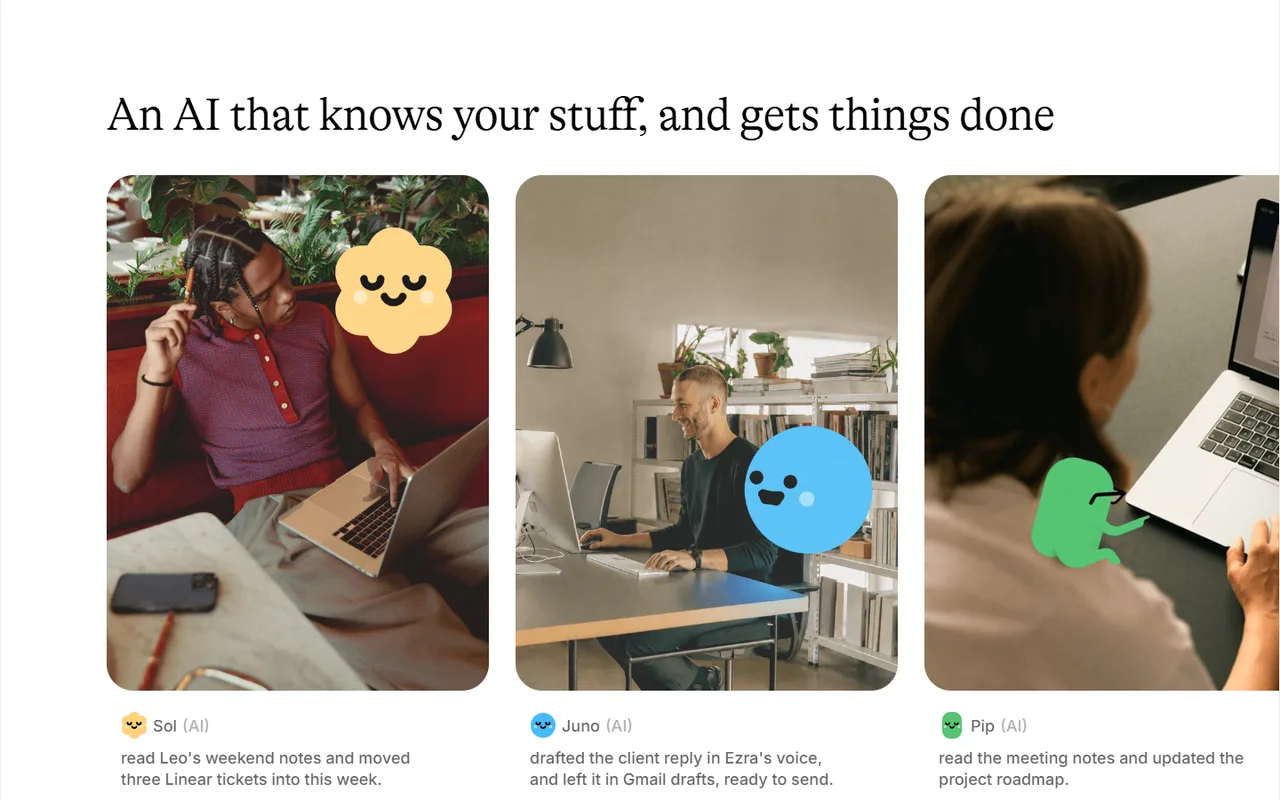
Sol, Juno and Pip are marketing examples of agents you create yourself, each with a name, a personality, a schedule and an email address.
The assistant. Ask a question and Fabric answers from your library with clickable citations, can edit a document (you approve the change), save the answer as a note, and build a “memory” about you and your topics. You can limit its context to a file, a folder or a selection. On Free and Plus you get a default model; model choice is only available on Pro and Teams.
Which models. The homepage lists nine labs — Gemini, OpenAI, Claude, DeepSeek, xAI, Z.ai, Kimi, MiniMax and Qwen. The “choosing a model” guide documents eight models from four of them, each with a cost weight: Gemini 3 Flash (1/5), Claude Haiku 4.5 (1), GPT-5.1 and GPT-5.2 (2), Claude Sonnet 4.6, Grok 4 and Gemini 3 Pro (3), and Claude Opus 4.6 (5). We found no documented DeepSeek, Kimi, MiniMax, Qwen or Z.ai model, so treat those logos as aspirational until they appear in the picker. Assistant web search is Pro-only as well.
How usage is metered. The pricing page sells AI as multiples — “5x”, “15x”, “45x more AI usage” — and never says 5x of what. The user guide explains that usage is token-based: long documents and media, queries that read many files, multi-step web searches, reasoning and large connected sources (a 10,000-file Google Drive is the example) consume a lot; renaming, search and tag suggestions consume little. The quota resets on the monthly anniversary of your subscription (or account creation on Free), and you can buy top-ups once or automatically when the quota drops below a percentage, with a spending limit. Top-up prices are not published. When storage or AI quota runs out you cannot create new items until it renews or you top up.
Agents. On Pro and Teams you create AIs with a name, personality, appearance and their own email address — email one and it answers or does the work, forward attachments and it offers to save them. Give each a plain-language task and a schedule (hourly, daily, weekly, monthly or custom), scope which folders it can read, make it read-only if you like, and require approval before it deletes or moves anything. Fabric’s examples are a Monday brief, a daily Reddit check for brand mentions, research digests, pre-meeting briefs and client status reports. Plans cap the number of AIs at 5 (Plus), 10 (Pro) and 50 (Max) and scheduled jobs at 10 (Pro) and 50 (Max); Teams gets “50+”. The homepage line that agents “act inside your apps — send emails, update your CRM, pull invoices” is broader than the agents page, which lists reading files, creating documents, organising content and web research.
Meeting notes and voice memos. The recorder captures your microphone and, with the system-audio permission, the other participants — “no need to invite a spooky additional participant,” the guide says. The desktop app detects meetings in Chrome (Meet, Teams, Zoom), Firefox (Meet, Teams) and the Zoom app and offers to record. You get a live, editable transcript, an AI summary from a template, the audio file and a chat over the meeting. It is paid plans only, Plus allows four recordings a day, and the Terms (section 3.8) make you responsible for consent — in California and other two-party states you must get affirmative consent from everyone.
Recap, canvas, handwriting. Recap sends AI summaries of what you saved to your inbox; the canvas lets you spread files, notes and links on one surface; a handwriting scanner turns photographed notes into searchable text. These are breadth features rather than depth — the editor is deliberately minimal, and Fabric’s own Notion comparison admits it has no relational databases, formulas, timelines or sprints.
5. Pricing — Free, Plus, Pro, Max and Teams, With Both Toggles
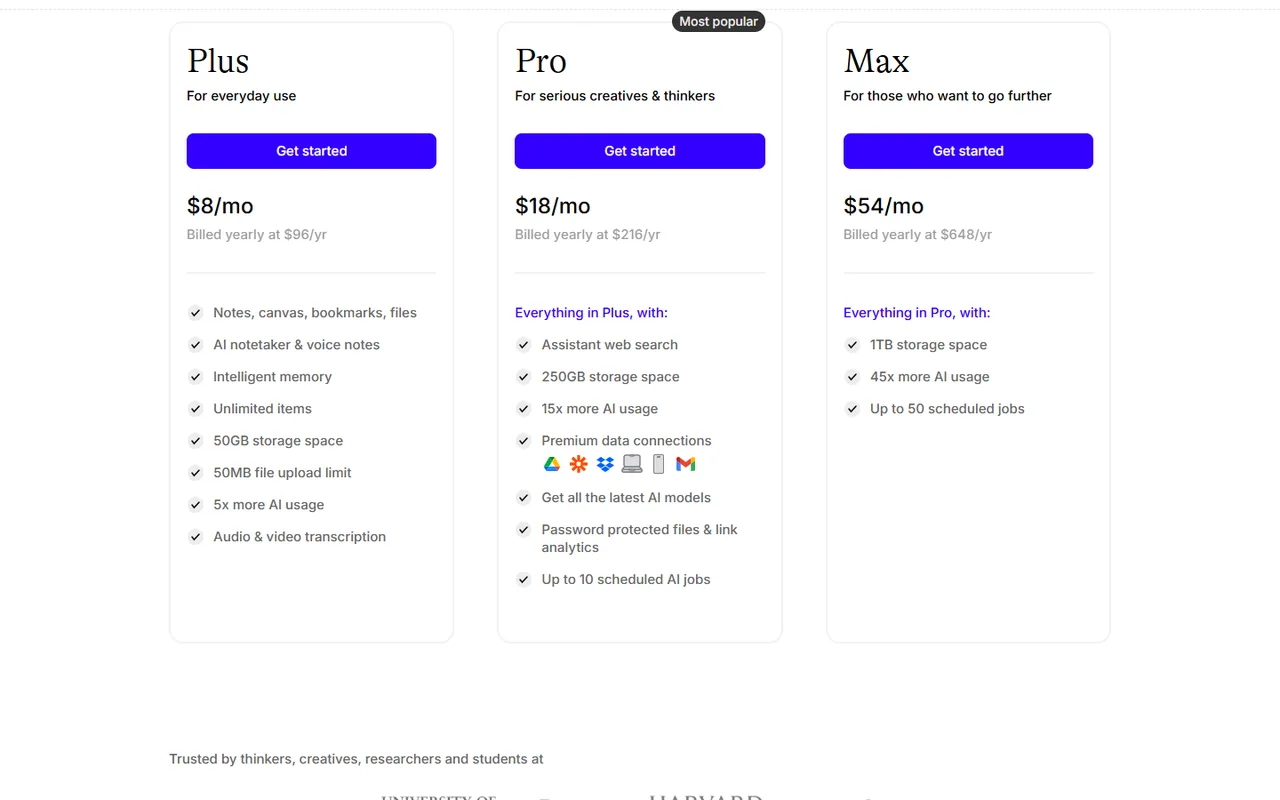
The individual plans with the Yearly toggle, captured 3 November 2026. The Monthly toggle shows $10, $24 and $68.
We read the pricing page with both toggles on 3 November 2026. Note two things before the table: the page’s “Save 25% on a yearly plan” banner and its FAQ’s “equivalent of 2 months free” describe different discounts, and the real saving is 20% on Plus, 25% on Pro, 21% on Max and 20% on Teams. And the live page has no Free column at all — the “Try for $0” button leads straight to sign-up.
| Plan | Monthly | Billed yearly (per month) | Storage and uploads | What you get |
|---|---|---|---|---|
| Free | $0 | — | Capped; not shown on the live page (see below) | Notes, canvas, bookmarks, files, sharing, CLI; assistant and basic search on a capped token quota; no agents, no model choice; no time limit |
| Plus | $10 | $8 ($96 a year) | 50 GB; 50 MB per upload; unlimited items | ”5x more AI usage”; 5 AIs, no scheduled jobs; AI notetaker and voice notes (4 recordings a day); audio and video transcription; intelligent memory; Raycast and Zapier |
| Pro (“Most popular”) | $24 | $18 ($216 a year) | 250 GB; 5 GB per upload; unlimited spaces | ”15x more AI usage”; model choice and assistant web search; 10 AIs, up to 10 scheduled jobs; premium connections (Google Drive, Dropbox, OneDrive, Notion…); password-protected files and link analytics; Fabric API |
| Max | $68 | $54 ($648 a year) | 1 TB; 5 GB per upload | Everything in Pro with “45x more AI usage”, 50 AIs and up to 50 scheduled jobs |
| Teams | $20 per user | $16 per user | 2 TB+; 5 GB per upload | ”Unlimited” AI pooled across seats; 50+ AIs and jobs; “living memory of your company”; admin dashboard with usage stats; centralised billing and access; 14-day free trial |
| Enterprise | Custom | Custom, billed yearly | — | Everything in Teams with “more usage included”, priority support and account management, deeper org access controls, enterprise analytics; opted out of data use by default |
The free plan
Fabric’s comparison pages say the free tier “is not a crippled trial. It’s the actual product with usage caps” and that “for light-to-moderate use, the free tier works indefinitely.” The numbers are harder to find. A search-engine copy of the pricing page lists 250 MB of storage, 10 MB per upload, 10 spaces and 1,000 items, and two independent reviews from August and October 2026 repeat 250 MB and 1,000 items; a June 2026 cancellation guide quotes 150 items and 25 MB instead. The live page shows none of this. One more thing to know: the Terms (section 11.17) say in capitals that data entered during a free trial “may be permanently lost” unless you subscribe or export it.
The 2026 price rise
Third-party price checks from June to August 2026 recorded Plus at $5–6 a month ($56–60 a year), Pro at $12.50–16 ($150 a year) and Max at about $32.50 ($390 a year). The App Store’s in-app purchase list still carries both generations side by side — “Plus – Yearly $56.00” and “Plus – Yearly $96.00”, “Pro – Monthly $16.00” and “$24.00”, “Pro – Yearly $150.00”, and a “Max – Monthly (Legacy) $39.99” — which confirms the change. Fabric’s own comparison pages, “last updated” April to June 2026, still advertise a “$5/mo Plus tier” and one contains an unfilled placeholder, “[Insert Fabric pricing details.]”. The affiliate page’s earnings example ($81 per Max annual referral, which is 25% of $324) also predates the current $648. Trust the pricing page and your checkout screen, not the rest of the site.
Students, gifts and teams
Students can verify a student email for “up to 30% off”. Gift subscriptions are one-year Plus ($96) or Pro ($216) codes. Teams comes with a 14-day trial, Enterprise is a “Contact us” email to sales, and no page states a seat minimum, SSO or SAML. One more inconsistency: Fabric’s own “Fabric vs Notion for teams” page, marked “last updated August 2026”, says Teams costs “$8/month flat (billed yearly). No per-user pricing” — the pricing page says $16 per user.
What our link does
Fabric’s affiliate programme pays referrers a 25% commission for up to 11 months. The affiliate page lists no discount, free month or bonus for the referred user, so the link in this review takes you to the normal sign-up and the prices above apply.
Free plan · no card · no refunds on paid plans
Try Fabric with your real files before you pay
Import a folder, a few recordings and your bookmarks on the free plan, test the desktop sync on your own machine, and only buy Plus or Pro monthly first — there is no refund if it does not suit you.
Try Fabric free
6. Refunds, Cancelling and the Contract
No refunds. The pricing FAQ answers “What is the refund policy?” with “Unfortunately, we cannot offer refunds as costs incurred for storing and analysing your data, and generating connections and summaries are extremely high. You can cancel at any time however.” The Terms repeat it in capitals: “YOU WILL NOT RECEIVE A REFUND OF ANY PORTION OF THE SUBSCRIPTION FEE”, unless the law requires one. The only pro-rata refund is if Fabric itself freezes or cancels your account for a reason other than your breach. A search-engine snippet of one App Store reply shows Fabric offering a refund by email, so it is worth asking — but nothing obliges them.
Cancelling. Cancel from Settings → Account (the button reads “Cancel subscription :(”) or by emailing team@fabric.so; it takes effect at the end of the current period, the workspace drops to Free and your data stays. Subscriptions bought through Apple or Google must be cancelled there.
The rest of the Terms. They are governed by California law with courts in San Francisco, and disputes go to binding individual arbitration with a class-action and jury-trial waiver — you can opt out by writing to team@fabric.so within 30 days of first agreeing. Liability is capped at what you paid in the previous 12 months, or $100 if you paid nothing. Fees can change with notice, the service is “as is”, you must be 16, Fabric may terminate “at our sole discretion, at any time” and “without notice”, and continued use after a change to the Terms counts as acceptance. None of this is unusual for a US SaaS product; the no-refund rule combined with a pricing page that hides the free limits is what makes it worth reading first.
7. Privacy, Security and Your Data
Encryption and infrastructure. Files are encrypted in transit (TLS) and at rest (AES-256), stored on Cloudflare and AWS, with Stripe for payments. Deleted accounts and data are purged within 30 days. Card details never touch Fabric’s servers.
Certifications. The homepage says “Compliant with major standards” and the assistant page mentions “our secure certified infra”, but no page names SOC 2, ISO 27001, GDPR or HIPAA, there is no trust centre, and /security returns a 404. The only concrete claim, on a comparison page and the students page, is CASA Tier 2 — the Google-run assessment required to use restricted Google Drive and Gmail API scopes, which is not a security audit of the company. Fabric’s own Notion comparison concedes that Notion has “SOC 2 and SSO certifications that Fabric doesn’t claim.”
Training on your data. The assistant page says “Your data is never used for training.” The privacy page narrows that to the OpenAI feature: “This data is anonymised and is never used for model training.” The Terms (section 3.5.1) say something different again: Fabric “may also use anonymized and aggregated data, including from the content of non-opted-out Customer Materials” to maintain, improve and develop its services, “including in collaboration with third-party partners”, and claims ownership of “any models, algorithms, insights, or other technologies developed or improved by Fabric” from that data. You can opt out in account settings; Enterprise plans are opted out by default. If this matters to you, find that toggle on day one.
Which AI companies see your content. The privacy page’s partner list names only OpenAI (GPT-4, for search) as an AI processor, alongside Google, Cloudflare, AWS, Bunny, Customer.io, Liveblocks, Mixpanel and Meta. The product sells Claude, Gemini and Grok on Pro. There is no sub-processor list reconciling the two, and no statement about how long any model provider retains your prompts.
Tracking. The marketing site uses Google Analytics and Meta conversion measurement; the product uses Mixpanel for anonymised feature analytics and Customer.io for email. The App Store label says email, name, user content, search history and a user ID are linked to you; the Chrome listing declares “personally identifiable information” only.
Getting your data out. Settings → “Export from Fabric” emails you a ZIP of your whole account; folders and spaces can be exported from their menu. Notes come out as HTML, not Markdown, bookmarks as a Bookmarks.html file, highlights as Highlights.html, and other files unchanged. Tags, metadata, comments and chats are not exported, and the guide says “re-import is not currently supported.” The REST API (Pro and Teams) and the MCP server give you programmatic access if you want to script a cleaner export. Fabric is far from a walled garden, but it is not a folder of Markdown either.
8. What Users Say
| Source | Rating | Reviews | Note |
|---|---|---|---|
| Apple App Store (US) | 4.6 | 254 ratings | Version 0.8.14, 8 October 2026; developer replies to reviews |
| Google Play | 4.6 | 2,766 ratings | 100,000+ downloads; updated 8 October 2026 |
| Chrome Web Store | 4.3 | 40 ratings | 10,000 users; Featured; clipper last updated 29 July 2026 |
| Product Hunt | 4.7 | 32 reviews | Five launches since April 2023; the CLI launch in April 2026 drew 123 votes |
| Trustpilot / G2 / Capterra | — | — | No active listing for fabric.so that we could confirm |
What people praise. The clipper and capture flow (“the browser extension is a game-changer, as it works smoothly”, August 2026), the clean visual interface, semantic search that finds things inside recordings, the flat pricing, a free tier that reviewers call “unusually complete”, unusually good Linux support (“outrageously good when it comes to supporting Linux”, July 2026), and responsive founders on Discord. The 2023 Product Hunt cohort was close to unanimous: “Very easy, very well-designed.”
What people criticise. The tone changes among longer-term paying users in 2025 and 2026:
- Reliability. “It just says ‘failed to upload note’ or ‘failed to upload link’” (App Store, May 2025); “The AI summary section never works” (July 2025); “uploads that never finish”, lag, videos that will not play and false “no internet” errors (October 2026 review). Fabric blamed some upload failures on a regional demand surge.
- The assistant. “The built-in AI model has just consistently led me astray” (App Store, January 2026); answers that were “five tabs longer than it needed to be”; one reviewer says the assistant “routinely lies about its capabilities.”
- Mobile UI. “In terms of intuitive design, the app is stuck ten years back” (App Store, August 2026); several Android reviews call the app laggy and complicated.
- Support and policy. Support runs through Discord rather than email or phone; one competitor’s review scores it 3.2 out of 5; the no-refund policy comes up repeatedly, as does one-way syncing of connected services.
- Transparency. Some users say they are “unable to trust a system that holds my personal information without disclosing the identities” behind it — the about page names nobody, and the founder’s name appears only on an author page.
A note on sources: the most detailed 2026 reviews come from a direct competitor (Saner.ai), from sites using Fabric affiliate links, and from a blogger who received a free year of Pro. We used them for specific, checkable claims and weighted the store reviews more heavily.
9. Alternatives Worth Knowing
Prices are from each vendor’s own pricing page as read on 3 November 2026 unless marked otherwise.
| Tool | Paid from | Free plan | Best at | The catch |
|---|---|---|---|---|
| Fabric | $10/mo; $8/mo yearly | Yes, capped storage and AI | Files, media, meetings and notes in one AI library; agents; CLI and MCP | No refunds; metered AI; HTML export; thin compliance documentation |
| Notion | Plus $10/user/mo yearly (~$12 monthly) | Yes | Databases, docs and wikis; huge template ecosystem | Full Notion AI needs Business at $20/user; files are attachments |
| Mem | Plus $9/mo; Pro $29/mo | 25 notes and 25 AI messages a month | AI-first notes that organise themselves | Notes only, no files or media; Pro moved to capped tiers in 2026 |
| Capacities | Pro $9.99/mo yearly; $11.99 monthly | Yes (5 GB media) | Object-based personal knowledge graph | AI is an add-on; structure-first, not file-first |
| mymind | $4.99/mo; core plan $7.99/mo or $79/yr | No | Private, beautiful visual scrapbook for bookmarks and images | Deliberately non-collaborative; no agents or meeting notes |
| Tana | Pro $19/member/mo | Yes | Supertags, outliner and AI meeting agent for structured thinkers | Steeper learning curve; AI credits on top |
| Saner.ai | Starter $8/mo; about $6.40 yearly | 30 AI messages, 100 notes | Notes, tasks and email in one ADHD-friendly assistant | Smaller product; direct competitor whose review we cite above |
| Recall (recall.it) | Plus $10/mo yearly | 10 AI summaries a month | Summarising and linking saved web content | Not a file store or notetaker |
| Obsidian | Free; Sync $4/mo yearly or $5 monthly | Yes, unlimited | Local Markdown you own, plugins for everything | No built-in AI, cloud or meeting recorder |
| Google Gemini Notebook (NotebookLM) | Free; Google AI Pro $19.99/mo | Yes (100 notebooks) | Source-grounded answers, audio overviews, Google ecosystem | Per-notebook sources, not a personal file system |
| Heptabase | Pro $8.99/mo yearly | No | Visual whiteboards for learning and research | No file drive or meeting notes |
| Evernote | Starter $8.25/mo billed yearly | 50 notes, 1 notebook, 1 device | Mature notes and clipping, OCR, offline | Free plan is almost unusable; no agents |
Where Fabric wins: nothing else in this table combines a cloud drive for large media, bot-free meeting recording, AI with citations on the free tier, scheduled agents with email inboxes, and a CLI, MCP server and API, for $8 to $18 a month billed yearly. Notion needs $20 a seat for the equivalent AI; Mem and mymind do not handle files; Obsidian has no cloud AI.
Where it loses: Notion for structured work and team permissions; Obsidian or Logseq for files you own in Markdown; Gemini Notebook for deep reading of a defined set of sources; Capacities or Tana if you think in objects and tags. And every vendor in the table except mymind and Fabric either offers a free trial with a refund path or a free plan whose limits are printed on the pricing page.
10. Pros and Cons
Where Fabric is genuinely strong
- Breadth in one library: files, media, notes, bookmarks, meetings, canvas, publishing, agents, across web, Mac, Windows, Linux, iOS, Android, Chrome and the terminal
- AI on every plan, including Free, answering from your own content with citations
- Flat personal pricing — Plus $8 a month billed yearly for 50 GB and unlimited items
- Bot-free meeting notes with a live transcript, summary templates and searchable audio
- Agents with real guardrails: scoped access, read-only mode, approval gates, email inboxes
- Open for power users: free CLI, MCP server (Claude, Cursor, ChatGPT), REST API, Zapier, Raycast
- Store ratings hold up: 4.6 on iOS and Android, Featured on the Chrome Web Store
Where Fabric falls short
- No refunds, on any plan, under the FAQ and the Terms
- A 2026 price rise of 44–71% on yearly plans, with stale “$5/mo” copy still on the site
- Metered AI sold as “5x / 15x / 45x” with no base number, and Pro-only model choice and web search
- Free limits hidden from the live pricing page; free-trial data “may be permanently lost”
- Marketing ahead of the product: 21 integrations not 200, eight models not nine labs, a synced folder not a mounted drive, no documented offline mode
- Data clauses that disagree: “never used for training” on one page, anonymised use of non-opted-out content in the Terms, only OpenAI named as an AI processor, no SOC 2 or ISO report
- HTML-only export without tags, comments or chats; Discord-only support; a run of 2025–2026 reviews about uploads, lag and the assistant’s reliability
11. Frequently Asked Questions
What is Fabric (fabric.so)?
Fabric is an AI workspace, often described as a 'second brain', from WFHLAND, Inc., a Delaware company founded by Jonathan Bree. It stores files, photos, videos, PDFs, notes, bookmarks and meeting recordings in one encrypted cloud library and adds an AI assistant that answers questions about that content with citations, search by meaning inside documents and media, a bot-free meeting notetaker, background agents on paid plans, a collaborative editor and canvas, published portals, and a web clipper, desktop apps for Mac, Windows and Linux, mobile apps, a CLI, an MCP server and a REST API.
How much does Fabric cost in 2026?
On 3 November 2026 the pricing page listed Plus at $10 a month or $8 a month billed yearly ($96), Pro at $24 or $18 billed yearly ($216), Max at $68 or $54 billed yearly ($648), and Teams at $20 or $16 per user a month with a 14-day trial; Enterprise is custom. A free plan exists behind the 'Try for $0' button but its limits are not shown on the live page; a search-engine copy of the page and two 2026 reviews list 250 MB of storage, 10 MB per upload, 10 spaces and 1,000 items. Students can verify an email for up to 30% off. Prices rose substantially in the second half of 2026.
Is there a free plan, and does it expire?
Yes. Fabric's own comparison pages say the free tier 'works indefinitely' for light use and is 'the actual product with usage caps' on storage and AI, without agents, model choice, web search or publishing analytics. The live pricing page does not print the caps. Note that the Terms warn that data entered during a free trial may be permanently lost unless you subscribe or export it, so export anything important.
Does Fabric offer refunds?
No. The pricing FAQ says Fabric 'cannot offer refunds' because of storage and processing costs, and the Terms state in capitals that you will not receive a refund of any portion of the subscription fee unless the law requires it. You can cancel at any time and keep access until the end of the paid period, after which the workspace drops to the free plan with your data intact. A pro-rata refund is only promised if Fabric itself terminates your account without a breach on your side.
Which AI models does Fabric use?
The model guide documents Gemini 3 Flash, Claude Haiku 4.5, GPT-5.1, GPT-5.2, Claude Sonnet 4.6, Grok 4, Gemini 3 Pro and Claude Opus 4.6, each with a different cost weight against your monthly token quota. Choosing a model is only available on Pro and Teams; Free and Plus use a default model. The homepage also shows DeepSeek, Z.ai, Kimi, MiniMax and Qwen logos, but we found no documented models from those labs.
How does the AI meeting notetaker work? Does a bot join my call?
No bot joins. Fabric records from your microphone and, with the system-audio permission, the other participants, on your own computer. The desktop app detects meetings in Chrome (Google Meet, Microsoft Teams, Zoom), Firefox (Meet, Teams) and the Zoom app and offers to record; you can also start a voice note manually. You get a live, editable transcript, an AI summary from a template, the audio file and a chat over the meeting. It is available on paid plans only, Plus allows four recordings a day, and the Terms require you to obtain consent from all participants.
Does Fabric use my files to train AI?
The AI assistant page says 'Your data is never used for training' and the privacy page says data sent to OpenAI is anonymised and never used for model training. The Terms are broader: section 3.5.1 lets Fabric use anonymised and aggregated data, including from the content of 'non-opted-out Customer Materials', to improve and develop its services, including with third-party partners, and you can opt out at any time in account settings. Enterprise plans are opted out by default. The privacy page names only OpenAI as an AI processor even though Pro offers Claude, Gemini and Grok.
Can I export my data from Fabric?
Yes, with limits. Settings → 'Export from Fabric' emails you a ZIP of your account, and any folder or space can be exported from its menu. Notes export as HTML rather than Markdown, bookmarks as a Bookmarks.html file and highlights as Highlights.html; other files come out unchanged. Tags, metadata, comments and chats are not included, and Fabric says re-import is not supported. On Pro and Teams you can also pull content through the REST API; the CLI is free on every plan, and the MCP server page does not state a plan requirement.
Is Fabric safe and legitimate?
Fabric is a real product from a US company founded in 2022–2023 with a $1 million pre-seed led by Seedcamp, about 350,000 claimed users, 4.6-star apps on iOS and Android and a Featured Chrome extension. Data is encrypted in transit and at rest and purged within 30 days of deletion. What it lacks is documentation: no SOC 2 or ISO 27001 report, no trust centre, a 404 security page, only a CASA Tier 2 mention, an about page that names no one, and Terms with a no-refund rule, binding arbitration and a class-action waiver (with a 30-day opt-out). Reviews from 2025 and 2026 report reliability problems rather than security incidents; we found no report of a breach.
Does the link in this review give a discount?
No. Our link is a Fabric referral link that leads to the normal sign-up page; Fabric's affiliate page lists no discount, free month or bonus for referred users, so prices and the free plan are the same as visiting directly. If you buy a plan through our link, Fabric pays us a commission for up to 11 months. Students can get a separate discount by verifying a student email on fabric.so.
12. Final Verdict: Is Fabric Worth It in 2026?
If your knowledge lives in files, recordings and screenshots rather than tidy notes, Fabric is one of the few products built for that, and the free plan lets you find out at no cost. Eight dollars a month billed yearly buys 50 GB, unlimited items, transcription, the meeting recorder and an assistant that cites your own material; eighteen buys model choice, web search, agents, the API and client portals. The CLI and MCP server make it unusually friendly to anyone who already works with coding agents.
The reasons to hesitate are mostly about the company rather than the product: no refunds, a 2026 price rise the rest of the site has not caught up with, AI quotas with no published numbers, free limits you cannot see before signing up, marketing that overstates integrations, models and the “drive”, data clauses that say different things on different pages, and a support model that is a Discord server. The 2025–2026 reviews about failed uploads and an unreliable assistant are consistent enough that you should test the parts you care about on your own machine and network first.
Use it the smart way. Start free with real content — a folder, a few recordings, your bookmarks. Install the desktop app and check that sync behaves. Open account settings and decide on the data-use opt-out. If you upgrade, buy monthly first at $10 or $24 and switch to yearly only once you know your AI usage fits the quota; there is no refund either way. Export a ZIP once to see what you would get back.
Choose something else if you need Markdown files you own (Obsidian, Logseq), databases and team permissions (Notion), documented compliance for work data, or a vendor with a refund policy.
Disclosure: This review is an independent assessment by TrackerTools and contains a Fabric referral link. If you buy a plan through it, Fabric’s affiliate programme pays us a commission; the link gives you no discount, and prices are the same as visiting directly. All factual claims were checked against fabric.so’s homepage, individual and team pricing pages (both billing toggles), about, affiliates, ambassador, gift, students, universities, community-ownership, environment, changelog, roadmap, terms and privacy pages, the user guide (AI usage, choosing a model, meeting notes, sync, importing, exporting, CLI, MCP and API setup), the connections and templates marketplaces, the Apple App Store, Google Play and Chrome Web Store listings, Product Hunt, TechCrunch’s 2023 launch coverage, and each competitor’s own pricing page, as of 3 November 2026. User counts, the “major standards” and CASA claims, and funding figures are attributed to Fabric or the cited sources; we could not verify them independently.