
Restream Review 2026: Multistreaming, Pricing and the Fine Print
What one stream to many platforms costs on each plan, what the yearly discount really saves, which pricing page you may see, and what the refund rules say.
Restream does one thing that most streamers understand at once: you go live once, and your stream appears on YouTube, Twitch, Kick, TikTok, LinkedIn and other platforms at the same time. Its homepage puts it in five words — “One live video 30+ destinations” — and says Restream is trusted by 10 million creators and 100,000 businesses.
The product is mature: Restream has been doing this since 2015. The pricing needs a closer look. The main pricing page sells four plans by the number of channels, from 2 on the free plan to 8 on Business, with a yearly switch that reads “Save 20%”. On some of our visits the same address opened a different page that sells plans by audience and counts streaming hours. And the refund rules in the help centre and in the Terms of Service do not say the same thing.
This review covers who runs Restream, what each plan actually includes, the limits that matter day to day, every price we found on both pricing pages, the yearly maths, the trial, refund and contract terms, what happens to your streams, recordings and data, what users say on Trustpilot, and how Restream compares with StreamYard, Castr, OneStream Live, Livepush, Riverside and Streamlabs. Everything was read on November 11, 2026, from Restream’s own pages, its help centre, its Terms of Service and Privacy Policy, Trustpilot, a third-party pricing tracker and competitors’ pricing pages. We did not stream through Restream for this review.
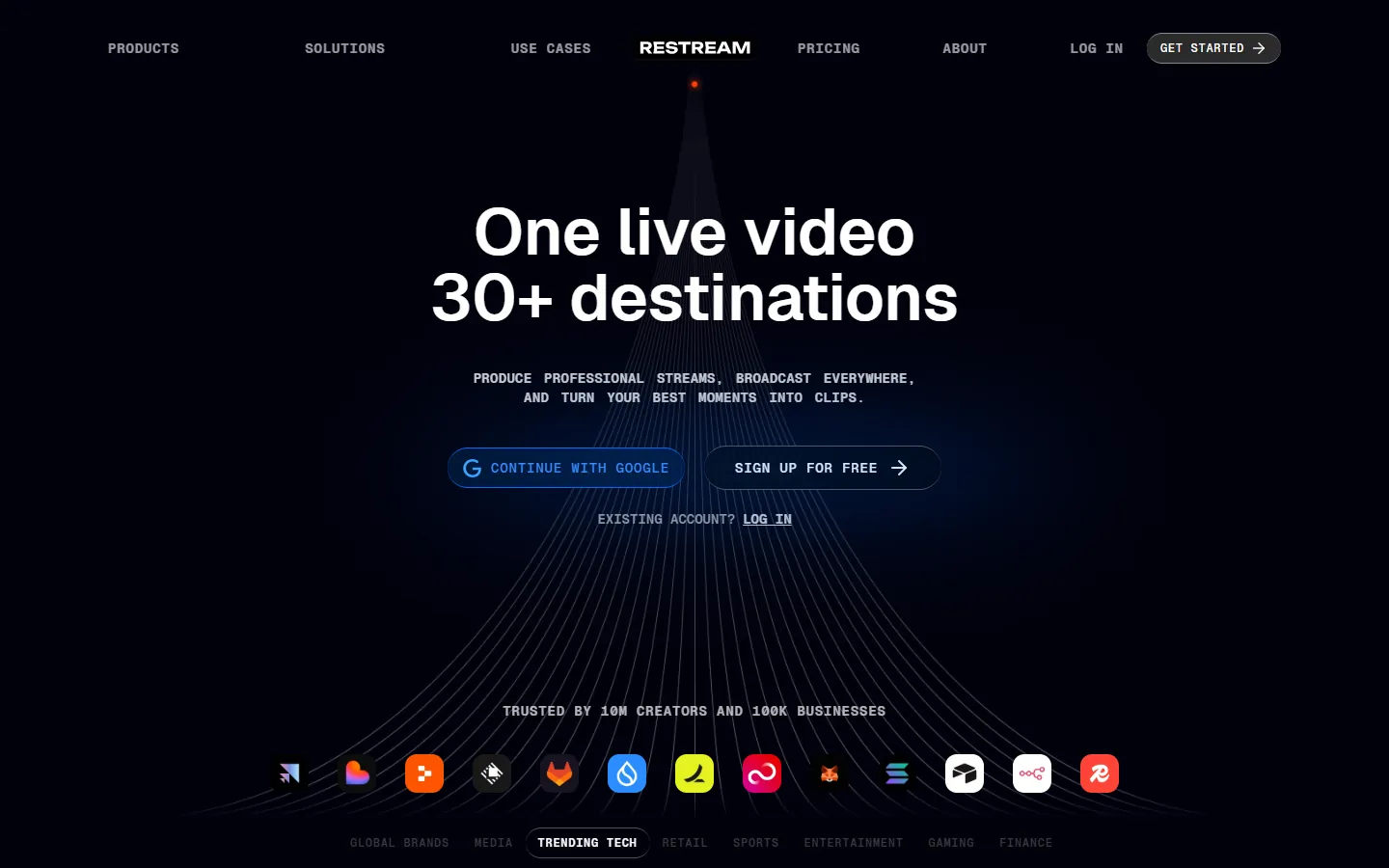
Restream’s homepage on November 11, 2026: “One live video, 30+ destinations”, with buttons to continue with Google or sign up for free.
1. What Is Restream — and Who Is Behind It
Restream describes itself in its help centre as “a live streaming software that lets you broadcast one live stream to 30+ platforms at the same time”. The idea is older than most of its rivals: the same article says the company was “Founded in 2015 in Ukraine” and claims it “pioneered multistreaming”. The About page dates its first break to that year, when the music broadcaster Boiler Room streamed one of its events through Restream’s first version.
Who runs it. The contract partner is Restream, Inc. The Terms of Service open as “a binding agreement between Restream, Inc.” and the user, and the help article on safety says the company is “based in Austin, Texas, with offices in Austin, Tallinn, Kyiv, and Cascais”. The Terms give a postal address for legal notices at 515 Congress Avenue in Austin, under a slightly different name, “Restream Live Streaming, Inc”. We did not look the two names up in a company register.
How big it is. The About page counts 65 staff — “Nerds at work” — from 22 nationalities in 15 countries and 4 offices, and says Restream helps people stream “over 200,000 hours of content” every day. The homepage says it is trusted by 10 million creators and 100,000 businesses. The help article on safety says Restream is “backed by Sapphire Ventures and Insight Partners (a $50M Series A in 2020)”; the About page gives the same $50M Series A under 2020 in its timeline, and names more than a dozen individual backers, among them two co-founders of Pipedrive.
What it sells. The footer lists five products, and the help centre adds two more pieces that tie them together:
- Multistreaming — the relay itself: one incoming stream, copied by Restream’s servers to every channel you enable.
- Studio — a live production room in the browser, with guests, scenes, overlays and on-screen chat.
- Upload & Stream — pre-recorded videos scheduled to air as live streams.
- Clips — an AI add-on that cuts recordings into short vertical videos.
- Webinars — closed live events for registered attendees, sold as an add-on.
- Chat and analytics — one window for comments from every platform, and viewer numbers from all channels in one place.
- Organizations and workspaces — shared team spaces, which the help centre says replace the older Teams feature, now “being phased out”.
What the relay does to your stream. According to Restream, nothing. The help centre says “Restream doesn’t modify your incoming audio and video in any way”, that multistreaming needs no extra bandwidth because “Our servers replicate your stream and send it to all platforms at once”, and that the added delay is “always under 2 seconds”, whether you stream to 2 channels or 20. We did not measure any of this ourselves. For an encoder stream it means the resolution you send is the resolution the platforms receive: the help centre says OBS users can stream in 4K, even on the free plan, as long as the destination accepts it.
2. Who Restream Is For — and Who It Is Not For
It fits you if:
- You already stream from OBS or another encoder and want the same stream on more platforms without sending it several times from your own connection. This is Restream’s oldest use, and the free plan covers two channels.
- You host a show with remote guests and want a production room in the browser rather than a desktop app: guests join from a link, and paid plans hold up to 9 of them.
- Your audience is spread out. Restream’s list of 30 integrations goes beyond YouTube, Twitch and Facebook to Kick, Rumble, Bilibili, Substack, Telegram and Steam, and on paid plans custom RTMP channels, and custom SRT channels from Business, cover most of what is missing.
- You read comments from several platforms and want them in one window during the show.
- Your organisation needs reach more than production. Launches, town halls and church services that must reach LinkedIn, YouTube, Facebook and a website at the same time are what the Business plan, the website player and the webinar add-on are built for.
Look elsewhere if:
- You stream for a company on a creator budget. The Terms say that someone who registers as an individual must “only be streaming for yourself”, and that someone whose job is to stream company content “must register for one of our “for companies” plan”. On the pricing page we saw on most visits, the Business tab offers the $239 Business plan and Enterprise; the solo plans on the second page we saw say “Individual use only” in so many words.
- You need recordings on the free plan. The help centre says “You need a paid Restream plan to create and access recordings”.
- You want to keep recordings in the cloud. They expire after 15 or 30 days depending on the plan, and “Once a recording has expired, it can no longer be retrieved.”
- You want 1080p from the browser studio for little money. Studio stays at 720p on Free and Standard; 1080p starts with Professional at $49 a month.
- You need more than 8 channels without talking to sales. Business stops at 8; more is “Custom channels” on Enterprise.
- You want a refund window that covers renewals. The help centre says “Auto-renewals are not covered by the 7-day money-back guarantee.”
3. What You Actually Get: Channels, Studio, Recording and Team Features by Plan
The plan cards on the main pricing page list only two to six lines each. The comparison table below them is where the limits live. This is that table as we read it on November 11, 2026, with monthly prices; a dash means the row is empty for that plan.
| Feature | Free | Standard | Professional | Business | Enterprise |
|---|---|---|---|---|---|
| Price, monthly billing | $0 | $19 | $49 | $239 | Custom |
| Channels at the same time | 2 | 3 | 5 | 8 | Custom |
| Quality you send from an encoder | 4K, 2160p | 4K, 2160p | 4K, 2160p | 4K, 2160p | 4K, 2160p |
| Studio video quality | HD, 720p | HD, 720p | Full HD, 1080p | Full HD, 1080p | Full HD, 1080p |
| People on screen in Studio | 6 | 10 | 10 | 10 | Custom |
| Restream watermark in Studio | Yes | — | — | — | — |
| Cross-platform chat, health monitor, encrypted RTMPS | Yes | Yes | Yes | Yes | Yes |
| Stream analytics | — | Yes | Yes | Yes | Yes |
| Cloud recording, length per stream | — | 6 hours | 10 hours | 10 hours | Custom |
| Recording storage | — | 15 days | 15 days | 30 days | Custom |
| Video transcription, custom RTMP, paired channels | — | Yes | Yes | Yes | Yes |
| RTMP pull links | — | — | 3 | 5 | Custom |
| Dual format streaming, split feed downloads, co-producers | — | — | Yes | Yes | Yes |
| SRT ingest, custom SRT channels, disconnect protection | — | — | — | Yes | Yes |
| Website player | — | — | — | 1,000 viewers | Custom |
| Team seats included | 1 | 1 | 2 | 2 | Custom |
| Extra seat | — | — | $25 a month | $25 a month | Contact us |
| Workspaces, per workspace | — | — | $49 a month | $239 a month | Contact us |
| Roles, priority support | — | — | — | Yes | Yes |
| SSO, security review, dedicated support, central billing | — | — | — | — | Yes |
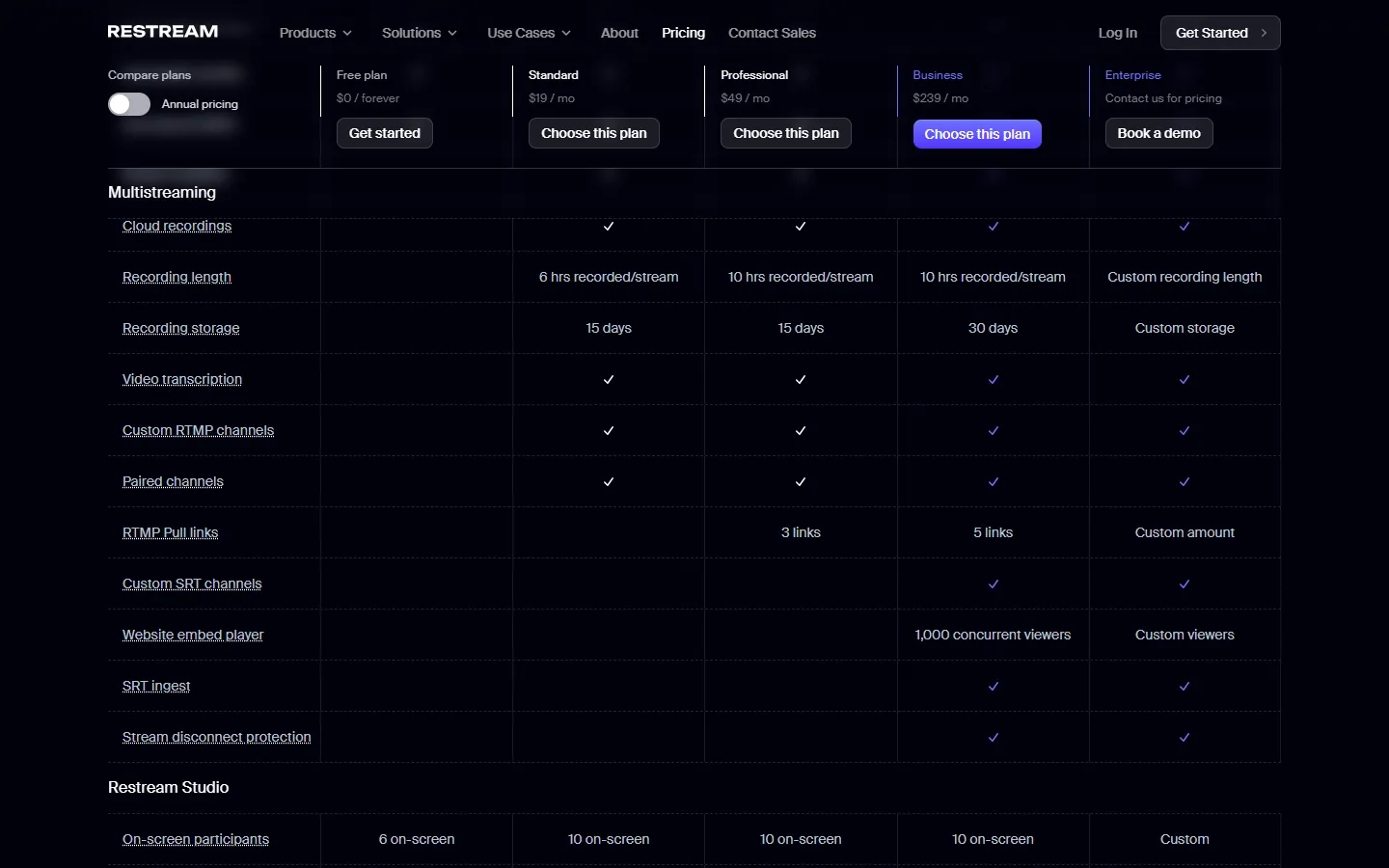
Part of Restream’s plan comparison table, monthly prices: recording length and storage, pull links, SRT and disconnect protection by plan.
Three rows deserve a second look.
Stream analytics. The table leaves the free plan’s cell empty. The help article “Can I use Restream for free? (Yes!)” lists “Stream analytics” among the things the free plan includes. One of the two is out of date; we could not tell which without an account.
Studio quality. The table stops Studio at 1080p, the multistreaming page says “Studio streams up to 1080p on Professional and higher plans”, and a help article says “With Restream Studio, the highest possible resolution is currently Full HD (1080p).” The webinars page, though, tells you to “Run the webinar from Restream Studio in up to 4K.” The Professional card’s “Record in 4K Ultra HD” fits a third reading: the help centre says local recordings “capture each participant on their own device in up to 4K quality”. What reaches your viewers from Studio is 1080p at most, by every page except one.
People on screen. The table counts 6 on the free plan and 10 on paid plans; the help centre counts guests, “up to 5 guests on a free plan and 9 guests on any paid plan”, a limit that includes “hosts and co-producers”. The table’s tooltip says its count includes “you, guest speakers, or co-hosts”, so the two differ by one person; we could not test which is right.
The pieces in practice
Studio. The browser studio is where Restream competes with StreamYard rather than with a relay. It has scenes, layouts, overlays and backgrounds, a scrolling ticker, QR codes, an extra camera, captions, screen and slide sharing, and royalty-free music: 3 genres on Free and 22 on paid plans. Guests need only the link; the help centre recommends Chrome and lists Safari as “least preferred” on computers. Professional adds dual format streaming, which sends a 16:9 version to some channels and a 9:16 version to others from one show. All graphics are shared between the two, and the help centre says paired guest channels “will always receive the primary landscape stream.”
Chat and analytics. Comments from every platform arrive in one window, and on-screen chat can show them in the stream. Analytics bring viewer numbers from all channels into one view, from Standard up according to the table.
Upload & Stream. You upload a video, or import it from Google Drive, Dropbox or Descript, and schedule it to air as a live stream; a video can loop up to 10 times. The files must be MP4, MOV, M4V or MKV, encoded in H264 with AAC audio and a keyframe interval of 2. The Enterprise card lists “Unlimited Upload & Stream”, which tells you the other plans have limits. The comparison table we read does not show them; PricingSaaS, a third-party pricing tracker, records that the Upload & Stream rows were removed from it in early 2026. The second pricing page sells Upload & Stream as an add-on with a 2-hour or 4-hour library.
Webinars. A separate add-on — “Webinars are only available as an add-on and not included in your main Restream subscription” — for closed events with registration, a webinar page, an attendee list, reminders, chat and call-ins from attendees. It costs $99 a month for 100 attendees on Standard and Professional, and $299 for 500 on Business.
Organizations and workspaces. Teams share an organisation with separate workspaces, each with its own channels, drafts, events and streams. Professional and Business include 2 seats; extra seats cost $25 a month, and the table prices workspaces at $49 or $239 a month each.
API and MCP. Developers get an API at developers.restream.io. The help centre also describes an MCP server that lets Claude, ChatGPT and other assistants create and schedule streams, manage destinations, pull viewer numbers and generate clips, and it says the assistant “can only do things you could already do yourself.” A free account is enough to start, though the article adds that some destinations and features depend on the plan.
4. Recordings, Storage, Clips and Backup: The Limits That Bite
Channels are the limit everyone sees. The ones that cost people a show are in the help centre.
Recordings are paid, capped and temporary. The free plan does not record. On paid plans each stream is recorded up to 6 hours on Standard and 10 hours on Professional and Business, and the help centre is plain about what happens beyond that: “only the hours included in your plan will be saved.” Recordings then expire — 15 days on Standard and Professional, 30 on Business — and “Recordings cannot be recovered beyond your plan’s expiration date.” Restream e-mails a reminder “a few days before your recordings expire”. There is no cap on how many recordings you keep, only on how long each one is and how long it stays.
New accounts start short. Two help articles carry the same sentence: “New accounts can record sessions of up to 15 minutes during the first 7 days after signup.” If you sign up on the day of an important show, record it somewhere else as well.
Downloads come in three formats. MP4 for the full video, MKV for split tracks per guest and M4A for audio. Split tracks exist only for Studio recordings. A recording can also be shared through a public or passcode-protected link.
Uploads last longer than recordings — if you pay. “For paid subscriptions, uploads never expire unless you manually delete them. For free users, uploads are stored for only 30 days.”
Clips run on a monthly allowance. The add-on is priced per plan:
| Plan | Clips add-on | Clips a month | Webinars add-on |
|---|---|---|---|
| Standard | $19 a month | 50 | $99 a month, 100 attendees |
| Professional | $29 a month | 100 | $99 a month, 100 attendees |
| Business | $59 a month | 250 | $299 a month, 500 attendees |
The help centre adds the rules. Clips are generated automatically from Studio or encoder recordings over 10 minutes, and, depending on your Clips plan, manually from uploads or public links from YouTube, OneDrive, Dropbox or Google Drive. The number counts generated clips, not downloads. The allowance “resets every month” and does not roll over: “It’s use it or lose it.” When you reach it, automatic generation stops and you are not charged extra. Restream recommends source video up to 1440p, warns that clips from true 4K or 8K “may fail to export or download”, and delivers downloads at 1080p. Clips you have exported stay until you delete them, but once a recording has expired no new clips can be made from it. A 7-day free trial of Clips turns into a paid subscription unless you cancel it first.
Backup has a timer. Stream disconnect protection, on Business and Enterprise, plays a fallback video when your encoder drops — by default a 17-second “We’ll be right back” clip on a loop — for 5, 15 or 30 minutes. If you do not reconnect in time, the stream ends on the platforms. Only Enterprise can upload its own fallback video, and the help centre says there are no failover alerts and no export of logs or metrics.
5. Restream Pricing 2026 — Four Plans, the Yearly Maths and a Second Pricing Page
Everything below was read on November 11, 2026, in US dollars. The Terms say fees are “exclusive of applicable taxes and duties”, and the help centre mentions sales tax at checkout, so the amount charged can be higher than the card.
The four plans
The main pricing page opens on the Creator tab with monthly billing. Its Business tab shows only the Business plan and Enterprise.
| Plan | Monthly billing | Yearly billing, per month on the card | Billed per year | Channels |
|---|---|---|---|---|
| Free | $0 | $0 | — | 2 |
| Standard | $19 | $16 | $190 | 3 |
| Professional | $49 | $39 | $470 | 5 |
| Business | $239 | $199 | $2,390 | 8 |
| Enterprise | Custom | Custom | Custom | Custom |
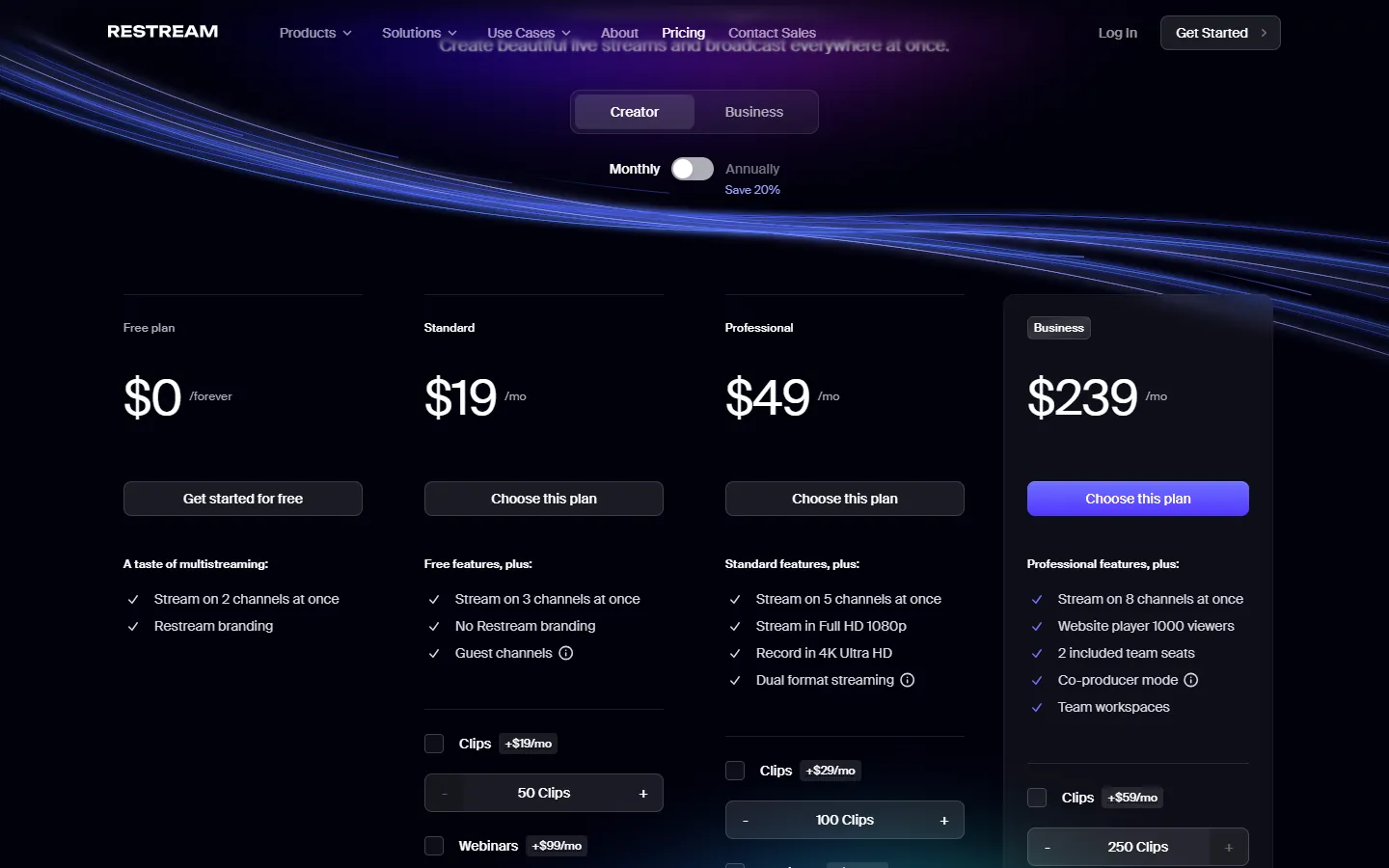
The main pricing page on monthly billing: Free, Standard, Professional and Business, with the Clips and Webinars add-ons under each paid card.
Each card adds a line or two over the plan below it. Free is “A taste of multistreaming”: 2 channels and Restream branding. Standard adds a third channel, removes the branding and adds guest channels. Professional adds two more channels, Full HD in Studio, “Record in 4K Ultra HD” and dual format streaming. Business adds three more channels and the website player for 1,000 viewers; its card also lists 2 included seats, co-producer mode and team workspaces, which the comparison table already gives Professional, and on the Business tab it lists stream disconnect protection. The Enterprise card, on the Business tab, promises “Stream on 10+ channels at once”, “SOC2, SSO, and audit logs” and “SLA and priority support”.
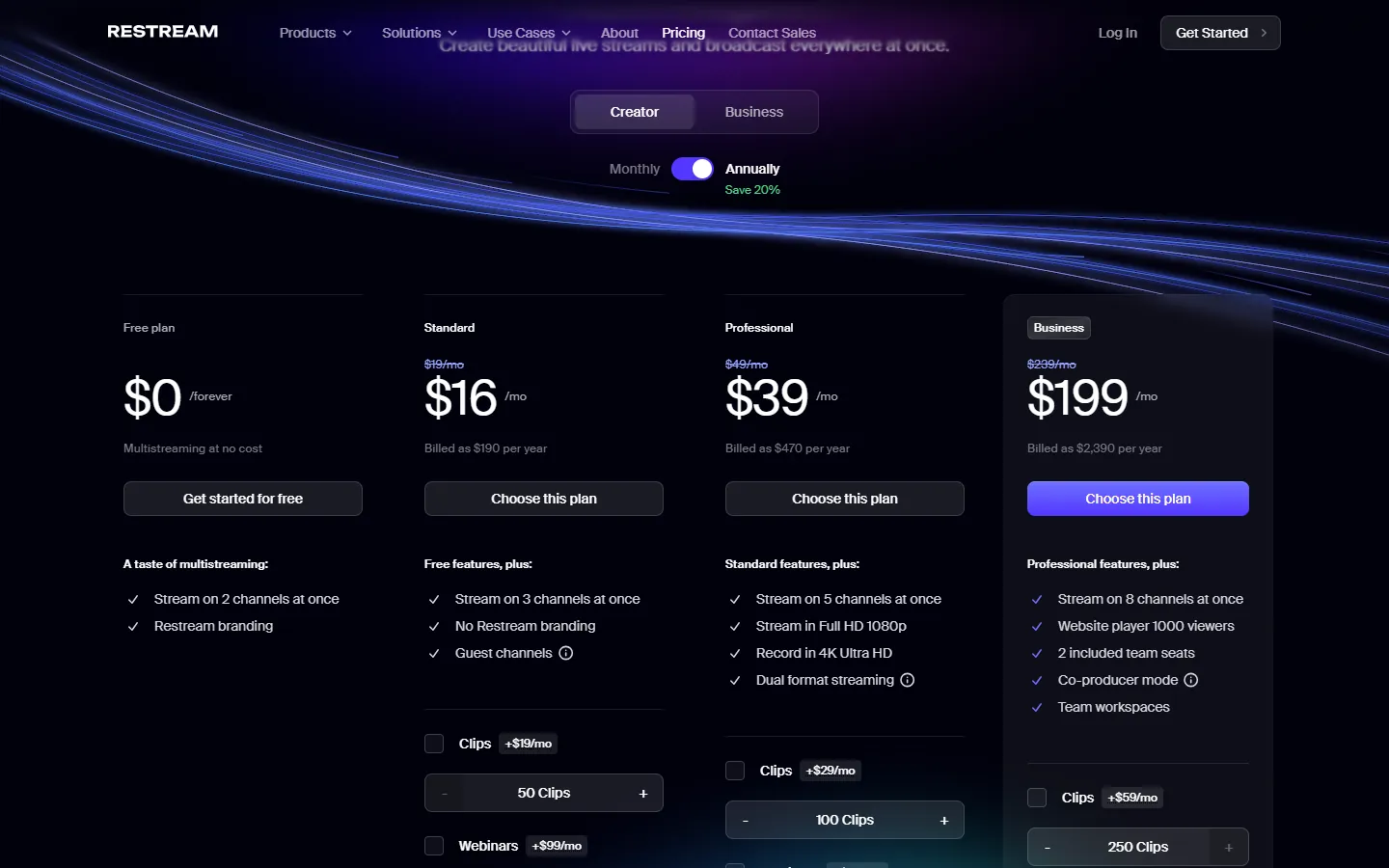
The same page on yearly billing: $16, $39 and $199 a month, billed as $190, $470 and $2,390 a year, under the “Save 20%” switch.
One small trap while reading: the prices count up and down in an animation when you switch tabs or billing. A capture taken too early showed us $238 and $200 for Business; once the animation had stopped, every reading gave $239 and $199.
”Save 20%” — on which plan?
The billing switch reads “Save 20%”. The arithmetic says that is true for one plan out of three:
| Plan | 12 months on monthly billing | One year on yearly billing | You save | Saving |
|---|---|---|---|---|
| Standard | $228 | $190 | $38 | 16.7% |
| Professional | $588 | $470 | $118 | 20.1% |
| Business | $2,868 | $2,390 | $478 | 16.7% |
The per-month figures on the yearly cards round the same way: $16 against $19 is a 16% cut on the card, and $199 against $239 is 17%. Only Professional, $39 against $49, rounds to 20%. Restream’s other pricing page, which we describe below, labels the same Business price more honestly: its yearly switch says “Save 17%”.
The difference is not large in dollars on Standard — $38 a year — but it matters for the decision. A yearly plan is paid upfront, the help centre says the 7-day money-back guarantee covers only a first purchase, and “To downgrade from a yearly plan to a monthly plan, you’ll need to cancel your yearly subscription” and wait for the year to end. On Standard you commit for twelve months to save the price of two.
What changed before. PricingSaaS, a third-party tracker that saves copies of pricing pages, records several changes we could not see ourselves. Between April 1 and July 1, 2024, it shows Standard going from 5 channels to 3 and Professional from 8 to 5, while Professional’s displayed price fell from $41 to $39 a month. In the third quarter of 2025 it logs the yearly message changing from “2 months free” to “Saving up to 20%”. In March 2026 it logs the removal of the savings amounts from the yearly cards — $38, $118 and $478, the same figures as our table. We have not seen the older pages; treat these as the tracker’s record, checked on November 9, 2026.
The second pricing page: plans by audience, and streaming hours
On several of our visits, restream.io/pricing did not open the page above. It redirected to restream.io/v-pricing, a different page headed “Plans that fit your needs.” In one test, two of six fresh visits landed there. Opening restream.io/v-pricing directly sent us back to the main page. This looks like a pricing experiment, and Restream does not say on either page who sees which one.
The second page asks “What best describes you?” and sells one base plan per audience, with add-ons you switch on:
| Audience | Base plan | Monthly | Yearly | Streaming hours in the base |
|---|---|---|---|---|
| Solo Creators | Free | $0 | — | 50, counted per destination |
| Solo Creators | Creator Plus | $19.99 | No yearly option shown | Not stated on the card |
| Business | Business | $239 | $199 a month, billed $2,390 a year | 50, 1 hour per destination |
| Media & Sports | Media | $359 | $299 a month, billed $3,590 a year | 100, 1 hour per destination |
| Faith & Nonprofits | Faith & Nonprofit | $99, shown against $239 | $83 a month, billed $992 a year | Not listed |
| Government | Government | $239 | $199 a month, billed $2,390 a year | Not listed |
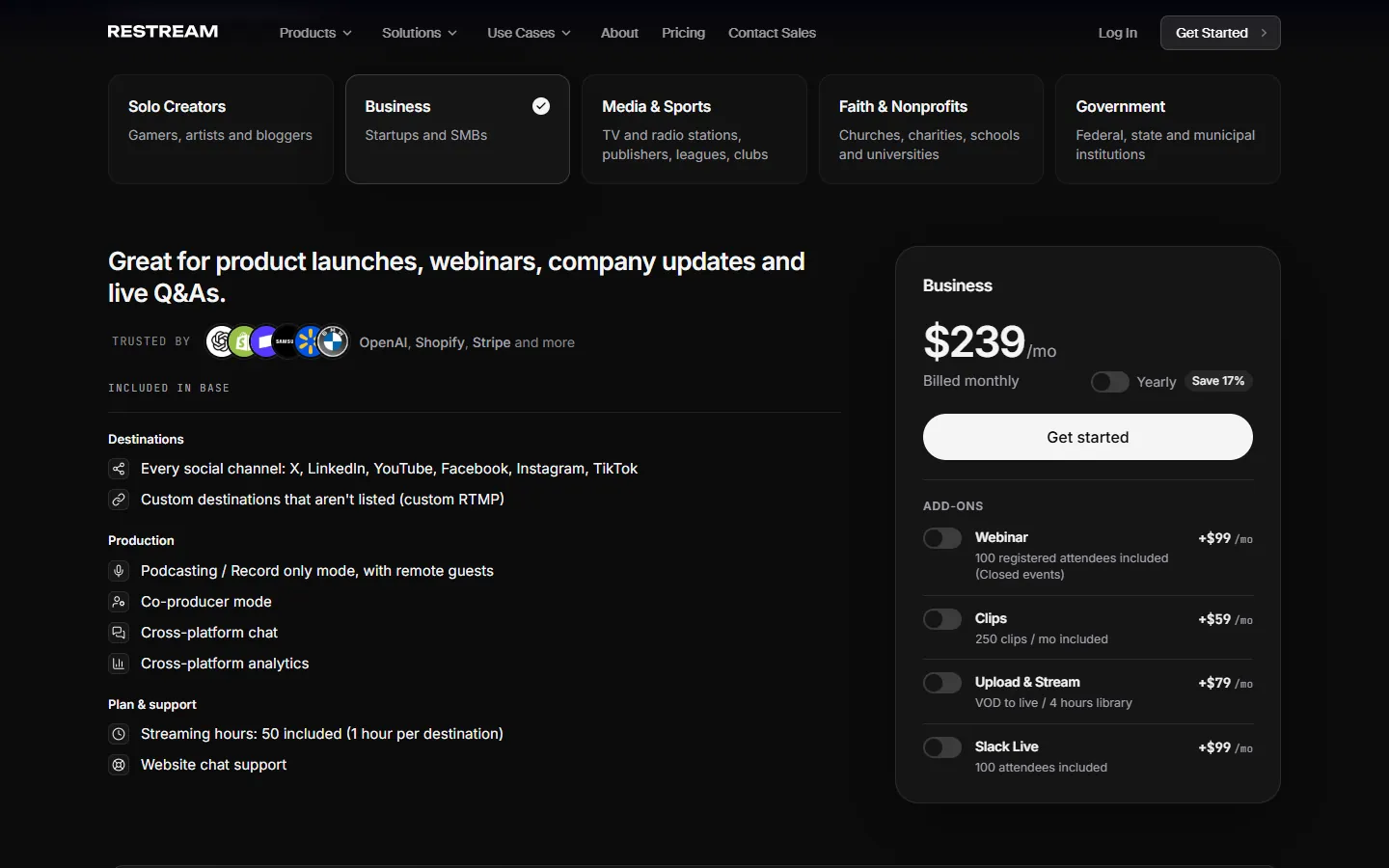
The second pricing page, Business tab: $239 a month, “Save 17%” on yearly billing, and 50 streaming hours counted per destination.
What “streaming hours” means. The free plan’s card spells it out: “Counted per destination: 1 hour live on 3 platforms uses 3 hours”. Fifty hours therefore buys nearly 17 hours of live time on three platforms, or 10 hours on five. The page does not say whether the 50 hours renew each month. The main pricing page we saw on most visits shows no hour limit at all, so the same free account may come with a cap or without one depending on the page you were shown.
What else is different.
- The solo plans are for individuals only. Both cards say “Individual use only”, and a banner asks “Streaming for a company or organization?” and points to the business plans.
- Creator Plus is $19.99, not $19, and is described as “Everything in Free, plus the extras you pick below.” Its add-ons are Clips at $19 a month for 50 clips, “Advanced Cloud recording” at $19 and Upload & Stream at $39 with a 2-hour library.
- The Business base leaves out things the main page includes. Its add-ons are a Webinar at $99, Clips at $59, Upload & Stream at $79 with a 4-hour library and Slack Live at $99. Its comparison with “Business Plus” marks disconnect protection, single sign-on and audit logs as Plus only, while the main page lists stream disconnect protection on the Business card.
- Faith and nonprofit organisations get a large discount. The card says “you save $140/mo on the base plan”, with real-time chat support during weekends, disconnect protection and a sermon library, and adds that “Add-ons are regular price.”
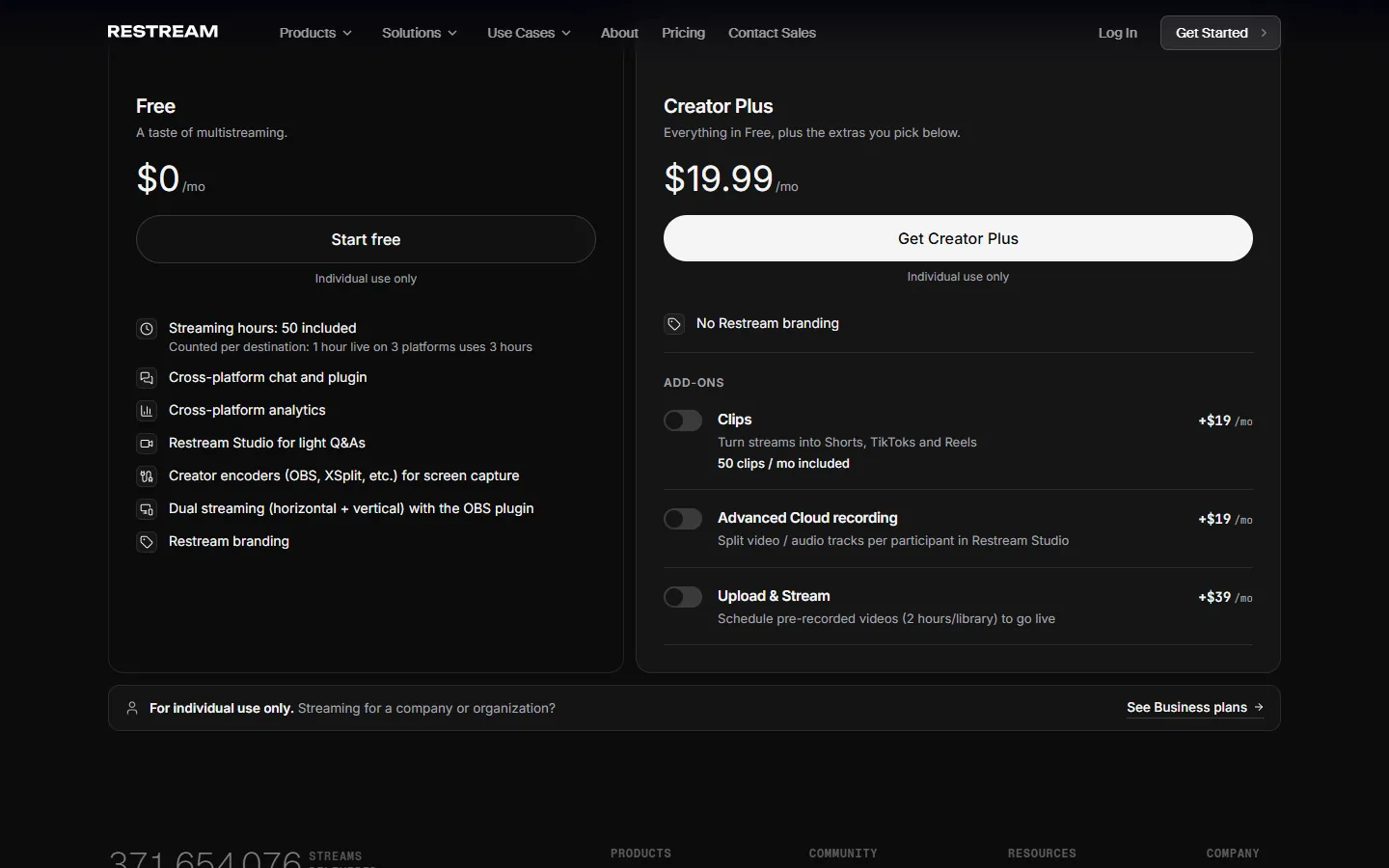
The Solo Creators tab of the second page: Free with 50 streaming hours counted per destination, and Creator Plus at $19.99 a month.
If you were shown the second page, read your plan’s terms at checkout before you rely on either set of numbers in this review.
Example budgets
What a first year costs for four common set-ups, at the prices on the main pricing page. The Clips and Webinars add-ons show only monthly prices there, so the yearly column leaves them out.
| Set-up | Plan and add-ons | Per month | First year, monthly billing | First year, yearly plan |
|---|---|---|---|---|
| A gamer on YouTube, Twitch and Kick | Standard | $19 | $228 | $190 |
| A weekly talk show on five platforms, with clips | Professional + Clips (100) | $78 | $936 | $470 plus Clips |
| A company streaming launches and webinars | Business + Webinars (500) | $538 | $6,456 | $2,390 plus Webinars |
| A church, on the second pricing page | Faith & Nonprofit | $99 | $1,188 | $992 |
Two things follow. For a creator, Standard is cheap enough that the yearly plan saves little and ties you in. For an organisation, the add-ons can cost more than the plan, so price the Webinars and Clips tiers before you compare Restream with anything else.
What our link does
The button below goes through our referral link, and TrackerTools may be paid by Restream if you subscribe after clicking. Restream’s help centre describes a referral programme in which the person who shares a link earns “10 USD” when someone signs up through it and buys a paid plan, and says the person who signs up gets “10 USD in Restream credit to use towards subscribing to paid plans”. We have not checked at checkout that the credit appears through our link. The referral section of the Terms of Service, from 2020, gives different amounts: $19 or $49 in referral credits, for a monthly or a yearly plan. The same article says referral credit is applied as a Stripe coupon, so it “can’t be combined with another promotional discount code” — if you hold a better promo code, use that instead.
Free plan with 2 channels · 7-day refund on a first purchase
Run one real stream on the free plan before you pay for a year
Start monthly. Yearly billing saves 20% only on Professional; on Standard and Business it saves 17%.
See Restream plans
6. Trial, Refunds, Cancelling and the Contract
Restream’s billing rules live in three places: help centre articles, a page of promo code terms, and Terms of Service that say they were “Last modified on 11/25/2020”. They do not say the same thing about refunds.
Trial. The main pricing page offers no trial of the paid plans; the free plan is the trial. The help centre does describe a “7-day trial” that turns into a paid plan unless you cancel, and a 7-day free trial of the Clips add-on with the same rule. Neither comes with a refund: “charges made after a 7-day trial do not qualify for Restream’s 7-day money-back guarantee”, and the promo code terms say “The 7-day refund policy doesn’t apply to trials.”
Refunds — the help centre version. An article last updated on July 11, 2025 opens with “Restream offers a 7-day money-back guarantee period for first-time subscribers.” You cancel within 7 calendar days of your first purchase and ask support for the money. The conditions are narrow: only first-time subscribers qualify, an upgrade from one paid plan to another does not count as a first subscription, and “Auto-renewals are not covered by the 7-day money-back guarantee.” The refund reaches your account “within 5–10 business days” once processed. The promo code terms agree: “We offer a full refund for the first time subscribers ONLY.”
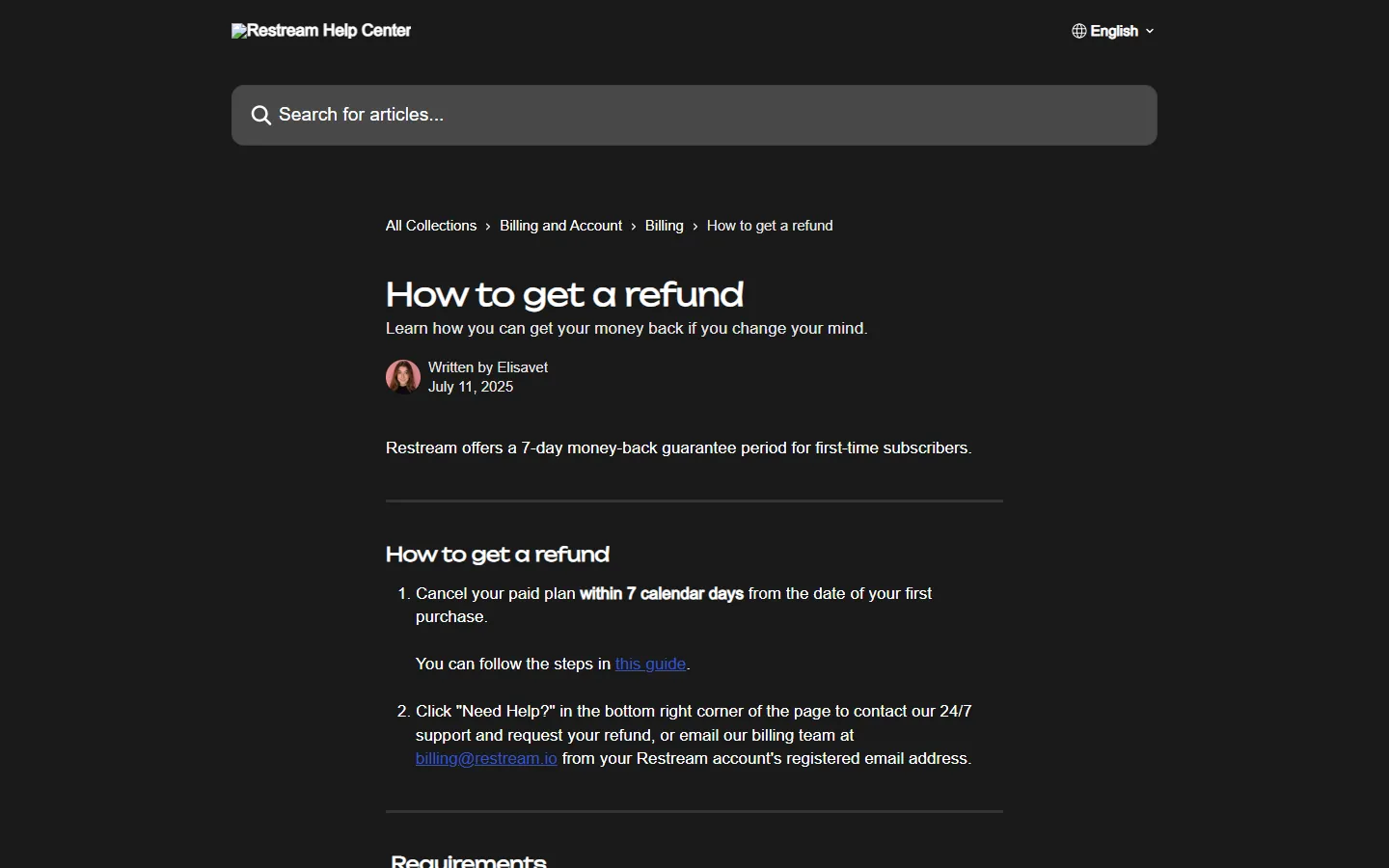
The help centre’s refund article, updated July 11, 2025: a 7-day money-back guarantee for first-time subscribers only.
Refunds — the Terms of Service version. Section 4.2.1 says that no refunds of prepaid, unused fees will be issued when you close your account, with two exceptions: a general outage that kept you out for at least 72 consecutive hours, or an access problem that support could not solve within 7 days of your report. It ends: “our billing team has the absolute right to decline to issue a refund.” Section 4.2.2 adds that downgrading or changing plans brings “no refunds or credits”. The Terms’ own text does not mention a 7-day guarantee; it appears in the promo code terms, which the Terms incorporate for customers who use a promo code.
We cannot tell you which document Restream’s billing team follows; a Trustpilot reviewer in August 2025 wrote that the company “refused to give me a refund”. If you want your money back, ask through the in-app chat within the 7 days, and keep the transcript.
Cancelling. The help centre’s way is the Billing page in your settings: “Cancel subscription”, pick a reason, confirm. You keep paid features until the end of the period you paid for, your channels and settings stay for a later return, and “any discounts that were previously applied to your plan will no longer be valid”. The Terms describe an older route — the in-app chat or an e-mail from your account’s address to the billing team — and warn that a cancellation sent from another address may not count, so that the account “may be considered as closed due to a payment default”. Use the button, and keep the confirmation.
Plan changes and failed payments. Upgrades take effect at once, with the unused part of your current plan subtracted; downgrades wait for the end of the billing period. Going from yearly to monthly means cancelling the yearly plan and resubscribing after it ends. If a renewal payment fails, the help centre says Restream retries “over the next few days”; the Terms allow a paid account to be terminated one business day after notice of a payment default.
Discounts. The promo code terms say discounts apply to the first payment only, “unless a “lifetime” promotion is stated”, cannot be combined, and do not apply to enterprise packages. They also say Restream “reserves the right to offer varying discount rates based on factors such as account creation date, streaming frequency, and other criteria” — two people can be offered different prices for the same plan.
The contract in one table
| Topic | What the Terms of Service say | What it means for you |
|---|---|---|
| Who you contract with | Restream, Inc.; legal notices go to “Restream Live Streaming, Inc” in Austin, Texas | Two company names for one contract; we did not check either in a register |
| Changes to the Terms | Most changes take effect when posted, others after 15 days or when you click to accept, and “It is your responsibility to check the Site regularly” | The rules can change without an e-mail to you |
| New fees | Section 2 lets Restream start charging for a free service “at any time and without notice”; Section 10.1 promises 30 days’ notice, posted on the pricing page | The two sections disagree; neither promises to write to you |
| Individual accounts | You may only stream content “that you own or created” and not on behalf of a company | A company streaming its own events belongs on a business plan |
| Termination by Restream | Free services can be ended at any time; paid services with 30 days’ notice; for cause immediately, or one business day after a payment default | A long-running channel setup can end on short notice |
| Your data after termination | Not intentionally erased for 30 days after a termination not for cause; getting it back may require paying storage charges | Download recordings before you leave or before a card expires |
| Your content | You keep “all right, title and interest”; Restream will not disclose it except to run the service or when the law requires | We found no licence from you to Restream in the Terms; suggestions you send become Restream’s |
| Security and backups | You “bear sole responsibility for adequate security, protection and backup of Your Content” | Keep your own copy of every recording |
| Liability | No liability for damages of any kind, except for gross negligence or wilful misconduct; overall liability capped at the amount you paid | If a broadcast fails, the most you could claim is what you paid |
| Disputes | Texas law; courts in Austin, Travis County; Restream may also sue you in your own country | No arbitration clause, but a court far from most customers |
| Marketing e-mail | ”By creating an Account, you agree to subscribe to newsletters”, with an unsubscribe link | Expect marketing e-mail from sign-up |
| Age | At least 16, or the age of majority where you live | Younger streamers need a parent or guardian as the user |
7. Is Restream Safe? Your Channels, Your Streams, AI Clips and Your Data
Access to your channels. To publish on your behalf, Restream needs either your approval on each platform or a stream key you paste in. The help article on safety says that with platform authorisation Restream receives “basic account information used for authentication, like your username, user ID, email address, and profile picture”, and the Privacy Policy lists “the stream keys or tokens needed to operate the Service” among what it collects. You can delete a channel from the Channels page at any time. Payments go through Stripe, and Restream says it does not store full card numbers. Two-factor authentication with an authenticator app is available in the account settings.
Whether multistreaming is allowed. Restream’s answer is careful: “Multistreaming is allowed on many major platforms”, but “each platform has its own rules and requirements”, and users should check them, “including any exclusivity contracts they may have with partners.” If you have a partner or creator agreement with one platform, read it before you send the same stream to its competitors.
Your streams and recordings. The Terms leave ownership with you and contain no licence to Restream that we could find. Recordings sit in Restream’s storage until they expire or you delete them; deleting your account “will permanently erase your personal data from Restream, including stream recordings, analytics, and destinations.” For personal data in general, the Privacy Policy, last modified on August 31, 2026, says “We do not currently delete personal information on a fixed schedule”, and that deletion requests are generally handled within 30 days.
Selling and sharing data. The Privacy Policy says “Restream does not sell personal information”. It also says Restream uses advertising and analytics technology from partners such as Google and Meta for retargeting, which “may be considered “sharing” or “targeted advertising”” under some US state laws. Where the law gives you that right, you opt out by e-mail.
AI training — two promises of different size. The Clips help page is categorical: “No AI training. Your voice, face, or likeness is never used to train any AI models.” The Privacy Policy is narrower. Its sentence is “Restream does not use your personal information to train Restream’s own AI models.”, and the next one reads: “This does not describe the practices of third-party service providers that support certain features (such as Clips)”. The Privacy Policy also says Restream processes “the video, audio, and metadata associated with your Clips”.
Restream’s list of sub-processors names the supplier. Next to “AI clips generation” it lists ZIGG SAS, with data in the United States. ZIGG SAS is the legal name on the website of Klap, a separate AI clipping product: its footer reads “ZIGG SAS doing business as Klap”. So by Restream’s own list, AI clip generation is handled by the company behind a competing clipping tool, and Restream’s Privacy Policy keeps such suppliers outside its no-training sentence. We did not read Klap’s data terms for this review. If this matters to you, turn off Clips’ autopilot — the help centre says you can — and generate clips only from recordings you are comfortable sending to that supplier.
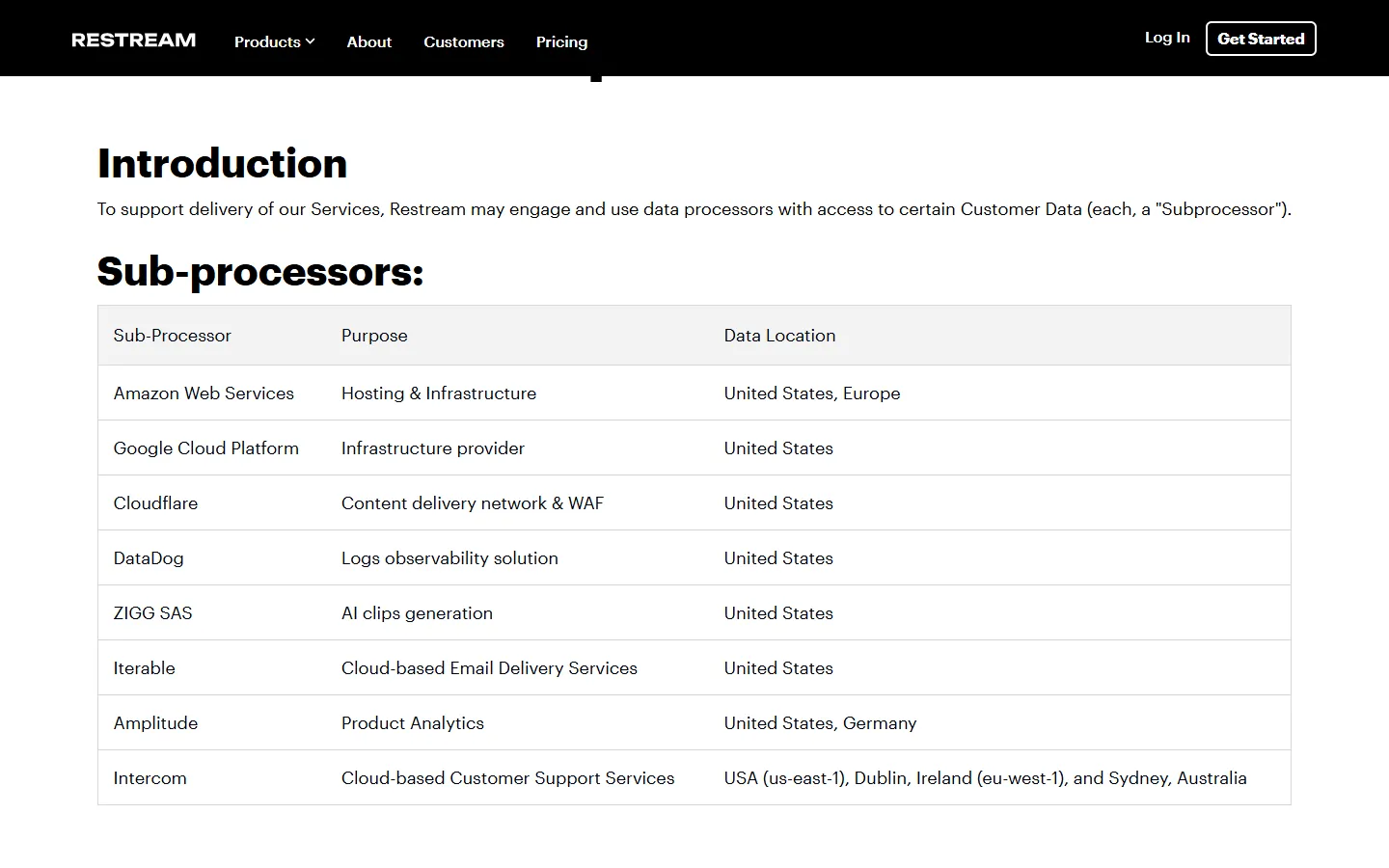
Restream’s sub-processors on November 11, 2026: ZIGG SAS handles “AI clips generation”, next to AWS, Google Cloud and Cloudflare.
SOC 2 and security reviews. On the Business tab of the pricing page, the Enterprise card lists “SOC2, SSO, and audit logs”, and the comparison table offers a “Security review” on Enterprise only. We found no public SOC 2 report or trust centre: restream.io/security returned a “Page Not Found” page, and trust.restream.io did not resolve. The help article on safety mentions GDPR, a data processing agreement with standard contractual clauses and two-factor authentication, but not SOC 2. Treat the SOC 2 line as something to ask sales for in writing.
Where the data goes. The sub-processor list names Amazon Web Services (United States and Europe), Google Cloud Platform (United States), Cloudflare, Datadog for logs, Iterable for e-mail, Amplitude for product analytics (United States and Germany) and Intercom for support. The Privacy Policy says data may be stored and processed outside your country.
Reliability. Restream says it adds a delay “always under 2 seconds”, and Business adds disconnect protection with a fallback video, while Enterprise adds backup streams and dedicated infrastructure. The Terms promise nothing: Restream may suspend services for maintenance, attacks or legal reasons and takes “no liability whatsoever” for the consequences, “including any loss of data or profits”. Only the Enterprise card mentions an SLA. For a stream that cannot fail, run a second path you control, such as a direct stream to your main platform.
8. What Restream Users Say: Trustpilot and the Sites We Could Not Read
Trustpilot. On November 11, 2026, Restream’s Trustpilot page showed a TrustScore of 4.6, rated “Excellent”, from 506 reviews. The split was 77% five-star, 11% four-star, 3% three-star, 1% two-star and 8% one-star. The profile has been claimed since January 2021, and the page says Restream “Replied to 66% of negative reviews” and “Typically replies within 1 month”. Restream’s own webinars page quotes the same 4.6. Trustpilot blocks automated downloads, so we read the page through a web-reading tool and record its figures as reported on that day.
What the happy reviews say. The eight most recent reviews were all five-star, from September and October 2026, and most of them are about support rather than the product: “Support is top-notch!”, “Resolutions are quick and direct.” One of them sums up the free tier: “Works, even the free tier is good”.
What the one-star reviews say. We read the ten most recent one-star reviews. One was about a job interview, not the product. The other nine fall into four groups — billing, streams that stop working, clip quality and support:
| Theme | Example, as written | Date |
|---|---|---|
| Charges and refunds | ”after cancelling they contiued to charge me $239/mo” | August 2026 |
| Charges and refunds | ”They refused to give me a refund and I can’t take my debit card off of their platform.” | August 2025 |
| Streams that stop working | ”One day, Im streaming to multiple platforms, the next day it doesnt work.” | June 2026 |
| Streams that stop working | ”the login function never works half of the time then it never connects to twitch” | August 2025 |
| Clips quality | ”Short subtitles are not working properly and make your shorts look like you are unprofessional” | January 2026 |
| Support that blames the user | ”Their knee jerk response is to blame the customer for everything.” | October 2025 |
| Support that blames the user | ”Asked a question via email. Got a tone deaf AI reply.” | September 2025 |
The two most recent one-star reviews, from June and August 2026, had no reply from Restream when we read them; the older ones did. The charges-after-cancelling complaint is worth reading next to section 6: the Terms describe cancelling through chat or e-mail from the account’s address, and the help centre through a button. Whichever you use, keep the confirmation.
The sites we could not read. G2 and Capterra both answered our requests with an HTTP 403 error on November 11, 2026, so we have no ratings from them to report. We did not try to get around the block.
9. Restream Alternatives: StreamYard, Castr, OneStream Live, Livepush, Riverside and Streamlabs
Every price below was read on each company’s pricing page on November 11, 2026. Destination counts are for the cheapest paid plan unless the cell says otherwise.
| Tool | Cheapest paid plan | Destinations on that plan | Free plan or trial | Best at |
|---|---|---|---|---|
| Restream | Standard, $19 a month or $190 a year | 3 (8 on Business) | Free plan, 2 channels, Restream branding | Relaying an encoder stream to many platforms, with a browser studio |
| StreamYard | Essential, $18.99 a month or $14.99 a month yearly | 2 (3 on Core, 8 on Advanced) | Free plan with a StreamYard logo; “Start 7-day free trial” on paid plans | A polished browser studio for shows with guests |
| Castr | Starter, $19.99 a month or $16.67 a month yearly | 6, with 2 streams at once (3 on yearly billing) | “Start 7-day trial”, “No credit card required” | Multistreaming plus video hosting, 24/7 playout and a paywall |
| OneStream Live | Basic, $15 a month | 5 (30 on Professional at $49) | Free plan, 2 destinations at 720p | Many destinations and pre-recorded streams for the price |
| Livepush | Pro, $13 a month on yearly billing ($156) | 15 | Free plan, 3 places and “20 hours of streaming a month” | 24/7 and pre-recorded channels |
| Riverside | Grow, the cheapest plan with live streaming: $39 a month or $34 a month yearly | Unlimited | ”Start 14-day free trial” | Recording studio and editor that also streams |
| Streamlabs Ultra | ”Starting at” $15.75 a month | Several, from Streamlabs Desktop, mobile or console | Free Streamlabs software without multistream | Gamers who already use Streamlabs Desktop |
StreamYard is the closest rival to Restream Studio, and the cheapest plans of both cost almost the same. The difference is where each starts: StreamYard is a studio first, and its Essential plan streams to 2 destinations, while Restream is a relay first and its Standard plan sends an encoder stream to 3. StreamYard’s paid plans are also “For individuals only”, with separate business plans.
Castr costs about the same as Restream Standard and lists 6 destinations on Starter and 2 streams at once, or 3 on yearly billing, plus video hosting, live-to-VOD, a paywall and TV playout. It is a better fit if you run a channel rather than a show, and it offers a trial without a card.
OneStream Live sells more destinations for less: 5 on Basic at $15 a month, 10 on Standard at $39 and 30 on Professional at $49, though Basic streams at 720p. A 24-hour YouTube stream costs a $30 add-on.
Livepush is the one to compare if the second Restream pricing page worries you: its free plan counts hours openly — 20 a month — and its Pro plan lists “No monthly streaming limit” and 15 places at once, at $13 a month billed yearly.
Riverside is a recording studio with an editor, podcast hosting and clips; its Grow plan adds “Multistream to unlimited destinations” in Full HD. Choose it if the recording matters more than the stream.
Streamlabs Ultra puts multistreaming inside Streamlabs’ own streaming software, mobile app and console app, for gamers who already stream with Streamlabs.
10. Restream Pros and Cons
Pros
- A real free plan: 2 channels from OBS or the browser studio, with chat and Restream branding
- One upload, many platforms: Restream’s servers copy the stream, so your connection carries it once, and Restream says the extra delay stays under 2 seconds
- Encoder streams pass through untouched: Restream says it does not modify your audio and video, so 4K from OBS reaches platforms that accept it, even on the free plan
- Wide reach: 30 named destinations, including Kick, Rumble, Bilibili and Substack, with custom RTMP channels from Standard and custom SRT from Business
- A browser studio with guests: up to 9 guests on paid plans, dual format streaming from Professional, and split tracks for editing
- Business features without Enterprise: SRT ingest, a website player for 1,000 viewers and disconnect protection on the $239 Business plan
- A 7-day money-back guarantee for first-time subscribers, according to the help centre and the promo code terms
- Your content stays yours: the Terms contain no licence from you to Restream that we could find
Cons
- The yearly switch says 20% but saves 17% on Standard and Business; only Professional saves 20%
- Two refund rules: a 7-day guarantee in the help centre, and Terms of Service from 2020 that allow refunds only after a 72-hour outage or an unsolved problem, at the billing team’s “absolute right to decline”
- A pricing experiment: some visitors see a second page with $19.99 Creator Plus and 50 streaming hours counted per destination
- Short-lived recordings: paid plans only, 15 or 30 days, and only 15-minute sessions in a new account’s first week
- Studio quality is rationed: 720p until Professional at $49 a month, and Restream’s own pages disagree about 4K
- Add-ons add up: Clips, Webinars and extra seats cost more, workspaces are priced one by one, and webinars cost more than the Standard and Professional plans themselves
- AI clips through a third party: the sub-processor for clips is ZIGG SAS, the company behind Klap, and the Privacy Policy keeps such suppliers outside its no-training sentence
- Company streaming needs a company plan: the Terms limit individual accounts to streaming for yourself
11. Frequently Asked Questions
What is Restream?
Restream is a live streaming service from Restream, Inc. of Austin, Texas, founded in 2015 in Ukraine. Its help centre calls it 'a live streaming software that lets you broadcast one live stream to 30+ platforms at the same time'. You send one stream from OBS, another encoder or its browser studio, and Restream's servers copy it to YouTube, Twitch, Kick, TikTok, LinkedIn, Facebook, X and other platforms. Around that it sells a browser studio with guests, a unified chat, cloud recording, AI clips and webinars.
How much does Restream cost in 2026?
On the pricing page we read on November 11, 2026: Free at $0 with 2 channels; Standard at $19 a month or $190 a year with 3 channels; Professional at $49 a month or $470 a year with 5 channels and 1080p in the studio; Business at $239 a month or $2,390 a year with 8 channels; Enterprise at a custom price. Clips cost $19 to $59 a month extra, Webinars $99 or $299 a month, and extra seats $25 a month. Fees are exclusive of taxes.
Is Restream free?
There is a free plan. The pricing page calls it 'A taste of multistreaming': 2 channels at once, with Restream branding. The help centre says that means a small watermark in studio streams and/or a link in your stream description; streams sent from OBS on the free plan carry no watermark on the outgoing stream. The free plan has no cloud recordings, and the studio streams at 720p with up to 5 guests.
Does Restream's yearly plan really save 20%?
Only on Professional. The switch reads 'Save 20%', but twelve monthly payments of $19 cost $228 against $190 for a year of Standard, a 17% saving; Business costs $2,868 against $2,390, also 17%. Professional, at $588 against $470, saves 20%. Restream's second pricing page labels the Business saving as 17%. The help centre's 7-day guarantee covers a first purchase only, so a yearly plan is a twelve-month commitment.
Why did I see a different Restream pricing page?
Restream appears to be testing a second pricing page. On some of our visits on November 11, 2026, restream.io/pricing redirected to restream.io/v-pricing, which sells plans by audience — Solo Creators, Business, Media & Sports, Faith & Nonprofits and Government — and lists 'Streaming hours: 50 included' on the free plan and the Business base, counted per destination, so one hour live on three platforms uses three hours. Creator Plus costs $19.99 a month there. Check your plan's details at checkout.
Can a company use Restream's Standard or Professional plan?
The Terms of Service say that if you register as an individual you must only stream content you own or created and not on behalf of a company, and that someone whose job is to stream company content must register for a 'for companies' plan. On the main pricing page the Business tab shows the Business plan at $239 a month and Enterprise; the solo plans on the second pricing page say 'Individual use only'.
Does Restream lower my video quality or add delay?
Restream says no to the first: 'Restream doesn't modify your incoming audio and video in any way.' On delay, it says any additional delay is 'always under 2 seconds' whatever the number of channels. Multistreaming needs no extra bandwidth from you because Restream's servers make the copies; the help centre recommends 25 Mbps of upload or more for Full HD. We did not measure delay or quality ourselves.
Can I stream in 4K or 1080p with Restream?
From an encoder such as OBS, yes: Restream passes on whatever resolution you send, 4K included, even on the free plan, as long as the destination accepts it. From Restream Studio, the pricing table, the multistreaming page and a help article put the limit at 1080p, available from Professional; Free and Standard stream from the studio at 720p. The webinars page claims 'up to 4K' from the studio, and the Professional card's 4K refers to recording: local recordings capture each participant in up to 4K.
How long does Restream keep my recordings?
Recordings exist on paid plans only. Each stream is recorded up to 6 hours on Standard and 10 hours on Professional and Business, and recordings expire after 15 days on Standard and Professional and 30 days on Business. The help centre says expired recordings cannot be recovered and that new accounts can record sessions of only 15 minutes during their first 7 days. Uploaded videos never expire on paid plans and last 30 days on the free plan.
Can I get a refund from Restream?
The help centre offers 'a 7-day money-back guarantee period for first-time subscribers': cancel within 7 calendar days of your first purchase and ask support. Renewals, upgrades and charges after a trial are not covered. The Terms of Service, last modified in 2020, are stricter: no refunds of prepaid fees unless an outage lasted 72 consecutive hours or support could not fix a problem within 7 days, and the billing team has 'the absolute right to decline to issue a refund'. Ask in writing within the 7 days.
How do I cancel Restream?
Go to the Billing page in your settings, click Cancel subscription, choose a reason and confirm. You keep paid features until the end of the period you paid for, and your channels and settings stay for later, but discounts you had are lost. The older Terms describe cancelling through the in-app chat or an e-mail from your account's address to the billing team. Download your recordings first, and keep the confirmation.
Does Restream use my videos to train AI?
The Clips help page says your voice, face or likeness is 'never used to train any AI models'. The Privacy Policy says Restream does not use your personal information to train 'Restream’s own AI models', and that this 'does not describe the practices of third-party service providers that support certain features (such as Clips)'. Restream's sub-processor list names ZIGG SAS for 'AI clips generation'; Klap's website says Klap is ZIGG SAS. You can turn off Clips' autopilot.
Restream or StreamYard: which should I choose?
Restream if you stream from OBS or another encoder and want the widest reach: its $19 Standard plan sends one stream to 3 channels, Business to 8, across 30 named destinations. StreamYard if you want a polished browser studio first: Essential costs $18.99 a month for 2 destinations, and Core at $44.99 adds a third and removes the logo. Both have free plans, so test your actual show on each before paying.
Does the link in this review give a discount?
Not one we could confirm. Our button goes through a referral link, and TrackerTools may be paid if you subscribe. Restream's help centre says people who sign up through a referral link get '10 USD in Restream credit to use towards subscribing to paid plans', but we have not checked at checkout that this applies to our link. Referral credit cannot be combined with another promo code.
12. Final Verdict: Is Restream Worth It in 2026?
For a streamer or a small team that already goes live from OBS or a browser and wants the same show on YouTube, Twitch, Kick, LinkedIn and Facebook at once, Restream is worth trying, and the free plan makes trying it cost nothing. The relay is the oldest and simplest part of the product: one upload, servers that do the copying, one chat for every platform, and a stream that Restream says it does not touch. Standard at $19 a month covers three channels without branding; Professional at $49 adds the 1080p studio and two more channels.
The reasons to hesitate are in the paperwork rather than the product. The yearly switch says 20% and saves 17% on two plans out of three. The help centre promises a 7-day money-back guarantee to first-time subscribers, while the Terms of Service, unchanged since 2020, barely allow a refund at all and leave the decision to the billing team. Recordings are for paid plans and disappear after 15 or 30 days. A second pricing page under test counts streaming hours per destination and prices the solo plan at $19.99. The AI clips are generated by a third-party supplier that the Privacy Policy keeps outside its no-training sentence. And about one Trustpilot review in twelve is one-star, the two most recent about charges after cancelling and a stream that stopped working.
Use it the smart way. Start on the free plan with two channels and a stream from your usual encoder, and watch the result on each platform. Pay monthly first. Move to yearly only on Professional, where the saving is real, and only after a few months of use. If you take a paid plan and are unhappy, ask for the refund in writing within 7 days of the first purchase. Download every recording on the day you make it. If you stream for a company, budget for the Business plan from the start. Cancel with the button in your billing settings, and keep the confirmation.
Choose something else if you want a studio first and multistreaming second (StreamYard), more destinations for the money (OneStream Live), hosting, playout and a paywall alongside the stream (Castr), a 24/7 channel or plans that count hours openly (Livepush), a recording studio with an editor (Riverside), or clips from recordings you already have rather than a live audience (OpusClip). To schedule the clips and posts around your streams, see our Metricool review.
Disclosure: This review is an independent assessment by TrackerTools and contains a Restream referral link. If you subscribe through it, TrackerTools may be paid; Restream’s help centre describes referral rewards of 10 USD for the referrer and 10 USD in Restream credit for the new user, and we have not checked whether that applies to our link. We did not create an account, buy a plan, stream through Restream or open the referral link. All factual claims were checked on 11 November 2026 against Restream’s homepage, both versions of its pricing page (monthly and yearly views, every audience tab of the second version), its product, About and sub-processor pages, its Terms of Service, Privacy Policy and promo code terms, and its help centre; against Trustpilot, read through a web-reading tool; against PricingSaaS’s record of earlier pricing changes; against Klap’s homepage for the identity of ZIGG SAS; and against each competitor’s own pricing page. User counts, hours streamed, the delay figure and the funding figure are the company’s claims; we could not verify them independently. G2 and Capterra refused our requests, no SOC 2 report or trust centre could be found, and the accounts given by Trustpilot reviewers could not be verified. Metricool and OpusClip were not re-read for this review; what we say about them rests on our own earlier reviews.