
Zapmail Review 2026: Google and Microsoft Cold Email Mailboxes at Scale
What the “$2.5 /mailbox” headline really buys, what the same mailbox costs in its second year, and the terms you accept on the way in.
Zapmail sells the layer underneath a cold-email campaign: Google Workspace and Microsoft 365 mailboxes, created in bulk on your sending domains, with the DNS written for you and an export button to Instantly, Smartlead and the rest. Its homepage promises “EMAIL INFRA AT SCALE”, a price that “Starts just at $2.5 /mailbox” and an average setup time of five minutes.
Most of that holds up, and some of it needs a second look. The $2.50 figure is real, but only on the 100-mailbox Pro plan paid a year ahead. The help centre — not the pricing page — shows that Google plans renew 26% to 51% higher after twelve months. The same help centre puts setup at “up to ~3 hours” for Google and “up to ~12 hours” for Microsoft. And every purchase is final.
This review covers who runs Zapmail, what you actually get, how long setup and warm-up take, every price we could find (plans, renewals, pre-warmed mailboxes and add-ons), the refund and contract terms, the ownership and “Indian IP” questions, what users say on Trustpilot and Reddit, and twelve alternatives. We did not buy a plan: everything here was read on Zapmail’s own pages, its help centre, its Terms and DPA, and third-party sources on 10 November 2026.
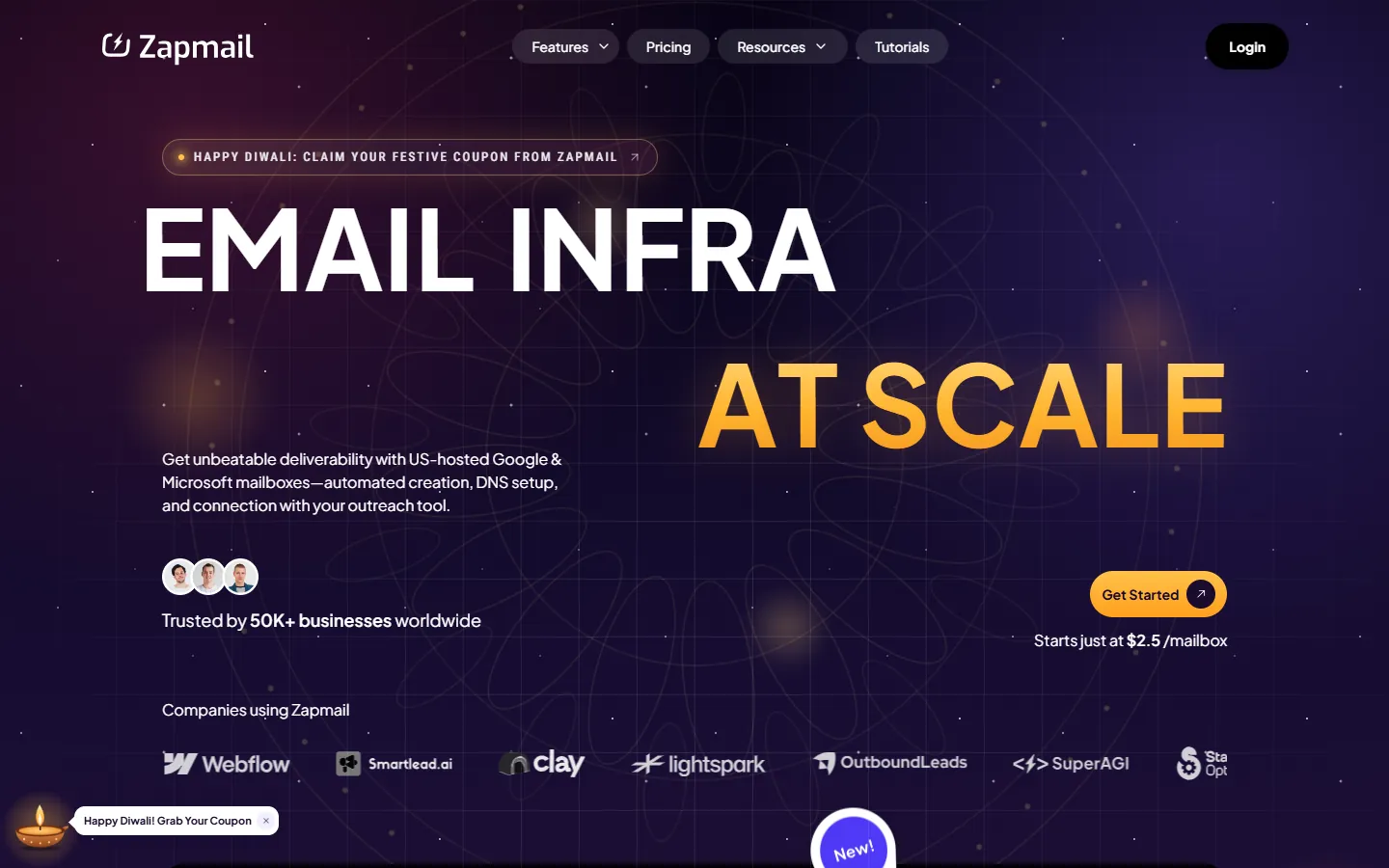
zapmail.ai on 10 November 2026. The “$2.5 /mailbox” headline matches one case only: the Pro plan, 100 mailboxes, billed yearly.
1. What Is Zapmail — and Who Is Behind It
The company. The Terms name the seller as “Outbox Labs Inc., a Delaware corporation doing business as Zapmail”, and the DPA gives its address as 108 W 13th St, Suite 100, Wilmington, DE 19801. The site footer links to outbox.vc, a group page that lists four products — ReachInbox, Zapmail, MailVerify and ReferralStack — and describes the group as “Headquartered in USA”. The founder and CEO is Alan D’Souza. In a GetLatka interview recorded on 6 May 2025 the host put it to D’Souza that Zapmail and the sequencer ReachInbox are “owned by the same parent company”, and the answer was “Absolutely.” D’Souza’s X profile gives Bangalore, India, as the location, and Zapmail’s privacy policy says personal data may be processed “in the United States, India, and other jurisdictions”. Keep that link in mind when you read ReachInbox’s own favourable review of Zapmail: it is a sister company writing about a product from its own group.
Scale. The homepage claims “50K+ businesses”, “1M+ Mailboxes Setup” and “330k+ Domains Managed”. These are the vendor’s own numbers and nobody audits them; the site’s social-preview image still shows the older “500k+ Mailboxes Setup” and “290k+ Domains Managed”. In the May 2025 interview the founder reported 4,500 paying customers, 27 full-time staff, a bootstrapped business and about 280 affiliates who had brought in 30 to 35 percent of customers. That last number matters when you search for opinions on Zapmail: a large share of what you will find was written by someone who earns a commission, and that includes this page (see “What our link does” below).
What it is, legally. Zapmail is a reseller and an automation layer, not a mail provider. Section 4.2 of the Terms says so in one line: “Zapmail is not an independent email service provider.” The mail itself runs on Google Workspace and Microsoft 365. What Zapmail adds is bulk creation, DNS, the workspace-per-domain structure and the export to your sending tool.
The 2026 direction. The product is spreading outward from mailboxes. The public API (v1, with webhooks and an MCP server) logged a “Unified Provider Launch” on 13 October 2026. ZapWarm is a house warm-up network, ZapBox a free unified inbox, ZapSites a website builder in beta, and ZapShield a paid protection layer for domains. The legal pages have kept pace: the Terms and privacy policy were last updated on April 2, 2026, and a new DPA took effect on 1 October 2026.
2. Who Zapmail Is For — and Who It Is Not For
It fits you if:
- You need 30 to a few hundred official Google or Microsoft mailboxes quickly and are happy to run a self-serve dashboard yourself.
- You already use Instantly, Smartlead, ReachInbox or Reply.io, the four tools with one-click export.
- You rotate sending domains within a year. If the mailboxes will be retired before month twelve, the renewal increase never applies to you.
- You want Google and Microsoft in one bundle, at one price, with admin credentials for both.
- You are building a product and want mailboxes from an API, and the $299 Pro plan is within budget.
Look elsewhere if:
- You want stable pricing for mailboxes you keep for years. A flat per-mailbox seller such as InboxKit or Hypertide is easier to budget.
- You need a refund path or a trial. Zapmail has neither. Maildoso publishes a 30-day money-back window for new users, and Mission Inbox had a 48-hour refund window when we reviewed it.
- You would put your main company domain on it. Nameservers must stay with Zapmail, and one Trustpilot reviewer says that repeatedly took their website down.
- You want someone else to do the setup and replace burned inboxes for free. That is the done-for-you model of Premium Inboxes, not this one.
- You send from your own IPs or need a dedicated server. Look at Mailreef, Infraforge or Mission Inbox instead.
- You need fast human support outside US business hours as a guarantee. Reviews are split, and no response time is promised in writing.
3. What You Actually Get: Mailboxes, DNS, Workspaces and Exports
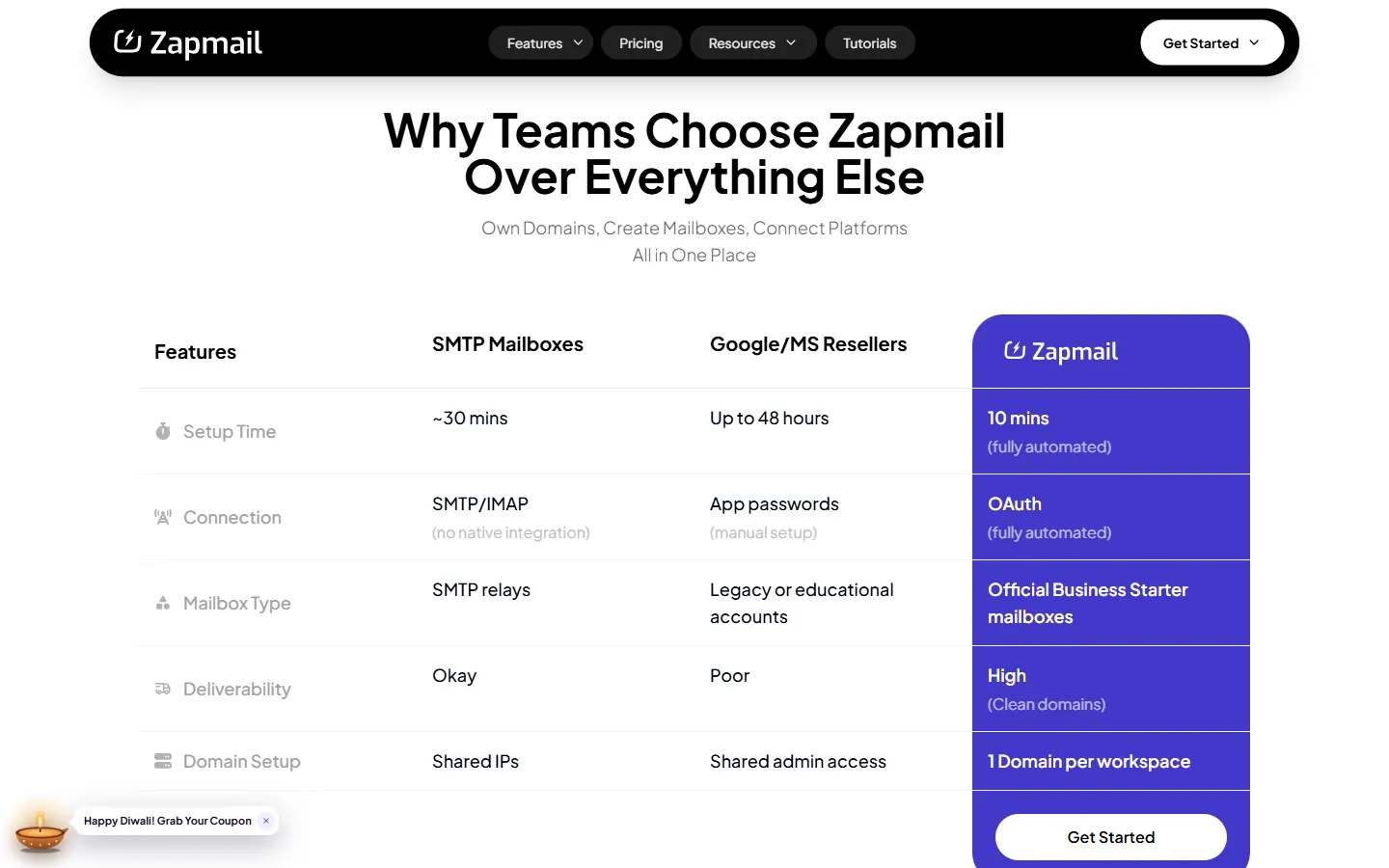
Zapmail’s own comparison table on 10 November 2026. It is the vendor grading itself: “10 mins” setup here, “up to ~3 hours” in the help centre.
The mailboxes. These are business accounts on Google’s and Microsoft’s own platforms. The help centre’s setup FAQ lists them as “Real Google Workspace licenses” and “Real Microsoft 365 business licenses”, and adds “Not educational accounts”, “Not legacy/free accounts” and “Not SMTP-only or virtual inboxes”. Google mailboxes are the Business Starter edition. On admin access the same FAQ answers: “Yes. Zapmail provides admin credentials for both Google Workspace and Microsoft 365”. One difference between the two: the credentials export includes app passwords and SMTP/IMAP details for Google only; for Microsoft you get the admin credentials and the login.
One domain per workspace. Each sending domain gets its own Google or Microsoft tenant — the homepage calls this “Workspace-Level Isolation” and describes it as “One domain per workspace, for unmatched deliverability.” The reasoning is sound: when a provider suspends a tenant, it takes one domain with it rather than thirty. The help centre recommends three mailboxes per domain and allows a maximum of five.
The DNS. Zapmail writes SPF, DKIM, DMARC and MX records and sets up forwarding and custom tracking domains without you opening a registrar. You can connect a root domain you already own or buy one in the dashboard (the homepage FAQ quotes “a .com domain is $13.00”). Two limits come with it. Subdomains are not supported. And to the question of whether you can move your nameservers elsewhere, the help centre answers: “No. Zapmail requires nameservers to remain pointed to Zapmail.” That single sentence is the reason not to connect a domain that also runs your website; section 7 comes back to it.
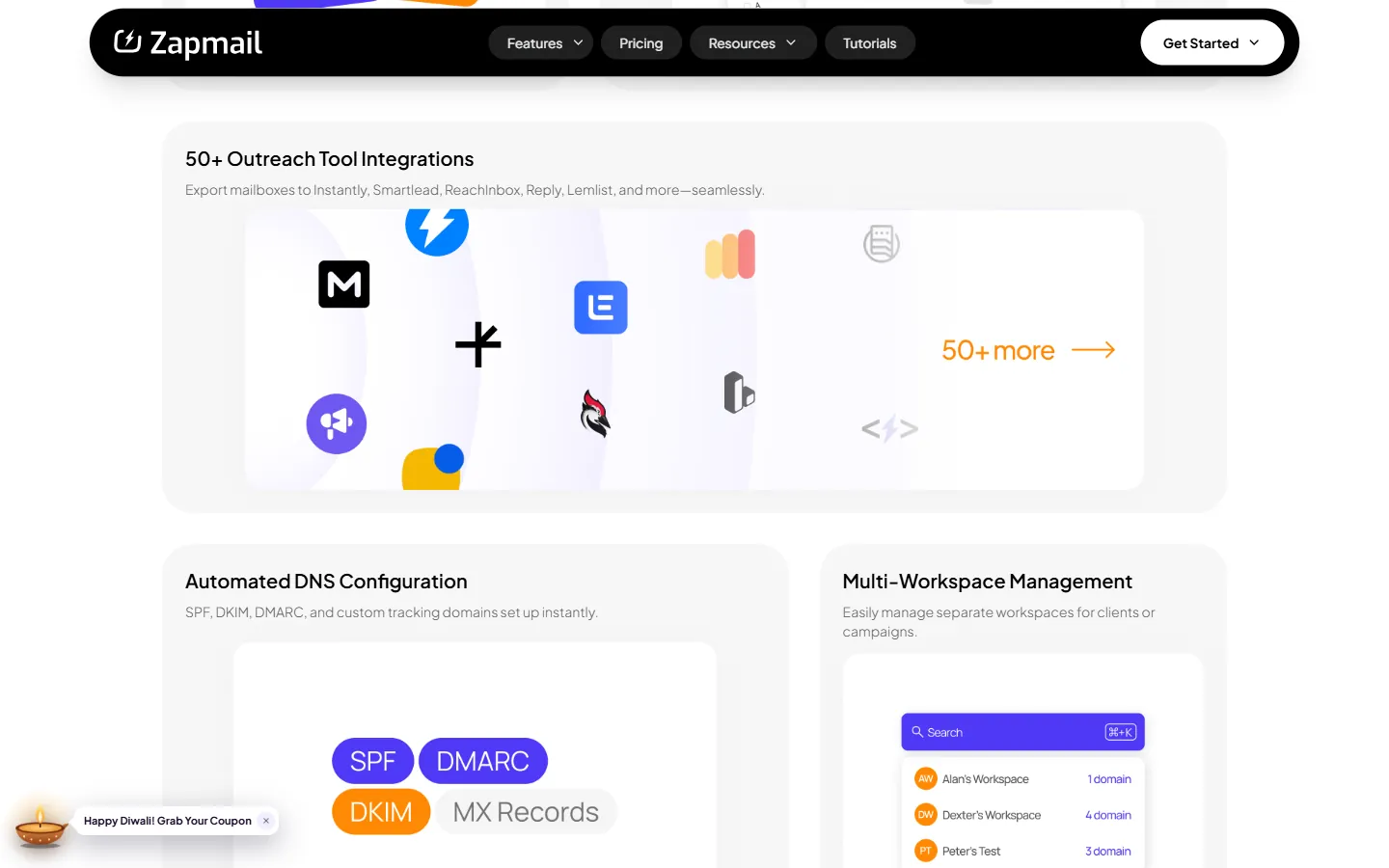
zapmail.ai on 10 November 2026. The card says “50+” integrations; we counted 33 platforms named in the help centre.
The exports. One click sends finished mailboxes to Instantly, Smartlead, ReachInbox or Reply.io. A help article lists 23 platforms that Zapmail supports for OAuth-assisted export, among them Lemlist, Apollo.io, Saleshandy, Woodpecker, HubSpot, Snov.io and Warmy.io, and not every name on it is a sending tool. The help centre’s 22 integration guides name nine more, including EmailBison and PlusVibe. The homepage says “50+ Outreach Tool Integrations”; across those pages we could count 33. Two conditions are easy to miss: “Zapmail only supports exports to paid accounts” on the sending tool, and platforms that connect only by app password are not supported.
What is not there. You cannot import or migrate mailboxes you already own. There are no aliases. Changing a mailbox’s username discards its warm-up history. API access and Priority Support are listed on the Pro plan only. Each plan includes a small monthly allowance of deliverability-test and AI Insights credits (3, 10 or 30 of each), which is enough to sample those tools, not to run them across a fleet.
The extras. Three AI helpers — “Instant Domain Genie”, “Smart Mailbox Namer” and “Persona Snapshots” — suggest domains and usernames and generate profile images. ZapBox is a free unified inbox for replies. ZapSites, a builder for the simple website a sending domain should point to, is in beta and “Free for your first 2 months”; its later price is not shown.
4. Setup Time, Warm-Up and Capacity: What “5 Minutes” Really Means
The headline numbers. The homepage says “5 mins Avg Setup Time”, the comparison table says “10 mins”, and the pricing FAQ says “Setup takes about 5 minutes.” Those figures describe the time you spend clicking. The help centre gives the time until the mailboxes exist: “Google: up to ~3 hours” and “Microsoft: up to ~12 hours”. The Terms add, in clause 11.1, “Timing estimates are estimates only and are not guarantees.” And the refund policy only treats an order as undelivered when the service is “not provisioned within 7 business days after confirmed payment”.
Warm-up is the real wait. A new mailbox is not ready for campaigns on the day it is created. The pricing FAQ says so plainly: “New mailboxes then need 3 to 4 weeks of warmup before you send at volume.” Zapmail’s own warm-up network, ZapWarm, runs a “21-day initial warmup” for Google and a “35-day initial warmup” for Microsoft. So the honest timeline for a new Google mailbox is minutes of work, hours of provisioning, then three to four weeks before real volume. Pre-warmed mailboxes skip the wait at about twice the plan price per mailbox from the second month, and more than three times it in the first (section 5).
| Stage | Zapmail’s figure | Where it is stated |
|---|---|---|
| Your own clicks | ”5 mins” or “10 mins” | Homepage, comparison table, pricing FAQ |
| Mailbox creation, Google | Up to about 3 hours | Help centre setup FAQ |
| Mailbox creation, Microsoft | Up to about 12 hours | Help centre setup FAQ |
| Warm-up before volume | 3 to 4 weeks | Pricing FAQ, mailbox FAQ |
| ZapWarm initial warm-up | 21 days Google, 35 days Microsoft | ZapWarm help article |
| Starting volume | 20 emails a day per mailbox | Help centre guides to high-reputation domains and pre-warmed mailboxes |
| Refund for non-delivery | After 7 business days | Refund and Cancellation Policy |
The 24-hour window. This is the rule most likely to cost you money, and it is not on the pricing page. The help centre explains: “When a workspace is created on a domain, Zapmail allows you to assign mailboxes for a limited time.” Then: “After 24 hours, new mailboxes can no longer be added to that workspace.” If you created two mailboxes on a domain and want a third next week, your choices are a new domain or scheduling the mailbox for the next billing cycle. The article is blunt about exceptions: “Support cannot override this restriction”. Decide how many mailboxes each domain gets before you create the workspace.
Slots do not come back. A plan is a set of mailbox slots, and the mailbox FAQ says: “Once used, a slot is locked for that cycle even if the mailbox is deleted.” They return only when “Slots reset automatically at the next billing renewal.” Deleting a mailbox you no longer need therefore does not free a slot for a replacement until the next cycle. A Reddit user put the effect this way on 2 April 2026: “Anytime you need to get or remove email accounts, you’re always going to be paying for an extra month of that usage”.
How many mailboxes you need. The help centre gives one starting figure, in its guide to high-reputation domains: “Start with ≤20 emails/day per mailbox.” Its guide to pre-warmed mailboxes gives the same number, and its setup FAQ recommends three mailboxes per domain. We found no separate figure for a standard new mailbox. At that starting volume, 500 cold emails a day needs 25 mailboxes on 9 domains. That is why the plan price is the small part of the bill: the domains, the sending tool and the weeks of warm-up are bought separately.
Provisioning does stall. Zapmail runs a public status page, which is to its credit. Its history shows 25 incidents between 22 February 2025 and 14 September 2026. Nine are titled as delays in mailbox creation or processing, more than any other kind, and four more concern Microsoft 365 or Azure itself. Examples: a delay in Google mailbox creation from 22 to 25 February 2025, Google creation pipelines on 14 to 16 May 2026, Microsoft creation pipelines on 18 to 24 June 2026, and a long entry tied to a global Azure outage from 29 October to 18 November 2025. If a client launch depends on a date, order a week earlier than the “5 mins” suggests.
5. Zapmail Pricing 2026 — Plans, the Year-Two Renewal, Pre-Warmed and Add-Ons
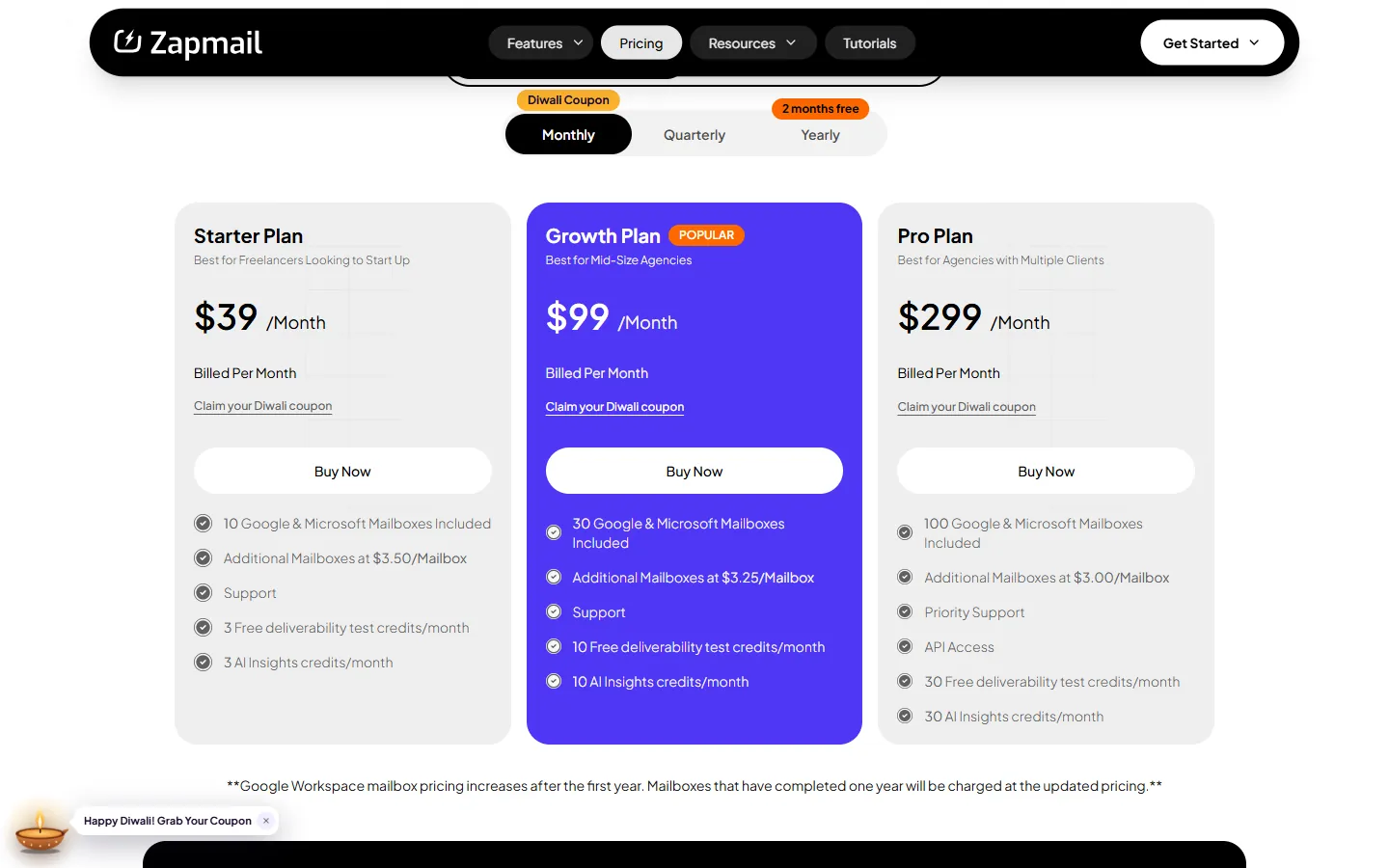
Zapmail’s pricing page on monthly billing, 10 November 2026. The renewal warning is the small note under the cards.
Zapmail sells bundles, not single seats. Each plan is a fixed number of mailbox slots that you can fill with Google Workspace or Microsoft 365 mailboxes in any mix — the page calls them “interchangeable under one plan” — and the Google or Microsoft licence is included. You can add mailboxes above the bundle at a per-mailbox price. Domains are not included.
The three plans by billing cycle
| Plan | Mailboxes | Monthly | Quarterly, per month | Yearly, per month | Extra mailbox (monthly / quarterly / yearly) |
|---|---|---|---|---|---|
| Starter | 10 | $39 ($3.90 each) | $35 ($3.50 each) | $32.50 ($3.25 each) | $3.50 / $3.25 / $3.25 |
| Growth | 30 | $99 ($3.30 each) | $90 ($3.00 each) | $82.50 ($2.75 each) | $3.25 / $3.00 / $2.75 |
| Pro | 100 | $299 ($2.99 each) | $270 ($2.70 each) | $250 ($2.50 each) | $3.00 / $2.70 / $2.50 |
Three things to read off this table. First, quarterly and yearly prices are shown per month but charged up front: the help centre notes “Quarterly plans are billed per quarter, while yearly plans are billed per year.” Yearly Pro is one payment of $3,000. Second, the homepage headline “Starts just at $2.5 /mailbox” is true for exactly one cell: 100 mailboxes on Pro, paid a year in advance. A buyer of ten mailboxes on monthly billing pays $3.90 each, 56% more. Third, Priority Support and API access are listed on Pro only.
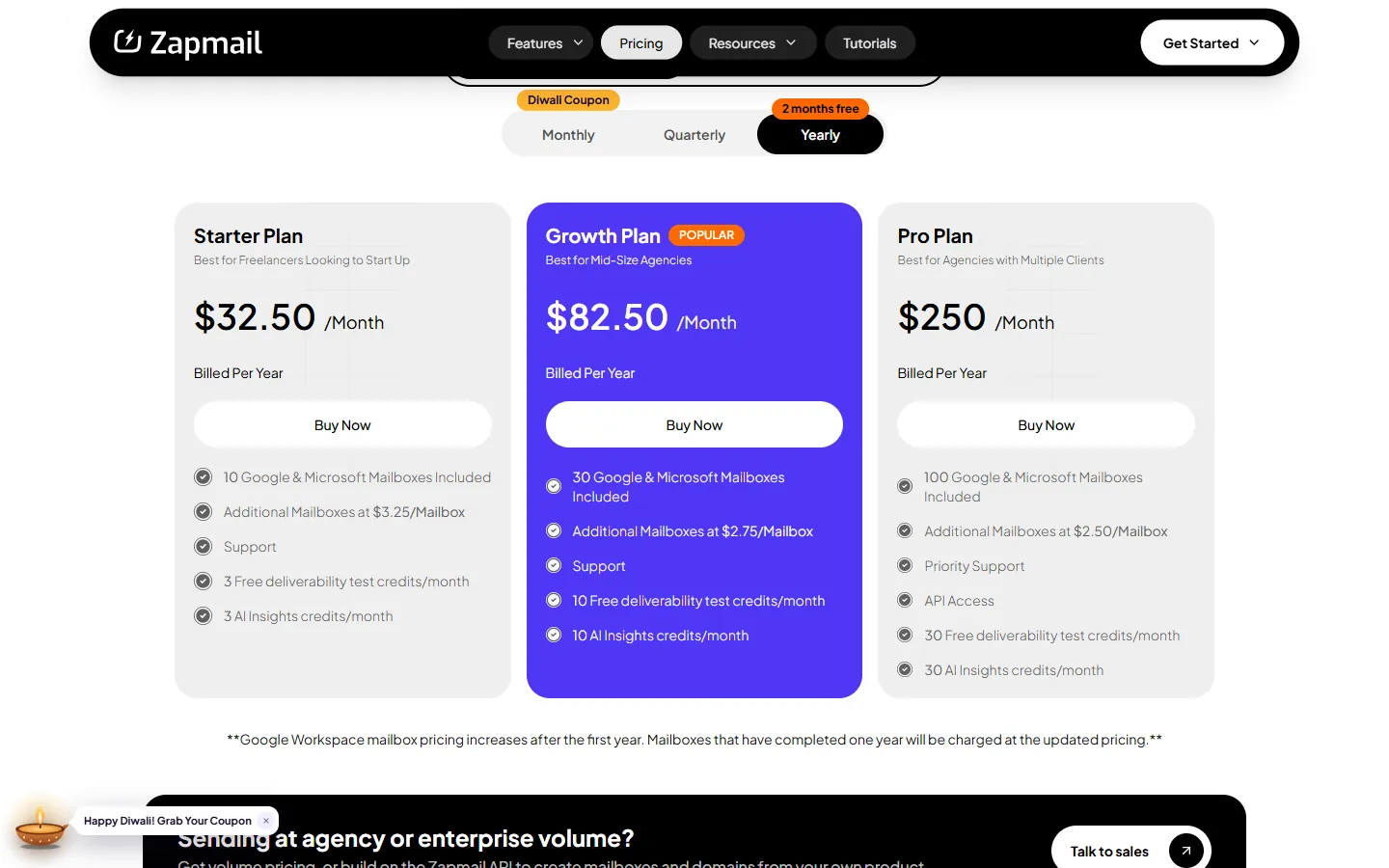
Yearly billing on 10 November 2026: “2 months free”, charged as one annual payment.
What happens after twelve months
This is the part of Zapmail’s pricing that most reviews leave out. The pricing page carries one sentence about it: “Google Workspace mailbox pricing increases after the first year. Mailboxes that have completed one year will be charged at the updated pricing.” The numbers are in a help-centre article, not on the pricing page.
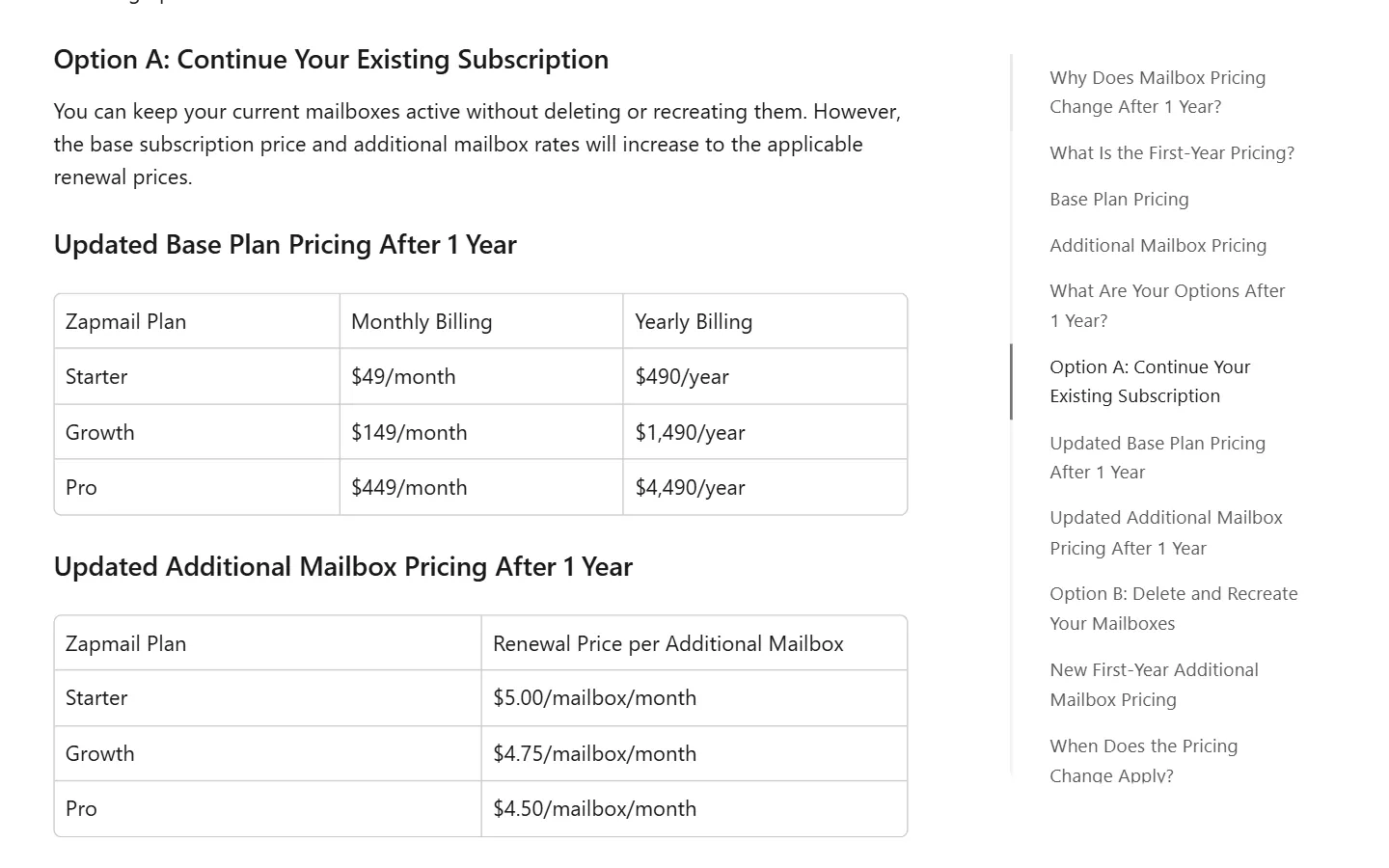
Zapmail help centre, “What Happens to Mailbox Pricing After 1 Year?”, read 10 November 2026.
| Plan | Monthly, year one | Monthly, after 12 months | Yearly, year one | Yearly, after 12 months | Rise | Extra mailbox, monthly |
|---|---|---|---|---|---|---|
| Starter | $39 | $49 | $390 | $490 | +26% | $3.50 to $5.00 (+43%) |
| Growth | $99 | $149 | $990 | $1,490 | +51% | $3.25 to $4.75 (+46%) |
| Pro | $299 | $449 | $3,000 | $4,490 | +50% | $3.00 to $4.50 (+50%) |
Two gaps in the article are worth knowing. The Rise column is for the plan price on monthly and yearly billing, and the article prints no renewal price for quarterly billing. It also gives a single renewal price per extra mailbox, with no split by billing cycle. Against the first-year yearly rates for extra mailboxes ($3.25, $2.75 and $2.50), that single price is 54%, 73% and 80% higher.
Zapmail’s explanation, from the pricing FAQ: “Google and Microsoft discount the first year, and we pass that discount straight to you. After 12 months, mailboxes move to the standard renewal rate automatically.” That matches what Google does on its own site, where Business Starter was on a 50%-off promotion for the first twelve months when we looked (details below). So the rise is not invented by Zapmail. What is Zapmail’s choice is where it tells you: one line on the pricing page and the full table in a help article.
Your two options at month twelve. The article offers Option A, keep everything and pay more: “You can keep your current mailboxes active without deleting or recreating them. However, the base subscription price and additional mailbox rates will increase to the applicable renewal prices.” And Option B, start over: “Alternatively, you can delete your existing mailboxes and create new ones to start a new 12-month introductory pricing period.” Option B has a cost the article states itself: “The Previous sending history will be deleted and will need to re-warmup the mailboxes.” and “Important: Deleting mailboxes may result in the loss of existing emails, contacts, and other mailbox data.” In practice Option B means three to four weeks of lost sending in exchange for the lower price.
Microsoft is unclear. The renewal article says its tables apply to Google only: “Microsoft 365 mailbox pricing follows its applicable pricing terms.” A second help article, on subscriptions and plans, says “Both Google and Microsoft offer discounted first-year pricing.” We could not find a published renewal price for Microsoft mailboxes. Ask support in writing before you commit a large Microsoft order.
A customer reported the rise in July 2025. On 3 July 2025 a Reddit user wrote in r/coldemail, in a post that has since been deleted and that we read in a public archive: “Just got an email from Alan that the pricing will almost double after being with them for 1 year. Anyone else seeing this? Something about Google policy but I don’t see it anywhere in their website plus other providers aren’t doing this.” The published rise is 26% to 51% on the plan price, and the single renewal price for extra mailboxes is up to 80% above the first-year yearly rate. For most buyers that is short of a doubling, and it is on the website now.
Pre-warmed mailboxes
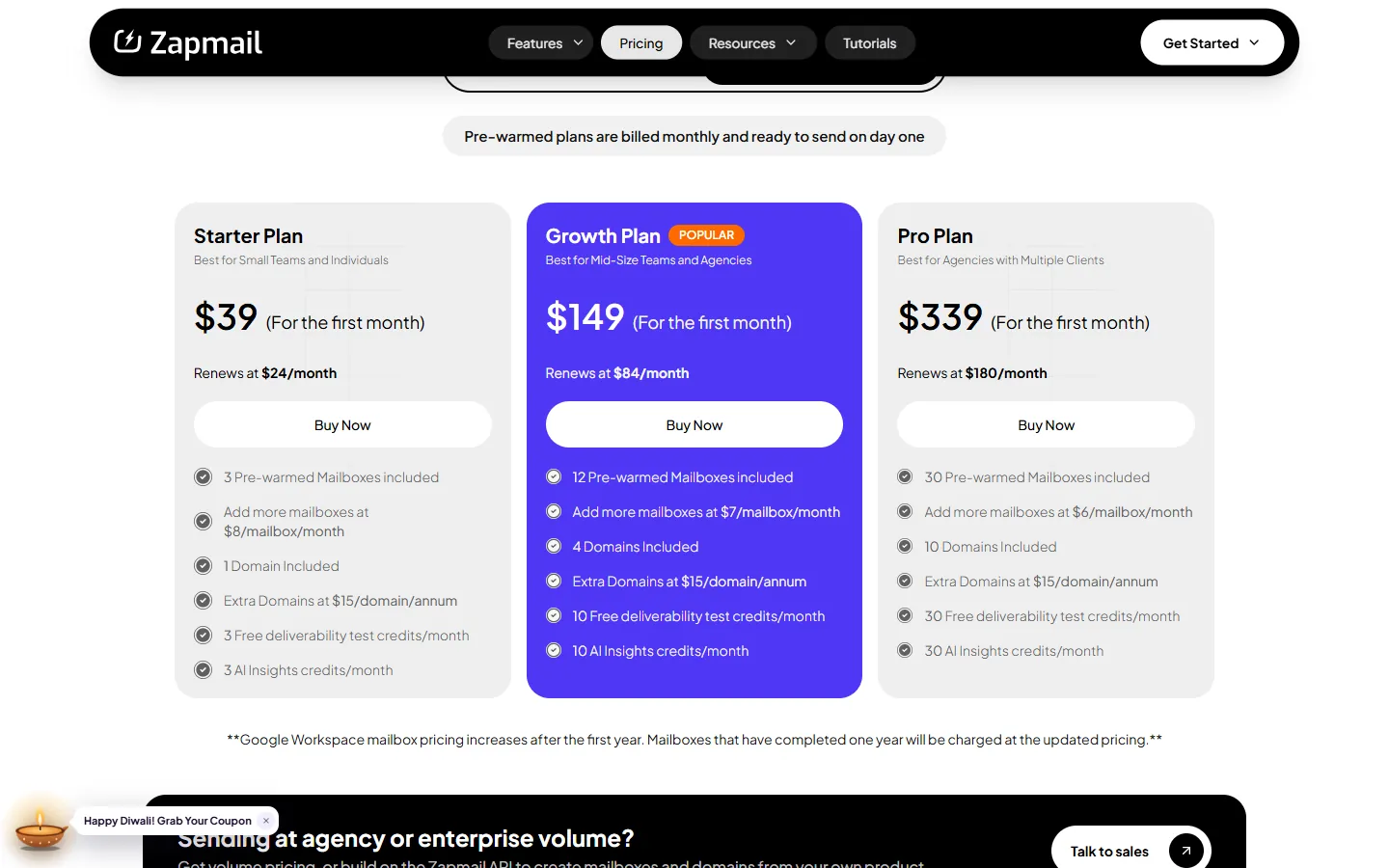
Pre-warmed plans on 10 November 2026: a higher first month, then a lower renewal, domains included.
| Plan | First month | Renews at | Mailboxes | Domains included | Extra mailbox | Per mailbox on renewal |
|---|---|---|---|---|---|---|
| Starter | $39 | $24 a month | 3 | 1 | $8 | $8.00 |
| Growth | $149 | $84 a month | 12 | 4 | $7 | $7.00 |
| Pro | $339 | $180 a month | 30 | 10 | $6 | $6.00 |
Pre-warmed mailboxes are sold monthly only, come with “over 12 weeks of warm-up history” according to the page, include their domains and ZapShield, and include a year of ZapWarm. Extra domains cost $15 each a year. The trade-offs are in the help centre’s guide: a “12-Month Lifecycle (Non-Renewable)”, after which “the domain is permanently retired”; “Pre-warmed mailboxes are not refundable once provisioned.”; you cannot pre-warm a domain you already own; and the guide still tells you to “Start with low daily volume (20 emails/day)”. You are renting a sender with a history for one year, not buying an asset.
Add-ons
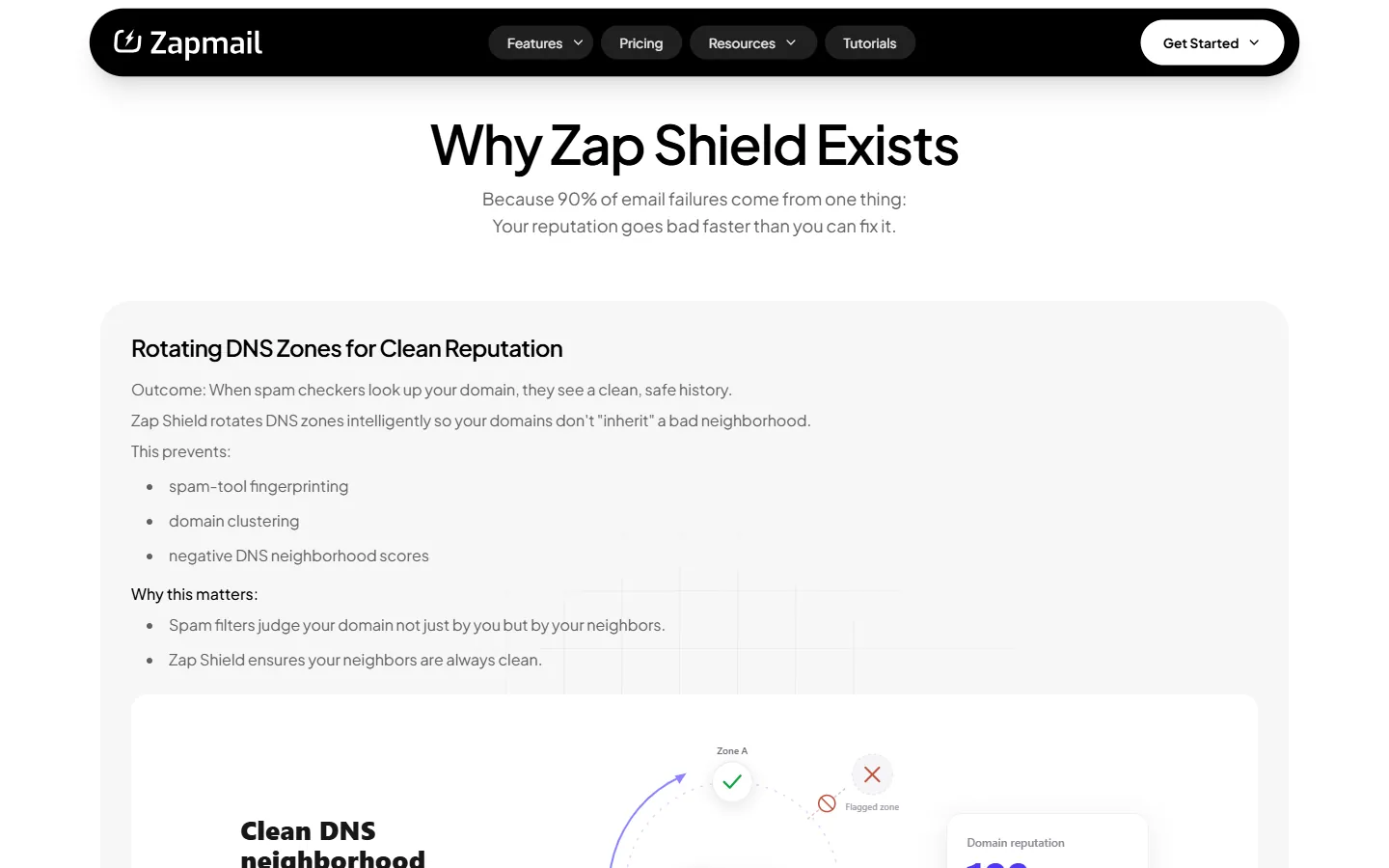
ZapShield’s feature page on 10 November 2026. It is billed per domain, on top of the plan.
| Add-on | Price | Note |
|---|---|---|
| Domains | $13.00 for a .com | 10+ extensions; other prices shown after login |
| ZapWarm | $2.00 a mailbox a month for 1 to 30, $1.50 for 31 to 100, $1.00 for 101+ | First month free; priced in the help centre, not on the pricing page |
| ZapCare | $1.50 a domain a month | Blacklist monitoring and alerts |
| ZapShield | $3.00 a domain a month | Monitoring plus a replacement domain, decided case by case; the help centre limits it to domains bought on Zapmail |
| Deliverability test | $2.00 a mailbox, one-time | $3.00 a mailbox a month on subscription, per the help centre; lifetime deals at $99, $299 and $999 for 30, 200 and 500 credits a month |
| AI Insights | $2.00 a mailbox, one-time | Monthly $29, $99 or $199; lifetime deals at $99, $399 and $999 |
| ZapBox | Free | Unified inbox |
| ZapSites | Free for the first 2 months | Beta; later price not shown |
| Aged domains | Not public | Priced in the dashboard only |
ZapShield deserves one caution. Its page claims “40–60% higher inbox placement”, and the replacement domain is described as “Included. Our team reviews each case individually and gives a final verdict based on the review.” The Terms, in clause 12.5, say ZapShield and monitoring “do not guarantee blacklist immunity, reputation protection, remediation success”. The help centre adds a limit: Zap Shield is “Available only for domains purchased on Zapmail.” Treat it as monitoring with a possible replacement, not as insurance.
Example baskets
These are our own sums from the prices above, with three mailboxes per domain and .com domains at $13.00. Domain renewal prices are not published, so year two leaves them out.
| Setup | Plan cost, year one | Domains | Year one total | Plan cost, year two (Google) |
|---|---|---|---|---|
| 10 Google mailboxes, Starter, monthly | $468 | 4 at $13 = $52 | $520 | $588 |
| 30 Google mailboxes, Growth, monthly | $1,188 | 10 at $13 = $130 | $1,318 | $1,788 |
| 100 Google mailboxes, Pro, yearly | $3,000 | 34 at $13 = $442 | $3,442 | $4,490 |
| 100 Google mailboxes, Pro, monthly | $3,588 | 34 at $13 = $442 | $4,030 | $5,388 |
A mid-sized order shows the extras at work. Fifty mailboxes on monthly billing is Growth plus 20 extra mailboxes at $3.25: $164 a month. After twelve months the same fleet is $149 plus 20 at $4.75: $244 a month, 49% more. Add ZapWarm and the bill moves again: ten mailboxes cost $20 a month after the free first month, which is about half the price of the Starter plan itself. None of these sums include your sending tool.
How it compares with buying the seat yourself
On 10 November 2026 Google listed Workspace Business Starter at $7.00 a user a month on an annual plan and $8.40 on a flexible one, with a promotion of $3.50 or $4.20: “50% off for 12 months”, limited to “the first 20 users added” and to new customers. Microsoft listed 365 Business Basic at $7.00 a user a month paid yearly, or $8.40 monthly. Against those list prices Zapmail is cheap in year one ($2.50 to $3.90 a mailbox) and still cheaper after the rise: $4.49 to $4.97 a mailbox on monthly billing, about $3.74 to $4.14 on yearly. Buying direct you would also do the DNS, the tenant-per-domain structure and the exports by hand, and Google’s promotion stops at 20 users.
What our link does
The button below goes through our affiliate link. Zapmail’s affiliate page says partners “earn 10% lifetime commissions”, so if you subscribe after clicking, TrackerTools is paid a share of what you pay for as long as you stay. The link carries a referral parameter and nothing else that we know of: Zapmail’s pages promise no discount, credit or extended terms to a buyer who arrives through a partner. The homepage showed a seasonal banner on the day we read it (“Happy Diwali: claim your festive coupon from Zapmail”) with no value stated; it is not tied to our link. We did not open the link ourselves — we never test affiliate or referral links — so we cannot tell you what the landing page looks like after the click.
From $39 a month for 10 mailboxes · no trial · no refunds
Start with Starter on spare domains before you move a client
Pay monthly first. Decide the mailboxes per domain before you create a workspace, and put the twelve-month renewal date in your calendar.
See Zapmail pricing
6. Trial, Refunds, Cancelling and the Contract
There is no free trial. We found none on the pricing page, the homepage or the help centre. The cheapest way to test Zapmail is one month of Starter at $39 plus a domain.
There are almost no refunds. The homepage FAQ says it in a friendly voice: “We keep it simple with monthly subscriptions and no long-term contracts. Just a heads up, we have a no-refund policy.” The Refund and Cancellation Policy says it in a stricter one: “All purchases made on Zapmail are final and non-refundable”, with two exceptions — duplicate billing caused by a system error, and a service “not provisioned within 7 business days after confirmed payment”. Even then: “All refund decisions are made at Zapmail’s sole discretion. Meeting one of the above conditions does not automatically guarantee a refund.” The Terms add that Zapmail “may issue Wallet credit instead of a cash refund” (clause 7.3) and that a chargeback “may constitute a material breach” (clause 7.5).
One Reddit account shows how this plays out. On 13 December 2025 a user wrote in r/coldemail: “I ended up with 14 inboxes unusable for almost an entire month. I was still paying, but couldn’t use the service. All I asked for was a refund for that downtime — roughly $40.” And then: “Instead, ZapMail hid behind internal policy and Google technicalities, minimized the timeline, and only offered a $12.30 “goodwill” credit.” It is one person’s account and we cannot verify it, but the outcome is consistent with the written policy.
Cancelling is easy; leaving is not free. The pricing FAQ: “Cancel from Billing in your dashboard and you won’t be charged next cycle. Licences are bought upfront, so the current cycle isn’t refunded.” A cancellation can be reversed before the billing date. After it, the help centre says the mailboxes under that subscription are scheduled for deletion. Standard plans, pre-warmed plans, ZapShield and placement tests are separate subscriptions with their own dates — “Each subscription bills on its own date, so you may see more than one charge in a month.” — so cancel each one, not only the main plan.
Domains you buy through Zapmail are yours, with conditions. The homepage FAQ says “Yes, any domain you buy through us is yours.” The domain FAQ adds that a purchased domain cannot be deleted before expiry and is not refundable, that you can transfer it out after 60 days once all its mailboxes are deleted (“Zapmail does not charge any transfer-out fee”), and that “High Reputation and Pre-warmed domain are not eligible for transfer.”
The Terms favour the vendor. They were last updated on April 2, 2026 and are governed by Delaware law. The clauses worth reading before you pay:
| Clause | What it says | What it means for you |
|---|---|---|
| 3.2 | Marketing features “are illustrative only and do not create a binding obligation" | "5 mins”, “US-hosted” and “50+” are not promises |
| 6.7 and 6.8 | Zapmail “may change pricing, packaging, included allowances” at any time and need not keep introductory pricing | The renewal table can change again |
| 7.1 | ”All fees are non-cancelable and non-refundable” unless the law or Zapmail in writing says otherwise | No pro-rata refund when you leave mid-cycle |
| 11.3 | No guarantee of “inbox placement, open rates, reply rates, sender reputation” | Deliverability claims are marketing |
| 17 and 17.1 | Bans “purchased lists, scraped lists”; consent records on request “within five (5) business days”, or “immediate termination without refund” | Typical cold outreach sits close to a breach |
| 20.1 | Zapmail may use your name and logo; this “does not require any further approval from you” | Opt out by email to support if you mind |
| 24.3 | Zapmail may end the account “at any time for convenience or immediately for cause” | No notice period is promised |
| 24.4 | On termination, “domains, mailboxes, data, logs, reports, exports, or other assets may be disabled or deleted” | Export what you need before you cancel |
| 26 | Liability capped at the fees paid in the 30 days before the event, or US $100, whichever is greater | A lost month of pipeline is your loss |
| 29 | Jury trial and class action waivers | Disputes are individual |
Clause 17 is the one to think about. Zapmail’s homepage sells mailboxes for cold outreach, and its Terms bar sending to recipients “sourced from purchased lists, scraped data, or other sources where you cannot demonstrate a lawful basis under applicable law”. They also let Zapmail demand documentation of that basis within five business days. Many cold-email senders work from bought or scraped data. We are not lawyers and this is not legal advice, but as written the clause gives Zapmail a reason to close an account that cannot produce that documentation, without a refund, whenever it chooses to use it.
7. Is Zapmail Safe? Ownership, Data, the “Indian IP” Question and Reliability
Who owns the tenant. Zapmail’s Data Processing Addendum, effective 1 October 2026, is clear in clause 4.1: “Google Workspace and Microsoft 365 tenants provisioned through the Services are created in Customer’s name and owned by Customer.” Clause 4.5 follows: “Because Customer owns the tenant, Customer keeps its administrator access to mailboxes and their content when the Agreement ends”. That is better than many resellers put in writing. It also sits awkwardly beside two other documents: clause 24.4 of the Terms, under which assets “may be disabled or deleted” on termination, and the help centre, which says cancelled mailboxes are scheduled for deletion. One Trustpilot reviewer described the exit as hard: Dmitry Krotov (US, two stars, 23 February 2026) wrote that releasing the Google Workspace was not easy and that “Our company email stopped working during this process”. Before you put anything important on a Zapmail tenant, ask support in writing what happens to the tenant and its licences when you cancel.
How your data is handled. The DPA is more detailed than most in this market. It names the hosting (AWS in Frankfurt and Hetzner in Germany, with backups at OVH in the EU), lists the sub-processors (AWS, Hetzner, OVH, Google Cloud Platform for OAuth, CrowdStrike, Resend and Intercom, with Stripe as an independent controller for billing), promises a breach notice within 48 hours of awareness, and states in its data table that mailbox content is “Never stored by Zapmail”. It lists TLS 1.2+, AES-256, multi-factor authentication and annual third-party penetration testing. What we did not find on any page is a SOC 2 or ISO 27001 report. Two limits for European buyers: the Privacy Policy says Zapmail “may process personal data in the United States, India, and other jurisdictions”, and DPA clause 4.4 notes that the default Business Starter edition “does not offer data region selection”.
The “Indian IP” question. Zapmail’s homepage promises “US-hosted Google & Microsoft mailboxes” and its FAQ credits deliverability to “using US-based IPs”. Several Trustpilot reviewers say they got something else:
- Juan Alou (US, one star, 23 March 2026): “They are Indian IPs with terrible deliverability.”
- Hafiz (PK, one star, 18 December 2025): “The IPs for the provided inbox activity pointed to India, not USA.”
- Cem (TR, one star, 10 June 2025): “I have used their inboxes and had 0.6% reply rate as their inboxes have INDIAN IP.”
Competitors repeat the charge on their own blogs; Saleshandy, which sells a rival product, calls it “the most reported Zapmail complaint”. Here is what we can and cannot say. We did not buy a plan, so we have no email headers of our own, and none of the reviewers published theirs. Zapmail has not answered any of these reviews. One reading would fit both sides: mail from a Google or Microsoft mailbox leaves from Google’s or Microsoft’s servers, which a reseller does not pick, while an account’s activity log shows where the people or systems that set it up signed in from — and Zapmail’s Privacy Policy mentions India, and its founder’s X profile gives Bangalore as the location. That is our inference, not a finding.
The practical answer is to check for yourself on day one. Send a test email from your first mailbox to an address you control and read the full headers. Open the admin console Zapmail gives you and look at the sign-in and audit logs. Do both before you add mailboxes two to one hundred, because there is no refund if you dislike what you see.
Your DNS is in Zapmail’s hands. Nameservers must stay pointed at Zapmail, so whatever else lives on that domain depends on its DNS automation. Henry André Fendt (DE, one star, 14 July 2026) titled the review “Bad DNS management, breaks your websites and hosting.” and wrote: “They regularly disconnect the domains from our webhost”. The status page shows a related incident in the same month: from 7 to 17 July 2026, “Domain forwarding, redirection & Custom tracking domains is temporarily paused”. Julie Hagman (US, one star, 2 November 2026) reported “constant Custom Tracking Domain issues that arise in Lemlist”. The lesson is the standard one for cold email, with more force here: use separate sending domains, and never connect the domain that carries your company website or your staff’s real inboxes.
Reliability. Of the 25 incidents on the status page, 14 fall in 2026. Besides the provisioning delays in section 4, the notable ones are a platform outage of 52 minutes on 26 March 2026, export delays tied to Google authentication on 14 and 15 April 2026, and domain search unavailable from 13 to 20 August 2026. We found no entry for a mass suspension of customer mailboxes, and the notices repeatedly say that existing mailboxes kept working.
8. What Zapmail Users Say: Trustpilot, Reddit and the Competitor Reviews
| Source | Rating | Reviews | Note |
|---|---|---|---|
| Trustpilot | 4.5, “Excellent” | 101 | 87% five-star, 7% one-star; profile claimed July 2024; “Hasn’t replied to negative reviews” |
| G2 | 3.9 to 4.3 | 6 or 7 | Search snippets only, and they disagree — the page refused our request, so treat as approximate |
| Slashdot / SourceForge | None | 0 | ”No User Reviews” |
| AppSumo | None | None | No listing found |
| Product Hunt | Not read | Not read | The page refused our request; search results suggest the “Zapmail” listed there is a different product |
| Reddit, r/coldemail | Not applicable | 100 posts read | Mixed; a forum heavily worked by vendors |
All figures were read on 10 November 2026. Zapmail’s homepage quotes “4.5 on TrustPilot”, which matches; its social preview image still shows 4.7.
Trustpilot: the praise is about support. Many five-star reviews name a support agent, and a good number describe a problem that the agent then fixed:
- George Thomas Marie (US, five stars, 6 November 2026): “My mailboxes got stuck during the assigning process. They hopped on and fixed this for me within fifteen minutes”
- Cam Fulton (US, five stars, 26 September 2026): “They’re support is the best out of any vendor we work with - and we literally work with 40 or more.”
- Andre Domanski (BR, five stars, 2 September 2026): “Speed, price, support, and deliverability features are just exceptional.”
- Maroine elaidi (MA, five stars, 18 August 2026): “Tanish is a professional support person; he really helped me a lot. Even if there is a bit of delay, the work gets done.”
- Abdul Rafay (PK, five stars, 29 July 2026): “I’ve been using Zapmail for cold email accounts (Google/Outlook setup) and honestly, the account quality has been solid”
Read together, these say two things: the chat support is quick and liked, and it is kept busy by mailboxes that stick during creation and domains that will not connect.
Trustpilot: the complaints go unanswered. Ten reviews carry one to three stars. Three allege Indian IPs (section 7), two describe broken DNS or tracking domains (section 7), and the rest are about support, bugs, billing and price:
- Julie Hagman (US, one star, 2 November 2026): “I’ve been using Zapmail for cold outreach for about a year. I’m currently searching for an alternative.”
- Alon Shkuri (IL, three stars, 20 May 2026): “Support takes way too long, and a lot of bugs in the platform”
- R. (PH, one star, 1 April 2026), on a referral that was not credited because of plan rules: “Otherwise, people only find out after they have already referred someone”
- Heather Trumpfheller (US, two stars, 10 July 2025): “it’s very expensive”
None of the ten has a reply from the company. For a vendor whose strongest asset is its support team, leaving every public complaint without an answer is a strange gap.
Reddit: fast to launch, slow when it breaks. We read 100 posts from r/coldemail dated 31 May 2025 to 7 June 2026 through a public archive, because reddit.com refused our plain requests; later months are not covered. The forum is full of vendors and affiliates, so weigh praise and attacks alike.
- u/Fast-Increase3254, 26 May 2026: “Zapmail is what we use when we need to spin up a clients infrastructure FAST. like a new client signs monday and wants to launch by friday. zapmail can deliver and your live in days not weeks.”
- u/Silly_Software_3577, 1 June 2026: “zapmail was solid until it wasnt. had deliverability tank twice and support took forever responding, so i’d already switched half the domains over by the time they got back to me.”
- u/Contechjohnson, 2 April 2026: “Their site is constantly down.” and “They lose connection with the cold email platforms (instantly.ai) and it’s a pain to get your accounts back on.”
- u/mattmlucero, 28 April 2026, who says they sent 650,075 cold emails split across three sequencers (Instantly, PlusVibe and Smartlead) and three mailbox providers (Hypertide, InboxKit and Zapmail): “By raw performance Plusvibe & Hypertide performed best, but the variance is not statistically significant making the performance basically identical across all six.”
The last quote is the most useful one in this section. If one sender’s large test found no real difference in results between the three mailbox providers it covered, then price, terms and reliability are what should decide your choice.
Reviews written by competitors. Most long “Zapmail review” articles in search results come from companies that sell an alternative, and we read them as claims, not evidence. InboxKit’s comparison page repeats the same $49, $149 and $449 renewal prices we found. Primeforge, a rival, concedes that Zapmail “hands over full admin access, which is a genuine point in its favor.” Saleshandy leads with the Indian IP allegation. One favourable review sits on the ReachInbox blog, and ReachInbox belongs to the same group as Zapmail (section 1).
9. Zapmail Alternatives: InboxKit, Hypertide, Premium Inboxes, Mission Inbox, Google and More
Prices come from each vendor’s own site as we read it on 10 November 2026: the pricing page, or the homepage where there is no separate one. Figures marked “worked out” are our arithmetic, not a vendor’s quote. Watch the unit: Zapmail sells bundles, InboxKit and Hypertide sell single mailboxes, the three Forge products sell slots with a minimum of ten, Mailreef and Inframail sell a flat server or plan, and Google and Microsoft bill per user. “Platform” says whose servers the mail leaves from: an official Google or Microsoft tenant, or the vendor’s own SMTP. “Not shown” means the page we read did not say, and “per our review” means the term comes from our own earlier review of that product, not from a page re-read for this one.
| Tool | Paid from | Unit and billing | Platform | Domains | Warm-up | Refund or guarantee |
|---|---|---|---|---|---|---|
| Zapmail | $39 a month for 10 mailboxes, $99 for 30, $299 for 100 ($3.90 to $2.99 each); $2.50 at best, on Pro paid yearly; Google mailboxes renew at $49, $149 and $449 after 12 months | Per bundle; monthly, quarterly or yearly; extra mailboxes $3.50 to $3.00 on monthly billing | Google Workspace and Microsoft 365, interchangeable | Bring or buy ($13.00 a .com); nameservers stay with Zapmail | ZapWarm $1.00 to $2.00 a mailbox a month; pre-warmed mailboxes from $39 for 3 | No trial; no refunds outside two narrow exceptions |
| InboxKit | $3.00 a mailbox monthly, $2.70 quarterly, $2.50 annual, the same at any volume; Azure $30 a tenant a month for up to 100 mailboxes | Per mailbox; minimum 1; prepaid wallet | Google Workspace or Microsoft 365; Azure tenants | Sold in-platform; a banner offers a .co “at $7 for the first year” | Pre-warmed $6.00, $7.00 or $9.00 a mailbox a month by warming age, plus a one-time domain fee from $12.50 | No traditional free trial; fees “generally non-refundable” |
| Hypertide | $3.30 a Google inbox a month at any volume; Entra domains $25 a domain a month with 25 inboxes (about $1 each) | Per inbox or per domain; monthly only; no minimum | Google Workspace and Microsoft 365; Entra and Azure tenants | Bring or buy in-platform, price not shown | No pre-warmed offer; the FAQ mentions “a 2 wk warm up period” | No free trial; refund not shown |
| Primeforge | $4.50 a mailbox slot a month; 25 slots cost $113 monthly or $94 a month billed yearly (about $3.76 each, worked out) | Per slot; minimum 10; monthly or yearly | Google Workspace or Microsoft 365 | $14 a year per .com | A pre-warmed page exists, no price shown | No trial; refund not shown |
| Mailforge | $3 a slot a month; 25 slots cost $75 monthly or $60 a month billed yearly ($2.40 each) | Per slot; minimum 10; monthly or yearly | Vendor’s own shared infrastructure, not Google or Microsoft | $14 a year per .com | Not shown | No trial; refund not shown |
| Infraforge | $4 a slot a month; 25 slots cost $100 a month billed quarterly or $83 billed yearly (about $3.32 each, worked out); dedicated IPs $99 each a month | Per slot; minimum 10; quarterly or yearly only | Vendor’s own private infrastructure | $14 a year per .com | A pre-warmed offer exists, no price shown | No trial; refund not shown |
| Maildoso | $75 a month for 30 mailboxes ($2.50 each), $225 for 300 ($0.75), $499 for 1,000 ($0.49) | Per bundle; monthly | Vendor’s own SMTP servers and IPs | $15 a year to register; pre-warmed domains at about $11.90 to $11.99 a month | Pre-warmed domains since 5 November 2026; up to 80 warm-up emails a day | ”30-day money-back guarantee for all new users”, on monthly SMTP packages |
| Mailreef | $240 a month on a 12-month commitment or $249 month to month, plus $0.001 a send (about $1.60 to $1.66 a mailbox at 150, worked out) | Per dedicated server with 150 mailboxes or more; demo call first | Vendor’s own dedicated server and IP | Bring your own or buy in one click, price not shown | Pre-warmed server, domains and mailboxes listed as features | Not shown |
| Inframail | $147 a month flat, recommended for up to 400 mailboxes (about $0.37 each at 400, worked out); $387 for up to 1,000 | Flat plan with unlimited inboxes; monthly or yearly | Vendor’s own setup on dedicated IPs, described as “Microsoft-backed” | Bring your own “for $5 per domain one time”; “10 FREE .com domains” with signup | No pre-warmed offer | ”Money-back guarantee” stated, terms not shown |
| Premium Inboxes | $3.50 an inbox for 1 to 249, $3.00 for 250 to 1,249, $2.80 from 1,250; Insured $4.50 | Per inbox; the homepage prints ”/ mo per inbox”, the checkout billed every four weeks per our review; no minimum | Google Workspace or Microsoft 365 | Bring your own; the page also says “Use your domain or one of ours.” | Not sold pre-warmed | Unlimited free replacements; no refunds after activation, per our review of 5 November 2026 |
| Mission Inbox | Lite $50 a month with 15 mailboxes and 5,000 sends; Scale $199 with 30 mailboxes and 10,000 sends | Per plan, plus credits at $1 each | Vendor’s own dedicated servers and IPs | Not shown | Paid add-on, 2 credits a mailbox a month | Refund within 48 hours of a subscription charge, per our review |
| Google Workspace direct | Business Starter $7.00 a user a month on the annual plan, $8.40 flexible; $3.50 or $4.20 for a new customer’s first 12 months, first 20 users only | Per user | Google Workspace | Bring your own | None | 14-day trial |
| Microsoft 365 direct | Business Basic $7.00 a user a month paid yearly, or $8.40 on a monthly subscription | Per user | Microsoft 365 | Bring your own | None | One-month free trial |
Mailscale used to appear in tables like this one. On 10 November 2026 its site showed no prices at all, only a “Book Demo” button, so it has no row here.
Where Zapmail wins: on the first-year price of official Google and Microsoft mailboxes once you need about a hundred of them. Pro works out at $2.99 a mailbox on monthly billing and $2.50 paid yearly. That is level with InboxKit’s annual rate and below Hypertide’s $3.30, Premium Inboxes’ $3.50 every four weeks and Primeforge’s $4.50. Against Google’s own list price of $7.00 to $8.40 a user it is less than half in year one, though a new Google customer pays an introductory $3.50 to $4.20 for the first 20 users for 12 months. Zapmail also puts a lot in one dashboard: domain purchase, automated DNS, exports to more than 30 named platforms, a warm-up network, pre-warmed mailboxes and, on Pro, an API with webhooks and an MCP server. And it documents itself in public, with a status page, a DPA and a help-centre article that prints the renewal prices.
Where it loses: first, for small buyers. Ten mailboxes on Starter cost $3.90 each, while InboxKit charges $3.00 with a minimum of one and Hypertide $3.30. Zapmail’s $2.50 needs the 100-mailbox Pro plan paid a year ahead, which is $3,000 upfront, while InboxKit’s $2.50 annual rate applies at any volume. Second, in year two. Google mailboxes renew at $4.90 each on Starter, $4.97 on Growth and $4.49 on Pro, which is above the list prices InboxKit, Hypertide and Premium Inboxes show today and about level with Primeforge. Third, on refunds. Maildoso offers 30 days to new users, Mission Inbox had a 48-hour window when we reviewed it, and Google and Microsoft give a 14-day and a one-month trial, against none at Zapmail. Fourth, at the bottom of the market. Private SMTP from Maildoso ($0.49 to $2.50 a mailbox) or Mailreef (about $1.60 at 150) costs a fraction, if you accept that mail leaving a vendor’s own servers is not the same thing as mail leaving Google or Microsoft. Inframail’s flat plan (about $0.37 a mailbox at 400) is cheaper still, on a setup it describes as “Microsoft-backed”.
One caution on the whole table. The Reddit sender quoted in section 8 found no statistically significant difference in results across the three sequencers and three mailbox providers tested (Hypertide, InboxKit and Zapmail). That test covers two of the twelve alternatives here and none of the vendors that send from their own servers. Treat the table as a price and terms comparison, not as a ranking of deliverability.
10. Zapmail Pros and Cons
Pros
- Real licences, with admin access: the help centre lists “Real Google Workspace licenses” and “Real Microsoft 365 business licenses”, and Zapmail hands over admin credentials for both platforms
- Low first-year prices: $3.90 a mailbox on Starter monthly down to $2.50 on Pro yearly, against Google’s own $7.00 to $8.40 list price for a Business Starter seat
- Setup automated end to end: mailboxes, SPF, DKIM, DMARC, MX, forwarding and tracking domains from one dashboard, then one-click export to Instantly, Smartlead, ReachInbox or Reply.io
- Google and Microsoft in one bundle, interchangeable and at one price
- Paperwork you can actually read: Terms dated April 2, 2026 and a DPA effective 1 October 2026 with EU hosting, a 48-hour breach notice and named sub-processors
- A public status page and published renewal prices: 25 logged incidents since February 2025, and a help-centre article that prints the year-two prices in full
- Trustpilot 4.5 from 101 reviews, 87% of them five-star, with support agents thanked by name in review after review
Cons
- Google plan prices rise 26% to 51% after twelve months: Starter $39 to $49, Growth $99 to $149, Pro $299 to $449 a month, and only the help centre gives the numbers
- The only way back to first-year pricing is to delete and recreate the mailboxes, which the help centre says deletes the sending history and needs a new warm-up
- No trial and no refunds: purchases are “final and non-refundable”, the two listed exceptions are decided at Zapmail’s “sole discretion”, and the Terms allow wallet credit instead of cash
- Rigid operations: a 24-hour window to add mailboxes to a workspace, slots locked for the billing cycle, no imports, no subdomains, and nameservers that must stay with Zapmail
- Marketing that runs ahead of the help centre: “5 mins” against up to about 3 hours for Google and about 12 for Microsoft, “50+” integrations against 33 platforms named in the help centre, and a “$2.5” headline that needs the Pro plan paid a year ahead
- A contract written for the vendor: termination for convenience, liability capped at 30 days of fees or $100, and Delaware law with jury-trial and class-action waivers
- Questions left unanswered in public: the Indian IP allegation, 2026 Reddit complaints about slow support and disconnections, and ten critical Trustpilot reviews without a company reply
11. Frequently Asked Questions
What is Zapmail?
Zapmail is a self-serve platform that creates Google Workspace and Microsoft 365 mailboxes for cold email on domains you connect or buy, writes the DNS records and exports the mailboxes to a sending tool. It is run by Outbox Labs Inc., a Delaware corporation doing business as Zapmail, and its founder and CEO is Alan D'Souza. The sequencer ReachInbox belongs to the same group. Zapmail does not run campaigns itself, so you still need a sending tool, a lead list and several weeks of warm-up.
How much does Zapmail cost in 2026?
There are three bundles. Starter is $39 a month for 10 mailboxes, Growth $99 for 30 and Pro $299 for 100, which works out at $3.90, $3.30 and $2.99 a mailbox. Quarterly billing is $35, $90 and $270 a month. Yearly billing is $32.50, $82.50 and $250 a month, charged as $390, $990 and $3,000 a year. Extra mailboxes cost $3.50, $3.25 and $3.00 on monthly billing. A .com domain is $13.00, ZapWarm is $1.00 to $2.00 a mailbox a month, ZapCare $1.50 and ZapShield $3.00 a domain a month. The homepage line 'Starts just at $2.5 /mailbox' is true only for Pro paid yearly.
Does the Zapmail price go up after the first year?
Yes, for Google mailboxes. Zapmail's help centre says that after 12 months Starter renews at $49 a month, Growth at $149 and Pro at $449, or $490, $1,490 and $4,490 on yearly billing, with extra mailboxes at $5.00, $4.75 and $4.50. For the plans that is 26% to 51% more than in year one, and for extra mailboxes 43% to 50% more on monthly billing. Renewal prices for Microsoft mailboxes are not published. The only way back to first-year pricing is to delete the mailboxes and create new ones, which the help centre says deletes the sending history and means a new warm-up.
Are these real Google Workspace and Microsoft 365 mailboxes?
By Zapmail's own description, yes. The help centre lists 'Real Google Workspace licenses' and 'Real Microsoft 365 business licenses', and adds 'Not educational accounts' and 'Not legacy/free accounts'. The DPA says tenants are 'created in Customer’s name and owned by Customer'. Zapmail provides admin credentials for both platforms, while app passwords and SMTP or IMAP access are for Google only. One caution: the Terms let Zapmail end the service for convenience and say assets may be disabled or deleted on termination, so ask support in writing how you would take a tenant with you.
How long does Zapmail setup take?
The homepage says '5 mins Avg Setup Time'. That is the time you spend clicking. The help centre gives the time until the mailboxes exist: 'Google: up to ~3 hours' and 'Microsoft: up to ~12 hours'. After that comes warm-up, and the pricing FAQ says new mailboxes 'need 3 to 4 weeks of warmup before you send at volume'. Plan about a month from purchase to a first real campaign, unless you buy pre-warmed mailboxes.
How many cold emails can each Zapmail mailbox send?
Zapmail's help centre says 'Start with ≤20 emails/day per mailbox.' in its guide to high-reputation domains, gives the same figure for pre-warmed mailboxes, and recommends three mailboxes per domain, with five as the maximum. At that starting volume, 500 cold emails a day needs 25 mailboxes on 9 domains. That is why the plan price is the small part of the bill: the domains, the sending tool and the weeks of warm-up are bought separately.
Does Zapmail include domains and warm-up?
Not in the three plans. You connect a root domain you already own or buy one in the dashboard, where a .com costs $13.00, and the nameservers must stay pointed at Zapmail. Subdomains are not supported. Warm-up is an add-on too: ZapWarm costs $2.00 a mailbox a month for 1 to 30 mailboxes, $1.50 for 31 to 100 and $1.00 above that, with the first month free. You can also use the warm-up built into your sending tool. Only the pre-warmed mailboxes come with a domain and a warm-up history.
What are Zapmail pre-warmed mailboxes and what do they cost?
They are mailboxes on domains Zapmail has already been warming, sold with what the page calls 'over 12 weeks of warm-up history'. Three mailboxes cost $39 in the first month and $24 after, twelve cost $149 then $84, and thirty cost $339 then $180. They are sold monthly only and include their domains. The help centre lists the trade-offs: a '12-Month Lifecycle (Non-Renewable)', after which 'the domain is permanently retired', and 'Pre-warmed mailboxes are not refundable once provisioned.' You are renting a sender with a history for one year.
Is there a free trial, and can I get a refund?
There is no trial, and almost no refund. The policy reads 'All purchases made on Zapmail are final and non-refundable'. The two exceptions are duplicate billing caused by a system error and a service 'not provisioned within 7 business days after confirmed payment', and even those are decided at Zapmail's sole discretion. The Terms add that Zapmail 'may issue Wallet credit instead of a cash refund'. The cheapest test is one month of Starter at $39 plus a domain.
Does Zapmail use Indian IP addresses?
We cannot tell you. Several Trustpilot reviewers and Reddit users say that mailboxes sold as US-hosted showed Indian IP addresses, and Saleshandy, which sells a rival product, calls it 'the most reported Zapmail complaint'. Zapmail has not answered those reviews on Trustpilot. We did not buy a plan, so we have no email headers of our own, and none of the reviewers published theirs. Check on day one: send a test email from your first mailbox to an address you control, read the full headers, and look at the sign-in and audit logs in the admin console before you add more mailboxes.
Which sending tools does Zapmail export to?
One-click export covers ReachInbox, Instantly, Smartlead and Reply.io. A help article lists 23 platforms for OAuth-assisted export, among them Lemlist, Apollo.io, Saleshandy, Woodpecker, HubSpot and Snov.io, and the help centre's 22 integration guides name nine more. The homepage says '50+ Outreach Tool Integrations', and we could count 33. Two conditions are easy to miss: 'Zapmail only supports exports to paid accounts' on the sending tool, and platforms that connect only by app password are not supported.
Is Zapmail legit and safe to use?
It is a real company with a working product: Outbox Labs Inc. is named in the Terms, Trustpilot shows 4.5 from 101 reviews, and there is a public status page and a DPA. The risks are in the details. Google plan prices rise 26% to 51% after a year. There are no refunds. Your nameservers stay with Zapmail, and one Trustpilot review is titled 'Bad DNS management, breaks your websites and hosting.' The status page logs 25 incidents since February 2025, 14 of them in 2026. And the Terms cap liability at 30 days of fees or $100. Use domains bought only for cold email, never your main business domain.
Zapmail vs InboxKit vs Premium Inboxes: which is cheaper?
It depends on volume and on the year. At 10 mailboxes InboxKit is cheapest, at $3.00 a mailbox monthly or $2.50 on annual billing, against $3.50 every four weeks at Premium Inboxes and $3.90 on Zapmail Starter. At 100 mailboxes Zapmail Pro costs $2.99 monthly or $2.50 paid yearly, level with InboxKit's annual rate and below Premium Inboxes. In year two Zapmail's Google mailboxes renew at $4.49 to $4.97 each, which makes it the dearest of the three at today's list prices.
Does the link in this review give a discount?
No. The link carries a referral tag from Zapmail's affiliate programme, whose page says partners 'earn 10% lifetime commissions' and promises nothing to the buyer. It does not change your price. We did not open the link ourselves, because we never test affiliate or referral links. On 10 November 2026 the homepage showed a seasonal coupon banner with no value stated. That is Zapmail's own promotion and is not tied to our link.
12. Final Verdict: Is Zapmail Worth It in 2026?
For a team that needs 30 to 100 official Google Workspace or Microsoft 365 mailboxes and wants the DNS, the exports and the admin work done by software, Zapmail is good first-year value. Growth works out at $3.30 a mailbox a month and Pro at $2.99, or $2.50 when Pro is paid yearly, against a list price of $7.00 to $8.40 for a Google or Microsoft seat bought direct. The mailboxes are real licences with admin access, setup is automated from domain to sending tool, and the company publishes a status page, a DPA and its renewal prices.
The reasons to hesitate are just as concrete. Google plans cost 26% to 51% more after twelve months, and that rise is published in the help centre, not on the pricing page. There is no trial, and no refund outside duplicate billing or a service not provisioned within 7 business days. Nameservers stay with Zapmail, the 24-hour window and the locked slots leave little room to change your mind, and the Terms cap liability at 30 days of fees or US $100, whichever is greater. The status page lists 25 incidents since February 2025, 14 of them in 2026. And the Trustpilot reviewers who say their mailboxes showed Indian IP addresses (section 7) have had no reply from Zapmail there.
Use it the smart way. Start with one month of Starter at $39, on a spare domain bought only for cold email and never on the domain your business runs on. On day one, open a message header and the admin audit log and see what you were given. Keep to three mailboxes a domain and start at 20 emails a day. Put the month-twelve renewal in your calendar the day you sign up, and price year two before you commit to a yearly plan. Before you scale, ask support in writing what happens to the mailboxes and domains when you leave, and what Microsoft mailboxes cost after the first year.
Choose something else if you want per-mailbox pricing with no minimum and the same rate at any volume (InboxKit), someone to do the setup for you with free replacements (Premium Inboxes), a refund window (Maildoso at 30 days; Mission Inbox at 48 hours when we reviewed it), the lowest price per mailbox without a per-seat Google or Microsoft licence (Maildoso, Inframail or Mailreef), or a direct contract with Google or Microsoft, with no reseller in between.
Disclosure: This review is an independent assessment by TrackerTools and contains a Zapmail affiliate link. If you sign up through it, Zapmail’s affiliate programme pays us a recurring commission; the link does not change your price and gives you no discount. We did not buy a plan and did not open the affiliate link. All factual claims were checked on 10 November 2026 against Zapmail’s homepage, pricing page (monthly, quarterly and yearly views), pre-warmed and ZapShield pages, affiliate page, Terms of Service, Privacy Policy, DPA, Refund and Cancellation Policy, help centre, API documentation and status page; against Trustpilot, whose quotes carry the dates they were posted; against a public archive of r/coldemail, because reddit.com refused our plain requests; against a GetLatka interview of 6 May 2025; and against each competitor’s own site, on its pricing page or its homepage. Refund and billing terms for Premium Inboxes and Mission Inbox come from our own earlier reviews of them and were not re-read. Customer, mailbox and domain counts, staff numbers and deliverability figures are the company’s or third parties’ claims; we could not verify them independently. G2’s score could be read only in search snippets that disagree, Product Hunt refused our request, the Indian IP allegations could not be tested without a paid account, Microsoft renewal prices are not published, and competitor refund terms marked “Not shown” were not stated on the pages we read.