
Premium Inboxes Review 2026: Done-For-You Cold Email Inboxes
Real prices on a four-week cycle, the 15-emails-a-day cap, what “unlimited replacements” and “Insured” actually cover, the no-refund rule, and what happens to your inboxes when a card fails.
Cold email in 2026 is an infrastructure problem before it is a copywriting problem. Google wants your spam rate under 0.3%, Microsoft caps a mailbox at 10,000 recipients a day and throttles it at 30 messages a minute, and both will suspend a business account that looks like it exists to send unsolicited mail — which, for a cold-email mailbox, is exactly what it exists to do. The industry’s answer is volume: dozens of mailboxes across dozens of domains, each sending a few emails a day, each one disposable. Somebody has to buy, build and babysit them.
Premium Inboxes sells that somebody. It is a reseller of Google Workspace and Microsoft 365 business mailboxes that takes your domains, creates the accounts, sets and hand-checks the DNS records, uploads the inboxes into Smartlead or Instantly, switches warm-up on and rebuilds any inbox that burns, for $3.50 an inbox at the small end and $2.80 at scale. Its Trustpilot profile shows a 5.0 from 509 reviews; its founder answers the negative ones himself. A reseller selling a Google seat for half of Google’s list price, with a no-refund policy and Terms that fit on a page, deserves a close look.
This review explains what Premium Inboxes does on 5 November 2026, what every tier costs on the four-week Chargebee cycle the pricing page never mentions, what the Insured tier, the $99 Deliverability Shield and the $7,500 Email Control Centre add, why the company caps each inbox at 15 cold emails a day and what Google’s and Microsoft’s own rules say, how delivery, replacements, refunds and cancellation really work, what you own and what the reseller controls, what 509 Trustpilot reviewers and a dozen competitor-written reviews say, and how it compares with InboxKit, Zapmail, Hypertide, Primeforge, PuzzleInbox, MailDeck, Instantly’s done-for-you inboxes, Mailforge, Infraforge, Maildoso, Mailreef, Mission Inbox, Mailscale, Superwave and buying straight from Google or Microsoft.
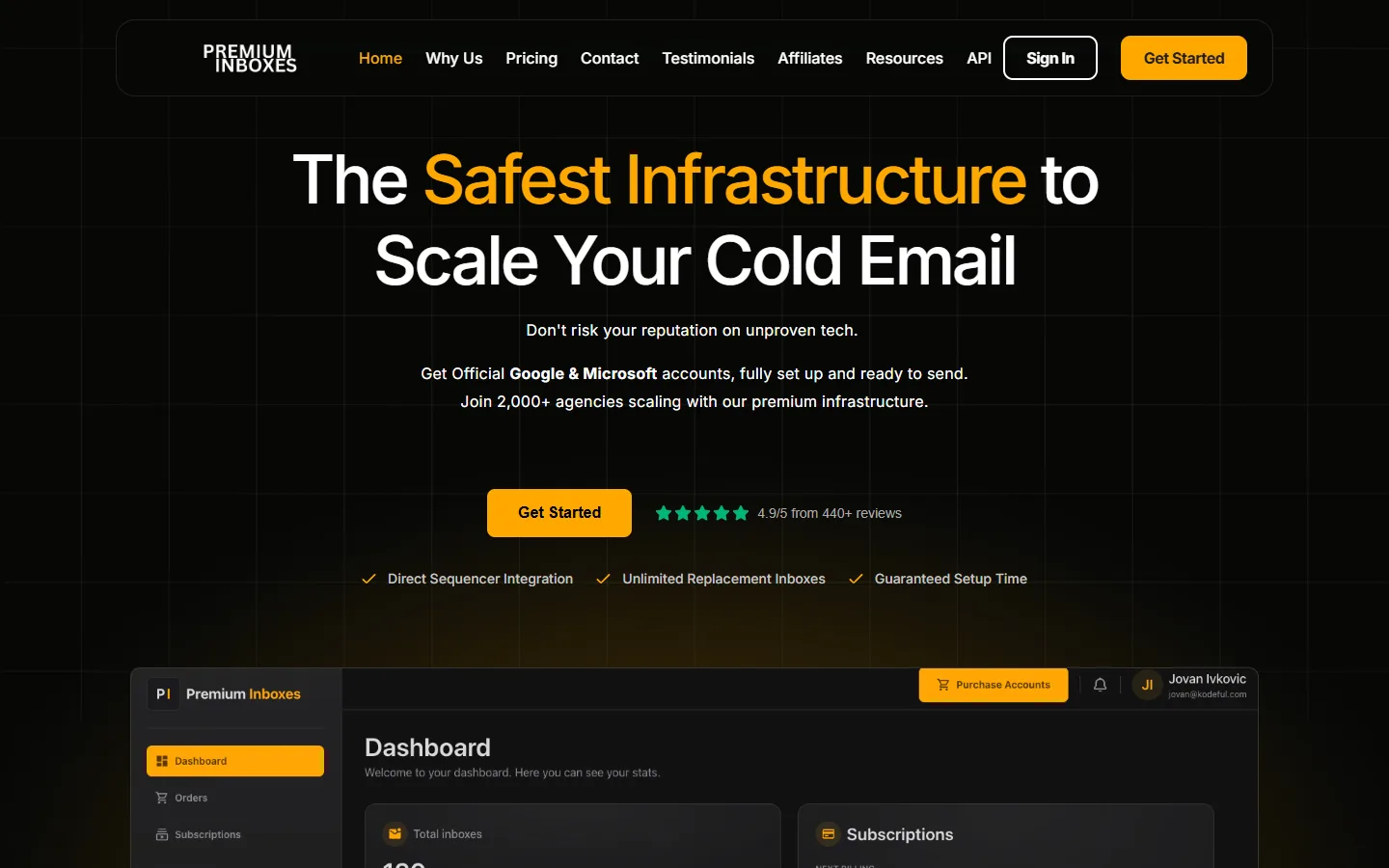
premiuminboxes.com on 5 November 2026. The homepage says 4.9 from 440+ reviews; Trustpilot that day showed 5.0 from 509.
1. What Is Premium Inboxes — and Who Is Behind It
The homepage FAQ puts it plainly: “Premium Inboxes are a reseller of Official Google workspace and Microsoft 365 Business inboxes, built specifically for cold email marketing.” The product is not software you log into to send mail. It is a provisioning service: you supply domains, the company supplies configured mailboxes inside your own Google Workspace or Microsoft 365 tenant and drops them into the sending tool you already use. The pitch is safety — “We never use ‘cracked’ or ‘farmed’ accounts. You get Official Google & Microsoft business accounts. This is the only way to ensure long-term domain health.” — plus speed (“<6h” delivery on every page), human-verified DNS and a replacement promise.
The company. The Terms and Conditions name Premium Inboxes LLC, say the Terms are “governed by and construed in accordance with the laws of the State of Florida, United States”, and give a registered address that reads, verbatim, “175th South, Southwest Street, Miami, Florida 33130” — not a street address that resolves. The Trustpilot profile lists a different Miami address, an apartment at 690 SW 1st Court. The site never names a person; the about page says the business “wasn’t a startup idea. It was a survival tactic” built by “agency owners scaling to 7-figures” who “built our own supply chain from scratch”. The setup-help page, however, has a “Book a Call w/ Richard” button for anyone who wants to speak to “Richard, the founder of Premium Inboxes, directly”, the calculator page says “27% of our reviews mention Richard by name. He built Premium Inboxes after watching agencies lose entire campaigns to unreliable infrastructure”, and a competitor’s review (Maildoso), an affiliate review (Mailing Monk), a one-star Trustpilot review and a search snippet of the company’s own Notion page all give the surname Illingworth; a LinkedIn search snippet, for a profile we could not open, places him in the Greater Bristol area of the United Kingdom. Maildoso’s review, a competitor’s, is the only source for a founding date, June 2023; the Terms are dated 03-10-2024, the oldest Trustpilot review is from January 2025 and the profile was claimed that month. The privacy policy says data may be processed in “the United States, United Kingdom, Europe, and Middle East”, and a second landing page, enjoypremiuminboxes.com, links to a “/cookie-policy-uk/”. We found no Companies House, Crunchbase, LinkedIn company or Product Hunt record we could read, no team page, no headcount and no funding: a Florida LLC with British fingerprints, one named founder, a support agent called Edward who appears in reviews from September 2026, and a partnerships contact called Liza.
Scale. The numbers on the company’s own pages do not agree with each other. The homepage body says “2,000+ Satisfied customers” and “250,000+ Inboxes in circulation”; its meta description says “570K+ inboxes”; the closing call to action on the same page says “Join 1000+ teams”; the about page’s meta says 2,500+ teams; the calculator page says “570K+ inboxes” and “220K+ domains”; the burned-inboxes page says “570K+ inboxes managed” and “95% uptime”. Review counts run from “240+ Positive reviews” (about page) through 339, 400+, 420+, 440+ and 450+ to the live Trustpilot figure of 509. All are the company’s figures and none is dated; the only external cross-check is Trustpilot, which the site consistently understates. One reviewer says he bought “200 domains and 400 mailboxes” on day one and “thousands of mailboxes” since; another ran “210 inboxes … with a 50/50 Google/Outlook split”; a case study is titled “How Ayaz Hussain Manages 600-700 Cold Email Inboxes Across Multiple Clients With Premium Inboxes”. The customer base is real; its size is the company’s word.
The 2026 direction. Three things changed on the site this year. The API page now says “The Premium Inboxes API gives your team full control of client workspaces, orders, subscriptions, and email accounts. It is included on every plan. Your API key is already in your portal settings.” — a direct answer to the 2026 reviews by two competitors, Mailforge and InboxKit, and the affiliate Mailing Monk, which say “There is no console and no API”, “no REST API or per-domain admin panels” or “There’s no API. Full stop.” The Email Control Centre, a $7,500-a-month managed operations tier, appeared on the pricing page with a 48-hour refund clause. And the Deliverability Shield, a $99-a-month account-wide monitoring add-on, got its own page. The anti-spam policy was updated on 24 March 2026, which is the only policy date on the site from this year; it governs how Premium Inboxes promotes itself, not what its customers send.
2. Who Premium Inboxes Is For — and Who It Is Not For
It fits you if:
- You run a lead-generation agency with several client brands and would rather pay $3.50 an inbox than keep someone on Workspace admin consoles, DNS and Instantly uploads
- You already own your domains and a sequencer (Smartlead, Instantly, Apollo, Lemlist, Reply.io or Bison are the ones named) and only want the mailbox layer handled
- You want official Google Workspace or Microsoft 365 accounts on your own domains rather than a provider’s private SMTP, and you want to split volume across both
- You value free replacements and a human on the other end when an inbox burns on a Friday
- You want to automate client onboarding — one workspace per client, orders placed and tracked from your own code through the API
Look elsewhere if:
- You need domains bundled or a one-stop stack with the sending tool — Premium Inboxes sells mailboxes only; Instantly, MailDeck, Zapmail’s pre-warmed plans and Maildoso’s quarterly plans bundle domains
- You want pre-warmed inboxes that can send on day one — warm-up here starts at handover, and Instantly, InboxKit, Zapmail, PuzzleInbox and Primeforge sell warmed accounts for a premium
- You need placement testing without paying $7,500 for the operations tier, or monitoring on fewer than 250 inboxes without paying $4.50 an inbox for Insured or $99 a month for Shield
- You cannot live with no trial, no refunds and 48-hour deletion after a failed payment (section 6)
- You need the cheapest possible inbox — Maildoso’s own SMTP at $0.49 to $2.50, PuzzleInbox’s Outlook seats at $0.35 or MailDeck’s SMTP at $0.95 cost less, with the deliverability trade-offs those prices imply
3. What You Actually Get: the Done-For-You Build, the Portal and the API
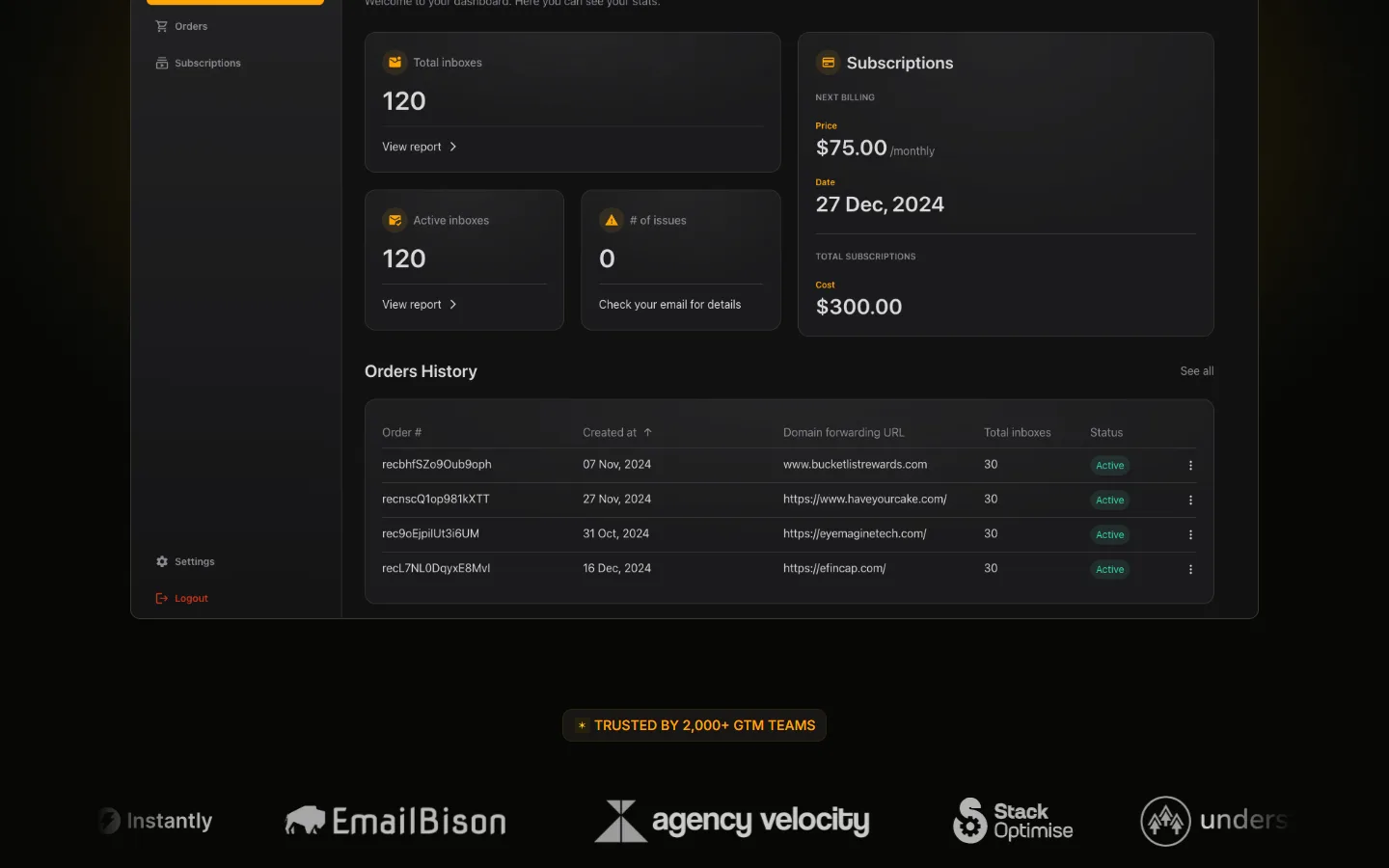
The portal preview on the homepage: inbox counts, issues, subscriptions and an order history with one forwarding domain per 30-inbox order.
The build. The homepage describes a four-step process. You “Choose between Official Google Workspace or Microsoft 365 accounts” (the company “recommend[s] diversifying your volume across both platforms”); you “Bring your own domains - we don’t sell them” and spend “2 minutes on our simple intake form to list them and give us access”; “Our engineers manually configure and verify every DNS record (SPF, DKIM, DMARC)”; and “We upload your accounts directly into your sequencer (Smartlead, Instantly) and initiate the warm-up process for you.” The Chargebee checkout lists the deliverables more precisely: “Complete technical setup (DKIM, DMARC, MX Records, SPF, Custom Domain Tracking, and Domain Forwarding)”, “Unlimited free replacement inboxes if performance drops” and “Delivery in 6 hours or less”. The Microsoft plan adds two lines the Google plan does not: “Daily sending capacity: 15 cold emails / day (equivalent to our Google Workspace solution)” and “oAuth connection to your sequencer”. A Trustpilot reviewer from July 2026 confirms the detail work: “The setup was done properly from the start — SPF, DKIM and DMARC were all configured correctly.” Profile photos and forwarding rules are included (“From profile photos to forwarding rules”); one order in the dashboard preview carries one forwarding domain per 30 inboxes.
What is not included. Domains, on the homepage: “we don’t sell them”. (The site’s own calculator says the $3.50 price is “including domains” and, lower down, “You bring the domains, we handle everything else”; the burned-inboxes page and enjoypremiuminboxes.com say “Use your domain or one of ours”; and the Email Control Centre tier promises “Domains sourced and procured for you”. The rule is softer, and muddier, than the homepage suggests; ask.) The sending tool: you need your own Smartlead, Instantly or equivalent subscription, and one one-star reviewer’s upload stalled because, in the company’s words, “your Instantly plan had reached its limit”. Warm-up: it is “initiated” at handover and runs in your sequencer; nothing is pre-warmed. Placement testing, blacklist monitoring and health alerts: not on Start Up; “24-hour health checks & alerts” from Growth (250 inboxes), “24-hour active monitoring” on Enterprise and Insured, “Continuous Placement Testing” only in the $7,500 tier.
The portal. portal.premiuminboxes.com shows total and active inboxes, a count of issues, the next billing amount and date, and an order history. Cancellation is self-serve per inbox, which a reviewer who runs thousands of mailboxes singled out: “I can cancel any individual inbox myself. Not the subscription, not a support ticket, not a retention flow. One inbox is underperforming, I remove it, done.” The flip side, from a four-star review: “If your subscription gets cancelled, it’s hard to redeem your original order.” The company’s reply to a one-star review explains why — “the ‘Reorder’ option was used, which by default creates new inboxes under a new admin panel rather than restoring the original setup.”
The API. Five documented calls — POST /client/workspaces, POST /client/purchase, GET /client/order, GET /client/subscription, GET /client/email-account — authenticated with an x-api-token header, returning JSON. The purchase call “does real work while it runs. Expect 30 to 45 seconds, then your order is in the build queue.” The page is explicit that it costs nothing extra: “No. It is included on every plan, from the first inbox up.” The use case is agencies: “White-label the whole flow. Your client sees your brand, your dashboard, your reports. We stay invisible under the hood.” We did not test the API; the API-reference page rendered a revenue-calculator template for our research agents, so the full reference may live behind the portal login.
Integrations. The homepage lists Smartlead, Instantly, Pipl.ai, Prospi.ai and Salesforge as sequencers and Porkbun, GoDaddy and Cloudflare as domain providers; the calculator page lists Instantly, Smartlead, Apollo, Lemlist, Reply.io and Bison. Uploads go over OAuth where the sequencer supports it (Instantly’s Google OAuth route needs a Workspace admin to trust its client ID under API Controls; Smartlead calls OAuth “the more secure and reliable method”) or over app passwords with IMAP and two-step verification. A reviewer in June 2026 had the team move a batch between sequencers: “Even they shifted our accounts from one platform to the other keeping the tags same.”
4. Capacity: 15 Emails a Day, 3 Inboxes a Domain, and the Rules Behind Them
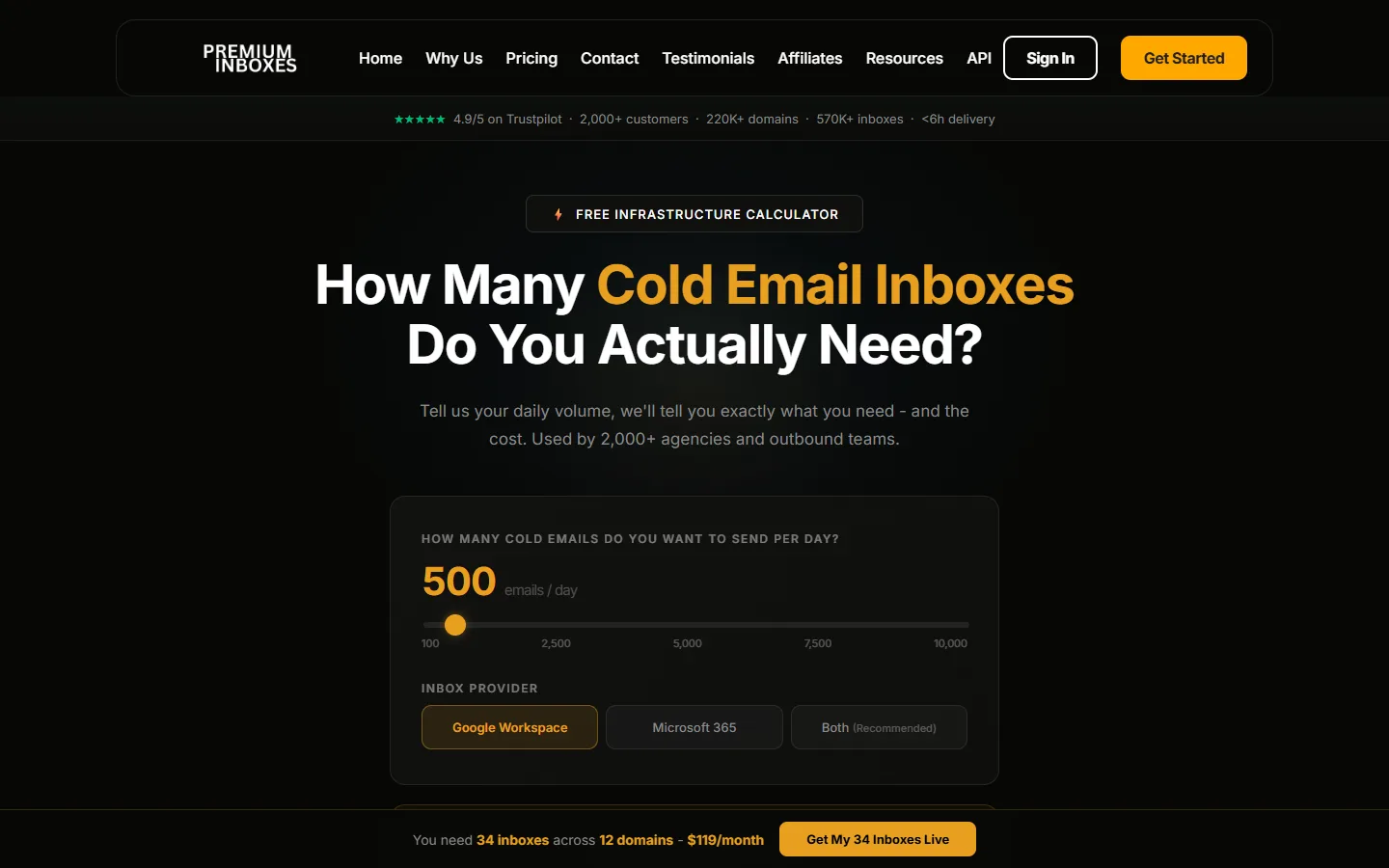
The calculator’s arithmetic: 500 emails a day ÷ 15 per inbox = 34 inboxes, ÷ 3 per domain = 12 domains, × $3.50 = $119 per cycle.
Premium Inboxes is unusually frank about capacity. The calculator page says: “Sending more than 15 cold emails per inbox per day triggers throttling from Google and Microsoft. Our calculator distributes volume safely across the right number of inboxes and domains.” Its formula is 15 sends per inbox per day and 3 inboxes per domain, so 500 cold emails a day = 34 inboxes on 12 domains = $119 per four-week cycle on Standard ($153 on Insured), and 2,500 a day = 167 inboxes on 56 domains. The Microsoft checkout repeats the number as a product spec.
That 15 is far below what the platforms technically allow and close to what the sequencers observe. Google Workspace lets a user send “2,000” messages a day (“500 for trial” accounts) to “3,000” external recipients, over a rolling 24-hour window, and blocks sending “for up to 24 hours” when a limit is hit. Microsoft’s Exchange Online limits are “10,000 recipients per day” and “30 messages per minute”, with a tenant-wide external-recipient cap introduced in 2025 and a default outbound spam policy that “automatically applies to all senders” and that admins “can’t disable”. But Google’s sender guidelines ask you to “Keep spam rates reported in Postmaster Tools below 0.10% and avoid ever reaching a spam rate of 0.30% or higher”, its Workspace Acceptable Use Policy forbids using the service “to generate, distribute, publish or facilitate unsolicited mass email, promotions, advertisements, or other solicitations (‘spam’)”, and Microsoft tells customers who “need to send legitimate bulk commercial email” to “use third-party providers”. Smartlead’s own benchmark, from more than 850 million emails in the first half of 2026, is that “The median mailbox sends 14 cold emails a day” and that it keeps “each mailbox at 50 cold emails a day or fewer”; Instantly recommends 30 campaign emails per account per day and says new accounts “typically need two to four weeks to reach moderate sending capacity”.
The practical consequences: an inbox is a small, disposable unit; a Google or Microsoft suspension is a question of when, not if, which is why the replacement promise matters more than the price; and the inbox bill is a fraction of the stack. For 500 sends a day you should budget 12 domains (around $14 a year each elsewhere), a sequencer (Instantly’s Growth plan is $47 a month, its warm-up included) and two to four weeks of warm-up before the first campaign, on top of $119 per cycle to Premium Inboxes.
5. Premium Inboxes Pricing 2026 — Standard, Insured, Shield and the Email Control Centre
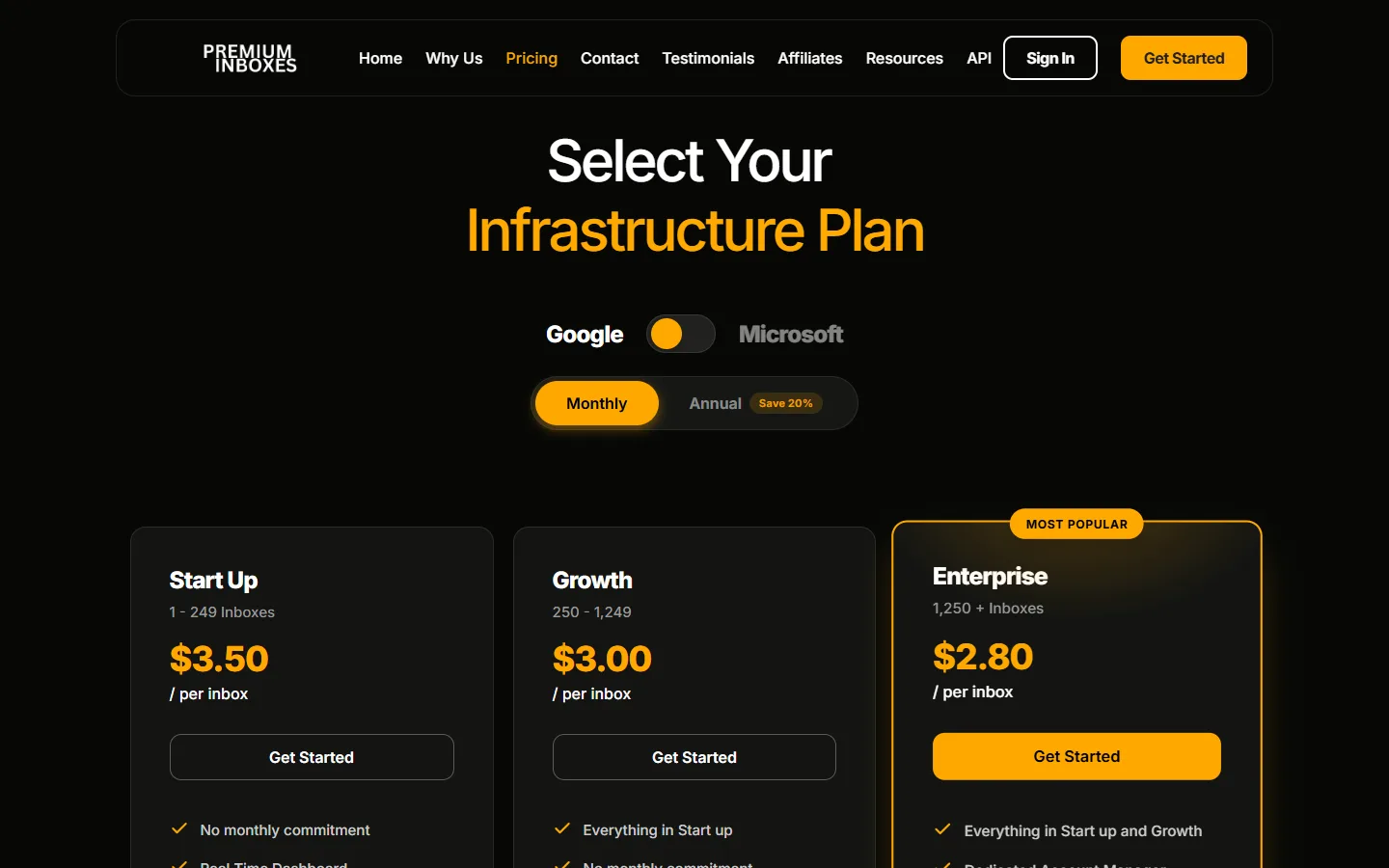
pricing-page on 5 November 2026. In its default Monthly state every Get Started button leads to the same Chargebee item, billed every four weeks; the Annual toggle swaps the cards to $35, $30 and $28 per inbox per year.
Prices were read from the pricing page, the homepage, the calculator, the special-offer page and the four Chargebee checkout carts the site links to, all on 5 November 2026. Every tier applies to both Google Workspace and Microsoft 365 at the same price.
The four-week cycle. This is the detail every price on the site hides. The pricing page prints “$3.50 / per inbox” and the homepage “$3.50 / mo per inbox”, but the checkout cart for 30 Google inboxes reads “$3.50 … 30 … /4 weeks … $105.00 … Next charge on December 3, 2026” — 28 days after our 5 November visit — and the Chargebee item is literally named FlexiPlan-USD-Every-4-weeks. Thirteen four-week cycles fit in a year, so an inbox at “$3.50 a month” costs $45.50 a year, or $3.79 per calendar month; the Terms, meanwhile, say “All services are paid in advance on a monthly basis”. The “Annual — Save 20%” toggle is live, but nothing on the page says what it does until you click it: the three cards swap to $35.00, $30.00 and $28.00 ”/ yr per inbox”, with “2 Months Free” at the top of each feature list, and the Get Started buttons switch to Chargebee items named FlexiPlan-USD-Yearly (Google) and microsoft-365-website-purchase-USD-Yearly (Microsoft). Ten months’ worth for twelve is a 16.7% saving against the sticker price, not 20% — or 23% against the thirteen four-week charges you would otherwise pay. The Insured tier has no annual price, and the special-offer page whose title promises an “Annual Contract Deal” shows only the four-week figures. We read the annual prices on the page but did not open the annual cart, so confirm the plan name and the charge in writing before you pay a year upfront.
One inbox: what each tier costs
| Tier | Inboxes | Per inbox, every 4 weeks | Per calendar month (×13 ÷ 12) | Per year, four-week plan | Annual plan, per inbox per year | What it adds |
|---|---|---|---|---|---|---|
| Start Up (Standard) | 1–249 | $3.50 | $3.79 | $45.50 | $35.00 (ten months for twelve) | Real-time dashboard, complete technical setup, upload to your sequencer, unlimited replacement inboxes, “No monthly commitment” |
| Growth (Standard) | 250–1,249 | $3.00 | $3.25 | $39.00 | $30.00 | Everything in Start Up plus a real-time health dashboard and 24-hour health checks and alerts |
| Enterprise (Standard) | 1,250–2,499 | $2.80 | $3.03 | $36.40 | $28.00 | Dedicated account manager, dedicated Slack channel, Infrastructure Autopilot, Domain Engine and Send Ops “modules”, 24-hour active monitoring |
| Custom | 2,500+ | Quote | — | — | Quote | The checkout cart lists “2,500+ Inboxes: Custom Plan” |
| Insured Infrastructure | Any number, “All Inboxes” | $4.50 | $4.88 | $58.50 | None shown | ”Deliverability Insurance”, unlimited free replacements “for guaranteed uptime”, 24-hour active monitoring with automatic reconnection, priority build queue, account manager, Slack channel, advanced analytics, priority support |
The Insured tier is the oddity. It does not appear on the pricing page’s body at all — only in that page’s meta description (“$2.80 – $4.50/inbox”), on the special-offer and compare pages (where it wears the “MOST POPULAR” badge), in the calculator (“Standard - $119/mo · Insured - $153/mo”) and at checkout (“Official Google Workspace Inboxes With Insurance · $4.50 per Inbox - Flat Fee”). What the insurance insures is not written down anywhere: the cart lists “Deliverability Insurance” as a line item without a definition, the Terms do not mention it, and there is no SLA. Read it as “monitoring plus priority rebuilds for a dollar more”, which at 30 inboxes is $30 a cycle.
Example baskets
| Basket | Standard, every 4 weeks | Standard, per year | Insured, every 4 weeks | Insured, per year | Daily capacity at 15 per inbox | Domains at 3 per domain |
|---|---|---|---|---|---|---|
| 1 inbox (a test) | $3.50 | $45.50 | $4.50 | $58.50 | 15 | 1 |
| 30 inboxes (the default cart) | $105.00 | $1,365 | $135.00 | $1,755 | 450 | 10 |
| 34 inboxes (500 a day) | $119.00 | $1,547 | $153.00 | $1,989 | 510 | 12 |
| 100 inboxes | $350.00 | $4,550 | $450.00 | $5,850 | 1,500 | 34 |
| 250 inboxes (Growth) | $750.00 | $9,750 | $1,125.00 | $14,625 | 3,750 | 84 |
| 1,250 inboxes (Enterprise) | $3,500.00 | $45,500 | $5,625.00 | $73,125 | 18,750 | 417 |
Domains, the sequencer and warm-up are extra in every row. On the annual plan the same 30 Standard inboxes are $1,050 a year and 100 are $3,500, paid upfront. Note that Insured is flat: at 1,250 inboxes it costs 61% more than Enterprise Standard, for monitoring that Enterprise already lists.
Add-ons and managed tiers
| Add-on | Price | What you get |
|---|---|---|
| Deliverability Shield | $99 a month, “flat, account-wide” | Daily domain and inbox health checks, priority replacements “at the front of the queue”, a monthly health snapshot, a “panic-mode” support route; no minimum inbox count, cancel anytime; “If you turn on Deliverability Shield and we completely miss a major inbox/infra issue we should have caught, we’ll credit your last month of Shield” |
| Email Control Centre (ECC) | $7,500.00 a month, by application, inboxes not included | 24/7/365 monitoring with automatic response, continuous placement tests to “real Google and Microsoft seed inboxes”, incident response (degrading inboxes rested in warm-up, accounts rebuilt “on fresh sending IPs”, dying domains rotated out), domains “sourced and procured for you”, “Any volume live within 60 minutes”, strategy advisory, a named account manager and analyst, bi-weekly calls; “If infrastructure stops your sending for more than 48 hours, that month is refunded. No carve-outs” |
| Priority delivery upgrade | Not published | The delivery policy’s 6-hour commitment instead of the standard 12 business hours |
| Domains | Not sold on the main site | ”Bring your own domains - we don’t sell them”; enjoypremiuminboxes.com says “Use your domain or one of ours”; ECC procures them |
| Setup, platform or contract fees | None | ”No setup fees. No platform fees. No contracts. Just per-inbox pricing” |
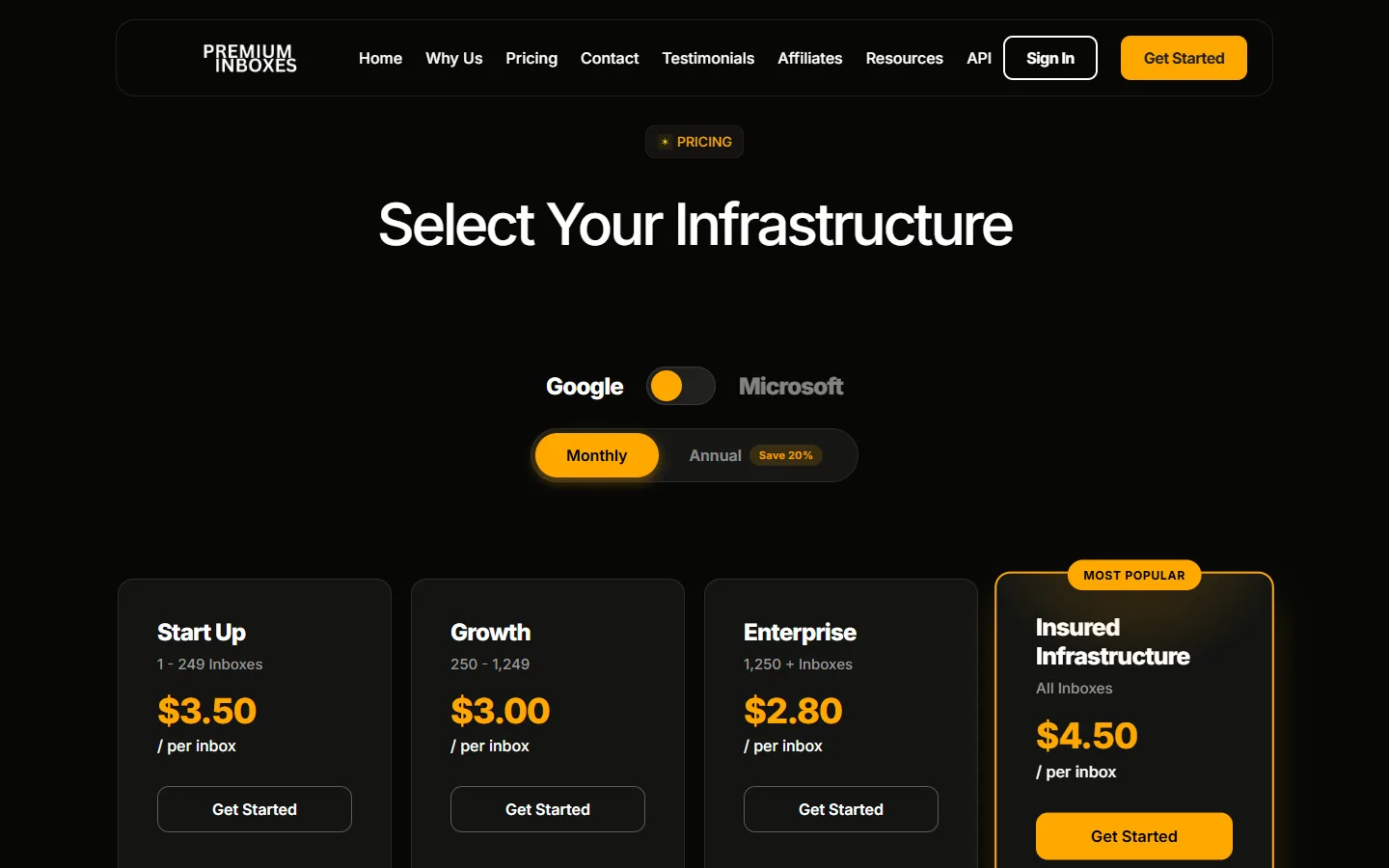
The Insured tier exists on the special-offer and compare pages and at checkout, but not on the pricing page itself.
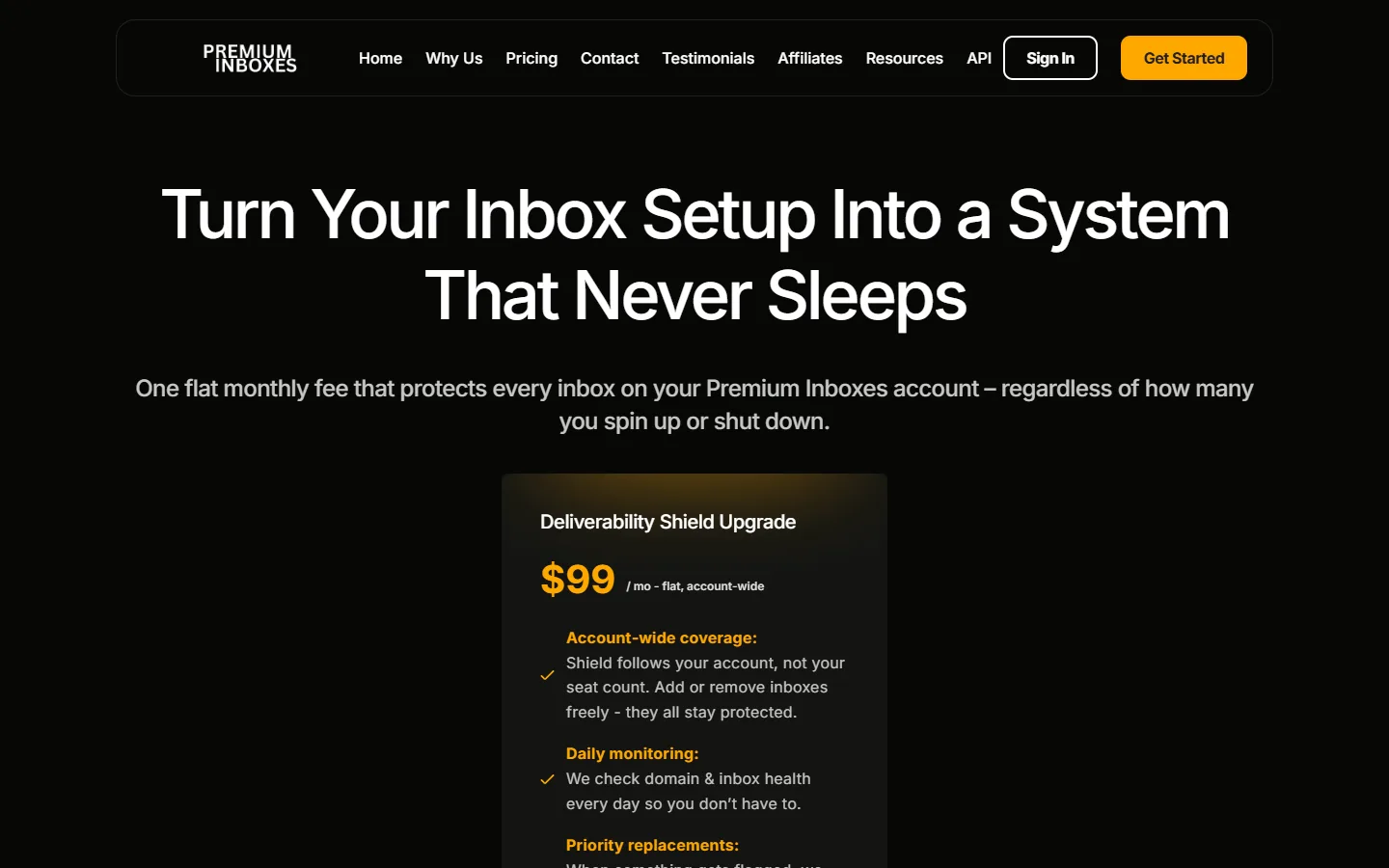
Deliverability Shield: $99 a month for the whole account, however many inboxes it holds.
How it compares with buying the seat yourself
Google sells Business Starter for $7.00 a user a month on a one-year commitment or $8.40 on its Flexible Plan (new customers get $3.50 for the first 12 months on up to 20 users); Microsoft lists Business Basic at $7.00 a user a month paid yearly or $8.40 on a monthly subscription (Microsoft’s own page, read 10 November 2026). Premium Inboxes charges $3.50 to $2.80 per four weeks for the same seat, configured, uploaded and replaceable. Google’s reseller terms let “all prices for Resold Services” be “solely determined between Reseller and Customer”, and the company does not explain its margin; a Trustpilot reviewer in February 2025 titled his review “Legit Google Account for less than half the retail price”. Hold both facts at once: it is a real bargain against list price, and it is a bargain whose economics you cannot see.
What our link does
Premium Inboxes runs an affiliate programme at affiliate.premiuminboxes.com with three tiers: “10% monthly recurring commission” up to the first $1,000 of monthly recurring revenue, 15% from $1,000 to $5,000, and “20% life time commission” from $5,000 to $25,000, the first two on 30-day terms. The link in this review carries an fpr parameter, the default referral tag of the FirstPromoter platform. The affiliate page promises nothing to the person who clicks: no discount, no extended trial, and the company runs no trial anyway. We did not open the link ourselves — we never test affiliate or referral links — so we cannot say whether a coupon appears; the checkout cart has an “Apply coupon” field, so ask the sales team if you want one.
From $3.50 an inbox · every 4 weeks · no minimum order
Start with one inbox on one spare domain before you move a client
There is no trial and no refund once an inbox exists, so buy one Standard inbox for $3.50, time the delivery against the 12-hour policy, check the DNS records yourself, run two weeks of warm-up and a placement test, then scale — and set a calendar reminder for the four-week charge.
See Premium Inboxes pricing
6. Delivery Time, Trial, Refunds, Cancelling and the Contract
Delivery. Every marketing page says “<6h” or “Live in under 6 hours”, and the checkout says “Delivery in 6 hours or less”. The delivery policy, dated 03-10-2024, says something narrower: “Our standard service delivery commitment is twelve (12) hours from the completion of all onboarding requirements”, with a “priority delivery upgrade” for “a six (6) hour delivery timeframe” whose price is not stated, and a clock that “Is based on business hours” and “Excludes time spent waiting for client responses or access”. The reviews mostly side with the marketing — “They also deliver the inboxes extremely quickly (within 6 hours, even on weekends)” (September 2026), “always set up within hours of purchase” (September 2026) — and one agency reviewer says a fresh batch of 50 can take days. The “Guaranteed Setup Time” badge on the homepage is defined nowhere, and no page offers money back for a late delivery: the two money-back promises on the site — the $7,500 tier’s refund of a month if sending stops for more than 48 hours, and Shield’s credit of a month’s fee if the team misses a major issue — cover outages, not delivery time.
Trial. There is none. The company sells one inbox at $3.50, which is the closest thing to a trial it offers.
Refunds. The refund policy, dated 06-01-2025, is as strict as any we have reviewed: “All sales are final. Once a license is activated, partially used, or has undergone any setup, no refunds, credits, or chargebacks will be issued under any circumstances.” The exclusions list “Change of mind”, “Incompatibility with other tools”, “Unused time in a billing cycle”, “Perceived lack of benefit”, “Mid-subscription cancellations” and “Misunderstanding of service scope”. The single exception requires that “The license has never been activated or accessed”, “No setup, onboarding, or technical work has been done”, “No resources have been allocated” and “The request is submitted within 7 days of purchase” — in practice, an order you cancel before the team starts. Requests go to hello@premiuminboxes.com with your order ID; “Final determination is at our sole discretion.” Then the clause that should give any card-holder pause: “Filing a chargeback after accepting these terms is considered fraudulent misuse. We will dispute all such claims and pursue action as needed.” Of the three one-star Trustpilot reviews, one is about a double charge that “took 10/12 days to refund” (the company says the refund was immediate once re-raised); of the other two, the company’s reply to one says the customer “declined a cancellation and refund”, while its reply to the other blames the customer’s Instantly plan limit and does not mention a refund at all.
Cancelling. The cancellation policy is self-serve: log in to the portal, open subscription management, choose “Cancel Subscription”; “Your service will continue until the end of your current billing period” and “We do not provide partial refunds for unused portions of your subscription period.” Individual inboxes can be cancelled the same way. Reactivation means “selecting a new subscription plan” at whatever the price is then.
Failed payments. This rule is not in any policy; it is in the company’s reply to a one-star review from July 2025: “When payment wasn’t received, your inboxes were automatically removed after 48 hours, in line with our policy. This automated process runs seven days a week - including weekends - as we also provide inboxes during that time. Four separate reminder emails were sent to the billing contact before removal.” The reviewer’s version: “they couldn’t charge my card on Friday night … by the Monday morning I logged into my sender account I found out that all my inboxes has been deleted … All warmup, setups were waisted.” Whoever was at fault for the card, the mechanism is the point: a four-week cycle, a weekend card failure and a 48-hour timer can erase a month of warm-up. Keep the card current and the billing contact watched.
The contract. The Terms are dated 03-10-2024 (the format does not say March 10 or October 3), run to eleven short sections, and contain no liability cap, no arbitration clause, no venue and no update date — only “the laws of the State of Florida” and the registered address quoted in section 1. Useful lines: “All subscriptions automatically renew unless cancelled”; “Prices are subject to change with notice”; “Account sharing is permitted at the discretion of the account holder”; “We aim to respond to and resolve all support queries within a 24-hour window. However, this is a target rather than a guarantee”; “You are solely responsible for backing up your data. We do not maintain backups of customer data”; and “We provide our Services ‘as is’ without any express or implied warranties.” The privacy policy, same date, lists the data it collects — including “Login details for various platforms” — says it is shared only under law, consent or a business transaction, names no processor (not Chargebee, not Google, not Microsoft) and allows processing in “the United States, United Kingdom, Europe, and Middle East”. There is no GDPR section, no retention period and no security certification.
7. Is Premium Inboxes Safe? Ownership, Suspensions and the Reseller Question
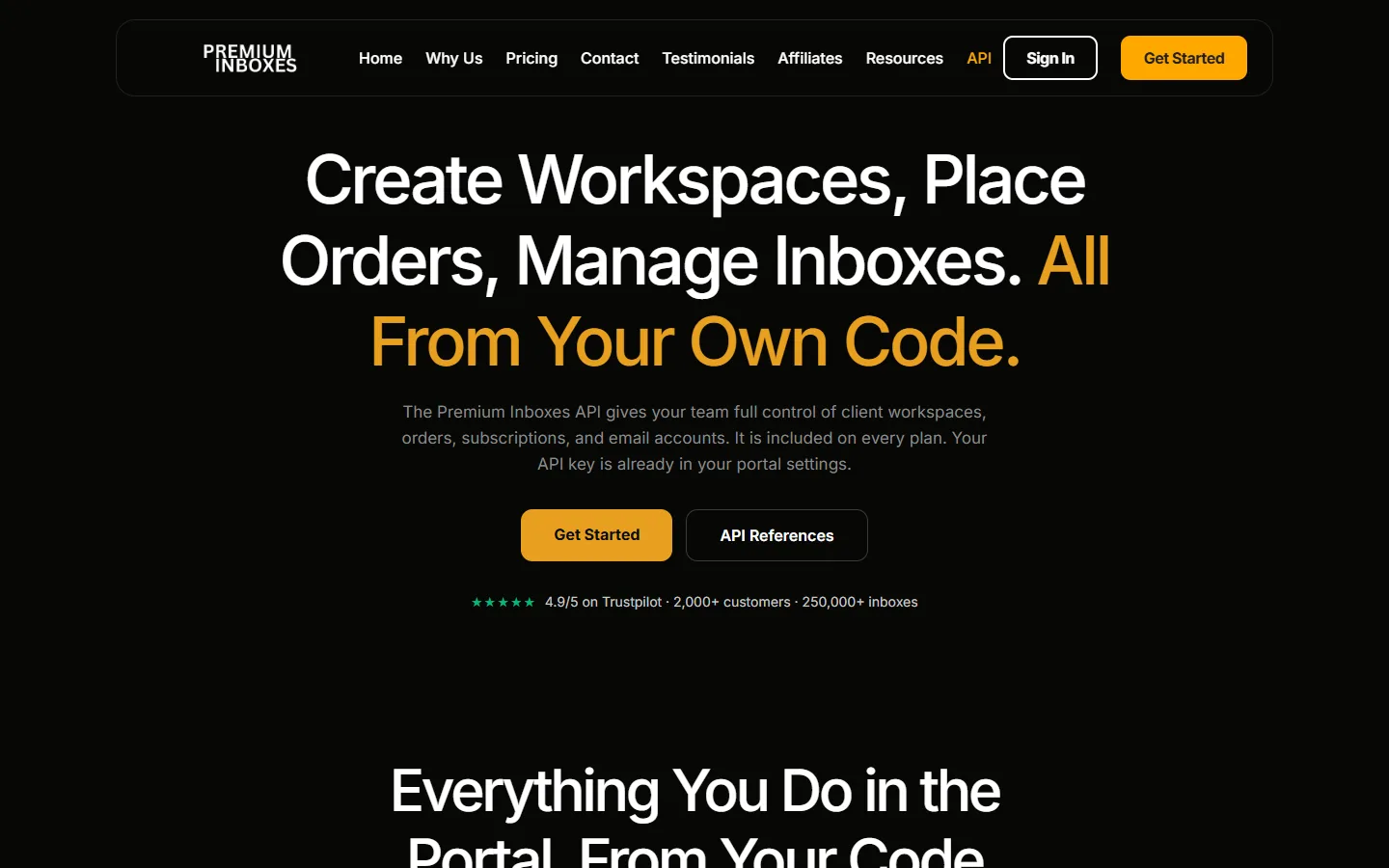
The API page, new in 2026: workspaces, purchases, orders, subscriptions and email accounts from your own code, at no extra cost.
“Safe” means three different things here.
Safe as in official accounts. The core claim — real Google Workspace and Microsoft 365 business licences, not “cracked” or “farmed” accounts — is consistent across the company’s pages, the reseller FAQ, the Chargebee carts (“Official Google Workspace Inboxes”, “Microsoft 365 Business Inboxes”) and most third-party reviews, including a competitor’s that concedes “These are not cracked or farmed inboxes, and they run on US IPs.” The calculator page goes further — “Official Google & Microsoft Partner … dedicated support from an authorized partner” — and the burned-inboxes page says “Licensed partner”. We could not find Premium Inboxes LLC in Google’s or Microsoft’s public partner directories, and the company publishes no partner ID; Google’s reseller programme does let an authorised reseller create a customer’s Workspace account, after which “the customer’s account stays in a suspended state until they accept the TOS”, and Microsoft’s Cloud Solution Provider programme requires “business verification” before a partner can transact. Treat “official partner” as plausible but unverified, and “official accounts” as the claim the whole business rests on; one competitor’s review alleges the Google accounts it bought “originated from India”, which no other source corroborates and the company’s “Official US Infrastructure” wording contradicts.
Safe as in you keep what you paid for. You own the domains, because you brought them. The Workspace or Microsoft tenant is created on your domain and, per the second landing page, with “Full admin access”; but the licences are bought through the reseller’s console, the subscription is the reseller’s, and Google’s terms say that “At Customer’s discretion, Reseller may access Customer’s Account” and that “Google will not have any Liability arising out of a Reseller’s (A) suspension or termination of Customer’s access to the Services”. In plain terms: if you stop paying Premium Inboxes, the mailboxes go — 48 hours after a failed payment, or at the end of the paid period if you cancel — and no page explains how to move a tenant to your own Google billing. The one competitor review that checked says the company “documents how to migrate in, but not how to migrate out”. Ask before you buy if that matters.
Safe as in deliverability. Nobody in this market can promise inbox placement, and Premium Inboxes does not; even the $7,500 tier’s 48-hour refund is an uptime guarantee, paid if “infrastructure stops your sending for more than 48 hours”, not a placement one. The replacement promise is the real product: “Unlimited free replacement inboxes if performance drops” on the Standard carts and “for guaranteed uptime” on the Insured ones, “An inbox gets flagged, we rebuild it free”, “same day” or “always within 24 hours” depending on the page. The Terms do not define “performance drops”, there is no cap or SLA in writing, and a competitor’s review claims replacements “often” take 48 to 72 hours — a claim we could not test. What we can say is that in 509 Trustpilot reviews the words “suspended”, “banned”, “replaced” and “replacement” return no matches, which cuts both ways: no public complaints about replacements, and no public praise of them either. The one deliverability failure on record is a one-star reviewer whose “domain reputation is destroyed” two weeks after a rebuild, which the company disputes.
What we would want before trusting it with a client’s domain. A written definition of “performance drops” and the replacement SLA; the priority-delivery price; confirmation of partner status; a processor list in the privacy policy; and a plan for what happens to the tenant if you leave. None of that exists today. What does exist is a founder who answers, in public, the same day — which is more than most resellers offer and less than a contract.
8. What Premium Inboxes Users Say: Trustpilot, G2 and the Competitor Reviews
| Source | Rating | Reviews | Note |
|---|---|---|---|
| Trustpilot | 5.0 | 509 reviews | 314 in the last 12 months; 98% five-star, under 1% four-star (three reviews), 0% two- and three-star, under 1% one-star (three reviews); every review labelled “Unprompted”, none “Verified”; profile claimed January 2025 on a paid subscription; the company replies to the three one-star reviews, each the same day, signed Richard |
| G2 | 4.8 | 17 reviews | Reported by a directory as of March 2026; G2 blocked our reader |
| Capterra / Product Hunt / Reddit | — | — | No Capterra or Product Hunt listing found; Reddit threads are cited by competitors but could not be read |
| The company’s own pages | 4.9 | 240+ to 450+ “reviews” | Undated figures that lag the live Trustpilot count |
The Trustpilot profile is extraordinary and should be read carefully. A 5.0 from 509 reviews with three one-star and three four-star reviews is a distribution almost no company earns. Trustpilot’s own note on the page — “This company hasn’t invited customers recently, so reviews may not be representative” — and the “Unprompted” label on every review mean the company is not using Trustpilot’s invitation system; it does not mean customers were not asked. The site’s testimonials page has a “Leave a Trustpilot Review” button, many reviews carry a “Date of experience” weeks or months before the posting date, Trustpilot’s AI summary says it considered 343 reviews rather than 509, and a one-star reviewer writes “I seriously question these 5-star reviews.” A competitor’s blog claims there were only “11 Trustpilot reviews between March and August 2026”, which the live profile contradicts (more than 140 in that window). Our reading: the reviews are real customers writing after a good onboarding, concentrated on the first week of the relationship, and almost silent on what happens months later.
What people praise is remarkably consistent: speed, DNS done right, and a named human. “Getting inboxes set-up by the team at PremiumInboxes is fast and painless. They’re a great price too” (the oldest reachable review, January 2025); “There is an actual Humans behind their operations. They are always there, quick to respond and will help you fix stuff if you need them” (February 2025); “Before, I used to manually set up all domains, inboxes and configuration (DKIM, DMARC, etc) and it becomes a pain in the arse, the more domains use have. Premium Inboxes has taken away all that” (September 2026); “When one setup got stuck, Edward from support answered within minutes and had it delivered within the hour, app password included” (September 2026); “Richard & his team are quick, friendly & efficient. … Mailboxes never have the deliverability problems I’ve seen with other providers” (September 2026); “Easy Setup. Quick Responses. Good Deliverability. And… cheaper inboxes than Instantly” (December 2025); “Takes the headache out of the experience, for the same cost as buying the inboxes normally so it’s a no brainer” (September 2026). On deliverability the honest line is “Deliverability is 90% of the time great and reliable” (November 2025) and “Really good deliverability on google inboxes if you follow their warmup guidelines and sending volume” (May 2025). No review names a dollar price.
What people criticise. Three one-star reviews and three four-star reviews, all answered or absorbed:
- Billing and deletion. “The second month they couldn’t charge my card on Friday night due to issue on their end and by the Monday morning I logged into my sender account I found out that all my inboxes has been deleted by their 48 hours automated removal process (ON A WEEKEND)” (July 2025). The company’s reply denies the card failure was its fault and confirms the 48-hour policy quoted in section 6.
- A stalled upload and silence. “Customer service is atrocious. They basically don’t respond to any tickets or emails. I bought 9 email addresses to migrate over to Instantly. Only 5 of them migrated” (March 2026). Reply: “We uploaded 5 to your Instantly account, but were unable to complete the rest because your Instantly plan had reached its limit.”
- A setup that went wrong. “After receiving payment he has refused to complete our setup and is ignoring all emails and linkedin messages” (June 2025). Reply: the order “was submitted with incorrect details”, a refund was declined by the customer, and “124 out of 126 email accounts” were delivered.
- Re-ordering. “If your subscription gets cancelled, it’s hard to redeem your original order. I wish there was an easier way to reestablish the order” (four stars, December 2025).
- Early placement. Two five-star reviewers describe a bad start that support fixed: “My early placement tests came back at 99 percent spam on Google” (July 2026) and “When we first looked into using Premium Inboxes our emails we landing in junk almost every time” (April 2026).
The competitor reviews. Almost every long-form “Premium Inboxes review” online is written by a rival — Aerosend (“Aerosend is my company and competes with Premium Inboxes”), Mailforge and Primeforge (both Salesforge companies, same author), Maildoso, InboxKit, PuzzleInbox, MailDeck, DitLead, Peeker — or by an affiliate (Mailing Monk, which also appears as a Premium Inboxes case study). Read as a group they agree on the facts that match the company’s pages (per-inbox prices, no domains, warm-up at handover, free replacements, founder support) and disagree wherever they guess. Mailforge’s “There is no console and no API” and Mailing Monk’s “There’s no API. Full stop.” are out of date. PuzzleInbox’s claims that pricing is sales-gated at “$6 to $15 per inbox per month”, that the service is “Google Workspace only” and that setup takes 24 to 72 hours contradict the public pricing page, the Microsoft checkout cart and the reviews; its community post’s “Inbox placement ranged from 72% to 76%” is one anonymous test on five inboxes. Primeforge’s Enterprise price of $2.50 is wrong (it is $2.80). The useful criticisms are the ones nobody disputes: no pre-warming, no placement testing below $7,500, no visibility into bounces on the base tier, Microsoft inboxes that “can become unstable at higher volumes”, and a refund policy that is “a real risk”. The one genuinely independent endorsement we found is a newsletter from an agency that says it has “tested 15+ inbox providers” and that Premium Inboxes is “Now responsible for supplying 80% of our email infrastructure” — behind an affiliate link.
9. Premium Inboxes Alternatives: InboxKit, Zapmail, Hypertide, Mission Inbox, Google and More
Prices are from each vendor’s own pricing page as read on 5 November 2026 unless marked, and were checked a second time by an independent reader. The InboxKit, Zapmail, Primeforge, Maildoso and Microsoft 365 rows were read again on 10 November 2026 and carry that day’s figures. Watch the unit: Premium Inboxes bills per inbox every four weeks; most rivals bill per mailbox, per slot, per domain or per server per calendar month; Google and Microsoft bill per user. “Platform” says whose servers the mail leaves from — an official Google or Microsoft tenant, or the vendor’s own SMTP.
| Tool | Paid from | Unit and billing | Platform | Domains | Warm-up | Replacement or guarantee | The catch |
|---|---|---|---|---|---|---|---|
| Premium Inboxes | $3.50 per inbox (1–249), $3.00 (250–1,249), $2.80 (1,250+); Insured $4.50 at any volume | Per inbox, every 4 weeks (13 charges a year) or $35/$30/$28 a year; no minimum | Google Workspace or Microsoft 365, same price | Bring your own (ECC procures them) | Started at handover in your sequencer | Unlimited free replacements, “same day”; no written SLA; ECC refunds a month after a 48-hour outage | No trial, no refunds, 48-hour deletion after a failed payment; Terms from 2024, refund policy from 2025 |
| InboxKit | $3.00 per mailbox monthly, $2.70 billed quarterly, $2.50 billed annually; pre-warmed $6, $7 or $9 by warming window; Azure tenants $30–$50 a month, up to 100 mailboxes each | Per mailbox, monthly, quarterly or annual; no minimum, no base fee | Google Workspace or Microsoft 365, same price; Azure | Not included; pre-warmed domains from $12.50 once | Pre-warmed option at 2–4, 4–8 or 8+ weeks | Cancel any mailbox before renewal; no replacement policy on the pricing page | Free account but no free trial of paid mailboxes |
| Zapmail | $39 a month for 10 mailboxes, $99 for 30, $299 for 100 ($3.90 to $2.99 each); $3.25 to $2.50 each paid yearly; extras $3.50–$3.00 on monthly billing | Per bundle; monthly, quarterly ($35, $90, $270 a month) or yearly ($390, $990, $3,000), the last two charged up front; Google mailboxes renew at $49, $149 and $449 a month after 12 months | Google Workspace and Microsoft 365, interchangeable | Bring or buy ($13.00 a .com) | Pre-warmed plans from $39 for 3 mailboxes, then $24 a month ($8.00 to $6.00 each on renewal), domains included; ZapWarm $1.00–$2.00 a mailbox a month | ZapShield $3 a domain a month: blacklist monitoring and a replacement domain decided case by case, only for domains bought on Zapmail; no trial, no refunds outside two narrow exceptions | Headline “Starts just at $2.5 /mailbox” needs 100 mailboxes paid a year ahead; Google renewals cost 26% to 51% more; Reddit threads on its India-based provisioning cited by rivals |
| Hypertide | $3.30 per Google inbox, any volume; Entra (Azure) domains $25 a month with 25 inboxes, extra inboxes $1 | Per inbox or per domain, monthly; no minimum | Google Workspace; Microsoft; Azure/Entra with Outlook UI | Bring or buy in-platform | 2-week warm-up referenced, not stated as included | Swap a flagged domain in-platform; “no provider can guarantee 100% primary inbox delivery” | Conflicting capacity figures on its own homepage |
| Primeforge | $4.50 per mailbox slot a month; 25 slots cost $113 billed monthly or $94 a month billed yearly (about $3.76 each, worked out) | Per slot, minimum 10, monthly or yearly (2 months free) | Google Workspace or Microsoft 365 | $14 a year per .com | Pre-warmed option, price on request | None stated; no free trial, cancel anytime | Pay for slots, not active mailboxes; same group as Mailforge and Infraforge |
| PuzzleInbox | Google Workspace $3 per inbox, warmed $4.50; Outlook 365 $0.35, warmed $0.50 (100-inbox minimum, $35 a month) | Per inbox, monthly | Google Workspace or Microsoft 365 | Registered and configured by PuzzleInbox | Pre-warmed option skips 2–3 weeks | Outlook inboxes replaced within 7 days for non-content suspensions; refunds within 48 hours if unfulfilled | 12 emails a day on Google, 3 a day on Outlook; delivery 24–72 hours |
| MailDeck | Google Workspace Starter $28 a month for 10 slots with 2 domains; Outlook $30 a domain a month for 100 inboxes; private SMTP $0.95 an inbox | Per bundle, domain or inbox, monthly | Google Workspace, Microsoft 365 or own SMTP | Included in Google bundles | Outlook Premium “3-5 days”; Google “15 days minimum” | Free domain replacement on burn | Two prices per plan on the page; 2-tenant minimum on Outlook; 4–7 cold emails a day per Outlook inbox |
| Instantly (done-for-you) | $5 per Google account a month, pre-warmed $10 (batches of 5), AirMail SMTP $4; domains $15 a year; needs a $47+ Instantly plan | Per account, monthly, inside Instantly | Google Workspace or Instantly’s own AirMail | Required, $15 a year, owned by Instantly | Pre-warmed Google accounts available | None stated | Instantly “retain[s] domain ownership and administrator access” and cannot transfer them; max 5 accounts a domain |
| Mailforge | $3 per mailbox slot a month, minimum 10; about $2.40 billed yearly | Per slot, monthly or yearly | Own infrastructure on a shared IP pool | $14 a year per .com | Pre-warmed; Warmforge sold alongside | None stated; cancel anytime | Not Google or Microsoft mailboxes; recommends 30 a day per mailbox |
| Infraforge | $4 per mailbox slot a month, minimum 10, billed quarterly or yearly (about $3.33 yearly); dedicated IP $99 a month | Per slot, quarterly or yearly only | Own dedicated servers | $14 a year per .com | Not stated as included | None stated | No monthly billing; dedicated IPs are a paid extra |
| Maildoso | $75 a month for 30 mailboxes ($2.50), $225 for 300 ($0.75), $499 for 1,000 ($0.49); legacy quarterly plans bundle domains | Per bundle, monthly or quarterly; no discounts | Own SMTP infrastructure | $12–$15 a year, included on quarterly plans | 14 days required on new domains, up to 80 warm-up emails a day; pre-warmed domains about $11.90 each a month, up to 50 mailboxes a domain | 30-day money-back for new users on monthly SMTP packages; refund “if your deliverability rate falls below 80%“ | 15 emails a day cap, like Premium Inboxes, but on private servers |
| Mailreef | $249 a month per dedicated server month-to-month, $240 on a 12-month term, plus $0.001 per send | Per server (150+ mailboxes), monthly | Own dedicated server and static IP | Bring or buy in one click | Pre-warmed server, domains and mailboxes | None stated | $249 minimum whatever your volume |
| Mission Inbox | Lite $50 a month (15 mailboxes, 5,000 sends); Scale $199 (30 mailboxes, 10,000 sends); credits from November 2026, $1 each | Per plan plus credits, monthly, prepaid or annual | Own dedicated servers and IPs | Not stated on the pricing page | Paid add-on (2 credits a mailbox a month) | Refund within 48 hours of a subscription charge | Annual terms cannot be ended early; credits forfeited on cancellation |
| Mailscale | $79 a month for 15 accounts, $119 for 50, $249 for 200, $1 per extra account (2024 help-centre prices; pricing now “built on a call”) | Per bundle, monthly | Google Workspace or Microsoft 365 | $15 a year per .com | Not stated | Domain replacement only, no money back | No public pricing page today |
| Superwave | Not published; competitors report $4.00–$7.00 per inbox by volume, or about $5,000 a year upfront | Per inbox, monthly or annual (reports conflict) | Google Workspace (per competitor reviews) | Not stated | Bundled at every tier (per competitor reviews) | Free replacement in the first 30 days, then case by case (per a competitor) | Its pricing page would not load for our checker; everything above is second-hand |
| Google Workspace direct | $7.00 a user a month on a 1-year plan, $8.40 Flexible; $3.50 for new customers’ first 12 months (up to 20 users) | Per user, monthly or annual | Google Workspace | Bring your own | None | 14-day trial; annual plan charges the remaining balance on early cancellation | You do all the setup; 300-user cap on Business plans; the AUP forbids unsolicited mass email |
| Microsoft 365 direct | Business Basic $7.00 a user a month paid yearly, or $8.40 on a monthly subscription (Microsoft’s own page, read 10 November 2026) | Per user, monthly or annual | Microsoft 365 | Bring your own | None | 1-month trial | You do all the setup; outbound spam policy and tenant-wide external-recipient limits apply |
Where Premium Inboxes wins: for a team that wants official Google or Microsoft mailboxes on its own domains, built by someone else and replaced free when they burn, it is within 50 cents of the cheapest no-minimum price in the table — $3.50 against InboxKit’s $3.00 ($2.70 billed quarterly, $2.50 annually), Hypertide’s $3.30, Zapmail’s $3.90 at 10 inboxes, Primeforge’s $4.50 and Instantly’s $5 — and the only one of those with an API on every plan, a founder in the Slack channel and five hundred reviews describing same-day delivery. Against Google’s own $7 to $8.40 list price it is a reseller discount of more than half, configured and uploaded.
Where it loses: on price per calendar month once you count 13 charges a year ($3.79), where InboxKit ($3.00 monthly, $2.70 quarterly, $2.50 annual), Hypertide ($3.30) and Zapmail at 100 inboxes ($2.99 monthly or $2.50 paid yearly in its first 12 months; its Google mailboxes then renew at $4.49 monthly or about $3.74 paid yearly) are cheaper — though Premium Inboxes’ own annual plan ($35 a year, about $2.92 a month) closes most of that gap if you can pay upfront; on bundling, where Zapmail’s pre-warmed plans, MailDeck and Maildoso’s quarterly plans include domains and Instantly folds everything into one bill; on pre-warming, which InboxKit, Zapmail, PuzzleInbox, Primeforge and Instantly sell and Premium Inboxes does not; on refunds, where Maildoso offers 30 days and a deliverability guarantee and Mission Inbox 48 hours, against none; and at the very low end, where private SMTP from Maildoso ($0.49 to $2.50), MailDeck ($0.95) or PuzzleInbox’s Outlook seats ($0.35) cost a fraction, if you accept that mail leaving a vendor’s servers is treated differently from mail leaving Google’s.
10. Premium Inboxes Pros and Cons
Pros
- Truly done-for-you: domains in, configured Workspace or Microsoft inboxes out, with DNS, tracking, forwarding, profile photos, sequencer upload and warm-up handled — and hundreds of reviews describing it landing within hours
- Official accounts at a reseller price: $3.50 to $2.80 per inbox per four weeks, less than half of Google’s list price for the same seat
- Unlimited free replacements on every tier, in writing on every checkout cart
- No minimum, no setup fee, no contract: one inbox can be bought, and single inboxes cancelled from the portal
- An API and a client-per-workspace portal on every plan, which most resellers and most competitor reviews still miss
- A founder who answers: Richard in 60-plus reviews, same-day replies to every one-star review, Slack channels for Enterprise and Insured
- Trustpilot 5.0 from 509 reviews, 314 of them in the last year, with three one-star reviews in total
Cons
- Four-week billing that the pricing page and Terms both call monthly: 13 charges a year, $45.50 per inbox annually
- No trial, no refunds, chargebacks called “fraudulent misuse”, and inboxes deleted 48 hours after a failed payment, weekends included
- 15 cold emails a day per inbox, so the inbox bill is the small part of a stack that also needs domains, a sequencer and weeks of warm-up
- Marketing promises without contract language: “Guaranteed Setup Time” (the policy says 12 business hours), “Unlimited replacements” (no SLA), “Insured” (no definition), “Annual — Save 20%” (it is 16.7%: ten months for twelve)
- Thin paperwork and an unverifiable partner claim: 2024 Terms with no liability cap and a garbled address, no processor list, no backups, no certifications, no partner ID
- Domains not included, nothing pre-warmed, no placement testing below the $7,500 tier
- Numbers that disagree with each other across the company’s own pages, from inbox counts to review counts
11. Frequently Asked Questions
What is Premium Inboxes?
Premium Inboxes is a reseller of Google Workspace and Microsoft 365 business mailboxes configured for cold email, operated by Premium Inboxes LLC under Florida law and run by its founder, Richard. You bring the domains and a sending tool such as Smartlead or Instantly; the company creates the accounts on your domains, sets and hand-checks MX, SPF, DKIM and DMARC, adds tracking domains, forwarding and profile photos, uploads the inboxes into your sequencer, switches warm-up on and replaces any inbox that gets flagged, free, for as long as you pay. A client portal and an API come with every plan.
How much does Premium Inboxes cost in 2026?
Per inbox, for Google Workspace or Microsoft 365 alike: $3.50 for 1 to 249 inboxes (Start Up), $3.00 for 250 to 1,249 (Growth), $2.80 for 1,250 to 2,499 (Enterprise) and a custom quote from 2,500; the Insured tier is $4.50 at any volume. Thirty Standard inboxes cost $105, thirty Insured $135. On the annual plan, shown only after clicking the Annual toggle, Standard inboxes cost $35, $30 or $28 a year by the same volume bands; Insured has no annual price. Add-ons: Deliverability Shield at $99 a month for the whole account, the Email Control Centre at $7,500 a month by application with inboxes not included, and an unpriced priority-delivery upgrade. There are no setup fees, no contracts and no minimum order; domains are not included.
Is Premium Inboxes billed monthly?
No — every four weeks. The pricing page says '$3.50 / per inbox' and the homepage '$3.50 / mo per inbox', but the Chargebee checkout shows '$3.50 ... /4 weeks' with the next charge 28 days after purchase, and the plan is named FlexiPlan-USD-Every-4-weeks. That is 13 charges a year, so a $3.50 inbox costs $45.50 a year, about $3.79 per calendar month; a $4.50 Insured inbox costs $58.50 a year. The Terms still say 'paid in advance on a monthly basis'. The 'Annual — Save 20%' toggle does work: it shows $35, $30 or $28 per inbox per year, which is ten months for twelve — a 16.7% saving on the sticker price and 23% on thirteen four-week charges — and the annual Chargebee plans are named FlexiPlan-USD-Yearly and microsoft-365-website-purchase-USD-Yearly.
Are these real Google Workspace and Microsoft 365 accounts?
That is the company's central claim: 'Official Google & Microsoft business accounts', never 'cracked' or 'farmed', created on your own domain inside a Workspace or Microsoft 365 tenant, with the checkout carts labelled 'Official Google Workspace Inboxes' and 'Microsoft 365 Business Inboxes'. Most third-party reviews, including competitors', accept this, and reviewers describe both Google and Outlook inboxes in 2026. What we could not verify is the 'Official Google & Microsoft Partner' wording on the calculator page: Premium Inboxes LLC publishes no partner ID and we found no listing in Google's or Microsoft's public partner directories.
How many cold emails can each inbox send?
Premium Inboxes plans around 15 cold emails per inbox per day and 3 inboxes per domain; its calculator turns 500 emails a day into 34 inboxes on 12 domains for $119 per four-week cycle, and the Microsoft checkout lists 'Daily sending capacity: 15 cold emails / day'. Google technically allows 2,000 messages a day per Workspace user and Microsoft 10,000 recipients a day, but both forbid unsolicited mass email in their acceptable-use policies and suspend accounts that look like spam senders; Smartlead's 2026 benchmark puts the median cold-email mailbox at 14 sends a day and Instantly recommends 30. Keep to 15 and treat each inbox as disposable.
Does Premium Inboxes include domains or warm-up?
Domains, no: the homepage says 'Bring your own domains - we don't sell them', although a second landing page says 'Use your domain or one of ours' and the $7,500 Email Control Centre procures them, so ask if you need them supplied. Warm-up is switched on in your sequencer at handover but nothing is pre-warmed; budget two to four weeks before the first campaign. Rivals that sell pre-warmed inboxes include InboxKit ($6 to $9), Zapmail ($13.00 to $11.30 a mailbox in the first month, then $8.00 to $6.00), PuzzleInbox ($4.50 on Google) and Instantly ($10).
What does 'unlimited replacement inboxes' mean?
Every tier, from the $3.50 Start Up plan up, promises unlimited free replacement inboxes ('if performance drops' on the Standard carts, 'for guaranteed uptime' on the Insured carts): an inbox that gets flagged or suspended is rebuilt at no charge. The landing pages say 'same day' and the FAQ 'always within 24 hours'; the Insured tier adds a priority build queue and 24-hour active monitoring with automatic reconnection. Nothing in the Terms defines 'performance drops', sets a cap or gives an SLA, and a competitor's review claims replacements often take 48 to 72 hours, which we could not test. No Trustpilot review mentions a replacement, good or bad.
Is there a free trial, and can I get a refund?
No trial, and effectively no refund. All sales are final once a licence is 'activated, partially used, or has undergone any setup'; the only exception is a licence never activated or accessed, with no setup, onboarding or resources allocated, requested within 7 days of purchase. Change of mind, incompatibility, unused time, mid-subscription cancellation and 'misunderstanding of service scope' are all excluded, and the policy calls a chargeback 'fraudulent misuse'. Cancelling is self-serve in the portal and takes effect at the end of the current four-week period. The cheapest way to test the service is one inbox at $3.50.
What is the difference between Standard and Insured?
Standard is $3.50, $3.00 or $2.80 per inbox by volume and includes the full technical setup, sequencer upload and unlimited replacements. Insured is a flat $4.50 per inbox at any volume and adds 'Deliverability Insurance', 24-hour active monitoring with automatic reconnection, a priority build queue, a dedicated account manager and Slack channel, advanced analytics and priority support. The insurance is not defined in the Terms or on any page; in practice it is monitoring plus faster rebuilds for a dollar more, which costs 61% more than Enterprise Standard once you pass 1,250 inboxes.
What are the Deliverability Shield and the Email Control Centre?
Deliverability Shield is a $99-a-month add-on that covers every inbox on the account however many there are: daily domain and inbox health checks, priority replacements, a monthly health snapshot and a 'panic-mode' support route, with a credit of the last month's fee if the team completely misses a major issue. The Email Control Centre is a $7,500-a-month operations tier, by application, with inboxes billed separately: a named team monitors 24/7/365, runs continuous placement tests to real Google and Microsoft seed inboxes, isolates and rebuilds degrading inboxes, rotates dying domains, procures domains, advises on strategy and holds bi-weekly calls; if your sending stops for more than 48 hours in a month, that month is refunded.
Does Premium Inboxes have an API?
Yes, since 2026, and it is included on every plan from the first inbox, with the key in the portal settings. It creates one workspace per client, places purchases, tracks order status, lists, cancels or reactivates subscriptions and lists or cancels email accounts, returning JSON; a purchase call takes 30 to 45 seconds and then queues the build. Several competitor reviews written earlier in 2026 still say the service has no API or console; they are out of date.
What happens if my payment fails?
According to the company's own reply to a Trustpilot review, inboxes are 'automatically removed after 48 hours' when a payment is not received, seven days a week including weekends, after four reminder emails to the billing contact. The reviewer lost a month of warm-up over a weekend card failure, and re-ordering creates new inboxes under a new admin panel rather than restoring the old ones. The rule appears in no policy page, so keep the card current and watch the billing inbox around each four-week charge.
Is Premium Inboxes legit and safe to use?
It is a real company with a real product and an unusually attentive founder: 509 Trustpilot reviews at 5.0, 314 of them in the last year, three one-star reviews answered the same day, and more than 500 customers describing working inboxes delivered within hours. The caveats are structural: you rent licences through a reseller whose Terms are a page long with no liability cap, who refunds nothing, who deletes unpaid inboxes after 48 hours, who holds your DNS and admin credentials under a 2024 privacy policy that names no processors, and whose 'official partner' status we could not verify. Google's terms say a reseller may access your account at your discretion, and that Google is not liable if a reseller suspends it. Safe enough for disposable cold-email tenants on dedicated domains; think harder before putting a client's primary domain through it.
Premium Inboxes vs InboxKit vs Zapmail: which is cheaper?
Per calendar month, with 13 charges a year counted, Premium Inboxes Standard costs about $3.79 per inbox at 1 to 249 inboxes, $3.25 at 250 and $3.03 at 1,250. InboxKit charges $3.00 monthly, $2.70 on quarterly billing or $2.50 on annual billing with no minimum, so it is cheaper on every cycle against Premium Inboxes' $3.79 to $3.03 per calendar month, although Premium Inboxes' own annual plan ($35 a year, about $2.92 a month) undercuts InboxKit's monthly rate; Zapmail works out to $3.90 at 10 inboxes, $3.30 at 30 and $2.99 at 100 on monthly billing, or $3.25, $2.75 and $2.50 paid a year ahead; its Google mailboxes renew after 12 months at $49, $149 and $449 a month, and it includes domains only in its pre-warmed plans. All three sell official Google and Microsoft mailboxes. Premium Inboxes is the one with unlimited free replacements written on every cart, an API on every plan and the founder in your Slack channel; InboxKit and Zapmail are the ones with pre-warmed inboxes and, in Zapmail's case, domains.
Does the link in this review give a discount?
No. The link carries a FirstPromoter referral tag from the Premium Inboxes affiliate programme, which pays the referrer 10% to 20% of what you spend each month and offers the buyer nothing: no coupon, no extended trial, and the company runs no trial at all. It does not change your price. We did not open the link ourselves, because we never test affiliate or referral links; the checkout cart has an 'Apply coupon' field, so ask sales if you want one.
12. Final Verdict: Is Premium Inboxes Worth It in 2026?
For an agency or outbound team that already owns its domains and sequencer and wants official Google Workspace or Microsoft 365 inboxes built, uploaded and replaced by someone else, Premium Inboxes is the best-value managed option we found — $3.50 an inbox at the small end, $2.80 at 1,250, no minimum, no setup fee, free replacements on every tier, an API on every plan, and a founder who still answers. Five hundred reviews describing inboxes live within hours are not nothing, and neither is a price less than half of Google’s list for the same seat.
The reasons to hesitate are all in the paperwork. The price is per four weeks, not per month, and nothing on the site says so until the checkout. There is no trial and no refund once an inbox exists, and the policy threatens chargebacks with legal action. A failed card deletes your inboxes after 48 hours. “Guaranteed Setup Time”, “Unlimited replacements” and “Insured” are promises without contract language; the delivery policy says 12 hours where the homepage says 6; the “Annual — Save 20%” badge is really 16.7%, ten months for twelve. The Terms are from 2024, name no processor, cap no liability and give an address that does not resolve, and the “official partner” claim cannot be checked. None of this is unusual for a two-year-old reseller in a grey corner of the email world; all of it should shape how you use it.
Use it the smart way. Buy one Standard inbox on a spare domain first — it is the trial the company does not offer. Check the DNS records yourself, run two to four weeks of warm-up in your sequencer, and test placement before you scale. Keep every cold-email tenant on dedicated domains you own, never on a client’s primary domain. Plan on 15 emails a day per inbox and 3 inboxes per domain, and budget domains, the sequencer and warm-up on top. Put the four-week charge on a calendar and a card that will not fail. Ask, in writing, what “performance drops” means, how long a replacement takes, what the priority-delivery upgrade costs, whether Insured can be bought annually and how a tenant can be moved to your own billing if you leave. Pay for Insured or Shield only once you know what a flagged inbox costs you in pipeline; for most teams under 250 inboxes, Standard plus your sequencer’s warm-up is the right starting point.
Choose something else if you need domains and pre-warmed inboxes in one bill (Zapmail, Instantly, MailDeck), the lowest possible price on private SMTP (Maildoso, MailDeck, PuzzleInbox’s Outlook seats), a money-back guarantee (Maildoso’s 30 days, Mission Inbox’s 48 hours), or annual billing at a real discount (InboxKit at $2.50) — or if you simply would rather do the setup yourself and pay Google $7 for the seat.
Disclosure: This review is an independent assessment by TrackerTools and contains a Premium Inboxes affiliate link. If you sign up through it, the Premium Inboxes affiliate programme pays us a recurring commission; the link does not change your price and gives you no discount. All factual claims were checked against premiuminboxes.com’s homepage, pricing page, calculator, compare, special-offer, burned-inboxes, Deliverability Shield, API, about, contact, case-studies, testimonials and affiliate pages, the four Chargebee checkout carts the site links to (Google and Microsoft, Standard and Insured, as rendered in a browser on 5 November 2026), the Terms and Conditions, refund, cancellation, delivery, anti-spam, privacy and cookies policies, the enjoypremiuminboxes.com landing page, the Trustpilot profile (pages 1 to 10, the one-, two-, three- and four-star filters, the Verified filter and keyword searches), Google’s Workspace sending limits, sender guidelines, Acceptable Use Policy and Cloud terms, Microsoft’s Exchange Online limits, outbound spam policy and Cloud Solution Provider documentation, Smartlead’s and Instantly’s help centres and benchmarks, each competitor’s own pricing page, and the competitor-written and affiliate reviews from Aerosend, Mailforge, Primeforge, Maildoso, InboxKit, PuzzleInbox, MailDeck, DitLead, Peeker, Mailing Monk, Modern Inbound, Prospeo, ColdIQ, The GTM Directory and StackOptimise — read and then re-read by an independent checker, as of 5 November 2026. Customer counts, inbox counts, partner status and the founder’s identity are the company’s or third parties’ claims; we could not verify them independently. G2, Capterra, Crunchbase, LinkedIn, Reddit, Superwave’s pricing page and Microsoft’s pricing pages could not be read directly.